Croppie result image is 10 times larger than the original image
Issue when the result size is set to original
size:'original'
When getting the resulting crop of the image I did observe that the file size was increased drastically. The size of the cropped image must be obviously lesser than the original file or at least not exceed more than the original file size when no crop is done.
Here is a Jsfiddle to demonstrate the issue. https://jsfiddle.net/hbmbfhff/8/
PS: I have tested this in chrome
Otherwise the plugin is awesome and this is the only issue I found, Also this is a high priority issue for my product.
@thedustinsmith
 RajshekarReddy
All 2 comments
Looks like the issue is with canvas toDataURL and not related to croppie.
The size of the image is determined mostly by the quality of the encoder built into the browser. It has very little to do with the size of the original image. Once you draw anything onto a canvas all you have are pixels, you no longer have the original image. toDataURL does not magically reconstitute an image that was painted onto the canvas. If you want a file with the same size as the original image: use the original image
Above and some more useful information can be found in this thread https://stackoverflow.com/a/9775435/2592042
I am now working to see if there is any workaround for having a decent file size after cropping.
RajshekarReddy
on 17 Dec 2017
So this is what worked for me..
If you look into the documentation information as below
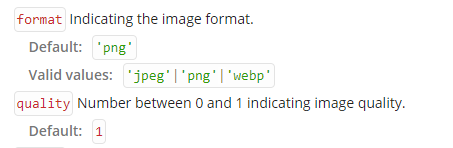
the default png format results in a huge increase in the file size, However changing it to jpeg results in much lesser size than the one produced by png, Also depending on the image quality the jpeg result size can either be less than original or more than original. You can choose the quality of the result as well from the quality property as in the document. Play with values from 0,0.1,0.2.....1 and lock the one works good for you. You can even have the user input the quality range with a slider as well.
I am using a quality of 0.99 which doesn't have any noticeable changes in the final output file but the size is reduced largely.
Here is a link to a informative blog https://www.import.io/post/html5-canvas-todataurl-webm-vs-png-vs-jpeg/
RajshekarReddy
on 17 Dec 2017
Related issues
 Lenndev
·
4Comments
Lenndev
·
4Comments
 edagenais
·
6Comments
edagenais
·
6Comments
 AliekseiDev
·
7Comments
AliekseiDev
·
7Comments
 iLearnAndCode
·
3Comments
iLearnAndCode
·
3Comments
 oystehei
·
6Comments
oystehei
·
6Comments
Most helpful comment
So this is what worked for me..
If you look into the documentation information as below

the default
pngformat results in a huge increase in the file size, However changing it tojpegresults in much lesser size than the one produced bypng, Also depending on the image quality thejpegresult size can either be less than original or more than original. You can choose the quality of the result as well from thequalityproperty as in the document. Play with values from 0,0.1,0.2.....1 and lock the one works good for you. You can even have the user input the quality range with a slider as well.I am using a quality of 0.99 which doesn't have any noticeable changes in the final output file but the size is reduced largely.
Here is a link to a informative blog https://www.import.io/post/html5-canvas-todataurl-webm-vs-png-vs-jpeg/