Create-react-native-app: Error: Invalid sdkVersion. Valid options are
Description
I created new app with create-react-native-app and trying to run it from app directory with yarn ios and getting:
03:18:26: Starting packager...
***ERROR STARTING PACKAGER***

Error: Invalid sdkVersion. Valid options are 10.0.0, 11.0.0, 12.0.0, 13.0.0, 14.0.0, 15.0.0, 16.0.0, 17.0.0, 18.0.0, 19.0.0, 20.0.0, 21.0.0, 22.0.0, 23.0.0, 24.0.0, 25.0.0, 7.0.0, 8.0.0, 9.0.0
Expected Behavior
My app correctly runs in emulator
Observed Behavior
I'm getting the Error: Invalid sdkVersion. Valid options are in console and same error in expo app in ios emulator.
Environment
npm ls react-native-scripts:
[email protected] /Users/tolik/dev/go/src/defiler/mobile
└── [email protected]npm ls react-native:
[email protected] /Users/tolik/dev/go/src/defiler/mobile
└── [email protected]npm ls expo:
[email protected] /Users/tolik/dev/go/src/defiler/mobile
└── [email protected]node -v:
v9.4.0npm -v:
5.6.0yarn --version:
1.3.2watchman version:
{
"version": "4.9.0"
}
Operating system: mac os.
app.json:
{
  "expo": {
    "sdkVersion": "26.0.0"
  }
}
 mirth
mirth
All 17 comments
I have the same issue. And this is not works for me.
 nikitatrifan
on 24 Apr 2018
nikitatrifan
on 24 Apr 2018
Can you try deleting the ~/.expo directory and see if that resolves this?
 anp
on 24 Apr 2018
anp
on 24 Apr 2018
@anp I deleted ~/.expo directory and it didn't solve the problem. Also I tried to delete all my devices in simulator and recreate them (like here). So it also didn't solve the problem.
nikitatrifan
on 25 Apr 2018
I did it! I just removed & installed again create-react-native-app.
npm uninstall -g create-react-native-app
npm i -g create-react-native-app
I can't believe that it works. @mirth have you solved your problem?
nikitatrifan
on 25 Apr 2018
Due to limitations in Russia, we can't log into exp.host and expo.io
Can owners change A record only for Russia?
I'm ready to provide a transparent server for that.
It might be very helpful for everyone in Russia)
 p0liper
on 3 May 2018
p0liper
on 3 May 2018
@p0liper it's good idea. I also have troubles with that.
nikitatrifan
on 5 May 2018
@trifandigital
Try to follow this instructions:
https://github.com/react-community/create-react-native-app/issues/653
p0liper
on 5 May 2018
I also have this issue on Windows 10
I just did 2 commands
- npm i -g create-react-native-app
- npm run android
And on emulator with NEXUS-5X-API-23
in expo app i see
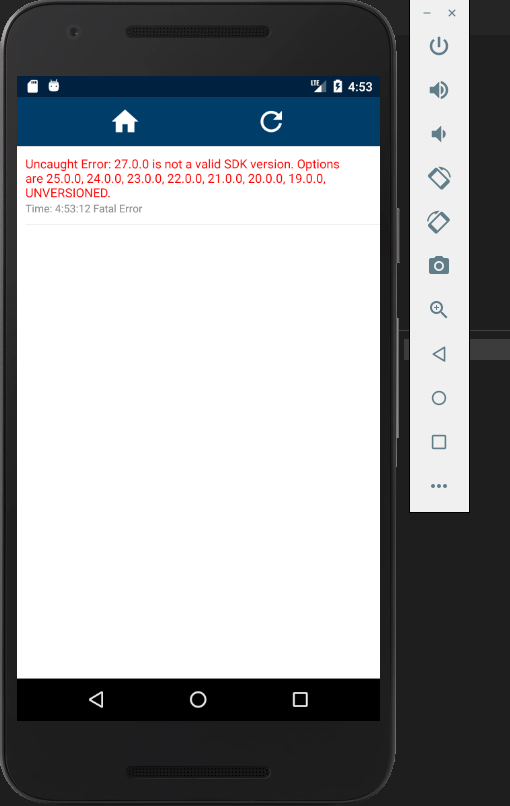
Checked with nvm
- npm -v 4.2.0
- node -v 7.10.1
- npm -v 5.6.0
- node -v 9.4.0
Clean .expo and https://github.com/react-community/create-react-native-app/issues/653 not fixed problem
Expo version on emulator 2.3.2
 chemaxa
on 9 May 2018
chemaxa
on 9 May 2018
@chemaxa After npm start do you see "exp://" address?
Can you attach log from npm start command?
p0liper
on 10 May 2018
`Windows PowerShell
(C) Корпорация Майкрософт (Microsoft Corporation). Все права защищены.
PS D:\Repositories\rn-app> npm start
[email protected] start D:\Repositories\rn-app
react-native-scripts start
10:41:06: Starting packager...
Packager started!
Your app is now running at URL: exp://192.168.56.1:19000
View your app with live reloading:
Android device:
-> Point the Expo app to the QR code above.
(You'll find the QR scanner on the Projects tab of the app.)
iOS device:
-> Press s to email/text the app URL to your phone.
Emulator:
-> Press a to start an Android emulator.
Your phone will need to be on the same local network as this computer.
For links to install the Expo app, please visit https://expo.io.
Logs from serving your app will appear here. Press Ctrl+C at any time to stop.
› Press a to open Android device or emulator.
› Press s to send the app URL to your phone number or email address
› Press q to display QR code.
› Press r to restart packager, or R to restart packager and clear cache.
› Press d to toggle development mode. (current mode: development)
`
chemaxa
on 10 May 2018
Also strange, but 192.168.56.1 not my local ip address, my local address is 192.168.1.192
chemaxa
on 10 May 2018
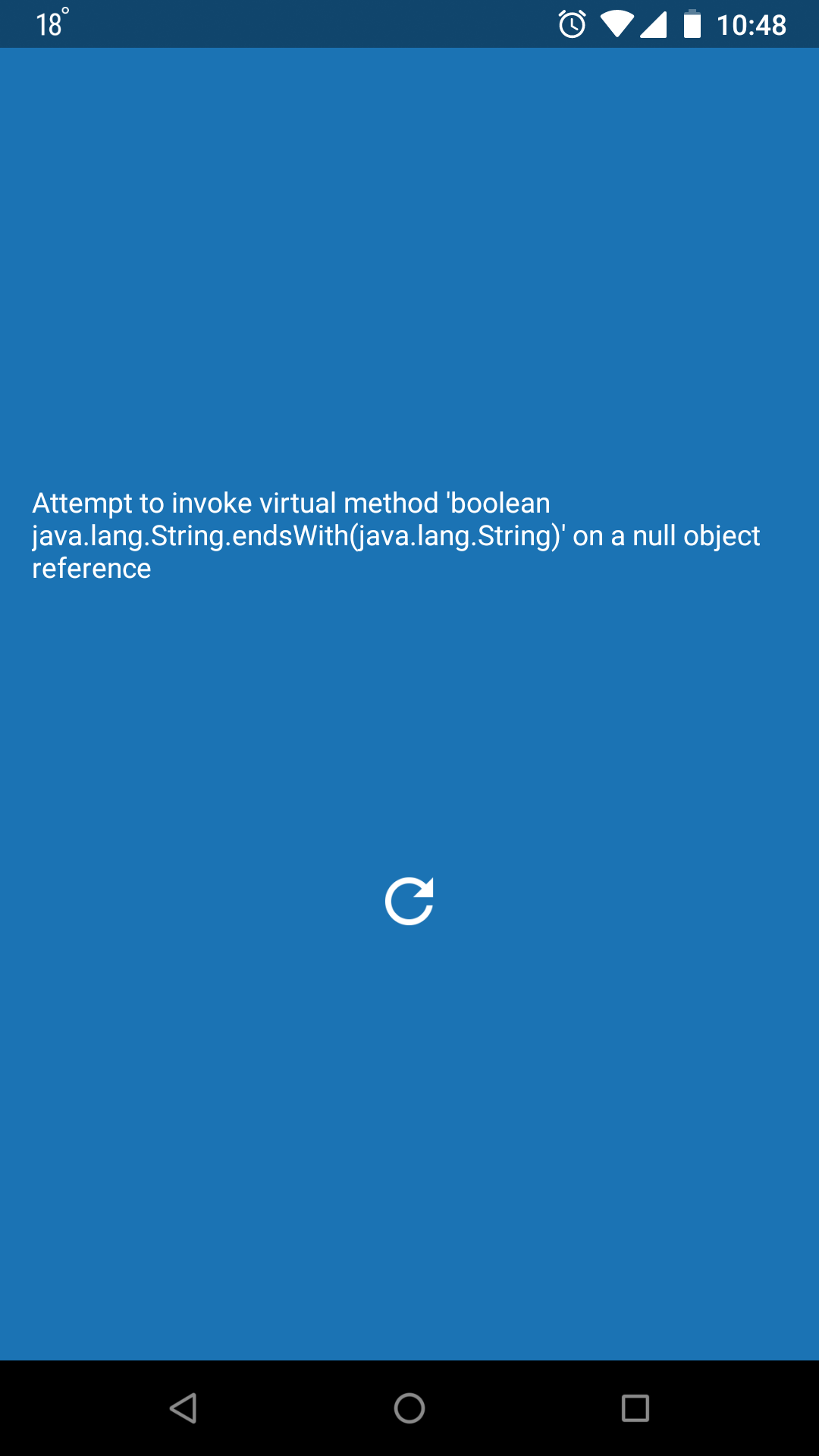
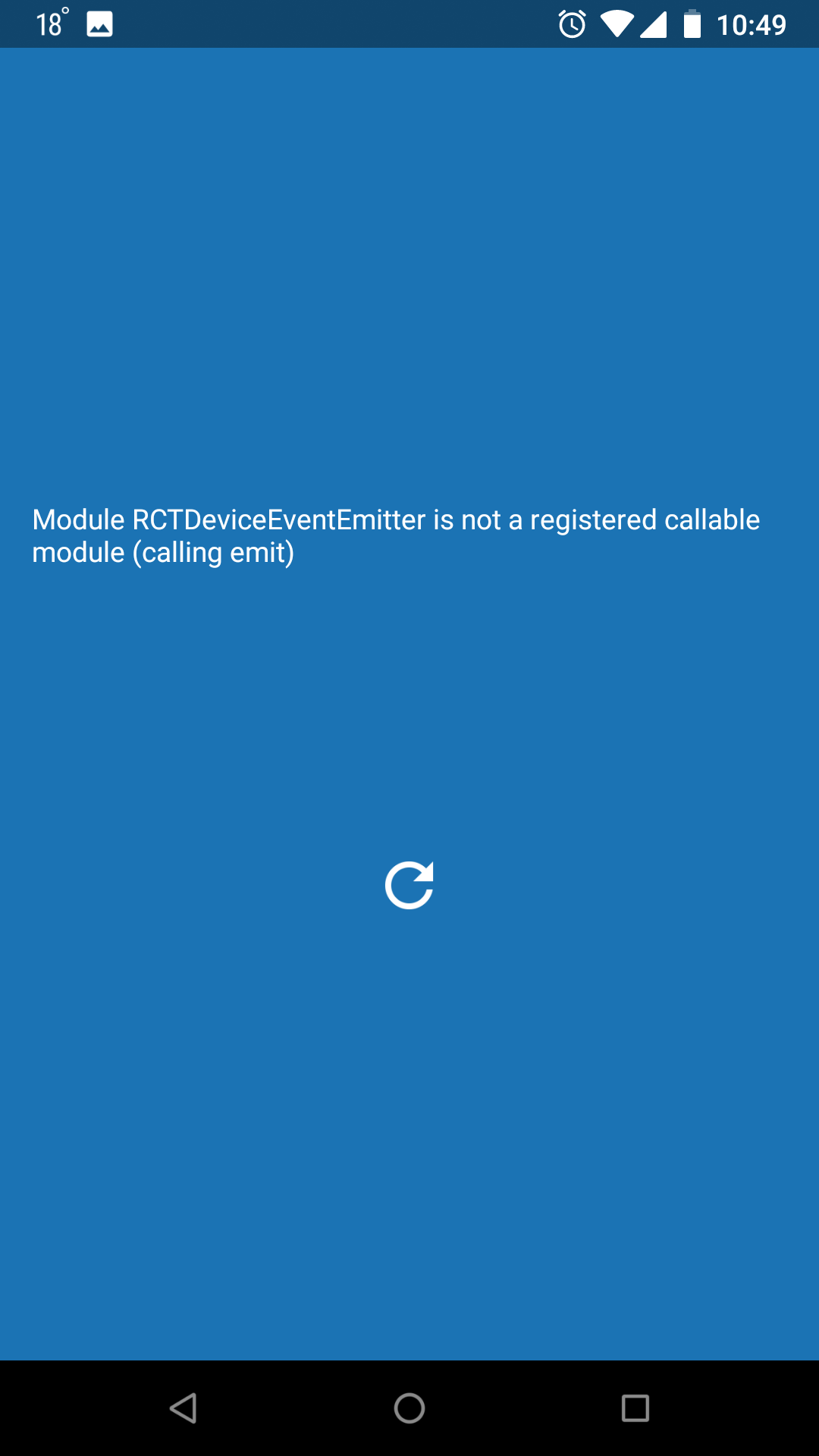
On my real device Nexus 5x with expo 2.5.0 and Android 8.1.0 i see

chemaxa
on 10 May 2018
@chemaxa Во первых, IP 192.168.56.1, можно с любого входить.
Пробовал обновить Expo c gplay? Возможно, старая версия Expo
И еще вариант, попробуй обнулить весь проект (удали папку .node_modules (предварительно сбэкапь), и сделай npm install ещё раз
p0liper
on 10 May 2018
@p0liper не помогает, все равно остается ошибка о несовместимости версий
По адресу 192.168.56.1 сервер не доступен, отвечает только по моему локальному 192.168.1.192
В общем скачал из gplay но тоже ничего не работает. Ругается на Attempt to invoke...
Это все на node 7.10.1 npm 4.2.0
chemaxa
on 11 May 2018
Anyone can solve this ? facing same issue. No solution found
 El-Mahbub
on 20 May 2018
El-Mahbub
on 20 May 2018
You have to install manually:
npm install react-native-elements
 maotoledos
on 27 Jun 2018
maotoledos
on 27 Jun 2018
Hey quick comment,
I was running into the same issue, turns out I changed the node version using nvm and was getting the exact same error. So make use you get back to your project with the previous version. It did work for me.
cheers
 ibandominguez
on 12 May 2020
ibandominguez
on 12 May 2020
Related issues
 kinergy
·
4Comments
kinergy
·
4Comments
 scf4
·
5Comments
scf4
·
5Comments
 Jawadgee
·
3Comments
Jawadgee
·
3Comments
 mwq27
·
5Comments
mwq27
·
5Comments
 jckuhl
·
4Comments
jckuhl
·
4Comments
Most helpful comment
I did it! I just removed & installed again
create-react-native-app.npm uninstall -g create-react-native-appnpm i -g create-react-native-appI can't believe that it works. @mirth have you solved your problem?