Create-react-native-app: Failed building JavaScript bundles, stuck on 99% and do not show the changes in the app. No detailed message of error.
Please make our job easier by filling this template out to completion. If you're requesting a feature instead of reporting a bug, please feel free to skip the Environment and Reproducible Demo sections.
Description
1-2 sentences describing the problem you're having or the feature you'd like to request
Expected Behavior
What action did you perform, and what did you expect to happen?
Observed Behavior
What actually happened when you performed the above actions?
If there's an error message, please paste the full terminal output and error message in this code block:
Error text goes here!
Environment
Please run these commands in the project folder and fill in their results:
npm ls react-native-scripts:npm ls react-native:npm ls expo:node -v:npm -v:yarn --version:watchman version:
Also specify:
- Operating system:
- Phone/emulator/simulator & version:
Reproducible Demo
Please provide a minimized reproducible demonstration of the problem you're reporting.
Issues that come with minimal repro's are resolved much more quickly than issues where a maintainer has to reproduce themselves.
 Neeraj1108Yadav
All 39 comments
npm ls react-native-scripts: -- [email protected]'
npm ls react-native:-- [email protected]
npm ls expo: `-- [email protected]
node -v: v8.9.4
npm -v: 4.6.1
watchman is not installed
Operating system: Windows 10 64 bit
Phone: Lenovo
Uploaded my, it is showing my previous development, but updating fresh changes, Not able to build javascript bundle is the only error I'm getting in cmd.

Neeraj1108Yadav
on 9 Feb 2018
Hi @Neeraj1108Yadav , I'm not quite clear, what is your issue?
 fxfactorial
on 9 Feb 2018
fxfactorial
on 9 Feb 2018
This is my first screen of the app, I did the changes in it and when I'm running it using expo, it is not doing changes, but showing me the error as "Failed building Javascript bundle". Every time it is showing me the same screen even if I remove the
Neeraj1108Yadav
on 10 Feb 2018
I'm getting the same problem.
02:53:05: Failed building JavaScript bundle
Building JavaScript bundle [=================================================================================================== ] 99%
There is probably a syntax error somewhere in my new code, and previously expo would display this syntax error. Now it doesn't display the error and it makes it difficult to track it down. I don't know if this problem lies in expo, create react native app, or whatever is building the javascript bundle.
Expo shows me the most recent working version of the code.
 jcktm
on 11 Feb 2018
jcktm
on 11 Feb 2018
@jackmurray I think the problem of not updating the source code and showing 99% is due to react-navigation library ( in my case ). When I removed this library it worked perfectly.
Neeraj1108Yadav
on 11 Feb 2018
Did you remember to npm install --save react-navigation? I forgot this step.
But I still have some other error somewhere that is causing the 99% problem, even if I remove react-navigation. I found that syntax error now (missing an equals sign).
I will try to add react-navigation in again.
Also, I was finally was able to get an error message to expo. I found it useful to quit expo, then kill every expo process in the background. I think this forced expo to remove the old version of the app, and it now displays a useful error message again.
jcktm
on 11 Feb 2018
Ok, that is working for me now with react-navigation.
Make sure you do export default App after your const App = StackNavigator(...)
It really helped after I was able to get the Expo errors showing again (fix above)
jcktm
on 11 Feb 2018
@jackmurray thanks for your suggestion. I'll implement it in my code and will let you know.
Neeraj1108Yadav
on 12 Feb 2018
Help me with this error, I'm not able to solve this, don't know what is the problem. Below mention is my code. I want to navigate from "HomeScreen" to "Registration". When I do so it stop updating the code and show me the error. Attached Image

import React from 'react';
import { StyleSheet,View,Image, Text,ImageBackground, TextInput, Button, Alert} from 'react-native';
import { Navigation } from 'react-native-navigation';
Navigation.registerComponent('BttonWork.HomeScreen', () => HomeScreen);
Navigation.registerComponent('BttonWork.Registeration', () => Registeration);
export default class HomeScreen extends React.Component {
SampleFunction1(){

Alert.alert("Function Without Argument");

}
constructor(props) {
super(props);
this.state = {
username: '',
pasword: ''
};
}
render() {
return (
<View style = {{flex: 1}}>
  <ImageBackground style = {{flex: 1,height: null, width: null}} source = {require('./assets/backimage.jpg')}>

    <View style = {{flex: 1, backgroundColor: '#000000A6', flexDirection: 'column'}}>

        <View style = {{height: 100, width: null}}></View>

        <Text style = {{textAlign: 'center', color: '#6CC829', fontSize: 18, fontWeight: 'bold'}}> LOGIN </Text>
        <Text style = {{textAlign: 'center', color: '#6CC829', fontSize: 14, marginTop: 3}}> Enter your credentials here </Text>

        <View style = {{height: 100, width: null}}></View>

        <View style = {{marginLeft: 20, marginRight: 20, flexDirection: 'column'}}>

            <Text style = {{color: '#fff', fontSize: 15}}> Username </Text>

            <TextInput style = {{color: '#fff',fontSize: 13, borderColor: 'white', borderBottomWidth: 1, marginTop: 3, marginLeft: 5}}
             onChangeText = {(username) => this.setState({username})}
             value = {this.state.username}
             underlineColorAndroid = 'rgba(0,0,0,0)'/>

             <Text style = {{color: '#fff', fontSize: 15, marginTop: 10}}>Password</Text>

             <TextInput secureTextEntry={true} style = {{color: '#fff', fontSize: 13, borderColor: 'white', borderBottomWidth: 1, marginTop: 3, marginLeft: 5}}
            onChangeText = {(pasword) => this.setState({pasword})}
            value = {this.state.pasword}
            underlineColorAndroid = 'rgba(0,0,0,0)'/>

        </View>

        <View style = {{height: 100, width: null}}></View>

        <View style = {{marginLeft: 20, marginRight: 20, flexDirection: 'column'}}>

        <Button
        title = "Sign In"
        color = "#6CC829"
        onPress = {this.props.navigator.push({
        screen: 'BttonWork.Registeration',
        animated: true,
        animationType: 'fade' });}/>

        <Text style = {{textAlign: 'center', fontSize: 12, color: '#6CC829', marginTop: 5}}>Don't have an account? </Text>
        <Text style = {{textAlign: 'center', fontSize: 15, color: '#6CC829', marginTop: 5, fontWeight: 'bold'}}>SIGN UP</Text>

        </View>

    </View>

  </ImageBackground>
</View>
);
}
}
class Registeration extends React.Component { }
render()
{
return (
            <View style = {{flex: 1, backgroundColor: '#000000A6', flexDirection: 'column'}}>

                <View style = {{height: 70, width: null}}></View>

                <Text style = {{textAlign: 'center', color: '#6CC829', fontSize: 18, fontWeight: 'bold'}}> REGISTER </Text>
                <Text style = {{textAlign: 'center', color: '#6CC829', fontSize: 14, marginTop: 3}}>  </Text>

                <View style = {{height: 70, width: null}}></View>

            </View>

        </ImageBackground>
    </View>
    );
}
Neeraj1108Yadav
on 12 Feb 2018
Having the same issue. react-native should print any compilation errors to the console, otherwise it's very hard to debug
 venil7
on 29 Apr 2018
venil7
on 29 Apr 2018
I found it useful to quit expo, then kill every expo process in the background [on the phone]. I think this forced expo to remove the old version of the app, and it now displays a useful error message again.
Maybe you can do something like this?
jcktm
on 30 Apr 2018
I have this problem regularly. Mostly it works just restarting expo, otherwise removing expo on the ios sim to force a reinstall. In some cases even that doesn't work: all I get is "Failed building Javascript bundle" in the console and Expo launching on the phone, then crashing with black screen showing briefly.
In those cases, I've had to do a git stash to go back to a project without errors, relaunch the app in the simulator, then do a git stash apply. The project recompiles and shows the error in a red screen on the simulator. Adding this note here in case other people can use this workaround.
 willerup
on 17 May 2018
willerup
on 17 May 2018
@jcktm You are right. There was an issue with new class (Code). I'd remove it and run it and it works fine.
 hpatel123
on 25 May 2018
hpatel123
on 25 May 2018
Hi, I get this sometimes. Is there no way to see the reason causing the "Failed building Javascript bundle"? Isn't there a log somewhere where I could look to even get a hint? :-)
 iosdev-republicofapps
on 26 May 2018
iosdev-republicofapps
on 26 May 2018
Yeep, it's quite annoying not seeing the reason and then searching which import is wrong. I had major code cleanup and it was a horror show.
 dakt
on 28 May 2018
dakt
on 28 May 2018
Description: Cannot test app because of the "Failed building JavaScript bundle" message
Expected Behavior: a working environment
Observed Behavior: it just crashes when it's commanded to run in a simulator
Failed building JavaScript bundle
Building JavaScript bundle [============================================================================ ]
99
Environment triage:
npm ls react-native-scripts
[email protected] /Users/felipe/Development/react-native/react-firebase
└── (empty)
npm ls react-native
[email protected] /Users/felipe/Development/react-native/react-firebase
└── UNMET DEPENDENCY [email protected]
npm ERR! missing: [email protected], required by [email protected]
npm ls expo
[email protected] /Users/felipe/Development/react-native/react-firebase
└── UNMET DEPENDENCY [email protected]
npm ERR! missing: [email protected], required by [email protected]
node -v
v10.1.0
npm -v
5.6.0
yarn --version
1.6.0
watchman version
{
"version": "4.9.0"
}
Operating system: macOS 10.13.4 (3.3 i5 - 32gb ram)
iphone simulator Version 10.0 (SimulatorApp-851.2 CoreSimulator-518.21)
simulated iOS 11.3

I've reinstalled the missing dependencies, npm i, yarn, tried almost all workarounds shown here... and this issue persists
Also, when running expo it throws:
yarn start
yarn run v1.6.0
(node:6363) [DEP0005] DeprecationWarning: Buffer() is deprecated due to security and usability issues. Please use the Buffer.alloc(), Buffer.allocUnsafe(), or Buffer.from() methods instead.
warning ../package.json: No license field
$ react-native-scripts start
23:34:06: Starting packager...
(node:6365) ExperimentalWarning: The fs.promises API is experimental
ERROR STARTING PACKAGER
Starting React Native packager...
Scanning folders for symlinks in /Users/felipe/Development/react-native/react-firebase/node_modules (17ms)
(node:6374) ExperimentalWarning: The fs.promises API is experimental
Packager started!
 frodriguezc
on 30 May 2018
frodriguezc
on 30 May 2018
For me the error happened because of some bad syntax in one of my files. I have a component file Input.js. I was testing the app using yarn run ios and on the simulator it would crash expo and give me the "Failed building JavaScript bundles" at 99%. There was no further error code. I ran it on my iphone by using the QR code given and there it gave me the errors which pointed me to incorrect syntax.
 impactcolor
on 31 May 2018
impactcolor
on 31 May 2018
This is also happening to me. Since debugging errors is one of the main activity of development and being able to see what is happening is fundamental to that, this is something that is taking me probably more than one hour of development time in just one day. Expo is a fantastic tool ant having this fixed would be really wonderful to keep up with the great productivity that expo allows us.
 brunoreis
on 5 Jun 2018
brunoreis
on 5 Jun 2018
Usually, when this happens the build is a lot slower and indeed it stops on 99 (99.18%)
brunoreis
on 5 Jun 2018
I find it so hard to believe there isn't a verbose option tucked away somewhere that we're missing? I seriously can't stand seeing this it's a huge waste of time.
 Loag
on 8 Jun 2018
Loag
on 8 Jun 2018
Seems like the most common cause is syntax errors, for me it was a bad import path. Usually I get the error "can't find module" etc. but got the same thing described here instead.
 zachdixon
on 8 Jun 2018
zachdixon
on 8 Jun 2018
Currently the best solution I have for this is to stash my work to get back to a state where it still works, get the simulator running successfully, then unstash the bad changes. For some reason after it's built successfully the first time it can show errors correctly on subsequent builds.
 Haegin
on 8 Jun 2018
Haegin
on 8 Jun 2018
It would be really nice if the errors got thrown up into the console. Debugging these issues are unbearable.
 moaxaca
on 11 Jun 2018
moaxaca
on 11 Jun 2018
If anyone can point me in the right direction to fix this I'm happy to give it a go. At the moment I'm losing so much time to this that it'd be well worthwhile.
Haegin
on 11 Jun 2018
@haegin the best I can do as well has been your comment from three days ago. The issue is the errors only printed to the simulator..and the only way to get to the simulator is a successful build
Loag
on 11 Jun 2018
@Haegin I branched my RN app and ejected from expo then all the errors became visible. After reading the message I switch back to my expo branch.
moaxaca
on 11 Jun 2018
Mine was caused by a bad import. I had pasted come code from another component into a new file and Webstorm attempted to generate the import statement for me but ended up locating it in the typings directory of the library. I believe this is why there were no specific errors being thrown since the bundler thought it had located the package.
import { createAnimatableComponent } from 'react-native-animatable/typings/react-native-animatable
had to be changed to
import { createAnimatableComponent } from 'react-native-animatable
 legarland
on 14 Jun 2018
legarland
on 14 Jun 2018
Try to run it with Expo XDE. Logs there should give you a clue about the error you are having. In my case it was a missing plugin, but apparently it could be anything 🤷♂️
 nicolas-amabile
on 17 Jun 2018
nicolas-amabile
on 17 Jun 2018
Thanks @nicolas-amabile . But a lot of us aren't using Expo XDE, we're using another IDE like VSCode. So "use Expo XDE" can't be the answer here ...
Hey @terribleben, @brentvatne or @jesseruder - any ideas on this? This is becoming a real blocker for a lot of us using Expo and personally I'm thinking of ejecting just to avoid this issue. Any help would be much appreciated! :-)
iosdev-republicofapps
on 17 Jun 2018
@iosdev-republicofapps Sorry, what I meant to say is not a particular IDE but the other tool (not the CLI) expo provides to run the project.
From their page:
If you don't prefer the Expo CLI, Expo XDE is a graphical development environment to serve, share, and publish your Expo projects.
Take a look at this example. I generated an error in one of my component to illustrate.
Terminal:

No clue about the error.
However with Expo XDE you can open the existing project and launch it from there. In this case this was the result:
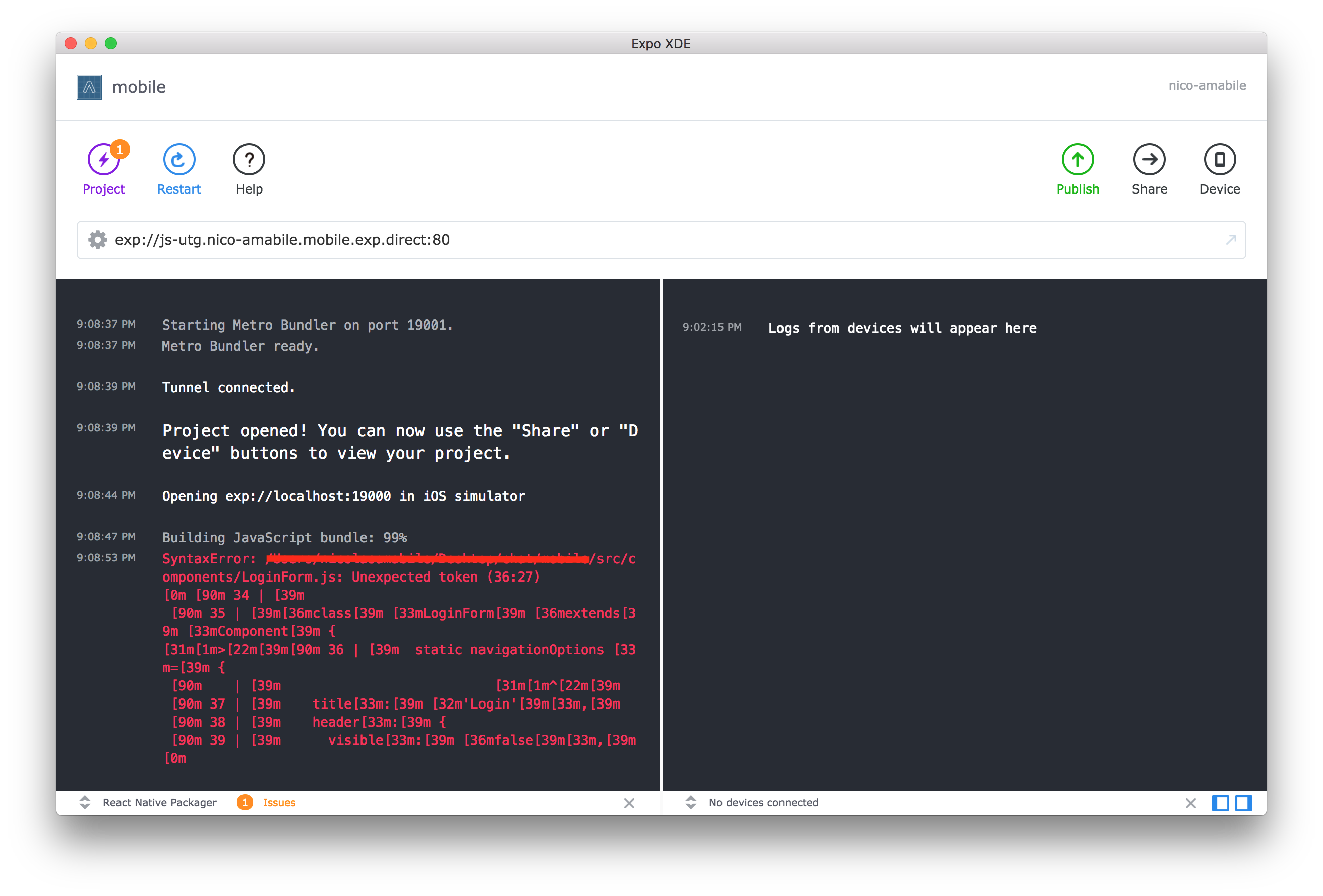
Give it a try and let us know how did it go 😉
nicolas-amabile
on 19 Jun 2018
I strongly agree with @iosdev-republicofapps, "just use Expo XDE" is not an acceptable solution to this problem. In order to use Expo XDE, I have to first modify composer.json from what is produced by react-create-native-app following these directions. Then, when I discover what the problem is with Expo XDE and want to further debug my program, the output it produces is extremely mess compared to what the CLI offers, so I have to close that down and relaunch yarn start via the CLI.
It's a really clunky experience, and I'd really like to see this improve.
 dctucker
on 19 Jun 2018
dctucker
on 19 Jun 2018
For me the error happened because of some bad syntax in one of my files. The solution for me was force stop Expo app and try to run again the project. After that, I could see the error.
 fgagneten
on 24 Jun 2018
fgagneten
on 24 Jun 2018
I had the same issue. I got some error, did not find the error clearly so I commented some additional lines of code in order discard error, then I had to restart Expo in order to successfully launch the app again on my phone. This behavior should be corrected.
 borch84
on 29 Jun 2018
borch84
on 29 Jun 2018
hi all,
here are a couple workarounds for this issue:
- use a linter
- use
exptools, which has the updated code to print to console
to fix this problem, the xdl dependency needs to be bumped cc: @fson
 quinlanj
on 30 Jun 2018
quinlanj
on 30 Jun 2018
XDE is a decent workaround for the problem, as it seems most of the time the issue occurs due to a syntax error. However, it's definitely not ideal.
 j0nscalet
on 15 Jul 2018
j0nscalet
on 15 Jul 2018
Ugly and anecdotal workaround, but I've found that if I mock out my entire application, it'll let expo load, then if I put my application back, I'll get my error message. So, for example, if my App.js looks like this:
// App.js
import React, { PureComponent } from 'react'
import MyTopLevelComponent from 'path/to/component' // this is where my component tree starts

export default App extends PureComponent {
  render () {
    return <MyTopLevelComponent />
  }
}
Expo will crash and I won't get any error. However, if I change App.js to be this instead:
// App.js
import React, { PureComponent } from 'react'
// import MyTopLevelComponent from 'path/to/component' // this is where my component tree starts

export default App extends PureComponent {
  render () {
    return null
    //return <MyTopLevelComponent />
  }
}
Then it will load an empty application in Expo. Now, all I need to do is put back the real code and I'll get an errorbox in the simulator which details the real error.
 Tvrqvoise
on 16 Jul 2018
Tvrqvoise
on 16 Jul 2018
Even trying @Tvrqvoise solution, I still get the issue. Right now I'm creating a second CRNA app to run from scratch and then copy my code into so I can figure out what the error actually is. This is a big problem. Definitely that if you launch npm start and your code has a bug in it already, it will not tell you where the bug is. And if you can't track down where the bug is manually without help from an error message, you're screwed.
I installed a linter as mentioned above and I have 0 issues in any of my code according to Atom.
 kylegoetz
on 2 Aug 2018
kylegoetz
on 2 Aug 2018
If you build your project using the desktop XDE application, sometimes it will give you better error messages. I've gotten these error messages before when I forgot to import a file, or have a type in the import string.
 marcusmolchany
on 13 Sep 2018
marcusmolchany
on 13 Sep 2018
I was getting the JavaScript bundle failed. I solved by:
1) Ctrl-C to quit the npm start
2) Quit the Expo app on Android emulator
3) run again using: npm start --reset-cache
 kmturley
on 17 Sep 2018
kmturley
on 17 Sep 2018
Related issues
 FezVrasta
·
3Comments
FezVrasta
·
3Comments
 kinergy
·
4Comments
kinergy
·
4Comments
 THPubs
·
4Comments
THPubs
·
4Comments
 mwq27
·
5Comments
mwq27
·
5Comments
 liujb
·
5Comments
liujb
·
5Comments
Most helpful comment
Having the same issue.
react-nativeshould print any compilation errors to the console, otherwise it's very hard to debug