Create-react-native-app: could not load exp://ipaddres+port
I am trying to "npm run android" but on the genymotion emulator i get the above error. Any suggestions please
 antonis80
All 122 comments
Have same problem. It seams that react-native-scripts are running the local server using the first network adapter, in my case ethernet, and i'm running on WiFi.
Any ideas how to change the default network adapter or change the server address?
 lukaszszymanski
on 17 Mar 2017
lukaszszymanski
on 17 Mar 2017
same here also, i am running on wifi
antonis80
on 17 Mar 2017
Also please check the image for the issue i am facing:

antonis80
on 17 Mar 2017
@antonis80 are you able to reach http://192.168.0.12:19000 in a web browser on your computer when CRNA is started?
 anp
on 17 Mar 2017
anp
on 17 Mar 2017
@dikaiosune thank you for the response. i have tried it as you said and i get the following in the browser:
{"sdkVersion":"14.0.0","name":"logeo","slug":"logeo","version":"0.1.0","xde":true,"developer":{"tool":"crna"},"packagerOpts":{"hostType":"tunnel","lanType":"ip","dev":true,"strict":false,"minify":false,"urlType":"exp","urlRandomness":null},"bundleUrl":"http://192.168.0.12:19001/./node_modules/react-native-scripts/build/bin/crna-entry.bundle?platform=ios&dev=true&strict=false&minify=false&hot=false&assetPlugin=expo/tools/hashAssetFiles","debuggerHost":"192.168.0.12:19001","mainModuleName":"./node_modules/react-native-scripts/build/bin/crna-entry","logUrl":"http://192.168.0.12:19000/logs","id":"@anonymous/logeo-1329440f-f35b-490d-b685-91733bb68359"}
antonis80
on 18 Mar 2017
almost same for me.
the genymotion android emulator connects but I cannot connect from my android phone (wrong network).
from: http://192.168.56.1:19000
{"sdkVersion":"14.0.0","name":"testcrna","slug":"testcrna","version":"0.1.0","xde":true,"developer":{"tool":"crna"},"packagerOpts":{"hostType":"tunnel","lanType":"ip","dev":true,"strict":false,"minify":false,"urlType":"exp","urlRandomness":null},"bundleUrl":"http://192.168.56.1:19001/./node_modules/react-native-scripts/build/bin/crna-entry.bundle?platform=ios&dev=true&strict=false&minify=false&hot=false&assetPlugin=expo/tools/hashAssetFiles","debuggerHost":"192.168.56.1:19001","mainModuleName":"./node_modules/react-native-scripts/build/bin/crna-entry","logUrl":"http://192.168.56.1:19000/logs","id":"@anonymous/testcrna-87e2ef63-2232-4d0b-889f-9355e587086e"}
 dansha
on 18 Mar 2017
dansha
on 18 Mar 2017
@antonis80 @dansha are you both able to get the same result when using your phone's browser?
anp
on 18 Mar 2017
cant access that ip from phone.
both ny PC and the phone are connected to my WIFI but crna is answering a diffrent IP address and not the IP address from the WIFI netwrok.
is there a way to conrtol in what IP the CRNA answers?
here is the result of ipconfig on my machine:
Windows IP Configuration


Ethernet adapter Ethernet:

   Media State . . . . . . . . . . . : Media disconnected
   Connection-specific DNS Suffix  . :

Ethernet adapter VirtualBox Host-Only Network:

   Connection-specific DNS Suffix  . :
   Link-local IPv6 Address . . . . . : fe80::ad02:43d2:a9bb:b8ad%7
   IPv4 Address. . . . . . . . . . . : 192.168.56.1
   Subnet Mask . . . . . . . . . . . : 255.255.255.0
   Default Gateway . . . . . . . . . :

Ethernet adapter VirtualBox Host-Only Network #2:

   Connection-specific DNS Suffix  . :
   Link-local IPv6 Address . . . . . : fe80::686b:dba8:1317:ca1e%8
   IPv4 Address. . . . . . . . . . . : 192.168.126.2
   Subnet Mask . . . . . . . . . . . : 255.255.255.0
   Default Gateway . . . . . . . . . :

Wireless LAN adapter Local Area Connection* 2:

   Media State . . . . . . . . . . . : Media disconnected
   Connection-specific DNS Suffix  . :

Wireless LAN adapter Wi-Fi:

   Connection-specific DNS Suffix  . : Home
   Link-local IPv6 Address . . . . . : fe80::850e:77f:81fb:57be%9
   IPv4 Address. . . . . . . . . . . : 10.0.0.7
   Subnet Mask . . . . . . . . . . . : 255.255.255.0
   Default Gateway . . . . . . . . . : 10.0.0.138

Tunnel adapter isatap.Home:

   Media State . . . . . . . . . . . : Media disconnected
   Connection-specific DNS Suffix  . : Home

Tunnel adapter Local Area Connection* 3:

   Media State . . . . . . . . . . . : Media disconnected
   Connection-specific DNS Suffix  . :

Tunnel adapter isatap.{4B394AD1-1A83-4657-B6A3-F2066B2CF54F}:

   Media State . . . . . . . . . . . : Media disconnected
   Connection-specific DNS Suffix  . :

Tunnel adapter isatap.{41F61778-411B-476B-82B4-6627C9DAD761}:

   Media State . . . . . . . . . . . : Media disconnected
   Connection-specific DNS Suffix  . :
@dansha I think you should look at https://github.com/react-community/create-react-native-app/issues/60#issuecomment-287081523 for information about how to change the order in which IP addresses appear in ipconfig.
@antonis80 I'll mark this as awaiting-reply until I hear about your network connectivity.
anp
on 18 Mar 2017
@dikaiosune when i access http://192.168.0.12:19000 from the genymotion emulator browser i get the following error: "the web page at http://192.168.0.12:19000 could not be loaded because: net:ERR_ADDRESS_UNREACHABLE"
My pc network connectivity can be seen below:
Windows IP Configuration


Wireless LAN adapter Local Area Connection* 3:

   Media State . . . . . . . . . . . : Media disconnected
   Connection-specific DNS Suffix  . :

Wireless LAN adapter Wi-Fi:

   Connection-specific DNS Suffix  . : cablenet.com.cy
   Link-local IPv6 Address . . . . . : fe80::fd7f:e9b8:151c:6004%6
   IPv4 Address. . . . . . . . . . . : 192.168.0.12
   Subnet Mask . . . . . . . . . . . : 255.255.255.0
   Default Gateway . . . . . . . . . : 192.168.0.1

Ethernet adapter Bluetooth Network Connection:

   Media State . . . . . . . . . . . : Media disconnected
   Connection-specific DNS Suffix  . :

Ethernet adapter Ethernet:

   Media State . . . . . . . . . . . : Media disconnected
   Connection-specific DNS Suffix  . :

Ethernet adapter VirtualBox Host-Only Network:

   Connection-specific DNS Suffix  . :
   Link-local IPv6 Address . . . . . : fe80::f8df:7b12:2c45:dea0%13
   IPv4 Address. . . . . . . . . . . : 192.168.56.1
   Subnet Mask . . . . . . . . . . . : 255.255.255.0
   Default Gateway . . . . . . . . . :

Ethernet adapter VirtualBox Host-Only Network #2:

   Connection-specific DNS Suffix  . :
   Link-local IPv6 Address . . . . . : fe80::cc22:2b62:950e:28cc%14
   IPv4 Address. . . . . . . . . . . : 192.168.151.2
   Subnet Mask . . . . . . . . . . . : 255.255.255.0
   Default Gateway . . . . . . . . . :
@antonis80 can you try following step 1 in this guide? https://docs.expo.io/versions/v15.0.0/guides/genymotion.html
If that does fix things for you, I'll need to add genymotion docs to the user guide.
anp
on 20 Mar 2017
@dikaiosune i have followed these two steps but still i get the same error. it is really frustrating.
antonis80
on 20 Mar 2017
@dansha did you manage to solve it?
antonis80
on 20 Mar 2017
Yes used #60 to change the order of IPs did the magic
dansha
on 20 Mar 2017
@dasha which one did you give highest priority, wireless or network adapters?
antonis80
on 20 Mar 2017
My phone was connected via mu WIFI so I gave the wireless the highest
priority so it was first on
ipconfig
in this case CRNA broadcasted with the IP from the WIFI
On Mon, Mar 20, 2017 at 10:31 AM, antonis80 notifications@github.com
wrote:
@dasha https://github.com/dasha which one did you give highest
priority, wireless or network adapters?—
You are receiving this because you were mentioned.
Reply to this email directly, view it on GitHub
https://github.com/react-community/create-react-native-app/issues/81#issuecomment-287699558,
or mute the thread
https://github.com/notifications/unsubscribe-auth/ABCS9SPgS_LL4PmKz0fJclDh8ZdW4pKqks5rnjlOgaJpZM4MgSVx
.
dansha
on 20 Mar 2017
still nothing on genymotion emulator, i have also tried it with expo app but still i get the same error as with the emulator
antonis80
on 20 Mar 2017
I got the same error . On opening on the browser I got a permission error for state.json inside a .expo folder . I gave it a 777 permission and it started working on my android device.
 Sidhanthsur
on 20 Mar 2017
Sidhanthsur
on 20 Mar 2017
@Sidhanthsur I'm not sure how that's related -- if you still have the error message handy could you open a new issue with that?
@antonis80 what about loading http://localhost:19000 in your emulator's browser? I'm not sure why the emulator isn't able to reach the host network adapter, since we listen on all network interfaces.
anp
on 20 Mar 2017
@dikaiosune i have tried the http://localhost:19000 and it is reachable, i get the following result in the mobile's (emulators) browser:
{"sdkVersion":"14.0.0","name":"logeo","slug":"logeo","version":"0.1.0","xde":true,"developer":{"tool":"crna"},"packagerOpts":{"hostType":"tunnel","lanType":"ip","dev":true,"strict":false,"minify":false,"urlType":"exp","urlRandomness":"i8-q24"},"bundleUrl":"http://192.168.0.12:19001/./node_modules/react-native-scripts/build/bin/crna-entry.bundle?platform=ios&dev=true&strict=false&minify=false&hot=false&assetPlugin=expo/tools/hashAssetFiles","debuggerHost":"192.168.0.12:19001","mainModuleName":"./node_modules/react-native-scripts/build/bin/crna-entry","logUrl":"http://192.168.0.12:19000/logs","id":"@anonymous/logeo-1329440f-f35b-490d-b685-91733bb68359"}
However i still i get the blue screen when i "npm run android" with the message "could not load exp://ip and port" for both the emulator and the expo app.
antonis80
on 20 Mar 2017
@antonis80 can you try manually entering exp://localhost:19000 in the Expo app within the emulator?
anp
on 20 Mar 2017
@dikaiosune i did not understand your request. The expo app resides on my mobile phone whereas the emulator of genymotion on my computer. Do you mean the expo app's "explore" section?
Thank you for all your support
antonis80
on 20 Mar 2017
Yeah, if you go to the Explore tab, you can type any URL in the search box, and tap the "attempt to open" button to open it directly.
anp
on 20 Mar 2017
i just tried it it and i get the same "could not load exp........."
antonis80
on 20 Mar 2017
in the error log i get the following: "Uncaught Error: java.net.ConnectException: Failed to connect to localhost/127.0.0.1:19000
antonis80
on 20 Mar 2017
And you're loading the localhost URL in the Expo app within Genymotion?
anp
on 20 Mar 2017
i am trying two different methods:
1) running the virtualbox and genymotion emulator + going to the project directory and typing "npm run android"
2) installed the expo app on my handset, in cmd i run "npm start", then scan the qr code
antonis80
on 20 Mar 2017
when i am testing with the expo app i do NOT test with the genymotion emulator, i just close genymotion
antonis80
on 20 Mar 2017
OK, so, if I'm understanding correctly, there are two scenarios where things aren't working.
The first scenario is inside of a VirtualBox VM, you run npm run android with a Genymotion emulator opened. Are you able to run adb devices and see the emulator in the list of devices?
The second scenario is when using the Expo app on a physical phone -- are you running the command there inside of the VirtualBox machine, or on the host computer's console?
anp
on 20 Mar 2017
Yes you are right as concerning the scenarios, as regards your questions
Adb device is working yes
I am running on the hos computers console
antonis80
on 20 Mar 2017
Hi,
I'm having the same kind of issue with my Android device. I'm using a Google Pixel in a MBP 2016 (the one with just USB-C ports). I've connected my phone to my laptop using an USB-C to A adapter, an USB A cable, and an USB-A to C adapter. Otherwise, ADB (or file transfer) doesn't seem to work (looks like it's a known issue on Google Pixel).
I have created the reverse tunnel with ADB:
adb reverse tcp:19000 tcp:19000
adb reverse tcp:19001 tcp:19001
The tunnel (and all that weird cabling!) does work - I open a browser on my Pixel and navigate to http://localhost:19000, it shows the Expo related JSON data.
When I run yarn run android, it opens the Expo app on my phone and seems to try to load exp://a-different-ip-address:19000/. This different IP address seem to be my laptop's IP address on the WiFi interface on the network I'm connected to. However, my phone is not (and cannot be) on the same network. That's the reason why I decided to try ADB in the first place.
I then tried to manually add the exp://127.0.0.1:19000 address to Expo (by the way, terrible UI; I spent 45 minutes looking for a way to manually enter an address in Expo...). Expo still fails to load the app with an error message.
My guess would be that, even though Expo can connect to 127.0.0.0:19000 and download the JSON metadata, that specific metadata seems to be pointing to http://a-different-ip-address:1900. Then Expo is likely trying to connect to that, instead of the IP address I typed.
It seems like the solution would be to change the IP address inside that JSON metadata Expo downloads, but I have no clue on how to do that.
Thanks
Bruno
 bfreis
on 20 Mar 2017
bfreis
on 20 Mar 2017
@bfreis thanks -- this makes it much clearer what's happening. I'm working on a solution to resolve this URL mismatch in the manifest server.
anp
on 20 Mar 2017
@dikaiosune fantastic, thanks!
A nice-to-have would be the ability to somehow configure the IP address I want to use for the IP address in the manifest. Maybe an environment variable? On not-so-trivial network settings on a laptop, might be hard to "guess" the IP address I want/need to use.
Thanks again
Bruno
bfreis
on 20 Mar 2017
the only solution i was able to find was the following:
1) on my android phone i enabled the wireless hotspot
2) on my pc i have connected to the network using the hotspot of the above mobile device
3) on pc i run "npm start" under my project's directory
4) on mobile handset i open the expo client and scan the qr code generated by the above command and the app is finally opened successfully
I believe as @dikaiosune said, it is definitely a networking issue, the ip obtained either by the genymotion emulator or the expo client app is different than the one obtained by the react-native commands. I do not know how to match those IPs so as to be on the right track and be able to achieve this without hotspot.
antonis80
on 21 Mar 2017
@dikaiosune when i try "adb devices" while the virtual box+genymotion emulator on my pc is started i get the following:
C:\Users\User\AndroidStudioProjects\logeo>adb devices
List of devices attached
192.168.151.101:5555    device
As you can see the ip address of the emulator is different from the one i am shown when i run "npm run android" which is:
exp://192.168.0.12:19000
Also this might help you realize the problem. In the virtual Box's command i get the following notification as soon as the genymotion emulator has started: "no such service "dhcpcd-eth0"
antonis80
on 21 Mar 2017
@dikaiosune also take into consideration that when testing on real device the pc does not have to be connected via USB to the mobile device as long as they are in the same network. Whenever i perform an update in my code the change is automatically appended to the expo client.
antonis80
on 21 Mar 2017
@antonis80 you can now specify the IP address to use with the REACT_NATIVE_PACKAGER_HOSTNAME environment variable if you upgrade to the newest scripts package (see the user guide) or create a new project.
anp
on 21 Mar 2017
you are a saver!!!!! thanks
antonis80
on 22 Mar 2017
@dikaiosune i created a new project but i can not find the 'REACT_NATIVE_PACKAGER_HOSTNAME' enviroment variable so as to reset it. Where can i find this?
When i try the following: "REACT_NATIVE_PACKAGER_HOSTNAME='my-custom-ip-address-or-hostname' npm start"
i get 'REACT_NATIVE_PACKAGER_HOSTNAME' is not recognized as an internal or external co
mmand,
operable program or batch file.
antonis80
on 22 Mar 2017
You can set it on the command line like in the user guide, or to make it
permanent there are a bunch of options, I'd recommend Googling for
"$YOUR_OPERATING_SYSTEM environment variables"
Adam Perry
Sent from mobile
On Mar 22, 2017 1:27 AM, "antonis80" notifications@github.com wrote:
@dikaiosune https://github.com/dikaiosune i created a new project but i
can not find the 'REACT_NATIVE_PACKAGER_HOSTNAME' enviroment variable so
as to reset it. Where can i find this? Thanks—
You are receiving this because you were mentioned.
Reply to this email directly, view it on GitHub
https://github.com/react-community/create-react-native-app/issues/81#issuecomment-288329786,
or mute the thread
https://github.com/notifications/unsubscribe-auth/AGfyeUp0HisvdFbxerBcV0RcsNOQidfYks5roNuLgaJpZM4MgSVx
.
anp
on 22 Mar 2017
i have tried it in the command line
IN THE COMMAND LINE I TYPE: "REACT_NATIVE_PACKAGER_HOSTNAME='my-custom-ip-address-or-hostname' npm start"
But i get 'REACT_NATIVE_PACKAGER_HOSTNAME' is not recognized as an internal or external co mmand, operable program or batch file.
Should i set a path in the environment variables of my windows pc? and to point where exactly? to my projects directory?
antonis80
on 22 Mar 2017
Take a look here:
I think you may need to run set REACT_NATIVE_PACKAGER_HOSTNAME='something'. If that works I'll update the user guide for Windows.
anp
on 22 Mar 2017
Also, can you try updating to react-native-scripts 0.0.23 and reinstalling?
Thanks again for all of your help in figuring out how to make this work for users with similar setups to your own.
anp
on 22 Mar 2017
@dikaiosune ok now crna listens to the specified ip address after setting the environment variable but i get the following error when i try to run npm android:
Or enter this address in the Expo app's search bar:

  exp://'192.168.151.101' npm start:19000

Your phone will need to be on the same local network as this computer.

For links to install the Expo app, please visit https://expo.io.

Logs from serving your app will appear here. Press Ctrl+C at any time to stop.

Error running adb: Error running app. Error: Activity not started, unable to res
olve Intent { act=android.intent.action.VIEW dat=exp://192.168.151.101 flg=0x100
00000 pkg=npm }
should i update my application after setting the environment variable?
antonis80
on 25 Mar 2017
@antonis80 can you also paste the exact command you're running? It looks like the npm start command is getting mixed up in the environment variable you're setting.
anp
on 25 Mar 2017
@dikaiosune below are the steps i follow:
1) set REACT_NATIVE_PACKAGER_HOSTNAME='192.168.151.101' npm start
2) npm run android OR npm start-> in case i am not using the emulator
Also please note that after i have set the "PACKAGER_HOSTNAME" i always get the following error:
Starting packager...
***ERROR STARTING PACKAGER***
Starting React Native packager...
I do not know why this occurred
antonis80
on 26 Mar 2017
From the docs:
Windows:
set REACT_NATIVE_PACKAGER_HOSTNAME='my-custom-ip-address-or-hostname'
npm start
Make sure to set the environment variable on a separate line from running npm start
anp
on 26 Mar 2017
as regards: Starting packager... ***ERROR STARTING PACKAGER*** Starting React Native packager... what is the difference between the "react native packager" and just packager, the 'packager' involves node?
as regards the issue, now resolved, i really appreciate your help.!! and sorry if a have asked some stupid questions :)
so, to recap:
1) by setting the HOSTNAME env.variable i have managed to set the IP of CRNA to the one the virtual machine listens to, thus be able to view my app on genymotion emulator. thanks for the patch.
2) i have also managed to view my app on my handset using the QR code ,ONLY if the network of my mobile handset is the same as with the computer used to launch CRNA.
another question to you :) do you have any guide on how to update to react-native-scripts 0.0.23 and reinstalling?
THANKS
antonis80
on 26 Mar 2017
I'm so glad you were able to get it working! That sounds like a correct summary to me.
There's a small section in the user guide about updating the project's dependencies: https://github.com/react-community/create-react-native-app/blob/master/react-native-scripts/template/README.md#updating-to-new-releases
anp
on 27 Mar 2017
Hi I've just started learning CRNA. I've set it up on my Windows 10 machine and expo app on my android phone. Getting a similar error while trying to connect. I've tried the following three configurations none of which seem to work:
- both laptop and mobile on the same wifi
- mobile on laptop's hotspot
- laptop on mobile's hotspot
Here is my console.

I notice the URL seems a bit weird, not 192.xx but 10.0...
Here are my error:
Uncaught Error: java.net.SocketTimeoutException: failed to connect to 10.0.75.1 (port:19000) after 10000ms
 subodhpareek18
on 13 Apr 2017
subodhpareek18
on 13 Apr 2017
This is what my IP Config looks like, and clearly the ip is from the hyper-v connection between docker and the system.
Windows IP Configuration


Ethernet adapter vEthernet (DockerNAT):

   Connection-specific DNS Suffix  . :
   Link-local IPv6 Address . . . . . : fe80::6581:de26:5145:be6e%4
   IPv4 Address. . . . . . . . . . . : 10.0.75.1
   Subnet Mask . . . . . . . . . . . : 255.255.255.0
   Default Gateway . . . . . . . . . :

Ethernet adapter VirtualBox Host-Only Network:

   Connection-specific DNS Suffix  . :
   Link-local IPv6 Address . . . . . : fe80::d47a:9856:1579:3365%6
   IPv4 Address. . . . . . . . . . . : 192.168.56.1
   Subnet Mask . . . . . . . . . . . : 255.255.255.0
   Default Gateway . . . . . . . . . :

Ethernet adapter VirtualBox Host-Only Network #2:

   Connection-specific DNS Suffix  . :
   Link-local IPv6 Address . . . . . : fe80::99e4:473c:3fdf:4838%11
   IPv4 Address. . . . . . . . . . . : 192.168.33.1
   Subnet Mask . . . . . . . . . . . : 255.255.255.0
   Default Gateway . . . . . . . . . :

Ethernet adapter VirtualBox Host-Only Network #3:

   Connection-specific DNS Suffix  . :
   Link-local IPv6 Address . . . . . : fe80::bd86:c003:83a2:54a1%7
   IPv4 Address. . . . . . . . . . . : 198.162.10.1
   Subnet Mask . . . . . . . . . . . : 255.255.255.0
   Default Gateway . . . . . . . . . :

Wireless LAN adapter Local Area Connection* 2:

   Media State . . . . . . . . . . . : Media disconnected
   Connection-specific DNS Suffix  . :

Wireless LAN adapter Local Area Connection* 12:

   Media State . . . . . . . . . . . : Media disconnected
   Connection-specific DNS Suffix  . :

Wireless LAN adapter Wi-Fi:

   Connection-specific DNS Suffix  . : Home
   Link-local IPv6 Address . . . . . : fe80::456f:7d60:fafb:3efc%10
   IPv4 Address. . . . . . . . . . . : 192.168.1.2
   Subnet Mask . . . . . . . . . . . : 255.255.255.0
   Default Gateway . . . . . . . . . : 192.168.0.254
                                       192.168.1.1
Now when I try Wireless LAN adapter Wi-Fi: IPv4 Address. . . . . . . . . . . : 192.168.1.2 as so
set REACT_NATIVE_PACKAGER_HOSTNAME='192.168.1.2'
yarn start
The package still starts at the old IP with the set command having no effect.
subodhpareek18
on 13 Apr 2017
oh my apologies, I forgot that I was using git bash on windows so
set REACT_NATIVE_PACKAGER_HOSTNAME='192.168.1.2' doesn't work, needed to use
export REACT_NATIVE_PACKAGER_HOSTNAME="192.168.1.2"
it works fine now
subodhpareek18
on 13 Apr 2017
I tried opening the url with browsers and got this error:
{"error":"Error: ValidationError: child \"urlRandomness\" fails because [\"urlRandomness\" must be a string]"}
 myguidingstar-zz
on 25 Apr 2017
myguidingstar-zz
on 25 Apr 2017
I had the same troubles when I was behind a nat, what I did (and worked) was to add port redirects to the firewall for the ports 19000 and 19001.
 laromicas
on 8 Jun 2017
laromicas
on 8 Jun 2017
@dikaiosune and @antonis80 help me out please I am new to react-native
I am getting same error "Somethind went wrong .could not load exp://my-ip-address:host. network response timed out" while running newly created app in Expo client app.
what I have tried so far ---
1-my pc and headset is connected to same wifi network, in command line i type "npm start" and scan the qr code in expo app but my application does'nt start , i tried to run manullay "exp://ip-address:host" in expo's search bar nut response is still the same , even i tried 'http://ip-address:host' in my phone's browser(chrome) but nothing happens.
2- i have created hotspot from my headset and connected my pc to this wireless connection and repeated step -1 but response is still the same
I have tried everything but not getting my application worked on my android mobile.
help me out
here is my terminal view
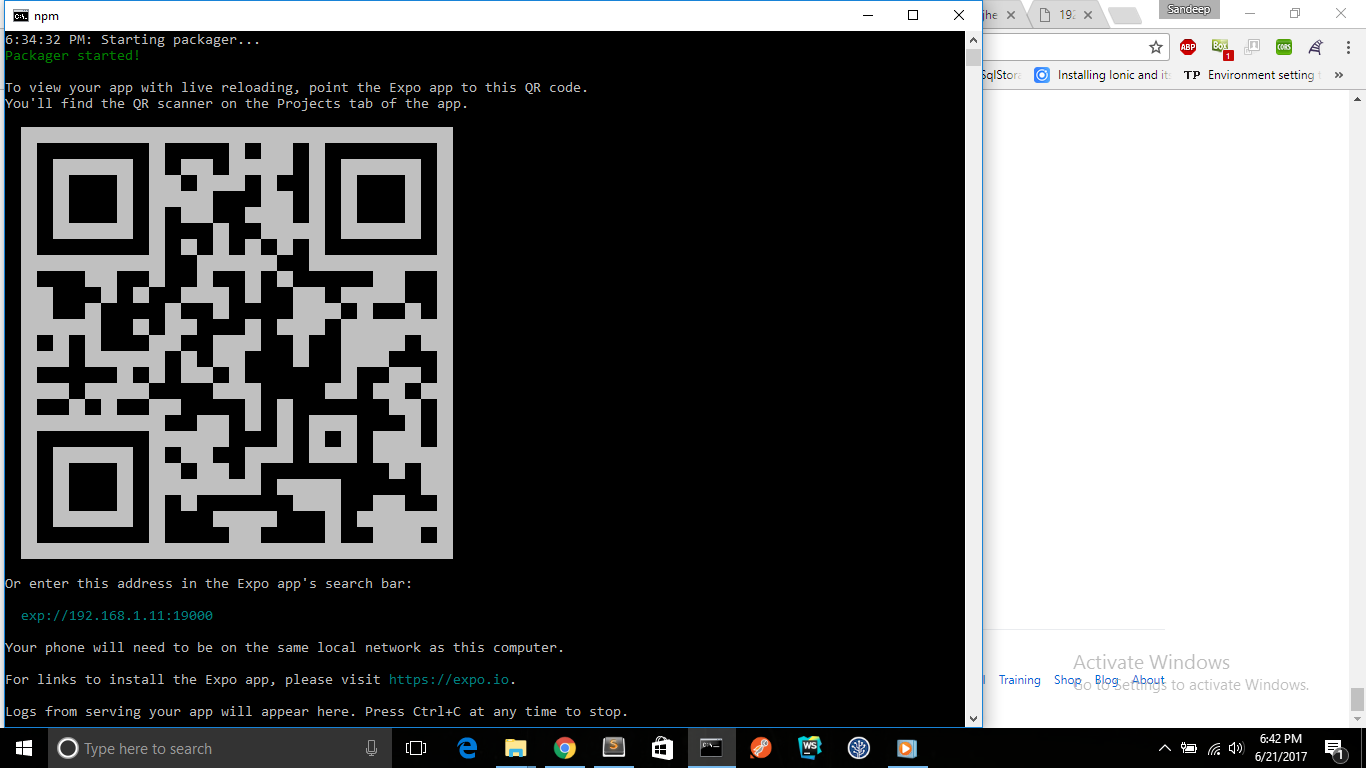
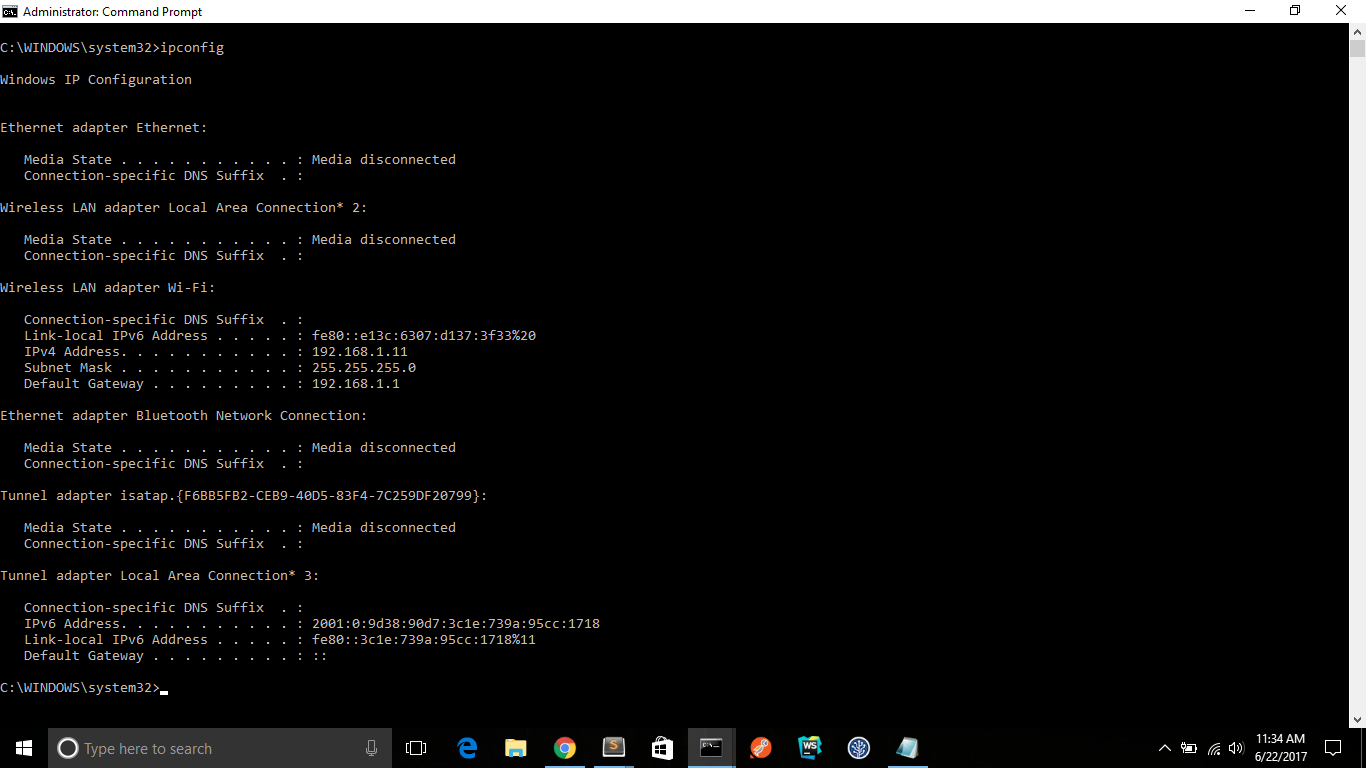
and my react-native dependencies-
react-native-scripts:[email protected],
react-native:-- [email protected],
expo:-- [email protected],
node -v:v6.10.1,
npm -v:3.10.10,
Operating system:windows-10,
Phone/emulator/simulator & version:android v 6.0
the application is not starting in my headset , I also tried setting set REACT_NATIVE_PACKAGER_HOSTNAME='ip-address'
npm start
but I am not getting things worked each and everytime I am getting same error-"uncaught error:java.net.SocketTimeoutException: failed to connect to /192.168..*(port 19000) after 10000ms "
 San10694
on 21 Jun 2017
San10694
on 21 Jun 2017
For me, the problem was resolved disabled Windows Firewall.
 charce36
on 28 Jun 2017
charce36
on 28 Jun 2017
So feel I have tried everything in this and all other threads, but still not working.
I got to the point where:
I can access the address 192.168.0.29:19000 and 19001 from both my android devices browsers and from my PC.
npm start yields
Without USB connection the error msg is:
"Something went wrong. Could not load exp://'192.168.0.29':19000
The error log:
Uncaught Error:javaUnknownHostException:Unable to resolve host"'192.168.0.29'": No address associated with hostname
npm run android
With usb connected:
uncaught Error:Packager is not running at http://'192.168.0.29':19001
http://192.168.0.29:19000 opened in browser:
{"sdkVersion":"18.0.0","name":"AwesomeProject","slug":"awesomeproject","version":"0.1.0","xde":true,"developer":{"tool":"crna"},"packagerOpts":{"hostType":"tunnel","lanType":"ip","dev":true,"strict":false,"minify":false,"urlType":"exp","urlRandomness":null},"env":{"REACT_NATIVE_PACKAGER_HOSTNAME":"'192.168.0.29'"},"bundleUrl":"http://'192.168.0.29':19001/./node_modules/react-native-scripts/build/bin/crna-entry.bundle?platform=ios&dev=true&strict=false&minify=false&hot=false&assetPlugin=expo/tools/hashAssetFiles","debuggerHost":"'192.168.0.29':19001","mainModuleName":"./node_modules/react-native-scripts/build/bin/crna-entry","logUrl":"http://'192.168.0.29':19000/logs","id":"@anonymous/awesomeproject-6f531b3f-8197-47dc-9cdc-7ecb8e89f626"}
http://192.168.0.29:19001 opened in browser:
`React Native packager is running.
Visit documentation`
The console log when visiting http://192.168.0.29:19001 from the phone's browser:
18:52:29: ::ffff:192.168.0.12 - - [04/Jul/2017:16:52:29 +0000] "GET /favicon.ico HTTP/1.1" 404 24 "http://192.168.0.29:19001/" "Mozilla/5.0 (Linux; Android 7.0; HUAWEI VNS-L31 Build/HUAWEIVNS-L31) AppleWebKit/537.36 (KHTML, like Gecko) Chrome/59.0.3071.125 Mobile Safari/537.36"
After running npm run android with the usb connected, the AwesomeProject shows up in the EXPO app under recently visited
Spend 3 hours on this now, and just about to go sell the customer on using NativeScript instead :D
Please help..!
 DaneGrinder
on 4 Jul 2017
DaneGrinder
on 4 Jul 2017
@DaneGrinder - I imagine that you set REACT_NATIVE_PACKAGER_HOST_NAME with single quotes around the ip address, see that they show up in this error message:

Spend 3 hours on this now, and just about to go sell the customer on using NativeScript instead :D
Go for it! ;)
 brentvatne
on 4 Jul 2017
DaneGrinder
on 4 Jul 2017
DaneGrinder
on 4 Jul 2017
DaneGrinder
on 4 Jul 2017
brentvatne
on 4 Jul 2017
DaneGrinder
on 4 Jul 2017
DaneGrinder
on 4 Jul 2017
DaneGrinder
on 4 Jul 2017
 tima-t
on 13 Jul 2017
tima-t
on 13 Jul 2017
 mmarovich
on 19 Jul 2017
mmarovich
on 19 Jul 2017
 darentanDZ
on 24 Jul 2017
darentanDZ
on 24 Jul 2017
 OpenKompani
on 25 Jul 2017
OpenKompani
on 25 Jul 2017
 developdeez
on 27 Jul 2017
developdeez
on 27 Jul 2017
 ASAPHAANING
on 27 Jul 2017
ASAPHAANING
on 27 Jul 2017
 ide
on 28 Jul 2017
developdeez
on 28 Jul 2017
ide
on 28 Jul 2017
developdeez
on 28 Jul 2017
 chiragparekh
on 30 Jul 2017
chiragparekh
on 30 Jul 2017
 bsotodo
on 7 Aug 2017
bsotodo
on 7 Aug 2017
 sentinelfm
on 8 Aug 2017
sentinelfm
on 8 Aug 2017
 dangbh1002-org
on 9 Aug 2017
brentvatne
on 9 Aug 2017
dangbh1002-org
on 9 Aug 2017
brentvatne
on 9 Aug 2017
 cristhian-net
on 24 Aug 2017
cristhian-net
on 24 Aug 2017
 BarisYazici
on 26 Aug 2017
BarisYazici
on 26 Aug 2017
 CyrusZei
on 2 Sep 2017
CyrusZei
on 2 Sep 2017
 adriancc88
on 6 Sep 2017
adriancc88
on 6 Sep 2017
 swayampakula
on 16 Sep 2017
swayampakula
on 16 Sep 2017
 alecperkey
on 21 Sep 2017
alecperkey
on 21 Sep 2017
 papadogg
on 21 Sep 2017
papadogg
on 21 Sep 2017
 vbarinov
on 25 Sep 2017
vbarinov
on 25 Sep 2017
 kowshikm
on 26 Sep 2017
kowshikm
on 26 Sep 2017
 Imranjaved2456
on 2 Oct 2017
Imranjaved2456
on 2 Oct 2017
 suhasm1990
on 11 Oct 2017
suhasm1990
on 11 Oct 2017
 Rajas-Git
on 6 Nov 2017
Rajas-Git
on 6 Nov 2017
 gregbenner
on 9 Nov 2017
brentvatne
on 9 Nov 2017
brentvatne
on 9 Nov 2017
gregbenner
on 9 Nov 2017
gregbenner
on 9 Nov 2017
brentvatne
on 9 Nov 2017
brentvatne
on 9 Nov 2017
gregbenner
on 9 Nov 2017
 vishalgadhiya91
on 22 Nov 2017
gregbenner
on 22 Nov 2017
vishalgadhiya91
on 22 Nov 2017
gregbenner
on 22 Nov 2017
 gitteraz
on 13 Dec 2017
gitteraz
on 13 Dec 2017
 zeroFruit
on 21 Dec 2017
zeroFruit
on 21 Dec 2017
 sawangupta
on 26 Dec 2017
sawangupta
on 26 Dec 2017
 csbubel
on 28 Dec 2017
csbubel
on 28 Dec 2017
 ballenwillis
on 7 Jan 2018
ballenwillis
on 7 Jan 2018
 kurusan
on 16 Feb 2018
kurusan
on 16 Feb 2018
 pbandjs
on 16 Feb 2018
kurusan
on 16 Feb 2018
pbandjs
on 16 Feb 2018
kurusan
on 16 Feb 2018
 piu130
on 19 Feb 2018
piu130
on 19 Feb 2018
 kanteankit
on 24 Feb 2018
kanteankit
on 24 Feb 2018
 alanlanglois
on 5 Mar 2018
brentvatne
on 5 Mar 2018
alanlanglois
on 5 Mar 2018
brentvatne
on 5 Mar 2018
 WilliamXu-Infinity
on 6 Mar 2018
alanlanglois
on 6 Mar 2018
alanlanglois
on 6 Mar 2018
WilliamXu-Infinity
on 6 Mar 2018
alanlanglois
on 6 Mar 2018
alanlanglois
on 6 Mar 2018
 jesseruder
on 7 Mar 2018
jesseruder
on 7 Mar 2018
 fson
on 7 Mar 2018
alanlanglois
on 7 Mar 2018
fson
on 7 Mar 2018
alanlanglois
on 7 Mar 2018
 nsourov
on 12 Mar 2018
nsourov
on 12 Mar 2018
 lucaszanella
on 20 Mar 2018
lucaszanella
on 20 Mar 2018
lucaszanella
on 20 Mar 2018
lucaszanella
on 20 Mar 2018
 Symyon
on 28 Mar 2018
Symyon
on 28 Mar 2018
 SirPhemmiey
on 7 Apr 2018
SirPhemmiey
on 7 Apr 2018
 lypanov
on 15 Apr 2018
lypanov
on 15 Apr 2018
 alvarofernandoms
on 22 May 2018
alvarofernandoms
on 22 May 2018
 martins-yalleprado
on 23 May 2018
martins-yalleprado
on 23 May 2018
 shemchavez
on 9 Jun 2018
shemchavez
on 9 Jun 2018
 boer0327
on 13 Jun 2018
boer0327
on 13 Jun 2018
 iddan
on 11 Aug 2018
iddan
on 11 Aug 2018
 merbin2012
on 3 Sep 2018
merbin2012
on 3 Sep 2018
Related issues
 FezVrasta
·
3Comments
FezVrasta
·
3Comments
 kinergy
·
4Comments
kinergy
·
4Comments
 ArashMotamedi
·
3Comments
ArashMotamedi
·
3Comments
 Jawadgee
·
3Comments
Jawadgee
·
3Comments
 liujb
·
5Comments
liujb
·
5Comments
Most helpful comment
Also please check the image for the issue i am facing: