Create-react-app: All builds now failing with Cannot divide by zero CompileError: Begins at CSS selector undefined
Describe the bug
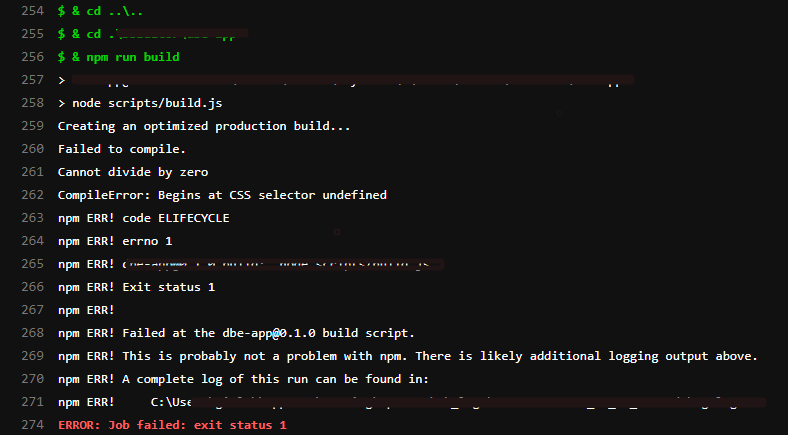
As of today my builds keep crashing. Even ones that were building just fine 2 days ago now crash with a rather strange message of:
Cannot divide by zero
CompileError: Begins at CSS selector undefined
Did you try recovering your dependencies?
Yes. Deleted the node-modules and the yarn.lock file and installed from scartch
Which terms did you search for in User Guide?
Cannot divide by zero
CompileError: Begins at CSS selector undefined
Environment
current version of create-react-app: 3.4.1
running from /Users/parsanasirimehr/.npm/_npx/7072/lib/node_modules/create-react-app
System:
OS: macOS 10.15.7
CPU: (12) x64 Intel(R) Core(TM) i7-9750H CPU @ 2.60GHz
Binaries:
Node: 12.18.2 - /usr/local/bin/node
Yarn: 1.22.5 - /usr/local/bin/yarn
npm: 6.14.5 - /usr/local/bin/npm
Browsers:
Chrome: 84.0.4147.89
Firefox: 79.0
Safari: 14.0
npmPackages:
react: ^16.13.1 => 16.13.1
react-dom: ^16.13.1 => 16.13.1
react-scripts: 3.4.1 => 3.4.1
npmGlobalPackages:
create-react-app: Not Found
Steps to reproduce
(Write your steps here:)
- yarn install --ignore-scripts
- yarn build
Expected behavior
That it would build. Even the commits that once built on the CI/CD server now fail with the same error
Actual behavior
it crashed.

Reproducible demo
I cannot give the project but i can give the package.json file:
{
"name": "report-app",
"version": "0.1.0",
"private": true,
"dependencies": {
"@babel/runtime": "^7.10.5",
"@material-ui/core": "^4.11.0",
"@material-ui/icons": "^4.9.1",
"@material-ui/lab": "^4.0.0-alpha.56",
"@progress/kendo-data-query": "^1.5.4",
"@progress/kendo-drawing": "^1.8.1",
"@progress/kendo-react-animation": "^3.15.0",
"@progress/kendo-react-buttons": "^3.15.0",
"@progress/kendo-react-data-tools": "^3.15.0",
"@progress/kendo-react-dateinputs": "^3.15.0",
"@progress/kendo-react-dialogs": "^3.15.0",
"@progress/kendo-react-dropdowns": "^3.15.0",
"@progress/kendo-react-excel-export": "^3.15.0",
"@progress/kendo-react-form": "^3.15.0",
"@progress/kendo-react-grid": "^3.15.0",
"@progress/kendo-react-inputs": "^3.15.0",
"@progress/kendo-react-intl": "^3.15.0",
"@progress/kendo-react-labels": "^3.15.0",
"@progress/kendo-react-layout": "^3.16.0",
"@progress/kendo-react-progressbars": "^3.16.0",
"@progress/kendo-react-upload": "^3.16.0",
"@progress/kendo-theme-default": "^4.20.0",
"axios": "^0.19.2",
"cldr-core": "^36.0.0",
"cldr-dates-full": "^36.0.0",
"cldr-numbers-full": "^36.0.0",
"clsx": "^1.1.1",
"express": "^4.17.1",
"form-data": "^3.0.0",
"jss": "^10.4.0",
"jss-rtl": "^0.3.0",
"material-ui-dropzone": "^3.4.0",
"path": "^0.12.7",
"react": "^16.13.1",
"react-dom": "^16.13.1",
"react-loading-overlay": "^1.0.1",
"react-router-dom": "^5.2.0",
"react-scripts": "3.4.1",
"react-spinners": "^0.9.0",
"react-transition-group": "^4.4.1",
"react-vis": "^1.11.7",
"reactjs-popup": "^1.5.0",
"uuid": "^8.3.0"
},
"scripts": {
"start": "react-scripts start",
"build": "react-scripts build",
"build:development": "REACT_APP_BRANCH=development react-scripts build",
"build:staging": "REACT_APP_BRANCH=staging react-scripts build",
"test": "react-scripts test",
"eject": "react-scripts eject",
"up": "git push --all && git push --tags",
"analyze": "source-map-explorer 'build/static/js/*.js'",
"prepublish": "yarn run build"
},
"eslintConfig": {
"extends": "react-app"
},
"browserslist": {
"production": [
">0.2%",
"not dead",
"not op_mini all"
],
"development": [
"last 1 chrome version",
"last 1 firefox version",
"last 1 safari version"
]
},
"devDependencies": {
"@babel/cli": "^7.11.5",
"@babel/core": "^7.11.5",
"@babel/preset-flow": "^7.10.4",
"@react-native-community/eslint-config": "^1.0.0",
"@testing-library/jest-dom": "^4.2.4",
"@testing-library/react": "^11.0.2",
"@testing-library/user-event": "^7.1.2",
"babel-eslint": "^10.1.0",
"eslint-config-fbjs": "^3.1.1",
"eslint-config-prettier": "^6.10.1",
"eslint-config-standard": "^14.1.1",
"eslint-plugin-babel": "^5.3.1",
"eslint-plugin-flowtype": "^5.2.0",
"eslint-plugin-import": "^2.22.0",
"eslint-plugin-jsx-a11y": "^6.3.1",
"eslint-plugin-node": "^11.1.0",
"eslint-plugin-prettier": "^3.1.3",
"eslint-plugin-promise": "^4.2.1",
"eslint-plugin-react": "^7.20.6",
"eslint-plugin-react-native": "^3.8.1",
"eslint-plugin-standard": "^4.0.1",
"flow-bin": "^0.132.0",
"msw": "^0.21.2",
"prettier": "2.0.5",
"source-map-explorer": "^2.4.2",
"node-sass": "^4.14.1"
}
}
 TheRogue76
All 12 comments
The strange thing is that the start script works fine and i can see it in development mode
TheRogue76
on 14 Oct 2020
The strange thing is that the start script works fine and i can see it in development mode
@TheRogue76 , we also have same issue in build since yesterday. We haven't made any recent changes on frontend code, but we are seeing this build failed on it.
I also use KendoReact & Eslint library on my side but it's in NPM instead of yarn.
 AlpeshMN
on 14 Oct 2020
AlpeshMN
on 14 Oct 2020
We are also facing the same issue. We use kendo-react similar to what is reported above. The cryptic error message is frustrating and we have not found any workaround yet.
 thava
on 14 Oct 2020
thava
on 14 Oct 2020
Having similar issue with using kendo themed components. You can try just importing the scss file for the component you need but will need to install node-sass to get this working with CRA
 Greg-Johns
on 14 Oct 2020
Greg-Johns
on 14 Oct 2020
I was able to get my build working by using a specific ver. of kendo theme "@progress/kendo-theme-default": "4.23.0
Not sure why but looks like the issue is in the kendo themes lib
Greg-Johns
on 14 Oct 2020
Same exact problem here with my project. Building and publishing to azure works just fine through visual studio, but fails using Azure CI/CD pipeline. I also use Kendo, but how were you guys able to determine the problem is there? I was unable to determine that from the logs it gave me.
 dreyescairo
on 14 Oct 2020
dreyescairo
on 14 Oct 2020
Facing exact same issue since yesterday. It is working fine on VS local environment but on AWS CodeBuild it is failing and giving this weird error.
Cannot divide by zero
181 | CompileError: Begins at CSS selector undefined
I also have some Kendo dependencies.
 neerajkhaturia
on 15 Oct 2020
neerajkhaturia
on 15 Oct 2020
I was able to get my build working by using a specific ver. of kendo theme "@progress/kendo-theme-default": "4.23.0
Not sure why but looks like the issue is in the kendo themes lib
I did try this method and it still failed. did you just change the package version in package.json and install and build or did you change anything else too?
what about loading the scss files? i do have node-sass installed but changing every single one of the imports is going to be a pain so i would appreciate every bit of knowledge i can gather before i change 40+ files.
what a mess this has turned into.
TheRogue76
on 15 Oct 2020
Trying to load just the SCSS files was throwing errors with undefined variables so the way I got my build working was by removing the kendo default theme v 4.24.0 and yarn add the specific version 4.23.0 and it worked. My guess is a bug was introduced in the latest version of kendo themes somewhere that's causing the issue.
Greg-Johns
on 15 Oct 2020
I also had this issue after upgrading my packages. In my case, this version of kendo-theme-bootstrap was responsible for the issue. After downgrading it to previous used 4.16.2, react build worked again.
Thank you @Greg-Johns for figuring that out! 😉
 stefanelsat
on 16 Oct 2020
stefanelsat
on 16 Oct 2020
Sorry i was kind of unavailable for 2 days. @Greg-Johns's solution works like a charm. I'm closing this issue but @stefanelsat has opened one in kendo's own repo. Hopefully we will get a heads up next time.
TheRogue76
on 18 Oct 2020
Is there any scope for CRA to display better error message in such scenarios ? There was absolutely zero hints about what module or file could be the source of the problem when this "Cannot divide by zero" error was displayed. May be CRA could have caught this exception and displayed "Problem encountered processing kendo module such and such file" ? A failure that needs help from CRA core developers only to find that the problem is caused by another dependent modules without printing any hints sends shivers down my spine if this happens again on production environment.
thava
on 18 Oct 2020
Related issues
 dualcnhq
·
3Comments
dualcnhq
·
3Comments
 JimmyLv
·
3Comments
JimmyLv
·
3Comments
 alleroux
·
3Comments
alleroux
·
3Comments
 fson
·
3Comments
fson
·
3Comments
 barcher
·
3Comments
barcher
·
3Comments
Most helpful comment
I was able to get my build working by using a specific ver. of kendo theme "@progress/kendo-theme-default": "4.23.0
Not sure why but looks like the issue is in the kendo themes lib