Create-react-app: react-scripts babel-jest version conflict
Is this a bug report?
Yes
Environment
Node: 10.15.3
NPM: 6.9.0
Yarn: 1.16.0
Output of npx create-react-app --info
Environment Info:
System:
OS: Linux 5.0 Solus 4.0
CPU: (4) x64 Intel(R) Core(TM) i5-5200U CPU @ 2.20GHz
Binaries:
Node: 10.15.3 - ~/.nvm/versions/node/v10.15.3/bin/node
Yarn: 1.16.0 - /usr/bin/yarn
npm: 6.9.0 - ~/.nvm/versions/node/v10.15.3/bin/npm
Browsers:
Chrome: Not Found
Firefox: 66.0.5
npmPackages:
react: ^16.8.6 => 16.8.6
react-dom: ^16.8.6 => 16.8.6
react-scripts: 3.0.0 => 3.0.0
npmGlobalPackages:
create-react-app: Not Found
Steps to Reproduce
Use the react-scripts dependency version 3.0.0
Expected Behavior
I would expect there to be no version conflicts in official packages which are part of the same official project and that running yarn run start would exit cleanly.
Actual Behavior
Running yarn run start which runs react-scripts start outputs the following error:
$ react-scripts start

There might be a problem with the project dependency tree.
It is likely not a bug in Create React App, but something you need to fix locally.

The react-scripts package provided by Create React App requires a dependency:

  "babel-jest": "24.7.1"

Don't try to install it manually: your package manager does it automatically.
However, a different version of babel-jest was detected higher up in the tree:

  /home/<a-user>/central/src/github.com/<a-user>/portfolio/node_modules/babel-jest (version: 24.8.0)

Manually installing incompatible versions is known to cause hard-to-debug issues.

If you would prefer to ignore this check, add SKIP_PREFLIGHT_CHECK=true to an .env file in your project.
That will permanently disable this message but you might encounter other issues.

To fix the dependency tree, try following the steps below in the exact order:

  1. Delete package-lock.json (not package.json!) and/or yarn.lock in your project folder.
  2. Delete node_modules in your project folder.
  3. Remove "babel-jest" from dependencies and/or devDependencies in the package.json file in your project folder.
  4. Run npm install or yarn, depending on the package manager you use.

In most cases, this should be enough to fix the problem.
If this has not helped, there are a few other things you can try:

  5. If you used npm, install yarn (http://yarnpkg.com/) and repeat the above steps with it instead.
     This may help because npm has known issues with package hoisting which may get resolved in future versions.

  6. Check if /home/<a-user>/central/src/github.com/<a-user>/portfolio/node_modules/babel-jest is outside your project directory.
     For example, you might have accidentally installed something in your home folder.

  7. Try running npm ls babel-jest in your project folder.
     This will tell you which other package (apart from the expected react-scripts) installed babel-jest.

If nothing else helps, add SKIP_PREFLIGHT_CHECK=true to an .env file in your project.
That would permanently disable this preflight check in case you want to proceed anyway.

P.S. We know this message is long but please read the steps above :-) We hope you find them helpful!

error Command failed with exit code 1.
info Visit https://yarnpkg.com/en/docs/cli/run for documentation about this command.
 mpfaff
All 13 comments
Please follow the steps in the error as is, check why babel-jest exist in /home/
 bugzpodder
on 5 Jun 2019
bugzpodder
on 5 Jun 2019
Hi there, I am also seeing this problem after updating to version 3.0.0, and had followed the steps but still unable to run.
Please find the attached result for npm ls babel-jest
`-- [email protected]
  +-- [email protected]
  `-- [email protected]
    `-- [email protected]
      `-- [email protected]
        `-- [email protected]
 raytangRT
on 5 Jun 2019
raytangRT
on 5 Jun 2019
@raytangRT I have the same result doing npm ls but did not see such a message. Please clear your node_modules, remove package-lock.json, do npm cache clean and npm install.
bugzpodder
on 5 Jun 2019
@bugzpodder It works after running npm cache clean
raytangRT
on 5 Jun 2019
This is my folder structure:
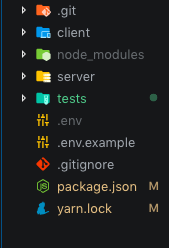
There's a CRA 3 app inside the client folder. When I install jest in the outer npm project for the server, CRA returns the error message.
 ghost
on 5 Jun 2019
ghost
on 5 Jun 2019
This is so bizarre, why would CRA care what's installed outside of its root directory?
ghost
on 5 Jun 2019
@edward-hong this is unfortunately expected behavior because of node module resolution. I would suggest you lock down the version of jest in the outer directory to be the same.
bugzpodder
on 5 Jun 2019
I'm also running into the issue of incompatible versions of babel-jest after upgrading all my dependencies. I've tried running yarn cache clean, deleting node_modules and deleting yarn.lock file without any success.
I'm resorting to using SKIP_PREFLIGHT_CHECK=true in a .env file for the moment.
For what it's worth, here's my npm ls babel-jest output:
└─┬ [email protected]
  ├── [email protected]
  └─┬ [email protected]
    └─┬ [email protected]
      └─┬ [email protected]
        └── [email protected]
 robertcoopercode
on 6 Jun 2019
robertcoopercode
on 6 Jun 2019
Whats in your package.json's dependencies and what's the output of yarn why babel-jest?
bugzpodder
on 6 Jun 2019
All jests internal dependencies are specified with a ^ so for a fresh install without a lock file yarn will install [email protected] for [email protected]. If you put a resolution on [email protected], it will still install [email protected].
You can put a resolution for [email protected] which do work but generates warnings when running yarn as all 2.8.0 packages has the range ^2.8.0.
This issue should be solved when #7007 is released. But as of now, create-react-app tries to verify something that neither yarn nor jest is guaranteeing.
 Pajn
on 7 Jun 2019
Pajn
on 7 Jun 2019
I somehow managed to get it passing locally, but my CI server was failing with the same issue regarding babel-jest versions. I've taken @Pajn's advice and used a resolution for [email protected] and I've managed to build with no issues. The only things I'm receiving are warnings when running yarn install.
Thanks @Pajn
robertcoopercode
on 7 Jun 2019
This issue has been automatically marked as stale because it has not had any recent activity. It will be closed in 5 days if no further activity occurs.
![stale[bot] picture](https://avatars3.githubusercontent.com/in/1724?v=4&s=40) stale[bot]
on 7 Jul 2019
stale[bot]
on 7 Jul 2019
This issue has been automatically closed because it has not had any recent activity. If you have a question or comment, please open a new issue.
stale[bot]
on 12 Jul 2019
Related issues
 alleroux
·
3Comments
alleroux
·
3Comments
 DaveLindberg
·
3Comments
DaveLindberg
·
3Comments
 AlexeyRyashencev
·
3Comments
AlexeyRyashencev
·
3Comments
 jnachtigall
·
3Comments
jnachtigall
·
3Comments
 wereHamster
·
3Comments
wereHamster
·
3Comments
Most helpful comment
All jests internal dependencies are specified with a
^so for a fresh install without a lock file yarn will install[email protected]for[email protected]. If you put a resolution on[email protected], it will still install[email protected].You can put a resolution for
[email protected]which do work but generates warnings when running yarn as all2.8.0packages has the range^2.8.0.This issue should be solved when #7007 is released. But as of now, create-react-app tries to verify something that neither yarn nor jest is guaranteeing.