Create-react-app: 3.0 Various problems after setting baseUrl
Various problems after setting baseUrl
This file is still using src
node_modules/react-scripts/config/paths.js
Error message
Error: ENOENT: no such file or directory, open '/Users/Jaydar/GitHub/xxxxx/src/react-app-env.d.ts'
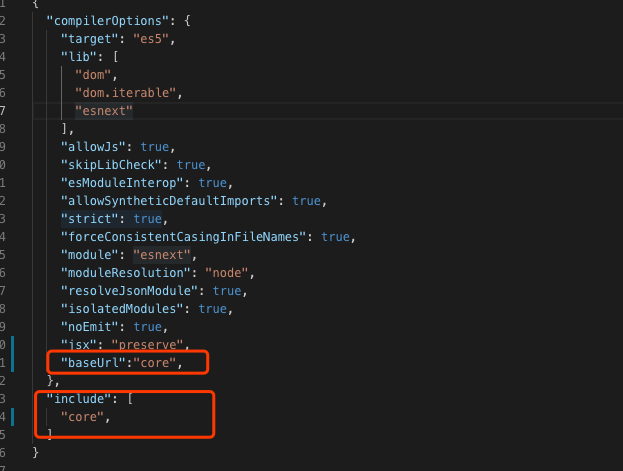
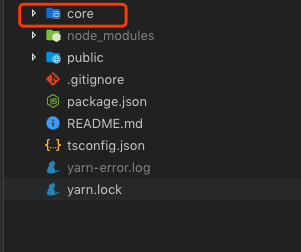
 Jaydar
All 8 comments
Please provide a reproducing project.
 gaearon
on 23 Apr 2019
gaearon
on 23 Apr 2019
@gaearon hi , baseUrl is not completely open?
Jaydar
on 23 Apr 2019
@Jaydar I believe baseUrl is configured on CRA to support only "src" and "node_modules" so you'd likely have to rename the "core" folder to "src"
 jamsch
on 23 Apr 2019
jamsch
on 23 Apr 2019
Btw, if you are using vscode you have to restart the ts server after setting baseUrl
 Dudeonyx
on 23 Apr 2019
Dudeonyx
on 23 Apr 2019
I am having similar issues. I was going to post an issue with a reproducible demo, but I can't reproduce is on a fresh CRA.
I noticed there is no documentation for baseUrl. Should we follow the documentation here, or has the CRA team done a custom implementation of jsonconfig? It would suck to lose baseUrl config in release notes.
EDIT: Created #6889
 NathanCH
on 24 Apr 2019
NathanCH
on 24 Apr 2019
baseUrl is documented here: https://facebook.github.io/create-react-app/docs/importing-a-component#absolute-imports. The only property from jsconfig.json we're currently doing anything with is baseUrl. We will likely support additional features in the future like paths.
 iansu
on 24 Apr 2019
iansu
on 24 Apr 2019
This issue has been automatically marked as stale because it has not had any recent activity. It will be closed in 5 days if no further activity occurs.
![stale[bot] picture](https://avatars3.githubusercontent.com/in/1724?v=4&s=40) stale[bot]
on 24 May 2019
stale[bot]
on 24 May 2019
This issue has been automatically closed because it has not had any recent activity. If you have a question or comment, please open a new issue.
stale[bot]
on 29 May 2019
Related issues
 fson
·
3Comments
fson
·
3Comments
 rdamian3
·
3Comments
rdamian3
·
3Comments
 alleroux
·
3Comments
alleroux
·
3Comments
 adrice727
·
3Comments
adrice727
·
3Comments
 barcher
·
3Comments
barcher
·
3Comments