Create-react-app: react proxy does not work
Hi i am facing issue with react proxy .. Actually i am accessing files from other port
The proxy works for "/" but not for any other url like "/currentpost/images/"
my proxy code is
  "proxy": {
    "/api/*": {
      "target": "http://localhost:5000"
    },
    "/currentPost/images/*" : {
      "target" : "http://localhost:5000"
    },
    "/images/*": {
      "target": "http://localhost:5000"
    }
}

and my proxy code in package js file is
ps://user-images.githubusercontent.com/35171108/46656606-dfe41f80-cbc7-11e8-9d1c-9d1713814ca8.PNG)
 USMAN378
All 13 comments
Please upgrade to v2 and follow the migration instructions.
 Timer
on 9 Oct 2018
Timer
on 9 Oct 2018
Timer ...................... i up graded but not solved??
USMAN378
on 10 Oct 2018
Did you follow the migration instructions? The example you posted does not work anymore.
Timer
on 10 Oct 2018
Thanks for reply @Timer ... yes i followed instructions and created new file setupProxy.js but don't know where to include this file .. i.e in package.json or in index.js

`const proxy = require('http-proxy-middleware');
module.exports = function(app){
app.use(proxy('/api/*' , { target : 'http://localhost:5000' }))
app.use(proxy('/images/*' , { target : 'http://localhost:5000' }))
}`
USMAN378
on 10 Oct 2018
Where did you create this file? It doesn't need to be imported anywhere.
Timer
on 10 Oct 2018
in src folder
USMAN378
on 10 Oct 2018
@Timer here is link of my project repo ... https://github.com/USMAN378/blog-Project- check it
USMAN378
on 10 Oct 2018
I don't see the proxy route for currentPost configured, that's what's failing in your screenshot.
Timer
on 11 Oct 2018
@Timer but now in the second method the other proxies also not working , that's why i asked you what to do

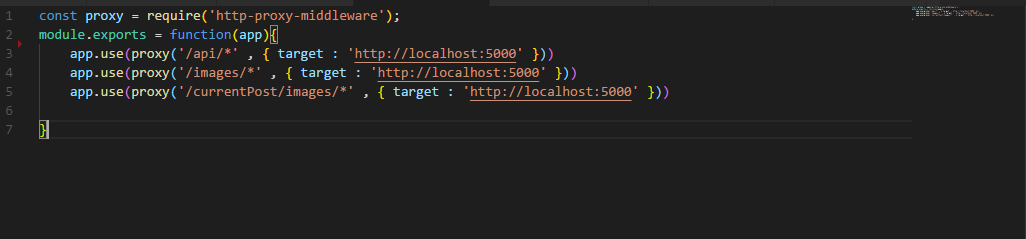
USMAN378
on 11 Oct 2018
hey
@USMAN378
@Timer
I have struggled quite some time with the exact same problem, but then I removed the wild card * and everyhting works fine again.
so try: app.use(proxy('/api/', { target: 'http://localhost:5000' }))
Pierrick
 Pier2208
on 16 Oct 2018
Pier2208
on 16 Oct 2018
Perhaps this will help you: https://github.com/facebook/create-react-app/issues/5441#issuecomment-429981692
My src/setupProxy.js looks like this now (simplified):
app.use(
  proxy("/rootpath", {
    target: "https://example.org",
    changeOrigin: true,
    onProxyReq(proxyReq) {
      if (proxyReq.getHeader("origin")) {
        proxyReq.setHeader("origin", "https://example.org")
      }
    },
    pathRewrite: { "^/rootpath": "" },
    logLevel: "debug",
  })
)
I recommend setting the logLevel so you'll be aware when a route is or isn't proxied.
 ghengeveld
on 16 Oct 2018
ghengeveld
on 16 Oct 2018
Ah yes good point, remove the wild card or make it ** probably.
Timer
on 16 Oct 2018
Well the issue has been solved thanks to all guys especially @Pier2208
USMAN378
on 3 Nov 2018
Related issues
 JimmyLv
·
3Comments
JimmyLv
·
3Comments
 stopachka
·
3Comments
stopachka
·
3Comments
 AlexeyRyashencev
·
3Comments
AlexeyRyashencev
·
3Comments
 wereHamster
·
3Comments
wereHamster
·
3Comments
 xgqfrms-GitHub
·
3Comments
xgqfrms-GitHub
·
3Comments
Most helpful comment
Perhaps this will help you: https://github.com/facebook/create-react-app/issues/5441#issuecomment-429981692
My
src/setupProxy.jslooks like this now (simplified):I recommend setting the logLevel so you'll be aware when a route is or isn't proxied.