Create-react-app: Question : Is it possible to run `npm start env.arbitrary`
I have multiple env. variables set in different files (external services keys etc...), and I'd like to run the app in development mode with each environment variable easily... Something like
npm start env.demo
npm start env.staging
npm start env.production
... etc
Is it currently possible with the CRA setup?
Thank you 🙏
 firaskrichi
All 5 comments
You can use this same method for npm start:
https://github.com/facebook/create-react-app/blob/next/packages/react-scripts/template/README.md#customizing-environment-variables-for-arbitrary-build-environments
 Timer
on 19 Apr 2018
Timer
on 19 Apr 2018
@Timer this is what I have :
"scripts": {
    "start": "react-scripts start",
    "start:prod": "env-cmd .env.production npm run start",
    "start:demo": "env-cmd .env.demo npm run start"
}
running npm run start:demo falls back to my .env variables and doesn't seem to use .env.demo
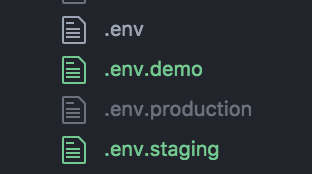
Any idea what could be going wrong? Thank you!
firaskrichi
on 20 Apr 2018
Hmm, that's very odd. What do your file contents look like? Can you try react-scripts start instead of npm run start?
Timer
on 20 Apr 2018
I tried react-scripts start but still falls back to the .env file instead of .env.demo
All my .env files are in the root, and look like this :
MAILCHIMP_KEY = "KEY"
REACT_APP_API_URL = 'URL'
REACT_APP_ENV = 'demo'
& now package.json has this but still nothing :
"scripts": {
"start": "react-scripts start",
"build": "react-scripts build",
"build:demo": "env-cmd .env.demo react-scripts build",
"test": "react-scripts test --env=jsdom",
"eject": "react-scripts eject",
"start:demo": "env-cmd .env.demo react-scripts start"
}
firaskrichi
on 23 Apr 2018
I suspect the format might be to blame.
Can you try just uh:
MAILCHIMP_KEY=KEY
REACT_APP_API_URL=URL
REACT_APP_ENV=demo
Also, make sure these variables aren't set in your shell already. Please open a new issue if you have a problem still!
Timer
on 25 May 2018
Related issues
 ap13p
·
3Comments
ap13p
·
3Comments
 alleroux
·
3Comments
alleroux
·
3Comments
 jnachtigall
·
3Comments
jnachtigall
·
3Comments
 DaveLindberg
·
3Comments
DaveLindberg
·
3Comments
 fson
·
3Comments
fson
·
3Comments
Most helpful comment
You can use this same method for
npm start:https://github.com/facebook/create-react-app/blob/next/packages/react-scripts/template/README.md#customizing-environment-variables-for-arbitrary-build-environments