Create-react-app: proxy not working
I nearly create a project using create-react-app.
I set a proxy in package.json just like "proxy":"https://xx.com"
then I write a button on a page and do the fetch action, here is my code:
class App extends Component {
  constructor(props) {
    super(props);
    this.fetch = this.fetch.bind(this);
  }
  fetch() {
    fetch('/getPoplayer.json',{headers:{
      "Accept":"text/html, application/xhtml+xml, application/json, */*"
    }})
    .then(function(response) {
      return response.text()
    }).then(function(json) {
      console.log('parsed json', JSON.parse(json))
    }).catch(function(ex) {
      console.log('parsing failed', ex)
    })
  }
  render() {
    return (
      <div className="App">
        <Button onClick={this.fetch}>测试fetch</Button>
      </div>
    );
  }
}

export default App;
after executing 'npm start' , the request is like this
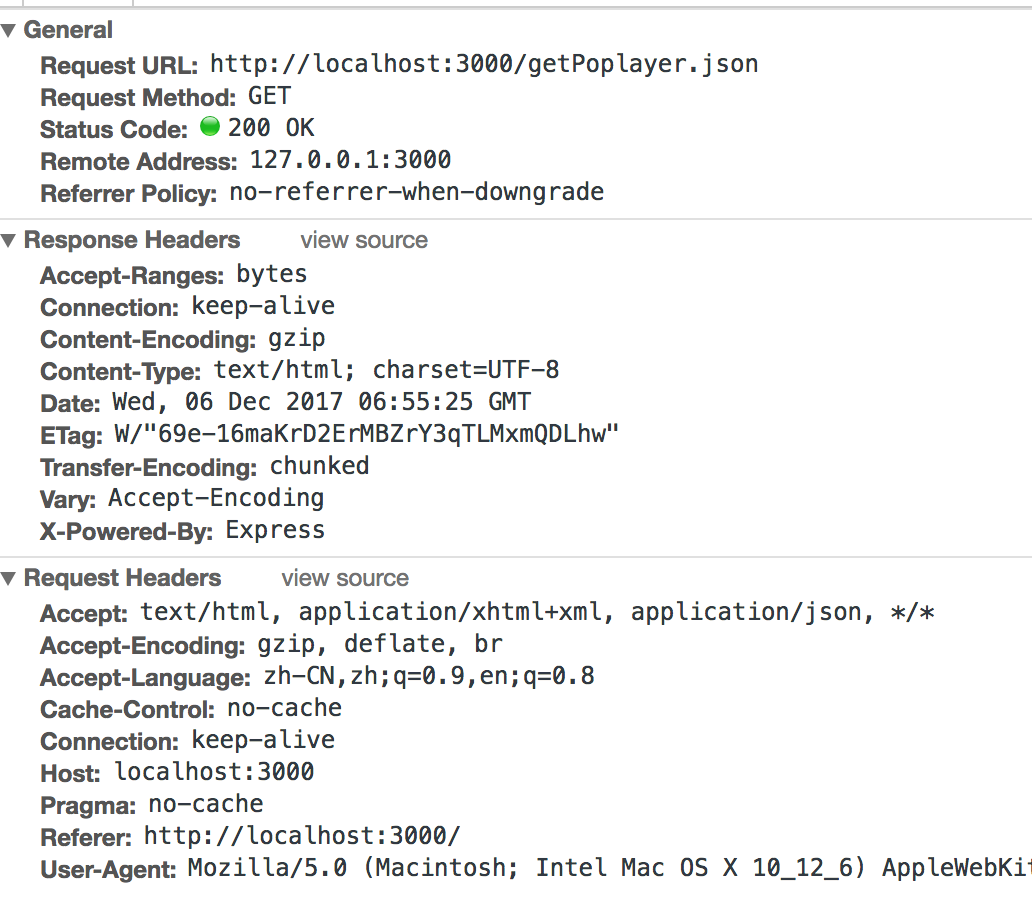
the proxy not works , but I console.log the proxySetting in start.js , it is right.
 sunnyYanan
All 5 comments
Proxy does not work for this usecase. Please call the URL directly in your application.
If they do not have CORS setup to allow this, you'll need to create your own server which reverse proxies to that domain and set your own server in the proxy field.
 Timer
on 8 Dec 2017
Timer
on 8 Dec 2017
@Timer why not proxy does not work for this usecase ?
 quanzhiyuan
on 5 Jan 2018
quanzhiyuan
on 5 Jan 2018
so yeah, why does proxy not work here?
 Gribbs
on 22 Jan 2018
Gribbs
on 22 Jan 2018
Because when text/html is in the Accept header there's no way our development server could guess whether you're requesting that URL through fetch or through the address bar. The second use case is important for client-side routing.
 gaearon
on 22 Jan 2018
gaearon
on 22 Jan 2018
I am not able to get proxy to work in application/json either.
 devssh
on 27 Apr 2018
devssh
on 27 Apr 2018
Related issues
 dualcnhq
·
3Comments
dualcnhq
·
3Comments
 wereHamster
·
3Comments
wereHamster
·
3Comments
 barcher
·
3Comments
barcher
·
3Comments
 onelson
·
3Comments
onelson
·
3Comments
 adrice727
·
3Comments
adrice727
·
3Comments
Most helpful comment
@Timer why not proxy does not work for this usecase ?