Version
Reproduction link
https://github.com/Vocast-fr/website
Steps to reproduce
Type the followin command line :
$ npx create-nuxt-app test
Enter the following options :
> Generating Nuxt.js project in <path>
? Project name <projectname>
? Project description My striking Nuxt.js project
? Use a custom server framework none
? Use a custom UI framework vuetify
? Choose rendering mode Single Page App
? Use axios module yes
? Use eslint yes
? Use prettier yes
? Author name
? Choose a package manager npm
Then run
$ cd <projectname>
$ npm run dev
You will get the following messages :
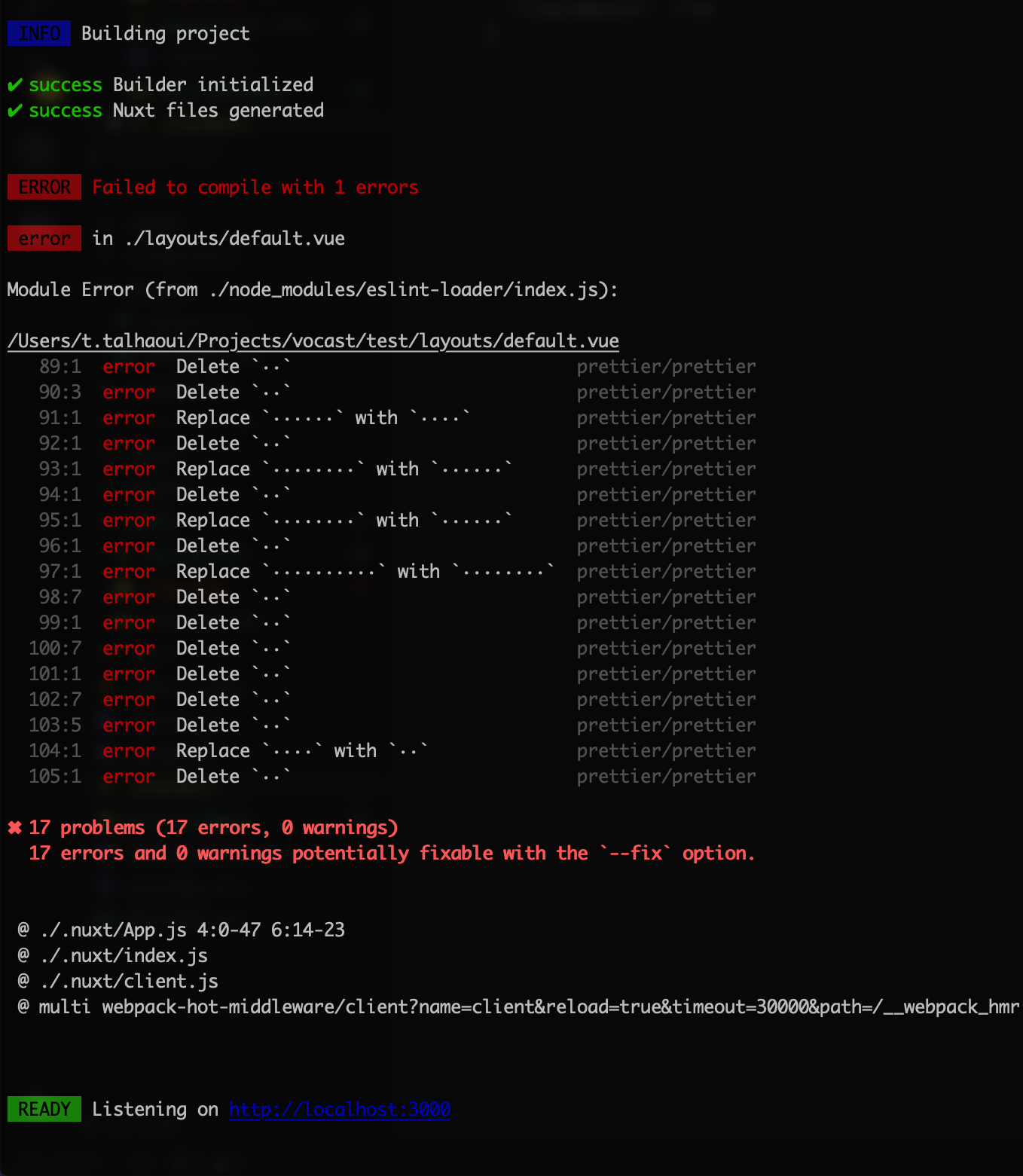
Am I doing something wrong ?
What is expected ?
The application is launched locally.
What is actually happening?
Fail to compile with Prettier error.
 TakCastel
All 11 comments
@TakCastel it was fixed, but not released. For now you could just lint --fix
 aldarund
on 27 Sep 2018
aldarund
on 27 Sep 2018
 manniL
on 13 Oct 2018
manniL
on 13 Oct 2018
This issue has resurfaced.
 skozzii
on 5 Jan 2019
skozzii
on 5 Jan 2019
@skozzii could you try to send in a fix?
manniL
on 5 Jan 2019
Fix for this anytime soon?
cc : @aldarund
 nzee
on 22 Mar 2019
nzee
on 22 Mar 2019
Can you brief us on what's the cause for this error so that we can look into pushing a fix? @manniL
nzee
on 23 Mar 2019
@nzee My guess is that there are some eslint-rules that intefere with prettier. you'd have to explicitly disable them when choosing both options.
manniL
on 23 Mar 2019
@manniL that should be handled already by prettier eslint config, that disable conflicting rules
@nzee do u have a reproduction?
aldarund
on 23 Mar 2019
Steps to Reproduce:
npx create-nuxt-app nuxty
? Project name nuxty
? Project description My impeccable Nuxt.js project
? Use a custom server framework none
? Choose features to install Progressive Web App (PWA) Support, Linter / Formatter,
Prettier, Axios
? Use a custom UI framework none
? Use a custom test framework none
? Choose rendering mode Universal
? Author name Nazim Zeeshan
? Choose a package manager npm
Make any change on index.vue such as indenting wrongly
npm run dev
You get the following error

.eslintrc.js
module.exports = {
  root: true,
  env: {
    browser: true,
    node: true
  },
  parserOptions: {
    parser: 'babel-eslint'
  },
  extends: [
    '@nuxtjs',
    'plugin:nuxt/recommended',
    'plugin:prettier/recommended',
    'prettier',
    'prettier/vue'
  ],
  plugins: [
    'prettier'
  ],
  // add your custom rules here
  rules: {
  }
}
.editorconfig
# editorconfig.org
root = true

[*]
indent_style = space
indent_size = 2
end_of_line = lf
charset = utf-8
trim_trailing_whitespace = true
insert_final_newline = true

[*.md]
trim_trailing_whitespace = false
.prettierrc
{
  "semi": false,
  "singleQuote": true
}
package.json
{
  "name": "nuxty",
  "version": "1.0.0",
  "description": "My impeccable Nuxt.js project",
  "author": "Nazim Zeeshan",
  "private": true,
  "scripts": {
    "dev": "nuxt",
    "build": "nuxt build",
    "start": "nuxt start",
    "generate": "nuxt generate",
    "lint": "eslint --ext .js,.vue --ignore-path .gitignore .",
    "precommit": "npm run lint"
  },
  "dependencies": {
    "cross-env": "^5.2.0",
    "nuxt": "^2.4.0",
    "@nuxtjs/axios": "^5.3.6",
    "@nuxtjs/pwa": "^2.6.0"
  },
  "devDependencies": {
    "nodemon": "^1.18.9",
    "@nuxtjs/eslint-config": "^0.0.1",
    "babel-eslint": "^10.0.1",
    "eslint": "^5.15.1",
    "eslint-config-standard": ">=12.0.0",
    "eslint-plugin-import": ">=2.16.0",
    "eslint-plugin-jest": ">=22.3.0",
    "eslint-plugin-node": ">=8.0.1",
    "eslint-plugin-nuxt": ">=0.4.2",
    "eslint-plugin-promise": ">=4.0.1",
    "eslint-plugin-standard": ">=4.0.0",
    "eslint-loader": "^2.1.2",
    "eslint-plugin-vue": "^5.2.2",
    "eslint-config-prettier": "^4.1.0",
    "eslint-plugin-prettier": "^3.0.1",
    "prettier": "^1.16.4"
  }
}
Make any change on index.vue such as indenting wrongly
So its totally expected if u format code wrong it will error. So you need to fix your code formatting according to how prettier wants.
It can be done either manually or via eslint --fix or you can configure automatic formatting in your IDE
aldarund
on 23 Mar 2019
I'm having similar issues.. at a very specific point the code hits the printWdith dead on, it will try to format and then go back to normal. Never resolving the error. :/
 tr1s
on 31 Mar 2020
tr1s
on 31 Mar 2020
Related issues
 Aperrix
·
4Comments
Aperrix
·
4Comments
 sandro-git
·
4Comments
sandro-git
·
4Comments
 miteyema
·
6Comments
miteyema
·
6Comments
 benmwendwa
·
5Comments
benmwendwa
·
5Comments
 jamesgeorge007
·
9Comments
jamesgeorge007
·
9Comments
Most helpful comment
@TakCastel it was fixed, but not released. For now you could just lint --fix