Crc: [BUG] Starting CRC (1.6) hangs on Ryzen CPU due to LUKS encryption
General information
- OS: Windows
- Hypervisor: Hyper-V
- Did you run
crc setupbefore starting it (Yes/No)?
CRC version
crc version: 1.6.0+8ef676f
OpenShift version: 4.3.0 (embedded in binary)
CRC status
Machine 'crc' does not exist. Use 'crc start' to create it.
CRC config
<empty>
Host Operating System
OS Name:                   Microsoft Windows 10 Pro
OS Version:                10.0.18363 N/A Build 18363
OS Manufacturer:           Microsoft Corporation
OS Configuration:          Standalone Workstation
OS Build Type:             Multiprocessor Free
Steps to reproduce
- install 1.5
- crc stop
- crc delete
- delete .crc dir
- install crc 1.6
- crc setup
- crc start -n 1.1.1.1 --log-level debug
No Idea what is wrong with 1.6. Also Tried:
- Disable Hyper-V and remove Hyper-V network adapter
- total network reconfigure with netcfg -d
- disabled a lot of running background processes
- disabled windows 10 firewall
- installed all windows 10 update
- total refresh install of windows 10
Unfortunately without any positive results.
Ended up with running CRC 1.5 again. Runs without problems out of the box
Expected
Crc to startup
Actual

Keeps saying
 C:\Windows\System32\WindowsPowerShell\v1.0\powershell.exe -NoProfile -NonInteractive ( Hyper-V\Get-VM crc ).state
(crc) DBG | [stdout =====>] : Running
(crc) DBG |
(crc) DBG | [stderr =====>] :
With 1.5 the admin question pop up if you trust the network command shell
I also got a different system Windows 10 system (same version) where I can not reproduce it.
EDIT
It is a bug for the Ryzen CPU family. See:
https://bugzilla.redhat.com/show_bug.cgi?id=1806532
EDIT 2 + Solution
Solved by updating the BIOS. See:
https://github.com/code-ready/crc/issues/1035#issuecomment-592410871
 michelmeeuwissen
All 36 comments
are you using a VPN or running an antivirus solution?
 gbraad
on 24 Feb 2020
gbraad
on 24 Feb 2020
C:\Windows\System32\WindowsPowerShell\v1.0\powershell.exe -NoProfile -NonInteractive ( Hyper-V\Get-VM crc ).state
Is not what I am seeing in the image. In the image it is about the IPAddress assigned to the virtual network interface. This means that the DHCP (default switch) was not able to hand out an address. What does the Network / IP Address tab show? Likely this is empty ... if so, check if nothing blocks the communication on the Default Switch; as said VPN and Antivirus often interferes.
gbraad
on 24 Feb 2020
You are right
I think the problem relies in the VM image. I tried to start it from hyper-v Itself and it doesn't start at all. I gets into a reboot loop. Going to look if I'm able to get the logs there to see what goes wrong. It looks like a kernel panic. Hangs on Startup finished (See image above) and after a couple of minutes the image reboots
Edit:
no Kernel Panic. I guess some timeout handling from Hyper-V itself:

michelmeeuwissen
on 24 Feb 2020
Kernel panics are unusual. what exact version of windows 10?
gbraad
on 24 Feb 2020
system info:
OS Name Microsoft Windows 10 Pro
Version 10.0.18363 Build 18363
Other OS Description    Not Available
OS Manufacturer Microsoft Corporation
System Name THREADRIPPER
System Manufacturer To Be Filled By O.E.M.
System Model    To Be Filled By O.E.M.
System Type x64-based PC
System SKU  To Be Filled By O.E.M.
Processor   AMD Ryzen 7 3800X 8-Core Processor, 3893 Mhz, 8 Core(s), 16 Logical Processor(s)
BIOS Version/Date   American Megatrends Inc. P1.30, 12-Jul-19
SMBIOS Version  3.2
Embedded Controller Version 255.255
BIOS Mode   Legacy
BaseBoard Manufacturer  ASRock
BaseBoard Product   X570 Pro4
BaseBoard Version
Platform Role   Desktop
Secure Boot State   Unsupported
PCR7 Configuration  Binding Not Possible
Windows Directory   C:\WINDOWS
System Directory    C:\WINDOWS\system32
Boot Device \Device\HarddiskVolume1
Locale  United States
Hardware Abstraction Layer  Version = "10.0.18362.628"
User Name   *****
Time Zone   W. Europe Standard Time
Installed Physical Memory (RAM) 31.9 GB
Total Physical Memory   31.9 GB
Available Physical Memory   18.4 GB
Total Virtual Memory    47.4 GB
Available Virtual Memory    30.9 GB
Page File Space 15.5 GB
Page File   C:\pagefile.sys
Kernel DMA Protection   Off
Virtualization-based security   Running
Virtualization-based security Required Security Properties
Virtualization-based security Available Security Properties Base Virtualization Support, SMM Security Mitigations 1.0, Mode Based Execution Control
Virtualization-based security Services Configured
Virtualization-based security Services Running
Device Encryption Support   Reasons for failed automatic device encryption: TPM is not usable, PCR7 binding is not supported, Hardware Security Test Interface failed and device is not Modern Standby, Un-allowed DMA capable bus/device(s) detected, TPM is not usable
A hypervisor has been detected. Features required for Hyper-V will not be displayed.
JFYI - If you are not getting an allocated IPV4 IP address, it is related to a bug in Hyper V!
 yapnel
on 24 Feb 2020
yapnel
on 24 Feb 2020
Any link to this bug or a workaround?
No Idea what is wrong with 1.6. Tried:
- Disable Hyper-V and remove Hyper-V network adapter
- total network reconfigure with
netcfg -d - disabled a lot of running background processes
- disabled windows 10 firewall
- installed all windows 10 update
- total refresh install of windows 10
Unfortunately without any positive results.
Ended up with running CRC 1.5 again. Runs without problems out of the box
michelmeeuwissen
on 24 Feb 2020
@michelmeeuwissen have you also tried to delete $USER/.crc/cache/crc_hyperv_4.3.0 and then starting it, it might be during the bundle extract it content of the image is not extracted properly and that's making it unstable since you are getting kernel panic. Also as soon as you fire up crc start try to open the hyperV manager console also and try to follow at what step this kernel panic happen? what is the error before that?
 praveenkumar
on 24 Feb 2020
praveenkumar
on 24 Feb 2020
@michelmeeuwissen have you also tried to delete
$USER/.crc/cache/crc_hyperv_4.3.0and then starting it, it might be during the bundle extract it content of the image is not extracted properly and that's making it unstable since you are getting kernel panic. Also as soon as you fire up crc start try to open the hyperV manager console also and try to follow at what step this kernel panic happen? what is the error before that?
Thanks for your reply. I really appreciate it. But please read my other comments.
michelmeeuwissen
on 24 Feb 2020
Thanks for your reply. I really appreciate it. But please read my other comments.
@michelmeeuwissen As your first comment you mention following.
3. crc delete
4. delete .crc dir
5. install crc 1.6
I just want to make sure during the extract of 1.6 bundle you put your system to sleep or it doesn't extracted properly. Another way to check it go to cache directory and try to check following (I am putting linux commands here, don't have windows machine handy atm) make sure the sha256sum which is part of bundle info file should match with the vhdx disk image if there is a mismatch that means the extract of the bundle had issue.
$ cd $USER/.crc/cache/crc_hyperv_4.3.0
$ grep -nR  sha256sum crc-bundle-info.json
34:        "sha256sum": "xxxxxxxxxxxxxxxxxxxxxxxxxxxxxxxx"
$ sha256sum crc.vhdx
xxxxxxxxxxxxxxxxxxxxxxxxxxxxxxxxxxxxx crc.vhdx
I'm sure of that. I even tried a total clean install of Windows 10 with having other versions/images installed
michelmeeuwissen
on 24 Feb 2020
@michelmeeuwissen thanks for confirming. @jsliacan We need to test our 1.6.0 bits on windows again and try to see if this is reproducible since 1.5.0 working without any issue and 1.6.0 causing issue.
praveenkumar
on 24 Feb 2020
If you are not getting IPV4 IP, you maybe hitting this bug
https://borncity.com/win/2019/06/18/windows-10-v1903-ip-resolution-bug-in-hyper-v-switch/
yapnel
on 24 Feb 2020
If you are not getting IPV4 IP, you maybe hitting this bug
https://borncity.com/win/2019/06/18/windows-10-v1903-ip-resolution-bug-in-hyper-v-switch/
Thanks. I tried the workaround with enabling Windows Sandbox.
unfortunately, the problem keeps the same -> CRC 1.6 image does not turn on in Hyper-V
Also tried to create a New virtual Switch and linked it to the CRC Hyper-V image. Without result.
Starting the CRC image in Hyper-V freezes for a while (+/- 30 sec) by the following lines:
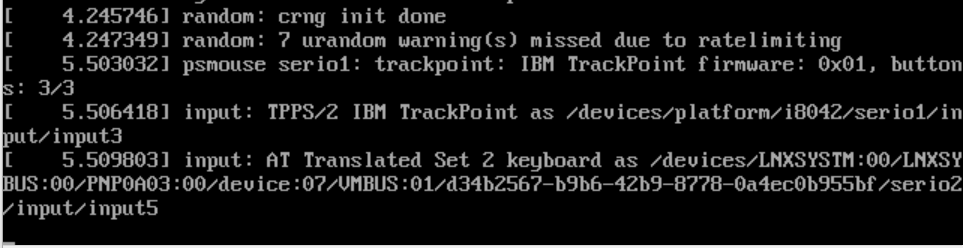
Maybe this says something about the underlying problem
michelmeeuwissen
on 24 Feb 2020
@michelmeeuwissen as per https://bugzilla.redhat.com/show_bug.cgi?id=1806532 looks like luks setup is failing on AMD Ryzen , may be same happening in your case since 4.3.0 which is shipped with 1.6.0 have encrypt ready.
praveenkumar
on 26 Feb 2020
@michelmeeuwissen as per https://bugzilla.redhat.com/show_bug.cgi?id=1806532 looks like luks setup is failing on AMD Ryzen , may be same happening in your case since 4.3.0 which is shipped with 1.6.0 have encrypt ready.
Wow that is very specific. I indeed got a Ryzen 3800x CPU. So a big chance that his bug is related to my desktop setup. On my laptop (Xeon E-2186M) I didn't have any problem.
Great found. Thanks. If I can test anything for you please let me know
I'll close this issue
michelmeeuwissen
on 26 Feb 2020
I rather keep the issue open for others to find
Processor AMD Ryzen 7 3800X 8-Core Processor, 3893 Mhz, 8 Core(s), 16 Logical Processor(s)
@robin-owen we have a known issue for the release notes of the current and likely next version.
gbraad
on 26 Feb 2020
Wow that is very specific. I indeed got a Ryzen 3800x CPU. So a big chance that his bug is related to my desktop setup. On my laptop (Xeon E-2186M) I didn't have any problem.
Great found. Thanks. If I can test anything for you please let me know
Can you check if you have the latest bios/firmware/microcode/... for your motherboard/cpu?
 cfergeau
on 26 Feb 2020
cfergeau
on 26 Feb 2020
This is likely an ASUS board or similar, as the values aren't filled:
To Be Filled By O.E.M.
So, this is a DIY system... check with the mainboard manufacturer for a BIOS update. NoteL ASRock as can be seen from the systeminfo.
https://www.asrock.com/MB/AMD/X570%20Pro4/index.asp#BIOS
For the OS, you are already at the latest possiblke public release (19H2, November). The current insider is 10.0.19569, but likely not worthy to try.
gbraad
on 26 Feb 2020
Hey, I was the one that posted the RH Bugzilla above. I definitely don't have the most recent BIOS update... mine is around 6months old. I need to update my BIOS and retry.
 rdoxenham
on 26 Feb 2020
rdoxenham
on 26 Feb 2020
This is likely an ASUS board or similar, as the values aren't filled:
To Be Filled By O.E.M.So, this is a DIY system... check with the mainboard manufacturer for a BIOS update. NoteL
ASRockas can be seen from the systeminfo.https://www.asrock.com/MB/AMD/X570%20Pro4/index.asp#BIOS
For the OS, you are already at the latest possiblke public release (19H2, November). The current insider is 10.0.19569, but likely not worthy to try.
Thanks for checking this :-)
Please let me know if I can do anything else to help
michelmeeuwissen
on 26 Feb 2020
Hey, I was the one that posted the RH Bugzilla above. I definitely don't have the most recent BIOS update... mine is around 6months old. I need to update my BIOS and retry.
Upgrading the bios in your case might help, I've found references of AMD saying in late December that they'd issue bios updates to avoid some rdrand issues with ryzen CPUs
cfergeau
on 26 Feb 2020
It is a little hard to locate the microcode updates as it is done by the BIOS and the OS. So, let us know the results. I am trying to get hold of a Tiny with a Ryzen CPU, but due to the situation here in China I'll probably will not be able to source it on short notice.
gbraad
on 27 Feb 2020
@michelmeeuwissen can you use https://docs.microsoft.com/en-us/sysinternals/downloads/coreinfo Coreinfo.exe so we can determine if all extensions are being forwarded for the vCPU?
gbraad
on 28 Feb 2020
This is really great. (Sorry for the delayed update)
I flashed my Bios because my version was a couple of months old (From 1.30 tot 2.30 See: https://www.asrock.com/MB/AMD/X570%20Pro4/index.asp#BIOS).
Did a reboot and tried to run crc start again.
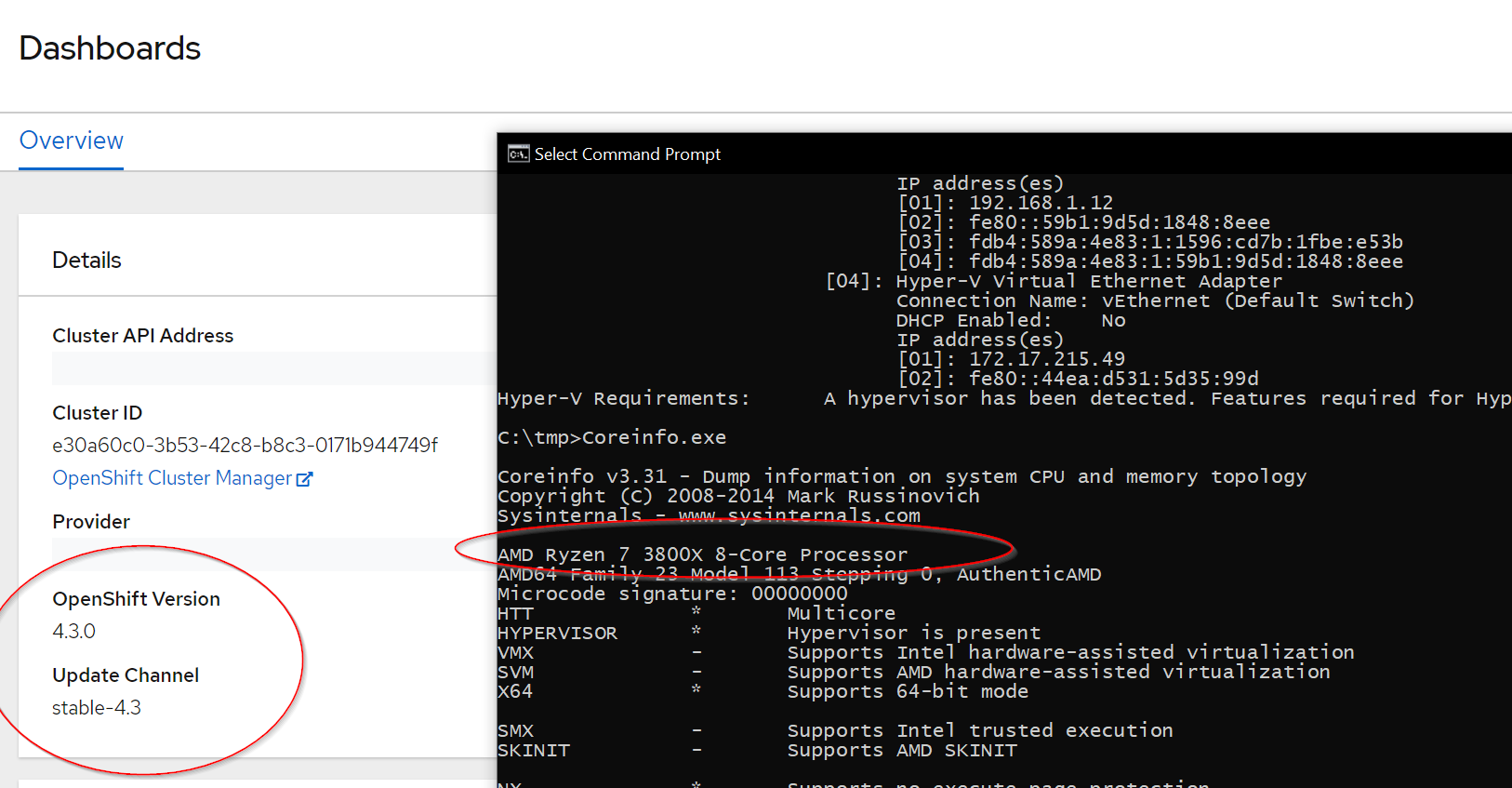
Everything seems to work again. This was a really specific bug after all. Is there anything I can do to help you guys?
Info from Coreinfo.exe:
AMD Ryzen 7 3800X 8-Core Processor
AMD64 Family 23 Model 113 Stepping 0, AuthenticAMD
Microcode signature: 00000000
HTT             *       Multicore
HYPERVISOR      *       Hypervisor is present
VMX             -       Supports Intel hardware-assisted virtualization
SVM             -       Supports AMD hardware-assisted virtualization
X64             *       Supports 64-bit mode

SMX             -       Supports Intel trusted execution
SKINIT          -       Supports AMD SKINIT

NX              *       Supports no-execute page protection
SMEP            *       Supports Supervisor Mode Execution Prevention
SMAP            *       Supports Supervisor Mode Access Prevention
PAGE1GB         *       Supports 1 GB large pages
PAE             *       Supports > 32-bit physical addresses
PAT             *       Supports Page Attribute Table
PSE             *       Supports 4 MB pages
PSE36           *       Supports > 32-bit address 4 MB pages
PGE             *       Supports global bit in page tables
SS              -       Supports bus snooping for cache operations
VME             *       Supports Virtual-8086 mode
RDWRFSGSBASE    *       Supports direct GS/FS base access

FPU             *       Implements i387 floating point instructions
MMX             *       Supports MMX instruction set
MMXEXT          *       Implements AMD MMX extensions
3DNOW           -       Supports 3DNow! instructions
3DNOWEXT        -       Supports 3DNow! extension instructions
SSE             *       Supports Streaming SIMD Extensions
SSE2            *       Supports Streaming SIMD Extensions 2
SSE3            *       Supports Streaming SIMD Extensions 3
SSSE3           *       Supports Supplemental SIMD Extensions 3
SSE4a           *       Supports Streaming SIMDR Extensions 4a
SSE4.1          *       Supports Streaming SIMD Extensions 4.1
SSE4.2          *       Supports Streaming SIMD Extensions 4.2

AES             *       Supports AES extensions
AVX             *       Supports AVX intruction extensions
FMA             *       Supports FMA extensions using YMM state
MSR             *       Implements RDMSR/WRMSR instructions
MTRR            *       Supports Memory Type Range Registers
XSAVE           *       Supports XSAVE/XRSTOR instructions
OSXSAVE         *       Supports XSETBV/XGETBV instructions
RDRAND          *       Supports RDRAND instruction
RDSEED          *       Supports RDSEED instruction

CMOV            *       Supports CMOVcc instruction
CLFSH           *       Supports CLFLUSH instruction
CX8             *       Supports compare and exchange 8-byte instructions
CX16            *       Supports CMPXCHG16B instruction
BMI1            *       Supports bit manipulation extensions 1
BMI2            *       Supports bit manipulation extensions 2
ADX             *       Supports ADCX/ADOX instructions
DCA             -       Supports prefetch from memory-mapped device
F16C            *       Supports half-precision instruction
FXSR            *       Supports FXSAVE/FXSTOR instructions
FFXSR           *       Supports optimized FXSAVE/FSRSTOR instruction
MONITOR         -       Supports MONITOR and MWAIT instructions
MOVBE           *       Supports MOVBE instruction
ERMSB           -       Supports Enhanced REP MOVSB/STOSB
PCLMULDQ        *       Supports PCLMULDQ instruction
POPCNT          *       Supports POPCNT instruction
LZCNT           *       Supports LZCNT instruction
SEP             *       Supports fast system call instructions
LAHF-SAHF       *       Supports LAHF/SAHF instructions in 64-bit mode
HLE             -       Supports Hardware Lock Elision instructions
RTM             -       Supports Restricted Transactional Memory instructions

DE              *       Supports I/O breakpoints including CR4.DE
DTES64          -       Can write history of 64-bit branch addresses
DS              -       Implements memory-resident debug buffer
DS-CPL          -       Supports Debug Store feature with CPL
PCID            -       Supports PCIDs and settable CR4.PCIDE
INVPCID         -       Supports INVPCID instruction
PDCM            -       Supports Performance Capabilities MSR
RDTSCP          *       Supports RDTSCP instruction
TSC             *       Supports RDTSC instruction
TSC-DEADLINE    -       Local APIC supports one-shot deadline timer
TSC-INVARIANT   *       TSC runs at constant rate
xTPR            -       Supports disabling task priority messages

EIST            -       Supports Enhanced Intel Speedstep
ACPI            -       Implements MSR for power management
TM              -       Implements thermal monitor circuitry
TM2             -       Implements Thermal Monitor 2 control
APIC            *       Implements software-accessible local APIC
x2APIC          -       Supports x2APIC

CNXT-ID         -       L1 data cache mode adaptive or BIOS

MCE             *       Supports Machine Check, INT18 and CR4.MCE
MCA             *       Implements Machine Check Architecture
PBE             -       Supports use of FERR#/PBE# pin

PSN             -       Implements 96-bit processor serial number

PREFETCHW       *       Supports PREFETCHW instruction

Maximum implemented CPUID leaves: 0000000D (Basic), 8000001E (Extended).

Logical to Physical Processor Map:
**--------------  Physical Processor 0 (Hyperthreaded)
--**------------  Physical Processor 1 (Hyperthreaded)
----**----------  Physical Processor 2 (Hyperthreaded)
------**--------  Physical Processor 3 (Hyperthreaded)
--------**------  Physical Processor 4 (Hyperthreaded)
----------**----  Physical Processor 5 (Hyperthreaded)
------------**--  Physical Processor 6 (Hyperthreaded)
--------------**  Physical Processor 7 (Hyperthreaded)

Logical Processor to Socket Map:
****************  Socket 0

Logical Processor to NUMA Node Map:
****************  NUMA Node 0

No NUMA nodes.

Logical Processor to Cache Map:
**--------------  Data Cache          0, Level 1,   32 KB, Assoc   8, LineSize  64
**--------------  Instruction Cache   0, Level 1,   32 KB, Assoc   8, LineSize  64
**--------------  Unified Cache       0, Level 2,  512 KB, Assoc   8, LineSize  64
********--------  Unified Cache       1, Level 3,   16 MB, Assoc  16, LineSize  64
--**------------  Data Cache          1, Level 1,   32 KB, Assoc   8, LineSize  64
--**------------  Instruction Cache   1, Level 1,   32 KB, Assoc   8, LineSize  64
--**------------  Unified Cache       2, Level 2,  512 KB, Assoc   8, LineSize  64
----**----------  Data Cache          2, Level 1,   32 KB, Assoc   8, LineSize  64
----**----------  Instruction Cache   2, Level 1,   32 KB, Assoc   8, LineSize  64
----**----------  Unified Cache       3, Level 2,  512 KB, Assoc   8, LineSize  64
------**--------  Data Cache          3, Level 1,   32 KB, Assoc   8, LineSize  64
------**--------  Instruction Cache   3, Level 1,   32 KB, Assoc   8, LineSize  64
------**--------  Unified Cache       4, Level 2,  512 KB, Assoc   8, LineSize  64
--------**------  Data Cache          4, Level 1,   32 KB, Assoc   8, LineSize  64
--------**------  Instruction Cache   4, Level 1,   32 KB, Assoc   8, LineSize  64
--------**------  Unified Cache       5, Level 2,  512 KB, Assoc   8, LineSize  64
--------********  Unified Cache       6, Level 3,   16 MB, Assoc  16, LineSize  64
----------**----  Data Cache          5, Level 1,   32 KB, Assoc   8, LineSize  64
----------**----  Instruction Cache   5, Level 1,   32 KB, Assoc   8, LineSize  64
----------**----  Unified Cache       7, Level 2,  512 KB, Assoc   8, LineSize  64
------------**--  Data Cache          6, Level 1,   32 KB, Assoc   8, LineSize  64
------------**--  Instruction Cache   6, Level 1,   32 KB, Assoc   8, LineSize  64
------------**--  Unified Cache       8, Level 2,  512 KB, Assoc   8, LineSize  64
--------------**  Data Cache          7, Level 1,   32 KB, Assoc   8, LineSize  64
--------------**  Instruction Cache   7, Level 1,   32 KB, Assoc   8, LineSize  64
--------------**  Unified Cache       9, Level 2,  512 KB, Assoc   8, LineSize  64

Logical Processor to Group Map:
****************  Group 0
Thanks. I am evaluating what to do, as this can still occur for others running a Ryzen 3xxx (3rd gen), especially as our usecase is more leaning towards a desktop usecase. Not sure if Epyc CPUs are affected (which I doubt) ... so perhaps a troubleshooting entry?
Thank you for taking the time to add more information.
gbraad
on 28 Feb 2020
On linux, we've disabled the rdrand instruction in the VM, I don't know if something similar is possible with hyperv https://github.com/code-ready/machine-driver-libvirt/commit/8a5f7dc0e11b23384b4f0cf6b01f400843362fd6 ? Maybe using this https://img.vembu.com/wp-content/uploads/2019/05/Configure-Basic-Hyper-V-Virtual-Machine-Resources2.png would allow a similar result?
Apart from this, fixing https://bugzilla.redhat.com/show_bug.cgi?id=1806532 in the guest would also avoid this issue.
cfergeau
on 28 Feb 2020
Added commenst to https://bugzilla.redhat.com/show_bug.cgi?id=1806532#c3 that the issue was resolved after updating the BIOS.
I have looked into the issue for HyperV, but it is not possible to control passing extensions to the guest in such a finegrained fashion. I would have to look into the compatiblity option, but this is merely a toggle ... https://docs.microsoft.com/en-us/previous-versions/windows/it-pro/windows-server-2012-r2-and-2012/dn859550(v%3Dws.11) -> https://docs.microsoft.com/en-us/previous-versions/windows/it-pro/windows-server-2012-r2-and-2012/dn859550(v%3Dws.11)#how-processor-compatibility-mode-works Wasn't able to locate this set of hidden extensions/features when activated.
gbraad
on 28 Feb 2020
Correction, when checking Hyper-V TLFS (rev 4.0b for the s012R), https://github.com/Microsoft/Virtualization-Documentation/raw/master/tlfs/Hypervisor%20Top%20Level%20Functional%20Specification%20v4.0b.pdf it seems section 5.2.11 does describe:
#define HV_PARTITION_PROCESSOR_FEATURES_AMD_COMPATIBILITY_MODE \ { \
...
     0,   /* RdRand */ \
...
that this is turned off when compatibility is selected. Choosing this is a workaround at best as it can impact performance. This however depends on the workload and what is used: https://www.altaro.com/hyper-v/performance-impact-hyper-v-cpu-compatibility-mode/ suggest "Virtual machine performance is unlikely to be impacted at all.", but if your application utilizes these features ... ?
gbraad
on 28 Feb 2020
On linux, crc 1.7.0 should have a workaround in place for this issue.
cfergeau
on 10 Mar 2020
I'm getting the same symptoms but intel and crc 1.7.0.
Also similar, went to crc 1.5.0 and after a couple kicks at that loop it picked up and finished without issue.
Do you want this here or a new more generic ticket, this issue may not be so isolated. I can post a [BUG] Starting CRC (1.6/1.7) hangs on NetworkAdapters state if you'd like to close this.
EDIT
Now a new ticket #1111 as per request (below)
 chrismajewski
on 16 Mar 2020
chrismajewski
on 16 Mar 2020
Please file a new issue as they are likely unrelated/other need another
solution/investigation
On Mon, Mar 16, 2020 at 2:40 PM Christopher Majewski <
[email protected]> wrote:
I'm getting the same symptoms but intel and crc 1.7.0.
Also similar, went to crc 1.5.0 and after a couple kicks at that loop it
picked up and finished without issue.Do you want this here or a new more generic ticket, this issue may not be
so isolated. I can post a [BUG] Starting CRC (1.6/1.7) hangs on
NetworkAdapters state if you'd like to close this.
General information
- OS: Windows
- Hypervisor: Hyper-V
- Did you run crc setup before starting it? Yes
CRC version
crc version: 1.7.0+fa7e558
OpenShift version: 4.3.1 (embedded in binary)CRC status
Machine 'crc' does not exist. Use 'crc start' to create it.
CRC config
Host Operating System
OS Name: Microsoft Windows 10 Pro
OS Version: 10.0.17763 N/A Build 17763
OS Manufacturer: Microsoft Corporation
OS Configuration: Standalone Workstation
OS Build Type: Multiprocessor Free
...
Processor(s): 1 Processor(s) Installed.
[01]: Intel64 Family 6 Model 158 Stepping 10 GenuineIntel ~3696 Mhz
BIOS Version: American Megatrends Inc. 2.40, 2018-03-08I flashed the BIOS in case... now on the following with the same issue.
BIOS Version: American Megatrends Inc. 2.B0, 2020-01-07
—
You are receiving this because you modified the open/close state.
Reply to this email directly, view it on GitHub
https://github.com/code-ready/crc/issues/1035#issuecomment-599369552,
or unsubscribe
https://github.com/notifications/unsubscribe-auth/AAAAOZVKRVTGWFY3BAAVDYLRHXCXRANCNFSM4K2EUZRQ
.
--
Gerard Braad | http://gbraad.nl
[ Doing Open Source Matters ]
gbraad
on 16 Mar 2020
This issue has been automatically marked as stale because it has not had recent activity. It will be closed if no further activity occurs. Thank you for your contributions.
![stale[bot] picture](https://avatars3.githubusercontent.com/in/1724?v=4&s=40) stale[bot]
on 16 May 2020
stale[bot]
on 16 May 2020
@michelmeeuwissen I will close this issues as it got resolved on your end by an update. We have also reported this as: https://bugzilla.redhat.com/show_bug.cgi?id=1806532 and a workaround is in place.
gbraad
on 27 May 2020
See https://github.com/json-c/json-c/issues/588 for even more details about the low-level issue which was causing this :)
cfergeau
on 23 Oct 2020
Related issues
 gaord
·
6Comments
gaord
·
6Comments
 Eyaldavid7
·
8Comments
Eyaldavid7
·
8Comments
 yanniszark
·
7Comments
yanniszark
·
7Comments
 rajivnathan
·
6Comments
rajivnathan
·
6Comments
 ktdreyer
·
8Comments
ktdreyer
·
8Comments
Most helpful comment
@michelmeeuwissen as per https://bugzilla.redhat.com/show_bug.cgi?id=1806532 looks like luks setup is failing on AMD Ryzen , may be same happening in your case since 4.3.0 which is shipped with 1.6.0 have encrypt ready.