crc status or crc start : ERRO Error occurred: Unable to connect to the server: x509
General information
- OS: RHEL 7.7
- Hypervisor: KVM
- Did you run
crc setupbefore starting it : Yes
CRC version
```qm@rhel7:/crc> crc version
version: 1.0.0-rc.0+34371d3
OpenShift version: 4.2.0-0.nightly-2019-09-26-192831 (embedded in binary)
## CRC status
qm@rhel7:/crc> crc status
ERRO Error occurred: Unable to connect to the server: x509: certificate signed by unknown authority - exit status 1
## CRC config view
qm@rhel7:/crc> crc config view
Returned empty
## Host Operating System
```bash
Red Hat Enterprise Linux Server release 7.7 (Maipo)
https://gist.github.com/ReddyTunga/c1854be228542f891aee26cbd97aa12d
 ReddyTunga
All 50 comments
qm@rhel7:/crc> oc get bc
Unable to connect to the server: x509: certificate signed by unknown authority
ReddyTunga
on 7 Oct 2019
@ReddyTunga by any chance you have KUBECONFIG env set in your current shell environment? Can you provide the output of echo $KUBECONFIG ?
 praveenkumar
on 7 Oct 2019
praveenkumar
on 7 Oct 2019
qm@rhel7:/crc> echo $KUBECONFIG
qm@rhel7:/crc>
I have not set any thing.
ReddyTunga
on 9 Oct 2019
@ReddyTunga Can you try below and provide the info?
$ oc login -u kubeadmin -p F44En-Xau6V-jQuyb-yuMXB https://api.crc.testing:6443
qm@rhel7:/crc> crc oc-env
export PATH="/home/qm/.crc/bin:$PATH"
# Run this command to configure your shell:
# eval $(crc oc-env)
qm@rhel7:/crc> export PATH="/home/qm/.crc/bin:$PATH"
qm@rhel7:/crc> eval $(crc oc-env)
qm@rhel7:/crc> export PATH="/home/qm/.crc/bin:$PATH"
qm@rhel7:/crc> oc login -u kubeadmin -p F44En-Xau6V-jQuyb-yuMXB https://api.crc.testing:6443
The server uses a certificate signed by an unknown authority.
You can bypass the certificate check, but any data you send to the server could be intercepted by others.
Use insecure connections? (y/n): y

error: Seems you passed an HTML page (console?) instead of server URL.
Verify provided address and try again.
qm@rhel7:/crc> oc login -u kubeadmin -p F44En-Xau6V-jQuyb-yuMXB https://api.crc.testing:6443
The server uses a certificate signed by an unknown authority.
You can bypass the certificate check, but any data you send to the server could be intercepted by others.
Use insecure connections? (y/n): n

error: The server uses a certificate signed by unknown authority. You may need to use the --certificate-authority flag to provide the path to a certificate file for the certificate authority, or --insecure-skip-tls-verify to bypass the certificate check and use insecure connections.
qm@rhel7:/crc>
@ReddyTunga was it the clean run can you do following and see if that still the same issue, meanwhile we will also try to reproduce in RHEL-7.7 environment.
$ crc delete
$ unset KUBECONFIG
$ crc start
qm@rhel7:/crc> crc stop; crc delete; unset KUBECONFIG; crc start -p pull-secret
Stopping CodeReady Containers instance... this may take a few minutes
CodeReady Containers instance stopped
Do you want to delete the crc VM? [y/N]: y
CodeReady Containers instance deleted
INFO Checking if running as non-root
INFO Checking if oc binary is cached
INFO Checking if Virtualization is enabled
INFO Checking if KVM is enabled
INFO Checking if libvirt is installed
INFO Checking if user is part of libvirt group
INFO Checking if libvirt is enabled
INFO Checking if libvirt daemon is running
INFO Checking if a supported libvirt version is installed
INFO Checking if crc-driver-libvirt is installed
INFO Checking if libvirt 'crc' network is available
INFO Checking if libvirt 'crc' network is active
INFO Checking if NetworkManager is installed
INFO Checking if NetworkManager service is running
INFO Checking if /etc/NetworkManager/conf.d/crc-nm-dnsmasq.conf exists
INFO Checking if /etc/NetworkManager/dnsmasq.d/crc.conf exists
INFO Loading bundle: crc_libvirt_4.2.0-0.nightly-2019-09-26-192831.crcbundle ...
INFO Creating CodeReady Containers VM for OpenShift 4.2.0-0.nightly-2019-09-26-192831...
INFO Verifying validity of the cluster certificates ...
ERRO Error occurred: parsing time "" as "2006-01-02T15:04:05Z07:00": cannot parse "" as "2006"
qm@rhel7:/crc>
Now got different error :)
ReddyTunga
on 10 Oct 2019
@ReddyTunga what is the time set on your system date command output ?
praveenkumar
on 10 Oct 2019
qm@rhel7:/crc> date
Thu Oct 10 09:12:28 +03 2019
ReddyTunga
on 10 Oct 2019
@ReddyTunga can you try below so we will get more logs?
$ crc delete; unset KUBECONFIG; crc start -p pull-secret --log-level debug
$ crc delete; unset KUBECONFIG; crc start -p pull-secret --log-level debug
Do you want to delete the crc VM? [y/N]: y
CodeReady Containers instance deleted
DEBU No new version available, latest version at mirror is 1.0.0-rc.0
INFO Checking if running as non-root
INFO Checking if oc binary is cached
DEBU oc binary already cached
INFO Checking if Virtualization is enabled
DEBU Checking if the vmx/svm flags are present in /proc/cpuinfo
DEBU CPU virtualization flags are good
INFO Checking if KVM is enabled
DEBU Checking if /dev/kvm exists
DEBU /dev/kvm was found
INFO Checking if libvirt is installed
DEBU Checking if 'virsh' is available
DEBU 'virsh' was found in /bin/virsh
INFO Checking if user is part of libvirt group
DEBU Checking if current user is part of the libvirt group
DEBU Current user is already in the libvirt group
INFO Checking if libvirt is enabled
DEBU Checking if libvirtd.service is enabled
DEBU libvirtd.service is already enabled
INFO Checking if libvirt daemon is running
DEBU Checking if libvirtd.service is running
DEBU libvirtd.service is already running
INFO Checking if a supported libvirt version is installed
DEBU Checking if libvirt version is >=3.4.0
INFO Checking if crc-driver-libvirt is installed
DEBU Checking if crc-driver-libvirt is installed
DEBU crc-driver-libvirt is already installed in /home/qm/.crc/bin/crc-driver-libvirt
INFO Checking if libvirt 'crc' network is available
DEBU Checking if libvirt 'crc' network exists
DEBU libvirt 'crc' network exists
INFO Checking if libvirt 'crc' network is active
DEBU Checking if libvirt 'crc' network is active
DEBU libvirt 'crc' network is already active
INFO Checking if NetworkManager is installed
DEBU Checking if 'nmcli' is available
DEBU 'nmcli' was found in /bin/nmcli
INFO Checking if NetworkManager service is running
DEBU Checking if NetworkManager.service is running
DEBU NetworkManager.service is already running
INFO Checking if /etc/NetworkManager/conf.d/crc-nm-dnsmasq.conf exists
DEBU Checking NetworkManager configuration
DEBU NetworkManager configuration is good
INFO Checking if /etc/NetworkManager/dnsmasq.d/crc.conf exists
DEBU Checking dnsmasq configuration
DEBU dnsmasq configuration is good
Checking file: /home/qm/.crc/machines/crc/.crc-exist
INFO Loading bundle: crc_libvirt_4.2.0-0.nightly-2019-09-26-192831.crcbundle ...
INFO Creating CodeReady Containers VM for OpenShift 4.2.0-0.nightly-2019-09-26-192831...
Found binary path at /home/qm/.crc/bin/crc-driver-libvirt
Launching plugin server for driver libvirt
Plugin server listening at address 127.0.0.1:18980
() Calling .GetVersion
Using API Version  1
() Calling .SetConfigRaw
() Calling .GetMachineName
(crc) Calling .GetMachineName
(crc) Calling .DriverName
Running pre-create checks...
(crc) Calling .PreCreateCheck
(crc) DBG | About to check libvirt version
(crc) DBG | Validating network
(crc) Calling .GetConfigRaw
Creating machine...
(crc) Calling .Create
(crc) Downloading /home/qm/.crc/cache/crc from file:///home/qm/.crc/cache/crc_libvirt_4.2.0-0.nightly-2019-09-26-192831/crc.qcow2...
(crc) DBG | Verifying executable bit set on /home/qm/.crc/machines/crc
(crc) DBG | Setting executable bit set on /home/qm/.crc/machines/crc
(crc) DBG | Verifying executable bit set on /home/qm/.crc/machines
(crc) DBG | Verifying executable bit set on /home/qm/.crc
(crc) DBG | Verifying executable bit set on /home/qm
(crc) DBG | Verifying executable bit set on /home
(crc) DBG | Defining VM...
(crc) DBG | Adding the file: /home/qm/.crc/machines/crc/.crc-exist
(crc) DBG | Starting VM crc
(crc) DBG | GetIP called for crc
(crc) DBG | Getting current state...
(crc) DBG | IP address: 192.168.130.11
(crc) Found IP for machine: 192.168.130.11
(crc) Calling .GetConfigRaw
(crc) Calling .DriverName
(crc) Calling .DriverName
Waiting for machine to be running, this may take a few minutes...
(crc) Calling .GetState
(crc) DBG | Getting current state...
Machine is up and running!
Machine successfully created
Created /home/qm/.crc/machines/crc/.crc-exist
(crc) Calling .GetState
(crc) DBG | Getting current state...
Found binary path at /home/qm/.crc/bin/crc-driver-libvirt
Launching plugin server for driver libvirt
Plugin server listening at address 127.0.0.1:15333
() Calling .GetVersion
Using API Version  1
() Calling .SetConfigRaw
() Calling .GetMachineName
DEBU Waiting until ssh is available
(crc) Calling .GetSSHHostname
(crc) DBG | GetIP called for crc
(crc) DBG | Getting current state...
(crc) DBG | Fetching VM...
(crc) DBG | IP address: 192.168.130.11
(crc) Calling .GetSSHPort
(crc) Calling .GetSSHKeyPath
(crc) Calling .GetSSHKeyPath
(crc) Calling .GetSSHUsername
Using SSH client type: native
&{{{<nil> 0 [] [] []} core [0x744eb0] 0x744e80 <nil>  [] 0s} 192.168.130.11 22 <nil> <nil>}
About to run SSH command:
exit 0
Error dialing TCP: dial tcp 192.168.130.11:22: connect: no route to host
Error dialing TCP: dial tcp 192.168.130.11:22: connect: no route to host
Error dialing TCP: dial tcp 192.168.130.11:22: connect: no route to host
Error dialing TCP: dial tcp 192.168.130.11:22: connect: no route to host
Error dialing TCP: dial tcp 192.168.130.11:22: connect: no route to host
Error dialing TCP: dial tcp 192.168.130.11:22: connect: no route to host
Error dialing TCP: dial tcp 192.168.130.11:22: connect: no route to host
Error dialing TCP: dial tcp 192.168.130.11:22: connect: no route to host
Error dialing TCP: dial tcp 192.168.130.11:22: connect: no route to host
Error dialing TCP: dial tcp 192.168.130.11:22: connect: no route to host
Error dialing TCP: dial tcp 192.168.130.11:22: connect: no route to host
Error dialing TCP: dial tcp 192.168.130.11:22: connect: no route to host
Error dialing TCP: dial tcp 192.168.130.11:22: connect: no route to host
Error dialing TCP: dial tcp 192.168.130.11:22: connect: no route to host
Error dialing TCP: dial tcp 192.168.130.11:22: connect: no route to host
Error dialing TCP: dial tcp 192.168.130.11:22: connect: no route to host
Error dialing TCP: dial tcp 192.168.130.11:22: connect: no route to host
Error dialing TCP: dial tcp 192.168.130.11:22: connect: no route to host
Error dialing TCP: dial tcp 192.168.130.11:22: connect: no route to host
Error dialing TCP: dial tcp 192.168.130.11:22: connect: no route to host
Error dialing TCP: dial tcp 192.168.130.11:22: connect: no route to host
Error dialing TCP: dial tcp 192.168.130.11:22: connect: no route to host
Error dialing TCP: dial tcp 192.168.130.11:22: connect: no route to host
Error dialing TCP: dial tcp 192.168.130.11:22: connect: no route to host
Error dialing TCP: dial tcp 192.168.130.11:22: connect: no route to host
Error dialing TCP: dial tcp 192.168.130.11:22: connect: no route to host
Error dialing TCP: dial tcp 192.168.130.11:22: connect: no route to host
Error dialing TCP: dial tcp 192.168.130.11:22: connect: no route to host
Error dialing TCP: dial tcp 192.168.130.11:22: connect: no route to host
Error dialing TCP: dial tcp 192.168.130.11:22: connect: no route to host
Error dialing TCP: dial tcp 192.168.130.11:22: connect: no route to host
Error dialing TCP: dial tcp 192.168.130.11:22: connect: no route to host
Error dialing TCP: dial tcp 192.168.130.11:22: connect: no route to host
Error dialing TCP: dial tcp 192.168.130.11:22: connect: no route to host
Error dialing TCP: dial tcp 192.168.130.11:22: connect: no route to host
Error dialing TCP: dial tcp 192.168.130.11:22: connect: no route to host
Error dialing TCP: dial tcp 192.168.130.11:22: connect: no route to host
Error dialing TCP: dial tcp 192.168.130.11:22: connect: no route to host
Error dialing TCP: dial tcp 192.168.130.11:22: connect: no route to host
Error dialing TCP: dial tcp 192.168.130.11:22: connect: no route to host
Error dialing TCP: dial tcp 192.168.130.11:22: connect: no route to host
Error dialing TCP: dial tcp 192.168.130.11:22: connect: no route to host
Error dialing TCP: dial tcp 192.168.130.11:22: connect: no route to host
Error dialing TCP: dial tcp 192.168.130.11:22: connect: no route to host
Error dialing TCP: dial tcp 192.168.130.11:22: connect: no route to host
Error dialing TCP: dial tcp 192.168.130.11:22: connect: no route to host
Error dialing TCP: dial tcp 192.168.130.11:22: connect: no route to host
Error dialing TCP: dial tcp 192.168.130.11:22: connect: no route to host
Error dialing TCP: dial tcp 192.168.130.11:22: connect: no route to host
Error dialing TCP: dial tcp 192.168.130.11:22: connect: no route to host
Error dialing TCP: dial tcp 192.168.130.11:22: connect: no route to host
Error dialing TCP: dial tcp 192.168.130.11:22: connect: no route to host
Error dialing TCP: dial tcp 192.168.130.11:22: connect: no route to host
Error dialing TCP: dial tcp 192.168.130.11:22: connect: no route to host
Error dialing TCP: dial tcp 192.168.130.11:22: connect: no route to host
Error dialing TCP: dial tcp 192.168.130.11:22: connect: no route to host
Error dialing TCP: dial tcp 192.168.130.11:22: connect: no route to host
Error dialing TCP: dial tcp 192.168.130.11:22: connect: no route to host
Error dialing TCP: dial tcp 192.168.130.11:22: connect: no route to host
Error dialing TCP: dial tcp 192.168.130.11:22: connect: no route to host
SSH cmd err, output: <nil>:
INFO Verifying validity of the cluster certificates ...
(crc) Calling .GetSSHHostname
(crc) DBG | GetIP called for crc
(crc) DBG | Getting current state...
(crc) DBG | IP address: 192.168.130.11
(crc) Calling .GetSSHPort
(crc) Calling .GetSSHKeyPath
(crc) Calling .GetSSHKeyPath
(crc) Calling .GetSSHUsername
Using SSH client type: native
&{{{<nil> 0 [] [] []} core [0x744eb0] 0x744e80 <nil>  [] 0s} 192.168.130.11 22 <nil> <nil>}
About to run SSH command:
date --date="$(sudo openssl x509 -in /var/lib/kubelet/pki/kubelet-client-current.pem -noout -enddate | cut -d= -f 2)" --iso-8601=seconds
Error dialing TCP: dial tcp 192.168.130.11:22: connect: no route to host
Error dialing TCP: dial tcp 192.168.130.11:22: connect: no route to host
Error dialing TCP: dial tcp 192.168.130.11:22: connect: no route to host
Error dialing TCP: dial tcp 192.168.130.11:22: connect: no route to host
Error dialing TCP: dial tcp 192.168.130.11:22: connect: no route to host
Error dialing TCP: dial tcp 192.168.130.11:22: connect: no route to host
Error dialing TCP: dial tcp 192.168.130.11:22: connect: no route to host
Error dialing TCP: dial tcp 192.168.130.11:22: connect: no route to host
Error dialing TCP: dial tcp 192.168.130.11:22: connect: no route to host
Error dialing TCP: dial tcp 192.168.130.11:22: connect: no route to host
Error dialing TCP: dial tcp 192.168.130.11:22: connect: no route to host
Error dialing TCP: dial tcp 192.168.130.11:22: connect: no route to host
Error dialing TCP: dial tcp 192.168.130.11:22: connect: no route to host
Error dialing TCP: dial tcp 192.168.130.11:22: connect: no route to host
Error dialing TCP: dial tcp 192.168.130.11:22: connect: no route to host
Error dialing TCP: dial tcp 192.168.130.11:22: connect: no route to host
Error dialing TCP: dial tcp 192.168.130.11:22: connect: no route to host
Error dialing TCP: dial tcp 192.168.130.11:22: connect: no route to host
Error dialing TCP: dial tcp 192.168.130.11:22: connect: no route to host
Error dialing TCP: dial tcp 192.168.130.11:22: connect: no route to host
Error dialing TCP: dial tcp 192.168.130.11:22: connect: no route to host
Error dialing TCP: dial tcp 192.168.130.11:22: connect: no route to host
Error dialing TCP: dial tcp 192.168.130.11:22: connect: no route to host
Error dialing TCP: dial tcp 192.168.130.11:22: connect: no route to host
Error dialing TCP: dial tcp 192.168.130.11:22: connect: no route to host
Error dialing TCP: dial tcp 192.168.130.11:22: connect: no route to host
Error dialing TCP: dial tcp 192.168.130.11:22: connect: no route to host
Error dialing TCP: dial tcp 192.168.130.11:22: connect: no route to host
Error dialing TCP: dial tcp 192.168.130.11:22: connect: no route to host
Error dialing TCP: dial tcp 192.168.130.11:22: connect: no route to host
Error dialing TCP: dial tcp 192.168.130.11:22: connect: no route to host
Error dialing TCP: dial tcp 192.168.130.11:22: connect: no route to host
Error dialing TCP: dial tcp 192.168.130.11:22: connect: no route to host
Error dialing TCP: dial tcp 192.168.130.11:22: connect: no route to host
Error dialing TCP: dial tcp 192.168.130.11:22: connect: no route to host
Error dialing TCP: dial tcp 192.168.130.11:22: connect: no route to host
Error dialing TCP: dial tcp 192.168.130.11:22: connect: no route to host
Error dialing TCP: dial tcp 192.168.130.11:22: connect: no route to host
Error dialing TCP: dial tcp 192.168.130.11:22: connect: no route to host
Error dialing TCP: dial tcp 192.168.130.11:22: connect: no route to host
Error dialing TCP: dial tcp 192.168.130.11:22: connect: no route to host
Error dialing TCP: dial tcp 192.168.130.11:22: connect: no route to host
Error dialing TCP: dial tcp 192.168.130.11:22: connect: no route to host
Error dialing TCP: dial tcp 192.168.130.11:22: connect: no route to host
Error dialing TCP: dial tcp 192.168.130.11:22: connect: no route to host
Error dialing TCP: dial tcp 192.168.130.11:22: connect: no route to host
Error dialing TCP: dial tcp 192.168.130.11:22: connect: no route to host
Error dialing TCP: dial tcp 192.168.130.11:22: connect: no route to host
Error dialing TCP: dial tcp 192.168.130.11:22: connect: no route to host
Error dialing TCP: dial tcp 192.168.130.11:22: connect: no route to host
Error dialing TCP: dial tcp 192.168.130.11:22: connect: no route to host
Error dialing TCP: dial tcp 192.168.130.11:22: connect: no route to host
Error dialing TCP: dial tcp 192.168.130.11:22: connect: no route to host
Error dialing TCP: dial tcp 192.168.130.11:22: connect: no route to host
Error dialing TCP: dial tcp 192.168.130.11:22: connect: no route to host
Error dialing TCP: dial tcp 192.168.130.11:22: connect: no route to host
Error dialing TCP: dial tcp 192.168.130.11:22: connect: no route to host
Error dialing TCP: dial tcp 192.168.130.11:22: connect: no route to host
Error dialing TCP: dial tcp 192.168.130.11:22: connect: no route to host
Error dialing TCP: dial tcp 192.168.130.11:22: connect: no route to host
SSH cmd err, output: <nil>:
ERRO Error occurred: parsing time "" as "2006-01-02T15:04:05Z07:00": cannot parse "" as "2006"
Making call to close driver server
(crc) Calling .Close
Successfully made call to close driver server
Making call to close connection to plugin binary
Making call to close driver server
(crc) Calling .Close
Successfully made call to close driver server
Making call to close connection to plugin binary
Help me remove these crc neywork
6: crc:
link/ether 52:54:00:fd:be:d0 brd ff:ff:ff:ff:ff:ff
inet 192.168.130.1/24 brd 192.168.130.255 scope global crc
valid_lft forever preferred_lft forever
7: crc-nic:
link/ether 52:54:00:fd:be:d0 brd ff:ff:ff:ff:ff:ff
ReddyTunga
on 10 Oct 2019
@ReddyTunga Looks like VM is up but the ssh connection is not available, by any chance your host rhel7 machine running as a VM and you are using the nested virtualization?
Using SSH client type: native
&{{{<nil> 0 [] [] []} core [0x744eb0] 0x744e80 <nil>  [] 0s} 192.168.130.11 22 <nil> <nil>}
About to run SSH command:
exit 0
Error dialing TCP: dial tcp 192.168.130.11:22: connect: no route to host
Error dialing TCP: dial tcp 192.168.130.11:22: connect: no route to host
Error dialing TCP: dial tcp 192.168.130.11:22: connect: no route to host
Error dialing TCP: dial tcp 192.168.130.11:22: connect: no route to host
Error dialing TCP: dial tcp 192.168.130.11:22: connect: no route to host
Error dialing TCP: dial tcp 192.168.130.11:22: connect: no route to host
Error dialing TCP: dial tcp 192.168.130.11:22: connect: no route to host
Error dialing TCP: dial tcp 192.168.130.11:22: connect: no route to host
Error dialing TCP: dial tcp 192.168.130.11:22: connect: no route to host
Error dialing TCP: dial tcp 192.168.130.11:22: connect: no route to host
Error dialing TCP: dial tcp 192.168.130.11:22: connect: no route to host
Error dialing TCP: dial tcp 192.168.130.11:22: connect: no route to host
Error dialing TCP: dial tcp 192.168.130.11:22: connect: no route to host
Error dialing TCP: dial tcp 192.168.130.11:22: connect: no route to host
Error dialing TCP: dial tcp 192.168.130.11:22: connect: no route to host
Error dialing TCP: dial tcp 192.168.130.11:22: connect: no route to host
I dont know. Haven't done any thing extra. Just ran crc setup and start. after this, these below networks created. How do i do it freshly ? by deleting these
6: crc:
link/ether 52:54:00:fd:be:d0 brd ff:ff:ff:ff:ff:ff
inet 192.168.130.1/24 brd 192.168.130.255 scope global crc
valid_lft forever preferred_lft forever
7: crc-nic:
link/ether 52:54:00:fd:be:d0 brd ff:ff:ff:ff:ff:ff
8: virbr1:
link/ether 52:54:00:de:94:f3 brd ff:ff:ff:ff:ff:ff
inet 192.168.42.1/24 brd 192.168.42.255 scope global virbr1
valid_lft forever preferred_lft forever
9: virbr1-nic:
link/ether 52:54:00:de:94:f3 brd ff:ff:ff:ff:ff:ff
10: virbr0:
link/ether 52:54:00:9b:8b:36 brd ff:ff:ff:ff:ff:ff
inet 192.168.122.1/24 brd 192.168.122.255 scope global virbr0
valid_lft forever preferred_lft forever
11: virbr0-nic:
link/ether 52:54:00:9b:8b:36 brd ff:ff:ff:ff:ff:ff
ReddyTunga
on 10 Oct 2019
@ReddyTunga you can delete the crc network using the virsh command.
$ sudo virsh net-list
$ sudo virsh net-destroy crc
$ sudo virsh net-undefine crc
I have cleaned it now. any pre checks you want me to do... ?
ReddyTunga
on 10 Oct 2019
I have cleaned it now. any pre checks you want me to do
I don't think even cleaning crc network is required, this is mostly be related to your host :(
praveenkumar
on 10 Oct 2019
Can you connect to the VM display with either virt-manager, or virt-viewer -c qemu:///system crc and take a screenshot of what it's showing?
 cfergeau
on 10 Oct 2019
cfergeau
on 10 Oct 2019
Have attached the same.
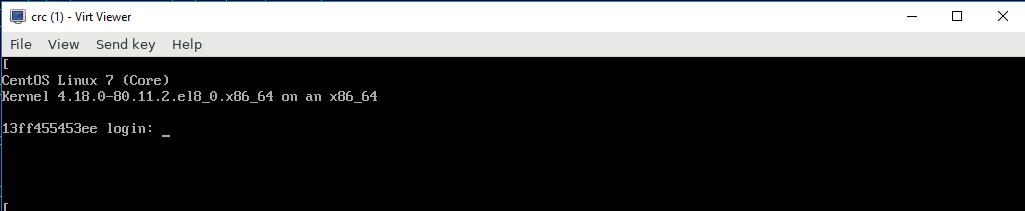
ReddyTunga
on 10 Oct 2019
After a new crc setup & start on different physical rhel7.7 machine. getting same error.
(crc) Calling .GetSSHHostname
(crc) DBG | GetIP called for crc
(crc) DBG | Getting current state...
(crc) DBG | IP address: 192.168.130.11
(crc) Calling .GetSSHPort
(crc) Calling .GetSSHKeyPath
(crc) Calling .GetSSHKeyPath
(crc) Calling .GetSSHUsername
Using SSH client type: native
&{{{<nil> 0 [] [] []} core [0x744eb0] 0x744e80 <nil>  [] 0s} 192.168.130.11 22 <nil> <nil>}
About to run SSH command:
sudo systemctl -f start kubelet
SSH cmd err, output: <nil>:
INFO Starting OpenShift cluster ... [waiting 3m]
INFO
INFO To access the cluster, first set up your environment by following 'crc oc-env' instructions
INFO Then you can access it by running 'oc login -u developer -p developer https://api.crc.testing:6443'
INFO To login as an admin, username is 'kubeadmin' and password is F44En-Xau6V-jQuyb-yuMXB
INFO
INFO You can now run 'crc console' and use these credentials to access the OpenShift web console
ERRO Error occurred: Error approving the node csr Not able to get csr names (exit status 1 : Unable to connect to the server: x509: certificate signed by unknown authority)
Making call to close driver server
(crc) Calling .Close
Successfully made call to close driver server
Making call to close connection to plugin binary
Making call to close driver server
(crc) Calling .Close
Successfully made call to close driver server
Making call to close connection to plugin binary
qm@rhel7:/qm/crc> sudo systemctl status dnsmasq -l
â dnsmasq.service - DNS caching server.
   Loaded: loaded (/usr/lib/systemd/system/dnsmasq.service; disabled; vendor preset: disabled)
   Active: failed (Result: exit-code) since Thu 2019-10-10 11:53:48 +03; 57min ago
 Main PID: 28128 (code=exited, status=2)

Oct 10 11:53:48 rhel7 systemd[1]: Started DNS caching server..
Oct 10 11:53:48 rhel7 dnsmasq[28128]: dnsmasq: failed to create listening socket for port 53: Address already in use
Oct 10 11:53:48 rhel7 systemd[1]: dnsmasq.service: main process exited, code=exited, status=2/INVALIDARGUMENT
Oct 10 11:53:48 rhel7 systemd[1]: Unit dnsmasq.service entered failed state.
Oct 10 11:53:48 rhel7 systemd[1]: dnsmasq.service failed.
qm@rhel7:/qm/crc> netstat -an | grep 53
tcp        0      0 127.0.0.1:53            0.0.0.0:*               LISTEN
tcp        0      0 192.168.130.1:53        0.0.0.0:*               LISTEN
tcp        0      0 192.168.122.1:53        0.0.0.0:*               LISTENISHED
udp        0      0 127.0.0.1:53            0.0.0.0:*
udp        0      0 192.168.130.1:53        0.0.0.0:*
udp        0      0 192.168.122.1:53        0.0.0.0:*
qm@rhel7:/qm/crc> ip a
1: lo: <LOOPBACK,UP,LOWER_UP> mtu 65536 qdisc noqueue state UNKNOWN group default qlen 1000
    link/loopback 00:00:00:00:00:00 brd 00:00:00:00:00:00
    inet 127.0.0.1/8 scope host lo
       valid_lft forever preferred_lft forever
    inet6 ::1/128 scope host
       valid_lft forever preferred_lft forever
2: enp2s0f0: <BROADCAST,MULTICAST,SLAVE,UP,LOWER_UP> mtu 1500 qdisc qm master bond0 state UP group default qlen 1000
    link/ether b4:b5:2f:66:81:d8 brd ff:ff:ff:ff:ff:ff
3: enp2s0f1: <BROADCAST,MULTICAST,SLAVE,UP,LOWER_UP> mtu 1500 qdisc qm master bond0 state UP group default qlen 1000
    link/ether b4:b5:2f:66:81:d8 brd ff:ff:ff:ff:ff:ff
4: bond0: <BROADCAST,MULTICAST,MASTER,UP,LOWER_UP> mtu 1500 qdisc noqueue state UP group default qlen 1000
    link/ether b4:b5:2f:66:81:d8 brd ff:ff:ff:ff:ff:ff
    inet 172.27.1.115/21 brd 172.27.175.255 scope global bond0
       valid_lft forever preferred_lft forever
    inet6 fe80::b6b5:2fff:fe66:81d8/64 scope link
       valid_lft forever preferred_lft forever
5: virbr0: <NO-CARRIER,BROADCAST,MULTICAST,UP> mtu 1500 qdisc noqueue state DOWN group default qlen 1000
    link/ether 52:54:00:51:23:ac brd ff:ff:ff:ff:ff:ff
    inet 192.168.122.1/24 brd 192.168.122.255 scope global virbr0
       valid_lft forever preferred_lft forever
6: virbr0-nic: <BROADCAST,MULTICAST> mtu 1500 qdisc pfifo_fast master virbr0 state DOWN group default qlen 1000
    link/ether 52:54:00:51:23:ac brd ff:ff:ff:ff:ff:ff
7: crc: <BROADCAST,MULTICAST,UP,LOWER_UP> mtu 1500 qdisc noqueue state UP group default qlen 1000
    link/ether 52:54:00:fd:be:d0 brd ff:ff:ff:ff:ff:ff
    inet 192.168.130.1/24 brd 192.168.130.255 scope global crc
       valid_lft forever preferred_lft forever
8: crc-nic: <BROADCAST,MULTICAST> mtu 1500 qdisc pfifo_fast master crc state DOWN group default qlen 1000
    link/ether 52:54:00:fd:be:d0 brd ff:ff:ff:ff:ff:ff
10: vnet0: <BROADCAST,MULTICAST,UP,LOWER_UP> mtu 1500 qdisc pfifo_fast master crc state UNKNOWN group default qlen 1000
    link/ether fe:fd:fc:07:21:82 brd ff:ff:ff:ff:ff:ff
    inet6 fe80::fcfd:fcff:fe07:2182/64 scope link
       valid_lft forever preferred_lft forever
some thisng to do woth dnsmasq service ? as it is failing as port already in use by Network Manager
ReddyTunga
on 10 Oct 2019
This is very odd :( could you try to run crc delete and remove the ~/.crc/cache directory, and then crc setup; crc start again?
cfergeau
on 10 Oct 2019
I have done today for couple of times. same result. Yes, its varied behavior :)
ReddyTunga
on 10 Oct 2019
Have attached the same.
That looks wrong, as this is clearly NOT our VM, but CentOS, named crc(1)` ?
You should have a RHEL CoreOS instance. Are you trying to run this as a nested virtualization by any chance?
 gbraad
on 10 Oct 2019
gbraad
on 10 Oct 2019
I have a physical server with RHEL 7 OS. on top am trying this crc environment.
Not sure how this CentOS came up. How do we eliminate, am not running nested virtualization ?
ReddyTunga
on 10 Oct 2019
I am not sure how you have setup your machine. The CentOS image is not ours. Please make sure you run the latest RC.0 release as can be downloaded from: https://mirror.openshift.com/pub/openshift-v4/clients/crc/1.0.0-rc.0/
To make sure we can debug this, follow the steps as below:
- Download https://mirror.openshift.com/pub/openshift-v4/clients/crc/1.0.0-rc.0/
crc deletecrc versioncrc setupcrc config viewcrc start --log-level debug
Also, make sure there are NO other VMs named crc on your host.
Note: nested virtualization is not supported as this can lead to unpredictable behaviour due to performance and other resource constrainst and pressure.
gbraad
on 10 Oct 2019
Have attached the same.
For what it's worth, here is what I get here

cfergeau
on 11 Oct 2019
At this point, I'd try again crc delete and rm -rf ~/.crc/cache, and then check virsh list --all and sudo virsh list --all and check if there are crc VMs listed there.
cfergeau
on 11 Oct 2019
Apologies, took time to reply back.
Here is the complete fresh setup
$ sudo virsh list --all
 Id    Name                           State
----------------------------------------------------

$ crc version
version: 1.0.0-rc.0+34371d3
OpenShift version: 4.2.0-0.nightly-2019-09-26-192831 (embedded in binary)
$
$ crc setup
INFO Checking if running as non-root
INFO Caching oc binary
INFO Setting up virtualization
INFO Setting up KVM
INFO Installing libvirt service and dependencies
INFO Adding user to libvirt group
INFO Enabling libvirt
INFO Starting libvirt service
INFO Checking if a supported libvirt version is installed
INFO Installing crc-driver-libvirt
INFO Removing older system-wide crc-driver-libvirt
INFO Setting up libvirt 'crc' network
INFO Starting libvirt 'crc' network
INFO Checking if NetworkManager is installed
INFO Checking if NetworkManager service is running
INFO Writing Network Manager config for crc
INFO Writing dnsmasq config for crc
INFO Unpacking bundle from the CRC binary
Setup is complete, you can now run 'crc start' to start a CodeReady Containers instance
$
$ crc start --log-level debug -p pull-secret
DEBU No new version available, latest version at mirror is 1.0.0-rc.0
INFO Checking if running as non-root
INFO Checking if oc binary is cached
DEBU oc binary already cached
INFO Checking if Virtualization is enabled
DEBU Checking if the vmx/svm flags are present in /proc/cpuinfo
DEBU CPU virtualization flags are good
INFO Checking if KVM is enabled
DEBU Checking if /dev/kvm exists
DEBU /dev/kvm was found
INFO Checking if libvirt is installed
DEBU Checking if 'virsh' is available
DEBU 'virsh' was found in /bin/virsh
INFO Checking if user is part of libvirt group
DEBU Checking if current user is part of the libvirt group
DEBU Current user is already in the libvirt group
INFO Checking if libvirt is enabled
DEBU Checking if libvirtd.service is enabled
DEBU libvirtd.service is already enabled
INFO Checking if libvirt daemon is running
DEBU Checking if libvirtd.service is running
DEBU libvirtd.service is already running
INFO Checking if a supported libvirt version is installed
DEBU Checking if libvirt version is >=3.4.0
INFO Checking if crc-driver-libvirt is installed
DEBU Checking if crc-driver-libvirt is installed
DEBU crc-driver-libvirt is already installed in /home/mqm/.crc/bin/crc-driver-libvirt
INFO Checking if libvirt 'crc' network is available
DEBU Checking if libvirt 'crc' network exists
DEBU libvirt 'crc' network exists
INFO Checking if libvirt 'crc' network is active
DEBU Checking if libvirt 'crc' network is active
DEBU libvirt 'crc' network is already active
INFO Checking if NetworkManager is installed
DEBU Checking if 'nmcli' is available
DEBU 'nmcli' was found in /bin/nmcli
INFO Checking if NetworkManager service is running
DEBU Checking if NetworkManager.service is running
DEBU NetworkManager.service is already running
INFO Checking if /etc/NetworkManager/conf.d/crc-nm-dnsmasq.conf exists
DEBU Checking NetworkManager configuration
DEBU NetworkManager configuration is good
INFO Checking if /etc/NetworkManager/dnsmasq.d/crc.conf exists
DEBU Checking dnsmasq configuration
DEBU dnsmasq configuration is good
Checking file: /home/mqm/.crc/machines/crc/.crc-exist
INFO Extracting bundle: crc_libvirt_4.2.0-0.nightly-2019-09-26-192831.crcbundle ...
DEBU Uncompressing /home/mqm/.crc/crc_libvirt_4.2.0-0.nightly-2019-09-26-192831.crcbundle to /home/mqm/.crc/cache
INFO Creating CodeReady Containers VM for OpenShift 4.2.0-0.nightly-2019-09-26-192831...
Found binary path at /home/mqm/.crc/bin/crc-driver-libvirt
Launching plugin server for driver libvirt
Plugin server listening at address 127.0.0.1:22559
() Calling .GetVersion
Using API Version  1
() Calling .SetConfigRaw
() Calling .GetMachineName
(crc) Calling .GetMachineName
(crc) Calling .DriverName
Running pre-create checks...
(crc) Calling .PreCreateCheck
(crc) DBG | About to check libvirt version
(crc) DBG | Validating network
(crc) Calling .GetConfigRaw
Creating machine...
(crc) Calling .Create
(crc) Downloading /home/mqm/.crc/cache/crc from file:///home/mqm/.crc/cache/crc_libvirt_4.2.0-0.nightly-2019-09-26-192831/crc.qcow2...
(crc) DBG | Verifying executable bit set on /home/mqm/.crc/machines/crc
(crc) DBG | Setting executable bit set on /home/mqm/.crc/machines/crc
(crc) DBG | Verifying executable bit set on /home/mqm/.crc/machines
(crc) DBG | Setting executable bit set on /home/mqm/.crc/machines
(crc) DBG | Verifying executable bit set on /home/mqm/.crc
(crc) DBG | Verifying executable bit set on /home/mqm
(crc) DBG | Verifying executable bit set on /home
(crc) DBG | Defining VM...
(crc) DBG | Adding the file: /home/mqm/.crc/machines/crc/.crc-exist
(crc) DBG | Starting VM crc
(crc) DBG | GetIP called for crc
(crc) DBG | Getting current state...
(crc) Found IP for machine: 192.168.130.11
(crc) DBG | IP address: 192.168.130.11
(crc) Calling .GetConfigRaw
(crc) Calling .DriverName
(crc) Calling .DriverName
Waiting for machine to be running, this may take a few minutes...
(crc) Calling .GetState
(crc) DBG | Getting current state...
Machine is up and running!
Machine successfully created
Created /home/mqm/.crc/machines/crc/.crc-exist
(crc) Calling .GetState
(crc) DBG | Getting current state...
Found binary path at /home/mqm/.crc/bin/crc-driver-libvirt
Launching plugin server for driver libvirt
Plugin server listening at address 127.0.0.1:6527
() Calling .GetVersion
Using API Version  1
() Calling .SetConfigRaw
() Calling .GetMachineName
DEBU Waiting until ssh is available
(crc) Calling .GetSSHHostname
(crc) DBG | GetIP called for crc
(crc) DBG | Getting current state...
(crc) DBG | Fetching VM...
(crc) DBG | IP address: 192.168.130.11
(crc) Calling .GetSSHPort
(crc) Calling .GetSSHKeyPath
(crc) Calling .GetSSHKeyPath
(crc) Calling .GetSSHUsername
Using SSH client type: native
&{{{<nil> 0 [] [] []} core [0x744eb0] 0x744e80 <nil>  [] 0s} 192.168.130.11 22 <nil> <nil>}
About to run SSH command:
exit 0
Error dialing TCP: dial tcp 192.168.130.11:22: connect: no route to host
Error dialing TCP: dial tcp 192.168.130.11:22: connect: no route to host
SSH cmd err, output: <nil>:
INFO Verifying validity of the cluster certificates ...
(crc) Calling .GetSSHHostname
(crc) DBG | GetIP called for crc
(crc) DBG | Getting current state...
(crc) DBG | IP address: 192.168.130.11
(crc) Calling .GetSSHPort
(crc) Calling .GetSSHKeyPath
(crc) Calling .GetSSHKeyPath
(crc) Calling .GetSSHUsername
Using SSH client type: native
&{{{<nil> 0 [] [] []} core [0x744eb0] 0x744e80 <nil>  [] 0s} 192.168.130.11 22 <nil> <nil>}
About to run SSH command:
date --date="$(sudo openssl x509 -in /var/lib/kubelet/pki/kubelet-client-current.pem -noout -enddate | cut -d= -f 2)" --iso-8601=seconds
SSH cmd err, output: <nil>: 2019-10-28T10:58:42+00:00

(crc) Calling .GetIP
(crc) DBG | GetIP called for crc
(crc) DBG | Getting current state...
(crc) DBG | IP address: 192.168.130.11
(crc) Calling .DriverName
(crc) Calling .GetSSHHostname
(crc) DBG | GetIP called for crc
(crc) DBG | Getting current state...
(crc) DBG | IP address: 192.168.130.11
(crc) Calling .GetSSHPort
(crc) Calling .GetSSHKeyPath
(crc) Calling .GetSSHKeyPath
(crc) Calling .GetSSHUsername
Using SSH client type: native
&{{{<nil> 0 [] [] []} core [0x744eb0] 0x744e80 <nil>  [] 0s} 192.168.130.11 22 <nil> <nil>}
About to run SSH command:
echo  | openssl enc -base64 -d | sudo tee /var/srv/dnsmasq.conf > /dev/null
SSH cmd err, output: <nil>:
(crc) Calling .GetSSHHostname
(crc) DBG | GetIP called for crc
(crc) DBG | Getting current state...
(crc) DBG | IP address: 192.168.130.11
(crc) Calling .GetSSHPort
(crc) Calling .GetSSHKeyPath
(crc) Calling .GetSSHKeyPath
(crc) Calling .GetSSHUsername
Using SSH client type: native
&{{{<nil> 0 [] [] []} core [0x744eb0] 0x744e80 <nil>  [] 0s} 192.168.130.11 22 <nil> <nil>}
About to run SSH command:
sudo podman rm -f dnsmasq
SSH cmd err, output: Process exited with status 1: Error: no container with name or ID dnsmasq found: no such container

(crc) Calling .GetSSHHostname
(crc) DBG | GetIP called for crc
(crc) DBG | Getting current state...
(crc) DBG | IP address: 192.168.130.11
(crc) Calling .GetSSHPort
(crc) Calling .GetSSHKeyPath
(crc) Calling .GetSSHKeyPath
(crc) Calling .GetSSHUsername
Using SSH client type: native
&{{{<nil> 0 [] [] []} core [0x744eb0] 0x744e80 <nil>  [] 0s} 192.168.130.11 22 <nil> <nil>}
About to run SSH command:
sudo rm -f /var/lib/cni/networks/podman/10.88.0.8
SSH cmd err, output: <nil>:
(crc) Calling .GetSSHHostname
(crc) DBG | GetIP called for crc
(crc) DBG | Getting current state...
(crc) DBG | IP address: 192.168.130.11
(crc) Calling .GetSSHPort
(crc) Calling .GetSSHKeyPath
(crc) Calling .GetSSHKeyPath
(crc) Calling .GetSSHUsername
Using SSH client type: native
&{{{<nil> 0 [] [] []} core [0x744eb0] 0x744e80 <nil>  [] 0s} 192.168.130.11 22 <nil> <nil>}
About to run SSH command:
sudo podman run  --ip 10.88.0.8 --name dnsmasq -v /var/srv/dnsmasq.conf:/etc/dnsmasq.conf -p 53:53/udp --privileged -d quay.io/crcont/dnsmasq:latest
SSH cmd err, output: <nil>: f285bf78ebd0cbfc60480668e85ff27be67b6cdcbf36cdcbe653a83801a73626

(crc) Calling .GetSSHHostname
(crc) DBG | GetIP called for crc
(crc) DBG | Getting current state...
(crc) DBG | IP address: 192.168.130.11
(crc) Calling .GetSSHPort
(crc) Calling .GetSSHKeyPath
(crc) Calling .GetSSHKeyPath
(crc) Calling .GetSSHUsername
Using SSH client type: native
&{{{<nil> 0 [] [] []} core [0x744eb0] 0x744e80 <nil>  [] 0s} 192.168.130.11 22 <nil> <nil>}
About to run SSH command:
cat /etc/resolv.conf
SSH cmd err, output: <nil>: # Generated by NetworkManager
nameserver 192.168.130.1

(crc) Calling .GetSSHHostname
(crc) DBG | GetIP called for crc
(crc) DBG | Getting current state...
(crc) DBG | IP address: 192.168.130.11
(crc) Calling .GetSSHPort
(crc) Calling .GetSSHKeyPath
(crc) Calling .GetSSHKeyPath
(crc) Calling .GetSSHUsername
Using SSH client type: native
&{{{<nil> 0 [] [] []} core [0x744eb0] 0x744e80 <nil>  [] 0s} 192.168.130.11 22 <nil> <nil>}
About to run SSH command:
echo IyBHZW5lcmF0ZWQgYnkgQ1JDCnNlYXJjaCBjcmMudGVzdGluZwpuYW1lc2VydmVyIDEwLjg4LjAuOApuYW1lc2VydmVyIDE5Mi4xNjguMTMwLjEKCg== | base64 --decode | sudo tee /etc/resolv.conf > /dev/null
SSH cmd err, output: <nil>:
(crc) Calling .GetSSHHostname
(crc) DBG | GetIP called for crc
(crc) DBG | Getting current state...
(crc) DBG | IP address: 192.168.130.11
(crc) Calling .GetSSHPort
(crc) Calling .GetSSHKeyPath
(crc) Calling .GetSSHKeyPath
(crc) Calling .GetSSHUsername
Using SSH client type: native
&{{{<nil> 0 [] [] []} core [0x744eb0] 0x744e80 <nil>  [] 0s} 192.168.130.11 22 <nil> <nil>}
About to run SSH command:
host -R 3 foo.apps-crc.testing
SSH cmd err, output: Process exited with status 1: Host foo.apps-crc.testing not found: 3(NXDOMAIN)

DEBU error: Temporary Error: ssh command error:
command : host -R 3 foo.apps-crc.testing
err     : Process exited with status 1
output  : Host foo.apps-crc.testing not found: 3(NXDOMAIN)
 - sleeping 1s
DEBU retry loop 1
(crc) Calling .GetSSHHostname
(crc) DBG | GetIP called for crc
(crc) DBG | Getting current state...
(crc) Calling .GetSSHPort
(crc) DBG | IP address: 192.168.130.11
(crc) Calling .GetSSHKeyPath
(crc) Calling .GetSSHKeyPath
(crc) Calling .GetSSHUsername
Using SSH client type: native
&{{{<nil> 0 [] [] []} core [0x744eb0] 0x744e80 <nil>  [] 0s} 192.168.130.11 22 <nil> <nil>}
About to run SSH command:
host -R 3 foo.apps-crc.testing
SSH cmd err, output: <nil>: foo.apps-crc.testing has address 192.168.130.11

INFO Check internal and public dns query ...
(crc) Calling .GetSSHHostname
(crc) DBG | GetIP called for crc
(crc) DBG | Getting current state...
(crc) Calling .GetSSHPort
(crc) DBG | IP address: 192.168.130.11
(crc) Calling .GetSSHKeyPath
(crc) Calling .GetSSHKeyPath
(crc) Calling .GetSSHUsername
Using SSH client type: native
&{{{<nil> 0 [] [] []} core [0x744eb0] 0x744e80 <nil>  [] 0s} 192.168.130.11 22 <nil> <nil>}
About to run SSH command:
host -R 3 quay.io
SSH cmd err, output: <nil>: quay.io has address 54.204.30.90
quay.io has address 54.204.46.170
quay.io has address 54.225.149.151
quay.io has address 23.23.73.73
quay.io has address 23.23.158.172
quay.io has address 23.23.190.62
quay.io mail is handled by 20 alt2.aspmx.l.google.com.
quay.io mail is handled by 30 aspmx2.googlemail.com.
quay.io mail is handled by 30 aspmx3.googlemail.com.
quay.io mail is handled by 10 aspmx.l.google.com.
quay.io mail is handled by 20 alt1.aspmx.l.google.com.

(crc) Calling .GetSSHHostname
(crc) DBG | GetIP called for crc
(crc) DBG | Getting current state...
(crc) DBG | IP address: 192.168.130.11
(crc) Calling .GetSSHPort
(crc) Calling .GetSSHKeyPath
(crc) Calling .GetSSHKeyPath
(crc) Calling .GetSSHUsername
Using SSH client type: native
&{{{<nil> 0 [] [] []} core [0x744eb0] 0x744e80 <nil>  [] 0s} 192.168.130.11 22 <nil> <nil>}
About to run SSH command:
' > /home/core/.ssh/authorized_keys
SSH cmd err, output: <nil>:
INFO Copying kubeconfig file to instance dir ...
DEBU Copying '/home/mqm/.crc/cache/crc_libvirt_4.2.0-0.nightly-2019-09-26-192831/kubeconfig' to '/home/mqm/.crc/machines/crc/kubeconfig'
INFO Adding user's pull secret and cluster ID ...
(crc) Calling .GetSSHHostname
(crc) DBG | GetIP called for crc
(crc) DBG | Getting current state...
(crc) DBG | IP address: 192.168.130.11
(crc) Calling .GetSSHPort
(crc) Calling .GetSSHKeyPath
(crc) Calling .GetSSHKeyPath
(crc) Calling .GetSSHUsername
Using SSH client type: native
&{{{<nil> 0 [] [] []} core [0x744eb0] 0x744e80 <nil>  [] 0s} 192.168.130.11 22 <nil> <nil>}
About to run SSH command:
cat <<EOF | tee /tmp/kubeconfig
clusters:
- cluster:
    certificate-authority-data:
    server: https://api.crc.testing:6443
  name: crc
contexts:
- context:
    cluster: crc
    user: admin
  name: admin
current-context: admin
preferences: {}
users:
- name: admin
  user:
    client-certificate-data:
    client-key-data:
EOF
SSH cmd err, output: <nil>: clusters:
- cluster:
        server: https://api.crc.testing:6443
  name: crc
contexts:
- context:
    cluster: crc
    user: admin
  name: admin
current-context: admin
preferences: {}
users:
- name: admin
  user:
    client-certificate-data:
(crc) Calling .GetSSHHostname
(crc) DBG | GetIP called for crc
(crc) DBG | Getting current state...
(crc) DBG | IP address: 192.168.130.11
(crc) Calling .GetSSHPort
(crc) Calling .GetSSHKeyPath
(crc) Calling .GetSSHKeyPath
(crc) Calling .GetSSHUsername
Using SSH client type: native
&{{{<nil> 0 [] [] []} core [0x744eb0] 0x744e80 <nil>  [] 0s} 192.168.130.11 22 <nil> <nil>}
About to run SSH command:
cat <<EOF | tee /tmp/pull-secret.yaml
apiVersion: v1
data:
  .dockerconfigjson:
kind: Secret
metadata:
  name: pull-secret
  namespace: openshift-config
type: kubernetes.io/dockerconfigjson
EOF
SSH cmd err, output: <nil>: apiVersion: v1
data:
  .dockerconfigjson:
kind: Secret
metadata:
  name: pull-secret
  namespace: openshift-config
type: kubernetes.io/dockerconfigjson

DEBU Output is : apiVersion: v1
data:

kind: Secret
metadata:
  name: pull-secret
  namespace: openshift-config
type: kubernetes.io/dockerconfigjson
(crc) Calling .GetSSHHostname
(crc) DBG | GetIP called for crc
(crc) DBG | Getting current state...
(crc) DBG | IP address: 192.168.130.11
(crc) Calling .GetSSHPort
(crc) Calling .GetSSHKeyPath
(crc) Calling .GetSSHKeyPath
(crc) Calling .GetSSHUsername
Using SSH client type: native
&{{{<nil> 0 [] [] []} core [0x744eb0] 0x744e80 <nil>  [] 0s} 192.168.130.11 22 <nil> <nil>}
About to run SSH command:
sudo systemctl daemon-reload
SSH cmd err, output: <nil>:
(crc) Calling .GetSSHHostname
(crc) DBG | GetIP called for crc
(crc) DBG | Getting current state...
(crc) Calling .GetSSHPort
(crc) DBG | IP address: 192.168.130.11
(crc) Calling .GetSSHKeyPath
(crc) Calling .GetSSHKeyPath
(crc) Calling .GetSSHUsername
Using SSH client type: native
&{{{<nil> 0 [] [] []} core [0x744eb0] 0x744e80 <nil>  [] 0s} 192.168.130.11 22 <nil> <nil>}
About to run SSH command:
sudo systemctl -f start kubelet
SSH cmd err, output: <nil>:
(crc) Calling .GetSSHHostname
(crc) DBG | GetIP called for crc
(crc) DBG | Getting current state...
(crc) Calling .GetSSHPort
(crc) DBG | IP address: 192.168.130.11
(crc) Calling .GetSSHKeyPath
(crc) Calling .GetSSHKeyPath
(crc) Calling .GetSSHUsername
Using SSH client type: native
&{{{<nil> 0 [] [] []} core [0x744eb0] 0x744e80 <nil>  [] 0s} 192.168.130.11 22 <nil> <nil>}
About to run SSH command:
timeout 80 bash -c 'until oc --config /tmp/kubeconfig replace -f /tmp/pull-secret.yaml 2>/dev/null 1>&2; \
do echo "Waiting for recovery apiserver to come up."; sleep 1; done'
SSH cmd err, output: <nil>: Waiting for recovery apiserver to come up.
Waiting for recovery apiserver to come up.
Waiting for recovery apiserver to come up.

DEBU Output of timeout 80 bash -c 'until oc --config /tmp/kubeconfig replace -f /tmp/pull-secret.yaml 2>/dev/null 1>&2; \
do echo "Waiting for recovery apiserver to come up."; sleep 1; done': Waiting for recovery apiserver to come up.
Waiting for recovery apiserver to come up.
Waiting for recovery apiserver to come up.
(crc) Calling .GetSSHHostname
(crc) DBG | GetIP called for crc
(crc) DBG | Getting current state...
(crc) Calling .GetSSHPort
(crc) DBG | IP address: 192.168.130.11
(crc) Calling .GetSSHKeyPath
(crc) Calling .GetSSHKeyPath
(crc) Calling .GetSSHUsername
Using SSH client type: native
&{{{<nil> 0 [] [] []} core [0x744eb0] 0x744e80 <nil>  [] 0s} 192.168.130.11 22 <nil> <nil>}
About to run SSH command:
timeout 80 bash -c 'until oc --config /tmp/kubeconfig patch clusterversion version -p '"'"'{"spec":{"clusterID":"b871c3cb-8b9c-4d86-8153-88304fad991e"}}'"'"' --type merge 2>/dev/null 1>&2; \
do echo "Waiting for recovery apiserver to come up."; sleep 1; done'
SSH cmd err, output: <nil>:
DEBU Output of timeout 80 bash -c 'until oc --config /tmp/kubeconfig patch clusterversion version -p '"'"'{"spec":{"clusterID":"b871c3cb-8b9c-4d86-8153-88304fad991e"}}'"'"' --type merge 2>/dev/null 1>&2; \
do echo "Waiting for recovery apiserver to come up."; sleep 1; done':
(crc) Calling .GetSSHHostname
(crc) DBG | GetIP called for crc
(crc) DBG | Getting current state...
(crc) DBG | IP address: 192.168.130.11
(crc) Calling .GetSSHPort
(crc) Calling .GetSSHKeyPath
(crc) Calling .GetSSHKeyPath
(crc) Calling .GetSSHUsername
Using SSH client type: native
&{{{<nil> 0 [] [] []} core [0x744eb0] 0x744e80 <nil>  [] 0s} 192.168.130.11 22 <nil> <nil>}
About to run SSH command:
sudo systemctl -f stop kubelet
SSH cmd err, output: <nil>:
(crc) Calling .GetSSHHostname
(crc) DBG | GetIP called for crc
(crc) DBG | Getting current state...
(crc) DBG | IP address: 192.168.130.11
(crc) Calling .GetSSHPort
(crc) Calling .GetSSHKeyPath
(crc) Calling .GetSSHKeyPath
(crc) Calling .GetSSHUsername
Using SSH client type: native
&{{{<nil> 0 [] [] []} core [0x744eb0] 0x744e80 <nil>  [] 0s} 192.168.130.11 22 <nil> <nil>}
About to run SSH command:
bash -c 'sudo crictl stopp $(sudo crictl pods -q) &&\
sudo crictl rmp $(sudo crictl pods -q)'
SSH cmd err, output: Process exited with status 1: Stopped sandbox 3688b379a8c2f18de2f28e5298c57e2ad9b67232e5523a67004fe2a6a7c940dc
Stopped sandbox ab0f56f17da2da318a7d924e1fd98945349c826fe53e38856a3f307dfc60dca7
Stopped sandbox 782143ba5dd8a4715ae57fefa3c97e0f16744a11318cb24f2753dae917cd0978
time="2019-10-14T07:11:02Z" level=fatal msg="removing the pod sandbox \"5d534dd496134578d176c814c0cde80b06d501c1ff4ec9c06c37091d8e5ae511\" failed: rpc error: code = Unknown desc = failed to remove pod sandbox 5d534dd496134578d176c814c0cde80b06d501c1ff4ec9c06c37091d8e5ae511: unlinkat /var/run/containers/storage/overlay-containers/5d534dd496134578d176c814c0cde80b06d501c1ff4ec9c06c37091d8e5ae511/userdata/shm: device or resource busy"

DEBU Output of bash -c 'sudo crictl stopp $(sudo crictl pods -q) &&\
sudo crictl rmp $(sudo crictl pods -q)':
DEBU error: Temporary Error: ssh command error:
command : bash -c 'sudo crictl stopp $(sudo crictl pods -q) &&\
sudo crictl rmp $(sudo crictl pods -q)'
err     : Process exited with status 1
output  : Stopped sandbox 3688b379a8c2f18de2f28e5298c57e2ad9b67232e5523a67004fe2a6a7c940dc
Stopped sandbox ab0f56f17da2da318a7d924e1fd98945349c826fe53e38856a3f307dfc60dca7
Stopped sandbox 782143ba5dd8a4715ae57fefa3c97e0f16744a11318cb24f2753dae917cd0978
time="2019-10-14T07:11:02Z" level=fatal msg="removing the pod sandbox \"5d534dd496134578d176c814c0cde80b06d501c1ff4ec9c06c37091d8e5ae511\" failed: rpc error: code = Unknown desc = failed to remove pod sandbox 5d534dd496134578d176c814c0cde80b06d501c1ff4ec9c06c37091d8e5ae511: unlinkat /var/run/containers/storage/overlay-containers/5d534dd496134578d176c814c0cde80b06d501c1ff4ec9c06c37091d8e5ae511/userdata/shm: device or resource busy"
 - sleeping 2s
DEBU retry loop 1
(crc) Calling .GetSSHHostname
(crc) DBG | GetIP called for crc
(crc) DBG | Getting current state...
(crc) Calling .GetSSHPort
(crc) DBG | IP address: 192.168.130.11
(crc) Calling .GetSSHKeyPath
(crc) Calling .GetSSHKeyPath
(crc) Calling .GetSSHUsername
Using SSH client type: native
&{{{<nil> 0 [] [] []} core [0x744eb0] 0x744e80 <nil>  [] 0s} 192.168.130.11 22 <nil> <nil>}
About to run SSH command:
bash -c 'sudo crictl stopp $(sudo crictl pods -q) &&\
sudo crictl rmp $(sudo crictl pods -q)'
SSH cmd err, output: <nil>: Stopped sandbox 5d534dd496134578d176c814c0cde80b06d501c1ff4ec9c06c37091d8e5ae511
Stopped sandbox 4fb96be76a7e793df9a4ac9815c17d079b5a81e2ac13f41504b16ae6b6aa7413
Removed sandbox 782143ba5dd8a4715ae57fefa3c97e0f16744a11318cb24f2753dae917cd0978

DEBU Output of bash -c 'sudo crictl stopp $(sudo crictl pods -q) &&\
sudo crictl rmp $(sudo crictl pods -q)': Stopped sandbox 5d534dd496134578d176c814c0cde80b06d501c1ff4ec9c06c37091d8e5ae511
Stopped sandbox 4fb96be76a7e793df9a4ac9815c17d079b5a81e2ac13f41504b16ae6b6aa7413
Removed sandbox 782143ba5dd8a4715ae57fefa3c97e0f16744a11318cb24f2753dae917cd0978
(crc) Calling .GetSSHHostname
(crc) DBG | GetIP called for crc
(crc) DBG | Getting current state...
(crc) Calling .GetSSHPort
(crc) DBG | IP address: 192.168.130.11
(crc) Calling .GetSSHKeyPath
(crc) Calling .GetSSHKeyPath
(crc) Calling .GetSSHUsername
Using SSH client type: native
&{{{<nil> 0 [] [] []} core [0x744eb0] 0x744e80 <nil>  [] 0s} 192.168.130.11 22 <nil> <nil>}
About to run SSH command:
cat <<EOF | sudo tee /var/lib/kubelet/config.json

EOF
SSH cmd err, output: <nil>:

DEBU Output is :
(crc) Calling .GetSSHHostname
(crc) DBG | GetIP called for crc
(crc) DBG | Getting current state...
(crc) DBG | IP address: 192.168.130.11
(crc) Calling .GetSSHPort
(crc) Calling .GetSSHKeyPath
(crc) Calling .GetSSHKeyPath
(crc) Calling .GetSSHUsername
Using SSH client type: native
&{{{<nil> 0 [] [] []} core [0x744eb0] 0x744e80 <nil>  [] 0s} 192.168.130.11 22 <nil> <nil>}
About to run SSH command:
sudo systemctl daemon-reload
SSH cmd err, output: <nil>:
(crc) Calling .GetSSHHostname
(crc) DBG | GetIP called for crc
(crc) DBG | Getting current state...
(crc) DBG | IP address: 192.168.130.11
(crc) Calling .GetSSHPort
(crc) Calling .GetSSHKeyPath
(crc) Calling .GetSSHKeyPath
(crc) Calling .GetSSHUsername
Using SSH client type: native
&{{{<nil> 0 [] [] []} core [0x744eb0] 0x744e80 <nil>  [] 0s} 192.168.130.11 22 <nil> <nil>}
About to run SSH command:
sudo systemctl -f start kubelet
SSH cmd err, output: <nil>:
INFO Starting OpenShift cluster ... [waiting 3m]
(crc) DBG | GetIP called for crc
(crc) DBG | Getting current state...
(crc) DBG | IP address: 192.168.130.11
(crc) Calling .GetSSHPort
(crc) Calling .GetSSHKeyPath
(crc) Calling .GetSSHKeyPath
(crc) Calling .GetSSHUsername
Using SSH client type: native
&{{{<nil> 0 [] [] []} core [0x744eb0] 0x744e80 <nil>  [] 0s} 192.168.130.11 22 <nil> <nil>}
About to run SSH command:
INFO
INFO To access the cluster, first set up your environment by following 'crc oc-env' instructions
INFO Then you can access it by running 'oc login -u developer -p developer https://api.crc.testing:6443'
INFO To login as an admin, username is 'kubeadmin' and password is F44En-Xau6V-jQuyb-yuMXB
INFO
INFO You can now run 'crc console' and use these credentials to access the OpenShift web console
ERRO Error occurred: Error approving the node csr Not able to get csr names (exit status 1 : Unable to connect to the server: dial tcp: lookup api.crc.testing on 172.27.23.35:53: no such host)
Making call to close driver server
(crc) Calling .Close
(crc) DBG | Closing plugin on server side
Successfully made call to close driver server
Making call to close connection to plugin binary
Making call to close driver server
(crc) Calling .Close
Successfully made call to close driver server
Making call to close connection to plugin binary

$ crc oc-env
export PATH="/home/mqm/.crc/bin:$PATH"
# Run this command to configure your shell:
# eval $(crc oc-env)
$ export PATH="/home/mqm/.crc/bin:$PATH"
$ eval $(crc oc-env)
$  oc login -u developer -p developer https://api.crc.testing:6443
error: dial tcp: lookup api.crc.testing on 172.27.14.178:53: no such host - verify you have provided the correct host and port and that the server is currently running.
$ crc config view
$
$ crc status
ERRO Error occurred: Unable to connect to the server: dial tcp: lookup api.crc.testing on 172.27.23.35:53: no such host  - exit status 1
$ crc version
version: 1.0.0-rc.0+34371d3
OpenShift version: 4.2.0-0.nightly-2019-09-26-192831 (embedded in binary)
$
@ReddyTunga Looks like your DNS requests are not being handled by NetworkManager? Do you recognize this IP address 172.27.14.178?
Also disable the standalone dnsmasq, the one started by NetworkManager is enough sudo systemct disable dnsmasq
also what is the o/p sudo systemctl status NetworkManager?
(Edited the logs in previous comment to remove some secrets)
 anjannath
on 14 Oct 2019
anjannath
on 14 Oct 2019
$ virsh list --all
 Id    Name                           State
----------------------------------------------------
 1     crc                            running

$ virsh domiflist crc
Interface  Type       Source     Model       MAC
-------------------------------------------------------
vnet0      network    crc        virtio      52:fd:fc:07:21:82

$ arp -n | grep 52:fd:fc:07:21:82
192.168.130.11           ether   52:fd:fc:07:21:82   C                     crc

$ crc ip
192.168.130.11

$$ cat /etc/hosts
127.0.0.1   localhost localhost.localdomain localhost4 localhost4.localdomain4
::1         localhost localhost.localdomain localhost6 localhost6.localdomain6
192.168.130.11 api.crc.testing

$ crc status
CRC VM:          Running
OpenShift:       Stopped
Disk Usage:      12.03GB of 32.2GB (Inside the CRC VM)
Cache Usage:     15.95GB
Cache Directory: /home/mqm/.crc/cache

$ oc config view
apiVersion: v1
clusters: []
contexts: []
current-context: ""
kind: Config
preferences: {}
users: []

$ oc login -u developer -p developer https://api.crc.testing:6443
The server uses a certificate signed by an unknown authority.
You can bypass the certificate check, but any data you send to the server could be intercepted by others.
Use insecure connections? (y/n): y

Error from server (InternalError): Internal error occurred: unexpected response: 404
$ oc login -u developer -p developer https://api.crc.testing:6443
The server uses a certificate signed by an unknown authority.
You can bypass the certificate check, but any data you send to the server could be intercepted by others.
Use insecure connections? (y/n): n

error: The server uses a certificate signed by unknown authority. You may need to use the --certificate-authority flag to provide the path to a certificate file for the certificate authority, or --insecure-skip-tls-verify to bypass the certificate check and use insecure connections.
$
$ systemctl status NetworkManager -l
â NetworkManager.service - Network Manager
   Loaded: loaded (/usr/lib/systemd/system/NetworkManager.service; enabled; vendor preset: enabled)
   Active: active (running) since Mon 2019-10-14 11:20:29 +03; 42min ago
     Docs: man:NetworkManager(8)
 Main PID: 615121 (NetworkManager)
    Tasks: 3
   Memory: 2.3M
   CGroup: /system.slice/NetworkManager.service
           ââ615121 /usr/sbin/NetworkManager --no-daemon

Oct 14 11:52:33 [email protected] NetworkManager[615121]: <info>  [1571043153.2574] device (vnet0): state change: disconnected -> prepare (reason 'none', sys-iface-state: 'external')
Oct 14 11:52:33 [email protected] NetworkManager[615121]: <info>  [1571043153.2580] device (vnet0): state change: prepare -> config (reason 'none', sys-iface-state: 'external')
Oct 14 11:52:33 [email protected] NetworkManager[615121]: <info>  [1571043153.2584] device (vnet0): state change: config -> ip-config (reason 'none', sys-iface-state: 'external')
Oct 14 11:52:33 [email protected] NetworkManager[615121]: <info>  [1571043153.2587] device (crc): bridge port vnet0 was attached
Oct 14 11:52:33 [email protected] NetworkManager[615121]: <info>  [1571043153.2587] device (vnet0): Activation: connection 'vnet0' enslaved, continuing activation
Oct 14 11:52:33 [email protected] NetworkManager[615121]: <info>  [1571043153.2590] device (vnet0): state change: ip-config -> ip-check (reason 'none', sys-iface-state: 'external')
Oct 14 11:52:33 [email protected] NetworkManager[615121]: <info>  [1571043153.2598] device (vnet0): state change: ip-check -> secondaries (reason 'none', sys-iface-state: 'external')
Oct 14 11:52:33 [email protected] NetworkManager[615121]: <info>  [1571043153.2601] device (vnet0): state change: secondaries -> activated (reason 'none', sys-iface-state: 'external')
Oct 14 11:52:34 [email protected] NetworkManager[615121]: <info>  [1571043154.8007] device (vnet0): Activation: successful, device activated.
Oct 14 11:52:37 [email protected] NetworkManager[615121]: <info>  [1571043157.2553] device (crc): carrier: link connected
$

$ systemctl status dnsmasq
â dnsmasq.service - DNS caching server.
   Loaded: loaded (/usr/lib/systemd/system/dnsmasq.service; disabled; vendor preset: disabled)
   Active: inactive (dead)
@ReddyTunga Which interface are you using for Internet? looks like nm only handled the vnet0, crc interfaces. also i don't see dhclient being run for any interface by nm.
can please provide the o/p from following commands:
$ nmcli conn show # to see the available conn profiles
$ cat /etc/resolv.conf # to check who is generating this file
$ crc ip
192.168.130.11
$ crc status
CRC VM:          Running
OpenShift:       Running (v4.2.0-0.nightly-2019-09-26-192831)
Disk Usage:      14.03GB of 32.2GB (Inside the CRC VM)
Cache Usage:     15.95GB
Cache Directory: /home/mqm/.crc/cache

$ netstat -an | grep 6443   $ Port is not up

$ nmcli conn show
NAME    UUID                                  TYPE    DEVICE
crc     2569f463-8732-44da-bc5e-66f356ec19c9  bridge  crc
virbr0  ad5caac3-a0a8-4b70-b886-f1c923defa25  bridge  virbr0
vnet0   997592b6-c6c6-4748-8e20-40a1b532a93d  tun     vnet0

$ cat /etc/resolv.conf
nameserver 172.27.1.14
nameserver 172.27.1.178
nameserver 172.27.3.3
api.crc.testing A 192.168.130.11
domain mq.local
search mq.local
options timeout:1
options attempts:1
options rotate
$
$ oc login -u developer -p developer https://api.crc.testing:6443
The server uses a certificate signed by an unknown authority.
You can bypass the certificate check, but any data you send to the server could be intercepted by others.
Use insecure connections? (y/n): y
Error from server (InternalError): Internal error occurred: unexpected response: 404

$ oc login -u developer -p developer https://api.crc.testing:6443
The server uses a certificate signed by an unknown authority.
You can bypass the certificate check, but any data you send to the server could be intercepted by others.
Use insecure connections? (y/n): n
error: The server uses a certificate signed by unknown authority
@ReddyTunga is the machine not connected to internet? from the available conn. it doesn't show a connection which is using your ethernet or wifi. also there seems to be many entries in /etc/resolv.conf do you manually update that file? also what is the o/p of ip addr on the host?
anjannath
on 14 Oct 2019
Its Redhat Enterprise Linux machine with no internet access.
Resolve.conf, is created by default after commissioning of the server.
$ ip a
1: lo: <LOOPBACK,UP,LOWER_UP> mtu 65536 qdisc noqueue state UNKNOWN group default qlen 1000
    link/loopback 00:00:00:00:00:00 brd 00:00:00:00:00:00
    inet 127.0.0.1/8 scope host lo
       valid_lft forever preferred_lft forever
    inet6 ::1/128 scope host
       valid_lft forever preferred_lft forever
2: enp2s0f0: <BROADCAST,MULTICAST,SLAVE,UP,LOWER_UP> mtu 1500 qdisc mq master bond0 state UP group default qlen 1000
    link/ether b4:b5:2f:66:81:d8 brd ff:ff:ff:ff:ff:ff
3: enp2s0f1: <BROADCAST,MULTICAST,SLAVE,UP,LOWER_UP> mtu 1500 qdisc mq master bond0 state UP group default qlen 1000
    link/ether b4:b5:2f:66:81:d8 brd ff:ff:ff:ff:ff:ff
4: bond0: <BROADCAST,MULTICAST,MASTER,UP,LOWER_UP> mtu 1500 qdisc noqueue state UP group default qlen 1000
    link/ether b4:b5:2f:66:81:d8 brd ff:ff:ff:ff:ff:ff
    inet 172.27.xx.xx/21 brd 172.27.175.255 scope global bond0
       valid_lft forever preferred_lft forever
    inet6 fe80::b6b5:2fff:fe66:81d8/64 scope link
       valid_lft forever preferred_lft forever
5: docker0: <NO-CARRIER,BROADCAST,MULTICAST,UP> mtu 1500 qdisc noqueue state DOWN group default
    link/ether 02:42:d1:2a:15:79 brd ff:ff:ff:ff:ff:ff
    inet 172.17.0.1/16 scope global docker0
       valid_lft forever preferred_lft forever
7: crc-nic: <NO-CARRIER,BROADCAST,MULTICAST,UP> mtu 1500 qdisc pfifo_fast master crc state DOWN group default qlen 1000
    link/ether 52:54:00:fd:be:d0 brd ff:ff:ff:ff:ff:ff
9: virbr0-nic: <NO-CARRIER,BROADCAST,MULTICAST,UP> mtu 1500 qdisc pfifo_fast master virbr0 state DOWN group default qlen 1000
    link/ether 52:54:00:51:23:ac brd ff:ff:ff:ff:ff:ff
17: crc: <BROADCAST,MULTICAST,UP,LOWER_UP> mtu 1500 qdisc noqueue state UP group default qlen 1000
    link/ether 52:54:00:fd:be:d0 brd ff:ff:ff:ff:ff:ff
    inet 192.168.130.1/24 brd 192.168.130.255 scope global crc
       valid_lft forever preferred_lft forever
18: virbr0: <NO-CARRIER,BROADCAST,MULTICAST,UP> mtu 1500 qdisc noqueue state DOWN group default qlen 1000
    link/ether 52:54:00:51:23:ac brd ff:ff:ff:ff:ff:ff
    inet 192.168.122.1/24 brd 192.168.122.255 scope global virbr0
       valid_lft forever preferred_lft forever
21: vnet0: <BROADCAST,MULTICAST,UP,LOWER_UP> mtu 1500 qdisc pfifo_fast master crc state UNKNOWN group default qlen 1000
    link/ether fe:fd:fc:07:21:82 brd ff:ff:ff:ff:ff:ff
    inet6 fe80::fcfd:fcff:fe07:2182/64 scope link
       valid_lft forever preferred_lft forever
Can you also run curl -k -v -XGET -H "Accept: application/json;as=Table;v=v1beta1;g=meta.k8s.io, application/json" https://api.crc.testing:6443/apis/config.openshift.io/v1/clusteroperators ?
cfergeau
on 14 Oct 2019
$ curl -k -v -XGET -H "Accept: application/json;as=Table;v=v1beta1;g=meta.k8s.io, application/json" https://api.crc.testing:6443/apis/config.openshift.io/v1/clusteroperators
* About to connect() to api.crc.testing port 6443 (#0)
*   Trying 192.168.130.11...
* Connected to api.crc.testing (192.168.130.11) port 6443 (#0)
* Initializing NSS with certpath: sql:/etc/pki/nssdb
* skipping SSL peer certificate verification
* NSS: client certificate not found (nickname not specified)
* SSL connection using TLS_ECDHE_RSA_WITH_AES_256_GCM_SHA384
* Server certificate:
*       subject: CN=api.crc.testing
*       start date: Oct 14 10:09:23 2019 GMT
*       expire date: Nov 13 10:09:24 2019 GMT
*       common name: api.crc.testing
*       issuer: CN=kube-apiserver-lb-signer,OU=openshift
> GET /apis/config.openshift.io/v1/clusteroperators HTTP/1.1
> User-Agent: curl/7.29.0
> Host: api.crc.testing:6443
> Accept: application/json;as=Table;v=v1beta1;g=meta.k8s.io, application/json
>
< HTTP/1.1 403 Forbidden
< Audit-Id: 5dd9a695-5cb5-40e5-b9df-7be64f11cc90
< Cache-Control: no-cache, private
< Content-Type: application/json
< X-Content-Type-Options: nosniff
< Date: Mon, 14 Oct 2019 11:47:07 GMT
< Content-Length: 413
<
{
  "kind": "Status",
  "apiVersion": "v1",
  "metadata": {

  },
  "status": "Failure",
  "message": "clusteroperators.config.openshift.io is forbidden: User \"system:anonymous\" cannot list resource \"clusteroperators\" in API group \"config.openshift.io\" at the cluster scope",
  "reason": "Forbidden",
  "details": {
    "group": "config.openshift.io",
    "kind": "clusteroperators"
  },
  "code": 403
What version of oc are you using? (oc version). I'd also be interested in the output of oc login -v 10 -u developer -p developer https://api.crc.testing:6443
cfergeau
on 14 Oct 2019
$ crc status
CRC VM:          Running
OpenShift:       Running
Disk Usage:      13.05GB of 32.2GB (Inside the CRC VM)
Cache Usage:     15.95GB
Cache Directory: /home/mqm/.crc/cache
$ oc version
Client Version: v4.3.0
$

$ oc login -v 10 -u developer -p developer https://api.crc.testing:6443
I1014 15:11:15.390565  646417 round_trippers.go:423] curl -k -v -XHEAD  'https://api.crc.testing:6443/'
I1014 15:11:15.444080  646417 round_trippers.go:443] HEAD https://api.crc.testing:6443/  in 32 milliseconds
I1014 15:11:15.444108  646417 round_trippers.go:449] Response Headers:
The server uses a certificate signed by an unknown authority.
You can bypass the certificate check, but any data you send to the server could be intercepted by others.
Use insecure connections? (y/n): y

I1014 15:11:29.764828  646417 round_trippers.go:423] curl -k -v -XHEAD  'https://api.crc.testing:6443/'
I1014 15:11:29.774366  646417 round_trippers.go:443] HEAD https://api.crc.testing:6443/ 403 Forbidden in 9 milliseconds
I1014 15:11:29.774394  646417 round_trippers.go:449] Response Headers:
I1014 15:11:29.774407  646417 round_trippers.go:452]     Content-Type: application/json
I1014 15:11:29.774418  646417 round_trippers.go:452]     X-Content-Type-Options: nosniff
I1014 15:11:29.774429  646417 round_trippers.go:452]     Content-Length: 186
I1014 15:11:29.774459  646417 round_trippers.go:452]     Date: Mon, 14 Oct 2019 12:11:29 GMT
I1014 15:11:29.774493  646417 round_trippers.go:452]     Audit-Id: 5c1dc4a9-f69f-43bd-bb75-9131cd65aaed
I1014 15:11:29.774509  646417 round_trippers.go:452]     Cache-Control: no-cache, private
I1014 15:11:29.774536  646417 request_token.go:86] GSSAPI Enabled
I1014 15:11:29.774590  646417 round_trippers.go:423] curl -k -v -XGET  -H "X-Csrf-Token: 1" 'https://api.crc.testing:6443/.well-known/oauth-authorization-server'
I1014 15:11:29.775847  646417 round_trippers.go:443] GET https://api.crc.testing:6443/.well-known/oauth-authorization-server 200 OK in 1 milliseconds
I1014 15:11:29.775870  646417 round_trippers.go:449] Response Headers:
I1014 15:11:29.775882  646417 round_trippers.go:452]     Audit-Id: 5f14560f-e225-4f1f-8aeb-dee488a79153
I1014 15:11:29.775907  646417 round_trippers.go:452]     Cache-Control: no-cache, private
I1014 15:11:29.775935  646417 round_trippers.go:452]     Content-Type: application/json
I1014 15:11:29.775948  646417 round_trippers.go:452]     Content-Length: 573
I1014 15:11:29.775968  646417 round_trippers.go:452]     Date: Mon, 14 Oct 2019 12:11:29 GMT
I1014 15:11:29.776110  646417 round_trippers.go:423] curl -k -v -XHEAD  'https://oauth-openshift.apps-crc.testing'
I1014 15:11:29.781227  646417 round_trippers.go:443] HEAD https://oauth-openshift.apps-crc.testing  in 5 milliseconds
I1014 15:11:29.781263  646417 round_trippers.go:449] Response Headers:
I1014 15:11:29.781283  646417 request_token.go:438] falling back to kubeconfig CA due to possible x509 error: dial tcp: lookup oauth-openshift.apps-crc.testing on 172.27.14.178:53: no such host
I1014 15:11:29.781372  646417 round_trippers.go:423] curl -k -v -XGET  -H "X-Csrf-Token: 1" 'https://oauth-openshift.apps-crc.testing/oauth/authorize?client_id=openshift-challenging-client&code_challenge=tY8JoqatztjN_qhh-hTy_O5RlCQ5QR9cAVNs08Bd_JU&code_challenge_method=S256&redirect_uri=https%3A%2F%2Foauth-openshift.apps-crc.testing%2Foauth%2Ftoken%2Fimplicit&response_type=code'
I1014 15:11:29.786441  646417 round_trippers.go:443] GET https://oauth-openshift.apps-crc.testing/oauth/authorize?client_id=openshift-challenging-client&code_challenge=tY8JoqatztjN_qhh-hTy_O5RlCQ5QR9cAVNs08Bd_JU&code_challenge_method=S256&redirect_uri=https%3A%2F%2Foauth-openshift.apps-crc.testing%2Foauth%2Ftoken%2Fimplicit&response_type=code  in 5 milliseconds
I1014 15:11:29.786477  646417 round_trippers.go:449] Response Headers:
F1014 15:11:29.786548  646417 helpers.go:114] error: dial tcp: lookup oauth-openshift.apps-crc.testing on 172.27.23.35:53: no such host
-----------------------------------------------
No such port running on ip : 172.27.23.35:53 # Not sure why its looking for this IP
$ netstat -an | grep -53
udp        0      0 192.168.122.1:53        0.0.0.0:*
udp        0      0 192.168.122.1:53        0.0.0.0:*
udp        0      0 192.168.122.1:53        0.0.0.0:*
Ok, so as pointed out by Anjan previously,
$ systemctl status NetworkManager -l
 NetworkManager.service - Network Manager
   Loaded: loaded (/usr/lib/systemd/system/NetworkManager.service; enabled; vendor preset: enabled)
   Active: active (running) since Mon 2019-10-14 11:20:29 +03; 42min ago
     Docs: man:NetworkManager(8)
 Main PID: 615121 (NetworkManager)
    Tasks: 3
   Memory: 2.3M
   CGroup: /system.slice/NetworkManager.service
           ââ615121 /usr/sbin/NetworkManager --no-daemon
is not good as there is no dnsmasq process running as part of the NetworkManager cgroup, which should be achieved by the changes crc setup does to /etc/NetworkManager. Without NM's dnsmasq running, we fail to resolve oauth-openshift.apps-crc.testing:
F1014 15:11:29.786548 646417 helpers.go:114] error: dial tcp: lookup oauth-openshift.apps-crc.testing on 172.27.23.35:53: no such host which then causes your other issues.
Now the question is why isn't NM's dnsmasq running? Our current hypothesis is that since you have no networking configured, NM does not consider it needs to start a dnsmasq instance.
However, at the moment, crc does not support environments without an external network connection, so your issue is not going to be considered a bug, but more an enhancement request.
cfergeau
on 14 Oct 2019
when i did crc setup, libvirtd and kvm it has setup and asked for NetworkManger, i have installed and started NM and then proceed to crc setup again. But never ask about dnsmasq process. Even it didn't ask, i have tried to start dnsmasq process, it fails as port 53 is already used by NM. @anjannath mentioned dnsmasq is not required.
What is the problem am facing with my crc environment ?
Solution you are considering as enhancement ?
ReddyTunga
on 15 Oct 2019
NetworkManager should take care of starting dnsmasq behind the hood, but in your case it does not, I don't know why. If you are using systemd-resolve or something else for handling networking on that box, you'll need to setup DNS yourself, https://code-ready.github.io/crc/#_dns_configuration_details has some details regarding crc's expectations.
cfergeau
on 15 Oct 2019
Yes, its there. There was no check about dnsmasq process duringcrc setup or crc start. What is the way forward for me :) ?
$ cat /etc/NetworkManager/conf.d/crc-nm-dnsmasq.conf
[main]
dns=dnsmasq
$ cat /etc/NetworkManager/dnsmasq.d/crc.conf
server=/apps-crc.testing/192.168.130.11
server=/crc.testing/192.168.130.11
ReddyTunga
on 15 Oct 2019
@ReddyTunga If you are online (connected to internet) CRC would work OOTB. as mentioned already we haven't tried crc in a disconnected state yet.
But if you can't get online, you can try cleaning up your /etc/resolv.conf, and add the crc vm ip address (there's a dnsmasq running in the VM). The file should look something like following:
$ cat /etc/resolv.conf
nameserver 192.168.130.11 # IP address of the crc vm
nameserver 172.27.1.14
nameserver 172.27.1.178
nameserver 172.27.3.3
domain mq.local
search mq.local
options timeout:1
options attempts:1
options rotate
Then clean up crc state and restart the cluster
$ crc delete -f && crc setup && crc start
Iirc, only the first 3 nameservers in /etc/resolv.conf are going to be used, so if 172.27.3.3 is not a fallback nameserver you might have issues.
cfergeau
on 16 Oct 2019
$ crc delete -f && crc setup && crc start -p pull-secret
Do you want to delete the crc VM? [y/N]: y
INFO Checking if running as non-root
INFO Caching oc binary
INFO Setting up virtualization
INFO Setting up KVM
INFO Installing libvirt service and dependencies
INFO Adding user to libvirt group
INFO Enabling libvirt
INFO Starting libvirt service
INFO Checking if a supported libvirt version is installed
INFO Installing crc-driver-libvirt
INFO Removing older system-wide crc-driver-libvirt
INFO Setting up libvirt 'crc' network
INFO Starting libvirt 'crc' network
INFO Checking if NetworkManager is installed
INFO Checking if NetworkManager service is running
INFO Writing Network Manager config for crc
INFO Writing dnsmasq config for crc
INFO Unpacking bundle from the CRC binary
Setup is complete, you can now run 'crc start' to start a CodeReady Containers instance
$
INFO Checking if running as non-root
INFO Checking if oc binary is cached
INFO Checking if Virtualization is enabled
INFO Checking if KVM is enabled
INFO Checking if libvirt is installed
INFO Checking if user is part of libvirt group
INFO Checking if libvirt is enabled
INFO Checking if libvirt daemon is running
INFO Checking if a supported libvirt version is installed
INFO Checking if crc-driver-libvirt is installed
INFO Checking if libvirt 'crc' network is available
INFO Checking if libvirt 'crc' network is active
INFO Checking if NetworkManager is installed
INFO Checking if NetworkManager service is running
INFO Checking if /etc/NetworkManager/conf.d/crc-nm-dnsmasq.conf exists
INFO Checking if /etc/NetworkManager/dnsmasq.d/crc.conf exists
INFO Extracting bundle: crc_libvirt_4.2.0-0.nightly-2019-09-26-192831.crcbundle ...
INFO Creating CodeReady Containers VM for OpenShift 4.2.0-0.nightly-2019-09-26-192831...
INFO Verifying validity of the cluster certificates ...
INFO Check internal and public dns query ...
INFO Copying kubeconfig file to instance dir ...
INFO Adding user's pull secret and cluster ID ...
INFO Starting OpenShift cluster ... [waiting 3m]
INFO
INFO To access the cluster, first set up your environment by following 'crc oc-env' instructions
INFO Then you can access it by running 'oc login -u developer -p developer https://api.crc.testing:6443'
INFO To login as an admin, username is 'kubeadmin' and password is F44En-Xau6V-jQuyb-yuMXB
INFO
INFO You can now run 'crc console' and use these credentials to access the OpenShift web console
CodeReady Containers instance is running
$ crc ip
192.168.130.11
$ crc status
CRC VM: Running
OpenShift: Running (v4.2.0-0.nightly-2019-09-26-192831)
Disk Usage: 12.91GB of 32.2GB (Inside the CRC VM)
Cache Usage: 15.95GB
Cache Directory: /home/mqm/.crc/cache
$
ReddyTunga
on 17 Oct 2019
error: proxyconnect tcp: dial tcp: lookup http on 172.27.14.178:53: server misbehaving
$ cat /etc/resolv.conf
nameserver 192.168.130.11
nameserver 172.27.1.14
nameserver 172.27.14.178
nameserver 172.27.23.35
domain qr.qrgrp.local
search qr.qrgrp.local
options timeout:1
options attempts:1
options rotate
$ oc login -u developer -p developer https://api.crc.testing:6443
The server uses a certificate signed by an unknown authority.
You can bypass the certificate check, but any data you send to the server could be intercepted by others.
Use insecure connections? (y/n): y

error: proxyconnect tcp: dial tcp: lookup http on 192.168.130.11:53: read udp 192.168.130.1:21085->192.168.130.11:53: i/o timeout

$ oc login -u developer -p developer https://api.crc.testing:6443
The server uses a certificate signed by an unknown authority.
You can bypass the certificate check, but any data you send to the server could be intercepted by others.
Use insecure connections? (y/n): n

error: The server uses a certificate signed by unknown authority. You may need to use the --certificate-authority flag to provide the path to a certificate file for the certificate authority, or --insecure-skip-tls-verify to bypass the certificate check and use insecure connections.
$ oc login -u developer -p developer https://api.crc.testing:6443
The server uses a certificate signed by an unknown authority.
You can bypass the certificate check, but any data you send to the server could be intercepted by others.
Use insecure connections? (y/n): y

error: proxyconnect tcp: dial tcp: lookup http on 172.27.14.178:53: server misbehaving
$
@ReddyTunga We have released 1.1.0 recently which have 4.2.2 openshift version, can you try that out and let us know if still same issue?
praveenkumar
on 12 Nov 2019
Did you get a chance to try 1.1.0 or 1.2.0? I'm closing this bug now as there was no additional information in more than a month, feel free to reopen it if you are still having issues.
cfergeau
on 17 Dec 2019
while running
crc start facing the same issue
DEBU retry loop: attempt 11 out of 80
DEBU Running 'C:\Users\pkhetawat.crc\binococ.exe get csr --kubeconfig C:\Users\pkhetawat.crc\machinescrc\kubeconfig --context admin --cluster crc'
DEBU Command failed: exit status 1
DEBU stdout:
DEBU stderr: Unable to connect to the server: dial tcp: lookup api.crc.testing: no such host
DEBU Unable to connect to the server: dial tcp: lookup api.crc.testing: no such host
DEBU error: Temporary Error: exit status 1 - sleeping 1s
windows version10 18363
 priyankakhetawat
on 22 Jul 2020
priyankakhetawat
on 22 Jul 2020
@priyankakhetawat Please do not comment against a closed issue. If you search for the 'no such host' you would have found other issues related to DNS. Please check your network setup and do not connect to a VPN. If the issue remains, please file a new issue.
gbraad
on 23 Jul 2020
Related issues
 drpaneas
·
7Comments
drpaneas
·
7Comments
 Eyaldavid7
·
8Comments
Eyaldavid7
·
8Comments
 vyom-soft
·
9Comments
vyom-soft
·
9Comments
 gasgithub
·
6Comments
gasgithub
·
6Comments
 rajivnathan
·
6Comments
rajivnathan
·
6Comments