Crank: Crank Native [and other custom Crank renderers]
EDIT – Original title: "Is there an API for creating custom renderers?"
If there is one, and provided it's reasonably similar to that of React, then I could probably port React NativeScript (https://github.com/shirakaba/react-nativescript) to it to make an iOS + Android framework (Crank NativeScript).
 shirakaba
All 27 comments
Exciting! Unfortunately, I decided not to follow the React renderer API in its current form. Rather I use generators to keep track of stateful DOM nodes and update them per commit.

Essentially you need to create a subclass of Renderer from the main module, and then extend the module with an Environment, which is an object with custom methods defined on it. These methods are mostly symbol keys, with the Default key doing the main work, and the Text key telling you how your renderer handles text. You can also provide specific overrides for specific tags by defining them on the environment. As far as the actual generator functions go, they look a lot like stateful Crank generator components with two key differences. First, instead of yielding JSX expressions, you yield whatever your renderer is trying to render. In the case of the DOM renderer, that’s DOM nodes, and in the case of the HTML renderer, that’s strings. Second, the children prop is not JSX elements but an array of whatever you’re trying to render and strings, which the parent must therefore manage. So in the case of the DOM renderer, children are DOM nodes and strings, and I wrote a helper method to efficiently insert them into the DOM.
If that was unclear, check out the implementation of the DOM and HTML renderers. Also, use TypeScript and follow along with the types I guess.
I have to warn you, this is the API that I’m least sure about, especially because it’s crucial to performance, and I may end up going back to a React-like API. But I really enjoy the flexibility of the current approach with generators, so if you’d like to give a try with NativeScript I’d love to see what you produce.
 brainkim
on 16 Apr 2020
brainkim
on 16 Apr 2020
@brainkim Thank you for the thorough details! 😊
I've completed the renderer by producing an equivalent to dom.ts and html.ts as you've recommended.
However, I've noticed that the main library, index.ts, is expecting the child to be of Element type rather than using the renderer methods for handling all Child APIs. So I'm not confident that this'll work without either a refactor of the core (to rely on renderer APIs rather than Element APIs) or me faking the DOM methods for NativeScript. Such a "DOM shim" does actually exist, however I never used it in React NativeScript, so it would be a new and uncomfortable journey of discovery for me. I haven't followed the index.ts code through completely though, so I'm not totally sure whether I'm diagnosing the situation correctly.
Does event.ts also assume existence of an addEventListener API on the instance? I'm just skim-reading a bit here.
Here's the renderer as it stands – should help frame the discussion:
shirakaba
on 17 Apr 2020
Such a "DOM shim" does actually exist, however I never used it in React NativeScript, so it would be a new and uncomfortable journey of discovery for me.
@brainkim I've had another look at the DOM shim just now and it's not too scary. If it would save you a whole bunch of refactoring, then I'll migrate to that instead. Of course, if the renderer is all you need, then we may already be good to go!
That's all for tonight, however!
shirakaba
on 17 Apr 2020
Haha crank-native is exciting! I also think that react-nativescript should have gotten a lot more attention from the React community.
I've noticed that the main library, index.ts, is expecting the child to be of Element type rather than using the renderer methods for handling all Child APIs.
I’m not sure I understand. The Element type is just a Crank element, not to be confused with the browser Element interface (I know it’s kinda confusingly named). I will poke around through crank-native and see if I can better understand where you’re coming from.
brainkim
on 17 Apr 2020
Haha
crank-nativeis exciting! I also think thatreact-nativescriptshould have gotten a lot more attention from the React community.
@brainkim Thank you very much 🙏 I feel that it's very hard to turn the heads of the React and React Native communities (to say the least). Calling it Crank Native is a conscious effort to turn heads from React Native devs as people may simply not know what NativeScript is. They'll find out soon enough though 😎
I’m not sure I understand. The Element type is just a Crank element, not to be confused with the browser Element interface (I know it’s kinda confusingly named).
That's a good sign. Cmd-clicking the Element typing takes me to lib.dom.d.ts, so I may have been misinterpreting things.
I'll try starting up a Crank Native sample app and just seeing what happens... if it works first try, we'll have some champagne to pop open 😄
shirakaba
on 17 Apr 2020
Ahaha @brainkim I got it working
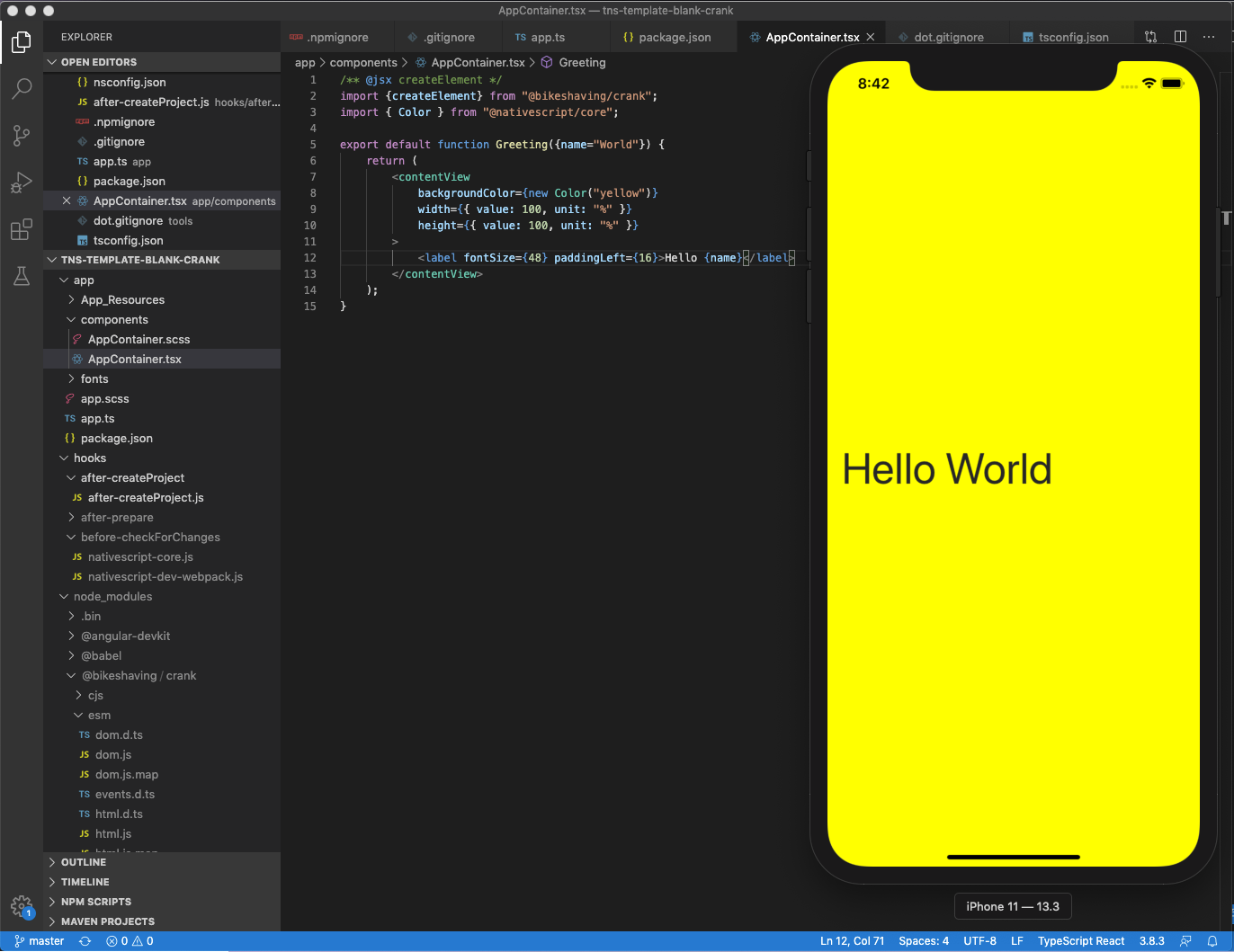
Going off for dinner now...
shirakaba
on 17 Apr 2020
Intellisense (i.e. for intrinsic element props) now implemented 😊

shirakaba
on 18 Apr 2020
Nothing other to say that this is very darn impressive @shirakaba ! Amazing work :raised_hands:
 marvinhagemeister
on 18 Apr 2020
marvinhagemeister
on 18 Apr 2020
@marvinhagemeister Thank you very much 😊
@brainkim How is ancestor context implemented? Some examples of what I mean by that follow.
- In Crank Native, children of
<flexboxLayout>will create a sort of "FlexboxLayout context", in which thealignSelfproperty becomes meaningful. - Similarly, and this is particularly relevant for text ancestry, certain CSS properties like
color(for font colour) may be inherited. - React DOM implements this; searching for
isInAParentTextin the codebase will bring it up.
Crank Native will need to implement the following ancestor context:
interface AncestorContext {
    isInAParentText: boolean,
    isInAParentSpan: boolean,
    isInAParentFormattedString: boolean,
    isInADockLayout: boolean,
    isInAGridLayout: boolean,
    isInAnAbsoluteLayout: boolean,
    isInAFlexboxLayout: boolean,
}
The renderer can diagnose and set what the ancestry is each time a child is added; but I think it might be Crank Native's job to pass this information to the renderer at the time of prop updating (this is how React Reconciler does it).
Open to any other solutions, and haven't looked too deeply into it yet – just leaving a quick message about this before I go out!
shirakaba
on 18 Apr 2020
@brainkim Hold fire; I think I can manage without host context. At the time of setting props on a child, React DOM doesn't pass you the parent instance, whereas Crank does. I never found a use for 'cascading' ancestry context (e.g. knowledge of anything further back than the immediate parent) in React NativeScript, so I'll be fine without an ancestor context system. At best, there may be an argument for memory efficiency (seems a shame to re-evaluate instanceof on the child's immediate parent each time we set props on a child), but I don't have metrics one way or another.
shirakaba
on 18 Apr 2020
@shirakaba I’m super impressed at how much progress you’ve made and how much you’ve figured out on your own! It’s all undocumented so your progress is inspiring!
As far as ancestor contexts for intrinsics go, early on I had intrinsic elements participate in the Crank context tree, but this seemed like a waste, insofar as 1. DOM elements have their own ways to communicate up and down the tree and 2. Portal elements mean that the Crank and DOM trees don’t match up exactly. My hope is that intrinsic elements can just figure out the tree on their own without any help from Crank.
Additionally, one important thing to think about when writing renderers is that component and intrinsic elements execute in the tree in a fundamentally different manner. Component elements execute in a pre-order traversal of the tree; in other words, parents execute before children. This makes sense because before the component is executed, we don’t actually know what the component‘s children will be, because the component’s children is the values yielded or returned.
By contrast, intrinsic elements execute in a post-order traversal of the tree. They wait for their children to finish rendering before performing their work. At the level of the DOM renderer, this means that it actually creates child nodes before parent nodes, and the parent is responsible for managing the children nodes as provided by the hostContext’s children prop.
Lemme know if this helps, I’ve been meaning to dive deeper into your implementation but I’m suddenly having to field a lot of questions from a lot of people! Again, thanks for working on this!
brainkim
on 18 Apr 2020
@shirakaba I’m super impressed at how much progress you’ve made and how much you’ve figured out on your own! It’s all undocumented so your progress is inspiring!
Thank you! You've managed to architect Crank Native as an extraordinarily well-decoupled framework with an incredibly small surface area, so after reading your explanation, actually I was pleasantly surprised at how clear it was to implement all the necessary APIs.
And thanks for that explanation on order of rendering! Following that, it's evident that each child is instantiated, and has props set on it, before any parent has been associated with it. This means that implementing ancestor context would be, although maybe not totally impossible, certainly fiddly.
I found in the end that my assumptions about needing ancestor context at all were misplaced, however, so luckily I've been able to sidestep the problem. Works for me!
I’ve been meaning to dive deeper into your implementation but I’m suddenly having to field a lot of questions from a lot of people! Again, thanks for working on this!
I can see just from the GitHub stars that Crank is really taking off and have enjoyed reading the really thorough responses written out by you on Reddit to the React community so it's all good!
shirakaba
on 18 Apr 2020
@brainkim What would be the idiomatic equivalents of componentDidMount and componentWillUnmount in Crank?
shirakaba
on 18 Apr 2020
@brainkim Crank Native now supports event handlers!
It also supports CSS (even SCSS), and Font Icons!
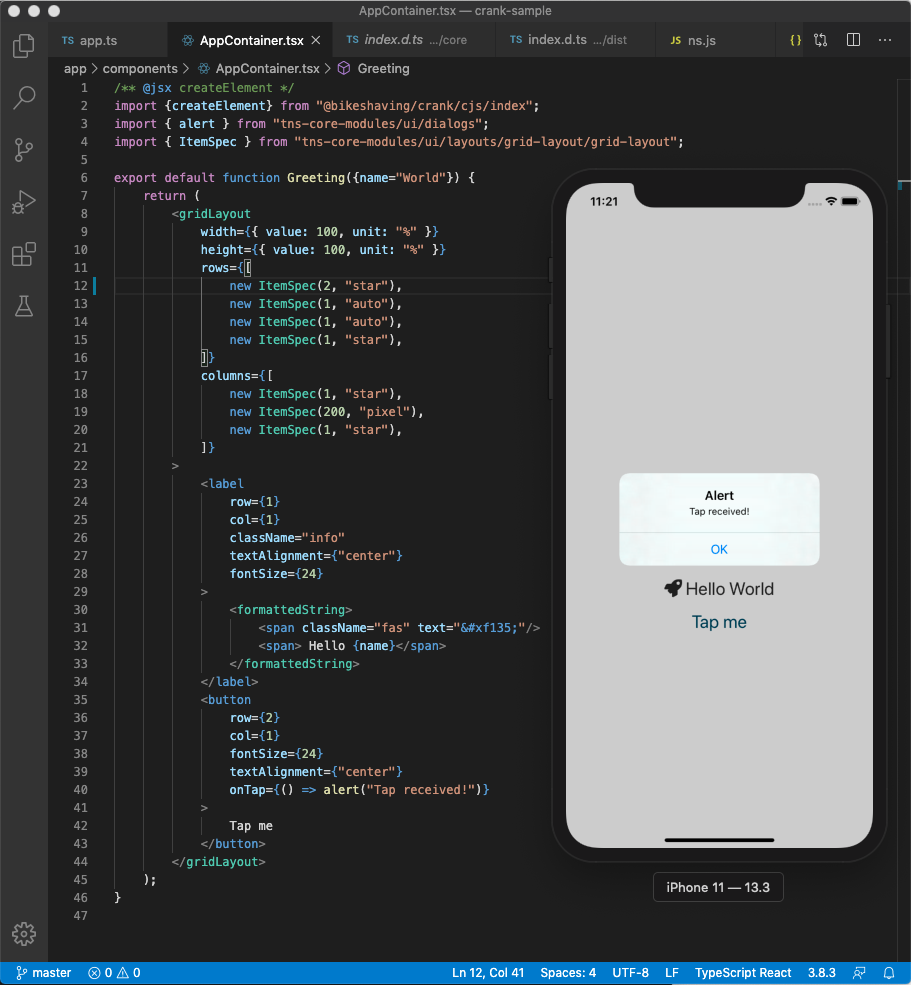
What would be the idiomatic equivalents of componentDidMount and componentWillUnmount in Crank?
Once I know how to handle this, I'll be able to support native iOS/Android navigation 😃
shirakaba
on 19 Apr 2020
What on Earth is going on this is incredible.
What would be the idiomatic equivalents of componentDidMount and componentWillUnmount in Crank?
Are you talking about intrinsics? Cuz for intrinsic generator functions you can just do work inside the generator exactly where you expect:
const env = {
  *myIntrinsic(props) {
    let el = createElement("whatever");
    // “component did mount”
    try {
      yield el;
      for (const newProps of this) {
        yield el;
        props = newProps;
      }
    } finally {
      // “component will unmount”
    }
  },
}
Crank will call return on intrinsic generators when they unmount so that’s pretty much how you’d do it.
If you’re asking about component props, it’d be pretty much the same.
brainkim
on 19 Apr 2020
@brainkim I think I'm not talking about intrinsics – the Default case in the renderer Environment handles everything as I need. Is your code snippet showing a case of custom renderer handling for any intrinsic with an explicit name? If so, it's pretty cool that Crank can do that!
However, I'm rather wondering how I could translate this particular scenario.
Here's a snippet of React NativeScript, using standard React concepts to pass a reference of our rendered Page instance to a Frame upon componentDidMount:
React NativeScript
import * as React from "react";
import { $Page } from "react-nativescript";
import { Frame, Page } from "@nativescript/core";

class AppContainer extends React.Component<{ frame: Frame }, {}> {
    private readonly pageRef: React.RefObject<Page> = React.createRef<Page>();

    componentDidMount(){
        this.props.frame.navigate({
            create: () => {
                const page: Page = this.pageRef.current!;
                page.addCssFile("./components/AppContainer.scss");
                return page;
            }
        });
    }

    render(){
        return (
            <$Page ref={this.pageRef}>
            </$Page>
        );
    }
}
Crank Native
/** @jsx createElement */
import { createElement } from "@bikeshaving/crank/cjs/index";
import { Frame } from "@nativescript/core";

export default function AppContainer({ rootView }: { rootView: Frame }) {
    console.log(`AppContainer got rootView:`, rootView);
    return (
        <page>
        </page>
    );
}
... I'm not really sure what to write to call an API on that <page> instance 😅
EDIT: Note that I am essentially new to generators. I have a vague recognition of them, but have never got on well with them. Hoping that getting used to Crank idioms improves my understanding.
shirakaba
on 19 Apr 2020
Some news on another front:
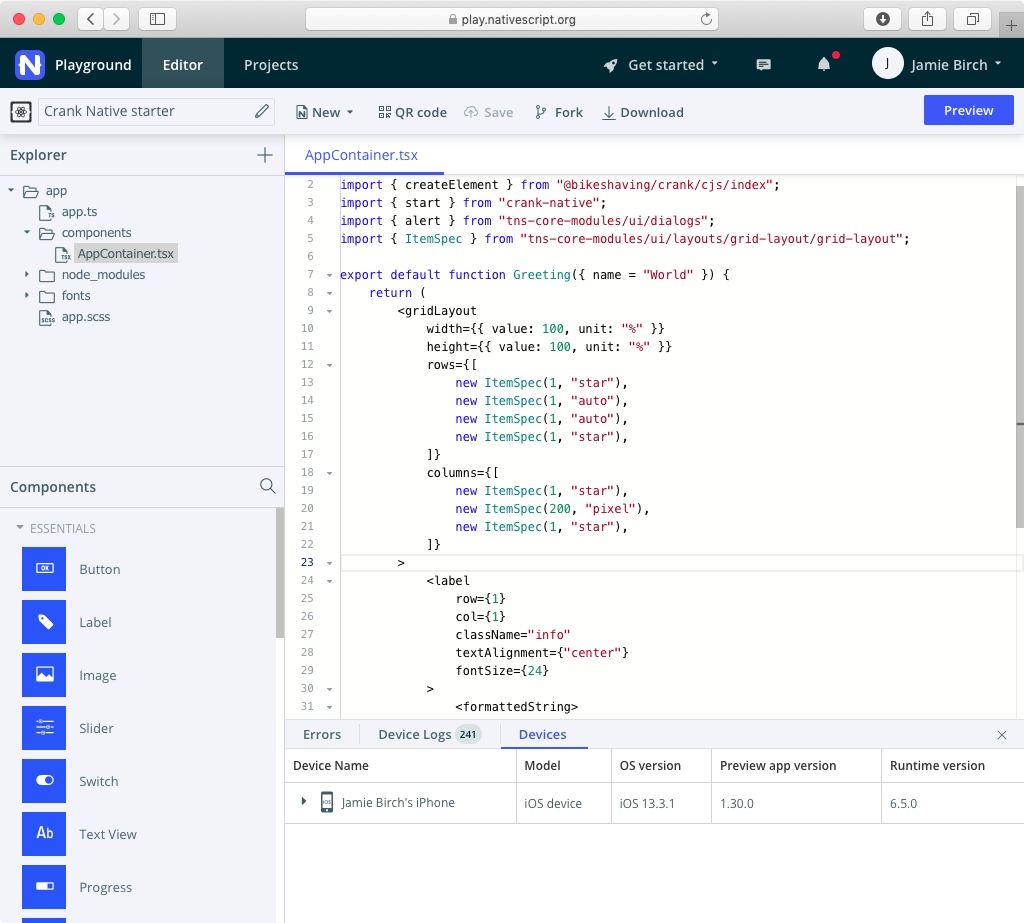

I investigated what would happen if I ~produced~ hacked together a NativeScript Playground starter boilerplate for writing Crank Native apps. I don't have any access to the Playground's node modules or webpack config, so I did what I could.
... And, well, it works! The typings might stop you from writing anything but the simplest of cases (for one thing, it's expecting child elements to be of React.ReactNode type; and for another, I don't know whether the template is configured to support async/await and generators), but what it gives us is a way for people to experience basic Crank Native apps without having to install anything – just by scanning a QR code!
https://play.nativescript.org/?template=play-react&id=GtKudF&v=10
shirakaba
on 19 Apr 2020
I think I'm not talking about intrinsics – the Default case in the renderer Environment handles everything as I need. Is your code snippet showing a case of custom renderer handling for any intrinsic with an explicit name? If so, it's pretty cool that Crank can do that!
Yeah this was an architecture pattern that was taken from another project I got, that’s why Default and Text are Symbols, so that they don’t overlap with string tags.
However, I'm rather wondering how I could translate this particular scenario.
I guess you saw the issue on refs, but basically one of the solutions there (make it an async generator or yield, refresh, copy). I know it can seem a little hacky but that’s what I got for now and we can discuss there. My one question though is why you pass the Frame as a prop rather than implement it as an intrinsic? I’m looking at the docs and I think it could be a part of the Intrinsic element tree (https://docs.nativescript.org/ui/components/frame) but I’m not too sure about how it would work.
... And, well, it works! The typings might stop you from writing anything but the simplest of cases (for one thing, it's expecting child elements to be of React.ReactNode type; and for another, I don't know whether the template is configured to support async/await and generators)
Do you have a contact on the NativeScript I could reach out to? It would be awesome if we could get this working.
brainkim
on 19 Apr 2020
Through this thread I have learned that native script works with React, made by this man
https://www.nativescript.org/blog/an-interview-with-react-nativescript-creator-jamie-birch
I think nobody knows it because there is no doc, not on the official site, nowhere.
It is very cool what you do here!
 lishine
on 19 Apr 2020
lishine
on 19 Apr 2020
Do you have a contact on the NativeScript I could reach out to? It would be awesome if we could get this working.
Thanks, I'm in good contact with the NativeScript team so I'll mention it. Turnaround on changes to Playground has historically been pretty slow, however.
Through this thread I have learned that native script works with React, made by this man
https://www.nativescript.org/blog/an-interview-with-react-nativescript-creator-jamie-birch
@lishine yup, that's me! 😊
I think nobody knows it because there is no doc, not on the official site, nowhere.
The repo is here and the docs are here. The official site only mentions the officially supported flavours (Core, Angular, and Vue), so the community-made ones (React, Svelte, Crank, and Preact – although the latter one is unfinished) aren't given much visibility beyond blog posts. Hopefully they'll give some more visibility to the community integrations in time.
It is very cool what you do here!
Thank you! Crank is a very cool renderer and I believe solves a lot of the pain points I've faced in both React NativeScript and React Native (lack of synchronous rendering, for one thing), so I'm interested to explore what a "Crank Native" would feel like in terms of developer experience.
shirakaba
on 19 Apr 2020
To keep everyone in the loop about my earlier statement:
... I'm not really sure what to write to call an API on that
instance
I ended up solving this in https://github.com/bikeshaving/crank/issues/33#issuecomment-616092969 thanks to @brainkim's code snippet and a preliminary implementation of React-style refs.
shirakaba
on 19 Apr 2020
Updated Playground template now working on Android thanks to @rigor789: https://play.nativescript.org/?template=play-react&id=lwOLY2&v=1
shirakaba
on 19 Apr 2020
I've just finished the documentation site!
https://crank-native.netlify.app
Once I understand more about usage patterns, it can be fleshed out with tutorials. For now, it just details the capabilities of the renderer.
shirakaba
on 19 Apr 2020
@shirakaba Just FYI I’m looking into performance and the renderer API is probably going to have to change at some point unless I can come up with a better algorithm for the updateDOMChildren function. Its worst case performance characteristics are really bad for removal of initial elements from big lists, so we might have to use an API which somehow allows children to remove themselves from their parent like React. It’s sad because I really did want to create a loosely coupled API between renderer and environment where you didn’t have to define a lot of the DOM interface like insertBefore, but maybe it’s for the best. Gotta think about what the API would look like if we make children reorder themselves in the parent.
If anyone has algorithm chops, this is the stackoverflow issue I created about the problem with updateDOMChildren long ago: https://stackoverflow.com/questions/59418120/what-is-the-most-efficient-way-to-update-the-childnodes-of-a-dom-node-with-an-ar It’s different from the longest common subsequence problem in the sense that elements are uniquely identified.
brainkim
on 6 May 2020
The Renderer API has been changed in 0.2.0. I need to document it, but essentially, the main takeaway is that creating a generator object for each DOM node is a lot of overhead in terms of memory. Each of the suspended generator objects was a couple 100 bytes for both the iterator and the retained state of the generator, and for a table of 1000 rows in the js-framework-benchmark test, this meant maybe 1 extra MB of memory.
Sorry about the breaking changes! I tried to preserve the generator API but I realized that 1. the Renderer API isn’t where I want to do novel things and 2. it was actually suboptimal as an API design, insofar as reducing all the possible work that a renderer needs to do to a single iterator is too coarse grained. Sometimes Crank will need to arrange the children of a parent, sometimes it will need to patch a node, and encapsulating this all within the same iterator was less optimal than just having these be separate methods.
Leaving this issue open so I can make sure to document the Renderer API.
@shirakaba If you’re not interested in continuing to work on crank-native I can probably update it for 0.2.0 myself. I have some thoughts on the API but haven’t really had a chance to figure out nativescript yet.
brainkim
on 2 Jul 2020
@shirakaba If you’re not interested in continuing to work on crank-native I can probably update it for 0.2.0 myself. I have some thoughts on the API but haven’t really had a chance to figure out nativescript yet.
Hi @brainkim, thanks for the heads-up! Sorry for the delay.
Sadly I haven't seen much interest in Crank Native (to be fair, there's not exactly a flood of interest even in its big brother, React NativeScript), so I'll be focusing on other projects. No obligation to update it for v0.2.0!
shirakaba
on 5 Jul 2020
The custom renderer API is now kinda documented. I’m not happy with the docs, but it should at least provide a reference for building custom renderers. Hopefully, the API shouldn’t change much more in the future, but it might because of performance reasons.
@shirakaba No worries about delays or anything haha. You are under no obligations whatsoever. I’m sorry to hear about lack of interest in NativeScript. I’m kinda curious about why the Vue community has seemed to pivot to a wrapper around React Native, for instance. Ultimately, I don’t stress about adoption because at the end of the day, I wrote the framework for myself, and my personal belief is that Crank provides a real competitive advantage, so if people don’t want to use it, it’s their loss. Also I think browser APIs have significantly firmed up in the past couple years, so the benifits that you get from the scale of adoption in terms of finding subtle cross-browser bugs has diminished somewhat. That being said, I do plan on publishing more blog posts eventually, so keep an eye out for that.
No obligation to update it for v0.2.0!
I do plan to update crank-native(script) if you don’t get around to it. I just haven’t been doing any mobile development of late and I’m too lazy to install NativeScript stuff right now.
Closing for housekeeping purposes, but feel free to use this issue for more thoughts on custom renderers.
brainkim
on 28 Jul 2020
Related issues
brainkim
·
6Comments
 virtualfunction
·
5Comments
virtualfunction
·
5Comments
 lukejagodzinski
·
4Comments
lukejagodzinski
·
4Comments
 malcolmstill
·
5Comments
malcolmstill
·
5Comments
 jazzdev
·
3Comments
jazzdev
·
3Comments
Most helpful comment
I've just finished the documentation site!
https://crank-native.netlify.app
Once I understand more about usage patterns, it can be fleshed out with tutorials. For now, it just details the capabilities of the renderer.