Cphalcon: Latest windows releases does not work with php7.2
The latest windows releases does not work with php7.2. (TS and NTS)
$ /c/php/php7.2.0/php --ri phalcon
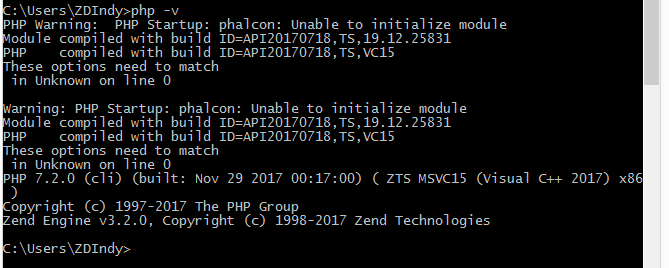
Warning: PHP Startup: phalcon: Unable to initialize module
Module compiled with build ID=API20170718,NTS,19.12.25831
PHP    compiled with build ID=API20170718,NTS,VC15
These options need to match
 in Unknown on line 0
PHP 7.2.0 (cli) (built: Nov 28 2017 23:48:32) ( NTS MSVC15 (Visual C++ 2017) x64 )
Copyright (c) 1997-2017 The PHP Group
Zend Engine v3.2.0, Copyright (c) 1998-2017 Zend Technologies
$ /c/php/php7.2.0/php --ri phalcon
Warning: PHP Startup: phalcon: Unable to initialize module
Module compiled with build ID=API20170718,NTS,19.12.25831
PHP    compiled with build ID=API20170718,NTS,VC15
These options need to match
 in Unknown on line 0
Extension 'phalcon' not present.
Details
- Phalcon version: 3.3.0
- PHP Version: PHP 7.2.0
- Operating System: Windows 10
- Installation type: Download from github
- Zephir version (if any): /
- Server: /
- Other related info (Database, table schema): /
 Ark4ne
All 19 comments
I found same problem in PHP 7.2 x64 NTS and PHP 7.2.1RC1 x64 NTS too.
 maurosys
on 26 Dec 2017
maurosys
on 26 Dec 2017
Refs:
 sergeyklay
on 26 Dec 2017
sergeyklay
on 26 Dec 2017
I can replicate this issue. It is weird because phalcon has been compiled using the sources from php.net.
I will re-compile the extension with a fresh copy from the sources and let you guys know.
Thanks for the heads up.
 niden
on 26 Dec 2017
niden
on 26 Dec 2017
Some progress:
I tried to run configure again in the 7.2 folder and noticed this:
------------------------------------------------
|                 |                            |
------------------------------------------------
| Build type      | Release                    |
| Thread Safety   | Yes                        |
| Compiler        | MSVC 19.12.25831, untested |
| Architecture    | x64                        |
| Optimization    | PGO disabled               |
| Static analyzer | disabled                   |
------------------------------------------------
The Compiler comes from Visual Studion 2017 community edition. I might have to resinstall it or google the results and see where that gets me. If anyone has any thoughts, feel free to contribute.
niden
on 26 Dec 2017
God, I'm NOT the only one here
 blackjyn
on 27 Dec 2017
blackjyn
on 27 Dec 2017
VC11, VC14 & VC15
More recent versions of PHP are built with VC11, VC14 or VC15 (Visual Studio 2012, 2015 or 2017 compiler respectively) and include improvements in performance and stability.

- The VC11 builds require to have the Visual C++ Redistributable for Visual Studio 2012 x86 or x64 installed

- The VC14 builds require to have the Visual C++ Redistributable for Visual Studio 2015 x86 or x64 installed

- The VC15 builds require to have the Visual C++ Redistributable for Visual Studio 2017 x64 or x86 installed
That's weird really.
 Jurigag
on 27 Dec 2017
Jurigag
on 27 Dec 2017
As I can see the problem is solved here: https://forum.phalconphp.com/discussion/17499/unable-to-initialize-phalcon-33-on-windows-php72#C53095
Has anybody tried such an approach?
sergeyklay
on 28 Dec 2017
No I haven't tried that
Compiling from the source is non-trivial for me
blackjyn
on 29 Dec 2017
Same issue here, compiling is not something that I can really do. However I did redownload again today and the issue persists with x64 / NTS.
 echodreamz
on 30 Dec 2017
echodreamz
on 30 Dec 2017
@niden Is there any news?
sergeyklay
on 30 Dec 2017
New DLLs have been compiled for 7.2 and they now report the correct version. (see release page)
Please let us know if that resolved the issue.
niden
on 30 Dec 2017
@niden Yes, it works for me now. Thanks a lot and happy new year
 lubber-de
on 30 Dec 2017
lubber-de
on 30 Dec 2017
Confirmed - Is now working! THank you!
echodreamz
on 31 Dec 2017
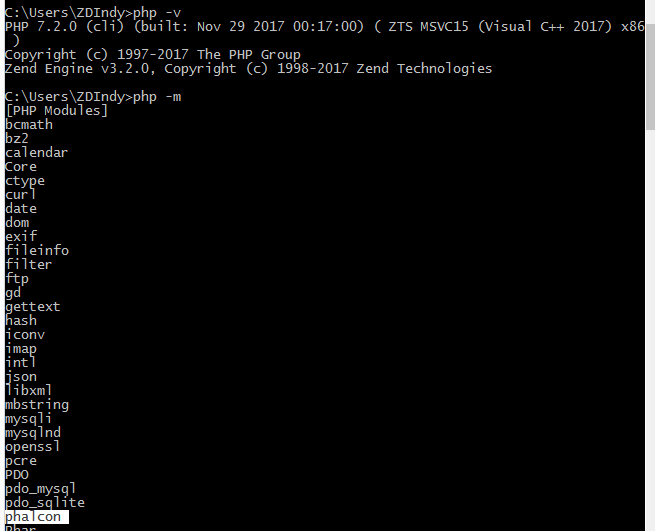
IT WORKS NOW! Thank you!
I'm on Windows 8.1 x64, using XAMPP PHP 7.2 , Phalcon 3.3 TS
Happy new year Y'all!!!! 😄 🎺 🎆 🎆 🎆
blackjyn
on 31 Dec 2017
Closing this issue :)
niden
on 1 Jan 2018
Hi
I am still finding the problem with extension.When i run php info i can see phalcon but if i try to run the command phalcon in cmd it slow error.pls hel
 chisumo2016
on 25 Apr 2018
chisumo2016
on 25 Apr 2018
I have been struggling for 5 days to install phalcon to my pc window 7 .when i open php.ini i can not find the list of all dll.I am running on php 7.1
chisumo2016
on 25 Apr 2018
@chisumo2016
sergeyklay
on 25 Apr 2018
I finally got the right one...
phalcon_x86_vc15_php7.2.0_3.3.0
This one works fine...
 salva-flores
on 25 May 2018
salva-flores
on 25 May 2018
Related issues
 ruudboon
·
3Comments
ruudboon
·
3Comments
 ismail0234
·
3Comments
ismail0234
·
3Comments
 dimak08
·
3Comments
dimak08
·
3Comments
 mynameisbogdan
·
3Comments
mynameisbogdan
·
3Comments
 TimurFlush
·
3Comments
TimurFlush
·
3Comments
Most helpful comment
New DLLs have been compiled for 7.2 and they now report the correct version. (see release page)
Please let us know if that resolved the issue.