Coverlet: Coverage works locally but returns `∞%` when running on Azure Pipelines or Appveyor
I'm currently running into a strange problem, which may be related to using the latest .NET Core 3 Preview. (I don't know for sure).
On my computers coverage comes back for all the expected modules instrumented, but when running on a CI environment no modules get instrumented and I'm not able to determine why.
Locally I get:
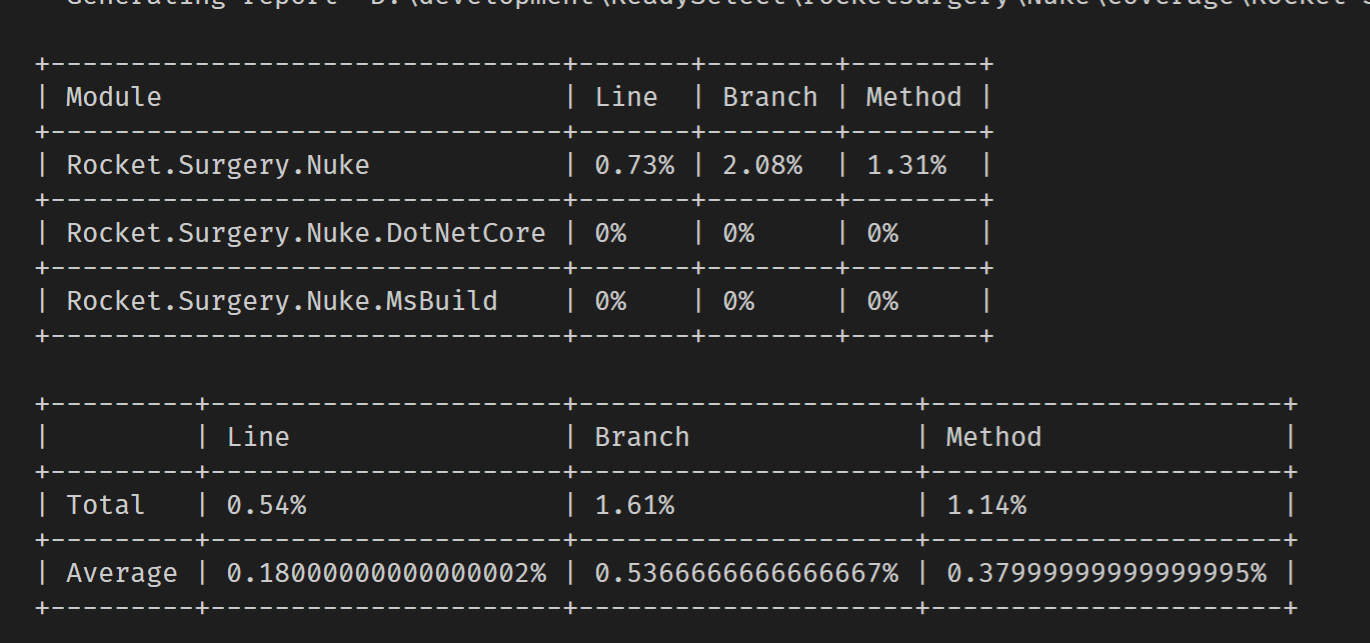
On Azure Pipelines I get:
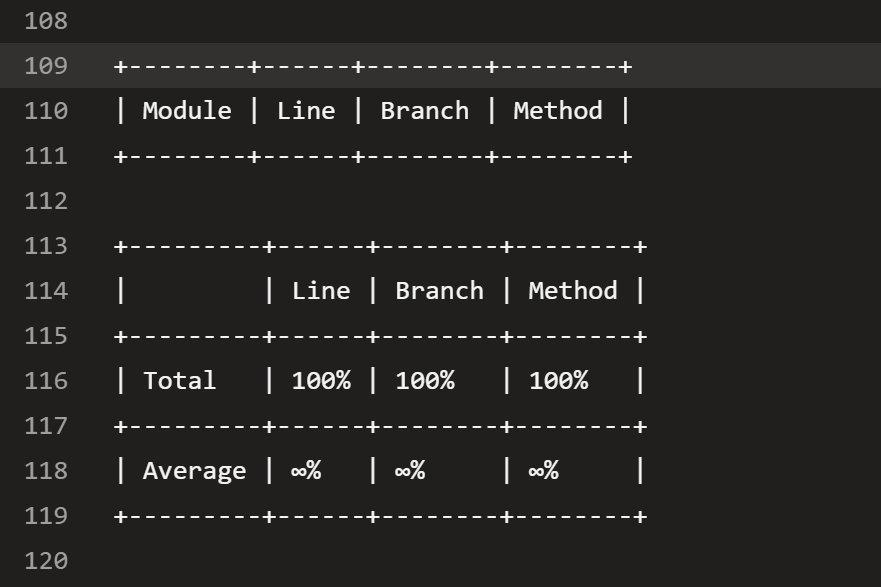
I have local logs (including binlogs) local.zip
I also have logs (including binlogs) from Azure Pipelines, but the same behavior happens on AppVeyor. Logs - Linux.zip
The CI builds for reference are:
- https://rocketsurgeonsguild.visualstudio.com/Libraries/_build?definitionId=31&_a=summary
- https://ci.appveyor.com/project/RocketSurgeonsGuild/nuke
I'm completely at a loss as to why the modules don't get instrumented, but no one single module shows up as getting instrumented in the CI environments.
Thanks for your time!
 david-driscoll
All 11 comments

I compared the two binlog, and the only difference I see is that on CI you're in release, can you confirm that libs are present on release folders(Rocket.Surgery.Nuke.dll etc...)?
 MarcoRossignoli
on 27 Jul 2019
MarcoRossignoli
on 27 Jul 2019
Yeah, the files are there (I added them as an artifact to be published). I've also tried being in Debug on CI, and running Release locally. The behavior persists either way.
https://rocketsurgeonsguild.visualstudio.com/Libraries/_build/results?buildId=1815&view=artifacts
Attached is the output from the build above.
1815.zip
This is where I just get really confused. I've tried using IncludeDirectory as well, but that doesn't seem to help either.
david-driscoll
on 27 Jul 2019
Oh and another note I also tried using the new collector package, and that gave me the exact same behavior
david-driscoll
on 27 Jul 2019
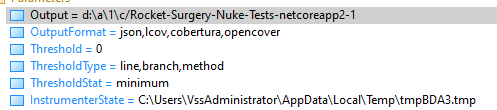
Can you attach coverlet generated(all 4 files) files from CI?I'd like to see inside those files.
MarcoRossignoli
on 29 Jul 2019
Sorry for the delay, I was out on vacation with super slow internet!
Attached is the coverage output (including the empty report)
Coverage - Windows.zip
david-driscoll
on 6 Aug 2019
Sorry for the delay, I was out on vacation with super slow internet!
No worries!
Can you try to add /p:IncludeDirectory=c:\... to command and add the ci directory where dlls should be?
And also launch a dir command on that directory to be sure that all files are where we think they are and print on ci output?
MarcoRossignoli
on 6 Aug 2019
Attached is the latest attempt. I thought maybe it was because dotnet core 2.1 wasn't installed (2.2 and 3.0-p7 were installed)
The command that was run was: dotnet test D:\a\1\s\Nuke.sln --configuration Release --logger trx --no-build --no-restore --results-directory d:\a\1\a\test --settings D:\a\1\s\test\coverlet.runsettings /property:CollectCoverage=True /property:CoverageDirectory=d:\a\1\c /property:IncludeDirectory=D:\a\1\s\test\Nuke.Tests\bin\Release\netcoreapp2.1
The contents of the output directory were:
...
D:\a\1\s\test\Nuke.Tests\bin\Release\netcoreapp2.1\Rocket.Surgery.Extensions.Testing.Coverlet.dll
D:\a\1\s\test\Nuke.Tests\bin\Release\netcoreapp2.1\Rocket.Surgery.Extensions.Testing.dll
D:\a\1\s\test\Nuke.Tests\bin\Release\netcoreapp2.1\Rocket.Surgery.Linq.Extensions.dll
D:\a\1\s\test\Nuke.Tests\bin\Release\netcoreapp2.1\Rocket.Surgery.Nuke.dll
D:\a\1\s\test\Nuke.Tests\bin\Release\netcoreapp2.1\Rocket.Surgery.Nuke.DotNetCore.dll
D:\a\1\s\test\Nuke.Tests\bin\Release\netcoreapp2.1\Rocket.Surgery.Nuke.DotNetCore.pdb
D:\a\1\s\test\Nuke.Tests\bin\Release\netcoreapp2.1\Rocket.Surgery.Nuke.MsBuild.dll
D:\a\1\s\test\Nuke.Tests\bin\Release\netcoreapp2.1\Rocket.Surgery.Nuke.MsBuild.pdb
D:\a\1\s\test\Nuke.Tests\bin\Release\netcoreapp2.1\Rocket.Surgery.Nuke.pdb
D:\a\1\s\test\Nuke.Tests\bin\Release\netcoreapp2.1\Rocket.Surgery.Nuke.Tests.deps.json
D:\a\1\s\test\Nuke.Tests\bin\Release\netcoreapp2.1\Rocket.Surgery.Nuke.Tests.dll
D:\a\1\s\test\Nuke.Tests\bin\Release\netcoreapp2.1\Rocket.Surgery.Nuke.Tests.pdb
D:\a\1\s\test\Nuke.Tests\bin\Release\netcoreapp2.1\Rocket.Surgery.Nuke.Tests.runtimeconfig.dev.json
D:\a\1\s\test\Nuke.Tests\bin\Release\netcoreapp2.1\Rocket.Surgery.Nuke.Tests.runtimeconfig.json
D:\a\1\s\test\Nuke.Tests\bin\Release\netcoreapp2.1\Rocket.Surgery.Reactive.Extensions.dll
....
All the files look to be there that should be there, hence my confusion!
Coverage - Windows.zip - the .dir file contains the list of files.
Logs - Windows.zip - binlogs are available in here if desired.
Full build results are: https://rocketsurgeonsguild.visualstudio.com/Libraries/_build/results?buildId=1991&view=logs&j=2d2b3007-3c5c-5840-9bb0-2b1ea49925f3
david-driscoll
on 8 Aug 2019
@david-driscoll sorry for the new ask...could you add also -verbosity:diagnostic I want to compare coverlet log with files in dir...sorry here I think https://github.com/RocketSurgeonsGuild/Nuke/blob/e2ca0a11694dba4de5b79c401227eea06db530d9/azure-pipelines.yml#L25
MarcoRossignoli
on 8 Aug 2019
@MarcoRossignoli no problem! I really appreciate you taking the time, I know this a strange issue and I'm assume somehow it's my fault... but I don't know where I've messed up.
Coverage artifacts:
https://rocketsurgeonsguild.visualstudio.com/Libraries/_build/results?buildId=2004&view=results
Coverage - Windows.zip
Logs - Windows.zip
david-driscoll
on 10 Aug 2019
@MarcoRossignoli thanks for your help but after reflecting and thinking I did something wrong, I discorvered the problem and I appear to have a fix.
The problem was caused by a props file that had defined ContinuousIntegrationBuild and set it to true. This then causes DeterministicSourcePaths to be set to true which is what causes the problem where it doesn't pick up the files! If I run dotnet test with DeterministicSourcePaths set to false, then everything works correctly!
Sorry for any time I may have wasted!!! 😭
david-driscoll
on 10 Aug 2019
Sorry for any time I may have wasted!!! 😭
Don't worry the important thing is resolve the issue...I didn't check configs of project I missed that!BTW learned new case useful for future 😄
Don't hesitate to open new issue if you'll have problem with coverlet!
MarcoRossignoli
on 10 Aug 2019
Related issues
 chaoticsoftware
·
7Comments
chaoticsoftware
·
7Comments
 ptupitsyn
·
4Comments
ptupitsyn
·
4Comments
 obtuse-whoosh
·
6Comments
obtuse-whoosh
·
6Comments
 SteveGilham
·
6Comments
SteveGilham
·
6Comments
 jamir-araujo
·
4Comments
jamir-araujo
·
4Comments
Most helpful comment
@MarcoRossignoli thanks for your help but after reflecting and thinking I did something wrong, I discorvered the problem and I appear to have a fix.
The problem was caused by a
propsfile that had definedContinuousIntegrationBuildand set it totrue. This then causesDeterministicSourcePathsto be set totruewhich is what causes the problem where it doesn't pick up the files! If I rundotnet testwithDeterministicSourcePathsset tofalse, then everything works correctly!Sorry for any time I may have wasted!!! 😭