Coverlet: Coverlet crashes VSTest
I'm getting errors when I'm trying to use the vstest integration to coverlet.
This is with the 2.2.300 SDK.
 PS> dotnet test --no-build --no-restore --settings ..\CodeCoverage.runsettings --collect:"XPlat Code Coverage"  -- RunConfiguration.DisableAppDomain=true
Test run for D:\dev\xUnit\visualstudio.xunit\test\test.xunit.runner.visualstudio\bin\Debug\net46\test.xunit.runner.visualstudio.dll(.NETFramework,Version=v4.6)
Microsoft (R) Test Execution Command Line Tool Version 16.1.1
Copyright (c) Microsoft Corporation.  All rights reserved.

Starting test execution, please wait...


Attachments:
  D:\dev\xUnit\visualstudio.xunit\test\test.xunit.runner.visualstudio\TestResults\730034da-8dc8-4a52-9bdf-db094514cf10\coverage.cobertura.xml
  D:\dev\xUnit\visualstudio.xunit\test\test.xunit.runner.visualstudio\TestResults\730034da-8dc8-4a52-9bdf-db094514cf10\Oren_ATHENA_2019-06-25.16_25_17.coverage

Test Run Aborted.
To repro:
- clone https://github.com/xunit/visualstudio.xunit
- checkout the
coverletbranch - from a VS Command prompt, go to the
/test/test.xunit.runner.visualstudiodirectory - run
msbuild /restoreto build the test project (and the project it's testing). You'll need the Windows/UWP 16299 SDK installed to successfully build it. - From the same directory, run the following command
dotnet test --no-build --no-restore --settings ..\CodeCoverage.runsettings --collect:"XPlat Code Coverage" -- RunConfiguration.DisableAppDomain=true
It'll start running the tests and then abort.
 clairernovotny
All 16 comments
I cannot repro I get a different issue seem I don't find collector(in other netcoreapp projects it works) but I also get tests abort.
 dotnet --info
.NET Core SDK (reflecting any global.json):
 Version:   2.2.300
 Commit:    73efd5bd87

Runtime Environment:
 OS Name:     Windows
 OS Version:  10.0.17763
 OS Platform: Windows
 RID:         win10-x64
 Base Path:   C:\Program Files\dotnet\sdk\2.2.300\
...
C:\git\visualstudio.xunit\test\test.xunit.runner.visualstudio (coverlet -> origin)
λ dotnet test --no-build --no-restore --settings ..\CodeCoverage.runsettings --collect:"XPlat Code Coverage" -- RunConfiguration.DisableAppDomain=true
Test run for C:\git\visualstudio.xunit\test\test.xunit.runner.visualstudio\bin\Debug\net46\test.xunit.runner.visualstudio.dll(.NETFramework,Version=v4.6)
Microsoft (R) Test Execution Command Line Tool Version 16.1.0
Copyright (c) Microsoft Corporation.  All rights reserved.

Starting test execution, please wait...
Data collection : Could not find data collector 'XPlat code coverage'

Attachments:
  C:\git\visualstudio.xunit\test\test.xunit.runner.visualstudio\TestResults\9e99c4dc-e9c6-4329-a592-749a262b5d6c\Marco_WS-3_2019-06-26.11_47_45.coverage

Test Run Aborted.
Btw it's strange I mean if it cannot find collector should ignore coverage and go on with test...so that output seem maybe unrelated to coverlet
@vagisha-nidhi do you have any idea?
 MarcoRossignoli
on 26 Jun 2019
MarcoRossignoli
on 26 Jun 2019
@MarcoRossignoli We set the collector path in coverlet.collector.targets which is in the build folder inside the nuget. Is it possible that since you are setting --no-build, this path is not set and hence collector is not discovered?
 vagisha-nidhi
on 26 Jun 2019
vagisha-nidhi
on 26 Jun 2019
Mmm the same without --no-build
C:\git\visualstudio.xunit\test\test.xunit.runner.visualstudio (coverlet -> origin)
λ dotnet test --settings ..\CodeCoverage.runsettings --collect:"XPlat Code Coverage" -- RunConfiguration.DisableAppDomain=true
Test run for C:\git\visualstudio.xunit\test\test.xunit.runner.visualstudio\bin\Debug\net46\test.xunit.runner.visualstudio.dll(.NETFramework,Version=v4.6)
Microsoft (R) Test Execution Command Line Tool Version 16.1.0
Copyright (c) Microsoft Corporation.  All rights reserved.

Starting test execution, please wait...
Data collection : Could not find data collector 'XPlat code coverage'

Attachments:
  C:\git\visualstudio.xunit\test\test.xunit.runner.visualstudio\TestResults\9ab7249b-2bd7-4906-9ae8-9a5645510777\Marco_WS-3_2019-06-26.12_55_32.coverage

Test Run Aborted.
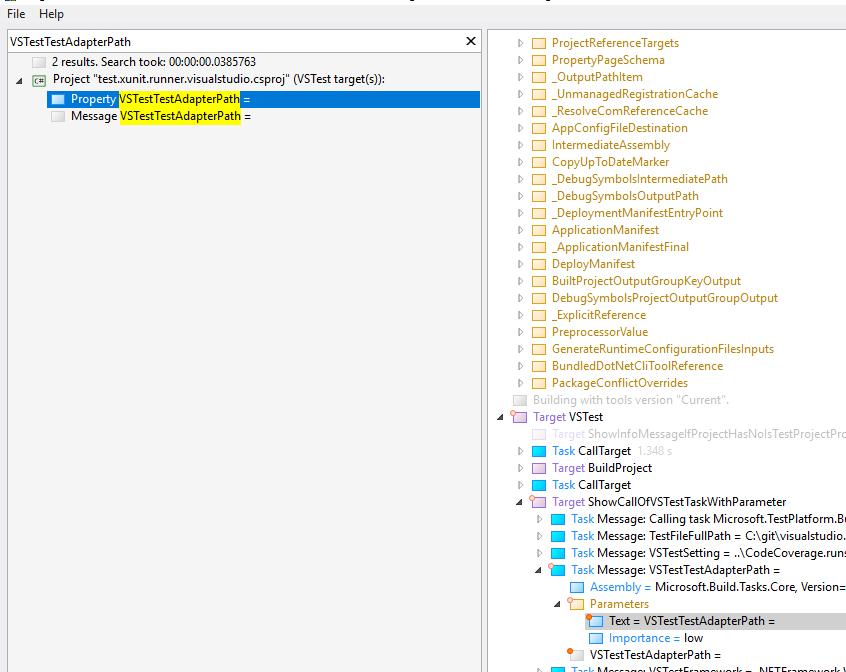
EDIT: I've logged build and I found empty VSTestTestAdapterPath
MarcoRossignoli
on 26 Jun 2019
@MarcoRossignoli This seems like .NETFramework dll
C:\git\visualstudio.xunit\test\test.xunit.runner.visualstudio\bin\Debug\net46\test.xunit.runner.visualstudio.dll(.NETFramework,Version=v4.6)
vagisha-nidhi
on 26 Jun 2019
Yes is a netfx lib...xplat collector doesn't support full .net right?
Is this the issue?
MarcoRossignoli
on 26 Jun 2019
@MarcoRossignoli Yes. At present collector only supports .net core
vagisha-nidhi
on 26 Jun 2019
@MarcoRossignoli Yes. At present collector only supports .net core
cc: @onovotny
MarcoRossignoli
on 26 Jun 2019
@vagisha-nidhi can you confirm that the issue is the same for issue text https://github.com/tonerdo/coverlet/issues/475#issue-460627092?
MarcoRossignoli
on 26 Jun 2019
I'm a bit confused since I was able to get the collector to work with .NET Framework with Ix Async:
clairernovotny
on 26 Jun 2019
@MarcoRossignoli @onovotny I'll try to repro the issue and get back.
vagisha-nidhi
on 26 Jun 2019
thank's a lot @vagisha-nidhi!
MarcoRossignoli
on 26 Jun 2019
@onovotny
So I have looked at this. In your runsettings you define both data collectors "CodeCoverage" and "Xplat Code coverage"
I tried both, and both of them are aborting the run. I don't have an RCA on the CodeCoverage one but for xplat code coverage, here's my analysis.
In test.xunit.runner.visualstudio, there's a condition
  <ItemGroup Condition=" '$(TargetFramework)' == 'net46' ">
    <PackageReference Include="Microsoft.TestPlatform.ObjectModel" Version="15.9.0" />
  </ItemGroup>
This is causing it to refer to old objectmodel which does not work with coverlet.
Getting this error when I looked at logs using --diag option
Microsoft.VisualStudio.TestPlatform.ObjectModel.DataCollection.SessionStartEventArgs..ctor(System.Collections.Generic.IDictionary`2<System.String,System.Object>)'.
   at Microsoft.VisualStudio.TestPlatform.CrossPlatEngine.EventHandlers.TestCaseEventsHandler.SendSessionStart(IDictionary`2 properties)
   at Microsoft.VisualStudio.TestPlatform.CrossPlatEngine.Execution.RunTestsWithSources.SendSessionStart()
   at Microsoft.VisualStudio.TestPlatform.CrossPlatEngine.Execution.BaseRunTests.RunTests().
Can you try with updating the object model and disabling data collector for CodeCoverage and see if xplat code coverage works?
cc: @MarcoRossignoli
vagisha-nidhi
on 26 Jun 2019
I'm not sure if I can use a later object model? As this is a test adapter for xunit, it has to run in both VS 2017 and VS 2019.
clairernovotny
on 26 Jun 2019
@onovotny The objectmodel should be back compat. You can give this a try. Coverlet integration has a dependency on the newer versions.
vagisha-nidhi
on 26 Jun 2019
Okay, yes, that was the cause. Just wish that vstest output a stacktrace instead of an unhelpful crash :)
clairernovotny
on 26 Jun 2019
Thank's for your time @vagisha-nidhi!
MarcoRossignoli
on 26 Jun 2019
Related issues
 ptupitsyn
·
4Comments
ptupitsyn
·
4Comments
 SteveGilham
·
6Comments
SteveGilham
·
6Comments
 IGx89
·
4Comments
IGx89
·
4Comments
 mateusdemboski
·
6Comments
MarcoRossignoli
·
6Comments
mateusdemboski
·
6Comments
MarcoRossignoli
·
6Comments