Coverlet: Spurious 'Unable to read beyond end of stream' in CI while collecting results
https://travis-ci.org/tgstation/tgstation-server/jobs/438449753#L1156
Not sure what causes this it rarely happens and seemingly at random. Latest coverlet.console
 Cyberboss
All 71 comments
Could it be that the files are cleaned up before Coverlet finishes doing its thing.
That error usually occurs when the StreamReader opens a file, it has its Length in memory then starts to stream the data... but its either 0, in very rare occasion in processes of being deleted.
For the Length to be more the length of the file is not possible unless it got modified as mentioned.
Because of this "randomness" it seems like a race condition somewhere.
 ppumkin
on 12 Oct 2018
ppumkin
on 12 Oct 2018
I'm also facing this, but consistently, when dealing with a huge number of testcases (~17k), i.e. in our nightly builds (where more complete testing is done).
In regular use cases, I don't see this happening.
My use case:
I'm calling coverlet, in dotnet test (via cake's DotNetCoreTest)
Error Line:
[16:34:51] : [Step 2/3] C:\Users\SVC-SS-BUILDER\.nuget\packages\coverlet.msbuild\2.3.1\build\netstandard2.0\coverlet.msbuild.targets(27,5): error : Unable to read beyond the end of the stream.
More Detailed:
[16:34:51] :     [Step 2/3] Results File: D:\tc_ba2\510a05667bb2cb9a\test\DynamicPricing.Application.Nightly.Tests\TestResults\TestResults.trx
[16:34:51] :     [Step 2/3]
[16:34:51] :     [Step 2/3] Total tests: 17071. Passed: 17071. Failed: 0. Skipped: 0.
[16:34:51] :     [Step 2/3] Test Run Successful.
[16:34:51] :     [Step 2/3] Test execution time: 26.1204 Minutes
[16:34:51]i:     [Step 2/3] TRX (1s)
[16:34:51] :     [Step 2/3]
[16:34:51] :     [Step 2/3] Calculating coverage result...
[16:34:51] :     [Step 2/3] C:\Users\SVC-SS-BUILDER\.nuget\packages\coverlet.msbuild\2.3.1\build\netstandard2.0\coverlet.msbuild.targets(27,5): error : Unable to read beyond the end of the stream. [D:\tc_ba2\510a05667bb2cb9a\test\DynamicPricing.Application.Nightly.Tests\DynamicPricing.Application.Nightly.Tests.csproj]
[16:34:51]E:     [Step 2/3] An error occurred when executing task 'RunTests'.
[16:34:52]E:     [Step 2/3] Error message is logged
[16:34:51]E:     [Step 2/3] Error: System.AggregateException: One or more errors occurred. ---> Cake.Core.CakeException: .NET Core CLI: Process returned an error (exit code 1).
[16:34:51]E:     [Step 2/3]    at Cake.Core.Tooling.Tool`1.ProcessExitCode(Int32 exitCode)
[16:34:51]E:     [Step 2/3]    at Cake.Core.Tooling.Tool`1.Run(TSettings settings, ProcessArgumentBuilder arguments, ProcessSettings processSettings, Action`1 postAction)
[16:34:51]E:     [Step 2/3]    at Cake.Common.Tools.DotNetCore.Test.DotNetCoreTester.Test(String project, DotNetCoreTestSettings settings)
[16:34:51]E:     [Step 2/3]    at Submission#0.DotNetCoreTest(String project, DotNetCoreTestSettings settings)
[16:34:51]E:     [Step 2/3]    at Submission#0.<<Initialize>>b__0_27(String configuration, String provider, Tuple`2 connectionInfo, Boolean nightly, Boolean coverage)
[16:34:51]E:     [Step 2/3]    at Submission#0.<<Initialize>>b__0_26()
 pedrofmanuel-sky
on 24 Oct 2018
pedrofmanuel-sky
on 24 Oct 2018
Yea it looks like coverlet is trying to open the file.. and its not there any more.
Again the common thing here is a CI pipeline.
Can you run this locally on your machine using dotnet test with coverlet?
ppumkin
on 25 Oct 2018
I ran it locally, but was unable to recreate the situation.
In the CI, it did happen always. But not on my laptop.
pedrofmanuel-sky
on 25 Oct 2018
So as I thought it is a CI related issue. Its not the build or coverlet problem it is that CI starts to cleanup too quickly.
Please tell us more about how your CI is setup, which platform etc.
The next step of problem elimination is to manually run it on the CI Agent.
If it is AzureDevops you should be able to get console access to your build agent (i am not sure about self hosted agents though) and try and run the pipeline commands manually. See if it breaks the same way. If it does that means its an environment problem but I seriously doubt that.
To Consider:
I think when the pipeline is executing one after the other.. there is a cleanup operation that is happening. Please check for any options like that and try and do cleanup at the end.. or, on first step do a clean sources and then make sure there are no other cleanup options tagged
Let us know what you find please.
ppumkin
on 26 Oct 2018
That is still not clear to me.
19k Total Tests = (17k nightly + 2k regular baseline)
We in fact have 19k tests, therefore, the 17k tests I was able to run (until I got the exception), was in the middle of the process. Therefore, before a possible CI cleanup (which I'm not sure we do at the end, I believe we cleanup the stuff at the beggining of a CI run).
Another hint: I had the exclusion lists not working properly (I was sending separate exclusion lists, via the command line, and that doesn't work well in powershell, there's an issue for that), which was causing that the extra 17k tests were also being "covered" by coverlet, generating a massive output (my guess, since I'm unable to see the result, because of the exception).
Cheers
pedrofmanuel-sky
on 26 Oct 2018
Yea... I am not entirely sure. The best thing to try and do is recreate the problem somewhere, outside of CI.
Sorry that is all I can say for this
ppumkin
on 26 Oct 2018
A potential workaround is to invoke bash and sync after
i.e.
$HOME/.dotnet/tools/coverlet bin/$CONFIG/netcoreapp2.1/Tgstation.Server.Api.Tests.dll --target "bash" --targetargs "-c \"dotnet test -c $CONFIG --no-build && sync\"" --format opencover --output "../../TestResults/api.xml" --include "[Tgstation.Server*]*" --exclude "[Tgstation.Server.Api.Tests*]*"
Disregard, it still errored out
Cyberboss
on 29 Oct 2018
I have the "feeling" that this has to do with some async (write) operation of some results, and when coverlet tries to read the output of it (it has not finished yet).
but this is just a guess...
pedrofmanuel-sky
on 29 Oct 2018
Getting this too on AppVeyor lately (last 2 days). Nothing has changed on our side.
 leppie
on 30 Oct 2018
leppie
on 30 Oct 2018
Not sure what causes this it rarely happens and seemingly at random. Latest coverlet.console
Out of curiosity is everyone having this problem using coverlet.console?
 tonerdo
on 31 Oct 2018
tonerdo
on 31 Oct 2018
That is what I'm using
On Tue, Oct 30, 2018, 10:41 PM Toni Solarin-Sodara notifications@github.com
wrote:
Not sure what causes this it rarely happens and seemingly at random.
Latest coverlet.consoleOut of curiosity is everyone having this problem using coverlet.console?
—
You are receiving this because you authored the thread.
Reply to this email directly, view it on GitHub
https://github.com/tonerdo/coverlet/issues/210#issuecomment-434541091,
or mute the thread
https://github.com/notifications/unsubscribe-auth/AHywenVul7IKf64aTZG5mVliZtFBZoQZks5uqQ3bgaJpZM4XNyyv
.
Cyberboss
on 31 Oct 2018
Not sure what causes this it rarely happens and seemingly at random. Latest coverlet.console
Out of curiosity is everyone having this problem using
coverlet.console?
I am using coverlet.msbuild and just calling dotnet test /p:CollectCoverage=true on a per project basis in AppVeyor.
Still on 2.3.0 here
leppie
on 31 Oct 2018
" just calling dotnet test /p:CollectCoverage=true on a per project basis"
Same here. Env: Windows + Teamcity + cake build script (which calls that, then).
pedrofmanuel-sky
on 31 Oct 2018
Quick follow up question, does this only happen on a CI server? Anyone experienced it locally?
tonerdo
on 4 Nov 2018
I ran my tests with coverlet in a docker container for a few hours but
never got the error
On Sat., Nov. 3, 2018, 10:34 p.m. Toni Solarin-Sodara <
[email protected] wrote:
Quick follow up question, does this only happen on a CI server? Anyone
experienced it locally?—
You are receiving this because you authored the thread.
Reply to this email directly, view it on GitHub
https://github.com/tonerdo/coverlet/issues/210#issuecomment-435637082,
or mute the thread
https://github.com/notifications/unsubscribe-auth/AHyweovQW9IU-Y5pUpSWLEhGI1P3uZdvks5urlJGgaJpZM4XNyyv
.
Cyberboss
on 4 Nov 2018
Just wanted to add my support to this issue. We also have intermittent failures on our Azure DevOps pipeline. Here's a snippet from the last failure, using coverlet.msbuild:
2018-11-08T17:03:48.4568642Z Results File: D:\agents\5\_work\_temp\SVC_TFSBuild_NCL-S-BUILD03_2018-11-08_17_03_47.trx
2018-11-08T17:03:48.4569469Z
2018-11-08T17:03:48.4572151Z Total tests: 14. Passed: 14. Failed: 0. Skipped: 0.
2018-11-08T17:03:48.4572637Z Test Run Successful.
2018-11-08T17:03:48.4576890Z Test execution time: 12.9343 Seconds
2018-11-08T17:03:48.5061451Z
2018-11-08T17:03:48.5062641Z Calculating coverage result...
2018-11-08T17:03:49.0712122Z D:\.nuget\packages\coverlet.msbuild\2.3.1\build\netstandard2.0\coverlet.msbuild.targets(27,5): error : Unable to read beyond the end of the stream. [D:\agents\5\_work\58\s\test\aaa.bbb.ccc.Unit.Tests\aaa.bbb.ccc.Unit.Tests.csproj]
 WiredUK
on 8 Nov 2018
WiredUK
on 8 Nov 2018
I've started doing some testing on this one. Have a custom version of coverlet with a bunch of extra logging to hopefully extract exactly where and why this is exploding. It's quite tedious though as a CI build needs to run and the hamsters in our build server are very tired. Will update when I get some more info...
WiredUK
on 14 Nov 2018
And here is a better stack trace:
2018-11-14T14:47:34.2650390Z System.IO.EndOfStreamException: Unable to read beyond the end of the stream.
2018-11-14T14:47:34.2651311Z    at System.IO.BinaryReader.FillBuffer(Int32 numBytes)
2018-11-14T14:47:34.2652232Z    at System.IO.BinaryReader.ReadInt32()
2018-11-14T14:47:34.2652389Z    at Coverlet.Core.Coverage.CalculateCoverage()
2018-11-14T14:47:34.2652489Z    at Coverlet.Core.Coverage.GetCoverageResult()
2018-11-14T14:47:34.2652672Z    at Coverlet.MSbuild.Tasks.CoverageResultTask.Execute()
I know that error from working with files. It basically means the file has been deleted while trying to read it.
That log is cool.. but it would be cooler if you knew what file it is trying to read. I suppose Coverlet is trying to instrument the DLL then all of a sudden it disappears...
This is where the error is propagating
And by reading
https://docs.microsoft.com/en-us/dotnet/api/system.io.binaryreader.readint32?view=netframework-4.7.2
It seems like just maybe there is a bug here where Coverlet expected more things than there were for some reason in the loops doing the ReadInt32.
Also it is difficult to understand what that code is actually doing...
ppumkin
on 14 Nov 2018
@ppumkin Yeah, I'm going to dig a little further now I know which part of the app to instrument. It's difficult to test as it's a sporadic issue, but I can queue up multiple builds at the same time which helps.
WiredUK
on 14 Nov 2018
@ppumkin Regarding your edit, the error could also be here:
Edit:
But it's not, it is throwing when trying to read hitCandidatesCount
WiredUK
on 14 Nov 2018
Yes, true. That is why I wrote its difficult to understand the code because is has a few levels of embedded loops and its reading 4 unsigned bytes each time from result.HitsFilePath,
What is in that file? Some kind of temporary file. If it it is temporary maybe that is the problem on the CI builds, lack of permissions to access the file? it gets cleaned up after build runs?
What is the file? (the path to it and contents)
ppumkin
on 14 Nov 2018
The file that it was trying to read from varies, but for me is in the form (where xxx.yyy.zzz is a project name):
C:\Users\SVC_TFSBuild\AppData\Local\Temp\xxxx.yyyy.zzzz_d884df17-4b8f-41e4-9ebf-93b044af742d
I'm now wondering if it's something to do with it being in the temp directory...
WiredUK
on 14 Nov 2018
Here's one I just triggered in travis https://travis-ci.org/tgstation/tgstation-server/jobs/455035648#L1719
Cyberboss
on 14 Nov 2018
yes! Temp directory! I bet you something on AZ (or other CI apparently like Travis) is cleaning up the temp after BUILD completes
ppumkin
on 14 Nov 2018
Possibly yeah, but this build server we have is local, not a hosted build.
WiredUK
on 14 Nov 2018
Coverlet assumes the file is still there. Experience taught me to always test if a file exists before trying to use it. I think its collecting hit data while code is running.
- I think there needs to be a way to set the location of this file . (env var? settings.json?)
- It should check if the file exists if not then throw a proper message with the filepath
- Possibility to not use the file at all?
ppumkin
on 14 Nov 2018
Let me check if the file exists then, it being missing is very different to is being completely empty...
WiredUK
on 14 Nov 2018
yes! Temp directory! I bet you something on AZ (or other CI apparently like Travis) is cleaning up the temp after BUILD completes
The thing is, I'm running "dotnet test /p:CollectCoverage=true" (and the problem existed) and coverlet runs within the test. therefore no "external" clean up should be happening meanwhile
pedrofmanuel-sky
on 14 Nov 2018
On Windows, there's some ways to change the tempdir location: https://stackoverflow.com/a/2365338/3976486.
I wonder how well mounting /tmp to a temp file would work on Linux
Cyberboss
on 14 Nov 2018
If the file exists and there is data inside it... maybe what the assumption of what was supposed to be in there is not always true for some reason.. and its trying to read the file beyond its capacity.
So it probably is a bug caused by assumption but again, this code should probably get patched up with some error trapping. I can fork this and put somethings if any body is interested in somehow using that patched version.. to atleast try and figure out the problem.
Also chainging the entire OS's temp location is not a good fix. On a build agent.. maybe.. but if there is a cleanup mechanism.. then it will apply to the new location too.
ppumkin
on 14 Nov 2018
@ppumkin Well that's what my patched version is doing here, I'm spamming the log with all this data so I can understand exactly what is going on.
For reference, we are telling Azure DevOps to use the temp folder, that may be our problem. Our command line looks something like this:
dotnet test --no-build <path-to-project> -l trx -r $(Agent.TempDirectory) /p:CollectCoverage=true
Well we have identified the region of code that is causing the problem.
I would suggest putting a few try catches around there and doing some more Verbose logging.
- Verify the file exists before trying to open it
- Capture its size before opening it
- monitor its cursor as it read bytes in the loops
- trying to capture other data as the loops progress. variables, etc
- when an exception occurs capture the state of things at that point. Then you may be able to spot a logical problem or something else. Like try and see if the file still exists at point of exception try catch. things like that.
I would then be inclined to raise your changes as PR but have it log to Verbose mode. Really... that should have been done originally as it would have saved a lot of time.
Unfortunately, that is the pain of working with files.
ppumkin
on 14 Nov 2018
I'm definitely going to put in a PR which will show a better error message when the file is missing or empty, but that doesn't solve the base problem itself unfortunately.
WiredUK
on 14 Nov 2018
No it does not solve the problem but it will help identify it correctly.
The solution may be one of these
I think there needs to be a way to set the location of this file . (env var? settings.json?)
It should check if the file exists if not then throw a proper message with the filepath
Possibility to not use the file at all?
ppumkin
on 14 Nov 2018
do we know who/what writes that file ?
who/what is responsible for writing it, and for deleting it?
pedrofmanuel-sky
on 14 Nov 2018
I think there needs to be a way to set the location of this file . (env var? settings.json?)
You can do this, use the -r <some-dir> parameter
It should check if the file exists if not then throw a proper message with the filepath
Yup, that's what I'll PR
Possibility to not use the file at all?
Don't think this is possible. Those files are built by a completely different process.
WiredUK
on 14 Nov 2018
I think it is a file used during instrumentation. Probably some events/delegates that write some specific 4 byte wide data that Coverlet is then trying to read out in 4bytes at a time.
Its not pretty... but it seems to have been done out of necessity.
One way would to try and refactor the code to read the entire file in in one go into a manageable class instead of using cursor advancements in loops. Always seem to cause trouble and difficult to read and debug. But who has the time.. right?
ppumkin
on 14 Nov 2018
Changing the directory from Path.GetTempPath() to something localized did not fix it, sadly.
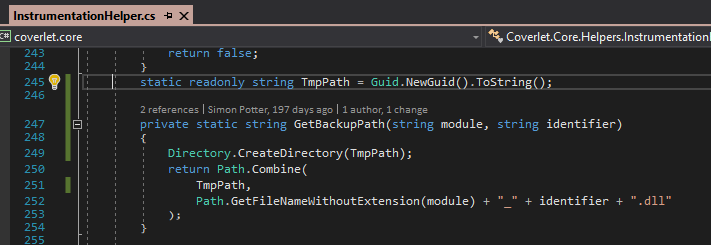
https://travis-ci.org/tgstation/tgstation-server/jobs/455055580#L2872
Cyberboss
on 14 Nov 2018
OK I have new info. The file exists but is zero bytes. That just confuses me even more :/
WiredUK
on 14 Nov 2018
Cool.
So there is a problem at the point where something is trying to write to the file. It is looking more like a permissions thing. It can create the file... but not write it ??
ppumkin
on 14 Nov 2018
I doubt it's a permission thing:
- It's the temp folder for the user which won't have peculiar perms
- It works most of the time
I'm looking to see if I can instrument where the file is created now...
WiredUK
on 14 Nov 2018
The hunt continues ... 🗡
ppumkin
on 14 Nov 2018
Could it be the result file, for some excluded assembly / namespaces, which didn't had any hits ?
pedrofmanuel-sky
on 14 Nov 2018
That is good point... but the fact that it works sometimes without changing the code means, no.
ppumkin
on 14 Nov 2018
if the tests are in fact predictable, and always pass on the same spots I would agree with you :) if not, then there's the possibility ;)
pedrofmanuel-sky
on 14 Nov 2018
The fact they work sometimes means it's almost certainly nothing to do with excluded parts.
WiredUK
on 14 Nov 2018
I'm just saying, if there's some dynamic execution, which stimulates different parts of the code, during the tests (in different runs, I mean), then the situation could happen.
(but I do not know the tests / code behind it).
pedrofmanuel-sky
on 14 Nov 2018
but of course, this is a very wild, wild guess.. :)
pedrofmanuel-sky
on 14 Nov 2018
I can confirm the file is zero bytes when failing:
https://travis-ci.org/tgstation/tgstation-server/jobs/455073759#L1731
But, what's weird is I added checks for the program to die after it created the backup files if it was zero bytes and they never triggered.
https://github.com/Cyberboss/coverlet/commit/4baaea7709ec7ad1e7e13cf3a774869c98a39e16#diff-8b69d76eab513f470ef1ee9f7d7306daR46
Cyberboss
on 14 Nov 2018
Actually, I didn't notice this before, but, there's a second implementation of InstrumentationHelper.GetBackupPath() here: https://github.com/tonerdo/coverlet/blob/master/src/coverlet.core/Instrumentation/Instrumenter.cs#L45 I'm gonna try messing with that too
Different thing nevermind
Cyberboss
on 14 Nov 2018
OK, so here's some more interesting stuff.
I made some modifications to the ModuleTrackerTemplate: https://github.com/tonerdo/coverlet/compare/master...Cyberboss:Testing
Now here's a failing build: https://travis-ci.org/tgstation/tgstation-server/jobs/455107315#L2630
It seems the process (or thread that runs that code at least) is being killed while UnloadModule is running, sometime after the open syscall. Compared to the other times where something is always written. This would explain why the file is zero bytes.
Now as for WHY the process is dying right then and there I have no idea. No exceptions are being thrown as far as I can tell (at least, nothing that can be caught with catch (Exception e)). It just seems to open the file and inexplicably die
Cyberboss
on 14 Nov 2018
Ahh, I think it's a simple timeout the handler is hitting: https://stackoverflow.com/a/12341932/3976486
The total execution time of all ProcessExit event handlers is limited, just as the total execution time of all finalizers is limited at process shutdown. The default is two seconds.
That's a potentially good spot there @Cyberboss.
Question for all others: Are your build servers under heavy load or severely underpowered by any chance? Mine absolutely is (currently running on a shard host with a bunch of other VMs) and the disk is being hammered, so there's every possibility that it's taking too long to execute that process.
WiredUK
on 15 Nov 2018
Travis CI is constantly under load, so I don't doubt it.
On Wed., Nov. 14, 2018, 7:49 p.m. David Glass <[email protected]
wrote:
That's a potentially good spot there @Cyberboss
https://github.com/Cyberboss.Question for all others: Are your build servers under heavy load or
severely underpowered by any chance? Mine absolutely is (currently running
on a shard host with a bunch of other VMs) and the disk is being hammered,
so there's every possibility that it's taking too long to execute that
process.—
You are receiving this because you were mentioned.
Reply to this email directly, view it on GitHub
https://github.com/tonerdo/coverlet/issues/210#issuecomment-438873941,
or mute the thread
https://github.com/notifications/unsubscribe-auth/AHyweglPDmYyZpeZiuCJ9A46U_uAe6Xiks5uvLn_gaJpZM4XNyyv
.
Cyberboss
on 15 Nov 2018
A way to avoid to do a lot of work in ProcessExit might be to use a memory mapped file to keep track of hit counts, which would be pretty easy to implement after #181. Instead of allocating an int[] a memory mapped file the size of HitCandidates.Count * 4 would be allocated, and each hit increment a counter at HitIndex * 4. This way there's no data to write to disk at the end of the test.
It shouldn't be a significant performance hit to use the memory mapped APIs instead of incrementing an int array directly, but that must be verified. It may not be necessary to use file-backed memory maps at all, and just use them as a shared memory area between the coverlet process and the test process.
To avoid locking threads on each others there would have to be one file per thread (much like there's one array per thread in #181), and Coverage.CalculateCoverage() would have to read all those files and tally them.
 petli
on 15 Nov 2018
petli
on 15 Nov 2018
Is this a use case for the new Span T - maybe? I never used it but listening to some conferences it sounds like that is what it could be used for?
Any way, anything other than file system writes is going to be better.. Sounds like a lot of work though.
Is there a "temporary" work around to increase this time out maybe?
ppumkin
on 16 Nov 2018
I can also confirm that this starts to become a problem on a CI server under load.
 ElephantsGerald
on 20 Nov 2018
ElephantsGerald
on 20 Nov 2018
We also have such problem in our build environment.
 Marachkouski
on 9 Jan 2019
Marachkouski
on 9 Jan 2019
@tonerdo Is there a workaround for this? I'm running into this error at the end of all test execution after I get all code coverage results. It happens locally on my machine when I run debug build but for release.
 codemzs
on 11 Jan 2019
codemzs
on 11 Jan 2019
I narrowed this down with @codemzs today. The failure occurs when the hit file is truncated due to process termination while writing the file. After that point, subsequent loads of the file for coverage gathering fail because the file is either empty or contains fewer entries than claimed. I'm planning to address two parts of this and send a pull request:
- Improve write performance using memory mapped files, allowing the final flush to disk to occur after the process closes.
- During reads, handle files that are too short by assuming the rest of the data is zero-filled.
There was some mention above of possible timeouts. I'm not planning to address this part specifically, but if the allowed data flush duration can be extended then it would likely round out the situation for great overall reliability.
 sharwell
on 12 Jan 2019
sharwell
on 12 Jan 2019
Can we please get #276 in to address the issue and have a new nuget? @Cyberboss @tonerdo @petli
codemzs
on 14 Jan 2019
@Cyberboss @codemzs New NuGet releases with the proposed fixed have been released
tonerdo
on 17 Jan 2019
The believe the fastest way to transfer data between the child (test process) and the host (coverlet) would be to just write the unique id + the hitcount out to stdout and read it in the host. That would remove complex references to MemoryMappedFile without any file I/O.
The problem with that solution is that coverlet.msbuild.tasks allow to instrument and assembly and collect its coverage without controlling how the process is launched. Therefore reading from stdout is not possible in the build task.
cc @petli
 ViktorHofer
on 20 Jan 2019
ViktorHofer
on 20 Jan 2019
@ViktorHofer Do you think named pipes be as fast as stdout? The pipe name could be passed into the instrumented code via ModuleTrackerTemplate much like the mmap name.
petli
on 21 Jan 2019
I'm starting to think the cause of this issue lies in the test runner itself, as opposed to the CLR. However, I haven't been able to pinpoint the sequence in the vstest runner that leads to the forced termination of the test process.
sharwell
on 21 Jan 2019
Correct the shutdown is triggered by vstest. This can be easily tested with the following code. Happens with both mstest and xunit which proves that its not the runner itself but the testing framework (vstest) which is responsible for stopping the execution early.
using Microsoft.VisualStudio.TestTools.UnitTesting;
using System;
using System.Diagnostics;
using System.Threading.Tasks;

namespace dotnettest
{
    [TestClass]
    public class UnitTest1
    {
        [TestMethod]
        public void Test1()
        {
            AppDomain.CurrentDomain.ProcessExit += CurrentDomain_ProcessExit;
        }

        private void CurrentDomain_ProcessExit(object sender, EventArgs e)
        {
            System.IO.File.WriteAllText("abc.txt", "start");
            Task.Delay(10000).Wait();
            System.IO.File.WriteAllText("abc.txt", "end");
        }
    }
}
Repro: dotnet test.
Related code paths in vstest:
https://github.com/Microsoft/vstest/blob/7b6248203164f8ea821f6795632bd22e0b69afb0/src/Microsoft.TestPlatform.CoreUtilities/Utilities/JobQueue.cs
VSTest which is triggered by dotnet test is responsible I'll try to gather more information.
As a workaround you could invoke your test runner without dotnet test, i.e. xunit.console.dll (unsupported).
ViktorHofer
on 24 Jan 2019
Close thank's to new collectors https://github.com/tonerdo/coverlet#requirements
 MarcoRossignoli
on 28 Sep 2019
MarcoRossignoli
on 28 Sep 2019
Related issues
 Stefanie899
·
3Comments
Stefanie899
·
3Comments
 spboyer
·
3Comments
spboyer
·
3Comments
 chaoticsoftware
·
7Comments
chaoticsoftware
·
7Comments
 obtuse-whoosh
·
6Comments
obtuse-whoosh
·
6Comments
 coderpatros
·
3Comments
coderpatros
·
3Comments
Most helpful comment
A way to avoid to do a lot of work in ProcessExit might be to use a memory mapped file to keep track of hit counts, which would be pretty easy to implement after #181. Instead of allocating an int[] a memory mapped file the size of HitCandidates.Count * 4 would be allocated, and each hit increment a counter at HitIndex * 4. This way there's no data to write to disk at the end of the test.
It shouldn't be a significant performance hit to use the memory mapped APIs instead of incrementing an int array directly, but that must be verified. It may not be necessary to use file-backed memory maps at all, and just use them as a shared memory area between the coverlet process and the test process.
To avoid locking threads on each others there would have to be one file per thread (much like there's one array per thread in #181), and Coverage.CalculateCoverage() would have to read all those files and tally them.