Coverlet: 0% coverage is being shown after running tests
Hi,
After running my tests with Nunit I get an unexpected result from coverlet.
My folder structure is
root
  \src
     \projectfolder\project.csproj
  \tests
     \testprojectfolder\testproject.csproj
  \solution.sln
I executed the tests from within the testprojectfolder
The result is printed below.
dotnet test /p:CollectCoverage=true
Build started, please wait...
Build completed.

Test run for /home/rob/git/svc_system_center/tests/Sag.SystemCenter.Api.Tests/bin/Debug/netcoreapp2.0/Sag.SystemCenter.Api.Tests.dll(.NETCoreApp,Version=v2.0)
Microsoft (R) Test Execution Command Line Tool Version 15.5.0
Copyright (c) Microsoft Corporation.  All rights reserved.

Starting test execution, please wait...
NUnit Adapter 3.9.0.0: Test execution started
Running all tests in /home/rob/git/svc_system_center/tests/Sag.SystemCenter.Api.Tests/bin/Debug/netcoreapp2.0/Sag.SystemCenter.Api.Tests.dll
NUnit3TestExecutor converted 456 of 456 NUnit test cases

NUnit Adapter 3.9.0.0: Test execution complete

Total tests: 456. Passed: 452. Failed: 0. Skipped: 4.
Test Run Successful.
Test execution time: 3.8804 Seconds

Calculating coverage result...
  Generating report '/home/rob/git/svc_system_center/tests/Sag.SystemCenter.Api.Tests/coverage.json'

+--------------------------------------------+--------+--------+--------+
| Module                                     | Line   | Branch | Method |
+--------------------------------------------+--------+--------+--------+
| Sag.SystemCenter.LoginManagement.BL        | 0%     | 0%     | 0%     |
+--------------------------------------------+--------+--------+--------+
| Sag.SystemCenter.UserManagement.BL         | 0%     | 0%     | 0%     |
+--------------------------------------------+--------+--------+--------+
| Sag.SystemCenter.Identity                  | 0%     | 0%     | 0%     |
+--------------------------------------------+--------+--------+--------+
| Sag.SystemCenter.UserManagement.DAL        | 0%     | 0%     | 0%     |
+--------------------------------------------+--------+--------+--------+
| Sag.SystemCenter.ApiManagement             | 0%     | 0%     | 0%     |
+--------------------------------------------+--------+--------+--------+
| Sag.SystemCenter.Captcha.BL                | 0%     | 0%     | 0%     |
+--------------------------------------------+--------+--------+--------+
| Sag.SystemCenter.Domain                    | 0%     | 0%     | 0%     |
+--------------------------------------------+--------+--------+--------+
| Sag.SystemCenter.Api                       | 0%     | 0%     | 0%     |
+--------------------------------------------+--------+--------+--------+
| Sag.SystemCenter.Messaging                 | 0%     | 0%     | 0%     |
+--------------------------------------------+--------+--------+--------+
| Sag.SystemCenter.ApplicationManagement.DAL | 0%     | 0%     | 0%     |
+--------------------------------------------+--------+--------+--------+
I'm running on a Linux Mint machine with this dotnet configuration
.NET Command Line Tools (2.1.4)

Product Information:
 Version:            2.1.4
 Commit SHA-1 hash:  5e8add2190

Runtime Environment:
 OS Name:     linuxmint
 OS Version:  18.3
 OS Platform: Linux
 RID:         linux-x64
 Base Path:   /usr/share/dotnet/sdk/2.1.4/

Microsoft .NET Core Shared Framework Host

  Version  : 2.0.5
  Build    : 17373eb129b3b05aa18ece963f8795d65ef8ea54
 robvanpamel
All 103 comments
Hi @robvanpamel can you try with the previous version of Coverlet (v1.2.0)? This seems to be a 2.0.0 issue. Let me know
 tonerdo
on 28 May 2018
tonerdo
on 28 May 2018
Hi @tonerdo,
I can see the issue as well, though only on Linux. Using v1.2.0 coverage results output as expected, though on 2.0.0 it's as @robvanpamel described.
Using macOS 10.13.4, both 2.0.0 and 1.2.0 work as expected.
Linux dotnet cofiguration
.NET Command Line Tools (2.1.4)

Product Information:
 Version:            2.1.4
 Commit SHA-1 hash:  5e8add2190

Runtime Environment:
 OS Name:     debian
 OS Version:  9
 OS Platform: Linux
 RID:         linux-x64
 Base Path:   /usr/share/dotnet/sdk/2.1.4/

Microsoft .NET Core Shared Framework Host

  Version  : 2.0.5
  Build    : 17373eb129b3b05aa18ece963f8795d65ef8ea54
macOS dotnet configuration
.NET Command Line Tools (2.1.200)

Product Information:
 Version:            2.1.200
 Commit SHA-1 hash:  2edba8d7f1

Runtime Environment:
 OS Name:     Mac OS X
 OS Version:  10.13
 OS Platform: Darwin
 RID:         osx.10.13-x64
 Base Path:   /usr/local/share/dotnet/sdk/2.1.200/

Microsoft .NET Core Shared Framework Host

  Version  : 2.0.7
  Build    : 2d61d0b043915bc948ebf98836fefe9ba942be11
 aburgett87
on 29 May 2018
aburgett87
on 29 May 2018
@tonerdo,
Interestingly, if I run my project with coverlet 2.0.0 on Linux using dotnet core 2.0.7 or 2.1-rc everything works as expected.
Linux dotnet 2.0.7 configuration
.NET Command Line Tools (2.1.200)

Product Information:
 Version:            2.1.200
 Commit SHA-1 hash:  2edba8d7f1

Runtime Environment:
 OS Name:     debian
 OS Version:  9
 OS Platform: Linux
 RID:         debian.9-x64
 Base Path:   /usr/share/dotnet/sdk/2.1.200/

Microsoft .NET Core Shared Framework Host

  Version  : 2.0.7
  Build    : 2d61d0b043915bc948ebf98836fefe9ba942be11
Linux dotnet configuration 2.1-rc1
.NET Core SDK (reflecting any global.json):
 Version:   2.1.300-rc1-008673
 Commit:    f5e3ddbe73

Runtime Environment:
 OS Name:     debian
 OS Version:  9
 OS Platform: Linux
 RID:         debian.9-x64
 Base Path:   /usr/share/dotnet/sdk/2.1.300-rc1-008673/

Host (useful for support):
  Version: 2.1.0-rc1
  Commit:  eb9bc92051

.NET Core SDKs installed:
  2.1.300-rc1-008673 [/usr/share/dotnet/sdk]

.NET Core runtimes installed:
  Microsoft.AspNetCore.All 2.1.0-rc1-final [/usr/share/dotnet/shared/Microsoft.AspNetCore.All]
  Microsoft.AspNetCore.App 2.1.0-rc1-final [/usr/share/dotnet/shared/Microsoft.AspNetCore.App]
  Microsoft.NETCore.App 2.1.0-rc1 [/usr/share/dotnet/shared/Microsoft.NETCore.App]

To install additional .NET Core runtimes or SDKs:
  https://aka.ms/dotnet-download
FYI @robvanpamel
aburgett87
on 29 May 2018
Hi,
For your information it is working with the 1.2 release
robvanpamel
on 29 May 2018
@robvanpamel Can you try to exclude NUnit3 Test Adapter assemblies: dotnet test /p:CollectCoverage=true /p:Exclude=[NUnit3.TestAdapter]*. See #101 for more information.
 basilfx
on 29 May 2018
basilfx
on 29 May 2018
I'm facing a similar problem.
I'm running below commands in .NET Docker container (2.0-sdk) and coverlet.msbuild version 2.0.0.
By removing /p:Threshold=90, I'm getting a coverage result. When the threshold is present, I get a 0 percentage report.
dotnet test /p:CollectCoverage=true /p:CoverletOutputFormat=lcov /p:ThresholdType=line /p:Threshold=90 /p:CoverletOutput=./lcov Test
Test run for /builds/Test/bin/Debug/netcoreapp2.0/Test.dll(.NETCoreApp,Version=v2.0)
Microsoft (R) Test Execution Command Line Tool Version 15.7.0
Copyright (c) Microsoft Corporation. All rights reserved.Starting test execution, please wait...
Total tests: 98. Passed: 98. Failed: 0. Skipped: 0.
Test Run Successful.
Test execution time: 4.8294 SecondsCalculating coverage result...
Generating report './lcov.info'+-------------------+--------+--------+--------+
| Module | Line | Branch | Method |
+-------------------+--------+--------+--------+
| XXXX | 0% | 0% | 0% |
+-------------------+--------+--------+--------+
/root/.nuget/packages/coverlet.msbuild/2.0.0/build/netstandard2.0/coverlet.msbuild.targets(23,5): error : 'XXXX' has a line coverage '0%' below specified threshold '90%' [/builds/Test/Test.csproj]
dotnet test /p:CollectCoverage=true /p:CoverletOutputFormat=lcov /p:ThresholdType=line /p:CoverletOutput=./lcov Test
Test run for /builds/Test/bin/Debug/netcoreapp2.0/Test.dll(.NETCoreApp,Version=v2.0)
Microsoft (R) Test Execution Command Line Tool Version 15.7.0
Copyright (c) Microsoft Corporation. All rights reserved.Starting test execution, please wait...
Total tests: 98. Passed: 98. Failed: 0. Skipped: 0.
Test Run Successful.
Test execution time: 4.7816 SecondsCalculating coverage result...
Generating report './lcov.info'+-------------------+--------+--------+--------+
| Module | Line | Branch | Method |
+-------------------+--------+--------+--------+
| XXXX | 100% | 85% | 100% |
+-------------------+--------+--------+--------+
 mikkokupsu
on 6 Jun 2018
mikkokupsu
on 6 Jun 2018
I have the issue of 0% coverage even on coverlet version 1.2.0
I am using
Xunit2,
Tested on Coverlet 1.2.0 and latest 2.0.0
on a netstand 2.0 projects.
Note: It works on other netstandard/netcore projects i have, running same framework versions etc.
Currently i do not see any pattern to the reason why some projects does not generate coverage where others do.
Update 2:
Message from dotnet test --no-build --filter Category=Unit /p:CollectCoverage=true
using XUNIT2 for tests.
No test is available in /Users/thomasblitz/Private/code/gitlab/Framework/framework-logging-applicationlogging/src/ApplicationLogging.DAL.Tests/bin/Debug/netcoreapp2.0/ApplicationLogging.DAL.Tests.dll. Make sure that test discoverer & executors are registered and platform & framework version settings are appropriate and try again.
Additionally, path to test adapters can be specified using /TestAdapterPath command. Example  /TestAdapterPath:<pathToCustomAdapters>.
Update 3:
Got it working
- I updated Microsoft.NET.Test.Sdk to 15.7.2 and maintained coverlet at 1.2.
Still same result. - I ran
dotnet test --no-build --filter Category=Unitand because i had been writing some testcode i now could see some test failing. The failures were suppressed when i had/p:CollectCoverage=true - Fixed the code, rebuild and run tests with success.
- ran
dotnet test --no-build --filter Category=Unit /p:CollectCoverage=trueand now i had coverage
Update 4:
Bumped coverlet to 2.0.0 and i still get coverage results :-D
There is a discrepancy in the results from coverlet 1.2 to 2.0.
Observe:
Coverlet 1.2
| Module | Coverage |
|--------------------------|----------|
| ApplicationLogging.Dal | 0.3% |
Coverlet 2.0
| Module | Line | Branch | Method |
|------------------------|------|--------|--------|
| ApplicationLogging.Dal | 2.3% | 2.7% | 3.9% |
 tlogik
on 8 Jun 2018
tlogik
on 8 Jun 2018
I'm seeing this as well in one of my test suites. I moved to using the nuget package, just to eliminate potential variables:
    <PackageReference Include="coverlet.msbuild" Version="2.2.1">
      <IncludeAssets>runtime; build; native; contentfiles; analyzers</IncludeAssets>
      <PrivateAssets>all</PrivateAssets>
    </PackageReference>
    <PackageReference Include="Microsoft.NET.Test.Sdk" Version="15.7.0" />
    <PackageReference Include="xunit.runner.visualstudio" Version="2.3.1" />
    <PackageReference Include="TeamCity.VSTest.TestAdapter" Version="1.0.10" />
    <PackageReference Include="xunit" Version="2.3.1" />
    <PackageReference Include="Moq" Version="4.8.3" />
Test run for C:\GitHub\api\test\unit\API.Partner.Service.Test\bin\Debug\netcoreapp2.1\API.Partner.Service.Test.dll(.NETCoreApp,Version=v2.1)
Microsoft (R) Test Execution Command Line Tool Version 15.8.0
Copyright (c) Microsoft Corporation.  All rights reserved.

Starting test execution, please wait...

Total tests: 53. Passed: 53. Failed: 0. Skipped: 0.
Test Run Successful.
Test execution time: 3.1755 Seconds

Calculating coverage result...
  Generating report 'C:\GitHub\api\test\unit\API.Partner.Service.Test\coverage.json'

+------------------------------------+--------+--------+--------+
| Module                             | Line   | Branch | Method |
+------------------------------------+--------+--------+--------+
| API                                 | 0%     | 0%     | 0%     |
+------------------------------------+--------+--------+--------+
| API.Partner.Service          | 0%     | 0%     | 0%     |
+------------------------------------+--------+--------+--------+
I know that coverage should actually be around 60-70% - certainly not 0. Interestingly, it generates an enormous coverage.json file full of lines, but all the Hits are :0.
"System.Collections.Generic.Dictionary`2<System.String,System.Func`2<System.Object,System.Object>> API.Partner.Service.AppCreatorBase`1::CreateCompiledGetters(System.Collections.Generic.IEnumerable`1<System.Reflection.PropertyInfo>)": {
          "Lines": {
            "114": 0,
            "115": 0,
            "117": 0,
            "118": 0,
            "119": 0,
            "121": 0,
            "123": 0,
            "125": 0,
            "126": 0,
            "127": 0,
            "129": 0,
            "130": 0
          },
          "Branches": [
            {
              "Line": 117,
              "Offset": 135,
              "EndOffset": 17,
              "Path": 1,
              "Ordinal": 1,
              "Hits": 0
            },
            {
              "Line": 117,
              "Offset": 135,
              "EndOffset": 137,
              "Path": 0,
              "Ordinal": 0,
              "Hits": 0
            }
          ]
        },
Is there a diagnostic logger for coverlet that I can enable?
 queen-of-code
on 16 Aug 2018
queen-of-code
on 16 Aug 2018
Hi @queen-of-code @robvanpamel @TLogik take a look at #72. Try adding the following line to your csproj:
<CopyLocalLockFileAssemblies>true</CopyLocalLockFileAssemblies>
Is there a diagnostic logger for coverlet that I can enable?
Not at this time
tonerdo
on 17 Aug 2018
Unfortunately no luck. I added that, and also tried switching my test csproj from
    <PropertyGroup Condition="'$(Configuration)'=='Debug'">
        <DebugType>pdbonly</DebugType>
    </PropertyGroup>
    <PropertyGroup Condition="'$(Configuration)'=='Debug'">
        <DebugType>full</DebugType>
    </PropertyGroup>
Aside from making my test run exponentially slower, it didn't provide any coverage information. Just a dump full of 0% coverage-claims.
queen-of-code
on 17 Aug 2018
181 @queen-of-code completely changes the way Coverlet instruments assemblies and makes the test run orders of magnitude faster. You can see perf improvements here: https://github.com/tonerdo/coverlet/pull/181#issuecomment-415816996.
I expect this change should fix the 0% coverage issue you're all getting, should make a release in 48 hours so you can test it
tonerdo
on 1 Sep 2018
Looking forward to it @tonerdo - when you cut the new release, I will test it out ASAP.
queen-of-code
on 5 Sep 2018
@queen-of-code The new releases are out
Coverlet Global Tool: https://www.nuget.org/packages/coverlet.console/1.2.0
Coverlet MSBuild: https://www.nuget.org/packages/coverlet.msbuild/2.3.0
Let me know if your issue gets fixed when you upgrade.
Thanks!
tonerdo
on 7 Sep 2018
@queen-of-code I didn't notice this before but you should try changing DebugType to portable
tonerdo
on 10 Sep 2018
I have good news and I have bad news.
The good news is that our total execution time is down from ~50 minutes to ~22 minutes. That's an amazing improvement! Great work!
The bad news is that I'm still getting no coverage results. I've included the problematic test csproj. The command I'm running is dotnet test --verbosity normal --no-build --configuration Debug /p:CollectCoverage=true
<Project Sdk="Microsoft.NET.Sdk">
  <PropertyGroup>
    <TargetFramework>netcoreapp2.1</TargetFramework>
    <AssemblyName>MP.Test</AssemblyName>
    <PackageId>MP.Test</PackageId>
    <CopyLocalLockFileAssemblies>true</CopyLocalLockFileAssemblies>
  </PropertyGroup>

    <PropertyGroup Condition="'$(Configuration)'=='Debug'">
        <DebugType>portable</DebugType>
    </PropertyGroup>

  <ItemGroup>
    <None Include="*.json" CopyToOutputDirectory="PreserveNewest" CopyToPublishDirectory="PreserveNewest" />
    <None Include="*.config" CopyToOutputDirectory="PreserveNewest" CopyToPublishDirectory="PreserveNewest" />
    <None Include="TestData\**\*.csv" CopyToOutputDirectory="PreserveNewest" CopyToPublishDirectory="PreserveNewest" />
  </ItemGroup>
  <ItemGroup>
    <ProjectReference Include="..\..\..\src\MP\MP.csproj" />
  </ItemGroup>
  <ItemGroup>
    <PackageReference Include="coverlet.msbuild" Version="2.3.0">
      <IncludeAssets>runtime; build; native; contentfiles; analyzers</IncludeAssets>
      <PrivateAssets>all</PrivateAssets>
    </PackageReference>
    <PackageReference Include="Microsoft.NET.Test.Sdk" Version="15.6.0" />
    <PackageReference Include="xunit.runner.visualstudio" Version="2.3.1" />
    <PackageReference Include="TeamCity.VSTest.TestAdapter" Version="1.0.10" />
    <PackageReference Include="xunit" Version="2.3.1" />
    <PackageReference Include="Moq" Version="4.8.3" />
  </ItemGroup>
</Project>
@queen-of-code I'm bummed that you're still having issues. Your csproj looks accurate enough and you shouldn't still be having problems. Unfortunately, I'm unable to debug without having access to the problematic project.
As a result of this limitation, I'm adding a new flag to log diagnostics information, making it easy for me to debug similar issues without needing a repro project. This will be ready/released in ~2 days
The good news is that our total execution time is down from ~50 minutes to ~22 minutes
Glad to hear that. Out of curiousity, how long do your tests take to run when Coverlet isn't included?
tonerdo
on 16 Sep 2018
Our current test suite (using dotnet test test.sln) runs in just over 1 minute. I just verified test-only numbers with the latest coverlet version, and it's at about 8.5 minutes. So it's still a significant overhead, most of which I suspect is due to running tests serially via */.csproj. SonarQube is involved in the build process as well, so it's certainly possible that it's leaving cruft in the dotnet assemblies.
queen-of-code
on 19 Sep 2018
I having what seems to be a similar issue of 0% results for code coverage using 2.3.0, however I do get coverage for 2 of the 4 projects with the .sln I'm trying to get coverage for. I do get results using 1.2.0. Happening on both centos7 and osx.
No coverage:
<Project Sdk="Microsoft.NET.Sdk">
  <PropertyGroup>
    <TargetFramework>netcoreapp2.1</TargetFramework>
  </PropertyGroup>
  <PropertyGroup>
    <CopyLocalLockFileAssemblies>true</CopyLocalLockFileAssemblies>
  </PropertyGroup>
  <ItemGroup>
    <PackageReference Include="coverlet.msbuild" Version="2.3.0">
      <IncludeAssets>runtime; build; native; contentfiles; analyzers</IncludeAssets>
      <PrivateAssets>all</PrivateAssets>
    </PackageReference>
    <PackageReference Include="Microsoft.NET.Test.Sdk" Version="15.8.0" />
    <PackageReference Include="xunit" Version="2.4.0" />
    <PackageReference Include="xunit.runner.visualstudio" Version="2.4.0" />
  </ItemGroup>
  <ItemGroup>
    <ProjectReference Include="..\AsteriskARIClient\AsteriskARIClient.csproj" />
    <ProjectReference Include="..\CallController.Test\CallController.Test.csproj" />
    <ProjectReference Include="..\CallControllerApi\CallControllerApi.csproj" />
    <ProjectReference Include="..\CallController\CallController.csproj" />
    <ProjectReference Include="..\Utilities\Utilities.csproj" />
  </ItemGroup>
  <ItemGroup>
    <None Update="appsettings.json">
      <CopyToOutputDirectory>Always</CopyToOutputDirectory>
    </None>
    <None Update="log4net.config">
      <CopyToOutputDirectory>Always</CopyToOutputDirectory>
    </None>
  </ItemGroup>
  <ItemGroup>
    <Service Include="{82a7f48d-3b50-4b1e-b82e-3ada8210c358}" />
  </ItemGroup>
</Project>
Coverage:
<Project Sdk="Microsoft.NET.Sdk">

  <PropertyGroup>
    <TargetFramework>netcoreapp2.1</TargetFramework>
  </PropertyGroup>

  <ItemGroup>
    <PackageReference Include="coverlet.msbuild" Version="2.3.0">
      <IncludeAssets>runtime; build; native; contentfiles; analyzers</IncludeAssets>
      <PrivateAssets>all</PrivateAssets>
    </PackageReference>
    <PackageReference Include="Microsoft.Extensions.Logging" Version="2.1.1" />
    <PackageReference Include="Microsoft.NET.Test.Sdk" Version="15.8.0" />
    <PackageReference Include="Moq" Version="4.10.0" />
    <PackageReference Include="xunit" Version="2.4.0" />
    <PackageReference Include="xunit.runner.visualstudio" Version="2.4.0" />
    <PackageReference Include="FluentAssertions" Version="5.4.2" />
  </ItemGroup>

  <ItemGroup>
    <ProjectReference Include="..\Utilities\Utilities.csproj" />
  </ItemGroup>

  <ItemGroup>
    <Service Include="{82a7f48d-3b50-4b1e-b82e-3ada8210c358}" />
  </ItemGroup>
</Project>
 twcclegg
on 5 Oct 2018
twcclegg
on 5 Oct 2018
Hello everyone on the thread.
A user of PrestoCoverage which uses Coverlet reported that he has issues while running the tests with Moq.
This error message appears.
Could not load file or assembly "Moq" Strong name signature could not be verified. The assembly may have been tampered with, or it was delay signed but not fully signed with the correct private key
Now all I did was a search on the bugs and found this post.. I notice you are referencing Moq which may probably be the reason you do not get any coverage results?
Is there anybody that can confirm that Coverlet works with Moq?
 ppumkin
on 23 Oct 2018
ppumkin
on 23 Oct 2018
I'm also getting 0% code coverage on one of my projects. You can view the source here: https://github.com/StephenMP/SLOBSharp/tree/cc9bfd373730f9fa46454bf9cca65039edae4651
Also @ppumkin not sure if this is the correct place for your question, but yes, it works with Moq :)
Update:
With some experimenting, I found that Coverlet returns 0% code coverage when I run my tests located in SLOBSharp.Tests.Domain.Services. It seems that Coverlet struggles when a test spins up a NamedPipeServerStream to run it's tests.
I use NCrunch to run my tests locally and it has no issue calculating metrics in this scenario, so not sure why Coverlet struggles?
Update 2:
I've since changed the way I was testing the named pipe parts in my project by mocking streams. So, I've updated the link above to point to the point in time where the issue was occuring.
 StephenMP
on 30 Oct 2018
StephenMP
on 30 Oct 2018
That is interesting. Coverlet needs to rewrite parts of the DLL and I have noticed if it fails to do so it wont crash and burn it will just return 0% coverage.
(I need to double check this but that is what I remember happening when I was messing around with my extension using coverlet - Probably need a message to say that the DLL's was not attached instead of returning 0%)
I wonder if there is a race condition or just a security constraint on rewriting the DLL
nCrunch uses a different technique to monitor for coverage.
ppumkin
on 5 Nov 2018
I can confirm that I have at least one test project using Moq that works fine, but it's true that the one that doesn't work is using Moq.
queen-of-code
on 29 Nov 2018
I also get 0% test coverage on my project at work, also have Moq installed.
 Nonary
on 3 Dec 2018
Nonary
on 3 Dec 2018
Facing the same issue. Got a feeling it is something on the lines of caching but cant put my figure to the pattern followed. I tried running the test with different options and sometimes it works. But this is not consistent
 amitwats
on 6 Dec 2018
amitwats
on 6 Dec 2018
I can confirm same issue. The coverage have been 0% after we added a dependency to Reactive Extensions (Rx) for .NET.
 bednar
on 6 Dec 2018
bednar
on 6 Dec 2018
For me coverage doesn't work unless I add references to:
- XUnit projects:
- Microsoft.NET.Test.Sdk
- xunit.runner.visualstudio
- NUnit Projects:
- NUnit3TestAdapter
- Microsoft.NET.Test.Sdk
And remove DebugType property from csproj files. Sometimes it doesnt work with DebugType Full, that includes projects you are testing.
 SlowLogicBoy
on 6 Dec 2018
SlowLogicBoy
on 6 Dec 2018
Same here in corefx. Spinning up a Ubuntu machine now to debug what's going on.
 ViktorHofer
on 10 Dec 2018
ViktorHofer
on 10 Dec 2018
Ok sorry, it is working for me, I was missing passing the include-directory with the right formatted path to coverlet.
ViktorHofer
on 10 Dec 2018
That is interesting. Coverlet needs to rewrite parts of the DLL and I have noticed if it fails to do so it wont crash and burn it will just return 0% coverage.
(I need to double check this but that is what I remember happening when I was messing around with my extension using coverlet - Probably need a message to say that the DLL's was not attached instead of returning 0%)
I wonder if there is a race condition or just a security constraint on rewriting the DLL
nCrunch uses a different technique to monitor for coverage.
Based on this comment I tried running the console in Admin mode and for atleast one time it gave a accurate coverage. Not sure this would be reproducible though.
amitwats
on 12 Dec 2018
I am still facing the issue. Was wondering if there are any temporary files generated by coverlet during the process of computing the coverage? The reason I ask this is that it may be possible that due to some reason, like incomplete run, the temporary file may not have been deleted and this is causing errors in the result. @tonerdo would be helpful if you can suggest if some temporary folder needs cleanup.
amitwats
on 28 Dec 2018
I attempted getting the coverlet code and execute it locally while debugging. Here is a pattern I noticed
In the file Coverage.cs in the method CalculateCoverage() there is a check done for result.HitsFilePath. I could compare results in cases where the results were shown and in the cases the results were not shown. Here is what I found:
When results were shown File.Exists(result.HitsFilePath) returned true and so the entire method code lines were executed and results shown. When the File.Exists(result.HitsFilePath) showed false then the results were returned as 0.
        private void CalculateCoverage()
        {

            foreach (var result in _results)
            {
                if (!File.Exists(result.HitsFilePath))
                {
                    // File not instrumented, or nothing in it called.  Warn about this?
                   continue;
                }

....
....
Now as mentioned earlier I am at random times getting results or 0 results. The latter being more often. It would be helpful if someone can point out a potential reason for these temporary files going missing , most of the times in the temp folder C:\Users\xxxx\AppData\Local\Temp
@tonerdo as you are familiar with the code base maybe you can help here.
amitwats
on 4 Jan 2019
Currently experiencing the same issue in a project which is otherwise nearly identical to a project with no issue, aside from the inclusion of Moq. Any guidance is helpful, happy to provide more information if it helps!
edit: and reverting to 1.2.0 does restore proper coverage reporting
 steverichey
on 4 Jan 2019
steverichey
on 4 Jan 2019
Currently experiencing the same issue in a project which is otherwise nearly identical to a project with no issue, aside from the inclusion of Moq. Any guidance is helpful, happy to provide more information if it helps!
_edit_: and reverting to 1.2.0 does restore proper coverage reporting
Thanks Steve, your post was helpful in a way. I changed the version to 1.2 and have been getting the correct results. The only downside being that the time taken for execution has shot up like crazy. Previously when I got results( even when I got the right results), the coverage would come in about 5 mins. Now with 1.2 it takes about 50 mins. I need to execute this for a solution which has 10+projects. Does not seem very practical to run coverlets with this speed.
For those who want to execute with an older version follow the following steps
- Uninstall the current version
dotnet tool uninstall -g coverlet.console - Install the alternate working version. In this case it is 1.2.0
dotnet tool install -g --version 1.2.0 coverlet.console - Add the package for the alternate version using
dotnet add package coverlet.msbuild --version 1.2.0in the folder of the project - Run the test using
dotnet test /p:CollectCoverage=true some.project.tests.csproj
amitwats
on 9 Jan 2019
I have a weird update. Now the output is claiming that SOME projects have 100% branch coverage, but 0% line coverage. @tonerdo is this any help in figuring out what's going on? Nothing much has changed for any versions, except that we're using the latest auto-installed version of the coverlet dotnet global tool.
Calculating coverage result...
  Generating report 'coverage/API.Partner.Service.Test.xml'
+--------------------------------------------------+--------+--------+--------+
| Module                                           | Line   | Branch | Method |
+--------------------------------------------------+--------+--------+--------+
| API.Partner.All                                 | 0%     | 100%   | 0%     |
+--------------------------------------------------+--------+--------+--------+
| API.Partner.Service                             | 0%     | 0%     | 0%     |
+--------------------------------------------------+--------+--------+--------+
| API.Partner.A                                   | 0%     | 0%     | 0%     |
+--------------------------------------------------+--------+--------+--------+
| API.Partner.B                                   | 0%     | 0%     | 0%     |
+--------------------------------------------------+--------+--------+--------+
| API.Partner.C                                   | 0%     | 0%     | 0%     |
+--------------------------------------------------+--------+--------+--------+
| xunit.runner.utility.netcoreapp10                | 0%     | 0%     | 0%     |
+--------------------------------------------------+--------+--------+--------+
| API.Partner.Common                              | 0%     | 0%     | 0%     |
+--------------------------------------------------+--------+--------+--------+
| API.Partner.D                                    | 0%     | 100%   | 0%     |
+--------------------------------------------------+--------+--------+--------+
| API.Partner.QA                                   | 0%     | 100%   | 0%     |
--------------------------------------------------+--------+--------+--------+
| xunit.runner.reporters.netcoreapp10              | 0%     | 0%     | 0%     |
+--------------------------------------------------+--------+--------+--------+
| API.Partner                                       | 0%     | 0%     | 0%     |
+--------------------------------------------------+--------+--------+--------+

+---------+--------+--------+--------+
|         | Line   | Branch | Method |
+---------+--------+--------+--------+
| Total   | 0%     | 0%     | 0%     |
+---------+--------+--------+--------+
| Average | 0%     | 0%     | 0%     |
+---------+--------+--------+--------+
@queen-of-code this is still being worked on, especially now that I'm starting to intermittently experience this issue when Coverlet is being run against itself. I believe this might be a problem with the temporary hits file that Coverlet creates. PR #276 will possibly fix this issue
tonerdo
on 15 Jan 2019
@queen-of-code @robvanpamel @amitwats the latest coverlet releases contain a proposed fix in #276. Let me know if you're still running into issues
tonerdo
on 17 Jan 2019
I too have this problem, though reverting to 1.2.0 gets me _incorrect_ coverage information (one lib has coverage, our entities for EF Core, the service lib has 0% coverage when it should have >80%). Upgrading to 2.5.1 for #276 does not appear to help.
Really eager to see this work, we moved our build process to Linux for docker containers for more integrated testing but lost the ability to use dotcover, this looks really promising with how easy it is and has TeamCity support... if we could figure out this hitch.
 CodeSteele
on 17 Jan 2019
CodeSteele
on 17 Jan 2019
@tonerdo I've just had a build agent download and install version 1.4.1 of the Coverlet dotnet tool, and I'm still getting the exact same output as mentioned above (including spurious 100% branch coverage reported with 0% line coverage)
.
queen-of-code
on 18 Jan 2019
@tonerdo
FYI, I've been monitoring this thread for potential solutions. I have large solution with 10 test projects, the small test projects are successful but the 2 large integration tests always show 0%.
I did install the 2.5.1 but the problem still exists.
 xcellsoft
on 18 Jan 2019
xcellsoft
on 18 Jan 2019
I found in our case the cause is a ProcessExit event handler that's taking too long (CLR runtime cuts them off if they take more than 2-3 seconds), so coverlet's ProcessExit never gets fired and the results never get reported.
 ECrownofFire
on 19 Jan 2019
ECrownofFire
on 19 Jan 2019
CLR runtime cuts them off if they take more than 2-3 seconds.
That only applies to .NET Framework. That limitation was lifted with .NET Core.
ViktorHofer
on 19 Jan 2019
including spurious 100% branch coverage
@queen-of-code this is probably an effect of #267 which defaults to 100% when the code contains no branches
tonerdo
on 19 Jan 2019
Confirmed what @ECrownofFire pointed out -- we removed this block of code:
AppDomain.CurrentDomain.ProcessExit += (s, e) => Dispose();
Which just calls EnsureDeleted on all of our databases that we stood up for the test, coverage works now.
For now this is okay because we're running our tests against docker containers and we can just toss the entire container.
CodeSteele
on 20 Jan 2019
@ECownofFire @CodeSteele are you instrumenting .NET Framework or .NET Core code? The cutoff was removed from CoreCLR.
ViktorHofer
on 20 Jan 2019
@ViktorHofer .NET Core 2.1
I can reproduce this by adding this:
AppDomain.CurrentDomain.ProcessExit += (a, b) => { Thread.Sleep(TimeSpan.FromSeconds(10)); };
CodeSteele
on 21 Jan 2019
I have the same issue with coverlet.msbuild 2.5.1.
and .Net Core 2.2
$ dotnet --info
.NET Core SDK (reflecting any global.json):
 Version:   2.2.103
 Commit:    8edbc2570a

Runtime Environment:
 OS Name:     debian
 OS Version:  9
 OS Platform: Linux
 RID:         debian.9-x64
 Base Path:   /usr/share/dotnet/sdk/2.2.103/

Host (useful for support):
  Version: 2.2.1
  Commit:  878dd11e62

.NET Core SDKs installed:
  2.2.103 [/usr/share/dotnet/sdk]

.NET Core runtimes installed:
  Microsoft.AspNetCore.All 2.2.1 [/usr/share/dotnet/shared/Microsoft.AspNetCore.All]
  Microsoft.AspNetCore.App 2.2.1 [/usr/share/dotnet/shared/Microsoft.AspNetCore.App]
  Microsoft.NETCore.App 2.2.1 [/usr/share/dotnet/shared/Microsoft.NETCore.App]

To install additional .NET Core runtimes or SDKs:
  https://aka.ms/dotnet-download
(inside docker microsoft/dotnet:sdk )
 tomap
on 12 Feb 2019
tomap
on 12 Feb 2019
Hi,
We are having the same kind of problem with coverlet.msbuild 2.0.0 and 2.5.1, with .Net Core 2.1
We upgraded the librairy to try to solve the issue, but it didn't work.
We sometimes have 0% coverage, somtimes we have the correct number, other times we have varying numbers... It's like the module is not able to get the coverage on some functions. For the test run, we have running time between 15s and 45s. It looks like the 0% coverage are when the runtime is higher.
``` dotnet --info
.NET Core SDK (reflecting any global.json):
Version: 2.1.503
Commit: 4c506e0f35
Runtime Environment:
OS Name: debian
OS Version: 9
OS Platform: Linux
RID: debian.9-x64
Base Path: /usr/share/dotnet/sdk/2.1.503/
Host (useful for support):
Version: 2.1.7
Commit: cca5d72d48
.NET Core SDKs installed:
2.1.503 [/usr/share/dotnet/sdk]
.NET Core runtimes installed:
Microsoft.AspNetCore.All 2.1.7 [/usr/share/dotnet/shared/Microsoft.AspNetCore.All]
Microsoft.AspNetCore.App 2.1.7 [/usr/share/dotnet/shared/Microsoft.AspNetCore.App]
Microsoft.NETCore.App 2.1.7 [/usr/share/dotnet/shared/Microsoft.NETCore.App]
To install additional .NET Core runtimes or SDKs:
https://aka.ms/dotnet-download
```
 MaxBolduc
on 12 Feb 2019
MaxBolduc
on 12 Feb 2019
I narrowed it down, in our case, I just updated some nugets (both private and public), and it broke.
So, the execution environment was stable, same SDK, same runtime, the only change was some nugets, and it broke.
My assumption is that it it related to code/assembly, not to environment.
I believe my next step is to do some step by step, if I can reproduce the issue outside docker.
tomap
on 13 Feb 2019
Guys you don't have to narrow it down any further. A PR by @sharwell was submitted to fix that issue: https://github.com/tonerdo/coverlet/pull/329. He is still working on it. Reason is that VSTest shuts down the test process after 100ms - somtimes before the coverage data is written to disk.
ViktorHofer
on 13 Feb 2019
Hi, thank you for the update!
So I figured if the issue is related to dotnet test (and vstest inside it), why not bypass it ? :)
Guess what? It works !
I was using
dotnet test *xunit* -c Release /p:CollectCoverage=true /p:CoverletOutputFormat=opencover /p:Exclude="[xunit*]*"
See https://github.com/tomap/dep-check/blob/adbf0af072828803c7fb8d46e7c430fa97e3f84f/.travis.yml#L7
I figured that I could run tests myself!
Add this program.cs to your test project:
https://github.com/xunit/samples.xunit/blob/master/TestRunner/Program.cs
along with this reference:
<PackageReference Include="xunit.runner.utility" Version="2.4.1" />
Modify the program.cs to skip input parameter:
public static int Main()
        {
            var testAssembly = typeof(Program).Assembly.Location;
            string typeName = null;

            using (var runner = AssemblyRunner.WithoutAppDomain(testAssembly))
            {
...
// there is an exit issue, don't know why, don't care: here is the fix:
                Environment.Exit(result);
                return result;
            }
        }
Add this to your test project csproj:
<GenerateProgramFile>false</GenerateProgramFile>
See here to know why https://andrewlock.net/fixing-the-error-program-has-more-than-one-entry-point-defined-for-console-apps-containing-xunit-tests/
Then you install coverlet global tool
dotnet tool install coverlet.console --tool-path tools
then you run it:
./tools/coverlet my.dll -t "dotnet" -a "my.dll" --format opencover --output report/coverage.opencover.xml --exclude "[xunit*]*"
Et voila :)
I'll probably create a branch here https://github.com/tomap/dep-check with the full code to demo it
tomap
on 14 Feb 2019
@queen-of-code if you're using coverlet.console and xunit can you try what @tomap suggested? https://github.com/tonerdo/coverlet/issues/110#issuecomment-463670592. #329 is still WIP at the moment
tonerdo
on 23 Feb 2019
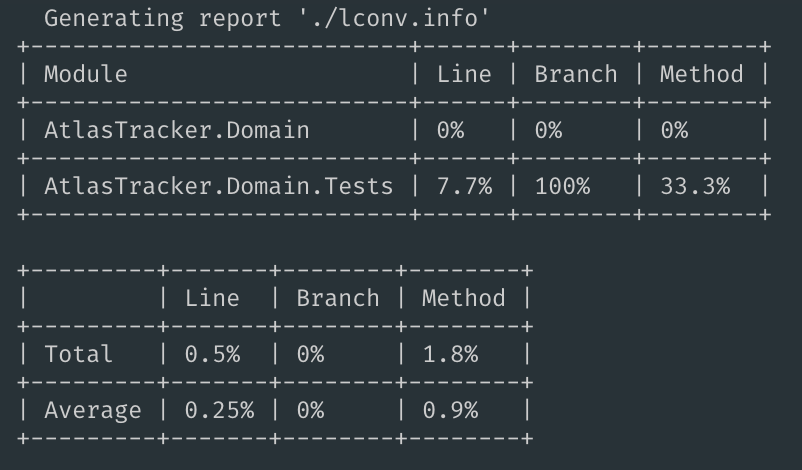
I have followed @tomap workaround and while I do get some coverage %, it only appears for the test project and not the actual class lib being tested.
 MagicTrevor
on 9 Mar 2019
MagicTrevor
on 9 Mar 2019
I'm using coverlet for 2 weeks now and everything was working fine. But today I'm getting 0% coverage report in some runs, other times it shows the right data. No package was updated nor installed.
 xolott
on 12 Mar 2019
xolott
on 12 Mar 2019
@xolott do you see any stdout logging from Coverlet?
tonerdo
on 12 Mar 2019
I don't @tornedo Just the usual output. It happened only 2 times today.

It usually takes 10s to run the test, but when coverlet report 0% it takes 20+ seconds.
xolott
on 12 Mar 2019
Ran into this problem myself using coverlet.msbuild 2.6.0. I was able to generate test coverage reports using @tomap's workaround.
 royshea
on 14 Mar 2019
royshea
on 14 Mar 2019
I'm having the same issue on the latest version. WebAPI project dotnet core 2.1, using vscode and the msbuild way.
It seems it cannot read/write some file in temp folder?
full logs:
Executing task: C:\Users\REDACTED\AppData\Local\Microsoft\dotnet\dotnet.exe test /p:CollectCoverage=true /p:CoverletOutputFormat=lcov /p:CoverletOutput=C:\Users\REDACTED\Documents\repo\testapp/lcov.info C:\Users\REDACTED\Documents\repo\testapp/testapp.Tests/testapp.Tests.csproj <

Build started, please wait...
Build completed.

Test run for C:\Users\REDACTED\Documents\repo\testapp\testapp.Tests\bin\Debug\netcoreapp2.1\testapp.Tests.dll(.NETCoreApp,Version=v2.1)
Microsoft (R) Test Execution Command Line Tool Version 15.9.0
Copyright (c) Microsoft Corporation.  All rights reserved.

Starting test execution, please wait...

Total tests: 1. Passed: 1. Failed: 0. Skipped: 0.
Test Run Successful.
Test execution time: 1.8602 Seconds

Calculating coverage result...
C:\Users\REDACTED\.nuget\packages\coverlet.msbuild\2.6.0\build\netstandard2.0\coverlet.msbuild.targets(21,5): warning : [coverlet] Hits file:'C:\Users\REDACTED\AppData\Local\Temp\testApp_ac32258b-fd4a-4bb4-824c-a79061e97c31' not found for module: 'testApp' [C:\Users\REDACTED\Documents\repo\testapp\testapp.Tests\testapp.Tests.csproj]
C:\Users\REDACTED\.nuget\packages\coverlet.msbuild\2.6.0\build\netstandard2.0\coverlet.msbuild.targets(21,5): warning : [coverlet] Hits file:'C:\Users\REDACTED\AppData\Local\Temp\testApp.Tests_ac32258b-fd4a-4bb4-824c-a79061e97c31' not found for module: 'testApp.Tests' [C:\Users\REDACTED\Documents\repo\testapp\testapp.Tests\testapp.Tests.csproj]
  Generating report 'C:\Users\REDACTED\Documents\repo\testapp\lcov.info'

+---------------+------+--------+--------+
| Module        | Line | Branch | Method |
+---------------+------+--------+--------+
| testApp       | 0%   | 0%     | 0%     |
+---------------+------+--------+--------+
| testApp.Tests | 0%   | 100%   | 0%     |
+---------------+------+--------+--------+

+---------+------+--------+--------+
|         | Line | Branch | Method |
+---------+------+--------+--------+
| Total   | 0%   | 0%     | 0%     |
+---------+------+--------+--------+
| Average | 0%   | 0%     | 0%     |
+---------+------+--------+--------+


Terminal will be reused by tasks, press any key to close it.
 TLaborde
on 29 Mar 2019
TLaborde
on 29 Mar 2019
@tonerdo I can't easily replicate that workaround given how our build system is configured (and what's where things usually fail, of course). However, I can confirm that it's the same /tmp file problem. My build log is filled with Hits file:'/opt/teamcity/temp/buildTmp/Security_7e5983e3-8478-4fed-ab9a-86056fa2452b' not found for module: 'Security' messages where it's reporting 0% coverage.
I think #329 is probably going to be the right way to fix it. Is there any way we can validate? If you publish a pre-release version of the dotnet tool, I'm happy to download it and give it a shot at scale.
queen-of-code
on 11 Apr 2019
I also encountered the same problem, my project also used moq.
 ymh199478
on 19 Apr 2019
ymh199478
on 19 Apr 2019
@queen-of-code thanks for offering to help. Our current blocker is finding the best way to integrate the data collector with the pipeline without drastically altering the user experience
tonerdo
on 1 May 2019
I was having a similar same issue - 0% coverage under MacOSX - but an upgrade of the xunit package from 2.3.1 to 2.4.1 fixed the problem (so using xunit 2.4.1, xunit.runner.visualstudio 2.4.1 and coverlet.msbuild 2.6.0), then running with:
dotnet test /p:CollectCoverage=true /p:Exclude="[xunit*]*"
 iainb123
on 2 May 2019
iainb123
on 2 May 2019
I also encountered the problem with missing Hits files and reporting 0% coverage and after cloning and poking around a bit i found 2 things which generated these warning.
- If a test project is referencing a project which is not used (no type/method is ever called in any test) the project is never loaded and the injected
UnloadModuleis never executed and no hits file is generated andCalculateCoveragewarns about the missing file and will report the module with 0% coverage.
It might be a good idea force load all modules which received the instrumentation to let them generated the hits file on unload.
- Running the the msbuild task
dotnet test /p:CollectCoverage=truewill result in #359. The problem here is that running the command will inject the instrumentation into the xunit assemblies but will NOT roll back these changes. This means that even if we rundotnet test /p:CollectCoverage=true /p:Exclude="[xunit*]*the xunit assemblies still contains the instrumentation and will try to generate hits files on unload. Because the file name of the hits file get's injected with the instrumentation it will try to write to the same file every time (which won't be deleted by coverlet because it's not part of the current run anymore) and is very likely to end up here here were we read 4 byte at a time from the current file and write rewrite the 4 byte we just read with new data which is so slow (Looking at this withProcMonI saw a 4Kb read followed by an 4 byte write for every iteration of the loop) that it got killed because it took more than 100ms.
 joemey
on 7 May 2019
joemey
on 7 May 2019
If a test project is referencing a project which is not used (no type/method is ever called in any test) the project is never loaded and the injected UnloadModule is never executed and no hits file is generated and CalculateCoverage warns about the missing file and will report the module with 0% coverage.
@joemey can you open a separate issue for this?
The problem here is that running the command will inject the instrumentation into the xunit assemblies but will NOT roll back these changes.
~Addressed by https://github.com/tonerdo/coverlet/pull/383~
Sorry misread, can you try with current master repo clone should be fixed in https://github.com/tonerdo/coverlet/pull/375? Build in release and use generated packages(adding packages folder as private feed for your project), let me know if need support.
 MarcoRossignoli
on 7 May 2019
MarcoRossignoli
on 7 May 2019
@joemey can you open a separate issue for this?
created issue #404
~Addressed by #383~
Sorry misread, can you try with current master repo clone should be fixed in #375? Build in release and use generated packages(adding packages folder as private feed for your project), let me know if need support.
this does indeed fix the issue and restores the original xunit files.
It's probably worth reworking/removing this block because rewriting the file like this is so slow.
At least there should be a check if the file exists because every error in the block above will set the failedToCreateNewHitsFile flag, this looks very fragile.
joemey
on 8 May 2019
FWIW I had the same or similar issue
Calculating coverage result...
/Users/bernhardrichter/.nuget/packages/coverlet.msbuild/2.6.0/build/netstandard2.0/coverlet.msbuild.targets(21,5): warning : [coverlet] Hits file:'/var/folders/6j/4hkjjhd50fg27s933nctz0480000gn/T/LightInject_ec1a3da6-cdb3-4ccb-91ab-89099645830a' not found for module: 'LightInject' [/Users/bernhardrichter/GitHub/LightInject/src/LightInject.Tests/LightInject.Tests.csproj]
Deleting the bin folder of the test project solved it. 😀
 seesharper
on 8 May 2019
seesharper
on 8 May 2019
FWIW I had the same or similar issue
Calculating coverage result...
/Users/bernhardrichter/.nuget/packages/coverlet.msbuild/2.6.0/build/netstandard2.0/coverlet.msbuild.targets(21,5): warning : [coverlet] Hits file:'/var/folders/6j/4hkjjhd50fg27s933nctz0480000gn/T/LightInject_ec1a3da6-cdb3-4ccb-91ab-89099645830a' not found for module: 'LightInject' [/Users/bernhardrichter/GitHub/LightInject/src/LightInject.Tests/LightInject.Tests.csproj]
Deleting the
binfolder of the test project solved it. 😀
I can confirm this fixed the issue! Good find @seesharper!
 emonhaider
on 9 May 2019
emonhaider
on 9 May 2019
@tonerdo I've downloaded the nightly build of the collector package (1.0.0-gbaad0091a5) and am running locally with the Microsoft.Sdk.Test version of 16.1.1. Interestingly, I can now locally repro my test modules that get 0% coverage, but -- _they do still get 0% coverage_. I have confirmed that my normally-working test modules do report coverage correctly using the collector.
queen-of-code
on 30 May 2019
I've downloaded the nightly build of the collector package
@queen-of-code thank's for testing our nightly...a the moment we've to fix "visual studio dropdown order" so to test with latest follow this step:
Go to https://www.myget.org/feed/coverlet-dev/package/nuget/coverlet.collector
Go to end of page and check "Last updated" column and chose the correct one
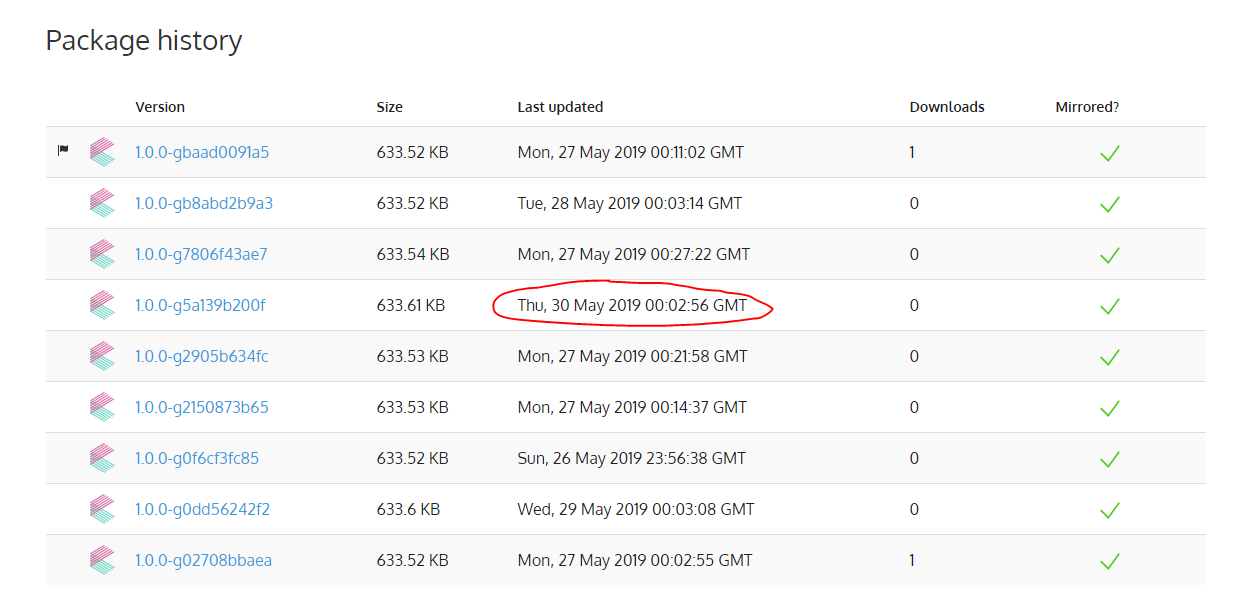
After collectors release we'll add a guide to nightly.
am running locally with the Microsoft.Sdk.Test version of 16.1.1.
@vagisha-nidhi is there a way to relate Microsoft.Sdk.Test version and core sdk used?
I have confirmed that my normally-working test modules do report coverage correctly using the collector.
Glad to hear that!
MarcoRossignoli
on 31 May 2019
@MarcoRossignoli We release Microsoft.Net.Test.Sdk with along with test platform https://www.nuget.org/packages/Microsoft.NET.Test.Sdk/. So this will have the same version as that of test platform. A specific version of test platform is then inserted into dotnet cli for use by .NET core command line tools for test suite.
Microsoft.net.test.sdk has dependency on Microsoft.TestPlatform.TestHost (which executes the test) https://www.nuget.org/packages/Microsoft.TestPlatform.TestHost/ This dependency is brought in my nuget while running tests in VS(the net test sdk version specified)
 vagisha-nidhi
on 31 May 2019
vagisha-nidhi
on 31 May 2019
@vagisha-nidhi thank's for explanation.
MarcoRossignoli
on 31 May 2019
We released first version of collector https://github.com/tonerdo/coverlet#vstest-integration this should fix 0% coverage issue.
Let us know.
MarcoRossignoli
on 7 Jun 2019
@MarcoRossignoli I'm still seeing 0% coverage on my project (see also #342) with the new VSTest integration package.
 jmezach
on 9 Jun 2019
jmezach
on 9 Jun 2019
@MarcoRossignoli To pick up inproc datacollector, there had to be changes in test platform in https://github.com/microsoft/vstest/pull/2020 specifying inproc collector dll name(which was done after finalizing the coverlet PR). This has not gone in 2.2.300 which might be the reason that inproc datacollector is not picked up.
vagisha-nidhi
on 9 Jun 2019
@queen-of-code @jmezach from https://github.com/tonerdo/coverlet/issues/110#issuecomment-500202344 it looks like we'll need to wait for the next release of the dotnet sdk so that https://github.com/tonerdo/coverlet/issues/110#issuecomment-463268787 doesn't happen anymore
tonerdo
on 9 Jun 2019
I'm also experiencing the 0% issue using the latest coverlet releases and .NET Code SDK 2.2.300
https://github.com/tonerdo/coverlet/issues/110#issuecomment-434436390 pointed me to the cause. I'm using a Socket to mock a Telnet server. Somehow this breaks coverlet.
I created https://github.com/prayzzz/coverlet-110-repro to reproduce the issue.
Edit:
I just noticed an exception of Jetbrains Rider when executing tests. It's caused by not handling client disconnects properly in the Telnet Server. Fixing this, solved the 0% issue.
But it's hard to figure out, because any dotnet test command runs without any errors.
 prayzzz
on 9 Jun 2019
prayzzz
on 9 Jun 2019
thank's @vagisha-nidhi for the info...so for now VSTests runs only Outproc Datacollector?
MarcoRossignoli
on 9 Jun 2019
@MarcoRossignoli Yes. Inproc will be picked up only when the bits contains these changes https://github.com/microsoft/vstest/pull/2020
I have released vstest with this, but this will flow into dotnet sdk 2.2.4 only.
vagisha-nidhi
on 10 Jun 2019
Out of curiosity @vagisha-nidhi are these changes in the dotnet 3 preview sdk yet?
queen-of-code
on 20 Jun 2019
Just fyi... In my case, the problema was when run coverlet into a docker and use NLog. I was getting 0% and no error was raised.
In my tests I added this line LogManager.Configuration = new NLog.Config.LoggingConfiguration(); and now it is working.
 dlplenin
on 28 Jun 2019
dlplenin
on 28 Jun 2019
Downgrading coverlet.msbuild version from 2.6.3 to 2.0.0 fixed the issue for me. Is there any better workaround/fix for this issue?
 NazmiAltun
on 8 Jul 2019
NazmiAltun
on 8 Jul 2019
see https://github.com/tonerdo/coverlet/issues/110#issuecomment-500351644
@NazmiAltun we need to wait for sdk 2.2.4 to use new collectors that should solve this issue.
MarcoRossignoli
on 8 Jul 2019
@MarcoRossignoli oops, missed that comment. Thanks, i will be following it.
NazmiAltun
on 8 Jul 2019
Hello all, on the same codebase I get 0% coverage when running all tests, but if I run only selected tests (a subset of the entire test project) I start getting coverage readings. I was able to isolate the test that seems to cause the whole set to zero-out the coverage reading. I read comments above about having to wait for sdk 2.2.4, but, are there known code patterns that would cause coverlet not to provide coverage readings? Is there a way to have coverlet to produce additional logging info that could be use to plan a workaround? thanks.
 ghost
on 13 Jul 2019
ghost
on 13 Jul 2019
Continuing to get more info on the 0% coverage, I'm running coverlet.console on the debugger, with references to the coverlet.core project. I added traces to ModuleTrackerTemplate class and I can see calls to RecordHit and Registering the Unload Events. However, the UnloadModule method doesn't seem to be called for the tests for which I get 0% coverage. The only other thing I see is a lonely message in the Application Output window that reads:
EventSource Error: ERROR: Exception during construction of EventSource System.Collections.Concurrent.ConcurrentCollectionsEventSource: 1
without any additional context. Does this message rings a bell to anybody as to whether or not may be related to an exception that would prevent the UnloadModule from running?
ghost
on 20 Jul 2019
I have released vstest with this, but this will flow into dotnet sdk 2.2.4 only.
@vagisha-nidhi can you confirm that last release of sdk 2.2.401(runtime 2.2.6) inject inproc data collector?
MarcoRossignoli
on 6 Sep 2019
I can confirm that at least some of my issues were FIXED in this combo of
releases. Thank you all for your effort here!
On Fri, Sep 6, 2019 at 6:48 AM Marco Rossignoli notifications@github.com
wrote:
I have released vstest with this, but this will flow into dotnet sdk 2.2.4
only.@vagisha-nidhi https://github.com/vagisha-nidhi can you confirm that
last release of sdk 2.2.401(runtime 2.2.6) inject inproc data collector?—
You are receiving this because you were mentioned.
Reply to this email directly, view it on GitHub
https://github.com/tonerdo/coverlet/issues/110?email_source=notifications&email_token=AEIOSMKLW6BJEFHIIXL2AG3QIJNSNA5CNFSM4FCAAE2KYY3PNVWWK3TUL52HS4DFVREXG43VMVBW63LNMVXHJKTDN5WW2ZLOORPWSZGOD6C4VJA#issuecomment-528861860,
or mute the thread
https://github.com/notifications/unsubscribe-auth/AEIOSMJYPTER34BZUKBBH5DQIJNSNANCNFSM4FCAAE2A
.
queen-of-code
on 6 Sep 2019
I can confirm that at least some of my issues were FIXED in this combo
Glad to hear thank's @queen-of-code for info.
I'll update docs to reflect this.
I'll close this issue after @vagisha-nidhi double confirm!
MarcoRossignoli
on 6 Sep 2019
I am having the same problem.
Code covarage is 0%
without any error or clue what is wrong.
using dotnet core version 2.2.402 ,coverlet version 2.6.3,
any way to get a clue what is wrong?
Test Run Successful.
Total tests: 510
     Passed: 510
 Total time: 11.9588 Seconds

Calculating coverage result...
  Generating report 'C:\Users\Amir\source\repos\tracking-api\tests\tests\coverage.json'

+-----------------------+------+--------+--------+
| Module                | Line | Branch | Method |
+-----------------------+------+--------+--------+
| TrackingApi.Apps.Core | 0%   | 0%     | 0%     |
+-----------------------+------+--------+--------+
| TrackingApi.Common    | 0%   | 0%     | 0%     |
+-----------------------+------+--------+--------+
| TrackingApi.Contracts | 0%   | 0%     | 0%     |
+-----------------------+------+--------+--------+
| TrackingApi.Domains   | 0%   | 0%     | 0%     |
+-----------------------+------+--------+--------+
| TrackingApi.Web       | 0%   | 0%     | 0%     |
+-----------------------+------+--------+--------+

+---------+------+--------+--------+
|         | Line | Branch | Method |
+---------+------+--------+--------+
| Total   | 0%   | 0%     | 0%     |
+---------+------+--------+--------+
| Average | 0%   | 0%     | 0%     |
+---------+------+--------+--------+
 AmirSasson
on 11 Sep 2019
AmirSasson
on 11 Sep 2019
using dotnet core version 2.2.402 ,coverlet version 2.6.3,
@AmirSasson you're using msbuild integration...you should try collectors to understand if this is the correct issue you're experiencing https://github.com/tonerdo/coverlet/blob/master/Documentation/VSTestIntegration.md
MarcoRossignoli
on 11 Sep 2019
hi @MarcoRossignoli , i tried the vstest integration using the collectors.
running dotnet test --collect:"XPlat Code Coverage"
its still giving me zero coverage.
does it matter if use xunit and not "mstest"?
(btw i was using msbuild integration cause it has "out of the box" minimum threshold that i have enforced in our CI).
i wonder if there is an error that i can see to understand what is wrong.. cause obviously everything worked before i changed some of the tests.
AmirSasson
on 12 Sep 2019
@AmirSasson you mean dotnet vstest --collect:"XPlat Code Coverage"?
And if you use vstest you need to publish before https://github.com/tonerdo/coverlet/blob/master/Documentation/VSTestIntegration.md#coverlet-integration-with-vstest
MarcoRossignoli
on 12 Sep 2019
hi @MarcoRossignoli GOOD NEWS
I have managed to solve this.
apparently i had a running thread that probably was still running when the code coverage was calculated.
and now, that i wait for it in the Test Fixture Dispose method, all starting to work out!
i still dont understand how the average is so low. (but this is another problem)
thanks for your help.
if someone experience the same, i would recommend to double check if all resources are cleaned in the end of the tests. (especially when using Fixture collection).
Test Run Successful.
Total tests: 510
     Passed: 510
 Total time: 20.7397 Seconds

Calculating coverage result...
  Generating report 'C:\Users\Amir\source\repos\tracking-api\tests\tests\coverage.json'

+-----------------------+--------+--------+--------+
| Module                | Line   | Branch | Method |
+-----------------------+--------+--------+--------+
| TrackingApi.Apps.Core | 100%   | 87.5%  | 100%   |
+-----------------------+--------+--------+--------+
| TrackingApi.Common    | 91.57% | 86.45% | 94.44% |
+-----------------------+--------+--------+--------+
| TrackingApi.Contracts | 99.15% | 76.27% | 97.16% |
+-----------------------+--------+--------+--------+
| TrackingApi.Domains   | 94.32% | 85.64% | 90.97% |
+-----------------------+--------+--------+--------+
| TrackingApi.Web       | 91.88% | 66.92% | 85.71% |
+-----------------------+--------+--------+--------+

+---------+---------+---------+---------+
|         | Line    | Branch  | Method  |
+---------+---------+---------+---------+
| Total   | 94.73%  | 81.99%  | 92.74%  |
+---------+---------+---------+---------+
| Average | 18.946% | 16.398% | 18.548% |
+---------+---------+---------+---------+
@MarcoRossignoli I just finished configuring a GH Actions workflow. All is well except my 100% coverage solution is reported as 0% running under GH Actions. The same project running on Travis (xenial) and local (Windows) is reported as 100%.
I've tried 2.2.108, 204, 401, 402 - along with 2.6.3. I tried all the workarounds listed on this thread, no luck. If you're aware of any other fixes I may try please let me know.
name: CI

on: [push]

jobs:
  build:
    runs-on: ubuntu-latest

    steps:
    - uses: actions/checkout@v1

    - name: Runtime
      uses: actions/setup-dotnet@v1
      with:
        dotnet-version: 2.2.204

    - name: Tools
      run: dotnet tool install --global dotnet-reportgenerator-globaltool

    - name: Build
      run: dotnet build

    - name: Test
      run: dotnet test /p:CollectCoverage=true /p:CoverletOutputFormat=OpenCover /p:Exclude=\"[xunit.*]*,[*]*.Migrations.*\"

    - name: Report
      run: |
        export DOTNET_ROOT=/opt/hostedtoolcache/dncs/2.2.204/x64
        export MSBuildSDKsPath=$DOTNET_ROOT/sdk/$(${DOTNET_ROOT}/dotnet --version)/Sdks
        export PATH="$PATH:$HOME/.dotnet/tools"
        ~/.dotnet/tools/reportgenerator "-reports:*Tests/coverage.opencover.xml" "-targetdir:coverage-reports"

    - name: Artifacts
      uses: actions/upload-artifact@master
      with:
        name: Coverage
        path: coverage-reports
 Rjae
on 14 Sep 2019
Rjae
on 14 Sep 2019
@Rjae you should try with collectors and version v2.2.401 or newer sdk, the issue could be related to vs test platform that kill process before hit files are written and could be dependant on ci machine load.
MarcoRossignoli
on 14 Sep 2019
Thanks @MarcoRossignoli I'm giving collectors a shot right now. Getting
$ dotnet test --settings <absolute path to runsettings>
Data collection : Could not find data collector 'XPlat code coverage'
My runsettings file:
<?xml version="1.0" encoding="utf-8" ?>
<RunSettings>
  <DataCollectionRunSettings>
    <DataCollectors>
      <DataCollector friendlyName="XPlat code coverage">
        <Configuration>
          <Format>opencover</Format>
          <Exclude>[xunit.*]*,[*]*.Migrations.*</Exclude>
          <ExcludeByAttribute>Obsolete,GeneratedCodeAttribute,CompilerGeneratedAttribute</ExcludeByAttribute>
          <SingleHit>false</SingleHit>
          <UseSourceLink>true</UseSourceLink>
        </Configuration>
      </DataCollector>
    </DataCollectors>
  </DataCollectionRunSettings>
</RunSettings>
I've followed the doc - but must be missing something. I'll keep digging and update thread here.
Rjae
on 16 Sep 2019
Force rebuild was necessary, so locally all good. Will use in GH workflow now and update thread with results.
Rjae
on 16 Sep 2019
Sadly, switching to collector did not resolve issue. Again, works locally (both collector and msbuild), on Travis, and on Jenkins.
Rjae
on 16 Sep 2019
@Rjae can you try to enable coverlet logging? msbuild collectors
MarcoRossignoli
on 16 Sep 2019
I'm going to close this issue as resolved by in-proc collectors.
If case of issue you can enable collectors logging through https://github.com/tonerdo/coverlet/blob/master/Documentation/Troubleshooting.md#collectors-integration
MarcoRossignoli
on 23 Sep 2019
@MarcoRossignoli I finally had time to enable logging (see attached). Not knowing coverlet code yet, I mostly skimmed through. I did notice many socket exceptions in host log. Please let me know if there is something else I may try.
Logs.zip
Rjae
on 28 Sep 2019
@Rjae can you open new issue(I'm oof at the moment) with copy paste your messages from this thread so we can go on there on clean one.
MarcoRossignoli
on 28 Sep 2019
Just curious, is this even necessary?
<IncludeAssets>runtime; build; native; contentfiles; analyzers</IncludeAssets>
<PrivateAssets>all</PrivateAssets>
 andrei-m-code
on 6 Dec 2019
andrei-m-code
on 6 Dec 2019
Needed to avoid that msbuild harness package coverlet.msbuild(also props,targets) flow to project that uses it https://docs.microsoft.com/en-us/nuget/consume-packages/package-references-in-project-files#controlling-dependency-assets
MarcoRossignoli
on 6 Dec 2019
Related issues
 obtuse-whoosh
·
6Comments
obtuse-whoosh
·
6Comments
 coderpatros
·
3Comments
coderpatros
·
3Comments
 chaoticsoftware
·
7Comments
chaoticsoftware
·
7Comments
 spboyer
·
3Comments
spboyer
·
3Comments
 IGx89
·
4Comments
IGx89
·
4Comments
Most helpful comment
I can confirm that at least some of my issues were FIXED in this combo of
releases. Thank you all for your effort here!
On Fri, Sep 6, 2019 at 6:48 AM Marco Rossignoli notifications@github.com
wrote: