Covalent: Design Pattern - Data Table: Filtering
More robust built-in filtering - Starts with, ends with, regular expressions, match case ... list of values and let user choose
 ishatd
All 10 comments
Got examples from other products or from the web we should reference?
 kyleledbetter
on 12 Apr 2017
kyleledbetter
on 12 Apr 2017
Devexpress team made an excellent work here: Devexpress DataGrid Demo
 akhedrane
on 12 Apr 2017
akhedrane
on 12 Apr 2017
Great example. Thx @akhedrane
kyleledbetter
on 13 Apr 2017
Kendo ui has a great example of this and several other features mentioned. They're be some design transition to material but much would still apply http://www.telerik.com/kendo-ui/grid

kyleledbetter
on 25 Apr 2017
This screen capture shows multi-column and global filtering as currently implemented in Studio Lite using the PrimeNg data table.
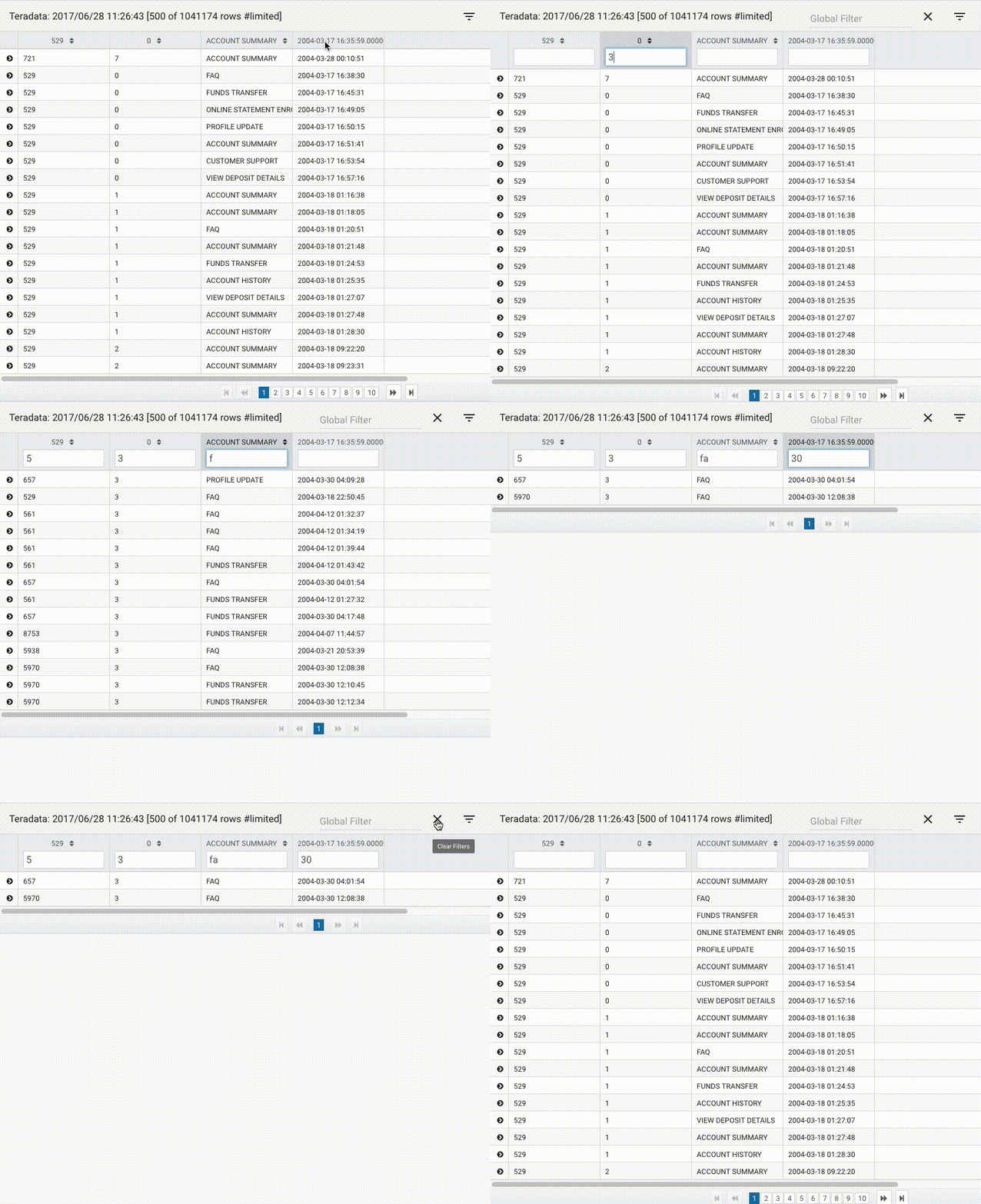
- Clicking the filter button shows or hides the global filter and the individual column filters
- Hiding the filters also disables filtering
- Showing filters re-enables filtering and restores any previously entered filter values
- Clicking the Clear Filters button (X) clears both global and column filters
- Filter events are emitted automatically after entering text and following a short pause (e.g. 500ms) to allow multiple characters to be entered before triggering filtering
The advantage to this approach is that the filter values remain visible as long as the filters are not hidden. From a UX perspective, being able to see all the filter values at a glance is very useful.
 jdundondev
on 5 Jul 2017
jdundondev
on 5 Jul 2017
Thinking about the close relationship between filtering and searching, I think that combining the two into a unified interface would be ideal.
- Searching locates and highlights values in the table while retaining all rows
- Filtering reduces the rows shown to only those matching the filter criteria
If we combine the two, filtering becomes just a toggle option of search (show only matching rows).
- Values matching the search criteria are highlighted in the table
- "Show only matching rows" can be toggled on or off to add or remove filtering
For example, reworking the current filter implementation shown above:

- The search button shows/hides the search/filter fields
- The filter button toggles filtering on and off
jdundondev
on 5 Jul 2017
That's a great example thanks
kyleledbetter
on 5 Jul 2017
Support for different match modes is also important (e.g. contains, startsWith, endsWith, equals, regex).
This could be added as a drop down selector.
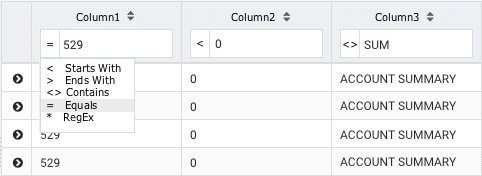
Again the UX is enhanced by showing the match mode in a concise way (<, >, <>, =, *)
jdundondev
on 5 Jul 2017
The event emitted for search/filter could be something like
{
filter: true,
globalSearch: {value: "a[bcd]e", matchMode: "regex"},
columnSearch: [
{name: "column1", value: "44", matchMode: "contains"},
{name: "column2", value: "ab", matchMode: "startsWith"},
{name: "column3", value: "55", matchMode: "equals"}
]
}
jdundondev
on 5 Jul 2017
Hi, will this be part of release 2.0.0?
 iamjoyce
on 10 Oct 2018
iamjoyce
on 10 Oct 2018
Related issues
 emoralesb05
·
5Comments
emoralesb05
·
5Comments
 trkbrkr2000
·
5Comments
trkbrkr2000
·
5Comments
 victorboissiere
·
5Comments
victorboissiere
·
5Comments
 dbettini
·
4Comments
dbettini
·
4Comments
 asaph26
·
3Comments
asaph26
·
3Comments
Most helpful comment
Devexpress team made an excellent work here: Devexpress DataGrid Demo