Covalent: [td-dynamic-forms] [Question] [Usage example] - How do you retrieve data from dynamic form?
Hey,
Could someone give me an idea how to properly retrieve data from <td-dynamic-forms> component?
What I tried so far is using a @ViewChild to get FormGroup:
@ViewChild(TdDynamicFormsComponent) form: TdDynamicFormsComponent;
and then I was subscribing to valueChanges.
  ngAfterViewInit() {
    this.form.form.valueChanges.subscribe( (val) => {
      this.change.emit(val);
    });
  }
it works, until I change the property [elements] to different value:
<td-dynamic-forms [elements]="newArrayOfElements"> </td-dynamic-forms>
then I get an error:
There is no FormControl instance attached to form control element with name: xxx
Any suggestions on that?
 filipows
All 10 comments
You only need to do get the value property out of it which will have all the values of the form.
this.form.value
Which you can do also with a local template variable (#dynamicForm)
 emoralesb05
on 3 Apr 2017
emoralesb05
on 3 Apr 2017
Thank you @emoralesb05 ! :+1:
this.form.value helped me a lot and just works.
Btw. what is the right way of watching for changes of the form values?
What I already did is below and it seems that works, but I'm not sure it's the right approach.
ngAfterViewInit() {
this.form.form.valueChanges.subscribe( () => {
console.log(this.form.val);
});
}
Any thoughts on that?
filipows
on 4 Apr 2017
非常感觉,解决问题了。
 woddp
on 6 May 2017
woddp
on 6 May 2017
This is still pretty confusing. Could the documentation be updated with typescript to actually access and display the values (following the same standard as material.angular.io?)
 natejgardner
on 19 Aug 2017
natejgardner
on 19 Aug 2017
Docs are already updated just not released https://github.com/Teradata/covalent/pull/787
 kyleledbetter
on 19 Aug 2017
kyleledbetter
on 19 Aug 2017
I looked at the new docs, but they are still lacking an explanation of how to actually access the data. Could they be updated with a submit button and display of the current values of the form data, and with complete typescript rather than just the json object?
natejgardner
on 21 Aug 2017
Hi can you create a plunker with your code so we can help on the code directly?
kyleledbetter
on 22 Aug 2017
I got some support over email that solved my problem. Here's the code that's needed:
<td-dynamic-forms #myForm></td-dynamic-forms>
@ViewChild('myForm')
_myForm: TdDynamicFormsComponent

printFormData() {
    console.log(this._myForm.value);
    }
It would be helpful in the docs if the code could be extended with something like this:
form: ITDynamicElementConfig[] = [{
    name: "inputField",
    type: TdDynamicElement.Input,
    label: "Input Field",
    required: true
}]

@ViewChild('myForm')
_myForm: TdDynamicFormsComponent

currentValue: string;

submit() {
    if(this._myForm) {
    let this.currentValue = this._myForm.value.inputField;
    }}
<td-dynamic-forms [elements]="form" #myForm></td-dynamic-forms>
<button (click)='submit()'>SUBMIT</button>
<h3>Your inputField value is:</h3> {{this.currentValue}}
This way developers can easily see the intended way of accessing data in the documentation. Right now, there's a submit button but it's not hooked up to anything. The creation of forms is intuitive, but accessing them isn't very straightforward at all.
natejgardner
on 23 Aug 2017
Required
Min value: {{element.min}}
Max value: {{element.max}}
Min length value: {{element.minLength}}
Max length value: {{element.minLength}}
how do I get the form values from the multiple forms generated, Now I can only get the first form's value only. I want to get even if they are 10 forms dynamically generated
 jayjieh
on 6 Mar 2018
jayjieh
on 6 Mar 2018
@jayjieh I use the local variable to get all the form values, in your case submit the local variable to the typescript file and use paramform.value (it will have all the form values). Screenshot of the post values and examples below with a link to the source files...
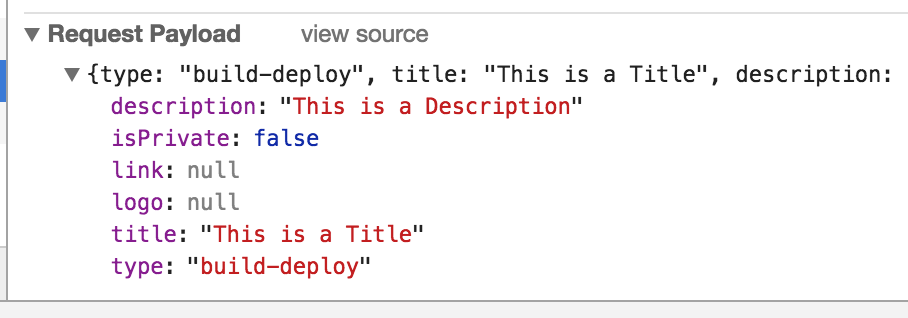
html
    <td-dynamic-forms [elements]="form.elements" #dynamicForm>
        <ng-template let-element ngFor [ngForOf]="form.elements">
          <ng-template let-control="control" [tdDynamicFormsError]="element.name">
          <span *ngIf="control.touched || !control.pristine">
            <span *ngIf="control.hasError('required')">Required</span>
            <span *ngIf="control.hasError('min')">Min value: {{element.min}}</span>
            <span *ngIf="control.hasError('max')">Max value: {{element.max}}</span>
            <span *ngIf="control.hasError('minlength')">Min length value: {{element.minLength}}</span>
            <span *ngIf="control.hasError('maxlength')">Max length value: {{element.minLength}}</span>
          </span>
          </ng-template>
        </ng-template>
      </td-dynamic-forms>
Typescript
submit(form: AbstractControl): void {
    this.environmentService
      .add(form.value)
      .subscribe(
        (environment: Environment) => this.router.navigate(['/environments', environment.id, 'view']),
        (error) => this.snackBar.open(error.message, null, { duration: 5000 })
      );
  }
 eddiejaoude
on 2 May 2018
eddiejaoude
on 2 May 2018
Related issues
 iceman3000
·
4Comments
iceman3000
·
4Comments
 victorboissiere
·
5Comments
victorboissiere
·
5Comments
 ineselmufti
·
4Comments
ineselmufti
·
4Comments
 mailok
·
3Comments
mailok
·
3Comments
 asaph26
·
3Comments
asaph26
·
3Comments
Most helpful comment
I got some support over email that solved my problem. Here's the code that's needed:
It would be helpful in the docs if the code could be extended with something like this:
This way developers can easily see the intended way of accessing data in the documentation. Right now, there's a submit button but it's not hooked up to anything. The creation of forms is intuitive, but accessing them isn't very straightforward at all.