Courseplay: Error loading save with Courseplay v6.02.00075
Not really sure what the issue is; tried loading up a save with the latest version of Courseplay on the Flint Hills map. I had previously saved a course for my Case Magnum 380 to do Anhydrous application on a field. Saved the game, left, came back later and can't load the save unless I disable Courseplay or delete the courses from the "CoursePlay_Courses" folder. It was also giving me the same error with a sprayer I was using for the same field. But I had deleted that vehicle from my vehicles.xml to see if it would fix anything. It did, temporarily. But I know the problem will start up again if I create and save a course for that sprayer. I think it may have something to do with the saved courses? I'm not really sure.
I think this is where the main issue is:
_2020-11-02 13:39 :11 [info lp1229] Magnum 380: Exception, can't init nil, nil
2020-11-02 13:39 Error: Running LUA method 'loadSharedI3DFileFinished'.
2020-11-02 13:39 C:/Users/waxto/Documents/My Games/FarmingSimulator2019/mods/FS19_Courseplay/settings.lua:27: attempt to call method 'delete' (a nil value)_
Here is the full log:
log.txt
 MrWaxton
All 23 comments
Sounds a bit like a mod Issue, not sure.
 Tensuko
on 3 Nov 2020
Tensuko
on 3 Nov 2020
Same thing is happening to my save on New Woodshire. I found that if I don't have nested folders for courses, the save will load fine.
 minxkin
on 3 Nov 2020
minxkin
on 3 Nov 2020
So it only happens if the course is inside of a folder ?
Tensuko
on 3 Nov 2020
yep. It seems that if the courseManager xml file has "parent" > 0, the save won't load.
minxkin
on 3 Nov 2020
Had the same issue, purging the courses for that map let the save load. Much appreciated @minxkin
 enderwiggin07
on 3 Nov 2020
enderwiggin07
on 3 Nov 2020
The real issue is:
2020-11-02 13:39 LUA call stack:
2020-11-02 13:39   =C:/Users/waxto/Documents/My Games/FarmingSimulator2019/mods/FS19_Courseplay/settings.lua (32) : printCallstack
2020-11-02 13:39   =C:/Users/waxto/Documents/My Games/FarmingSimulator2019/mods/FS19_Courseplay/course_management.lua (1263) : __index
2020-11-02 13:39   =C:/Users/waxto/Documents/My Games/FarmingSimulator2019/mods/FS19_Courseplay/settings.lua (614) : getMeOrBestFit
2020-11-02 13:39   =C:/Users/waxto/Documents/My Games/FarmingSimulator2019/mods/FS19_Courseplay/settings.lua (651) : setCourses
2020-11-02 13:39   =C:/Users/waxto/Documents/My Games/FarmingSimulator2019/mods/FS19_Courseplay/course_management.lua (1364) : reloadCourses
2020-11-02 13:39   =C:/Users/waxto/Documents/My Games/FarmingSimulator2019/mods/FS19_Courseplay/hud.lua (1957) : reloadVehicleCourses
2020-11-02 13:39   =C:/Users/waxto/Documents/My Games/FarmingSimulator2019/mods/FS19_Courseplay/hud.lua (2298) : updateCourseList
2020-11-02 13:39   =C:/Users/waxto/Documents/My Games/FarmingSimulator2019/mods/FS19_Courseplay/AIDriver.lua (218) : setAIDriverContent
2020-11-02 13:39   =C:/Users/waxto/Documents/My Games/FarmingSimulator2019/mods/FS19_Courseplay/AIDriver.lua (174) : setHudContent
2020-11-02 13:39   =C:/Users/waxto/Documents/My Games/FarmingSimulator2019/mods/FS19_Courseplay/CpObject.lua (43) : init
2020-11-02 13:39   =[C] (4294967295)
2020-11-02 13:39   =C:/Users/waxto/Documents/My Games/FarmingSimulator2019/mods/FS19_Courseplay/settings.lua (32) : xpcall
2020-11-02 13:39   =C:/Users/waxto/Documents/My Games/FarmingSimulator2019/mods/FS19_Courseplay/base.lua (570)
2020-11-02 13:39   dataS/scripts/vehicles/SpecializationUtil.lua (30)
2020-11-02 13:39   dataS/scripts/vehicles/Vehicle.lua (615) : raiseEvent
2020-11-02 13:39   =C:/Users/waxto/Documents/My Games/FarmingSimulator2019/mods/FS19_Courseplay/register.lua (133) : superFunc
2020-11-02 13:39   =C:/Users/waxto/Documents/My Games/FarmingSimulator2019/mods/FS19_UnitConvertLite/scripts/Vehicles.lua (71) : savedFunc
2020-11-02 13:39   dataS/scripts/i3d/I3DManager.lua (118) : asyncCallbackFunction
2020-11-02 13:39 :01 [info lp902] Steiger 620: Exception, can't init nil, nil
 pvaiko
on 3 Nov 2020
pvaiko
on 3 Nov 2020
(for @Satissis) :)
pvaiko
on 3 Nov 2020
Okay guys we need some help here.
Pls all do the same that caused the Issue and when that Issue happens, post you full logfile here, just like @MrWaxton did (attach, not post the text).
What else you could try:
Use CP 00074, just to see if there went something wrong with latest release.
Tensuko
on 3 Nov 2020
Here is my log for v6.02.00075. I'll try 74 later.
log.txt
minxkin
on 3 Nov 2020
I could not replicate the issue in 74. Log attached for 74 if helpful.
log.txt
minxkin
on 4 Nov 2020
In both of your logs is already a Callstack with GlobalCompany....
What GC productions do you have in use ?
Tensuko
on 4 Nov 2020
I removed the GlobalCompany mods and 75 loaded just fine.
minxkin
on 4 Nov 2020
Wich GC mods ?
Is it all ? is it a conflict with a specific one ?
We need to know that in detail.
As I got GC for myself (no productions placed yet) I need exact steps to reproduce, if that got something to do with GC in general, or if you had one production that caused that Issue.
Tensuko
on 4 Nov 2020
I didn't have any productions either. I'll need some time to do some testing, which I should be able to do this evening (EST).
minxkin
on 4 Nov 2020
Version 75:
Loaded Ravenport with only courseplay enabled. Made a course inside folder, and saved the game. I can load into the save but once in a vehicle courseplay manager doesn't open up, then Esc key quits working, and soon all keyboard controls are broken and have to force exit game.
Version 74:
First tried loading the broken save with version 74, same issue as above. Next I deleted the course xml files and once again saved a course in a folder. Saved the game and loaded back in, no errors or issues.
MapUS.zip
enderwiggin07
on 5 Nov 2020
@enderwiggin07 that test is no help, look in your log and see whats going up there with Errors...
You got a double CP in your mods folder:
Error: Invalid mod name 'FS19_Courseplay(1)'! Characters allowed: (_, A-Z, a-z, 0-9). The first character must not be a digit
and only 'not loading' a mod into the game won't help anything, REMOVE from mods folder!
And never ever make a backup inside your mods folder!
We see several different Errors happening here, none of it gives a clear way to reproduce the problem...
Tensuko
on 5 Nov 2020
@Tensuko this should be a clean test, sorry for the mixup earlier, apparently I had an extra courseplay in there since september lol
log.txt
enderwiggin07
on 5 Nov 2020
It looks to me in the coursemanager xml, it isn't making an entry for the folder.
Here's how a good one looks:
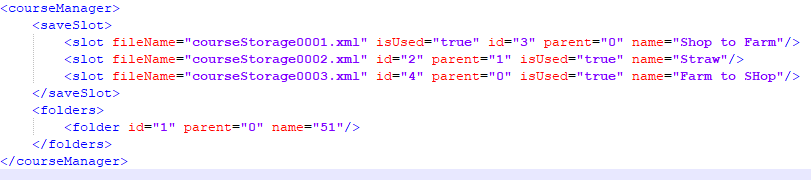
And how one made in 75 looks:

To be curious I manually pasted in the folder entry to the broken save's coursemanager xml, and it eliminated the bug.
enderwiggin07
on 5 Nov 2020
I wonder if this order got something to do with it ?!

@Satissis could this be a problem ?
Tensuko
on 5 Nov 2020
No the problem is the parent="1" where there is no parent at all.
pvaiko
on 5 Nov 2020
Folders won't get saved, but Course will be changed if moved into a folder (wich is not saved into the .xml....)
other then that, even with 'corrupted' course I had no Issue loading a savegame or anything, also all the Errors I had no problem with my complete modded savegame.
Even the 'corrupted' course I was able to load...
Tensuko
on 5 Nov 2020
Everything working properly with version 76!
enderwiggin07
on 5 Nov 2020
So this is fixed too, not sure about the LUA Error from initial post but since all here is about course and save not loading, I take it as fixed.
Tensuko
on 6 Nov 2020
Related issues
 BostonJohnny1226
·
4Comments
BostonJohnny1226
·
4Comments
 txmazing
·
4Comments
txmazing
·
4Comments
 rgoe
·
3Comments
rgoe
·
3Comments
 fischbesuch
·
4Comments
fischbesuch
·
4Comments
 hoefti10
·
5Comments
hoefti10
·
5Comments
Most helpful comment
yep. It seems that if the courseManager xml file has "parent" > 0, the save won't load.