Courseplay: Hide the Hud but not the mouse
I'm posting this message for the developers of Course.
I am disabled and have motor problems.
To play FS19 I use a ps4 controller plugged into my computer like this
https://www.youtube.com/watch?v=Gv9RkBC_EVk
I play with my chin because my hands are not working.
To be able to use my onscreen virtual keyboard I leave courseplay open because I have to use my mouse cursor to press the keys on the onscreen keyboard.
Only a few times do I not use court play but I have to leave it on so that my computer mouse is visible.
My question is: Would it be to develop a system to hide cour play while having the mouse cursor visible and usable for my virtual keyboard?
Thank you
 Step72
All 9 comments
Hi Step,
sadly our Mousecurser use is a real mess, we have a very old system for it.
But I did try something out for you.
There is a mod called AutoDrive. AutoDrive can hide the HUD and with e.g. middle Mouse Button (that is the standart config) you can have a mouse on screen without any HUD open (no AD and no CP HUD).
You can download it from here:
https://github.com/Stephan-S/FS19_AutoDrive
Direct downloadlink from GitHub:
https://host-my-bits.com/cdn/files/1/FS19_AutoDrive.zip
I hope this will help you to enjoy play FS19 more easy :)
We might try to make mosue work better with CP too, but right now we have not much time for this, so I hope the soultion with AD helps you for now :)
 Tensuko
on 24 Sep 2020
Tensuko
on 24 Sep 2020
Unfortunately that is not possible.
If courseplay is not enabled (Closed from Cross HUB) and there is just AutoDrive enabled, the mouse cursor is not visible and usable.
Do you think that one day we will be able to see and use the mouse cursor with the Courseplay HUB shut down?
Step72
on 26 Sep 2020
Hmm but I had CP and AD active, closed both HUD and then pressed middle mouse button and mouse was there.
I will check CP mouse later maybe I can find abtweak for it.
Tensuko
on 26 Sep 2020
I think I found it. In the keyboard settings I set to show / hide the keyboard right click.

On the other hand, I have deactivated the display of the Courseplay Hub in the settings, but how do I display it now?
Step72
on 26 Sep 2020
I found :)

Step72
on 26 Sep 2020
@Step72 if you still need any help or there is something that could help you, feel free to tell us and we will have a look :)
 schwiti6190
on 28 Sep 2020
schwiti6190
on 28 Sep 2020
Ok thank you Tensuko
Step72
on 29 Sep 2020
@Step72
did you find a working solution for you now ?
I did try some things in CP Code to just get the Mouse to show up, but sadly I had no success yet...
Tensuko
on 16 Oct 2020
Hello Tensuko
I managed to get my mouse to appear with courseplay and autodrive by setting as below
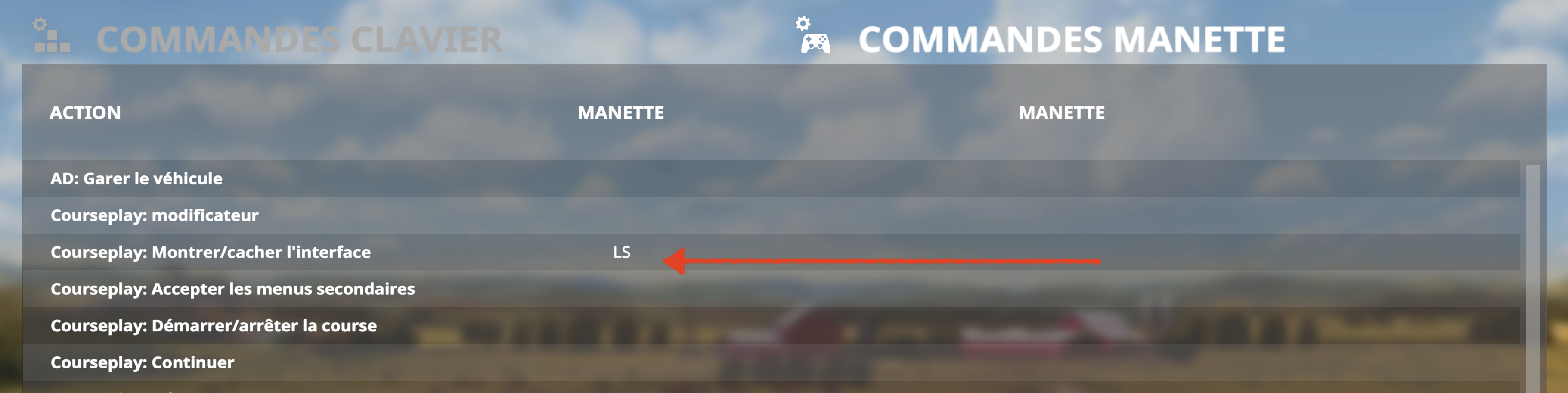
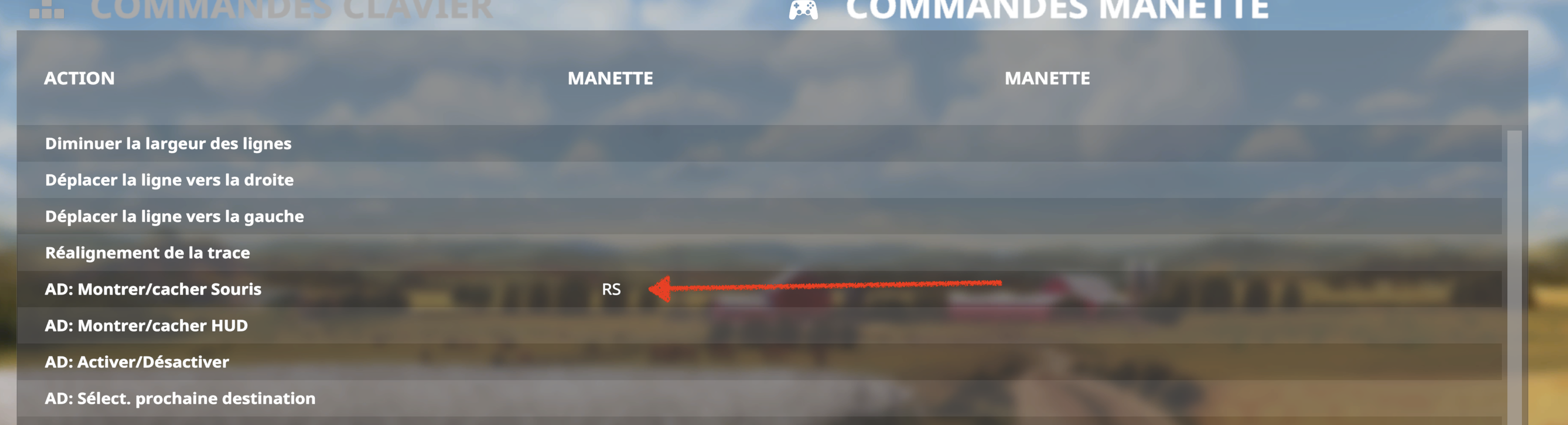
Step72
on 17 Oct 2020
Related issues
 valdimellen
·
4Comments
valdimellen
·
4Comments
 MicaelJarniac
·
4Comments
MicaelJarniac
·
4Comments
 Satissis
·
4Comments
Satissis
·
4Comments
 Gonimy-Vetrom
·
3Comments
Gonimy-Vetrom
·
3Comments
 hoefti10
·
5Comments
hoefti10
·
5Comments