Courseplay: Combine unloading w/ AD - no tractor called
Hello,
I encountering an issue with combine(s) unloading action with autodrive.
Sometimes, when combines are full, they didn't succedeed called a tractor.
The combine wait, but no tractor answer to the call to drive to the combine
In my case, I have 2 combines with 3 tractors.
I have always 2 tractors available to unload them.
At the beinning, I thought the issue occurs when two combines are waiting for unload, but that also occurs when only one wait for unloading.
I note that happens when the settings is "call the nearest tractor" and when the tractor which is the nearest performing an action (unload a another combine, moving to the wait point).
In think the combine made the called for the nearest tractor, which does not receive call due to current action.
I'm trying to record a video to illustrates the issue.
Thanks you for your help.
Kinldy Regards,
Neoblaster
 neooblaster
All 14 comments
logfile ?
 Tensuko
on 30 Mar 2020
Tensuko
on 30 Mar 2020
I will try to catch Log file in the same time I will record the repro session.
I have no exact time when that occurs to this morning.
neooblaster
on 30 Mar 2020
Keep in mind that if the field is too big and the combine is too far, the only way that AD will go to unload the combine is when the same target is selected on the combine AD window.
In fact it is good practice to have both the combine and the tractor with the same target selected.
You won't use AD on the combine but you should have the same target selected.
Hope I made myself clear
 masneoquil
on 30 Mar 2020
masneoquil
on 30 Mar 2020
hI @masneoquil,
Thanks you for your reply.
I didn't know this detail. Indeed, the field is quite big. (Field 14-15-16-17 in US map)
So if I understand, I have to choose the same target point for the combine. Which mode in AD I have to select for the combine ?The combine will drive to the target and unload on the trigger ?
Maybe, one workaround is, depending of field size, put the waypoint in the middle of the largest side or two waypoints of each extremity of the field to have a correct distance between tractors and the combine.
Kindly Regards,
neooblaster
on 30 Mar 2020
What I often do (if possible), is to create a target for the tractors around the middle of the field(on the edges of course, not inside de field) like in this image.
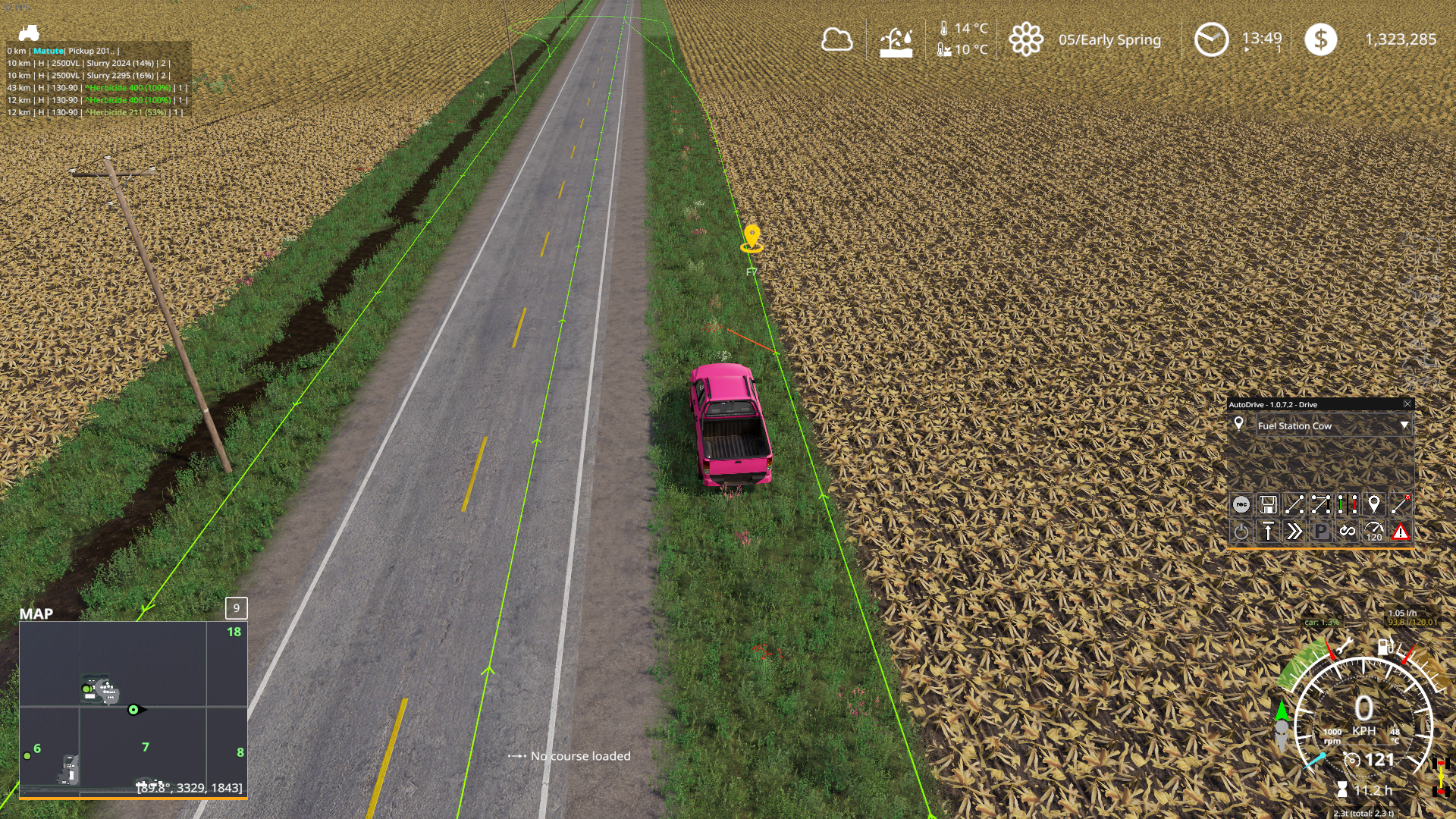
This tractors will be in the unload combine mode as usual.
Then the combines will be in drive mode with the same target selected, as the tractors.
The combines will then send a signal to the tractors once they are full and then the tractors will go to the combines to unload them.
Hope it helped.
Edit: Don't pay attention to the AD window in the image. I just drove there to take the screenshot
masneoquil
on 30 Mar 2020
Hi @masneoquil ,
I took attention about the AD windows ;)
The drive mode for the combine must be set as it is in the Screenshot but with the same unloading point of tractors ?
I will try to move my way point for tractors to a best position, around the middle as you did.
I will keep you inform about the issue. I will come with Video + Log if issue persist.
Thanks a lot for your replies !
Kindly Regards.
neooblaster
on 30 Mar 2020
The drive mode for the combine must be set as it is in the Screenshot but with the same unloading point of tractors ?
Exactly. Drive mode, and in the case of my screenshot, F7 Selected
masneoquil
on 31 Mar 2020
Just to be absolutely sure, F7 is the wait position of the tractor, not the unloading point, when trailer will be emptied. If you put F7 in AD for the combine, she will go to F7 to unload in the tractor trailer ?
Sorry, I want to be sure to not make mistake between waiting point and unloading point.
:D
neooblaster
on 31 Mar 2020
Not quite.
I assume you are using CP for the combines. They will be harvesting the field using CP. You also setup AD in drive mode with F7 as the selected target, but you don't activate AD on the combines.
Then, setup AD on the tractor in Unload Combine mode. In this mode you have two things to setup. The first one is the same target as the combines, in our case F7. Then, you have to setup where you want the tractors to unload the trailer. For this you will need a route to a silo or sell point and a route back.
Then you activate CP on the combines, and AD on the tractors.
When the tractors reach the field F7 will wait until a combine is full, then it will drive to the combine to unload it and then drive to unloading target (the silo or sell point and drive back.)
Keep in mind that AD will exit the field thru the first target (F7 in our case), so if you will be using more than one tractor to unload the combines, you should setup the route as the screenshot, because if there already is a tractor waiting at F7, the one trying to exit will get behind this one, As soon the one waiting drive to unload the combine , the one waiting to exit will start to drive to the unloading target.
masneoquil
on 31 Mar 2020
Not a single word about the AD or CP Version...
I want to see the logfile for more then any Error kind reason!
Tensuko
on 31 Mar 2020
Hi @Tensuko,
Please find the versions of CP & AD used.
About log, I have to reproduce the issue.
- AD : 1.0.7.0
- CP : Build 383
I updated AD & CP.
I will see when I will harvest my field if the issue always occurs with these versions.
The issue occurs at least once on the field, so it will be easy to "reproduce" or said if version fixe the issue.
Kindly Regards.
neooblaster
on 31 Mar 2020
Both outdated.... then there is no reason to discuss anything about this here.
There is a reason why I ask for the logfile and it is so simple to just drag and drop the .txt into the comment box... it takes you 5-10 seconds....
Tensuko
on 31 Mar 2020
I thought logfile was to get error during the issue, not to get versions.
I already update CP & AD and issue persists. I try again, but I will inform you with logfile + video when that occurs again (without changing the way how actually I do)
Kindly Regards
neooblaster
on 31 Mar 2020
.................
Logfile tells a lot more then just Errors, when I ask for a logfile, I got a reason for this. One would be what Versions you use and to tell you to update, would save a lot of talk in this Issue...
logfile or I close this one...
Tensuko
on 31 Mar 2020
Related issues
 huseyinsayar
·
3Comments
huseyinsayar
·
3Comments
 fischbesuch
·
4Comments
fischbesuch
·
4Comments
 valdimellen
·
4Comments
valdimellen
·
4Comments
 VatriXxX
·
3Comments
VatriXxX
·
3Comments
 mawie
·
5Comments
mawie
·
5Comments