Courseplay: Intital setup for mode9 is online. Please test and report.
with v263 mode 9 shovel mode is been reactivated. please test all situations and report bugs here.
Thanks
 ThomasGaertner
All 71 comments
- Shovel lowers only for a short time, then stops loading
- He stops to far away from waitpoint for unloading into trailer

Is it still:
Start - Waitpoint in front of Bunker - Waitpoint at end of Bunker - Reverse out - Waitpoint at unloading - Reverse - Drive Infront of Start and put Stop ?

Also when something goes wrong (mostly my Mistake I guess, I am getting LUA Error:
2019-08-06 23:21 Error: Running LUA method 'update'.
2019-08-06 23:21 I:/Dokumente/My Games/FarmingSimulator2019/mods/FS19_Courseplay/bunkersilo_management.lua:324: attempt to index a nil value
Somehow I remember I don't need a SiloBunker for this.
My 1st try was to load grass from a place (same waitpoint setup I think...) and try unload into GC Fermenter (Just to see what happens...) but that LUA Error.
LUA Error came from Testing GC Fermenter, Guess its Trigger Issue (see #4049 )
Can't change Shovel Positions, while debugchannel 10 is active.
2019-08-06 23:45 Error: Running LUA method 'mouseEvent'.
2019-08-06 23:45 I:/Dokumente/My Games/FarmingSimulator2019/mods/FS19_Courseplay/debug.lua:98: attempt to concatenate local 'str' (a nil value)
2019-08-06 23:45 :38 [dbg10 lp41762] 435S (#1): saveShovelPosition(..., 2)
2019-08-06 23:45 :38 [dbg10 lp41762] 435S (#1): getMovingTools(): frontLoader index=0, shovel index=1
2019-08-06 23:45 :38 [dbg10 lp41762] [1] primaryMt=435S (#1), secondaryMt=Hochkippschaufel, shovel=Hochkippschaufel
More test tmr, good night...
 Tensuko
on 6 Aug 2019
Tensuko
on 6 Aug 2019
in 264 I fixed the debug error.
for the waiting too early issue, try to move the unloading point closer to the trailer. with debug channel 10 active you can see the area it will check.
ThomasGaertner
on 7 Aug 2019
Vanilla Test with just FastForward.
Setup:

Trailer Position:

Aproach:

Unload:

Next try:


Not sure if he got a problem with wait+reversepoint at same position, but I was used to make the course like that in FS17.
Maybe some new or other way to create the course ?
The way to position the Trailer is tricky, as you got to record first the Mode9 Course and then the Mode1 Course, so that the Trailer sits inside the Waitpoint.
logfile with some 9, 10, 12 and 14.
log.txt
Prepared Savegame:
savegame2.zip
Course:
MapDE.zip
Note: Log cotains some debug info on a stranger Fendt1050 wich ran into the Widls, like Radlader on the Screenshot...
Tensuko
on 7 Aug 2019
Moin bei mir kann der New Holland Radlader nicht in die Bga abladen
Hello to me, the New Holland wheel loader can not unload into the bga

 Tom20214
on 7 Aug 2019
Tom20214
on 7 Aug 2019
Glad to read that mode 9 is back! I think the main confusion is about how to course need to be recorded. Maybe you could give us a quick tutorial @ThomasGaertner ?
 Knowen
on 7 Aug 2019
Knowen
on 7 Aug 2019
It should be the same as here (and I was remembering it right hehe) https://youtu.be/5msPvdaRxww
Just the unload place seems problematic as shown in my report and also at the BGA from Tombarkemeyerb...
Tensuko
on 7 Aug 2019
as @Tensuko said, it changed nothing since 17 except you should consider, that the first two or three way points reverse from the unload point are straight. otherwise it will start to swing before unloading.
https://courseplay.github.io/courseplay/en/manual/index.html#driveMode9
ThomasGaertner
on 7 Aug 2019
@Tombarkemeyerbruns : test v 265 or higher
ThomasGaertner
on 7 Aug 2019
@ThomasGaertner
In die BGA kippt er nun, aber leider in keinen Anhänger. Danke für deine Arbeit :)
 Onkel2000
on 7 Aug 2019
Onkel2000
on 7 Aug 2019
@ThomasGaertner I would say you need 2 raycast in ShovelModeAIDriver.lua, state STATE_WAIT_FOR_TARGET: 1 for trailers and 1 for tipTriggers.
 Axel32019
on 7 Aug 2019
Axel32019
on 7 Aug 2019
@Onkel2000 : ich kann den Fehler nicht reproduzieren, kannst Du einen screenshot machen und mir das savegame und den Kurs geben ?
@Axel32019 : why ?
ThomasGaertner
on 7 Aug 2019
@ThomasGaertner Die Callback-Funktionen prüfen das "Ziel"-Objekt. Für einen TipTrigger werden z.B. die fest in der Map gefundenen Trigger geprüft, nicht jedoch der bewegliche eines Anhängers - so zumindest mein (bisheriges) Verständnis.
Axel32019
on 7 Aug 2019
@Axel32019 : ich hab ja mein eigenes callback. Da habe ich ja jetzt auch die TipTrigger hinzugefügt triggers.lua(291)
ThomasGaertner
on 7 Aug 2019
Tested on CP 265 on the Felsbruun BGA, with the JCB Wheel Loader by Giants and the 6000 liter Wheel Loader Shovel by grasslandMods. Only tested with the BGA on this map. Haven't tried with trailers or other maps yet.
I found that the speed has to be limited to max 20 km/h, otherwise it doesn't turn fast enough (since it tries to go full speed) and misses all the waypoints on the curves. Before restricting the speed it would only load the centre of the silage bunker because it went too fast to get lined up correctly and even reversing out of the bunker it went too fast and went past the "go forward" point before stopping.
Once the speed is restricted it works really well. Only it doesn't stop when the BGA is full, so it dumps the silage on the ground inside the fill trigger, and then returns to continue filling. Would be nice if it was possible for CP to detect that the BGA is full and wait for it to process before continuing, and maybe alert us that it can't continue.
On my first attempt (before I restricted the speed) CP glitched out and crashed into the bunker, and caused the game to lock up (can't find anything in the log and had to use the console to stop CP). But somehow the shovel it used when it broke is now stuck showing 97% full, after being emptied. Had to buy a new shovel to do another test. Haven't found any errors to explain this.
On second attempt with restricted speed it works really well, digging right, middle, and left side of the bunker, and haven't had it break or crash yet. It just doesn't stop on its own.
 SteelRodent
on 8 Aug 2019
SteelRodent
on 8 Aug 2019
@SteelRodent : how did you record the course ? on the way to the silo and to the unload point it uses the recorded speeds of the course , inside the silo it uses the turn speed. the bunker fill level thing will be done in the next update
ThomasGaertner
on 9 Aug 2019
@SteelRodent Your observation I can confirm, but:
- I assume you recorded the course with self-driving. Usually you can drive faster manually than CP can control the recorded course exactly the same way you drove - this is common from my experience with CP and not only relevant for Mode9. Especially it becomes more relevant the more mass a vehicle has!
You should already record your course "CP"-like: drive fast when the direction is straight ahead and slow down in curves: <20 kmh in edges, 20..40 depending on how tight a curve is and the mass of the vehicle. So slow down before reaching a needed waitpoint during recoring will help. In addition to the manual mentioned above by ThomasGaertner, there should be 3-4 waypoints as straight as possible before / after start-, end- and waitpoints. This makes the course robust enough to run for hours without problems. - The shovel stuck showing 97% full I also had during some tests. You could see the fillplane of the shovel is empty but the status is showing zz% in the vehicle status. If you are able to let CP empty it in a next try (i.e. BGA is empty enough) it will recover as far as I remember.
Axel32019
on 9 Aug 2019
@ThomasGaertner zu https://github.com/Courseplay/courseplay/issues/4050#issuecomment-519198429
Aus meiner Sicht bietet sich die schon vorhandene Funktion doTriggerRaycasts(vehicle, 'tipTrigger', 'fwd', false, x, y, z, lx7, ly7, lz7, 10) an.
Das zugehörige Callback wertet alles nötige aus:
- wurde ein Trigger zum Abladen gefunden
- wird das Ladegut vom Trigger überhaupt akzeptiert
- ist noch Platz im Trigger für das Ladegut
Axel32019
on 9 Aug 2019
Moin,
ich habe gerade auch ein Problem mit der Schaufel festgestellt.
Anbei das Video + Logs.
Problem ist beim Orginalen + Mod Radlader aufgetreten.
log.txt
https://youtu.be/66xbOPOR3U0
Qualität wird gleich noch besser sobald Youtube sich rafft
Den Kurs habe ich anhand der alten Anleitung erstellt:
http://courseplay.github.io/courseplay/de/manual/index.html#driveMode9
 Heartbeatss1
on 10 Aug 2019
Heartbeatss1
on 10 Aug 2019
@ThomasGaertner I went by http://courseplay.github.io/courseplay/en/manual/index.html#driveMode9 and tried to do it as straight as possible between the required turns. There's not a whole lot of space between the near bunker and the dump point on the Felsbruun BGA so the straight sections end up being the minimal length. Don't know if it makes any difference that I recorded the route on 264 and ended up testing the actual loading on 265. Since I drive with keyboard I never go full speed at turns, especially with the articulated vehicles because they just end up going wherever they feel like, but on the return to start and reverse out of the bunker, CP tried to accelerate to full speed. On all the other legs it went slow <10 kmh up to the turns and seemed to hit every marker.
I have no idea if that has to do with the wheel loader I used or something I did.
@Axel32019 I know not to speed with CP and don't think I did on this, but don't know. Never actually used this mode before. Once I restricted the speed I let it run until it started dumping on the floor because the BGA was full and then stopped it.
Either way, it looks like it works well as long as it's not allowed to go too fast.
SteelRodent
on 10 Aug 2019
It isnt working for me if i record a way with front and backwords with connected shovel positions it isnt working, if i press start it just lag, cant move the camera and the vehicle is doing nothing, no driving no anything
 C43AMG
on 10 Aug 2019
C43AMG
on 10 Aug 2019
New Issue with attatched logfile pls
Tensuko
on 10 Aug 2019
@SteelRodent : I think I fixed the speeds thing in v272 , please check
I also added checks for valid shovel positions and waiting points, which should solve @Heartbeatss1 issue. please test and report
ThomasGaertner
on 11 Aug 2019
@ThomasGaertner Yes the Problem is solved, but now is the Problem that the shovel gets to early empty so that the silage is on the ground.
Video + logs are following
Heartbeatss1
on 11 Aug 2019
Hello everyone
Here is the problem of mode 9 unloading (8min)
https://www.youtube.com/watch?v=sk6URphUymo&t=526s
 saku05
on 12 Aug 2019
saku05
on 12 Aug 2019
@saku05 that doesnt look nice, but it works :-) it depends on the unload Trigger. as you can see, the silage will be added to the bunker fillLevel. so its just cosmetics :-) @Heartbeatss1 : is it the same, you wanted to show ?
ThomasGaertner
on 13 Aug 2019
One thing came back to my mind now, where mode 9 is back.
A few months ago i hade a problem whith CP unloading caff in a silo. CP noticed the unloading trigger and sometimes matched the speed to the length of the silo. but sometimes CP accelerated to max speed and chaff was all around the place not only in the silo.
Did anyone else noticed this? Maybe it is allready fixed.
Knowen
on 13 Aug 2019
That is Mode2 related and got bothing to do with Mode9. It is the old CP driver in mode2.
Tensuko
on 13 Aug 2019
Thank you for your wonderful work and your passion for CP
Sam
saku05
on 13 Aug 2019
@saku05 : thank you for your videos :-)
ThomasGaertner
on 13 Aug 2019
@Tensuko Ah okay.
Knowen
on 13 Aug 2019
Moin, wäre schön, wenn der Radlader o.ä. bei der Entnahme aus dem Silo erst ein Stück gerade rückwärts fahren würde (evtl. auch bis zur Silomitte - bis er auf der aufgenommenen Strecke durch das komplette Silo angekommen ist). Er schlägt die Lenkung momentan direkt vor dem Zurücksetzen ein. Dadurch "verkeilt" er sich bei der Entnahme an den Silowänden, wenn die Schaufel nicht bis in den Himmel angehoben wird.
Siehe z.B. auch das heutige Video von Cairo Amun: https://youtu.be/1I1M2w2lHzk (39:06 min).
Momentaner workaround ist es, die Schaufelbreite (3m) im CP auf 7,5m zu erhöhen, wodurch ausreichend Abstand zur Wand eingehalten wird.
Vielleicht wäre es ja aber auch möglich, die Breite des Filltriggers der Schaufel bei der Berechnung der Silozufahrt, bzw. -entnahme zu Berücksichtigen. Der ist ja in der Regel etwas breiter wie die Schaufel.
 bgo1973
on 13 Aug 2019
bgo1973
on 13 Aug 2019
Hi !
Mode 9 works well with the width of the shovel at 3.1m.
https://www.youtube.com/watch?v=oEyqZx8t8FA
saku05
on 14 Aug 2019
Hi saku05,
it seems to depend on the bunker width. I don't know why yours is not steering after filling. Even 4.5m will not work for this one. It's the one on the Multimap. 7.5m seems to be a little to much so that this needs to be corrected downwards. Even as it works with 7.5m much of try and error is needed to find the correct width for every bunker. For that it would be nice if cp could calculate it on it's own correctly. Or as mentioned above the wheelloader should start steering always after backing up a few meters instead of in some cases steering directly after filling the shovel. For that case the workwidth setting could be left as it is.
bgo1973
on 14 Aug 2019
Hi bgo1973
The original mod works on original map.
Sorry for you, I can not help you
saku05
on 14 Aug 2019
What a statement. Are you involved in developing cp?
bgo1973
on 14 Aug 2019
Before that Discussion starts to grow into something unwanted:
Screenshot of Bunker with Course + CP Settings and a logfile with Debugchannel 10 and I think it was 12. So lets see where does what Vehicle drive in what way :)
Tensuko
on 14 Aug 2019
To show you how my course looks like, when backing up from the trailer I should have go a bit more straight first before turning... anything else is fine. But I will do more tests with newer version.

Tensuko
on 14 Aug 2019
Thx so far. The needed information will follow as soon as possible.
bgo1973
on 15 Aug 2019
@bgo1973 : i understood the issue mentioned in the video of Cairo Amun. I will try to find a solution which fits to all silos and all situations.....
ThomasGaertner
on 16 Aug 2019
@ThomasGaertner Great, thx for your work.
So screenshot and log are not needed anymore?
bgo1973
on 16 Aug 2019
nope, i've seen the video
ThomasGaertner
on 16 Aug 2019
Perfect. Thx in advance.
bgo1973
on 16 Aug 2019
i've tried to fix the BunkerSilo wall issue , please try whether it improved or not ....
ThomasGaertner
on 17 Aug 2019
As soon as possible. Thx
bgo1973
on 17 Aug 2019
Hi Servus,
bei nordfriessicher marsch lädt der Radlader nicht in der BGA ab bleibt immer bei 5m davor stehen was mach ich falsch
v.282

 Bolle1988
on 17 Aug 2019
Bolle1988
on 17 Aug 2019
drück mal bitte F5 und schau ob die roten Streifen von oben auf den Trigger schauen oder zu tief sind, wenn die zu tief sind, musst Du die Schaufel mehr anheben.
ThomasGaertner
on 18 Aug 2019
Vielen Dank Thomas hat geholfen
Bolle1988
on 18 Aug 2019
Hello Courseplay team,
I have been testing course play for a while and have to say that you are all doing a great job. Now I am testing mode 9 and in my eyes it works almost perfect as long as you know how to record the route. I made a video recording where you can see that mode 9 also works with manure. Only I have noticed (so far) 2 things;
1- If you have switched on manual starting, problems may arise when continuing the route when you return with an empty trailer. The vehicle then remains standing. So my advice would be to disable that option.
2- What you also see in the video recording is that it drives the route almost perfectly. Only at the end you see that it collides with the silo wall. It doesn't matter what width you set (1m to 10m) it continues to hit the silo wall. You also get no notification that it is slipping, which you do get when a helper bumps into a tree or fence in other modes.
I am very satisfied with what you all have achieved so far, keep up the good work
 pipo1983
on 18 Aug 2019
pipo1983
on 18 Aug 2019
My wheel-loader always stops at the second to last waypoint. to make another round, I have to unassign the driver and than reassign. Continue driving has no effect.
 Th301
on 18 Aug 2019
Th301
on 18 Aug 2019
It's getting a little better. But you still have to add 1.5 m workwidth in the CP settings to avoid the problem with the bunkerwalls. For a 3 m wide shovel you have to set 4.5 m for example. With the CP setted 3 m it will collide.
bgo1973
on 18 Aug 2019
I have refactored the code again, please test your issues, whether they have been solved and report.
as a new feature can you start the course from every point of the unloading course outside the silo.
the shovel will be set to the correct position and then it will go on.
Thanks
ThomasGaertner
on 20 Aug 2019
Hi Thomas,
It works almost perfectly, there is only 1 problem. When the trailer is fully loaded and the shovel bucket is not 100% empty, the bucket remains above the trailer (see the end of the video) and the rest falls to the ground when the trailer drives away.
https://youtu.be/IoMarrZwYCM
pipo1983
on 21 Aug 2019
I tested it and ....... What shall I say...... now nothing is possible. The wheel loader drives into the bunker, picks up silage and then wants to get out of the bunker at full throttle through the wall. When driving of the middle lane he also picks up silage, but does not drive backwards, but simply forwards and with the full shovel at the fermentation residual silo against the wall.
bgo1973
on 21 Aug 2019
@bgo1973 :screenshots ? logs debug 10 active ?
ThomasGaertner
on 21 Aug 2019
Hello I use the "FS19_GlobalCompanyPlaceable_BGA_GrimmeBeetBeater" but I can't get mode 9 working with this mod?
My shovel is alway's stopping arround 5m before the trigger?
Maybe I'm doing something wrong but I think courseplay can't find or don't recognize the trigger to dump in.
If you need more information or if I need to open a new issue I will add it here.
Best regard's
 OldFamous
on 22 Aug 2019
OldFamous
on 22 Aug 2019
@ThomasGaertner Missed your second response. Don't have the save I tested on before, but will see how it behaves once I have another batch of silage done.
Meanwhile, I wanted to set up CP to load manure on the Riesenbeck map (from the modhub contest), before there is any manure in the pit.
Went through all the required steps to set up the path, but when I try to start the driver in this position it isn't working.
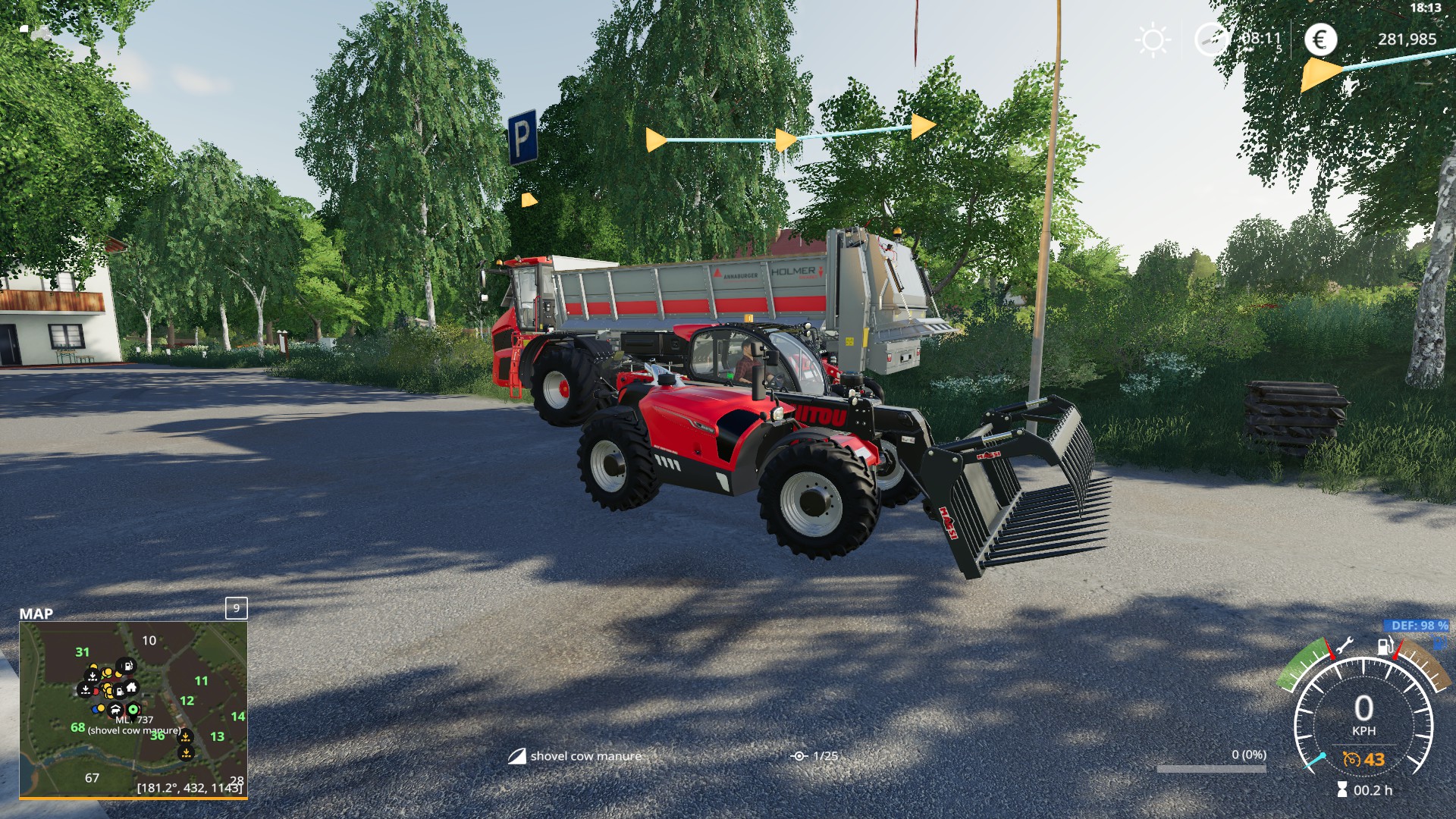
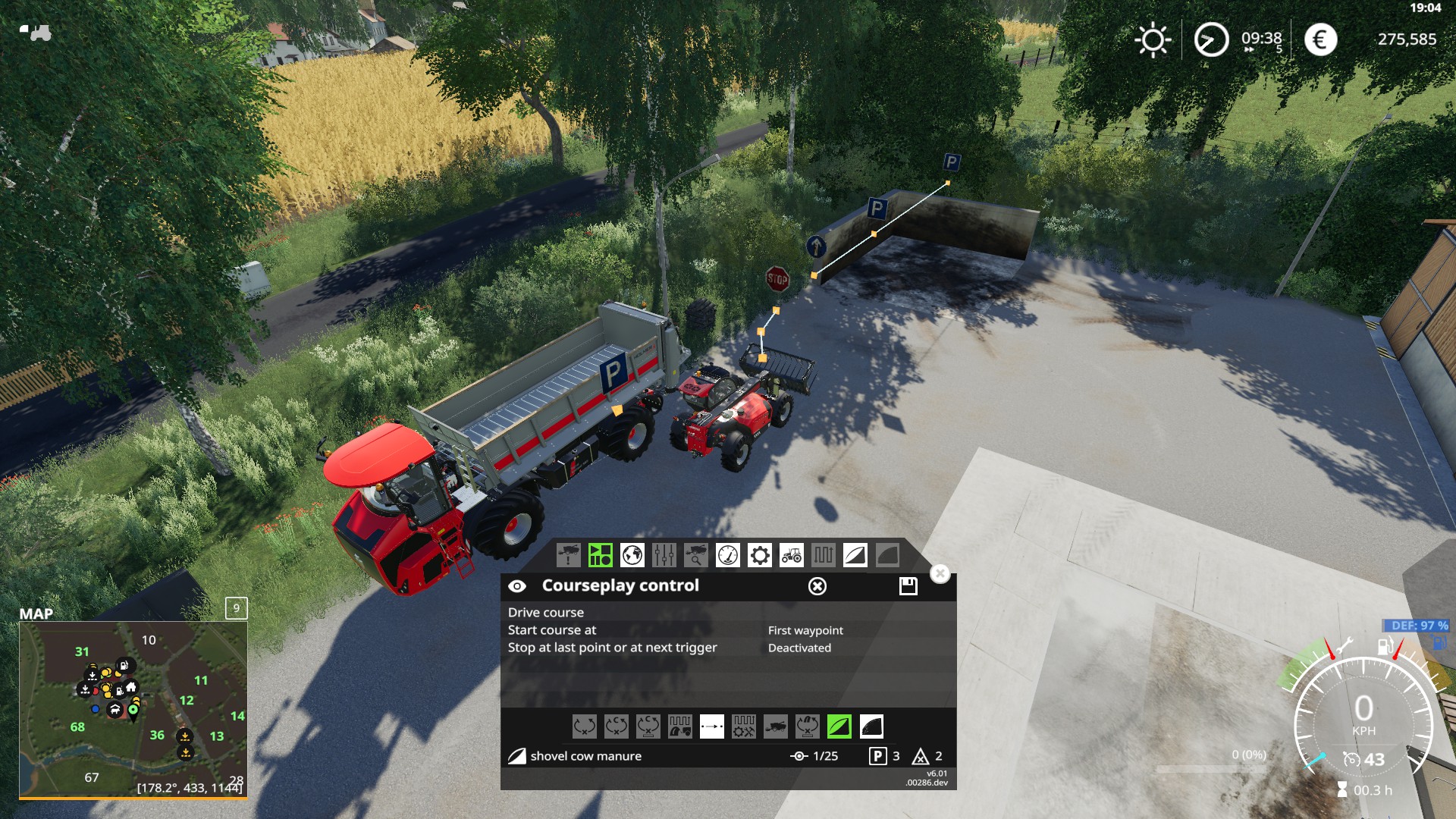
Driver closes the shovel and then sits there; no message. Tried with both vanilla shovels for the telehandler and again with the wheel loader with both the vanilla shovel and the modded shovel I have. In every case they refused to start from this position, whether I start them in "first" or "next nearest" waypoint. The actual start point and the manure trigger is further ahead and if I move the loader so it's not right next to spreader, but right on the start point, it starts to work, and then immediately stops because, of course, we've got no manure yet.
I believe it's supposed to go to the start point, even when started at the stop point, but I assume the problem is starting next to the spreader? The old manual does not say anything about this, so unsure if I'm simply doing something CP doesn't like or if it's a bug.
SteelRodent
on 22 Aug 2019
log is clean ? and with debug 10 active ?
ThomasGaertner
on 22 Aug 2019
ThomasGaertner I'm not sure if you ask this to me or SteelRodent.
So here is my log and two screenshots with debug 10 active.
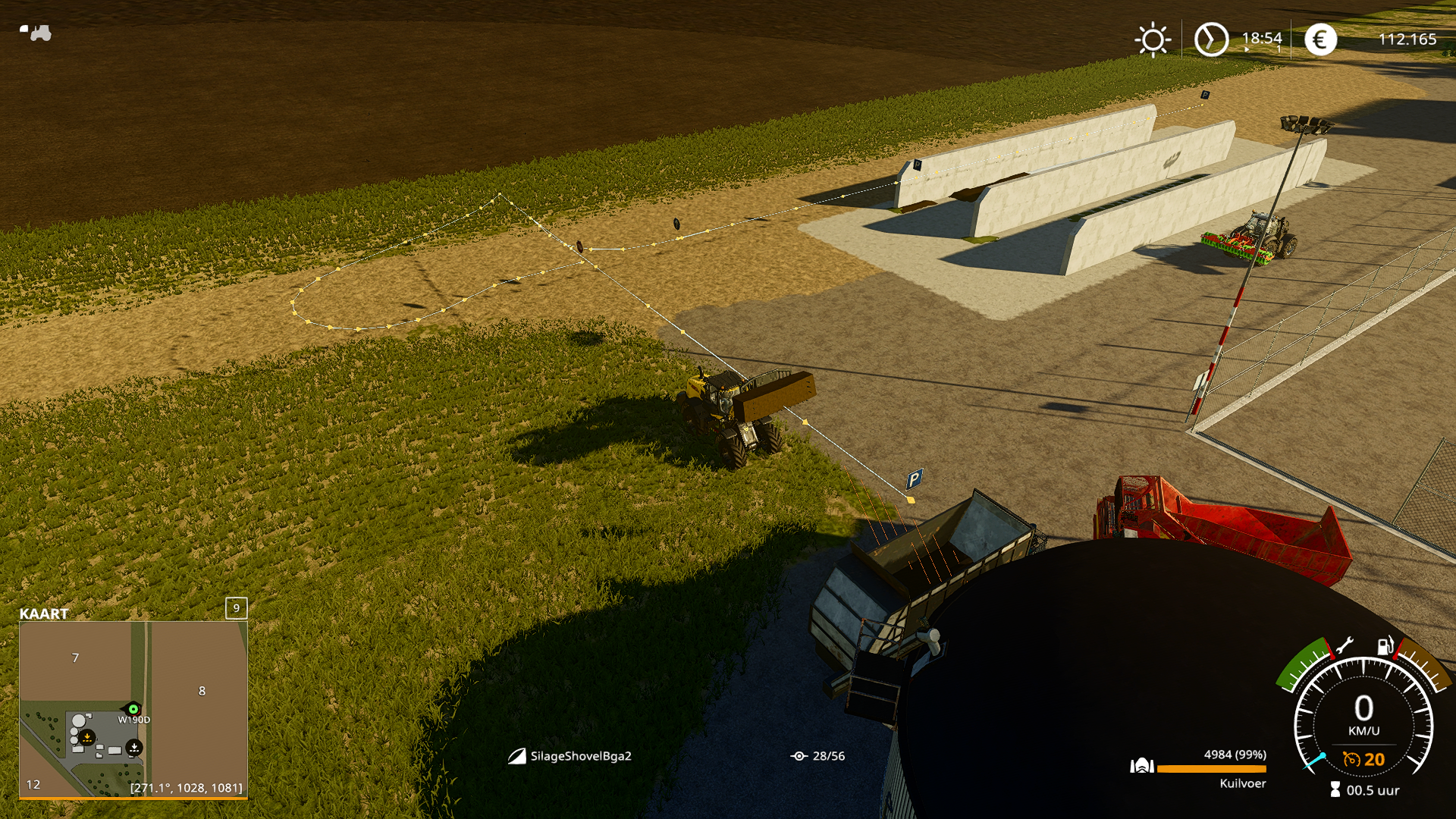
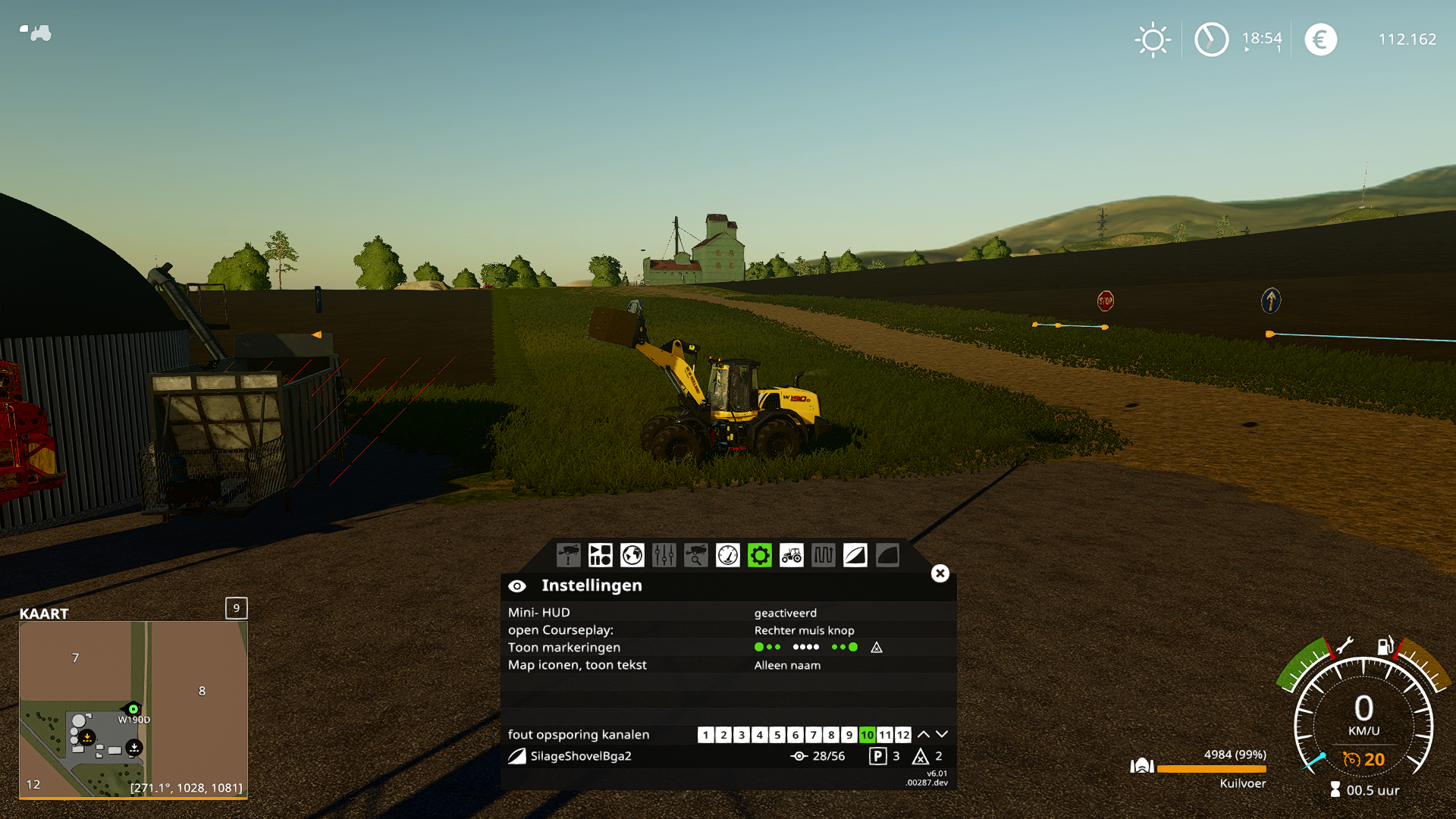 OldFamous
on 22 Aug 2019
OldFamous
on 22 Aug 2019
@ThomasGaertner wasn't sure what channel to use for this. Was hoping you would tell me :). Enabled debug channel 10 and tried again.
It behaves the same with 289 - refuses to start from that spot - but when I move it forward, now it starts to drive even though the manure pit is empty and when it indicates it's going for the pass next to the left wall, it instead turns 90 degrees and heads off at speed (only it manages to find a tree so it doesn't get very far).
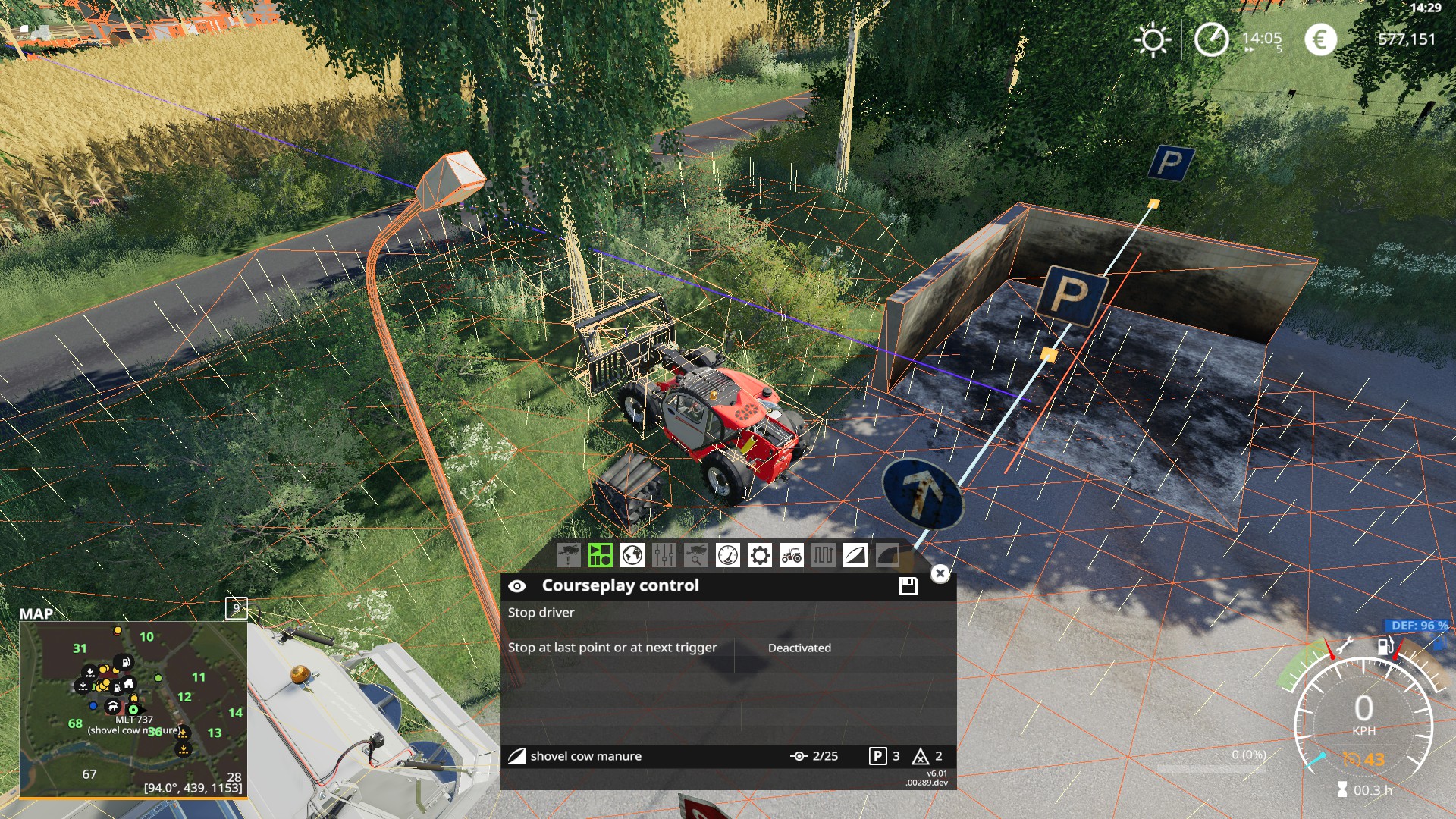
As much as I can tell, CP detects the manure pit correctly, but I guess I should figure out how to cheat manure into it to test properly.
EDIT: The cows created a tiny bit of manure by themselves, but now I lose control of the camera when I try to run the course and CP does nothing.
Got
2019-08-23 15:11 Error: Running LUA method 'update'.
2019-08-23 15:11 C:/Users/********/Documents/My Games/FarmingSimulator2019/mods/Courseplay_6_01_00289/ShovelModeAIDriver.lua:272: attempt to index a nil value
a few thousand times in the log. Updated it on GIST.
SteelRodent
on 23 Aug 2019
Hi, I did some testing with Mode9 and was a bit tricky to get it to work as I wanted, but I did my best ;)
I have some strange behavior with the telehandler, so I started to record some:
- Empty bucket above a trailer, standing still...
- Driving out of the bunker, but not straight, almost out but then start to raise his bucket and wants to unload, but got stuck (vid explains better ;) )
https://www.youtube.com/watch?v=H30RVUrtzvU&feature=youtu.be
Also a log (is longer then expected, was trying a lot):
log.txt
 Bobster82
on 23 Aug 2019
Bobster82
on 23 Aug 2019
@ThomasGaertner
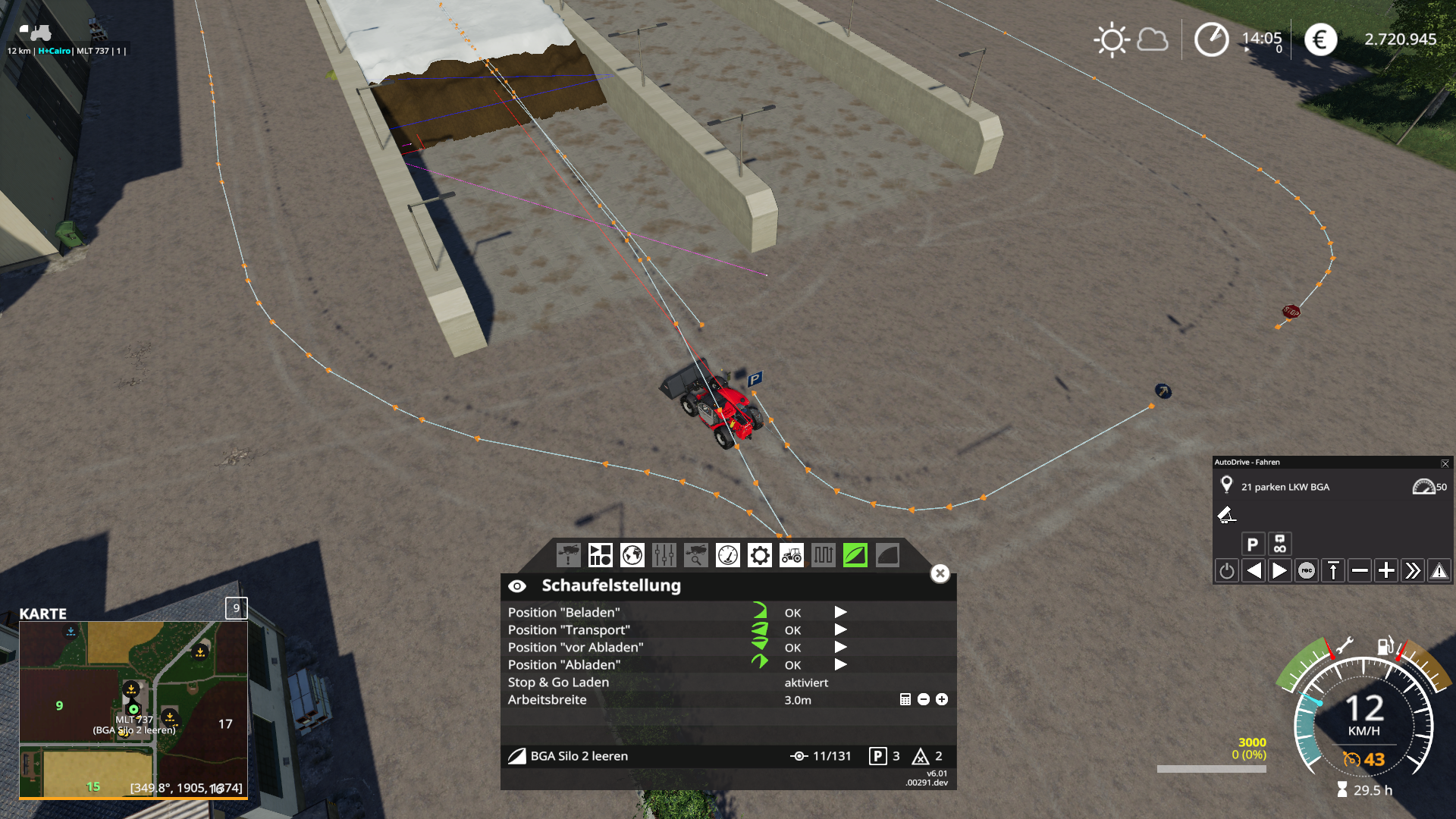
Sorry for being late. New version works like a charm. New kind of course setup was needed for that. Thx for the great improvement.
bgo1973
on 24 Aug 2019
bgo1973
on 24 Aug 2019
@SteelRodent : can you give me the savegame and courses?
ThomasGaertner
on 25 Aug 2019
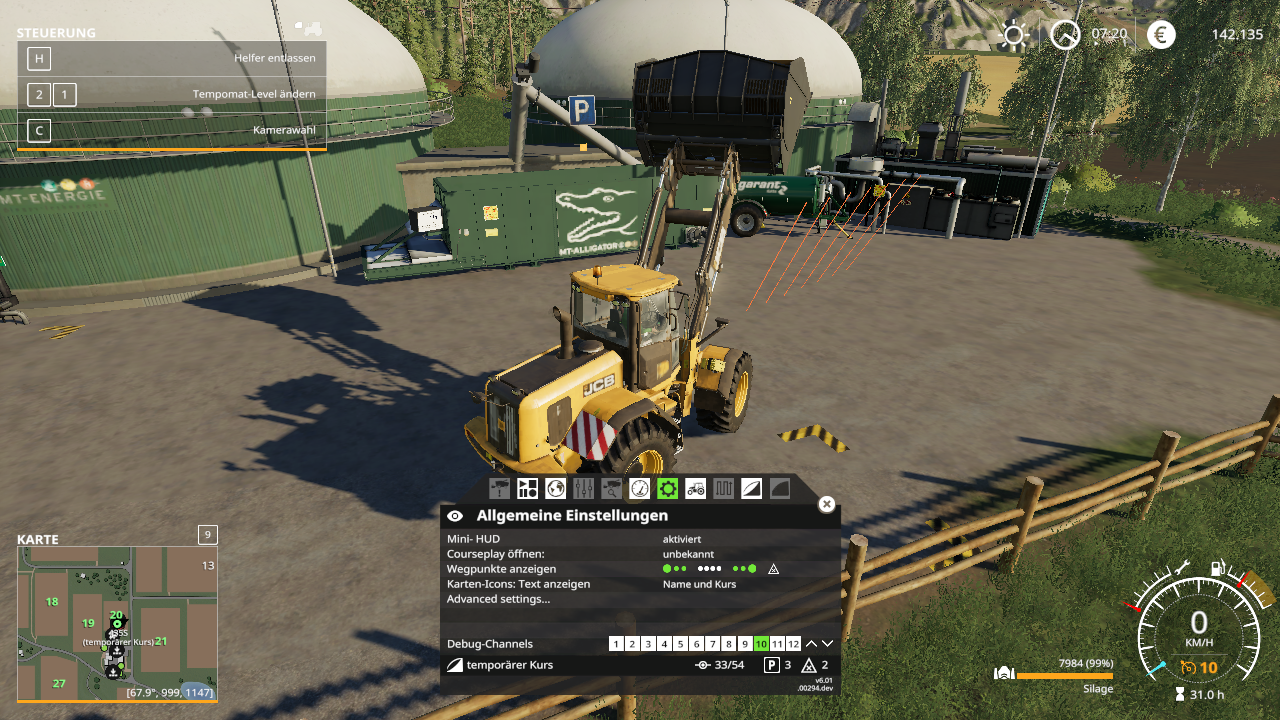
Hello, i have also an issue with the trigger is not set at the right spot. Is this an issue of the Mod-BGA?
You can see the red lines moving, then they stop and the loader too. Does it not recognize the Trigger of the BGA?
Log:
2019-09-07 22:31 :35 [dbg10 lp146393] 435S (#1): called setShovelState to STATE_TRANSPORT
2019-09-07 22:31 :35 [dbg10 lp146393] 435S (#1): getMovingTools(): frontLoader index=0, shovel index=1
2019-09-07 22:31 :35 [dbg10 lp146393] [1] primaryMt=435S (#1), secondaryMt=Hochkippschaufel, shovel=Hochkippschaufel
2019-09-07 22:31 :35 [dbg10 lp146393] 435S (#1): Continuing...
2019-09-07 22:31 :42 [dbg10 lp146601] 435S (#1): called setShovelState to STATE_CHECKSILO
2019-09-07 22:31 :43 [dbg10 lp146634] 435S (#1): Bunkersilo filled with SILAGE(24) will be devided in 5 lines and 3 columns
2019-09-07 22:31 [ ][ ][ ]
2019-09-07 22:31 [ ][ ][ ]
2019-09-07 22:31 [XXX][XXX][XXX]
2019-09-07 22:31 [XXX][XXX][XXX]
2019-09-07 22:31 [XXX][XXX][XXX]
2019-09-07 22:31 :43 [dbg10 lp146634] 435S (#1): called setShovelState to STATE_GOINTO_SILO
2019-09-07 22:31 :43 [dbg10 lp146635] 435S (#1): called setShovelState to STATE_REVERSE_OUT_OF_SILO
2019-09-07 22:31 :49 [dbg10 lp146854] 435S (#1): called setShovelState to STATE_TRANSPORT
2019-09-07 22:32 :05 [dbg10 lp147407] 435S (#1): called setShovelState to STATE_WAIT_FOR_TARGET
 wwaayynn33
on 7 Sep 2019
wwaayynn33
on 7 Sep 2019
Are the keybindings for shovel positions working for anyone else? I see the option to set them in settings, and I have them bound to my 1-4 buttons on my G27 shifter, but I can't get them to work.
 MtBakerScum
on 9 Sep 2019
MtBakerScum
on 9 Sep 2019
The Positions in the HUD are set ?
I will try it if I remember it later...
Tensuko
on 9 Sep 2019
@Tensuko yeah I have the positions set in the HUD
MtBakerScum
on 9 Sep 2019
Keybindings are not working right now, will be looked into later
Tensuko
on 9 Sep 2019
Hello the issue above was, that the angle was to small, but the loader still tips around 5m in front of the bunker, but its filling the bunker, so i assume the MOD BGA has some wrong tip triggers. Anyway thank you - This is a very helpful mode!
wwaayynn33
on 11 Sep 2019
@Tensuko @MtBakerScum
I was also having trouble with the key bindings for shovel positions.
They actually do work fine.
I looked through the current code to find and then remember from FS17 you also have to have the courseplay modifier button pressed in order for it to work.
Line: 443 of Input.lua
if courseplay.inputModifierIsPressed then
if keyStatus == 1 and vehicle:getIsActive() and vehicle:getIsEntered() then
Which this does make it quite difficult for using a controller of some kind. With limited button combinations, it kind of has to be a 3 button press on a controller to make it work.
@Tensuko
Could the modifier button press be removed from the shovel positions?
 jhomer
on 4 Oct 2019
jhomer
on 4 Oct 2019
I will close this Info Issue to clean up a bit.
Any Issues with Mode9 stays open and if you get into any new problem with it, make a new Issue.
Closed.
Tensuko
on 15 Jan 2020
Related issues
 mawie
·
5Comments
mawie
·
5Comments
 Mogli12
·
4Comments
Mogli12
·
4Comments
 iw-shawn
·
5Comments
iw-shawn
·
5Comments
 VatriXxX
·
3Comments
VatriXxX
·
3Comments
 Satissis
·
4Comments
Satissis
·
4Comments
Most helpful comment
Keybindings are not working right now, will be looked into later