Courseplay: Support of AutoDrive - Collection/Discussion/Status
As some ppl already noticed. CP got in contact with the AD Developer, @Stephan-S
Feel free to add your thoughts and Ideas here, before make a new Issues.
Also read the actual existing Issues for what we talked about so far.
3819
3792
 Tensuko
All 138 comments
Hi,
ich benutze seit Jahren CP! - und war bis Gestern damit eigentlich vollens zufrieden!! ;) wie gesagt bis gestern!
Denn nun habe ich gesehen ( Youtube) wie einfach sich Strecken mit AD erstellen lassen!!
Mein Traum : Könnten CP und AD nicht fusionieren ?!?!?!?
....arbeiten mit CP und die ganze abfahrerei mit AD-Strecken!
lg BJ
 scandal65
on 21 May 2019
scandal65
on 21 May 2019
Hey guys,
Just to get some brainstorming going, here are some approaches we could try/decide on.
For combined unload mode. I see a few alternatives as on how to combine the two mods.
Use mode2 (reworked mode2 in the future) to efficiently unload combines and then the question is whether to
a) 'pass' the tractor over to AutoDrive which then drives to the offloading destination and back to the field and again passes control over to CP
or
b) just use an interface to access the AutoDrive network and generate the course which is then solely driven by Courseplay.
For option b), the user would have to either
b1) control both HUDs to generate the course. Since the Destinations would have to be selected in AD for both cases.
or
b2) if CP is supposed to do all the heavy lifting, it would be nice to control everything in one HUD. Which means CP would have to access and display possible start and target destinations from the AD network.
What are your thoughts on this? Do you see any other good use cases? I'm happy to discuss some interface options where CP just queries AD for a path to certain locations.
@scandal65 Ich hoffe der Mod überzeugt dich auch Ingame und nicht nur im Video. Lob ihn nicht zu früh :D
 Stephan-S
on 21 May 2019
Stephan-S
on 21 May 2019
My opinion, if you guys think of combining both mods as one, go for option B2. If you prefer to keep them separate, because some people might prefer to have autodrive or courseplay instead of both or a unique mod with combined resources, go for A, and this might be also easier to implement coding wise i think.
 fudoido
on 21 May 2019
fudoido
on 21 May 2019
@Stephan-S
Hallo,
ich hatte mir zu LS17-Zeiten meine "scandal-numbers" (mit Hilfe! ;) ) zusammen gebastelt! - mit denen habe ich auf der Map die Kreuzungen durchnummeriert und konnte so meine Routen aus Teilstrecken zusammensetzen! Das Problem hierbei waren aber die Kurven/Abbiegen! ( !! das finde ich bei AD genial !! )
Hinzu kommt natürlich bei AD das ich sagen fahre von "A" nach "F" ! - ohne 4 oder 5 Teilstrecken zusammen setzen zu müssen!
Bei LS19 habe ich jetzt das Problem, hier kann ich nur Kreuzungen nummerieren die MIR GEHÖREN !
Ich würde zu 60/40 zu B2/B1 tendieren - nur müssten alle Fzg CP und AD kompatibel sein! Denn es bringt mir wenig wenn der CP-Drescher ADmässig abgetankt werden kann - ich aber für den Ladewagen mit Stroh eine extra CP-Route brauche! ;-)
lg BJ
PS entschuldigt das ich auf Deutsch schreibe, aber ich bin Ü50 und mein Englisch wollt ihr nicht wirklich! :-))
scandal65
on 22 May 2019
Still trying out, what and how AD handels and compare it to CP, as well as try to combine it with what is possible so far. For any kind of Route, like go from A to B, refill, etc AD looks nice.
But where should be the point to combine them.
Option A, AD drives the vehicle to its work place, and CP takes over, when done, CP gives it back to AD and AD drives it back to where you want it.
But where to integrate the combination, in CP HUD ?
Like give the Tracktor a whole Task ?
A lot of things to discuss...
Tensuko
on 22 May 2019
Not sure I fully understand how AD works but one idea requiring probably the least amount of work on the CP side would be to include the AutoDrive destinations in the CP course storage menu, for example in an AutoDrive (virtual) folder where you could select destinations known to AD and then load them to CP as any saved course.
This would need an interface provided by AD with the list of the destinations, to generate and return a course to CP.
 pvaiko
on 22 May 2019
pvaiko
on 22 May 2019
The destinations could easily be exported with name, location in world coordinates and an id which corresponds to the node id in the AD network.
And for some explanation 'on how AD works':
I assume you know that the pathfinding works on a recorded network which is internally represented in a graph structure, where every node knows it's in/outgoing paths.
The fastest routes are calculated using a Dijkstra algorithm, with the euclidian distances as weight function.
If AD needs to know a path from point x to some destination, it can just look it up, as each node knows the fastest path (next edge) to every recorded destination.
So I can relatively easily provide an interface to retrieve a path.
eg. vehicle_spec_autodrive:GetFastestPath(startX, startZ, startYRot, destinationID)
As a return you would get a list of waypoints with x,y,z values (no rotation).
I guess the waypoint transformation into your format should take place on CP side.
you could select destinations known to AD and then load them to CP as any saved course
The question here is where the starting point should be in this case, right?
And maybe we should add an option parameter for things like
maximum distance to the first node (from your provided starting point)
or other future restrictions
Theoretically AD could also calculate routes to any location, not just the marked destinations, but that would require 'real-time' calculation instead of looking it up in the table. I would have to build something around that use case to make the calculation asynchron if that need exists.
Stephan-S
on 22 May 2019
Option A, AD drives the vehicle to its work place, and CP takes over, when done, CP gives it back to AD and AD drives it back to where you want it.
I like this idea of @Tensuko
 RUGhost
on 22 May 2019
RUGhost
on 22 May 2019
@RUGhost that would be the easiest to implement in CP, to drive to the first waypoint of any CP course using an AD generated route, but based on what @Stephan-S writes that is not possible at the moment.
pvaiko
on 22 May 2019
@Stephan-S why don't we pick a specific use case and think about how would that be implemented best? We have the one above (driving to a field and start working), or how to run a refill/unload course from the field to some destination and back?
pvaiko
on 22 May 2019
I like the idea of Option A as suggested by @Tensuko and @RUGhost.
I think the unload course in CP would have to have two AD points set to do the unload course properly. First point would be the point at the field, and the second would be the unload point. The AD unload mode may also have to get triggered by CP so it will not stop if left in one of the other modes. Finally maybe AD can call the proper CP function to continue/resume the original CP course once it reaches the starting point.
 cyberndj
on 23 May 2019
cyberndj
on 23 May 2019
Ok dev's it seem we must continue fusion discussion here? here is my test look not so bad !! I can observe 2 issue one of each side it seem.
The one side from CP to open the pipe I must click continue now after it show it need to be unloaded to open the pipe for unload because if not it not open alone at the 1st unload pass. When this step is done then AD start to come and waiting under the pipe but the cover won't open alone too :) like this:

Edit: At the 2nd pass unload CP opened it alone BUT FOR THIS HAPPEN it seem we must click CP call driver before it came full for unload if not finally click continue now is needed again.
I continue how it go...
hope this help maybe already reported.
Regard
 Anonymous-any
on 25 May 2019
Anonymous-any
on 25 May 2019
I think upcoming new mode 2 of CP will be better to control a chaser than AD. We can use AD for transfer course.
RUGhost
on 25 May 2019
Hi all I was at the pick up (tired) but it was a status all the same :p
To my user thing and view point I will vote for B2 too but maybe leave both HUD's ? maybe with this you can keep benefit to create path and destinations separately while of the workers working ? I say that because I don't know if one HUD can do dual jobs too it's you the coders, all which we would need is CP can read AD destinations purposed in B2 because it already can reach the combine. So is will be possible the same way for other vehicles/tools (I want to mean by tools all other vehicles who they are not combines or tractors) ? maybe by this way both will manage as better way all tools and much easy to code because you just have done do it actually in few days ?
For the story It am front of a fascination to see how AD create and fast calculate his virtual ways to reach in the fields :)
Finally what we would need a CP editable in real time but with the speed storm of AD /O-O/
Good guys you are half-gods
Anonymous-any
on 27 May 2019
With release .225.dev the combine dont open the pipe when full (or something between 95% to 100%). This means no AD Driver will unload the combine.
This worked like a charm with release .224.dev.
 Knowen
on 27 May 2019
Knowen
on 27 May 2019
@Knowen can you double check this, there's really nothing in 225 which could be causing this. If you still see it, open a new issue and post log with debug channels 12 and 14.
pvaiko
on 27 May 2019
Hallo nochmal,
_....als Erstes..._
@Stephan-S
Ich habe hier NICHTS zu früh GELOBT! - AD ist vom System her Super!
Ich habe mir auf einer Map die ganzen Strecken eingefahren! - und kann jedes Fahrzeug überall hin schicken!
Abtanken vom Drescher funktioniert auch ! ;)
_....Zweitens..._
Wie soll das bei der Heu bzw. Gras Ernte funktionieren?
Kann man dem Ladewagen einen Befehl geben, das er nach dem sammeln mit CP - mit AD zum Lager fährt und anschliessend mit CP wieder weiter sammelt?
...oder geht eure Planung bisher nur zum Abtanken von Dreschern!?
lg BJ
### google english ! - sorry!! ;)
Hello again,
_....first..._
@ Stephan S
I have NOT praised TOO soon! - AD is super from the system!
I retracted on a map the whole distance! - and can send any vehicle anywhere!
Uploading from the thresher works too! ;)
_....Secondly..._
How should that work with the hay or grass harvest?
Is it possible to give the loader a command that after collecting with CP - with AD it drives to the warehouse and then continues to collect with CP?
... or is your planning so far only for working with thresher?
lg BJ
scandal65
on 27 May 2019
With release .225.dev the combine dont open the pipe when full (or something between 95% to 100%). This means no AD Driver will unload the combine.
This worked like a charm with release .224.dev.
I don't have this issue I'm on 225 maybe a setting somewhere ?
Anonymous-any
on 27 May 2019
@Knowen can you double check this, there's really nothing in 225 which could be causing this. If you still see it, open a new issue and post log with debug channels 12 and 14.
@pvaiko I'll check that. I updated several mods today. maybe one of that is causing the problem.
EDIT: The Mod PlayerSpeed seems to be a problem. First i thought it could be FollowMe, but it wasnt. Now everything works!
Knowen
on 27 May 2019
I used to run FS19 with -Cheats so I always on speed + Console Commands when I need them for testing. :)
Tensuko
on 29 May 2019
I used to run FS19 with -Cheats so I always on speed + Console Commands when I need them for testing. :)
There were only three mods who could have caused the problem: FollowMe, PlayerSpeed or HUDSmartShade.
With FollowMe and HUDSmartShade the combine opens the pipe. With PlayerSpeed not.
Dont know why, but this mod is causing the problem.
Knowen
on 29 May 2019
I have a hacked together mod for FS17 that used AD and CP functions to generate CP courses from an AD route - I could select a destination in AD, and hit my generate hotkey, and it would create a course in CP. It was by no means professional (was just for my use, because it was in early stages), but it was pretty neat for transferring vehicles, or getting unload routes. I also had parking spots for each vehicle in AD, so I could send a vehicle from the field back to its parking spot.
Would be really cool to see this as a part of CP!
 tjb8907
on 8 Jun 2019
tjb8907
on 8 Jun 2019
…..das wäre großartig, wenn man AD in CP integrieren könnte!
Dann könnte man jedes Fahrzeug mit AD-Routen auf Felder schicken – mit CP arbeiten (Ladewagen, Dünger, saeen.....) lassen – und anschließend mit AD wieder zum Hof schicken!
(M)ein Traum!
.....that would be great if you could integrate AD into CP!
Then you could send any vehicle with AD routes to fields - work with CP (loader, fertilizer, .....)- and then send back to the farm with AD!
(My) a dream!
scandal65
on 8 Jun 2019
Hey,
@tjb8907 that sounds very interesting. And very impressive, considering the coding quality of the FS17 version of AutoDrive, that you were able to do this :-D
@pvaiko
I just updated the AutoDrive Interface and included a small example on how to use it, to start AutoDrive and receive a callback, when it has reached it's target.
When you have the time, you could try calling this function from Coursplay code. Maybe there could be an option such as "Use AutoDrive" to decide what to do when the trailer is full in fieldwork mode or mode2 and then call the autodrive interface instead of driving an unload course in cp.
I tried doing it myself and managed to get the fieldworker who was collecting hay to switch to AD to unload and then switch back to cp when it reached the fieldpos again. But I am sure you can do a better job of integrating this properly into CP without breaking anything else. But I can send you the changed file to get you started more quickly. I annotated the changes with some comments (--AutoDrive ..)
This way, the settings and target set in the AutoDrive HUD are used when switching over to AutoDrive from Courseplay.
Best regards,
Stephan
Stephan-S
on 8 Jun 2019
@Stephan-S sweet! I'll finish my current project and then continue with this. I guess you did this in your Courseplay fork, would you mind opening a pull request next time, I prefer doing everything in git instead of zipped sources.
pvaiko
on 8 Jun 2019
Aiiii @tjb8907 FS17 this look good ! can you share your whole ?
Regard
Anonymous-any
on 9 Jun 2019
Aiiii @tjb8907 FS17 this look good ! can you share your whole ?
Regard
- Its been a while since i used it, so I'd have to revisit my code, but I think may have altered the CP code to make it work....If I have some time i'll see if i can port it to FS19 and see how it works again,
tjb8907
on 9 Jun 2019
Aiiii @tjb8907 FS17 this look good ! can you share your whole ?
Regard* Its been a while since i used it, so I'd have to revisit my code, but I think may have altered the CP code to make it work....If I have some time i'll see if i can port it to FS19 and see how it works again,
@tjb8907 I wanted to talk about your FS17 version :)
Anonymous-any
on 9 Jun 2019
@Stephan-S you may want to check 9dccb8e on the autodrive branch, I implemented it in CP as you intended I think.
pvaiko
on 15 Jun 2019
@Stephan-S oh, the AutoDrive setting is on the general vehicle settings page of the CP HUD.
pvaiko
on 15 Jun 2019
Hey @pvaiko looks really good.
Two issues though:
1: Since spec_autodrive is only available after the vehicle has once called Autodrive:onUpdate(), depending on which mod runs first (differs for each vehicle), the CP HuD often lists Autodrive as 'Not installed'. So a delayed or somehow regular check would be required here.
2: When I set the option to use AautoDrive and then start the CP driver, it resets back to 'Don't use' and I have to set it on while the CP driver is already active. I think this also happened after Autodrive returns from unloading.
Otherwise it seems to work as expected. As soon as CP passes to AutoDrive, the driver will drive to the closest/best suited waypoint and start it's route.
As mentioned earlier, it might be a better solution to first drive to the first waypoint of the cp field course before passing the control to AutoDrive. But that depends also on how many waypoints are around the field and if Autodrive can always find a suitable waypoint to start the route. It is not set up to use 'pathfinding' in this scenario. But Courseplay already has that integrated in this mode, right?
Stephan-S
on 16 Jun 2019
Your #1 is already fixed on the master branch I believe.
As for #2, CP can use its own pathfinding to get off the field, but where exactly? If AD can give me the coordinates of the first wp I could work with that. I don't think using the first cp wp is a good idea for multiple reasons.
On June 16, 2019 11:55:03 AM CDT, Stephan Schlosser notifications@github.com wrote:
Hey @pvaiko looks really good.
Two issues though:
1: Since spec_autodrive is only available after the vehicle has once
called Autodrive:onUpdate(), depending on which mod runs first (differs
for each vehicle), the CP HuD often lists Autodrive as 'Not installed'.
So a delayed or somehow regular check would be required here.
2: When I set the option to use AautoDrive and then start the CP
driver, it resets back to 'Don't use' and I have to set it on while the
CP driver is already active. I think this also happened after Autodrive
returns from unloading.Otherwise it seems to work as expected. As soon as CP passes to
AutoDrive, the driver will drive to the closest/best suited waypoint
and start it's route.
As mentioned earlier, it might be a better solution to first drive to
the first waypoint of the cp field course before passing the control to
AutoDrive. But that depends also on how many waypoints are around the
field and if Autodrive can always find a suitable waypoint to start the
route. It is not set up to use 'pathfinding' in this scenario. But
Courseplay already has that integrated in this mode, right?--
You are receiving this because you were mentioned.
Reply to this email directly or view it on GitHub:
https://github.com/Courseplay/courseplay/issues/3820#issuecomment-502468292
--
Sent from my Android device with K-9 Mail. Please excuse my brevity.
pvaiko
on 16 Jun 2019
Sorry, the second part was not about #2, I will look into it
On June 16, 2019 11:55:03 AM CDT, Stephan Schlosser notifications@github.com wrote:
Hey @pvaiko looks really good.
Two issues though:
1: Since spec_autodrive is only available after the vehicle has once
called Autodrive:onUpdate(), depending on which mod runs first (differs
for each vehicle), the CP HuD often lists Autodrive as 'Not installed'.
So a delayed or somehow regular check would be required here.
2: When I set the option to use AautoDrive and then start the CP
driver, it resets back to 'Don't use' and I have to set it on while the
CP driver is already active. I think this also happened after Autodrive
returns from unloading.Otherwise it seems to work as expected. As soon as CP passes to
AutoDrive, the driver will drive to the closest/best suited waypoint
and start it's route.
As mentioned earlier, it might be a better solution to first drive to
the first waypoint of the cp field course before passing the control to
AutoDrive. But that depends also on how many waypoints are around the
field and if Autodrive can always find a suitable waypoint to start the
route. It is not set up to use 'pathfinding' in this scenario. But
Courseplay already has that integrated in this mode, right?--
You are receiving this because you were mentioned.
Reply to this email directly or view it on GitHub:
https://github.com/Courseplay/courseplay/issues/3820#issuecomment-502468292
--
Sent from my Android device with K-9 Mail. Please excuse my brevity.
pvaiko
on 16 Jun 2019
I was thinking would this be possible.
Everybody know courseplay do the best fieldworks but it cant change the field without player interaction (or i dont know how it works) and the auto drive calculate best those ways to get somewhere.
So i think if player could put fields what player want example cultivate to queue and the and when the field is ready and tractor is back in first waypoint courseplay allow auto drive to drive tractor to second field and then courseplay take controls back and this continue so far that all player chosen fields are ready.
I dont know anything about coding but this doesnt sound very big job. Of course it would be nice if it works with chaff driving too.
 mauma123
on 16 Jun 2019
mauma123
on 16 Jun 2019
Hi! First of all thank you for your efforts in joining CP and AD.
Like @Stephan-S said, CP resets the option of using AD. We have to select it again from the menu after the CP driver begins its work.
I only tried one time but I can't figure out how the drivers goes from unloading to the field again.
Whats the best option to select in AD?
Another thing is that like @Stephan-S said maybe CP could make the driver return to the first waypoint? Or else we'll have to map various routes for AD so that the driver can reach the network.
And again thank you so much :)
 tozedascoves
on 17 Jun 2019
tozedascoves
on 17 Jun 2019
@tozedascoves honestly, I don't know how to make AD drive back to the field again.
My problem is that I have very limited time to test, as at this point, testing is what takes most of the time.
If one of the CP/AD users would be volunteering to help testing the CP/AD interface before I release it here that would be a tremendous help for us.
pvaiko
on 18 Jun 2019
@tozedascoves
CP resets the option of using AD. We have to select it again from the menu after the CP driver begins its work.
I have trouble reproducing this, which version are you using? Can you post a log with debug channel 12, it should show when the autodrive mode is toggled.
pvaiko
on 18 Jun 2019
@pvaiko I can help you testing the new interface.
Sent with GitHawk
Knowen
on 18 Jun 2019
@tozedascoves in which mode did you set AutoDrive? For this to work, it has to be in 'Pickup and deliver' mode.
Then you can set the first target as 'Field X' and the second (unload) destination as 'Unload point Y'.
Stephan-S
on 18 Jun 2019
@tozedascoves
CP resets the option of using AD. We have to select it again from the menu after the CP driver begins its work.
I have trouble reproducing this, which version are you using? Can you post a log with debug channel 12, it should show when the autodrive mode is toggled.
Ok so I download AD and CP again deleted all the config files I had and that problem didn't appear again.
But @Stephan-S I cannot for example refill my Seeder.
I have CP working on a field and selected the use Autodrive on the CP menu. Then I set the AD to Pickup and Deliver where the pickup is the field CP is working on and the deliver is the place where my seeds are.
I cannot get the seeder to refill. It stops where it should stop to refill but it doesn't so automatically. If I press 'R' it begins to refill.
Is this the way it's intended?
If you need any logs let me know. Thank you
tozedascoves
on 18 Jun 2019
My problem is that I have very limited time to test, as at this point, testing is what takes most of the time.
If one of the CP/AD users would be volunteering to help testing the CP/AD interface before I release it here that would be a tremendous help for us.
@pvaiko ,I have a lot of time to help out, I work at home and not many hours, I can easy do a lot of testing if needed. You guys are doing a great job and if I can help out in any way, let me know.
 Bobster82
on 18 Jun 2019
Bobster82
on 18 Jun 2019
But @Stephan-S I cannot for example refill my Seeder.
I have CP working on a field and selected the use Autodrive on the CP menu. Then I set the AD to Pickup and Deliver where the pickup is the field CP is working on and the deliver is the place where my seeds are.I cannot get the seeder to refill. It stops where it should stop to refill but it doesn't so automatically. If I press 'R' it begins to refill.
Is this the way it's intended?If you need any logs let me know. Thank you
@Stephan-S @tozedascoves , I have the same. All works as intended, but it doesnt refill at the trigger. Some seeders u can press "R" to refill, some seeders u need to open the cap to refill and that wont work, as u cant open the hood if CP is active.
And what to do if ur seeder can fertilize too and needs refill? Can you (@Stephan-S ) add a code when the seeder (or fertilizer) drives by the seeds/fertilizer trigger It auto start filling? So when ur waypoint is beyond the seed trigger and the fertilize trigger, it 1st stops at seed trigger, 100% fill it and continue and stops again at the fert trigger, 100% and continue to the waypoint and sees its 100% then continue to the field?
Als when the tractor with seeder needs a refill and goes off the field, it drives straigt to the nearest wp, crossing right trough the field... then when at the waypoint it just overshoots and gets himself stuck (but it does some circles and finds the route again) maybe a finetuning?
Bobster82
on 18 Jun 2019
@tozedascoves in which mode did you set AutoDrive? For this to work, it has to be in 'Pickup and deliver' mode.
Then you can set the first target as 'Field X' and the second (unload) destination as 'Unload point Y'.
Does it matter wich fruit I select for unload/refill ?
Tensuko
on 18 Jun 2019
Does it matter wich fruit I select for unload/refill ?
@Tensuko , In seed refill route, it doesnt matter now, as no one works atm... (I just tested all types) for pick up at silo, it does matter what u want to load
Bobster82
on 18 Jun 2019
In the meanwhile, if anyone has a good idea for the CP HUD: I'd like to add an option to use AutoDrive to generate the unload/refill course, so you'd select an AD destination to drive to for unload or refill on the CP HUD, AD would give CP the waypoints but CP would do the driving.
pvaiko
on 18 Jun 2019

@pvaiko ,With the calc icon (or make another) u get a sort of drop down list, the + and - buttons u can select too
Bobster82
on 18 Jun 2019
That line is used for use fertilizer yes or no if I remember correct, pls check that.
I would rather put that one on the 2nd page where you hire the worker, like: select destination and hire.
Maybe same for sure AD or not.
Tensuko
on 18 Jun 2019
@Tensuko , yes ur right... I thought when u switch to use or not use ad it would be usefull to select destination on the same page...
there is still a line left, or is that one used too?
Bobster82
on 18 Jun 2019
@Knowen @Bobster82 thanks for the offer, I'll let you know when I have something to test.
pvaiko
on 19 Jun 2019
why idont see in my game that autodrive choice?
mauma123
on 20 Jun 2019
@mauma123 wich autodrive choice ?
Auto Drive For unload/refill ?
You need AD in the newest Version and CP .00231 or higher.
Tensuko
on 20 Jun 2019
yes that i mean, i have both of those. the place where "autodrive" should be there is only + and -. i tried without any another mod both it not appear.
mauma123
on 20 Jun 2019
Depends on the Mode you use as well.
Screenshot ? Logfile ?
Tensuko
on 20 Jun 2019
Sorry for that, i had newest version of autodrive but i hadent put that in the mods folder. But now there is real problem with combine unload wtih auto drive. I dont know how but auto drive start drive combine random direction in somepoint and it do it again after every unload and change that autodrive unload/refill to dont use. how ican get those log files?
i found this, if it is right.
log.txt
mauma123
on 21 Jun 2019
Why does AD drives the Combine ?
You only set up the CP Tracktor for use AD and Combine use CP only.
CP can also use AD for refill, not perfect yet, but dev working on it.
Tensuko
on 21 Jun 2019
I cant know. It starts in some point every time. i have disabled ad for combine but it dont help. It start to drive it anyway. And if there is autodrive off from cp. it wont work too beacause combine never get full and the pipe dont come out beacause of that it stops before combines tank is 100% full.
mauma123
on 22 Jun 2019
@mauma123 , setup AD and CP for combine and tractor with trialer:
Use the combine with CP to drive the course on the field, set in the AD menu the waypoint that the tractor uses to wait to unload the combine.
The tractor with trailer needs to run de AD course with the combine option, select waypoints field and the silo/sellpoint. It doesnt need CP.
You dont use the CP function to use AD, thats not ready for combine
Bobster82
on 22 Jun 2019
Hey there,
I really enjoy this cooperation! Is there already any type of "How-to" for the combined use of both addons? Seems as if I am too stupid to make it work ^^
 Th301
on 24 Jun 2019
Th301
on 24 Jun 2019
@Th301 Here you can watch a demo video showing how to set up and how it works. It automatically refills a fertilizer spreader and drives back to the field to finish the job: https://youtu.be/vEO4pEvz9kA
Make sure to have latest version of Courseplay and Autodrive (not the zip file in released folder)
 jala15
on 24 Jun 2019
jala15
on 24 Jun 2019
Thx @jala15!
Since there are so many releases of CP, I thought the last release is always the latest version?! Is it not like this?
Th301
on 25 Jun 2019
CP's latest version is always at https://github.com/Courseplay/courseplay/releases (auto generated whenever a developer pushes something on the master branch)
pvaiko
on 25 Jun 2019
Thx @jala15!
Since there are so many releases of CP, I thought the last release is always the latest version?! Is it not like this?
Sorry for my bad explanation. It´s ok with the last release of Courseplay, but Autodrive doesn't work that way. In its master branch you can find a releases folder with Autodrive zipped versions (which currently do not include the new Load mode) and a folder called FS19_AutoDrive which is the one you have to download and get into your mod folder
jala15
on 25 Jun 2019
Thx again @jala15 .
Is it possible to only download the Folder FS19_AutoDrive? Otherwise I always have to download the ...master.zip and there are all previous releases included. The "Clone and Download" button is not available in that folder.
sorry for the perhaps stupid question. I am not very familiar with the usage of Github.
Th301
on 25 Jun 2019
Is there a version planned that allows the use of CP and AD in combination with harvesters?
 sdl112
on 25 Jun 2019
sdl112
on 25 Jun 2019
@sdl112 what exactly are you looking for?
pvaiko
on 5 Jul 2019
@pvaiko I think AutoDrive have replaced the necessity of mode 5 (drive A to B). So you can remove mode 5 from CP hud and add some AD control option instead (such as loading point, unloading point, fill type etc)
RUGhost
on 5 Jul 2019
We won't remive anything from CP for several reasons. Not everyone wants to use AD.
Tensuko
on 6 Jul 2019
I Think sdl112 meant the use with combination of CP and AD and choppers.
But this is more a AD issue perhaps?
Th301
on 6 Jul 2019
I meant to use CP for tractor/trailer with corn harvesters (chopper) in on the field and AD to get them to the silo and back to the field.
In short: AD on the road, CP on the field.
sdl112
on 7 Jul 2019
Autodrive does not navigate to the field entrance when it takes over on a refill route... so it just crashes into fences or obstacles on the edges of the field trying to get back to the road. Perhaps Courseplay needs to have the tractor return to the start point before handing it off to AD
 sootysax
on 16 Jul 2019
sootysax
on 16 Jul 2019
@sootysax CP can certainly drive to the start point (or any other point defined somehow) and hand the vehicle off to AD there.
pvaiko
on 16 Jul 2019
I already implemented a new method which CP could call to start AD with path finding to the desired start point a few days ago. Just have to wait for @pvaiko to make use of it :-)
@sootysax Don't worry. As stated, I have definitely not abandoned AD. I only stopped spending almost all free time on it as I used to.
Stephan-S
on 16 Jul 2019
@Stephan-S thanks for all your hard work, and collaboration with the CP team. Awesome that instead of rival mods, they are coming together to work along side each other!
sootysax
on 17 Jul 2019
@Stephan-S I know, and if I did not have a job and a family I'd have already implemented it :)
pvaiko
on 17 Jul 2019
Yeah @pvaiko I absolutely understand. There is no hurry and there are certainly more important things in life than FS modding :-)
Stephan-S
on 17 Jul 2019
I have thought about the handover problem as well, as CP needs a start- and an endingpoint for mode2. I thought about 3 possibilities:
AD is set to "returnpoint behind start point". The Start point of AD can be used to enter the field for CP. The point behind start point can be used to exit the field. This point should be at least 2 Waypoint behind the starting point, to avoid collisions. That would have to be adapted by AD.
You have to configure AD 2 targetpoints for every field. On to enter, one to exit the field. Then in CP there would have to be a menue where you have to choose the enter and exit points.
CP uses the targetpoint from AD to enter the field. To leave the field, it uses the nearest AD waypoint. Risk here is, that a vehicle exits the field behind the waiting vehicles and gets stuck behind them. Could be solved by creating a 2way AD loop around the field to which the vehicles go as it is closer than the starting point outside of the field.
If you already have better solutions, ignore this post :)
sdl112
on 18 Jul 2019
I like AD way how to define routes and network use. Would be nice if CP will learn understand AD courses as 1st step.
If it is too hard, would be nice add posibility for in-game add/edit/delete crossing-route points for existing route plus name of point which can be used as target. Lets say your vehicle will mark closest point and than you can edit that point. In this way you can make better CP course network similar to AD.
 raxtor
on 7 Aug 2019
raxtor
on 7 Aug 2019
@Knowen @Bobster82 as you offered to help testing, may want to look at 274 (ad6497c6171186aa44086f45c61b68430ad3e28f), AD should now use pathfinding and exit strategy set in AD.
pvaiko
on 12 Aug 2019
For mode 5, would it make sense to add an option to the CP HUD to select an AD destination? AD has nice interface function to get the list of destinations and the course to that destination. CP would then drive the course received from AD.
pvaiko
on 12 Aug 2019
That would be a fantastic addition
 alpha117
on 12 Aug 2019
alpha117
on 12 Aug 2019
I think at co-op between AD and CP brought both mods to a complete new level.
I just discovered AD's new parking function, where i can define each tractors parking spot.
I think it would be VERY cool if i could tell a parked tractor to go to field 5, seed the field and then go back at the parking spot.
I mean, let the AD drive to field point, CP do its thing, and then AD will bring it back to parking.
it "should" just be some handshaking, letting AD drive and then tell CP to start its course, vise versa.
Keep up the amazing work guys! @pvaiko @Stephan-S
 Martinnygaard
on 12 Aug 2019
Martinnygaard
on 12 Aug 2019
For mode 5, would it make sense to add an option to the CP HUD to select an AD destination? AD has nice interface function to get the list of destinations and the course to that destination. CP would then drive the course received from AD.
Do you mean that it will be CP driving? And then AD will just send the course? (Like a real life GPS?)
I guess that will be very usefull for refill routes and stuff!
Martinnygaard
on 12 Aug 2019
Yeah, while AD is awesome at generating courses, we here at CP believe that CP is a better driver than AD ;)
pvaiko
on 12 Aug 2019
If that even solve the problem with refilling seed AND fertilizer (wich AD seems to be not able to) then it would be interesting for me again too :) I still don't rly know how to use AD.... but when only got to make the Course with it, rest done by CP, then even I could work with that...
Tensuko
on 12 Aug 2019
Refilling seed and fertilizer is included since a recent release. At least if both refill triggers are in proximity of the loading destination.
Stephan-S
on 12 Aug 2019
Oh okay, I guess I need to give it a new try.
Just a little hind from me:
I find it very complicated to get the right Files from GitHub for AD.
Maybe @pvaiko can tell you how to get those release files, that we provide ?
Tensuko
on 12 Aug 2019
Stephan-S
on 12 Aug 2019
Granted, I do not auto-generate them, since I do not necessarily want every commit to result in a release, but they should be easy to find and use I suppose :-)
Stephan-S
on 12 Aug 2019
Ok they are not where I click to get to them for CP XD
Shame on me! thanks :D
Tensuko
on 12 Aug 2019
@Stephan-S glad you are here, I have a question: how could I get an unload/refill course from AD? Can I use one of the destinations with GetPath()? Will it give me the return from the refill location as well?
pvaiko
on 12 Aug 2019
Hey @pvaiko ,yeah I had to check out your integration of the AD pathfinding :-) Seems to work just fine. I will include the proper check for ignoring/avoiding fruit in the next release, so he wont drive right through the existing crops if there is any left on the field^^
GetPath() will only deliver you the path from the closest/best fitted point of the network (the one AD always uses if you manually start a driver) to the selected destination. If you want the return path as well, you can chain the results with a call to 'AutoDrive:FastShortestPath(AutoDrive.mapWayPoints, startPoint,markerName, destinationID)' and pass the field destination this time, and as startpoint the last element of the path to the refill/unload destination.
But since AutoDrive:FastShortestPath() is an internal function, I am happy to supply you with some interface functions. Would this suit your needs?:
'GetPathVia(startX, startY, startYRot, viaID, destinationID)'
or a more general wrapper for the internal function, so you can pass AutoDrive waypoints instead of world locations?
Stephan-S
on 12 Aug 2019
'GetPathVia(startX, startY, startYRot, viaID, destinationID)'
That sounds good to me, except I'm not sure how to get the destinationID, which would be that of the field I guess, all I know in CP is the world coordinates and the number of the field, can I derive destinationID from any of these?
Also, I'm afraid I'm not (yet) familiar with the AD terminology, not sure what exactly you mean by waypoints (and how are they related to destinations), but I can look at the AD code to figure it out.
One last thing is, if we I use the GetPathVia(), how would the path around the fill trigger look like? Where would the return path begin related to the end of the path to the fill trigger? Just wondering if we can turn back there properly.
pvaiko
on 12 Aug 2019
@pvaiko I'll test it and report back. Any wishes for logs with debug channels?
Knowen
on 12 Aug 2019
That sounds good to me, except I'm not sure how to get the destinationID, which would be that of the field I guess, all I know in CP is the world coordinates and the number of the field, can I derive destinationID from any of these?
You can either use the closest destination which you will have to calculate yourself from the available AutoDrive destinations (external Interface):
function AutoDrive:GetAvailableDestinations()
local destinations = {};
for markerID, marker in pairs(AutoDrive.mapMarker) do
local point = AutoDrive.mapWayPoints[marker.id];
destinations[markerID] = {name=marker.name, x=point.x, y=point.y, z=point.z, id=markerID};
end;
return destinations;
end;
As you can see, all destinations include an x & z coordinate you can check for range from your position.
One last thing is, if we I use the GetPathVia(), how would the path around the fill trigger look like? Where would the return path begin related to the end of the path to the fill trigger? Just wondering if we can turn back there properly.
If you are going to use my function, it will seamlessly drive over the refill trigger locations. The point after the refill point is just the next point along that path, as recorded/connected with AutoDrive.
Startpoint->.->.->.->viaLocation->.->.->.->destination
Also, I'm afraid I'm not (yet) familiar with the AD terminology, not sure what exactly you mean by waypoints (and how are they related to destinations), but I can look at the AD code to figure it out.
I call every 'dot'/'point' inside the network a waypoints. They are all stored in 'AutoDrive.mapWayPoints' and the destinations or mapMarkers are the actual target locations which are created and named by the user.
And be aware that AutoDrive waypoints differ from your CP internal representations. If I remember correctly, you also store a heading, speed etc. in there, which AutoDrive doesn't need.
I setup a small demo in the external Interfunctions file.
Just use the console command 'adGetPath'. This will generate the waypoints and uses the destinations set in the AutoDrive Hud.
They are stored in vehicle.ad.testVar so you can easily print them and have a look at. I would advise you to just record a small circle with two destinations to get a feel for it.
If there is anything else I can provide, feel free to ask, but I'm off for today :-)
Stephan-S
on 12 Aug 2019
@Knowen not as long as everything works... Was a trivial change in CP, any issues you may see will likely to be related to AD.
pvaiko
on 12 Aug 2019
All right. Then I’ll test it and report back.
Sent with GitHawk
Knowen
on 12 Aug 2019
@pvaiko , What mode do u want to test? is it the seed and refill?
Bobster82
on 13 Aug 2019
@Bobster82 thanks, that's fine nothing special, I'm just calling a different AD function and I have not tested it, as I said earlier, you really are testing how AD drives on the field.
Expect more changes to come soon though.
pvaiko
on 13 Aug 2019
@pvaiko , I was testing around with a seed run... U changed the code, so when the seeder needs a refill its using cp pathfinder to go to the ad point?
Its not going to that point, its making a course to nothing, then its making another course to near field exit, then ad turns on (you see in ad menu its turning green) then a few seconds nothing, then cp takes over again, makes a weird course and goes back to ad... again nothing... this goes on and on...
here is the log:
log.txt
edit: If you need a video of it, let me know ;)
Bobster82
on 14 Aug 2019
Hey, can you upload your savegame so I can recreate the situation? I can't say where Courseplay is going before passing control to AutoDrive, but AutoDrive can't seem to calculate a way from that position to the field exit.
Is it located very close to that point or maybe pointing towards a Wall, bunch of trees etc. ?
Stephan-S
on 14 Aug 2019
@Stephan-S , No its an open field, its on a mod map Honey_Dew_Farms_XL ...
savegame1.zip
its just a map where i test on
Bobster82
on 14 Aug 2019
@Bobster82 Thanks for that, this was helpful.
The problem was that the fruit detection process is quite slow in the current implementation. It works really well for the combine unload mode because I simply extract the fruit to avoid from the combines fillType, but it is slow on empty fields like the ones to expect for refill courses.
I just released an update (1.0.4.5) which disabled the fruit detection completely for these courses, but you could also do this manually in the AutoDrive options in your current version.
Thanks again for the testing and feedback :-)
Stephan-S
on 14 Aug 2019
(CP uses lua coroutines to stretch the pathfinding over multiple update loops)
pvaiko
on 15 Aug 2019
@pvaiko Is there any point to your comment? Of course AD is also not running the Pathfinder in one cycle. If I say it's taking too long, I mean it takes to many cycles.
Like I said, it's just slow while trying to figure out which fruit to avoid, because I am calling an asynchronous Giants function to retrieve that Info, which is not ideal in the given situation
Stephan-S
on 15 Aug 2019
@Stephan-S sorry, I really did not mean to critique anything just wanted to share an information that may be useful for others, I was just happy to find something similar to multithreading in Lua.
pvaiko
on 15 Aug 2019
@pvaiko sorry for snapping. Was before my first coffee this morning :D
I like the coroutine concept in lua. Havent't checked this out before. My pathfinder is simply using a statemachine and is called from the main update loop.
But I think I will adapt your concept of checking for fruit, which is to simply bruteforce the check with every fruit type. At least until one is found. I was afraid of the perfomance impact first, but well if it works, it works :-) Certainly better than my Asnyc call of the Giants function.
Stephan-S
on 15 Aug 2019
log.txt
@Stephan-S , thanks for the new changes, it works as intended. But got a next problem, when leaving the field, its driving the ad course to the refill silos, then it only refills the seed, not the fertilizer... when i press continue, it exit the course and CP adds a path to the field (it got stuck between the silos, so i dint continue checking)
btw, in my savegame, i changed (or added) the placement of the silos, seed on the right and fert on the left, so the tractor is on both triggers
Bobster82
on 15 Aug 2019
hm, when you say you have to press continue. Has the driver already reached the fertilizer trigger before it reached the loading destination point? AutoDrive will only refill/unload etc. while approaching the destination. Never behind it.
Is this the same savegame from yesterday? I will check it out later today!
Thank you!
Stephan-S
on 15 Aug 2019
hm, when you say you have to press continue. Has the driver already reached the fertilizer trigger before it reached the loading destination point? AutoDrive will only refill/unload etc. while approaching the destination. Never behind it.
Is this the same savegame from yesterday? I will check it out later today!
Thank you!
Yes, it stands besides the seed and fert tank, its refilling the seed but not the fert. I press continue to either refill fert (what didnt work) or continue his route (what he didnt)
I adjusted the placement of the silos for testing what works
Bobster82
on 15 Aug 2019
I made some adjustments to the relevant code. In my tests, the handling seemed to work as intended. I also included better integration of auger wagons, which now automatically fold/unfold the pipe.
Thank you again for testing :-)
Stephan-S
on 15 Aug 2019
@Stephan-S I have some questions on AD. I added the AD destinations to our course folder as virtual courses and I'd like now to create a course from the vehicle's position (or close to it) to an AD destination.
I have trouble understanding how the minDistance, maxDistance in GetPath works, looks like if the vehicle is more than maxDistance away from (any?) AD path, it won't give me a path. So I set it to a huge value, 500m, but now it seems to be giving me something very far away, see the screenshot (blue rectangle is the vehicle position):
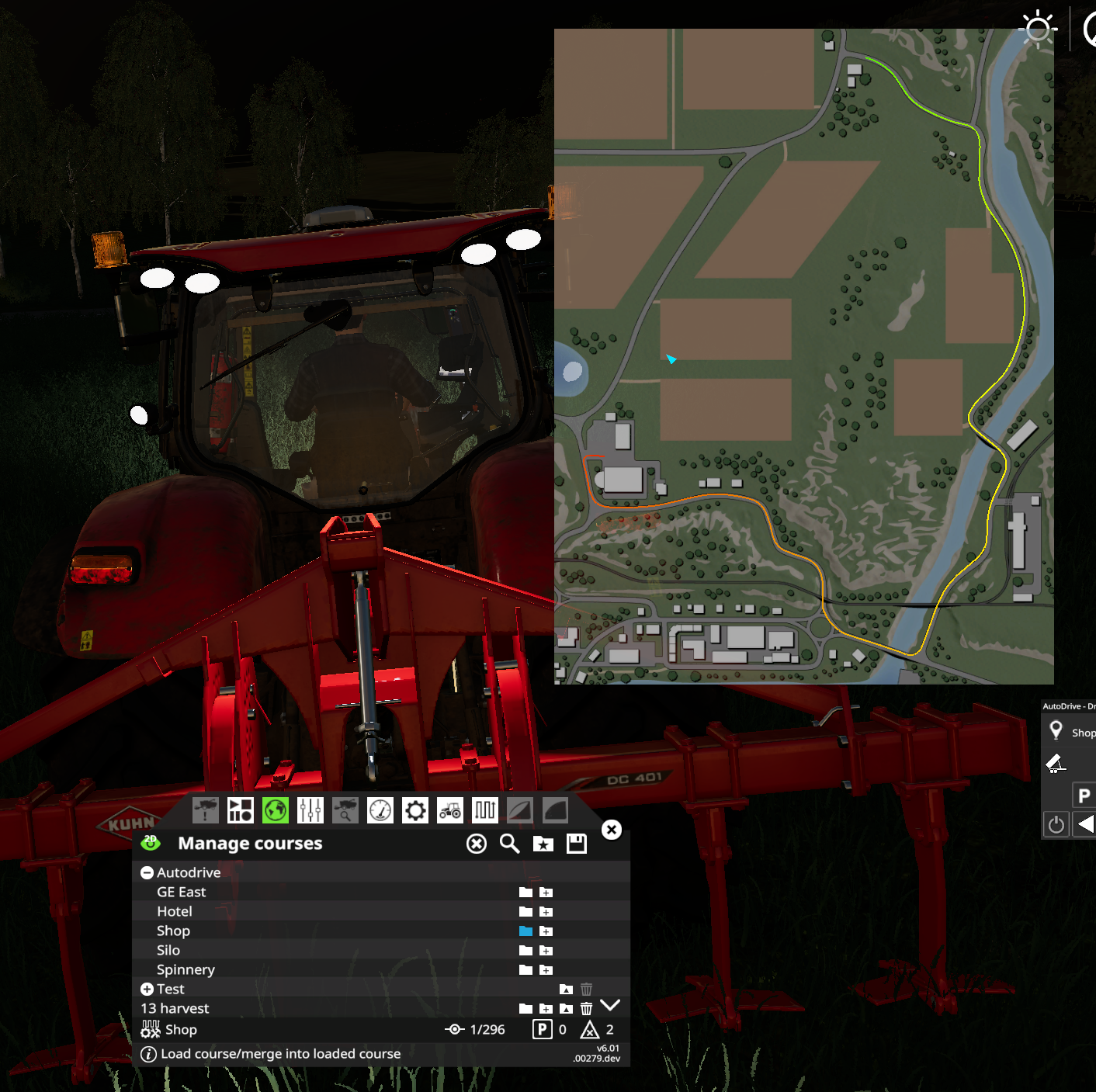
Also, when using the default 20m for maxDistance, I have trouble with the direction, the course to the shop brings me around the world:
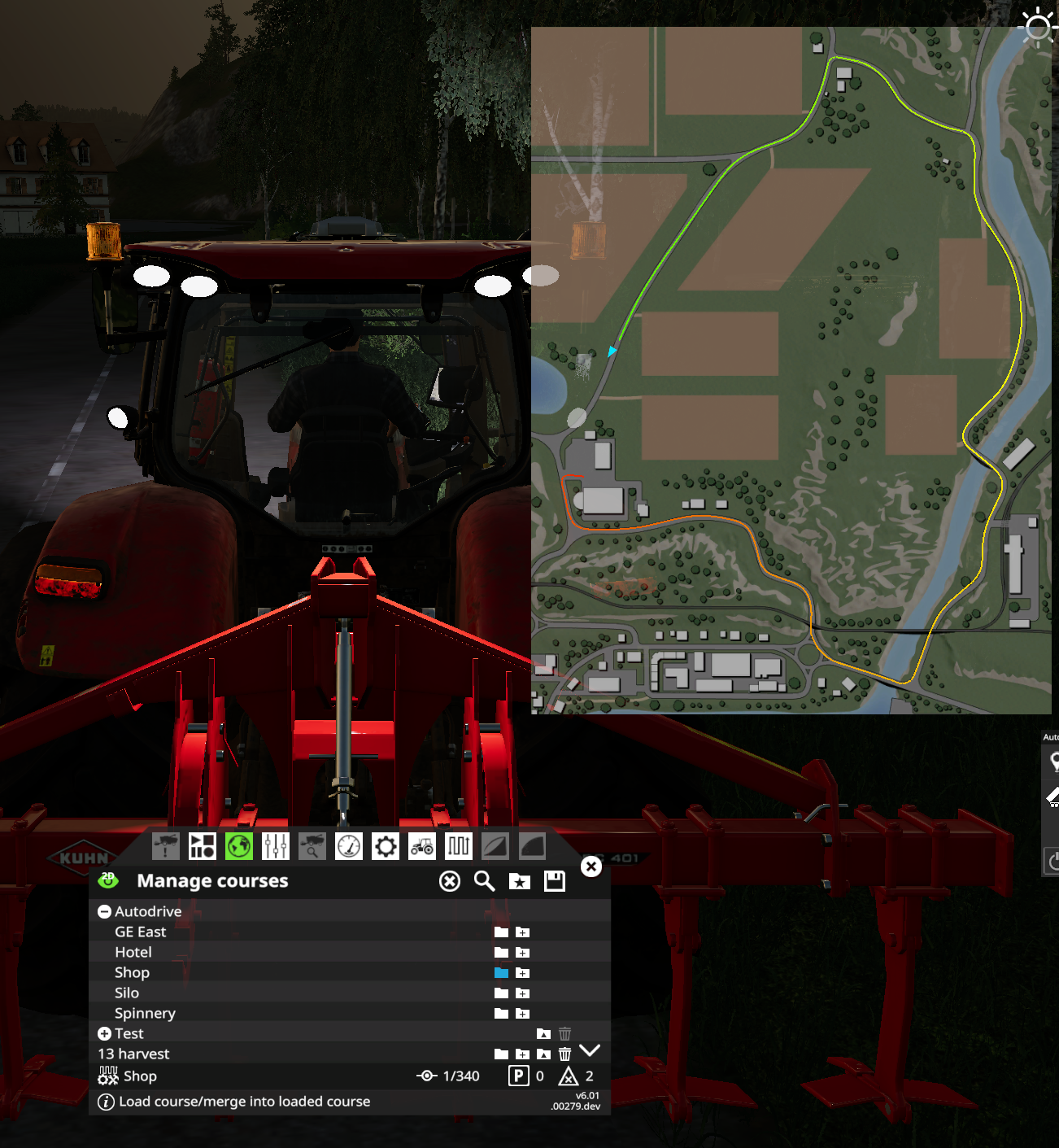
Is it because of the yRotation? I pass in
local _, yRot, _ = getWorldRotation(vehicle.rootNode)
to GetPath().
pvaiko
on 18 Aug 2019
hey, yeah my bad. Had some misinterpretation of the y rotation there.
I uploaded the sources (not a new release) if you wanna give it another try.
If you pass maxDistance as math.huge, he will basically look anywhere in the map for a suitable heading (which as stated above, was interpreted wrong) and choose this as starting location, so I would be careful with that :-)
I updated the function to fallback to the closest point without regard for the parameters if no suitable heading vector could be found, so you should always get a route back but it would be on you to check if the first waypoint might be too far away if you want to react to this.
Stephan-S
on 18 Aug 2019
@Stephan-S thanks, that's much better, I may bug you later.
I pushed a beta release for those who want to test the AD courses in CP:
https://github.com/Courseplay/courseplay/releases/tag/6.01.00283.1
6.01.00283.1 Beta: AutoDrive destinations as virtual courses
BACKUP YOUR COURSEPLAY COURSES BEFORE TRYING THIS! I messed a lot
with the course management and can't guarantee I did not screw up
something.
When AutoDrive present, add a virtual course folder with AutoDrive
destinations to the course management. When loaded, AD will create a
course from the current vehicle position to the selected destination.
(You'll need AutoDrive 1.0.4.9 or later for this to work correctly)
pvaiko
on 18 Aug 2019
@pvaiko , some have reported about this new function in a new issue, so I posted my thoughts in it too ;) #4108
Bobster82
on 18 Aug 2019
@pvaiko, I am experimenting with your new destination feature - but i am not sure how to use it.
Let's say that i am harvesting fieldand want a CP driver to offload the harvester.
I want to create the unload-route, and I opened the new "Autodrive folder" and loaded  the AutoDrive destination (MainFarm - Silo - Unload)
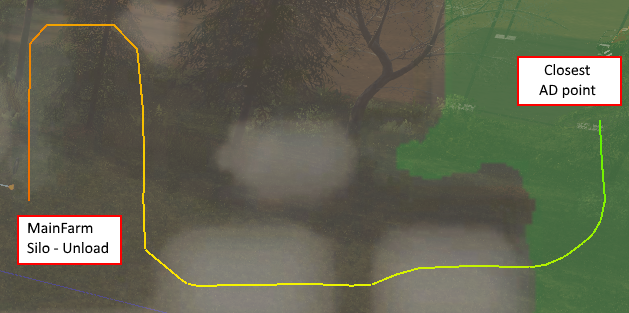
Then I get a route from the closest AD point to the unload point. Great!
To complete the course, my thought was to add the next destination  (Field 02), but this seams first create a straight line from the unload point to again the closest AD point and then, from the AD point to the destination (field 02)
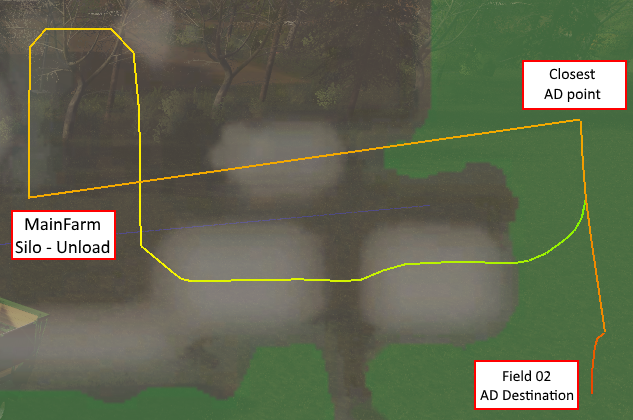
Am I using the feature wrong?
Martinnygaard
on 19 Aug 2019
@FforFarm this stage isn't for unload/refill courses yet. That'll come in one of the next releases, I plan to add return routes to any destination which will do what you want.
pvaiko
on 19 Aug 2019
@Stephan-S , regarding GetPathVia(startX, startY, startYRot, viaID, destinationID), I understand what you wrote earlier but what if there's no destination at my current location? Can't I just get a course from the closest AD waypoint to viaID and then back to the closest AD waypoint?
pvaiko
on 19 Aug 2019
@pvaiko No, this is not possible right now.
If you are asking for a path to a destination. This works basically like a look-up table, because all the paths are already calculated when a user clicks on the 'Recalculate' button.
So I would have to calculate this just in time for your requirements.
But I think if a player is using CP for fieldwork on field X, he should also create an AutoDrive destination to that field. One that would already represent some 'natural' field entry point or at least an unobstructed one. So I would prefer if the network could be used that way, rather than going back to some waypoint, that happened to be closest. This is just asking for trouble down the road and would likely be less reliable.
The relculation process for the whole network is highly optimized and it would require some effort to extract this into an asynchronously running function for one waypoint. If you think this is the way to go for CP, I will look into it, but as stated above, this is not my preferred way to go.
I hope you get my concerns :-)
Stephan-S
on 19 Aug 2019
I agree with Stephan. The user should use the AD network destination to create a field entry/exit point .
Also its so simple to achieve.
Just my 2 cents worth
alpha117
on 19 Aug 2019
@Stephan-S and @alpha117 I got it, what I don't know yet though is how to add this to CP, my idea was so far that for every destination I add a second line, like for example:
Silo
Silo (and return)
the first one way from the current position to the Silo, the second including a return path from the silo to the current position.
What you saying is since the current position can't be used, CP should use the closest (?) AD destination instead, which is fine, I can find that but there'd be no indication to the user about which destination has been selected automatically.
Sure all this can be solved but I did not really want to change anything on the CP HUD/UI or adding new pop ups or dialogs, I'm trying to add this with as few changes as possible.
I'm open for any ideas.
pvaiko
on 19 Aug 2019
Surely it is down to the user to make sure that the AD 'network', is just that a 'network' or GPS that connects all points, no matter where you are on that network
Using this as an example, you can get from any point (silo, stores etc etc) and return.
So, if I was on the network to the north(redline) I can tell AD to go to refill from the stores and take it to field 2.

I can get from any point on this network to any other point or return
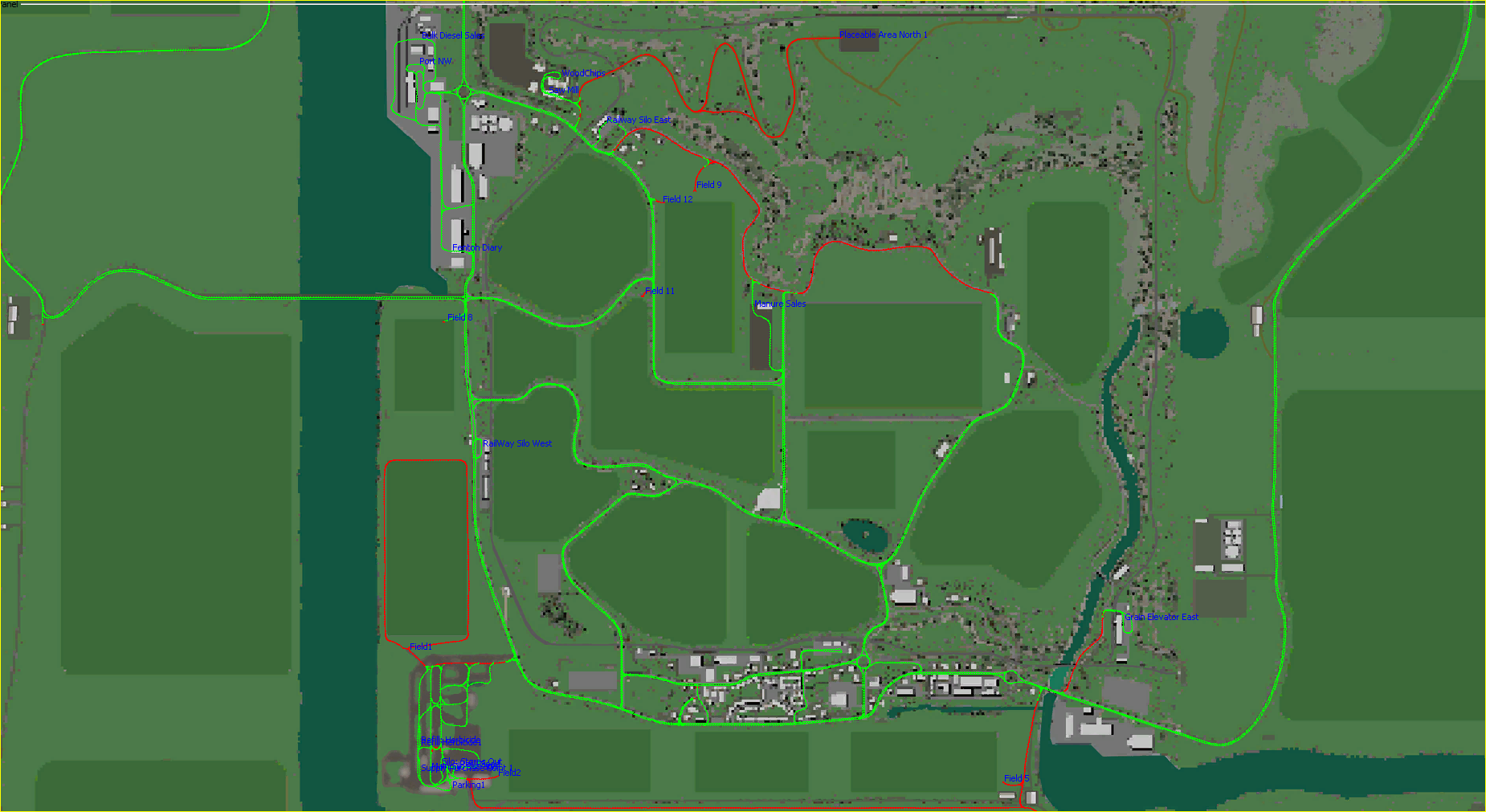
In your example it very easy to go to silo and return in AD
alpha117
on 19 Aug 2019
I think you will have to change the CP GUI as I think AD is slightly more flexible when analyzing routing from A to B due to the network. IN CP the courses are yard > Shop, then Field 1 to Field 2. But you cannot get from Yard to Field 2, if you see what I mean. without creating a course Yard > Field 2.
In AD you just have to create destinations within that network, not individual routes.
Here how I do it. On a map, the first thing I do is to create 'the network', no destinations, just drive around the complete map making sure everything that you want is in the network, you can add to the network at anytime. II then go a create destinations (silos, fields,, garage, shop, café, whatever).
That way I know I can reach any point from anywhere within that network.
Final 'tweaks' to the network I make in the AD editor as its quicker and easier to do, especially at road junctions, where you can have many parts of the network going through that point.
alpha117
on 19 Aug 2019
I'm not sure where your end goal is with intergrating CP and AD.
alpha117
on 19 Aug 2019
Current in the CP GUI (using the AD selection you can only go from where you are to an AD destination. What you cannot do currently is say from you current position, lets say then 'go to silo1' refill' 'Hay' and take it to the 'Port sell point'. and then return to the 'Yard' That would be good to be able to do.
Currently in AD I would have to do that in 2 steps. 1. Silo1 to Port. 2. Port to Yard. I can do that as all these destination can be reached from anywhere on the AD network
alpha117
on 19 Aug 2019
I think one of the main issues currently is that the users AD network is not setup correctly, and when to use single routing(Green) and double routing(red). AD seems to get confused sometimes, especially if there are to many nodes in one place, the driver get stuck, message appears.
alpha117
on 19 Aug 2019
I'm not sure where your end goal is with integrating CP and AD.
The short term goal is to eliminate at least some of the course recording from CP, so I can use the AD generated courses in various CP modes.
One of the most frequent complaints about CP is having to manually record everything other than fieldwork courses.
What the end goal is, I don't know. We'll see :)
pvaiko
on 19 Aug 2019
_well, you got to record with AD too, but not all create short CP ways and combine them for a task. What I miss for AD is the reverse driving. I had a course for reverse, the forward to load trigger and because of lack of space, reverse also into the selling trigger. If I wouldnt fked up the start, it would work more then once (or it is a GC load trigger Issue :) )
Tensuko
on 19 Aug 2019
Biggest problem of CP is bad design for crossroads... when you will add possibility for adding crossroads for existing course, than you are in similar situation like AD... now when I forgot add crossroad mark, I have to do new road what is rly boring... next good thing of AD is using node of course as target of way.
raxtor
on 19 Aug 2019
Sorry, some offtopic here:
If I wouldnt fked up the start, it would work more then once (or it is a GC load trigger Issue :) )
Have you had any problems with the GC triggers when trying to load with CP?
I had to make some adjustments to their Trigger onActivate and onFillTypeSelection methods so they would happily accept AD drivers without player characters in them.
At first testing I thought everything was fine until, because I was always in the test vehicle myself :D
The patch is already sent to @kevink98, but it should also include some line to check for CP I suppose.
Stephan-S
on 19 Aug 2019
Well @kevink98 also helped us and noticed something for GC Script. ( #4049 ).
Not sure how @ThomasGaertner implemented GC yet, but I didn't make testruns with all the new GC stuff from other modders and I got the feeling that the one from FED Action cause some Issue, as ppl also report, that they got to stay in the vehicle to get them refilled.
Tensuko
on 19 Aug 2019
Hello together!
Since in this topic is a lot of traffic, I want to address my question to the developers of both, CP and AD here.
Is there any plan to make chaff harvesting comfortable with the two tools? There is the shovel-mode and the filling/compacting mode from CP what is very nice! but bringing the chaff from the field to the silo is nearly impossible atm. without paying attention all the time or even drive vehicles by myself. It would be wonderful, if the CP driver would do the part on the field (get the trailer filled by the harvester) and than hands over to AD to drive to the Silo. Similar to the options we already have with the combination of field-work course with CP and refill/empty course from AD.
That would be just wonderful, because in my view the chaff harvesting chain is one of the most interesting ones in the game.
Greets
Theo
Th301
on 20 Aug 2019
I am not sure what AD is able to do for that, but our Mode2 can do that, well not right now, as it needs to be rewritten for FS19 to have all the features, but it will be able to do it again.
The only workarround for now is use the course that CP use for Mode2, but use it in Mode1 and just drive it manualy for chaff harvesting, then send it away with mode1 and take the next tracktor manualy. I know you all are waiting for mode2 to come back like it should work, but it is rly a lot to do.... maybe I post some explanations on that Mode2....
Tensuko
on 20 Aug 2019
My point is more, that it would be unnecessary to record all these courses for mode 2, when AD would do the driving job.
Th301
on 20 Aug 2019
That is already kinda working.
The thing is, that you can use AD alone to unload a Combine.
I haven't try again AD way of unload it, but the 1st Versions I try, wasn't rly that good as the Tracktor drives arround in hughe circles to get to the combine, maybe that changed.
Sure, when our Mode2 is back, I am VERY sure, that CP will do the Mode2 Combine unload and head then over to AD Course, just like Mode6 for reload Fertilizer and Seed already working.
Tensuko
on 20 Aug 2019
Reverse unloading works fine in Mode 2 atm as far as i can tell. Open silos
need some cleaning up afterwards, but that's not a huge problem.
Op di 20 aug. 2019 13:27 schreef Tensuko notifications@github.com:
That is already kinda working.
The thing is, that you can use AD alone to unload a Combine.
I haven't try again AD way of unload it, but the 1st Versions I try,
wasn't rly that good as the Tracktor drives arround in hughe circles to get
to the combine, maybe that changed.
Sure, when our Mode2 is back, I am VERY sure, that CP will do the Mode2
Combine unload and head then over to AD Course, just like Mode6 for reload
Fertilizer and Seed already working.—
You are receiving this because you are subscribed to this thread.
Reply to this email directly, view it on GitHub
https://github.com/Courseplay/courseplay/issues/3820?email_source=notifications&email_token=ALA7QG2RUCQTDMIZXMUV3DLQFPILHA5CNFSM4HOHNL42YY3PNVWWK3TUL52HS4DFVREXG43VMVBW63LNMVXHJKTDN5WW2ZLOORPWSZGOD4V6P6A#issuecomment-522971128,
or mute the thread
https://github.com/notifications/unsubscribe-auth/ALA7QGZE3WA5M6H3QN6F6ITQFPILHANCNFSM4HOHNL4Q
.
 SirStranger1989
on 20 Aug 2019
SirStranger1989
on 20 Aug 2019
I have been thinking a lot about how the integration of CP and AD would make the best sence for me.
Now that Pvaiko recently imported AD Destinations to CP, i thought about this opportunity:
When running some fieldwork, where roadwork is necessary, i think it would be awesome with some pre-defined targets to AD in the course file of CP.
I mean that when I generate the field work, i will specify which unload/refill target AD should drive to, as well as which field target it should return to. (I guess it also need to specify a drive mode?)
Then CP can pass on the field and remote targets to AD, and AD will do its thing.
Doing it this way, it will not be necessary to setup both CP (choosing the "use AD"-setting, which I forget every time) nor we will have to setup the target/modes in AutoDrive GUI.
My main interest in this suggestion is to keep the user interface as simple as possible. This way we only need to choose a course in CP and press "Start", and everything is setup automatically.
The remote destination could be changeable in a drop-down in the CP GUI, if i wanted to change destination (Lets say change from MaimFarm silo to directly at the sell point)
I do not expect all of this becomming part of the mods, i am just trying to share my opinion. :-)
CoursePlay and AutoDrive cooperation is simply the best feature i have seen in any mod since i started playing FS in 2009 - I admire your work :-)
Martinnygaard
on 23 Aug 2019
As it is now, it will not make any difference to me if it is AD or CP that drives the road couse, but i guess AD will give some limitations in regards to "reverse into silo" and other special unload types.
Will it be possible to record a "unload course", just from a point next to the silo, where CP reverse into the silo, empty, and then drives back to the way point next to the silo.
Then the workflow will be:
- CP fills a trailer with grass on field 01
- AD drives the tractor from F01 to Silo point
- CP takes over, reverse into the silo, unloads and drives back to the Silo point
- AD drives the tractor from Silo to F01
- CP continues fieldwork
Both drive routes (Point 2 and 4) could of course be driven by CP as well, with a route given by AD.
I am not sure how if this approach would be userfriendly-wice, since i can see how it could give confussion when only some routes (with reverse unload er fill) would need this "unload course".
Martinnygaard
on 23 Aug 2019
CP/AD interface works now, closing this, report any problems/suggestions in a new issue.
pvaiko
on 8 Jan 2020
Related issues
 MicaelJarniac
·
4Comments
MicaelJarniac
·
4Comments
 iw-shawn
·
5Comments
iw-shawn
·
5Comments
 rgoe
·
3Comments
rgoe
·
3Comments
 mawie
·
5Comments
mawie
·
5Comments
 PromGames
·
4Comments
PromGames
·
4Comments
Most helpful comment
Hey,
@tjb8907 that sounds very interesting. And very impressive, considering the coding quality of the FS17 version of AutoDrive, that you were able to do this :-D
@pvaiko
I just updated the AutoDrive Interface and included a small example on how to use it, to start AutoDrive and receive a callback, when it has reached it's target.
When you have the time, you could try calling this function from Coursplay code. Maybe there could be an option such as "Use AutoDrive" to decide what to do when the trailer is full in fieldwork mode or mode2 and then call the autodrive interface instead of driving an unload course in cp.
I tried doing it myself and managed to get the fieldworker who was collecting hay to switch to AD to unload and then switch back to cp when it reached the fieldpos again. But I am sure you can do a better job of integrating this properly into CP without breaking anything else. But I can send you the changed file to get you started more quickly. I annotated the changes with some comments (--AutoDrive ..)
FieldworkAIDriver.zip
This way, the settings and target set in the AutoDrive HUD are used when switching over to AutoDrive from Courseplay.
Best regards,
Stephan