Courseplay: Course generation and starting direction
The latest information I could find from the devs regarding the implementation of directions beyond the N-S-E-W so that the paths could be aligned to irregularly aligned fields dates back to January 2, and I am wondering if there is any news regarding its feasibility.
 yitzh4k
All 63 comments
I'm not one of the developers but started working on this exact problem a few weeks ago. By now I think I have a solid solution and at this time the biggest task ahead of me is to integrate it with Courseplay.
You can see an example of the generated course for Field 9 at Coldborough Farm at http://vajko.name/field9.png.

What my extension does:
- generates tracks in any direction
- finds the optimum angle, that is the direction the parallel tracks must run in order to have the minimum number of turns.
- makes a best effort to find an angle for non-convex fields which results in continuous tracks
- start the headland tracks at any location.
- link the headland tracks with the parallel track (remember, the parallel tracks start location changes with the angle)
can easily be extended to have interleaved parallel tracks (sorry, don't know the exact term) where you work every second track to prevent Y turns.
So far I was working with field data dumped to the log file and with Courseplay saved courses and use LOVE to visualize my results.
I'm pretty much ready to start the integration with Courseplay and was just going to ask the developers if they are interested in this and are willing to give me minimum support. (I develop software for a living and pretty confident that can handle a lot myself, but if someone experienced with FS17 and Courseplay can give me a few pointers that can immensely speed things up as I don't have to reverse engineer everything)
As for the integration, my thought was to use the vehicle's position and heading to define the starting point and direction of the headland path (that is how my current implementation works, if you look at the screenshot the purple circle with the line represents the vehicle).
Again, I'm more than happy to share this work and spend time on the integration if the developers would like to do so.
(Deutsch ist auch kein Problem)
Peter
Here is another example, Field 8 in Coldborough Farm. The red line is the path from the last headland path to the center of the field:

 pvaiko
on 21 Feb 2017
pvaiko
on 21 Feb 2017
Does your solution skip any fruit on the turns? This is my pet peeve with headlands and CP, but I can live with. However, if you have a solution, I think they ought to take a look at it.
 lcc1211
on 22 Feb 2017
lcc1211
on 22 Feb 2017
That's exactly what I was looking for and more.
yitzh4k
on 22 Feb 2017
It will skip fruit on the headland just as the existing CP course, I know, it is annoying, but I was focusing on the parallel tracks in the center of the field. Let's see if I can get this one integrated first.
pvaiko
on 22 Feb 2017
This could be very nice to have - especially in mod maps, where there is less though on angling the fields in parallel to N/S/W/E
 gammelgaard52
on 22 Feb 2017
gammelgaard52
on 22 Feb 2017
First harvest test at Coldborough Farm. My lua script used the outermost headland track of a CP generated saved course (in XML format) and based on that, regenerated the optimum path for Field 9 in CP XML format. Then I loaded that course in the game. Looks good so far:

pvaiko
on 23 Feb 2017
Awesome! How can I help you test it?
yitzh4k
on 23 Feb 2017
Thanks, it'd be extremely helpful if you could do that.
I could prepare a script which would prompt you to select an existing Courseplay course (which you generated and saved earlier) and create an optimized version of it which you would be able load in the game.
Would that work for you?
pvaiko
on 23 Feb 2017
Yes, sounds very good.
yitzh4k
on 23 Feb 2017
@pvajko it looks grate what you did on it.
If you are up to the task, then we could look into adding it to cp, but it would first be after the first release, since we are more or less at the point where we have stopped adding new features in and preparing for the first release + bug fixing.
Would you also be able to optimize the headland generation ?
 Satissis
on 23 Feb 2017
Satissis
on 23 Feb 2017
I'm more than happy to work on adding it to CP, whenever you tell me you are ready for it.
In the meanwhile I wrap up the current solution so saved courses can be loaded and regenerated. That way we can start testing it in multiple maps if there are volunteers...
Would love to give a try to improve the headland generation too. What exactly would you want to optimize? I know one issue is the corners where we don't cover 100% of the field.
pvaiko
on 23 Feb 2017
@Satissis & @pvajko I will volunteer when you're ready to test it - especially if you're willing to try and get it to stop skipping fruit on the headlands. Just let me know what I need to do.
lcc1211
on 23 Feb 2017
Yeah the corners a the biggest problem, and then the transition from 1 headlane to the next one.
The starting point of the headland (before doing lanes) should should be at an edge of the field.
Then if the degree from 1 waypoint to the next one is bigger that..... let's say 60 degree, it should make an turn start and turn end on that waypoint, so I can start incorporate some headland turn maneuvers, which should also help on those corners where it misses some areas. But this should first go live when the headland turns are done as well.
Hope this gives you some ideas.
Satissis
on 23 Feb 2017
For offline course generation I have now a lua script which lists the saved courses found in a folder, can make a copy of a selected one (also updating the courseManager.xml file) and open the course generator window where you can adjust some parameters and then save it:

The tool needs a lua interpreter and the LÖVE graphical framework (https://love2d.org/)
Question to those interested in trying, would you prefer to
install the lua interpreter and LÖVE framework yourselves and download the script files only, or
you want me to ZIP everything together so no installation other than unzipping is needed?
pvaiko
on 25 Feb 2017
@pvajko that looks great thanks for diggin into this.😀
I would like to be a testing volunteer.🙌
I think the best way would be if you could zip everything together so everyone willing to test would have the same version of the tools.
 shelweg
on 25 Feb 2017
shelweg
on 25 Feb 2017
@pvajko I think a zip would be best for me.
lcc1211
on 25 Feb 2017
@pvajko which ever one is fine by me, but maybe zip would be best.
yitzh4k
on 25 Feb 2017
i'd like to be included in testing
 gec100
on 25 Feb 2017
gec100
on 25 Feb 2017
@yitzh4k @lcc1211 @gec100 @debejerry @gammelgaard52 @Satissis
I uploaded a Windows version which should have everything you need to run it: http://vajko.name/coursegen.zip I have no access to Mac computers, but I'm happy to work with someone who has to create a Mac version.
I really appreciate if you try it and let me know your thoughts, the bugs you find and ideas for improvement. Hope it won't be frustratingly buggy...
Here is the README file in the zip:
Fieldwork Course Generator
==========================
This tool is a preview of an extended course generator and
may at some point be integrated into Courseplay.
It is a standalone tool, that is, currently you won't be
able to use it from the game directly. Instead, it'll load
a fieldwork course previously generated in Courseplay, then
you make some adjustments and save the customized course.
Note that you can only load fieldwork courses with a headland
track as the tool uses the outermost headland track to find
the field boundary.
You can then load this customized course in the game just
as a Courseplay generated course.
What this preview does:
- generates tracks in any direction
- finds the optimum angle, that is the direction the parallel
tracks must run in order to have the minimum number of turns. - makes a best effort to find an angle for non-convex fields
which results in continuous tracks - start the headland tracks at any location.
- link the headland tracks with the parallel track (remember,
the parallel tracks start location changes with the angle)
Upcoming features:
- integration with Courseplay so courses can be generated
in game - generate course starting in the center and finishing with
the headland for sowing and any fieldwork other than
harvesting - interleaved parallel tracks (sorry, don't know the exact term)
where you work every second track to prevent Y turns. - optimized headland track generation to prevent skipping
fruit at corners.
Installation
To install, just unzip to any folder.
The package is for Windows and contains everything needed
to run it, including a lua interpreter and the LÖVE graphical
framework.
This is the Windows version, I don't have access to Mac
computers. If you are willing to install lua and LÖVE ,
you can run the scripts on a Mac too.
To install, just unzip to any folder.
Usage
=====
Find your game folder. On Windows, this will most likely
be under My Documents\My Games\FarmingSimulator2017Under that, there is a CoursePlay_Courses folder with
a subfolder for each installed map. This is where
the Courseplay courses are stored for each map.
Note the full path to these folders.MAKE A BACKUP OF YOUR CoursePlay_Courses FOLDER! This is
a beta version, there may be bugs in there I don't want
you to lose your saved courses!Now switch to the folder where you unzipped the course
generator and type:
lua53.exe startCourseGenerator.lua
for example, on my computer this would be:lua53.exe startCourseGenerator.lua "c:\Users\Peter\Documents\My Games\FramingSimulator2017\CoursePlay_Courses\FS17_coldboroughParkFarm.SampleModMap"for the Coldborough Farm map. Make sure there is _no_ \ at the very
end of the folder name just before the ".You should now see a list of the saved courses of that map.
Only the top folder works, courses in subfolders won't show up.
I can add that feature if people really need it, but please
try to live with this limitation for now.Select a fieldwork course by typing in the number of the course
and pressing enter. You'll have to confirm the creation of a new
course. Remember, the course must have a headland track!
Selecting non-fieldwork courses or fieldwork courses with no
headland tracks will result in errors.The course generator window appears showing the outline of the
field.Set the width and number of passes using the w/W and p/P keys.
Next, you'll have to define where to start the headland track.
Use the right mouse button to place a marker where your want to
start it, just outside the field boundary.Use the keys j and k to turn the marker. This will determine the
direction of the headland pass.Press g to generate the course. Green is the headland, blueish
are the tracks in the center of the field and the red line is
the path between the two.If you like what you see, press s to save the course.
If you are in a game, you'll have to quit it and restart to be
able to see the new course, otherwise it won't show up.Load the new course and test.
Thanks for giving it a try. If you have any problems, report it on
github https://github.com/Courseplay/courseplay/issues/1793 or
at [email protected].
Peter
pvaiko
on 26 Feb 2017
Hi, I know this is quite extreme field but who want's it simple :)

This field is surrounded with fence so it needs at least two headlands for combine to stay in side it. For some reason it generates third pass over the second headland on the left half of the field. Probably so it would start from the top most corner.
gec100
on 26 Feb 2017
if I place the combine on the upper corner then there's no overlapping.

gec100
on 26 Feb 2017
now only if CP would reload the save folder somehow so i do not have to exit the game every time :)
gec100
on 26 Feb 2017
@gec100: first of all, thanks for checking it out.
That 'third' pass you see in red is the chunk between the end of the headland path and the start of the regular tracks in the middle, I just implemented the easiest solution, which is: if you end the last headland then follow the last headland until you reach any corner. It's obviously not the best solution but sometimes you can work around it (as I see) by starting the course at a different location or direction.
It is probably not too complicated to fix this, I'll check it.
BTW, this is an interesting field as it is not convex and the best angle would be something like 45 degrees (northeast) here but the algorithm rejects it because it would skip the bottom left part of the field as it is implemented now. Generating realistic tracks for non-convex fields like this are really not trivial...
pvaiko
on 26 Feb 2017
@gec100 I think it will reload the folder when you save a filter or another course.
pvaiko
on 26 Feb 2017
I think it will reload the folder when you save a filter or another course.
Nop it does not. that's in a separate list which it shows. (Or it's an unintended bug that could be intended :P)
@PromGamers have already requested an reload button and is on my todo list as well :)
Satissis
on 26 Feb 2017
I tried to install per your directions, but Norton thinks none of the files are safe and has quarantined all of them.
lcc1211
on 26 Feb 2017

lcc1211
on 26 Feb 2017
Sorry to hear that.
This file is part of LÖVE (love2d.org), the graphics framework I added
to the package for convenience. Obviously, I can't guarantee it's safe
although I don't think it would do any harm.
Either you tell Norton it is Ok or I can provide a script only package
which assumes lua and love are in the path which means you have to
install them yourselves.
pvaiko
on 26 Feb 2017
I'm not much for programming or anything like that, but if the script package is fairly straight forward I might be able to handle that.
lcc1211
on 26 Feb 2017
Working exactly as it should!

Took me a while to figure out I could switch the headland orientation (clockwise or anti-clockwise) by rotating the magenta circle, lol. Working great so far on the Dutch Polder map, only downside is having to reload the game to be able to use the course, but apart from that it is doing exactly what I hoped for.
Great work so far!
edit: also, when choosing the amount of headland passes, you should always n+1, because I found that the first headland track sits exactly on top of the field edge.
here's another field:

yitzh4k
on 26 Feb 2017
peter, this looks amazing i cant wait to test this! im glad about the reload button being worked on as well. i was going to suggest it. i do alot of editing with coursedrawer.
 sootysax
on 26 Feb 2017
sootysax
on 26 Feb 2017
@lcc1211 if you don't want to restore the OpenAL32.dll from the Norton quarantine, the easiest would probably be to install LOVE from love2d.org (https://bitbucket.org/rude/love/downloads/love-0.10.2-win64.exe) or download their 64bit zip package (https://bitbucket.org/rude/love/downloads/love-0.10.2-win64.zip) and the copy the OpenAL32.dll from the LOVE installation directory or zip file to the LOVE subfolder under the directory where you installed course generator.
pvaiko
on 26 Feb 2017
@yitzh4k
Glad you like it. It really motivates me to improve it.
edit: also, when choosing the amount of headland passes, you should always n+1, because I found that the first headland track sits exactly on top of the field edge.
Not sure what you mean by n+1. The current algorithm uses a saved course with headland passes. That means it has no idea about the field boundary, it uses the first headland track in the saved course as the basis and builds everything on top of that.
In the final, integrated version it'll of course use the field's boundary.
pvaiko
on 26 Feb 2017
Uploaded a new version to http://vajko.name/coursegen.zip. This can reverse a course (key r) so you can use it for sowing and other fieldwork. A green dot marks the start of the course, the red dot is the end.
pvaiko
on 27 Feb 2017
@Satissis I moved my git repo to github and added you as a contributor. I'd like to have a place to discuss improvements and track issues until the generator is integrated into Courseplay.
pvaiko
on 27 Feb 2017
i'm having trouble wit field 8 in Sandybay 17 map.

fileld is quite simple but coursegen would not load it to generate the course. After entering the number from the list and [enter], nothing happens. just like it waits for something else. if i than enter 0 it exits normally.
attached is the course from the CP_storage
gec100
on 27 Feb 2017
gec100 Would you mind using https://github.com/pvajko/course-generator/issues to track these issues until it gets integrated with Courseplay?
I already entered yours there.
pvaiko
on 27 Feb 2017
same thing with field 11.
traveling courses open normally with error cause there is no field. but field courses stuck.
will try with vanilla map
gec100
on 27 Feb 2017
as far as missing any crops on the headlands, you can significantly help this problem by recording your own field edges. I have to imagine this will work with this external tool as much as it does with CP course generation.
If you drive your own course around the edge, with the reverse mode turned on (but driving forwards) it will generate much closer waypoints when you are making turns. If you take turns slowly and as gradually as possible, when you generate the course, you should be able to generate 6 headlanes with very minimal loss of crop when combining (especially if you plot the course with a slightly narrower work width than your header). You can get even tighter waypoints by popping off crossing points before your actual turn on the corners.
I havent tried this with Peter's tool, but i have to think it would make an improvment with headland generation
sootysax
on 27 Feb 2017
Testing the new pattern:

pvaiko
on 1 Mar 2017
@sootysax these are very good tips which I can use in the algorithm as the ultimate goal is to automatically generate headland tracks which do not miss any fruit.
For example using slightly narrower width in the headland passes is very easy to implement. Adding more waypoints in the corners is also possible, the problem is the shape of the tracks in the corners, that can be tricky.
pvaiko
on 1 Mar 2017
Looks indeed very interesting... I'll go and test it now :D
 JDTiger
on 4 Mar 2017
JDTiger
on 4 Mar 2017
Thanks. Make sure you test the latest release at https://github.com/pvajko/course-generator/releases/tag/v0.2
pvaiko
on 4 Mar 2017
Just changed it to postponed until after Release.
Satissis
on 5 Mar 2017
A quick update on this: I forked to work on the integration (https://github.com/pvajko/courseplay) and the first tests went very smooth, I changed the CP course generation to use https://github.com/pvajko/course-generator when there is a headland and was able to generate and save courses from within the game.
Not sure how to set up the HUD for the new generator. The easiest would be is to add a new option to the Starting corner: vehicle location. If that's selected, the direction would be disabled and CP would use the new generator. In every other case it'd use the old one, at least until we are sure the new is stable enough.
pvaiko
on 22 May 2017
Simplest would be the best. My only problem with vehicle position would be having to drive the field for this to work. Maybe instead use part of the old the old system has the limits for the new one. So for example if a user selects SW your course generation is limited to 180 to 270. and selects the longest line between those degrees and to keep using the old systems have 3 options. North or East for this example(Old System) Longest Line(New) How hard of a hit is this on CPU performance? How are headlands coming along?
 pops64
on 22 May 2017
pops64
on 22 May 2017
use part of the old the old system has the limits for the new one.
Not sure what you meant by that, I guess I wasn't able to explain clearly what I was thinking.
So, the new algorithm has two distinct features:
- Find the optimum angle for the center tracks.
- Start the headland at any location.
In the current implementation the user has no control over the angle (but has a million parameters to tweak). The algorithm is working with a 1 degree resolution and I see no performance issues with it, lua seems to be great at this type of computation. It would be easy to limit the algorithm to any angle or range of angles or a coarser resolution.
As for the start of the headland, for irregular fields one should be able to define the start location anywhere (for example near the gate to the field). One way (the easiest from the coding perspective) is use the vehicle: drive to the field, you don't have to be on the field, only near the location where you want to start the headland and generate it there, you'll immediately see the markers if you have it turned on and have feedback on the start location. The other alternative would be to use a map, for example the CP course view map and click the start location there.
I think the algorithm is pretty flexible, so everything you recommend seems doable, I'd also prefer to add one or two parameters for tweaking, for example the overlap for the headland.
pvaiko
on 22 May 2017
My only problem with starting the headland in any location is where is the initial up down course going to be. If it is not reasonably close to the end or beginning of the headland course CP can't handle that in its current setup. Adding the mouse to the map and having a interface would be a good idea tho I am not to sure of how hard this would be(@Satissis area of expertise) and you would still have the initial problem. Also Satissis might have plans for making 90 degree turns some time in the far future. I don't know if we want to setup the system to handle this at one point in time. With what I was talking about using the old system is to define which corner you would like to start in and have CP stay with in that comer but adjust so you don't have the initial problem.
pops64
on 22 May 2017
If it is not reasonably close to the end or beginning of the headland course CP can't handle that in its current setup.
My course generator connects the end of the headland with the start of the up-down course with waypoints. If you scroll up in this page, that red highlighted part is this connecting section. The only problem at the moment is that there is no way to turn on/off the combine or implement for this section, see also https://github.com/pvajko/course-generator/issues/3 on this topic. But other than, it works fine, vehicles travel happily over to the beginning of the up-down tracks.
The way it works now is that the course continues in the direction of the headland (cw, ccw) on the innermost headland until it reaches the first point where it can start the up-down tracks.
In a field with a convex solution there are four such points and where they exactly are depends on the selected angle.
is to define which corner you would like to start in
My problem with this is that some fields just don't really have a corner and it is hard to predict where exactly for example SW corner will be on an irregularly shaped field, see some examples above. I'd prefer to somehow keep the ability to pick any location to start, but of course, I'm happy to implement whatever you guys find useful.
pvaiko
on 22 May 2017
So you generate way points from the end of the headlands maneuvers to the beginning of the up down? Over top the headlands course. Because my big concern is if the up down start requires a U-Turn get going in the right direction. CP can't handle this situation unless you make a turn maneuver there. In regards to the
is no way to turn on/off the combine or implement for this section
I don't think this would be possible with out some serious reprogramming of core code. That's why the current system doesn't have that gap. That's why I'm of the opinion that the user should select the general area and CP adjusts the start location with in limits of that general area to remove that gap. But if you can handle driving back to start of up down then using vehicle position or map gui would be the best if we want to give the user that option.(GUI would have to wait for Satissis opinion)
pops64
on 22 May 2017
So you generate way points from the end of the headlands maneuvers to the beginning of the up down?
Yes sir. That's exactly what I do. The only drawback at the moment is that there is an area which will be worked twice, for a combine it's ok, for sowing/fertilizing, etc. you are wasting some money.
I think that even if there is no turn on/off possibility, I can come up with something to eliminate this inefficiency, for example by not staying on the headland but move inwards as if there were another headland until we reach the start of the up/down tracks.
pvaiko
on 22 May 2017
Yea from a coding perspective and user experience that would be easiest and best to have a partial headland on un-worked field back to the start of the up down. And adjust the updown so you don't have overlap. Assuming this isn't hard. This will also avoid a potential conflict of overlapped way points(AKA you save in the middle of this part and launch the game again you wont have a conflict.)
pops64
on 22 May 2017
That's a good point with the overlapped waypoints. I'll see what I can do.
pvaiko
on 22 May 2017
I made a first usable version with the new generator integrated at https://github.com/pvajko/courseplay, see the last commit:
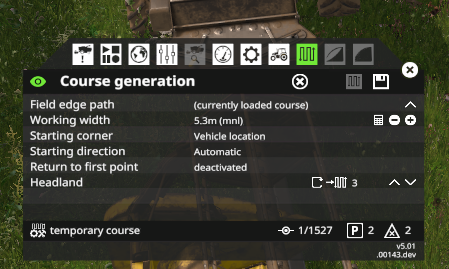
Updated HUD and hooked up settings

You can now select 'Vehicle location' in the HUD as
starting corner. If you do so, Starting Direction is set to
automatic too and one headland is selected (can't yet generate
without headland)

Also, hooked up the number of headlands, clockwise/counterclockwise
and headland/center order to the new generator.

If you select anything other than 'Vehicle location' for the
starting corner, the old generator is invoked.
BTW, that partial headland generation is not trivial, it is a chicken and egg problem, need to think about it more.
pvaiko
on 12 Jun 2017
If this is stable and your are happy with go ahead a make a pull request. I will get @Satissis to look over it and see if he approves. Thanks
pops64
on 12 Jun 2017
Thanks, I'd wait a bit and see if some of the guys test it, I created a new release over there at https://github.com/pvajko/course-generator/releases/tag/v1.0-with-courseplay.
I have two questions though:
- What do you think about git submodules? I integrated the course generator as a submodule in my fork which allows us to develop and use it separately from Courseplay but there are some things to remember for the developers when working with submodules. If you don't want submodules in Courseplay then I can just add the files and work out the rest.
- I think if we integrate this, we'd have to document it to avoid confusion. I'm happy to write up something but then I'd need someone to review it, preferably a native English speaker.
pvaiko
on 12 Jun 2017
Fixed some integration/packaging issues with the release: https://github.com/pvajko/course-generator/releases/tag/v1.0-with-courseplay.
pvaiko
on 17 Jun 2017
Rainy afternoon today so made some tests, found a bug when working on fields with really sharp corners (like 20 degrees), that's fixed now.
However, one thing is clear: before I make pull request I need to implement graceful handling of errors and pop up a message that the course could not generated with the current settings.
pvaiko
on 18 Jun 2017
A marker for the continuation of #2124.
 ollydoyle
on 18 Jun 2017
ollydoyle
on 18 Jun 2017
Rainy afternoon today so made some tests, found a bug when working on fields with really sharp corners (like 20 degrees), that's fixed now.
Just found this too, i was gonna report it but you beat me too it :)
In my case it was cause by the number of headlands, so i just reduced it down. i figure that have more headland loops would cause turns to become more and more acute.
I have been testing all day and what you have done is very good.
I have a question about workflow. How do you recommend it is used in this case: Today I harvested a field with a course generated with your algorithm, and it work well, then i deleted the course forgetting to save it, moving my harvester to the next field. when i realized my mistake, where i have to bale next, and i would normally copy the course from the harvester to the tractor.
ollydoyle
on 18 Jun 2017
I think i answered my own question, where i just generated a course again with the harvester width from a approximate location similar to the deleted course and it seems to be OK
ollydoyle
on 18 Jun 2017
Sorry for the delayed response. I would have to ask @Satissis about that. He is the one that handles file organization for CP. Has for documentation usually we will just comment it in the code. If it is to verbose to be put into the code. I will ask the rest of the CP team what they think about that.
pops64
on 18 Jun 2017
New course generator now merged to master.
pvaiko
on 29 Jun 2017
Related issues
 Mogli12
·
4Comments
Mogli12
·
4Comments
 MicaelJarniac
·
4Comments
MicaelJarniac
·
4Comments
 PromGames
·
4Comments
PromGames
·
4Comments
 bojanh66
·
4Comments
bojanh66
·
4Comments
 huseyinsayar
·
3Comments
huseyinsayar
·
3Comments
Most helpful comment
I'm not one of the developers but started working on this exact problem a few weeks ago. By now I think I have a solid solution and at this time the biggest task ahead of me is to integrate it with Courseplay.
You can see an example of the generated course for Field 9 at Coldborough Farm at http://vajko.name/field9.png.
What my extension does:
can easily be extended to have interleaved parallel tracks (sorry, don't know the exact term) where you work every second track to prevent Y turns.
So far I was working with field data dumped to the log file and with Courseplay saved courses and use LOVE to visualize my results.
I'm pretty much ready to start the integration with Courseplay and was just going to ask the developers if they are interested in this and are willing to give me minimum support. (I develop software for a living and pretty confident that can handle a lot myself, but if someone experienced with FS17 and Courseplay can give me a few pointers that can immensely speed things up as I don't have to reverse engineer everything)
As for the integration, my thought was to use the vehicle's position and heading to define the starting point and direction of the headland path (that is how my current implementation works, if you look at the screenshot the purple circle with the line represents the vehicle).
Again, I'm more than happy to share this work and spend time on the integration if the developers would like to do so.
(Deutsch ist auch kein Problem)
Peter
Here is another example, Field 8 in Coldborough Farm. The red line is the path from the last headland path to the center of the field:
