Couchdb: Unable to install CouchDB from apt in Ubuntu 18.04
Expected Behavior
I followed the instructions at http://docs.couchdb.org/en/stable/install/unix.html#installation-using-the-apache-couchdb-convenience-binary-packages and verified that deb https://apache.bintray.com/couchdb-deb bionic main is in /etc/apt/sources.list and [email protected] is in my apt-key list.
When I run sudo apt install couchdb, I expect it to install properly
Current Behavior
Here is what I'm currently seeing.
me@server:~$ sudo apt update
Ign:1 https://apache.bintray.com/couchdb-deb bionic InRelease
Get:2 https://apache.bintray.com/couchdb-deb bionic Release [1,840 B]
Get:3 http://security.ubuntu.com/ubuntu bionic-security InRelease [83.2 kB]
Hit:5 http://us.archive.ubuntu.com/ubuntu bionic InRelease
Get:6 http://us.archive.ubuntu.com/ubuntu bionic-updates InRelease [88.7 kB]
Fetched 174 kB in 1s (222 kB/s)
Reading package lists... Done
Building dependency tree
Reading state information... Done
18 packages can be upgraded. Run 'apt list --upgradable' to see them.
me@server:~$ sudo apt install couchdb
Reading package lists... Done
Building dependency tree
Reading state information... Done
Package couchdb is not available, but is referred to by another package.
This may mean that the package is missing, has been obsoleted, or
is only available from another source

E: Package 'couchdb' has no installation candidate
Also
me@server:~$ sudo apt search couchdb
Sorting... Done
Full Text Search... Done
couchapp/bionic 1.0.2+dfsg1-1 all
  Standalone CouchDB Application Development Made Simple

libcatmandu-perl/bionic 1.0700-1 all
  metadata toolkit

liblightcouch-java/bionic 0.0.6-1 all
  LightCouch - CouchDB Java API

pd-purest-json/bionic 1.4.2-3 i386
  Pd library for working with JSON data and RESTful webservices

python-celery/bionic 4.1.0-2ubuntu1 all
  async task/job queue based on message passing (Python2 version)

python-celery-common/bionic 4.1.0-2ubuntu1 all
  async task/job queue based on message passing (common files)

python-celery-doc/bionic 4.1.0-2ubuntu1 all
  async task/job queue based on message passing (Documentation)

python-couchdb/bionic 0.10-1.1 all
  library for working with Apache CouchDB

python-couchdbkit/bionic 0.6.5-2 all
  Trying to improve couchdb experience in Python

python-paisley/bionic 0.3.1-1 all
  CouchDB client written in Python to be used within a Twisted application

python-restkit/bionic 4.2.2-2 all
  Restkit is an HTTP resource kit for Python

python3-celery/bionic 4.1.0-2ubuntu1 all
  async task/job queue based on message passing (Python3 version)
Possible Solution
I looked at #1314 so it appears that this should have been resolved awhile ago, so I'm not sure why I'm running into issues here.
Neither sudo apt clean or sudo apt autoclean helped.
I wouldn't be surprised if I made other mistakes in the process, but I'm not sure what else I can try to fix things.
Your Environment
I'm running Ubuntu 18.04 on a VPS that I recently updated from Ubuntu 14.04. I did not have couchdb installed previously.
 StoicLoofah
All 29 comments
I can't reproduce on a local 18.04 system.
Can you make sure you have apt-transport-https installed?
 wohali
on 14 Jan 2019
wohali
on 14 Jan 2019
Looks like that is installed, too.
me@server:~$ sudo apt install apt-transport-https
Reading package lists... Done
Building dependency tree
Reading state information... Done
apt-transport-https is already the newest version (1.6.6).
0 upgraded, 0 newly installed, 0 to remove and 0 not upgraded.
If this isn't ringing any bells and isn't reproducible from your side, I'll just close it out since I'm not sure whether it makes sense for you to help me debug this if it's just my problem. Maybe someone else will stumble across it with an idea of what to do
StoicLoofah
on 14 Jan 2019
Yeah, sorry - I would suggest to build a new machine and see if you have the same problem again. It looks for all the world like you're not actually getting the CouchDB packages into apt. Perhaps run aptitude and see if you can see CouchDB at all. Also check any release pinning you might have, or any other oddball changes you made under the /etc/apt directory.
Good luck, and do report back if/when you fix things.
wohali
on 14 Jan 2019
I am running into the same issue with Ubuntu 18.04.1
The only note I would add is that I upgraded from 16.04, this was not a fresh install.
administrator@mfalcon:~$ sudo apt-get update && sudo apt-get install couchdb
[sudo] password for administrator:
Hit:1 http://us.archive.ubuntu.com/ubuntu bionic InRelease
Get:2 http://us.archive.ubuntu.com/ubuntu bionic-updates InRelease [88.7 kB]
Get:3 http://security.ubuntu.com/ubuntu bionic-security InRelease [83.2 kB]
Get:4 http://us.archive.ubuntu.com/ubuntu bionic-backports InRelease [74.6 kB]
Ign:5 https://apache.bintray.com/couchdb-deb bionic InRelease
Get:6 https://apache.bintray.com/couchdb-deb bionic Release [1,840 B]
Fetched 248 kB in 1s (247 kB/s)
Reading package lists... Done
Reading package lists... Done
Building dependency tree
Reading state information... Done
Package couchdb is not available, but is referred to by another package.
This may mean that the package is missing, has been obsoleted, or
is only available from another source

E: Package 'couchdb' has no installation candidate
administrator@mfalcon:~$
 surveyservice
on 18 Jan 2019
surveyservice
on 18 Jan 2019
@surveyservice What if you uninstall, then reinstall couchdb?
This will not remove your data.
wohali
on 18 Jan 2019
CouchDB is not installed. (and hasn't been on this machine)
This morning, I upgraded the OS from 16.04 Xenial to 18.04 Bionic, added the CouchDB repo and key, and tried to install.
It appears as though the CouchDB repository is being read, however I am consistently getting the Package 'couchdb' has no installation candidate. message.
I've tried the same steps as in the original post, but no luck.
surveyservice
on 18 Jan 2019
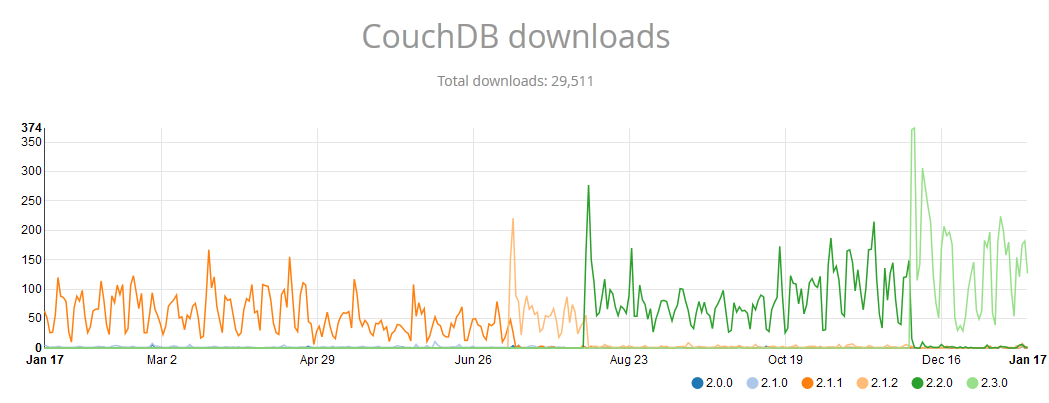
I don't know what to say, and I'm unable to reproduce the problem. People are able to download it - and there's even been an uptick since 2.2.0 - see the attached image, which is stats just for the .deb packages.
wohali
on 18 Jan 2019
FYI I have reached out to a Debian/Ubuntu expert for advice; we'll see if anything comes back.
wohali
on 18 Jan 2019
@surveyservice Can you please run
apt policy couchdb
to see if something is pinned in such a way as to make it uninstallable?
wohali
on 18 Jan 2019
You should also check the apt cache directly, there should be a file in /var/lib/apt/lists/, something like apache.bintray.com_couchdb-deb_bionic_main_Packages.
wohali
on 18 Jan 2019
the results:
administrator@mfalcon:~$ apt policy couchdb
couchdb:
  Installed: (none)
  Candidate: (none)
  Version table:
     1.6.0-0ubuntu7 -1
        100 /var/lib/dpkg/status
administrator@mfalcon:~$
there is a file called apache.bintray.com_couchdb-deb_dists_bionic_Release
I put its contents here in this gist
surveyservice
on 18 Jan 2019
@surveyservice can you confirm this is an amd64 host, not i386 or armhf or aarch64 or other? CouchDB only supplies 64-bit amd64 (x86_64) packages at this time.
wohali
on 18 Jan 2019
@StoicLoofah Same point as above - was your machine 32-bit (i386)? That would explain the absence of packages.
@surveyservice Your output says this is a 32-bit install, sorry, we only provide 64-bit packages. You'll need to upgrade to a 64-bit processor, or install the 64-bit version of Ubuntu to get packages from us.
wohali
on 18 Jan 2019
@wohali Well that certainly explains it... thoroughly misjudged the machine I'm working with... thank you for your help and sorry for wasting your time...
surveyservice
on 18 Jan 2019
@wohali confirmed that I am on a 64-bit machine
me@server:~$ uname -a
Linux ... SMP PREEMPT Mon Dec 10 18:25:47 UTC 2018 x86_64 x86_64 x86_64 GNU/Linux
My /var/lib/apt/lists/apache.bintray.com_couchdb-deb_dists_bionic_Release matches https://gist.github.com/surveyservice/20a4a36202c67a0efc31d6b28cb3adaf
Also
me@server:~$ apt policy couchdb
couchdb:
  Installed: (none)
  Candidate: (none)
  Version table:
Since @surveyservice also mentioned it, I also did upgrade from 14.04 to 18.04 via 16.04 within the past month as well
StoicLoofah
on 18 Jan 2019
make sure you have the gpg public key used to sign the repo imported, otherwise, it is disbled by default in 1804
curl -sSL https://couchdb.apache.org/repo/bintray-pubkey.asc | sudo apt-key add -
 zhengpenghou
on 17 Jun 2019
zhengpenghou
on 17 Jun 2019
What @zhengpenghou is probably your issue. I'm unable to reproduce this.
wohali
on 17 Jun 2019
Even I was facing the same issue. I couldn't install couchdb on ubutnu 18.04. So i Switched to Ubuntu 16.04 where I was able to instal succesfully.
 MadhuMPandurangi
on 27 Jun 2019
MadhuMPandurangi
on 27 Jun 2019
What exactly was the error?
On Thu, Jun 27, 2019 at 15:13 Madhu M Pandurangi notifications@github.com
wrote:
Even I was facing the same issue. I couldn't install couchdb on ubutnu
18.04. So i Switched to Ubuntu 16.04 where I was able to instal succesfully.—
You are receiving this because you were mentioned.
Reply to this email directly, view it on GitHub
https://github.com/apache/couchdb/issues/1856?email_source=notifications&email_token=AABKIKOO67WQYVRXGF4U343P4RSB7A5CNFSM4GPWLTI2YY3PNVWWK3TUL52HS4DFVREXG43VMVBW63LNMVXHJKTDN5WW2ZLOORPWSZGODYWFTNA#issuecomment-506223028,
or mute the thread
https://github.com/notifications/unsubscribe-auth/AABKIKJ47HZSEWKIWXJ4KGDP4RSB7ANCNFSM4GPWLTIQ
.>
Mobile: +86 185 0003 6513 <185%200003%206513>
Wechat: zhengpenghou
zhengpenghou
on 27 Jun 2019
I don't know much about Linux. I do know a thing or two about programming. Here is my complete tale of key spamming myself out of this situation.
It all started with the same issue:
melvin@melvin-lubuntu:~$ sudo apt install couchdb
Reading package lists... Done
Building dependency tree
Reading state information... Done
Package couchdb is not available, but is referred to by another package.
This may mean that the package is missing, has been obsoleted, or
is only available from another source
E: Package 'couchdb' has no installation candidate
I did a combination of the following things, which didn't work.
melvin@melvin-lubuntu:~$ curl -sSL https://couchdb.apache.org/repo/bintray-pubkey.asc | sudo apt-key add -
OK
echo "deb https://apache.bintray.com/couchdb-deb bionic main" | sudo tee -a /etc/apt/sources.list
deb https://apache.bintray.com/couchdb-deb bionic main
sudo apt update
melvin@melvin-lubuntu:~$ apt policy couchdb
couchdb:
Installed: (none)
Candidate: (none)
Version table:
melvin@melvin-lubuntu:~$ uname -a
Linux melvin-lubuntu 5.0.0-13-generic #14-Ubuntu SMP Mon Apr 15 14:59:14 UTC 2019 x86_64 x86_64 x86_64 GNU/Linux
Then
I decided to remove sources.list without knowing if such a thing is a good idea (this is were my lack of experience really shines).
sudo rm /etc/apt/sources.list
sudo apt update
Then
I did all this keyboard spamming again (more or less in the same order as I wrote it here).
melvin@melvin-lubuntu:~$ sudo apt-get install couchdb
Reading package lists... Done
Building dependency tree
Reading state information... Done
Some packages could not be installed. This may mean that you have
requested an impossible situation or if you are using the unstable
distribution that some required packages have not yet been created
or been moved out of Incoming.
The following information may help to resolve the situation:
The following packages have unmet dependencies:
couchdb : Depends: libicu60 (>= 60.1-1~) but it is not installable
Depends: libssl1.0.0 (>= 1.0.1) but it is not installable
Depends: libtinfo5 (>= 6) but it is not installable
Recommends: python3-progressbar but it is not installable
E: Unable to correct problems, you have held broken packages.
Progress!
I would continue, but I don't have time at the moment (appointment IRL, I thought installing this would take 5 min. not 30, it's fun though :P). I might get back to this.
 melvinroest
on 28 Sep 2019
melvinroest
on 28 Sep 2019
You may want to try another route:
https://bitnami.com/stack/couchdb/installer
On Sat, 28 Sep 2019 at 14:07, melvinroest notifications@github.com wrote:
I don't know much about Linux. I do know a thing or two about programming.
Here is my complete tale of key spamming myself out of this situation.It all started with the same issue:
melvin@melvin-lubuntu:~$ sudo apt install couchdb
Reading package lists... Done
Building dependency tree
Reading state information... Done
Package couchdb is not available, but is referred to by another package.
This may mean that the package is missing, has been obsoleted, or
is only available from another sourceE: Package 'couchdb' has no installation candidate
I did a combination of the following things, which didn't work.
melvin@melvin-lubuntu:~$ curl -sSL
https://couchdb.apache.org/repo/bintray-pubkey.asc | sudo apt-key add -
OKecho "deb https://apache.bintray.com/couchdb-deb bionic main" | sudo tee
-a /etc/apt/sources.list
deb https://apache.bintray.com/couchdb-deb bionic mainsudo apt update
melvin@melvin-lubuntu:~$ apt policy couchdb
couchdb:
Installed: (none)
Candidate: (none)
Version table:melvin@melvin-lubuntu:~$ uname -a
Linux melvin-lubuntu 5.0.0-13-generic #14
https://github.com/apache/couchdb/pull/14-Ubuntu SMP Mon Apr 15
14:59:14 UTC 2019 x86_64 x86_64 x86_64 GNU/LinuxThen
I decided to remove sources.list without knowing if such a thing is a good
idea (this is were my lack of experience really shines).sudo rm /etc/apt/sources.list
sudo apt update
Then
I did all this keyboard spamming again (more or less in the same order as
I wrote it here).melvin@melvin-lubuntu:~$ sudo apt-get install couchdb
Reading package lists... Done
Building dependency tree
Reading state information... Done
Some packages could not be installed. This may mean that you have
requested an impossible situation or if you are using the unstable
distribution that some required packages have not yet been created
or been moved out of Incoming.
The following information may help to resolve the situation:The following packages have unmet dependencies:
couchdb : Depends: libicu60 (>= 60.1-1~) but it is not installable
Depends: libssl1.0.0 (>= 1.0.1) but it is not installable
Depends: libtinfo5 (>= 6) but it is not installable
Recommends: python3-progressbar but it is not installable
E: Unable to correct problems, you have held broken packages.Progress!
I would continue, but I don't have time at the moment (appointment IRL, I
thought installing this would take 5 min. not 30, it's fun though :P). I
might get back to this.—
You are receiving this because you are subscribed to this thread.
Reply to this email directly, view it on GitHub
https://github.com/apache/couchdb/issues/1856?email_source=notifications&email_token=ABKTZUR25FGXUXA6VIY7DT3QL5CIHA5CNFSM4GPWLTI2YY3PNVWWK3TUL52HS4DFVREXG43VMVBW63LNMVXHJKTDN5WW2ZLOORPWSZGOD72YATI#issuecomment-536182861,
or mute the thread
https://github.com/notifications/unsubscribe-auth/ABKTZUUCSGZZYXTLW6LTWS3QL5CIHANCNFSM4GPWLTIQ
.
 SinanGabel
on 28 Sep 2019
SinanGabel
on 28 Sep 2019
Deleted Lubuntu as this whole reckless process broke my terminal, installed Ubuntu. I still had the same issue though. I went through my 'tutorial' (I didn't remove the sources file this time), it worked and I got to the same point as in the tutorial. What was interesting is that I had to change the name to bionic, as my distro is in disco, but yea, other than that, it was fine.
Installing python3-progressbar had to be done via a seperate command, but that then worked.
I somehow cannot install libssl yet, and it's weird since 1.1 is already pre-installed, apparently. And I still have no clue how to deal with libicu60.
I refuse to use bitnami, since I want to do it via apt. I'm stubborn :)
So, libssl1.1 and libicu63 were installed, yet the apt install couchdb still says that it doesn't have those dependencies.
Edit: nevermind, bitnami worked.
melvinroest
on 28 Sep 2019
@melvinroest We don't support disco, that's your problem. That is not 18.04 LTS.
@SinanGabel We don't recommend the Bitnami approach at all - those images are unupgradable and completely unsupported by the CouchDB team. If you want a package like that, you can use our Docker image or Ubuntu snap which are fully supported.
wohali
on 28 Sep 2019
Ahh.... thanks!
melvinroest
on 29 Sep 2019
I get this on docker image of ubuntu:18.04 and ubuntu:latest.
root@7700d8a9c0ab:/# apt update -qq
3 packages can be upgraded. Run 'apt list --upgradable' to see them.
root@7700d8a9c0ab:/# apt upgrade
# stuff
root@7700d8a9c0ab:/# apt install couchdb
Reading package lists... Done
Building dependency tree
Reading state information... Done
Package couchdb is not available, but is referred to by another package.
This may mean that the package is missing, has been obsoleted, or
is only available from another source

E: Package 'couchdb' has no installation candidate
 bean5
on 18 Mar 2020
bean5
on 18 Mar 2020
@bean5 cannot reproduce. Here's the log of me following our installation instructions:
$ docker pull ubuntu:18.04
18.04: Pulling from library/ubuntu
Digest: sha256:04d48df82c938587820d7b6006f5071dbbffceb7ca01d2814f81857c631d44df
Status: Image is up to date for ubuntu:18.04
docker.io/library/ubuntu:18.04
$ docker run -it ubuntu:18.04 /bin/bash
root@0e5e6927a80a:/# apt update
Get:1 http://security.ubuntu.com/ubuntu bionic-security InRelease [88.7 kB]
Get:2 http://archive.ubuntu.com/ubuntu bionic InRelease [242 kB]
Get:3 http://security.ubuntu.com/ubuntu bionic-security/multiverse amd64 Packages [7904 B]
Get:4 http://security.ubuntu.com/ubuntu bionic-security/universe amd64 Packages [831 kB]
Get:5 http://security.ubuntu.com/ubuntu bionic-security/restricted amd64 Packages [34.6 kB]
Get:6 http://security.ubuntu.com/ubuntu bionic-security/main amd64 Packages [855 kB]
Get:7 http://archive.ubuntu.com/ubuntu bionic-updates InRelease [88.7 kB]
Get:8 http://archive.ubuntu.com/ubuntu bionic-backports InRelease [74.6 kB]
Get:9 http://archive.ubuntu.com/ubuntu bionic/universe amd64 Packages [11.3 MB]
Get:10 http://archive.ubuntu.com/ubuntu bionic/main amd64 Packages [1344 kB]
Get:11 http://archive.ubuntu.com/ubuntu bionic/restricted amd64 Packages [13.5 kB]
Get:12 http://archive.ubuntu.com/ubuntu bionic/multiverse amd64 Packages [186 kB]
Get:13 http://archive.ubuntu.com/ubuntu bionic-updates/restricted amd64 Packages [48.1 kB]
Get:14 http://archive.ubuntu.com/ubuntu bionic-updates/universe amd64 Packages [1360 kB]
Get:15 http://archive.ubuntu.com/ubuntu bionic-updates/main amd64 Packages [1149 kB]
Get:16 http://archive.ubuntu.com/ubuntu bionic-updates/multiverse amd64 Packages [11.9 kB]
Get:17 http://archive.ubuntu.com/ubuntu bionic-backports/universe amd64 Packages [4245 B]
Get:18 http://archive.ubuntu.com/ubuntu bionic-backports/main amd64 Packages [2496 B]
Fetched 17.7 MB in 3s (6430 kB/s)
Reading package lists... Done
Building dependency tree
Reading state information... Done
3 packages can be upgraded. Run 'apt list --upgradable' to see them.
root@0e5e6927a80a:/# apt-get install -y apt-transport-https gnupg ca-certificates
Reading package lists... Done
Building dependency tree
Reading state information... Done
The following additional packages will be installed:
  dirmngr gnupg-l10n gnupg-utils gpg gpg-agent gpg-wks-client gpg-wks-server gpgconf gpgsm libasn1-8-heimdal libassuan0
  libgssapi3-heimdal libhcrypto4-heimdal libheimbase1-heimdal libheimntlm0-heimdal libhx509-5-heimdal libkrb5-26-heimdal libksba8
  libldap-2.4-2 libldap-common libnpth0 libreadline7 libroken18-heimdal libsasl2-2 libsasl2-modules libsasl2-modules-db
  libsqlite3-0 libssl1.1 libwind0-heimdal openssl pinentry-curses readline-common
Suggested packages:
  dbus-user-session libpam-systemd pinentry-gnome3 tor parcimonie xloadimage scdaemon libsasl2-modules-gssapi-mit
  | libsasl2-modules-gssapi-heimdal libsasl2-modules-ldap libsasl2-modules-otp libsasl2-modules-sql pinentry-doc readline-doc
The following NEW packages will be installed:
  apt-transport-https ca-certificates dirmngr gnupg gnupg-l10n gnupg-utils gpg gpg-agent gpg-wks-client gpg-wks-server gpgconf
  gpgsm libasn1-8-heimdal libassuan0 libgssapi3-heimdal libhcrypto4-heimdal libheimbase1-heimdal libheimntlm0-heimdal
  libhx509-5-heimdal libkrb5-26-heimdal libksba8 libldap-2.4-2 libldap-common libnpth0 libreadline7 libroken18-heimdal libsasl2-2
  libsasl2-modules libsasl2-modules-db libsqlite3-0 libssl1.1 libwind0-heimdal openssl pinentry-curses readline-common
0 upgraded, 35 newly installed, 0 to remove and 3 not upgraded.
Need to get 5950 kB of archives.
After this operation, 17.6 MB of additional disk space will be used.
Get:1 http://archive.ubuntu.com/ubuntu bionic-updates/main amd64 libssl1.1 amd64 1.1.1-1ubuntu2.1~18.04.5 [1300 kB]
Get:2 http://archive.ubuntu.com/ubuntu bionic-updates/main amd64 openssl amd64 1.1.1-1ubuntu2.1~18.04.5 [613 kB]
Get:3 http://archive.ubuntu.com/ubuntu bionic/main amd64 ca-certificates all 20180409 [151 kB]
Get:4 http://archive.ubuntu.com/ubuntu bionic/main amd64 readline-common all 7.0-3 [52.9 kB]
Get:5 http://archive.ubuntu.com/ubuntu bionic/main amd64 libreadline7 amd64 7.0-3 [124 kB]
Get:6 http://archive.ubuntu.com/ubuntu bionic-updates/main amd64 libsqlite3-0 amd64 3.22.0-1ubuntu0.3 [498 kB]
Get:7 http://archive.ubuntu.com/ubuntu bionic-updates/universe amd64 apt-transport-https all 1.6.12 [1692 B]
Get:8 http://archive.ubuntu.com/ubuntu bionic/main amd64 libassuan0 amd64 2.5.1-2 [35.0 kB]
Get:9 http://archive.ubuntu.com/ubuntu bionic-updates/main amd64 gpgconf amd64 2.2.4-1ubuntu1.2 [123 kB]
Get:10 http://archive.ubuntu.com/ubuntu bionic/main amd64 libksba8 amd64 1.3.5-2 [92.6 kB]
Get:11 http://archive.ubuntu.com/ubuntu bionic/main amd64 libroken18-heimdal amd64 7.5.0+dfsg-1 [41.3 kB]
Get:12 http://archive.ubuntu.com/ubuntu bionic/main amd64 libasn1-8-heimdal amd64 7.5.0+dfsg-1 [175 kB]
Get:13 http://archive.ubuntu.com/ubuntu bionic/main amd64 libheimbase1-heimdal amd64 7.5.0+dfsg-1 [29.3 kB]
Get:14 http://archive.ubuntu.com/ubuntu bionic/main amd64 libhcrypto4-heimdal amd64 7.5.0+dfsg-1 [85.9 kB]
Get:15 http://archive.ubuntu.com/ubuntu bionic/main amd64 libwind0-heimdal amd64 7.5.0+dfsg-1 [47.8 kB]
Get:16 http://archive.ubuntu.com/ubuntu bionic/main amd64 libhx509-5-heimdal amd64 7.5.0+dfsg-1 [107 kB]
Get:17 http://archive.ubuntu.com/ubuntu bionic/main amd64 libkrb5-26-heimdal amd64 7.5.0+dfsg-1 [206 kB]
Get:18 http://archive.ubuntu.com/ubuntu bionic/main amd64 libheimntlm0-heimdal amd64 7.5.0+dfsg-1 [14.8 kB]
Get:19 http://archive.ubuntu.com/ubuntu bionic/main amd64 libgssapi3-heimdal amd64 7.5.0+dfsg-1 [96.5 kB]
Get:20 http://archive.ubuntu.com/ubuntu bionic-updates/main amd64 libsasl2-modules-db amd64 2.1.27~101-g0780600+dfsg-3ubuntu2.1 [14.8 kB]
Get:21 http://archive.ubuntu.com/ubuntu bionic-updates/main amd64 libsasl2-2 amd64 2.1.27~101-g0780600+dfsg-3ubuntu2.1 [49.2 kB]
Get:22 http://archive.ubuntu.com/ubuntu bionic-updates/main amd64 libldap-common all 2.4.45+dfsg-1ubuntu1.4 [16.9 kB]
Get:23 http://archive.ubuntu.com/ubuntu bionic-updates/main amd64 libldap-2.4-2 amd64 2.4.45+dfsg-1ubuntu1.4 [155 kB]
Get:24 http://archive.ubuntu.com/ubuntu bionic/main amd64 libnpth0 amd64 1.5-3 [7668 B]
Get:25 http://archive.ubuntu.com/ubuntu bionic-updates/main amd64 dirmngr amd64 2.2.4-1ubuntu1.2 [316 kB]
Get:26 http://archive.ubuntu.com/ubuntu bionic-updates/main amd64 gnupg-l10n all 2.2.4-1ubuntu1.2 [49.6 kB]
Get:27 http://archive.ubuntu.com/ubuntu bionic-updates/main amd64 gnupg-utils amd64 2.2.4-1ubuntu1.2 [127 kB]
Get:28 http://archive.ubuntu.com/ubuntu bionic-updates/main amd64 gpg amd64 2.2.4-1ubuntu1.2 [467 kB]
Get:29 http://archive.ubuntu.com/ubuntu bionic/main amd64 pinentry-curses amd64 1.1.0-1 [35.8 kB]
Get:30 http://archive.ubuntu.com/ubuntu bionic-updates/main amd64 gpg-agent amd64 2.2.4-1ubuntu1.2 [227 kB]
Get:31 http://archive.ubuntu.com/ubuntu bionic-updates/main amd64 gpg-wks-client amd64 2.2.4-1ubuntu1.2 [91.9 kB]
Get:32 http://archive.ubuntu.com/ubuntu bionic-updates/main amd64 gpg-wks-server amd64 2.2.4-1ubuntu1.2 [84.9 kB]
Get:33 http://archive.ubuntu.com/ubuntu bionic-updates/main amd64 gpgsm amd64 2.2.4-1ubuntu1.2 [215 kB]
Get:34 http://archive.ubuntu.com/ubuntu bionic-updates/main amd64 gnupg amd64 2.2.4-1ubuntu1.2 [249 kB]
Get:35 http://archive.ubuntu.com/ubuntu bionic-updates/main amd64 libsasl2-modules amd64 2.1.27~101-g0780600+dfsg-3ubuntu2.1 [48.8 kB]
Fetched 5950 kB in 2s (3935 kB/s)
debconf: delaying package configuration, since apt-utils is not installed
Selecting previously unselected package libssl1.1:amd64.
(Reading database ... 4046 files and directories currently installed.)
Preparing to unpack .../00-libssl1.1_1.1.1-1ubuntu2.1~18.04.5_amd64.deb ...
Unpacking libssl1.1:amd64 (1.1.1-1ubuntu2.1~18.04.5) ...
Selecting previously unselected package openssl.
Preparing to unpack .../01-openssl_1.1.1-1ubuntu2.1~18.04.5_amd64.deb ...
Unpacking openssl (1.1.1-1ubuntu2.1~18.04.5) ...
Selecting previously unselected package ca-certificates.
Preparing to unpack .../02-ca-certificates_20180409_all.deb ...
Unpacking ca-certificates (20180409) ...
Selecting previously unselected package readline-common.
Preparing to unpack .../03-readline-common_7.0-3_all.deb ...
Unpacking readline-common (7.0-3) ...
Selecting previously unselected package libreadline7:amd64.
Preparing to unpack .../04-libreadline7_7.0-3_amd64.deb ...
Unpacking libreadline7:amd64 (7.0-3) ...
Selecting previously unselected package libsqlite3-0:amd64.
Preparing to unpack .../05-libsqlite3-0_3.22.0-1ubuntu0.3_amd64.deb ...
Unpacking libsqlite3-0:amd64 (3.22.0-1ubuntu0.3) ...
Selecting previously unselected package apt-transport-https.
Preparing to unpack .../06-apt-transport-https_1.6.12_all.deb ...
Unpacking apt-transport-https (1.6.12) ...
Selecting previously unselected package libassuan0:amd64.
Preparing to unpack .../07-libassuan0_2.5.1-2_amd64.deb ...
Unpacking libassuan0:amd64 (2.5.1-2) ...
Selecting previously unselected package gpgconf.
Preparing to unpack .../08-gpgconf_2.2.4-1ubuntu1.2_amd64.deb ...
Unpacking gpgconf (2.2.4-1ubuntu1.2) ...
Selecting previously unselected package libksba8:amd64.
Preparing to unpack .../09-libksba8_1.3.5-2_amd64.deb ...
Unpacking libksba8:amd64 (1.3.5-2) ...
Selecting previously unselected package libroken18-heimdal:amd64.
Preparing to unpack .../10-libroken18-heimdal_7.5.0+dfsg-1_amd64.deb ...
Unpacking libroken18-heimdal:amd64 (7.5.0+dfsg-1) ...
Selecting previously unselected package libasn1-8-heimdal:amd64.
Preparing to unpack .../11-libasn1-8-heimdal_7.5.0+dfsg-1_amd64.deb ...
Unpacking libasn1-8-heimdal:amd64 (7.5.0+dfsg-1) ...
Selecting previously unselected package libheimbase1-heimdal:amd64.
Preparing to unpack .../12-libheimbase1-heimdal_7.5.0+dfsg-1_amd64.deb ...
Unpacking libheimbase1-heimdal:amd64 (7.5.0+dfsg-1) ...
Selecting previously unselected package libhcrypto4-heimdal:amd64.
Preparing to unpack .../13-libhcrypto4-heimdal_7.5.0+dfsg-1_amd64.deb ...
Unpacking libhcrypto4-heimdal:amd64 (7.5.0+dfsg-1) ...
Selecting previously unselected package libwind0-heimdal:amd64.
Preparing to unpack .../14-libwind0-heimdal_7.5.0+dfsg-1_amd64.deb ...
Unpacking libwind0-heimdal:amd64 (7.5.0+dfsg-1) ...
Selecting previously unselected package libhx509-5-heimdal:amd64.
Preparing to unpack .../15-libhx509-5-heimdal_7.5.0+dfsg-1_amd64.deb ...
Unpacking libhx509-5-heimdal:amd64 (7.5.0+dfsg-1) ...
Selecting previously unselected package libkrb5-26-heimdal:amd64.
Preparing to unpack .../16-libkrb5-26-heimdal_7.5.0+dfsg-1_amd64.deb ...
Unpacking libkrb5-26-heimdal:amd64 (7.5.0+dfsg-1) ...
Selecting previously unselected package libheimntlm0-heimdal:amd64.
Preparing to unpack .../17-libheimntlm0-heimdal_7.5.0+dfsg-1_amd64.deb ...
Unpacking libheimntlm0-heimdal:amd64 (7.5.0+dfsg-1) ...
Selecting previously unselected package libgssapi3-heimdal:amd64.
Preparing to unpack .../18-libgssapi3-heimdal_7.5.0+dfsg-1_amd64.deb ...
Unpacking libgssapi3-heimdal:amd64 (7.5.0+dfsg-1) ...
Selecting previously unselected package libsasl2-modules-db:amd64.
Preparing to unpack .../19-libsasl2-modules-db_2.1.27~101-g0780600+dfsg-3ubuntu2.1_amd64.deb ...
Unpacking libsasl2-modules-db:amd64 (2.1.27~101-g0780600+dfsg-3ubuntu2.1) ...
Selecting previously unselected package libsasl2-2:amd64.
Preparing to unpack .../20-libsasl2-2_2.1.27~101-g0780600+dfsg-3ubuntu2.1_amd64.deb ...
Unpacking libsasl2-2:amd64 (2.1.27~101-g0780600+dfsg-3ubuntu2.1) ...
Selecting previously unselected package libldap-common.
Preparing to unpack .../21-libldap-common_2.4.45+dfsg-1ubuntu1.4_all.deb ...
Unpacking libldap-common (2.4.45+dfsg-1ubuntu1.4) ...
Selecting previously unselected package libldap-2.4-2:amd64.
Preparing to unpack .../22-libldap-2.4-2_2.4.45+dfsg-1ubuntu1.4_amd64.deb ...
Unpacking libldap-2.4-2:amd64 (2.4.45+dfsg-1ubuntu1.4) ...
Selecting previously unselected package libnpth0:amd64.
Preparing to unpack .../23-libnpth0_1.5-3_amd64.deb ...
Unpacking libnpth0:amd64 (1.5-3) ...
Selecting previously unselected package dirmngr.
Preparing to unpack .../24-dirmngr_2.2.4-1ubuntu1.2_amd64.deb ...
Unpacking dirmngr (2.2.4-1ubuntu1.2) ...
Selecting previously unselected package gnupg-l10n.
Preparing to unpack .../25-gnupg-l10n_2.2.4-1ubuntu1.2_all.deb ...
Unpacking gnupg-l10n (2.2.4-1ubuntu1.2) ...
Selecting previously unselected package gnupg-utils.
Preparing to unpack .../26-gnupg-utils_2.2.4-1ubuntu1.2_amd64.deb ...
Unpacking gnupg-utils (2.2.4-1ubuntu1.2) ...
Selecting previously unselected package gpg.
Preparing to unpack .../27-gpg_2.2.4-1ubuntu1.2_amd64.deb ...
Unpacking gpg (2.2.4-1ubuntu1.2) ...
Selecting previously unselected package pinentry-curses.
Preparing to unpack .../28-pinentry-curses_1.1.0-1_amd64.deb ...
Unpacking pinentry-curses (1.1.0-1) ...
Selecting previously unselected package gpg-agent.
Preparing to unpack .../29-gpg-agent_2.2.4-1ubuntu1.2_amd64.deb ...
Unpacking gpg-agent (2.2.4-1ubuntu1.2) ...
Selecting previously unselected package gpg-wks-client.
Preparing to unpack .../30-gpg-wks-client_2.2.4-1ubuntu1.2_amd64.deb ...
Unpacking gpg-wks-client (2.2.4-1ubuntu1.2) ...
Selecting previously unselected package gpg-wks-server.
Preparing to unpack .../31-gpg-wks-server_2.2.4-1ubuntu1.2_amd64.deb ...
Unpacking gpg-wks-server (2.2.4-1ubuntu1.2) ...
Selecting previously unselected package gpgsm.
Preparing to unpack .../32-gpgsm_2.2.4-1ubuntu1.2_amd64.deb ...
Unpacking gpgsm (2.2.4-1ubuntu1.2) ...
Selecting previously unselected package gnupg.
Preparing to unpack .../33-gnupg_2.2.4-1ubuntu1.2_amd64.deb ...
Unpacking gnupg (2.2.4-1ubuntu1.2) ...
Selecting previously unselected package libsasl2-modules:amd64.
Preparing to unpack .../34-libsasl2-modules_2.1.27~101-g0780600+dfsg-3ubuntu2.1_amd64.deb ...
Unpacking libsasl2-modules:amd64 (2.1.27~101-g0780600+dfsg-3ubuntu2.1) ...
Setting up libnpth0:amd64 (1.5-3) ...
Setting up readline-common (7.0-3) ...
Setting up apt-transport-https (1.6.12) ...
Setting up libldap-common (2.4.45+dfsg-1ubuntu1.4) ...
Setting up libreadline7:amd64 (7.0-3) ...
Setting up libsasl2-modules-db:amd64 (2.1.27~101-g0780600+dfsg-3ubuntu2.1) ...
Setting up libsasl2-2:amd64 (2.1.27~101-g0780600+dfsg-3ubuntu2.1) ...
Setting up libroken18-heimdal:amd64 (7.5.0+dfsg-1) ...
Setting up libksba8:amd64 (1.3.5-2) ...
Setting up gnupg-l10n (2.2.4-1ubuntu1.2) ...
Setting up libssl1.1:amd64 (1.1.1-1ubuntu2.1~18.04.5) ...
debconf: unable to initialize frontend: Dialog
debconf: (No usable dialog-like program is installed, so the dialog based frontend cannot be used. at /usr/share/perl5/Debconf/FrontEnd/Dialog.pm line 76.)
debconf: falling back to frontend: Readline
debconf: unable to initialize frontend: Readline
debconf: (Can't locate Term/ReadLine.pm in @INC (you may need to install the Term::ReadLine module) (@INC contains: /etc/perl /usr/local/lib/x86_64-linux-gnu/perl/5.26.1 /usr/local/share/perl/5.26.1 /usr/lib/x86_64-linux-gnu/perl5/5.26 /usr/share/perl5 /usr/lib/x86_64-linux-gnu/perl/5.26 /usr/share/perl/5.26 /usr/local/lib/site_perl /usr/lib/x86_64-linux-gnu/perl-base) at /usr/share/perl5/Debconf/FrontEnd/Readline.pm line 7.)
debconf: falling back to frontend: Teletype
Setting up libheimbase1-heimdal:amd64 (7.5.0+dfsg-1) ...
Setting up openssl (1.1.1-1ubuntu2.1~18.04.5) ...
Setting up libsqlite3-0:amd64 (3.22.0-1ubuntu0.3) ...
Setting up libsasl2-modules:amd64 (2.1.27~101-g0780600+dfsg-3ubuntu2.1) ...
Setting up ca-certificates (20180409) ...
debconf: unable to initialize frontend: Dialog
debconf: (No usable dialog-like program is installed, so the dialog based frontend cannot be used. at /usr/share/perl5/Debconf/FrontEnd/Dialog.pm line 76.)
debconf: falling back to frontend: Readline
debconf: unable to initialize frontend: Readline
debconf: (Can't locate Term/ReadLine.pm in @INC (you may need to install the Term::ReadLine module) (@INC contains: /etc/perl /usr/local/lib/x86_64-linux-gnu/perl/5.26.1 /usr/local/share/perl/5.26.1 /usr/lib/x86_64-linux-gnu/perl5/5.26 /usr/share/perl5 /usr/lib/x86_64-linux-gnu/perl/5.26 /usr/share/perl/5.26 /usr/local/lib/site_perl /usr/lib/x86_64-linux-gnu/perl-base) at /usr/share/perl5/Debconf/FrontEnd/Readline.pm line 7.)
debconf: falling back to frontend: Teletype
Updating certificates in /etc/ssl/certs...
133 added, 0 removed; done.
Setting up libassuan0:amd64 (2.5.1-2) ...
Setting up libwind0-heimdal:amd64 (7.5.0+dfsg-1) ...
Setting up libasn1-8-heimdal:amd64 (7.5.0+dfsg-1) ...
Setting up gpgconf (2.2.4-1ubuntu1.2) ...
Setting up libhcrypto4-heimdal:amd64 (7.5.0+dfsg-1) ...
Setting up libhx509-5-heimdal:amd64 (7.5.0+dfsg-1) ...
Setting up gpgsm (2.2.4-1ubuntu1.2) ...
Setting up gnupg-utils (2.2.4-1ubuntu1.2) ...
Setting up pinentry-curses (1.1.0-1) ...
Setting up libkrb5-26-heimdal:amd64 (7.5.0+dfsg-1) ...
Setting up libheimntlm0-heimdal:amd64 (7.5.0+dfsg-1) ...
Setting up gpg (2.2.4-1ubuntu1.2) ...
Setting up gpg-agent (2.2.4-1ubuntu1.2) ...
Setting up gpg-wks-server (2.2.4-1ubuntu1.2) ...
Setting up libgssapi3-heimdal:amd64 (7.5.0+dfsg-1) ...
Setting up libldap-2.4-2:amd64 (2.4.45+dfsg-1ubuntu1.4) ...
Setting up dirmngr (2.2.4-1ubuntu1.2) ...
Setting up gpg-wks-client (2.2.4-1ubuntu1.2) ...
Setting up gnupg (2.2.4-1ubuntu1.2) ...
Processing triggers for libc-bin (2.27-3ubuntu1) ...
Processing triggers for ca-certificates (20180409) ...
Updating certificates in /etc/ssl/certs...
0 added, 0 removed; done.
Running hooks in /etc/ca-certificates/update.d...
done.
root@0e5e6927a80a:/# echo "deb https://apache.bintray.com/couchdb-deb bionic main"     | tee -a /etc/apt/sources.list.d/couchdb.list
deb https://apache.bintray.com/couchdb-deb bionic main
root@0e5e6927a80a:/# apt-key adv --keyserver keyserver.ubuntu.com --recv-keys \
>   8756C4F765C9AC3CB6B85D62379CE192D401AB61
Executing: /tmp/apt-key-gpghome.ZDIaKTDch2/gpg.1.sh --keyserver keyserver.ubuntu.com --recv-keys 8756C4F765C9AC3CB6B85D62379CE192D401AB61
gpg: key 379CE192D401AB61: public key "Bintray (by JFrog) <[email protected]>" imported
gpg: Total number processed: 1
gpg:               imported: 1
root@0e5e6927a80a:/# apt update
Hit:1 http://security.ubuntu.com/ubuntu bionic-security InRelease
Hit:2 http://archive.ubuntu.com/ubuntu bionic InRelease
Hit:3 http://archive.ubuntu.com/ubuntu bionic-updates InRelease
Ign:4 https://apache.bintray.com/couchdb-deb bionic InRelease
Get:5 https://apache.bintray.com/couchdb-deb bionic Release [1840 B]
Hit:6 http://archive.ubuntu.com/ubuntu bionic-backports InRelease
Get:7 https://apache.bintray.com/couchdb-deb bionic Release.gpg [821 B]
Get:8 https://apache.bintray.com/couchdb-deb bionic/main amd64 Packages [2063 B]
Fetched 4724 B in 1s (7016 B/s)
Reading package lists... Done
Building dependency tree
Reading state information... Done
3 packages can be upgraded. Run 'apt list --upgradable' to see them.
root@0e5e6927a80a:/# apt install -y couchdb
Reading package lists... Done
Building dependency tree
Reading state information... Done
The following additional packages will be installed:
  couch-libmozjs185-1.0 curl krb5-locales libcurl4 libgssapi-krb5-2 libicu60 libk5crypto3 libkeyutils1 libkrb5-3 libkrb5support0
  libnghttp2-14 libnspr4 libpsl5 librtmp1 publicsuffix
Suggested packages:
  krb5-doc krb5-user
The following NEW packages will be installed:
  couch-libmozjs185-1.0 couchdb curl krb5-locales libcurl4 libgssapi-krb5-2 libicu60 libk5crypto3 libkeyutils1 libkrb5-3
  libkrb5support0 libnghttp2-14 libnspr4 libpsl5 librtmp1 publicsuffix
0 upgraded, 16 newly installed, 0 to remove and 3 not upgraded.
Need to get 37.4 MB of archives.
After this operation, 86.8 MB of additional disk space will be used.
Get:1 http://archive.ubuntu.com/ubuntu bionic-updates/main amd64 libicu60 amd64 60.2-3ubuntu3.1 [8054 kB]
Get:2 https://apache.bintray.com/couchdb-deb bionic/main amd64 couch-libmozjs185-1.0 amd64 1.8.5-1.0.0+couch-2~bionic [1257 kB]
Get:3 https://apache.bintray.com/couchdb-deb bionic/main amd64 couchdb amd64 3.0.0~bionic [26.8 MB]
Get:4 http://archive.ubuntu.com/ubuntu bionic-updates/main amd64 krb5-locales all 1.16-2ubuntu0.1 [13.5 kB]
Get:5 http://archive.ubuntu.com/ubuntu bionic-updates/main amd64 libkrb5support0 amd64 1.16-2ubuntu0.1 [30.9 kB]
Get:6 http://archive.ubuntu.com/ubuntu bionic-updates/main amd64 libk5crypto3 amd64 1.16-2ubuntu0.1 [85.6 kB]
Get:7 http://archive.ubuntu.com/ubuntu bionic/main amd64 libkeyutils1 amd64 1.5.9-9.2ubuntu2 [8720 B]
Get:8 http://archive.ubuntu.com/ubuntu bionic-updates/main amd64 libkrb5-3 amd64 1.16-2ubuntu0.1 [279 kB]
Get:9 http://archive.ubuntu.com/ubuntu bionic-updates/main amd64 libgssapi-krb5-2 amd64 1.16-2ubuntu0.1 [122 kB]
Get:10 http://archive.ubuntu.com/ubuntu bionic/main amd64 libpsl5 amd64 0.19.1-5build1 [41.8 kB]
Get:11 http://archive.ubuntu.com/ubuntu bionic/main amd64 publicsuffix all 20180223.1310-1 [97.6 kB]
Get:12 http://archive.ubuntu.com/ubuntu bionic/main amd64 libnghttp2-14 amd64 1.30.0-1ubuntu1 [77.8 kB]
Get:13 http://archive.ubuntu.com/ubuntu bionic/main amd64 librtmp1 amd64 2.4+20151223.gitfa8646d.1-1 [54.2 kB]
Get:14 http://archive.ubuntu.com/ubuntu bionic-updates/main amd64 libcurl4 amd64 7.58.0-2ubuntu3.8 [214 kB]
Get:15 http://archive.ubuntu.com/ubuntu bionic-updates/main amd64 curl amd64 7.58.0-2ubuntu3.8 [159 kB]
Get:16 http://archive.ubuntu.com/ubuntu bionic/main amd64 libnspr4 amd64 2:4.18-1ubuntu1 [112 kB]
Fetched 37.4 MB in 4s (9079 kB/s)
debconf: delaying package configuration, since apt-utils is not installed
Selecting previously unselected package libicu60:amd64.
(Reading database ... 4704 files and directories currently installed.)
Preparing to unpack .../00-libicu60_60.2-3ubuntu3.1_amd64.deb ...
Unpacking libicu60:amd64 (60.2-3ubuntu3.1) ...
Selecting previously unselected package krb5-locales.
Preparing to unpack .../01-krb5-locales_1.16-2ubuntu0.1_all.deb ...
Unpacking krb5-locales (1.16-2ubuntu0.1) ...
Selecting previously unselected package libkrb5support0:amd64.
Preparing to unpack .../02-libkrb5support0_1.16-2ubuntu0.1_amd64.deb ...
Unpacking libkrb5support0:amd64 (1.16-2ubuntu0.1) ...
Selecting previously unselected package libk5crypto3:amd64.
Preparing to unpack .../03-libk5crypto3_1.16-2ubuntu0.1_amd64.deb ...
Unpacking libk5crypto3:amd64 (1.16-2ubuntu0.1) ...
Selecting previously unselected package libkeyutils1:amd64.
Preparing to unpack .../04-libkeyutils1_1.5.9-9.2ubuntu2_amd64.deb ...
Unpacking libkeyutils1:amd64 (1.5.9-9.2ubuntu2) ...
Selecting previously unselected package libkrb5-3:amd64.
Preparing to unpack .../05-libkrb5-3_1.16-2ubuntu0.1_amd64.deb ...
Unpacking libkrb5-3:amd64 (1.16-2ubuntu0.1) ...
Selecting previously unselected package libgssapi-krb5-2:amd64.
Preparing to unpack .../06-libgssapi-krb5-2_1.16-2ubuntu0.1_amd64.deb ...
Unpacking libgssapi-krb5-2:amd64 (1.16-2ubuntu0.1) ...
Selecting previously unselected package libpsl5:amd64.
Preparing to unpack .../07-libpsl5_0.19.1-5build1_amd64.deb ...
Unpacking libpsl5:amd64 (0.19.1-5build1) ...
Selecting previously unselected package publicsuffix.
Preparing to unpack .../08-publicsuffix_20180223.1310-1_all.deb ...
Unpacking publicsuffix (20180223.1310-1) ...
Selecting previously unselected package libnghttp2-14:amd64.
Preparing to unpack .../09-libnghttp2-14_1.30.0-1ubuntu1_amd64.deb ...
Unpacking libnghttp2-14:amd64 (1.30.0-1ubuntu1) ...
Selecting previously unselected package librtmp1:amd64.
Preparing to unpack .../10-librtmp1_2.4+20151223.gitfa8646d.1-1_amd64.deb ...
Unpacking librtmp1:amd64 (2.4+20151223.gitfa8646d.1-1) ...
Selecting previously unselected package libcurl4:amd64.
Preparing to unpack .../11-libcurl4_7.58.0-2ubuntu3.8_amd64.deb ...
Unpacking libcurl4:amd64 (7.58.0-2ubuntu3.8) ...
Selecting previously unselected package curl.
Preparing to unpack .../12-curl_7.58.0-2ubuntu3.8_amd64.deb ...
Unpacking curl (7.58.0-2ubuntu3.8) ...
Selecting previously unselected package libnspr4:amd64.
Preparing to unpack .../13-libnspr4_2%3a4.18-1ubuntu1_amd64.deb ...
Unpacking libnspr4:amd64 (2:4.18-1ubuntu1) ...
Selecting previously unselected package couch-libmozjs185-1.0.
Preparing to unpack .../14-couch-libmozjs185-1.0_1.8.5-1.0.0+couch-2~bionic_amd64.deb ...
Unpacking couch-libmozjs185-1.0 (1.8.5-1.0.0+couch-2~bionic) ...
Selecting previously unselected package couchdb.
Preparing to unpack .../15-couchdb_3.0.0~bionic_amd64.deb ...
Unpacking couchdb (3.0.0~bionic) ...
Setting up libicu60:amd64 (60.2-3ubuntu3.1) ...
Setting up libnghttp2-14:amd64 (1.30.0-1ubuntu1) ...
Setting up libpsl5:amd64 (0.19.1-5build1) ...
Setting up librtmp1:amd64 (2.4+20151223.gitfa8646d.1-1) ...
Setting up libkrb5support0:amd64 (1.16-2ubuntu0.1) ...
Setting up libnspr4:amd64 (2:4.18-1ubuntu1) ...
Setting up krb5-locales (1.16-2ubuntu0.1) ...
Setting up publicsuffix (20180223.1310-1) ...
Setting up libkeyutils1:amd64 (1.5.9-9.2ubuntu2) ...
Setting up libk5crypto3:amd64 (1.16-2ubuntu0.1) ...
Setting up couch-libmozjs185-1.0 (1.8.5-1.0.0+couch-2~bionic) ...
Setting up libkrb5-3:amd64 (1.16-2ubuntu0.1) ...
Setting up libgssapi-krb5-2:amd64 (1.16-2ubuntu0.1) ...
Setting up libcurl4:amd64 (7.58.0-2ubuntu3.8) ...
Setting up curl (7.58.0-2ubuntu3.8) ...
Setting up couchdb (3.0.0~bionic) ...
debconf: unable to initialize frontend: Dialog
debconf: (No usable dialog-like program is installed, so the dialog based frontend cannot be used. at /usr/share/perl5/Debconf/FrontEnd/Dialog.pm line 76.)
debconf: falling back to frontend: Readline
debconf: unable to initialize frontend: Readline
debconf: (Can't locate Term/ReadLine.pm in @INC (you may need to install the Term::ReadLine module) (@INC contains: /etc/perl /usr/local/lib/x86_64-linux-gnu/perl/5.26.1 /usr/local/share/perl/5.26.1 /usr/lib/x86_64-linux-gnu/perl5/5.26 /usr/share/perl5 /usr/lib/x86_64-linux-gnu/perl/5.26 /usr/share/perl/5.26 /usr/local/lib/site_perl /usr/lib/x86_64-linux-gnu/perl-base) at /usr/share/perl5/Debconf/FrontEnd/Readline.pm line 7.)
debconf: falling back to frontend: Teletype
Configuring couchdb
-------------------

Please select the CouchDB server configuration type that best meets your needs.

For single-server configurations, select standalone mode. This will set up CouchDB to run as a single server.

For clustered configuration, select clustered mode. This will prompt for additional parameters required to configure CouchDB in a
clustered configuration.

If you prefer to configure CouchDB yourself, select none. You will then need to edit /opt/couchdb/etc/vm.args and
/opt/couchdb/etc/local.d/*.ini yourself. Be aware that this will bypass *all* configuration steps, including setup of a CouchDB
admin user - leaving CouchDB in "admin party" mode.

  1. standalone  2. clustered  3. none
General type of CouchDB configuration: 3

invoke-rc.d: could not determine current runlevel
invoke-rc.d: policy-rc.d denied execution of start.
Processing triggers for libc-bin (2.27-3ubuntu1) ...
This solved the issue for me:
Start by adding the CouchDB GPG key to your system using the following command:
curl -L https://couchdb.apache.org/repo/bintray-pubkey.asc | sudo apt-key add -
Once the key is imported, add the CouchDB repository with:
echo "deb https://apache.bintray.com/couchdb-deb bionic main" | sudo tee -a /etc/apt/sources.list
sudo apt update
sudo apt install couchdb
Credits to: https://linuxize.com/post/how-to-install-couchdb-on-ubuntu-18-04/
Hope it helps!
 ghost
on 1 Apr 2020
ghost
on 1 Apr 2020
@sergiosanchezstb Thanks for your comment, but this is 100% in our installation documentation:
http://docs.couchdb.org/en/stable/install/unix.html#installation-using-the-apache-couchdb-convenience-binary-packages .
Locking this to "me-too" responses.
wohali
on 1 Apr 2020
Related issues
 mtabb13
·
5Comments
wohali
·
5Comments
wohali
·
5Comments
mtabb13
·
5Comments
wohali
·
5Comments
wohali
·
5Comments
 ondra-novak
·
4Comments
ondra-novak
·
4Comments
 dpdornseifer
·
3Comments
dpdornseifer
·
3Comments