Coteditor: support for markdown preview
Hi,
cotEdit has a great help for my work.
How about supportting for markdown preview?
 harlentan
All 5 comments
I'd like to keep CotEditor as a general plain-text editor.
Therefore, for me, the motivation to add features for a specific language is very low.
It is actually due to the limited development resource.
So, at this time point, I have no plan to support Markdown preview. Sorry.
IMPO, Marked (2) is a good markdown previewer suitable to use beside CotEditor.
 1024jp
on 12 Sep 2017
1024jp
on 12 Sep 2017
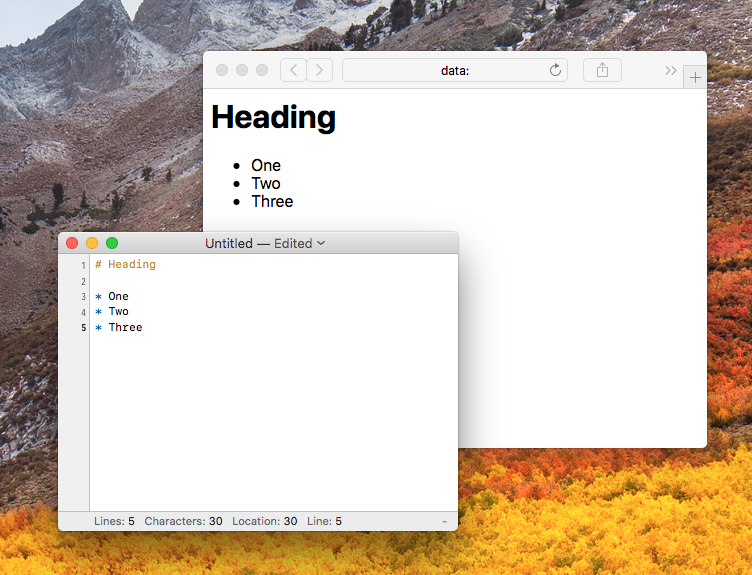
I was able to build a Markdown preview using the awesome script support:
after brew install cmark, I made a script: ~/Library/Application Scripts/com.coteditor.CotEditor/Markdown [email protected]
#!/bin/bash
#%%%{CotEditorXInput=AllText}%%%
#%%%{CotEditorXOutput=None}%%%

INPUT=$(/usr/local/bin/cmark)
HTML="<html><style>body { font-family: -apple-system; }</style><body>$INPUT</body></html>"
OUTPUT=$(echo "$HTML" | base64 | cat <(echo -n "data:text/html;charset=UTF-8;base64,") -)
osascript -e "tell application \"Safari\" to open location \""$OUTPUT"\""
I can then press: ⇧⌘M to see the result in Safari:
https://github.com/peteog/CotEditorScripts/blob/master/Markdown%20Preview.%40M.sh
 peteog
on 18 Jan 2018
peteog
on 18 Jan 2018
I close this issue since I do not have any plan to implement this kind of features in the future.
1024jp
on 12 Dec 2018
I was able to build a Markdown preview using the awesome script support:
after
brew install cmark, I made a script:~/Library/Application Scripts/com.coteditor.CotEditor/Markdown [email protected]#!/bin/bash #%%%{CotEditorXInput=AllText}%%% #%%%{CotEditorXOutput=None}%%% INPUT=$(/usr/local/bin/cmark) HTML="<html><style>body { font-family: -apple-system; }</style><body>$INPUT</body></html>" OUTPUT=$(echo "$HTML" | base64 | cat <(echo -n "data:text/html;charset=UTF-8;base64,") -) osascript -e "tell application \"Safari\" to open location \""$OUTPUT"\""I can then press: ⇧⌘M to see the result in Safari:
https://github.com/peteog/CotEditorScripts/blob/master/Markdown%20Preview.%40M.sh
I try macOS Big Sur.1 on MacBook Air Late 2020 (Apple M1).
Only two different things have, but this tips is able to use macOS Big Sur.1 on MacBook Air Late 2020 (Apple M1).
One, brew install cmark -> brew install --build-from-source cmark
Because cmark not release Apple M1 version.
Two, script 5 line "/usr/local/" -> "/opt/HomeBrew/"
Because HomeBrew change to use directory at macOS Big Sur version,
One more thing.
Marked 2.6.2(Intel) through Rosetta 2 is not need. and this CRASH CRASH CRASH on macOS Big Sur.1 on Apple M1.
 Chamiu
on 24 Dec 2020
Chamiu
on 24 Dec 2020
I was able to build a Markdown preview using the awesome script support:
afterbrew install cmark, I made a script:~/Library/Application Scripts/com.coteditor.CotEditor/Markdown [email protected]#!/bin/bash #%%%{CotEditorXInput=AllText}%%% #%%%{CotEditorXOutput=None}%%% INPUT=$(/usr/local/bin/cmark) HTML="<html><style>body { font-family: -apple-system; }</style><body>$INPUT</body></html>" OUTPUT=$(echo "$HTML" | base64 | cat <(echo -n "data:text/html;charset=UTF-8;base64,") -) osascript -e "tell application \"Safari\" to open location \""$OUTPUT"\""I can then press: ⇧⌘M to see the result in Safari:
https://github.com/peteog/CotEditorScripts/blob/master/Markdown%20Preview.%40M.shI try macOS Big Sur.1 on MacBook Air Late 2020 (Apple M1).
Only two different things have, but this tips is able to use macOS Big Sur.1 on MacBook Air Late 2020 (Apple M1).One, brew install cmark -> brew install --build-from-source cmark
Because cmark not release Apple M1 version.Two, script 5 line "/usr/local/" -> "/opt/HomeBrew/"
Because HomeBrew change to use directory at macOS Big Sur version,One more thing.
Marked 2.6.2(Intel) through Rosetta 2 is not need. and this _CRASH CRASH CRASH_ on macOS Big Sur.1 on Apple M1.
and do not forget to run this line in the terminal.
chmod u+x ~/Library/Application Scripts/com.coteditor.CotEditor/Markdown [email protected]
 YUX
on 13 Jan 2021
YUX
on 13 Jan 2021
Related issues
 wanik
·
5Comments
wanik
·
5Comments
 eailfly
·
3Comments
eailfly
·
3Comments
 webmurkser
·
6Comments
webmurkser
·
6Comments
 bluemix
·
5Comments
bluemix
·
5Comments
 tatsy-ymj
·
6Comments
tatsy-ymj
·
6Comments
Most helpful comment
I was able to build a Markdown preview using the awesome script support:
after
brew install cmark, I made a script:~/Library/Application Scripts/com.coteditor.CotEditor/Markdown [email protected]I can then press: ⇧⌘M to see the result in Safari:
https://github.com/peteog/CotEditorScripts/blob/master/Markdown%20Preview.%40M.sh