Cosmos: How do I get past the return statement in the Control Register?
Area of Cosmos - What area of Cosmos are we dealing with?
T<> Lists...
Expected Behaviour - What do you think that should happen?
It should take the first integer stored and use it (sound card)
Actual Behaviour - What unexpectedly happens?
When I try to use a snipet like this: var aVariable1 = ANamespace.Aclass.AstaticListFunction(); var xVariable2 = xVariable1[0]; I get an exception saying: Parameter Name: <Enum.ToString> Not implemented...
Reproduction - How did you get this error to appear?
When I added it into my code for vital functioning purposes, it throws an exception in the VM as a runtime error but not on the build or debug output.
Version - Were you using the User Kit or Dev Kit? And what User Kit version or Dev Kit commit (Cosmos, IL2CPU, X#)?
The latest UserKit 20200708.
 elkaamee326
All 47 comments
What methods are you actually using/for what methods does this happen? Enum.ToString isnt implemented, but I dont understand how list methods themselves are directly affected by it.
 quajak
on 29 Nov 2020
quajak
on 29 Nov 2020
So I am working on a simple sound card driver from this source: https://git.meowviewer.org/Tiger/CosmosAerOS/src/commit/178bbb677b76216ec0cbec207d1a75a43d169c60/source/DokuTest/ES1370.cs // This is the code being executed by my kernel and it uses this class, but in a different file and class.
And whenever I try to use...
var xAudioCards = Cosmos.Hardware2.Audio.Devices.ES1370.FindAll(); and then use
var xAudioCards = xAudioCard[0]; I get that excpetion at runtime.
I found some old Cosmos source code, and tried to update it to the most recent version of Cosmos.
This is what is in the public static List<ES1370>FindAll() { } function:
public static List<ES1370> FindAll()
{
List<ES1370> found = new List<ES1370>();
        foreach (Cosmos.Hardware2.PCIDevice device in Cosmos.Hardware2.PCIBus.Devices)
        {
            Console.WriteLine("VendorID: " + device.VendorID + " - DeviceID: " + device.DeviceID);
            if (device.VendorID == 0x1274 && device.DeviceID == 0x1371)
                found.Add(new ES1370(device));
            Console.WriteLine("Generic ES1370 Audio device added...");
        }

        return found;
    }`
Here is the source (not updated by anyone) to the ES1370 and Generic Sound Card (abstract): https://git.meowviewer.org/Tiger/CosmosAerOS/src/commit/178bbb677b76216ec0cbec207d1a75a43d169c60/source/Cosmos/Cosmos.Hardware/Audio/Devices
I used this version of Cosmos and updated the code and added important files to my project and I updated it. I added some extra files and got its code and put files like a tempdictionary (at first), An address space abstract class, Memory and IOAddressSpace, a binary helper, a PCIBus (Old) and any extra needed stuff.
P.S I just put Cosmos.Hardware2 as another namesapce so some of the kernel's features don't interfere with Cosmos.HAL and is https://github.com/CosmosOS/Cosmos/blob/master/source/Archive/Cosmos.Hardware/PCIBus.cs still supported by this current version of Cosmos? Thank you for any feedback.
elkaamee326
on 29 Nov 2020
that is actually my git server, you can find the same files here on the official repo, the stuff i host there is most likely to 99% broken and just a playground for me to test stuff before i push it to github
 KM198912
on 30 Nov 2020
KM198912
on 30 Nov 2020
Hmmm, interesting. The
 MishaTY
on 30 Nov 2020
MishaTY
on 30 Nov 2020
In the ES1370 the Constructor goes like this:
public ES1370(PCIDevice device) : base(device)
{
isr=(InterruptStatusRegister.Load(getMemReference()));
sir = (SerialInterfaceRegister.Load(getMemReference()));
uir = (UARTInterfaceRegister.Load(getMemReference()));
cr=(ControlRegister.Load(getMemReference()));
dacs.Add(new DACManager(new DACak4531(), cr.DAC1Enabled,(byte)MainRegister.Bit.Dac1FrameAddr, (byte)MainRegister.Bit.Dac1FrameSize));
dacs.Add(new DACManager(new DACak4531(), cr.DAC2Enabled, (byte)MainRegister.Bit.Dac2FrameAddr, (byte)MainRegister.Bit.Dac2FrameSize));
foreach (var dac in dacs.ToArray())
preparePlayBackOnDac(dac);
}
Also in the Load() function for the control register and the same thing for the rest of them goes like this:
private Kernel.MemoryAddressSpace xMem;
public static ControlRegister Load(Kernel.MemoryAddressSpace aMem)
{
return new ControlRegister(aMem);
}
    private ControlRegister(Kernel.MemoryAddressSpace aMem)`
    {
        xMem = aMem;
    }
The getMemRefrence() function in the GenericSoundCard class (abstract) goes like this:
private Cosmos.Kernel.MemoryAddressSpace mem; //This is global
#region Helpers
        protected Cosmos.Kernel.MemoryAddressSpace getMemReference()
        {
            return mem;
        }
        #endregion
This is what is inside the Cosmos code for MemoryAddressSpace:
`using System;
using System.Collections.Generic;
using System.Linq;
using System.Text;
using System.IO;
namespace Cosmos.Kernel
{
public unsafe class MemoryAddressSpace : AddressSpace
{
public MemoryAddressSpace( UInt32 offset, UInt32 size )
: base( offset, size )
{ }
    public override string ToString()
    {
        return "";// String.Concat("MemoryAddressSpace, offset = ", Offset.ToHex(), ", size = ", Size.ToHex());
    }

    public override byte Read8( UInt32 offset )
    {
        if( offset > Size )
            throw new ArgumentOutOfRangeException( "offset" );
        return *( byte* )( this.Offset + offset );
    }
    public override UInt16 Read16( UInt32 offset )
    {
        if( offset < 0 || offset > Size )
            throw new ArgumentOutOfRangeException( "offset" );
        return *( UInt16* )( this.Offset + offset );
    }
    public override UInt32 Read32( UInt32 offset )
    {
        if( offset < 0 || offset > Size )
            throw new ArgumentOutOfRangeException( "offset" );
        return *( UInt32* )( this.Offset + offset );
    }

    public override UInt64 Read64( UInt32 offset )
    {
        if( offset < 0 || offset > Size )
            throw new ArgumentOutOfRangeException( "offset" );
        return *( UInt64* )( this.Offset + offset );
    }

    public override byte Read8Unchecked( UInt32 offset )
    {
        return *( byte* )( this.Offset + offset );
    }
    public override UInt16 Read16Unchecked( UInt32 offset )
    {
        return *( UInt16* )( this.Offset + offset );
    }
    public override UInt32 Read32Unchecked( UInt32 offset )
    {
        return *( UInt32* )( this.Offset + offset );
    }

    public override UInt64 Read64Unchecked( UInt32 offset )
    {
        return *( UInt64* )( this.Offset + offset );
    }

    public override void Write8( UInt32 offset, byte value )
    {
        if( offset < 0 || offset > Size )
            throw new ArgumentOutOfRangeException( "offset" );
        ( *( byte* )( this.Offset + offset ) ) = value;
    }
    public override void Write16( UInt32 offset, UInt16 value )
    {
        if( offset < 0 || offset > Size )
            throw new ArgumentOutOfRangeException( "offset" );
        ( *( UInt16* )( this.Offset + offset ) ) = value;
    }
    public override void Write32( UInt32 offset, UInt32 value )
    {
        if( offset < 0 || offset > Size )
            throw new ArgumentOutOfRangeException( "offset" );
        ( *( UInt32* )( this.Offset + offset ) ) = value;
    }
    public override void Write64( UInt32 offset, UInt64 value )
    {
        if( offset < 0 || offset > Size )
            throw new ArgumentOutOfRangeException( "offset" );
        ( *( UInt64* )( this.Offset + offset ) ) = value;
    }
    public override void Write8Unchecked( UInt32 offset, byte value )
    {
        ( *( byte* )( this.Offset + offset ) ) = value;
    }
    public override void Write16Unchecked( UInt32 offset, UInt16 value )
    {
        ( *( UInt16* )( this.Offset + offset ) ) = value;
    }
    public override void Write32Unchecked( UInt32 offset, UInt32 value )
    {
        ( *( UInt32* )( this.Offset + offset ) ) = value;
    }
    public override void Write64Unchecked( UInt32 offset, UInt64 value )
    {
        ( *( UInt64* )( this.Offset + offset ) ) = value;
    }

    public void CopyFrom( MemoryAddressSpace src )
    {
        for( uint x = 0; x < src.Size; x++ )
        {
            ( *( byte* )( this.Offset + x ) ) = *( byte* )( src.Offset + x );
        }
    }

    public void CopyFrom( MemoryAddressSpace src, uint srcOffset, uint dstOffset, uint bytes )
    {
        for( uint x = 0; x < bytes; x++ )
        {
            ( *( byte* )( this.Offset + dstOffset + x ) ) = *( byte* )( src.Offset + srcOffset + x );
        }
    }

    public void SetMem( byte data )
    {
        for( uint x = 0; x < this.Size; x++ )
        {
            ( *( byte* )( this.Offset + x ) ) = data;
        }
    }
}
}`
Is there anyway I can resolve the error? Also a brief question, are Arrays supported in Cosmos???
Ie:
foreach(var dac in dacs.ToArray())
{
     preparePlayBackOnDac(dac);
}
Here is the Cosmos Code for the preparePlayBackOnDac() function:
private void preparePlayBackOnDac(DACManager dacManager)
{
bool state = dacManager.setDACStateEnabled(true);
Console.WriteLine("State: " + state);
}
Thank you for any feedback.
elkaamee326
on 3 Dec 2020
The error is that you that you are trying to access the item 0 in the array but it does not exist. You should change your code to:
var xAudioCards = Cosmos.Hardware2.Audio.Devices.ES1370.FindAll();
if (xAudioCards.Count != 0)
    var xAudioCard = xAudioCards[0];
else
    Console.Log("No ES1370 detected!");
Let me know if this fixes the error. Also, arrays are supported in Cosmos.
P.S: Make sure to add the ES1370 in your virtual machine.
MishaTY
on 3 Dec 2020
I tried the method that you gave me, but on the VM (VMware) it said No ES1370 detected! Also what did you mean when you said Make sure to add the ES1370 in your VM? I don't have a physical ES1370 Sound Card but when I go VMware Player -> Cosmos -> Settings -> SoundCard the ES1370 option isn't there.
Do you know how to make it so it jumps to the two lines if (xAudioCards.Count != 0)
var xAudioCard = xAudioCards[0]; ??? Thank you, any feedback is appreciated :)
elkaamee326
on 5 Dec 2020
I don't think that Vmvare supports the emulating ES1370 card. Try using qemu instead of vmvare.
MishaTY
on 5 Dec 2020
Will Bochs work too?
elkaamee326
on 6 Dec 2020
I'm using the latest version of CosmosOS Userkit
elkaamee326
on 6 Dec 2020
Does Qemu support the Cosmos Filesystem?
elkaamee326
on 6 Dec 2020
in a word: yes
the file system should work on any virtualizer that supports SATA storage
 zarlo
on 6 Dec 2020
zarlo
on 6 Dec 2020
On the Cosmos Properties menu there is no option for Qemu, since I am running Visual Studio 2019, and the latest version of CosmosOS UserKit, so how would I debug on Qemu? Also how would I be able to add a sound card to the VM? Also does VirtualBox support the specified type of Sound Card above?
P.S: Do I need any extra software tools or anything else to debug it on Qemu? Also how would I debug it, would I run a specific command to the terminal? Thank you for any feedback.
elkaamee326
on 9 Dec 2020
On every VM I try to debug on, I put it to display on the VM Console.WriteLine("No ES1370 Detected!"); and for every VM I tried it would execute that line since there is nothing (or no sound card drivers recognized) by the VM, and how can I resolve that error because the Enum.ToString Not implemented error is gone, but now I want it to execute the driver code that was placed and possibly implement a very basic DAC Manager. Any feedback is appreciated :)
elkaamee326
on 9 Dec 2020
I already have basic code for this such as an audio irq handler for DAC, UART and more. But how would I be able to make it jump to this line of code var xAudioCards = xAudioCard[0];
elkaamee326
on 11 Dec 2020
qemu supports emulating the ES1370 card. here are the instructions to get past the "No ES1370 card".
- Open the properties of your project in visual studio. Click on cosmos and select the ISO profile. Then build the project.
- Find the ISO and copy it's file location.
- Install qemu.
- Open cmd. cd to where qemu is installed. Type this in to launch qemu.
qemu-system-x86_64.exe -cdrom "Path to ISO" -device es1370
Replace "Path to ISO" with the path to your iso.
That should launch qemu with the sound card emulated.
MishaTY
on 11 Dec 2020
When I tried debugging on the latest version of qemu with everything that you told me to, it threw the exact same message. Infact, it isn't so much about the VM because when I was debugging my code in FindAll(); function it always stops at this specific line of code where it finds any Sound Cards:
foreach (Cosmos.Hardware2.PCIDevice device in Cosmos.Hardware2.PCIBus.Devices) { }, because after that inside of the foreach loop, I added:
Console.WriteLine("VendorID: " + device.VendorID + " - DeviceID: " + device.DeviceID");
and it wouldn't execute it. The PCIBus.cs file is here: https://github.com/CosmosOS/Cosmos/blob/master/source/Archive/Cosmos.Hardware/PCIBus.cs
The file to the ES1370 class is here:
https://github.com/CosmosOS/Cosmos/blob/master/source/Archive/Cosmos.Hardware/Audio/Devices/ES1370/ES1370.cs
P.S; is there any way it can go through the foreach loop, and if it gets past that function the rest should be a bit easier to debug. Thank you, any feedback is appreciated :)
elkaamee326
on 13 Dec 2020
Maybe if this minor bug is resolved than it should get past through the No ES1370 Detected sector. :)
elkaamee326
on 13 Dec 2020
If Console.WriteLine("VendorID: " + device.VendorID + " - DeviceID: " + device.DeviceID"); won't execute, then that means that Cosmos.Hardware2.PCIBus.Devices is empty. Before the foreach loop, you should call Cosmos.Hardware2.PCIBus.Init();
MishaTY
on 13 Dec 2020
When I tried PCIBus.Init(); it still showed the exact same thing other than the output from the Init() function. It showed No ES1370 Detected! I even tried to put the initialization function before I declared the list used in the FindAll() function. I displayed PCIBus.Init();,
then I declared this List:
List<ES1370> found = new List<ES1370>();
Is there anyway I can resolve this issue? Thank you for any feedback :)
elkaamee326
on 19 Dec 2020
It also still stops at the foreach loop, even when I put PCIBus.Init();. Is there anything I can do to make it get past that line.
elkaamee326
on 19 Dec 2020
Are you sure that PCIBus.Devices is not empty? You can check that by adding this code after the PCIBus.Init();.
foreach (Cosmos.Hardware2.PCIDevice device in Cosmos.Hardware2.PCIBus.Devices)
{
Console.WriteLine("VendorID: " + device.VendorID + " - DeviceID: " + device.DeviceID);
}
After you added that, compile and send me the output.
MishaTY
on 19 Dec 2020
Everytime I debug on qemu I get this output:
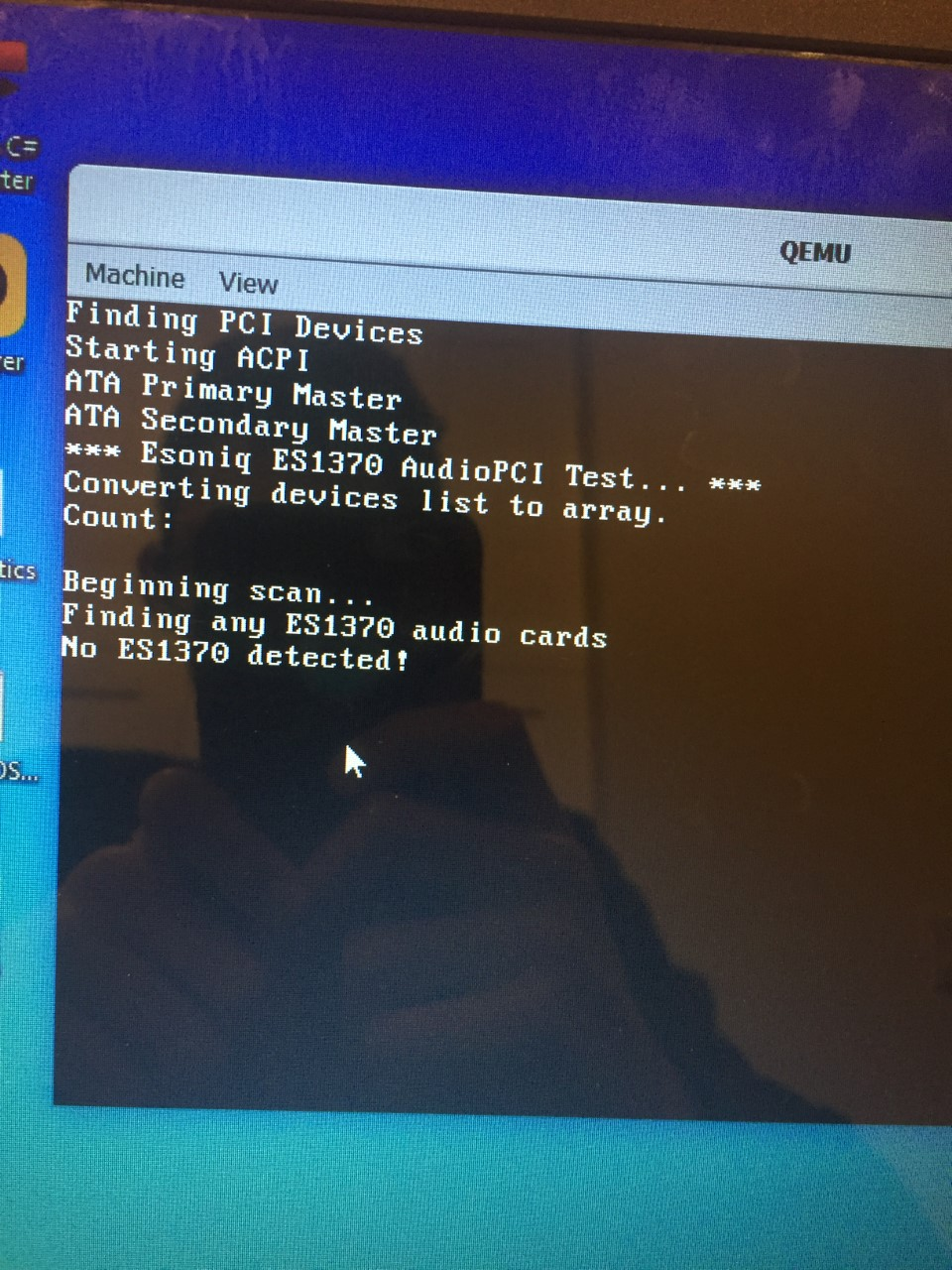
Even on VMware I got the same output. What does this mean, even when I try to put it before the ES1370 FindAll() Function
This is in the PCIBus.Init() function:
`public static void Init()
{
var xDevices = new List
EnumerateBus(0, ref xDevices);
Console.WriteLine("Converting devices list to array.");
Console.Write("Count: ");
Console.WriteLine("");
mDevices = xDevices.ToArray();
Console.WriteLine("");
mEnumerationCompleted = true;
}
    /// <summary>
    /// Enumerates a given bus, adding devices to Devices
    /// </summary>
    /// <param name="aBus">The bus number to enumerate</param>
    /// <param name="rDevices">The list of Devices</param>
    private static void EnumerateBus(byte aBus, ref List<PCIDevice> rDevices)
    {
        for (byte xSlot = 0; xSlot < 32; xSlot++)
        {
            byte xMaxFunctions = 1;
            for (byte xFunction = 0; xFunction < xMaxFunctions; xFunction++)
            {
                PCIDevice xPCIDevice = new PCIDeviceNormal(aBus, xSlot, xFunction);
                if (xPCIDevice.DeviceExists)
                {
                    if (xPCIDevice.HeaderType == 2)
                    { /* PCIHeaderType.Cardbus */
                        xPCIDevice = new PCIDeviceCardBus(aBus, xSlot, xFunction);
                    }

                    if (xPCIDevice.HeaderType == 1)
                    { /* PCIHeaderType.Bridge */
                        xPCIDevice = new PCIDeviceBridge(aBus, xSlot, xFunction);
                    }
                    if (xPCIDevice is PCIDeviceBridge)
                    {
                        EnumerateBus(((PCIDeviceBridge)xPCIDevice).SecondaryBus, ref rDevices);
                    }
                    rDevices.Add(xPCIDevice);
                    if (xPCIDevice.IsMultiFunction)
                    {
                        xMaxFunctions = 8;
                    }
                }
            }
        }
    }`
Is there anything I can do to make it work? Thank you, any reply is appreciated :D
elkaamee326
on 24 Dec 2020
I did not try in qemu but it seems normal in VMWare, the FindAll function is searching for devices with VendorID = 0x10EC and DeviceID = 0x8139
When I list the PCI Devices all I have from Ensoniq is this:
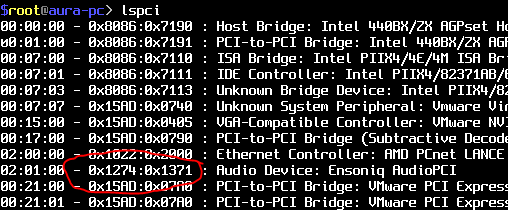
And as you can see it's not 0x10EC and 0x8139 but 0x2174 and 0x1371 so it's normal that your returned list is empty
 valentinbreiz
on 24 Dec 2020
valentinbreiz
on 24 Dec 2020
Inside of the FindAll() Function this is my current code:
`public static List
{
Cosmos.Hardware2.PCIBus.Init(); // remove if nescessary
List
try
{
Console.WriteLine("Beginning scan...");
foreach (Cosmos.Hardware2.PCIDevice device in Cosmos.Hardware2.PCIBus.Devices)
{
Console.WriteLine("PCI Device Detected...");
Console.WriteLine("VendorID: " + device.VendorID + " - DeviceID: " + device.DeviceID);
if (device.VendorID == 0x1274 && device.DeviceID == 0x5000)
found.Add(new ES1370(device));
Console.WriteLine("Generic ES1370 Audio device added...");
}
}
        catch (Exception ex)
        {
            Console.WriteLine(ex.Message.ToString(), "Something happened...");
        }

        return found;
    }`
Is there anything I should do to modify this so it can work properly? Thank you.
elkaamee326
on 24 Dec 2020
0x5000 didn't work, so I will try 0x1371. Also is the device ID 0x1371 for an ES1371 or an ES1370?
elkaamee326
on 24 Dec 2020
0x1371 still didn't work. Idk what is wrong with the driver? Apparently there are no errors or exceptions in the code but I don't understand why it keeps on saying No ES1370 Detected! Thank you :))
elkaamee326
on 24 Dec 2020
0x1371 is Ensoniq ES1371
You are trying to use really really really old and outdated code... I think you'll need to rewrite the driver if you want to have something working
PS: Can you provide me a ZIP with a sample kernel with your code to take a look if I can do something to use this driver?
valentinbreiz
on 24 Dec 2020
CosmosSpeakerTest.zip * Edit: this one doesn't work *
This is the exact code I am using for the project, let me know if there was a bug or something in the code that I used. I set the default configuration to ISO Image so I can debug with QEMU. Thank you very much :)
P.S: In the code it says that the Device ID is 0x1371, but I forgot to change it back to 0x5000, which is for an ES1370.
elkaamee326
on 24 Dec 2020
Later, when the sound card driver works, if possible can you show me how to implement a very basic PCM so that sound files can be played? Because that part is where I got perplexed. Thank you so much :D
elkaamee326
on 26 Dec 2020
Apparently I resolved the No ES1370 Sector and rewrote some parts to the driver. It even got past the var xAudioCard = xAudioCards[0]; Now it is stuck on this line: xAudioCards.Enable();
This is my most recent build:
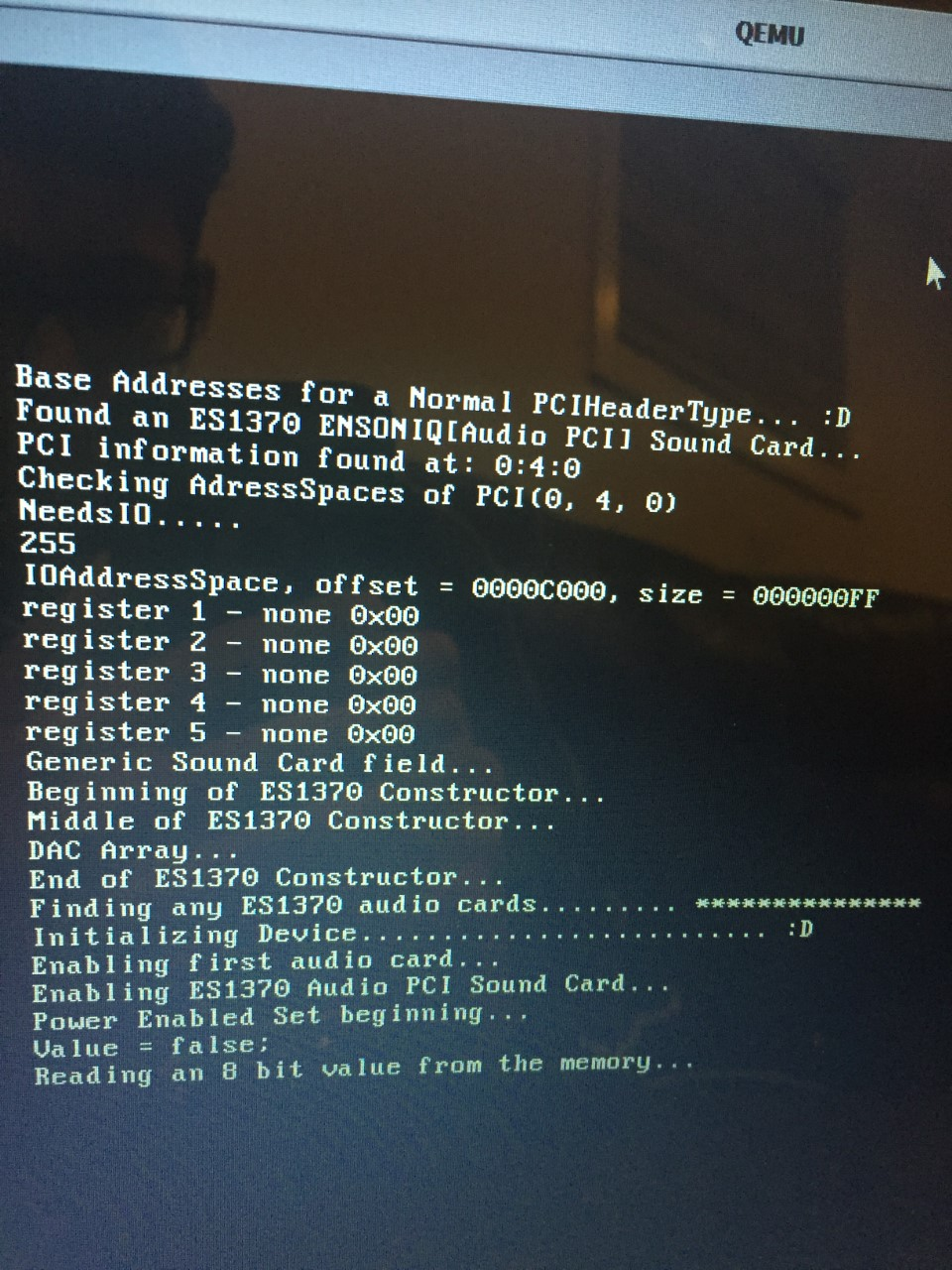
Here is the updated driver source:
CosmosSpeakerTest (Modified).zip
This is the Control register code:
`
using System;
using System.Collections.Generic;
using Cosmos.Hardware2;
using Cosmos.Kernel;
using Cosmos.Common;
namespace Cosmos.Hardware2.Audio.Devices.ES1370.Registers
{
class ControlRegister
{
#region Constructor
private Kernel.MemoryAddressSpace xMem; * 2
public static ControlRegister Load(Kernel.MemoryAddressSpace aMem) * 2
{
return new ControlRegister(aMem);* 2
}
    private ControlRegister(Kernel.MemoryAddressSpace aMem)*
    {
        xMem = aMem;* 2
    }

    /// <summary>
    /// Get or Sets the 8 bits in the Control Register.
    /// </summary>
    public byte CONTROL
    {
        get
        {
            Console.WriteLine("Reading an 8 bit value from the memory..."); * 10
            return xMem.Read8Unchecked((UInt32)Registers.MainRegister.Bit.Control); // Get past this!!! #### This is where the code execution stops (It stops right here) // or `Read8()`
        }
        set
        {
            Console.WriteLine("Writing an 8 bit value to the memory...");
            xMem.Write8Unchecked((UInt32)Registers.MainRegister.Bit.Control, value);
            Console.WriteLine("Done...");
        }

    }

    #endregion

    #region Register Data

    public bool PowerEnabled * 3
    {
        get
        {
            Console.WriteLine("Power Enabled Get...");
            return !GetBit(BitPosition.SERRDis);
        }
        set *
        {
            Console.WriteLine("Power Enabled Set beginning..."); * 4
            SetBit(BitValue.SERRDis, !value); * 5
            Console.WriteLine("Power Enabled Set end...");
        }
    }

    public bool CodecEnabled
    {
        get
        {
            return GetBit(BitPosition.CodecEn);
        }
        set
        {
            SetBit(BitValue.CodecEn, value);
        }
    }

    public bool DAC1Enabled
    {
        get
        {
            return GetBit(BitPosition.DAC1En);
        }
        set
        {
            SetBit(BitValue.DAC1En, value);
        }
    }

    public bool DAC2Enabled
    {
        get
        {
            return GetBit(BitPosition.DAC2En);
        }
        set
        {
            SetBit(BitValue.DAC2En, value);
        }
    }

    public bool UARTEnabled
    {
        get
        {
            return GetBit(BitPosition.UARTEn);
        }
        set
        {
            SetBit(BitValue.UARTEn, value);
        }
    }
    public bool MemoryBusRequestEnabled
    {
        get
        {
            return GetBit(BitPosition.BREQEn);
        }
        set
        {
            SetBit(BitValue.BREQEn, value);
        }
    }

    public ClockSourceType ClockSourceTypeSelected
    {
        get
        {
            if (GetBit(BitPosition.MSBB))
                return ClockSourceType.MPEGClock;
            else
                return ClockSourceType.GenClock;
        }
        set
        {
            if (value.Equals(ClockSourceType.GenClock))
                SetBit(BitValue.MSBB, true);
            else
                SetBit(BitValue.MSBB, false);
        }
    }

    public MPEGDataType MPEGDataTypeSelected
    {
        get
        {
            if (GetBit(BitPosition.MSFMTSEL))
                return MPEGDataType.I2S;
            else
                return MPEGDataType.SONY;
        }
        set
        {
            if (value.Equals(MPEGDataType.I2S))
                SetBit(BitValue.MSFMTSEL, true);
            else
                SetBit(BitValue.MSFMTSEL, false);
        }
    }
    #endregion

    #region Accessors

    private bool GetBit(BitPosition bit)
    {
        return BinaryHelper.CheckBit(this.CONTROL, (byte)bit);
    }

    private void SetBit(BitValue bit, bool value) *6
    {
        if (value)
        {
            Console.WriteLine("Value = true;");
            this.CONTROL = (byte)(this.CONTROL | (byte)bit);
        }

        else * 7
        {
            Console.WriteLine("Value = false;"); * 8// Just to see if it executes in this sector
            this.CONTROL = (byte)(this.CONTROL & ~(byte)bit); * 9
        }
    }

    public override string ToString()
    {
        return this.CONTROL.ToBinary(8);
    }

    #endregion

}
#region Bits

[Flags]
public enum BitPosition : byte
{
    SERRDis = 0,
    CodecEn = 1,
    UARTEn = 3,
    DAC2En = 5,
    DAC1En = 6,
    BREQEn = 7, //memory bus request enable
    MSBB = 14, //clock source for DAC: gen (0) - MPEG(1)
    MSFMTSEL = 15 //MPEG data SONY(0)/I2S(1)
}

[Flags]
public enum BitValue : uint
{
    SERRDis = BinaryHelper.BitPos.BIT0,
    CodecEn = BinaryHelper.BitPos.BIT1,
    UARTEn = BinaryHelper.BitPos.BIT3,
    DAC2En = BinaryHelper.BitPos.BIT5,
    DAC1En = BinaryHelper.BitPos.BIT6,
    BREQEn = BinaryHelper.BitPos.BIT7,
    MSBB = BinaryHelper.BitPos.BIT14,
    MSFMTSEL = BinaryHelper.BitPos.BIT15
}

public enum ClockSourceType : uint
{
    GenClock = 0,
    MPEGClock = 1
}

public enum MPEGDataType : uint
{
    SONY = 0,
    I2S = 1
}
#endregion
}
`
The Enable() function goes like this:
public override bool Enable()
{
Console.WriteLine("Enabling ES1370 Audio PCI Sound Card..."); * 1
cr.PowerEnabled = true; * 2
Console.WriteLine("Enabled Audio Card...");
return cr.PowerEnabled;
}
The asterick denotes where the code executes... (as well as the numbers)
This is the (updated) MemoryAddressSpace Class()
`using System;
using Cosmos.Common.Extensions;
using System.Collections.Generic;
using System.Linq;
using System.Text;
using System.IO;
namespace Cosmos.Kernel
{
public unsafe class MemoryAddressSpace : AddressSpace
{
public MemoryAddressSpace(UInt32 offset, UInt32 size)
: base(offset, size)
{ }
    public override string ToString()
    {
        return String.Concat("MemoryAddressSpace, offset = ", Offset.ToHex(), ", size = ", Size.ToHex());
    }

    public override byte Read8(UInt32 offset)
    {
        Console.WriteLine("Read8(UInt32 offset);");
        if (offset > Size)
            //throw new ArgumentOutOfRangeException("offset");
            Console.WriteLine("Argument out of range exception...");

        Console.WriteLine("Returning value...");
        return *(byte*)(this.Offset + offset);
    }
    public override UInt16 Read16(UInt32 offset)
    {
        if (offset < 0 || offset > Size)
            throw new ArgumentOutOfRangeException("offset");
        return *(UInt16*)(this.Offset + offset);
    }
    public override UInt32 Read32(UInt32 offset)
    {
        if (offset < 0 || offset > Size)
            throw new ArgumentOutOfRangeException("offset");
        return *(UInt32*)(this.Offset + offset);
    }

    public override UInt64 Read64(UInt32 offset)
    {
        if (offset < 0 || offset > Size)
            throw new ArgumentOutOfRangeException("offset");
        return *(UInt64*)(this.Offset + offset);
    }

    public override byte Read8Unchecked(UInt32 offset)
    {
        Console.WriteLine("Offset: " + offset);
        Console.WriteLine("Read 8 (Unchecked)");
        return *(byte*)(this.Offset + offset);
    }
    public override UInt16 Read16Unchecked(UInt32 offset)
    {
        return *(UInt16*)(this.Offset + offset);
    }
    public override UInt32 Read32Unchecked(UInt32 offset)
    {
        return *(UInt32*)(this.Offset + offset);
    }

    public override UInt64 Read64Unchecked(UInt32 offset)
    {
        return *(UInt64*)(this.Offset + offset);
    }

    public override void Write8(UInt32 offset, byte value)
    {
        if (offset < 0 || offset > Size)
            throw new ArgumentOutOfRangeException("offset");
        (*(byte*)(this.Offset + offset)) = value;
    }
    public override void Write16(UInt32 offset, UInt16 value)
    {
        if (offset < 0 || offset > Size)
            throw new ArgumentOutOfRangeException("offset");
        (*(UInt16*)(this.Offset + offset)) = value;
    }
    public override void Write32(UInt32 offset, UInt32 value)
    {
        if (offset < 0 || offset > Size)
            throw new ArgumentOutOfRangeException("offset");
        (*(UInt32*)(this.Offset + offset)) = value;
    }
    public override void Write64(UInt32 offset, UInt64 value)
    {
        if (offset < 0 || offset > Size)
            throw new ArgumentOutOfRangeException("offset");
        (*(UInt64*)(this.Offset + offset)) = value;
    }
    public override void Write8Unchecked(UInt32 offset, byte value)
    {
        (*(byte*)(this.Offset + offset)) = value;
    }
    public override void Write16Unchecked(UInt32 offset, UInt16 value)
    {
        (*(UInt16*)(this.Offset + offset)) = value;
    }
    public override void Write32Unchecked(UInt32 offset, UInt32 value)
    {
        (*(UInt32*)(this.Offset + offset)) = value;
    }
    public override void Write64Unchecked(UInt32 offset, UInt64 value)
    {
        (*(UInt64*)(this.Offset + offset)) = value;
    }

    public void CopyFrom(MemoryAddressSpace src)
    {
        for (uint x = 0; x < src.Size; x++)
        {
            (*(byte*)(this.Offset + x)) = *(byte*)(src.Offset + x);
        }
    }

    public void CopyFrom(MemoryAddressSpace src, uint srcOffset, uint dstOffset, uint bytes)
    {
        for (uint x = 0; x < bytes; x++)
        {
            (*(byte*)(this.Offset + dstOffset + x)) = *(byte*)(src.Offset + srcOffset + x);
        }
    }

    public void SetMem(byte data)
    {
        for (uint x = 0; x < this.Size; x++)
        {
            (*(byte*)(this.Offset + x)) = data;
        }
    }
}
}
`
Is there anything I can do to get past the CONTROL sector so it can enable the device? Thank you for any response :D
P.S The part where it says MainRegister.Bit.Control, that enum is equal to 0x00...
elkaamee326
on 3 Jan 2021
I basically just need to get past that line and then execute the Read8() function in the memory address space function, then it should pretty much work.
elkaamee326
on 3 Jan 2021
Can you confirm that Cosmos.Kernel.MemoryAddressSpace mem; in GenericSoundCard is non-null and has the correct value?
quajak
on 3 Jan 2021
Yep, on my virtual machine mem in the GenericSoundCard was null.
MishaTY
on 3 Jan 2021
What do I do if it is null? Do I need to modify it? Is there anyway I can change my code so that the mem is not null? Thank you for your support on this project :)
elkaamee326
on 3 Jan 2021
I got it to work. First I changed the MemoryAddressSpace to IOAddressSpace. And inside the GenericSoundCard constructor. Then I changed the mem = deviceP.GetAddressSpace(1) as Cosmos.Kernel.MemoryAddressSpace;
to mem = deviceP.GetAddressSpace(0) as Cosmos.Kernel.IOAddressSpace;
Here is the project with these changes. Also, I cleaned up some code in the project.
CosmosSpeakerTest.Modifed-V2.zip
MishaTY
on 3 Jan 2021
Thank you all so much for helping me with this perplexing project, now it can actually enable, disable, have audio interrupts (dac, uart, mccb, codec) and much more! Last question, later if I have a complete working DAC Manager, decoder UART, MCCB and more, would it be possible if I can take the .wav or .mp3 file contents, convert it to a byte array and play it through PCSpeaker.Beep(); Would this be possible or would I have to develop some sort of new way to directly play audio files. If this is the case, if possible do you know any online code refrences I can use to play PCM audio using the current code that I have. :D
elkaamee326
on 4 Jan 2021
Yes, it is possible to play wav or mp3 files, but wav files are easier since wav does not have compression. You can take a look at these resources on how to parse wav files:
https://en.wikipedia.org/wiki/WAV
http://www.topherlee.com/software/pcm-tut-wavformat.html
MishaTY
on 4 Jan 2021
Thank you for the resources and the suggestion, but do I play the file (or any desired file) via PCSpeaker.Beep or do I have to develop another amplifier interface? Because PCSpeaker.Beep has two parameters frequency and duration (controlled via PIT). I see lots of PCM Streams now have SpeakerInterface.PlaySound(string filename, int duration);Is it possible I can do this with this current implementation of Cosmos or do I need to manually develop more features. Thank you all very much, I will close this issue once this question is answered.
elkaamee326
on 6 Jan 2021
Here's how to parse a wav file in C#: https://stackoverflow.com/questions/8754111/how-to-read-the-data-in-a-wav-file-to-an-array (third answer)
MishaTY
on 6 Jan 2021
PCSpeaker.Beep is using internal PC Speaker. You definitely can't play wav files with it, it supports only one frequency per time
valentinbreiz
on 6 Jan 2021
What can I use to play Wav files? Where do I send the wav data to. Thank you all :)
elkaamee326
on 7 Jan 2021
You need to implement the driver for some more advanced speaker/sound card. As @valentinbreiz stated, only PC Speaker is currently implemented so there is no way to play wav files. If you for example finish the ES1370 driver, you could then play wav files.
quajak
on 7 Jan 2021
Do you know any other names of interfaces ie: ac97, Intel high definition audio etc... that are compatible with this sound card that I can implement or find online? Thank you all for helping me... :D
elkaamee326
on 7 Jan 2021
You need to implement the driver for some more advanced speaker/sound card. As @valentinbreiz stated, only PC Speaker is currently implemented so there is no way to play wav files. If you for example finish the ES1370 driver, you could then play wav files.
P.S: What did you mean when you said you can play wav files when the ES1370 driver is completed, does it have a built in amplifier or I can take whatever data and send it to the amp port on the sound card to the speakers? Is that what you meant? :D Thx...
elkaamee326
on 7 Jan 2021
I dont really know that much about how sound works, except that what you need is currently not supported, your best bet is to research further on osdev etc. and find what you need to implement.
quajak
on 7 Jan 2021
Okay, thank you all so much... I'll close this issue.
elkaamee326
on 7 Jan 2021
Related issues
 geomtech
·
9Comments
geomtech
·
9Comments
 fanoI
·
8Comments
fanoI
·
8Comments
 manamster
·
4Comments
manamster
·
4Comments
 365Tito
·
11Comments
365Tito
·
11Comments
 TFTWPhoenix
·
7Comments
TFTWPhoenix
·
7Comments
Most helpful comment
I got it to work. First I changed the MemoryAddressSpace to IOAddressSpace. And inside the GenericSoundCard constructor. Then I changed the
mem = deviceP.GetAddressSpace(1) as Cosmos.Kernel.MemoryAddressSpace;to
mem = deviceP.GetAddressSpace(0) as Cosmos.Kernel.IOAddressSpace;Here is the project with these changes. Also, I cleaned up some code in the project.
CosmosSpeakerTest.Modifed-V2.zip