Cosmos: OS Freezes when drawing an image
Area of Cosmos - What area of Cosmos are we dealing with?
GUI.
Expected Behaviour - What do you think that should happen?
Draw a bitmap image
Actual Behaviour - What unexpectedly happens?
the OS freezes
Reproduction - How did you get this error to appear?
I Just wrote this line to draw an image:
canvas.DrawImage(new Bitmap(@"C:\Users\user\Desktop\BITMAP.bmp"), 40, 30);
Version - Were you using the User Kit or Dev Kit? And what User Kit version or Dev Kit commit (Cosmos, IL2CPU, X#)?
Userkit
 Vardan2009
All 11 comments
The path to the bitmap must be on the filesystem of the os not the system used to compile it.
 quajak
on 26 Oct 2020
quajak
on 26 Oct 2020
but how to do this...
Vardan2009
on 26 Oct 2020
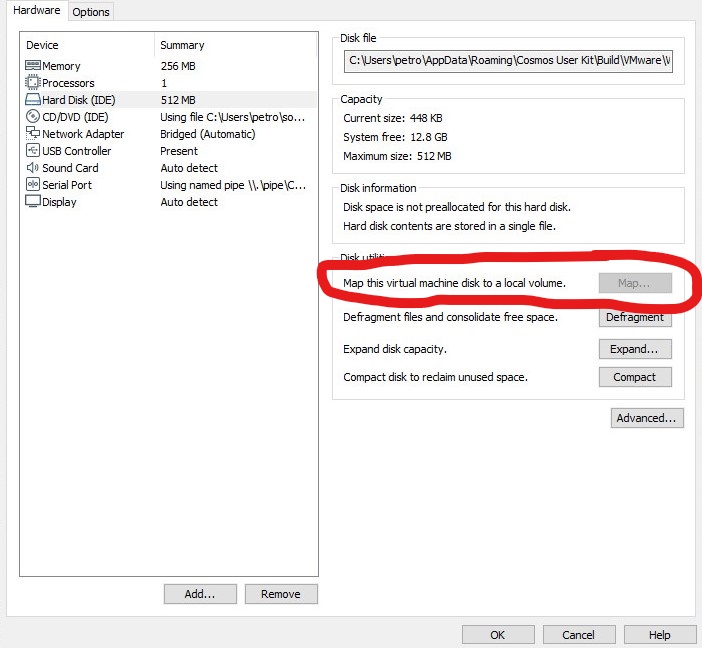
You can go on VMware Workstation 15.0 player with Cosmos selected and go -> Edit virtual machine settings. Than you go -> Hardisk IDE than go on map virtual disk. Tick off read only mode on the dialog and press enter. Than you can add your Cosmos OS images and other assets to the virtual disk.
 elkaamee326
on 1 Nov 2020
elkaamee326
on 1 Nov 2020
I Cant Map The virtual disk
Vardan2009
on 1 Nov 2020
:(
Vardan2009
on 11 Nov 2020
I Cant Map The virtual disk
I'd look that up, because there may be a relevant search result for the mapping part. There may be a YouTube video for that.
 octaviousrex
on 11 Nov 2020
octaviousrex
on 11 Nov 2020
You can't map the virtual disk because that feature is only avaliable in Vmware pro, unfortunately
 sudopigeek
on 11 Nov 2020
sudopigeek
on 11 Nov 2020
Can you try map the vmdk from within Windows Explorer?
quajak
on 12 Nov 2020
how to do this
Vardan2009
on 15 Nov 2020
use IMDisk ToolKit https://sourceforge.net/projects/imdisk-toolkit/
 KM198912
on 15 Nov 2020
KM198912
on 15 Nov 2020
but how to use it?
Vardan2009
on 20 Nov 2020
Related issues
 geomtech
·
9Comments
geomtech
·
9Comments
 Lrios4403
·
12Comments
Vardan2009
·
11Comments
Lrios4403
·
12Comments
Vardan2009
·
11Comments
 erikpro007
·
4Comments
erikpro007
·
4Comments
 AAli107
·
10Comments
AAli107
·
10Comments
Most helpful comment
You can go on VMware Workstation 15.0 player with Cosmos selected and go -> Edit virtual machine settings. Than you go -> Hardisk IDE than go on map virtual disk. Tick off read only mode on the dialog and press enter. Than you can add your Cosmos OS images and other assets to the virtual disk.