Area of Cosmos - What area of Cosmos are we dealing with?
GUI
Expected Behaviour - What do you think that should happen?
I should be able to make windows and such.
Actual Behaviour - What unexpectedly happens?
I cant.
Reproduction - How did you get this error to appear?
Not an error
Version - Were you using the User Kit or Dev Kit? And what User Kit version or Dev Kit commit (Cosmos, IL2CPU, X#)?
Dev kit
How do I make gui
 WeRandom
All 78 comments
Making GUI's is a very complicated subject. You would first need to enter a GUI mode, then you need to make a Window Manager. And all that would be useless without a way to launch apps (file browser, taskbar, dock, start menu, start screen, etc.). Even something as simple as text would require you to make your own font! I don't have any examples other than MishaOS, which may not even be a great example of what you'd want to do. (All apps here must be hardcoded, you can't make executables show up.) Another example is the Cosmos GUI Framework but please be aware that this is a 2016 project and almost certainly no longer works!
 TFTWPhoenix
on 1 Oct 2020
TFTWPhoenix
on 1 Oct 2020
So you are saying there is no way to make gui
WeRandom
on 1 Oct 2020
Are you guys planning on putting the gui thing back
WeRandom
on 1 Oct 2020
and do you think i should just use the 2016 version of cosmos since it looks like it is more customizable and there is more I can do?
WeRandom
on 1 Oct 2020
and is there a way to make the console bigger
WeRandom
on 1 Oct 2020
Ok so GUI's are DEFINITELY still possible. Easier than ever with bitmap support. It's still a very advanced subject. And you can even set screen height with this (careful though bitmaps can only go up to a megabyte from my research but I'm not positive). 1920x1080 might be hard to accomplish but I have no doubts that its possible. And even on the cosmos wiki you can find a cursor tutorial.
EDIT: Definitely use the latest version. And as to making the console bigger there might be a way but if you make a console in your GUI you can make it whatever size you wish.
TFTWPhoenix
on 1 Oct 2020
Look at https://cosmosos.github.io/api/Cosmos.System.Graphics.Canvas.html for what methods are currently available for creating a gui. As @TFTWPhoenix said creating a working GUI is quite a lot of work.
and is there a way to make the console bigger
You can set it in https://github.com/CosmosOS/Cosmos/blob/master/source/Cosmos.System2/Graphics/VGATextMode.cs#L38
 quajak
on 2 Oct 2020
quajak
on 2 Oct 2020
Ok thanks imma keep this open for 48 hours so I have time to try it out
WeRandom
on 2 Oct 2020
just so you know the second code made no sense and I was so confused
WeRandom
on 2 Oct 2020
speaking of gui how do you make a mouse that is super easy and can work with buttons
WeRandom
on 2 Oct 2020
It isn't that simple. There are no "buttons". What you need is to make a mouse, then you get its x and y points and if they are in an area, do something.
 samnad
on 2 Oct 2020
samnad
on 2 Oct 2020
oh ok
WeRandom
on 2 Oct 2020
Sorry, should have mentioned that you also need to check if the mouse was clicked.
Here's the code for that:
MouseManager.MouseState == MouseState.Left
samnad
on 2 Oct 2020
Also, with vga screen it doesnt work when setting color depth and that kind of stuff Here is the tutorial is there any way that this is an older version and the methods are diferent
WeRandom
on 2 Oct 2020
Also How do i know the cordnates of things?
WeRandom
on 2 Oct 2020
and why do i have the label pro?
WeRandom
on 2 Oct 2020
Yes, that is an older version and the code is outdated. See my comment in your other issue, it explains it and there is a link to my more modern implementation of that same method.
samnad
on 2 Oct 2020
ok
WeRandom
on 2 Oct 2020
Your code was also confusing because there was folders with gui and stuff. I tried out the project and it worked but there was so much I was just confused
WeRandom
on 2 Oct 2020
1499 just so others coming in can see the other issue
WeRandom
on 2 Oct 2020
 nifanfa
on 3 Oct 2020
nifanfa
on 3 Oct 2020
See my project
nifanfa
on 3 Oct 2020
Making GUI's is a very complicated subject. You would first need to enter a GUI mode, then you need to make a Window Manager. And all that would be useless without a way to launch apps (file browser, taskbar, dock, start menu, start screen, etc.). Even something as simple as text would require you to make your own font! I don't have any examples other than MishaOS, which may not even be a great example of what you'd want to do. (All apps here must be hardcoded, you can't make executables show up.) Another example is the Cosmos GUI Framework but please be aware that this is a 2016 project and almost certainly no longer works!
actually it's very easy. i think the hardest is play sound....
nifanfa
on 3 Oct 2020
if i know how to drive a sound card then i can make a real operating system
nifanfa
on 3 Oct 2020

nifanfa
on 3 Oct 2020
Thank you... I'll check it out
WeRandom
on 3 Oct 2020
I made a new thread on how to add sound -- I doubt I wrote the question right but it can always be changed. #1501
WeRandom
on 3 Oct 2020
I can only use console.beep to play sound now. This reminds me of FC
nifanfa
on 3 Oct 2020
how did you add the bit maps... I've been trying for a long time and it keeps saying null reference error
WeRandom
on 3 Oct 2020
also is that clock a clock that's actually on time?
WeRandom
on 3 Oct 2020
@nifanfa i did some research and if you want to play a specific sound from a sound file you use this...
Namespace you need -- using System.Media;
Code -- SoundPlayer player = new SoundPlayer (@"###.mp3");
player.Play();
WeRandom
on 3 Oct 2020
i hope that helped
WeRandom
on 3 Oct 2020
@nifanfa i did some research and if you want to play a specific sound from a sound file you use this...
Namespace you need -- using System.Media;
Code -- SoundPlayer player = new SoundPlayer (@"###.mp3");
player.Play();
I bet it won't work
nifanfa
on 3 Oct 2020
who knows?
WeRandom
on 3 Oct 2020
I'll try it and tell you if it does
WeRandom
on 3 Oct 2020
You don't even let the operating system know that there's a sound card. And i bet it will makes il2cpu fails to compile. System.media seems not work in cosmos
nifanfa
on 3 Oct 2020
yeah it doesnt
WeRandom
on 3 Oct 2020
The sound player command needs system.media but cosmos doesn't like that meaning... Hey cosmos people... can you allow us to play sound files.
WeRandom
on 3 Oct 2020
There is something called NAudio. I dont know how to use it but I think that it could work... It can record and play audio.
WeRandom
on 3 Oct 2020
No, it doesn't work. Cosmos has no speaker support outside of playing tones with the PC speaker and Console.Beep().
 Project-Magenta
on 3 Oct 2020
Project-Magenta
on 3 Oct 2020
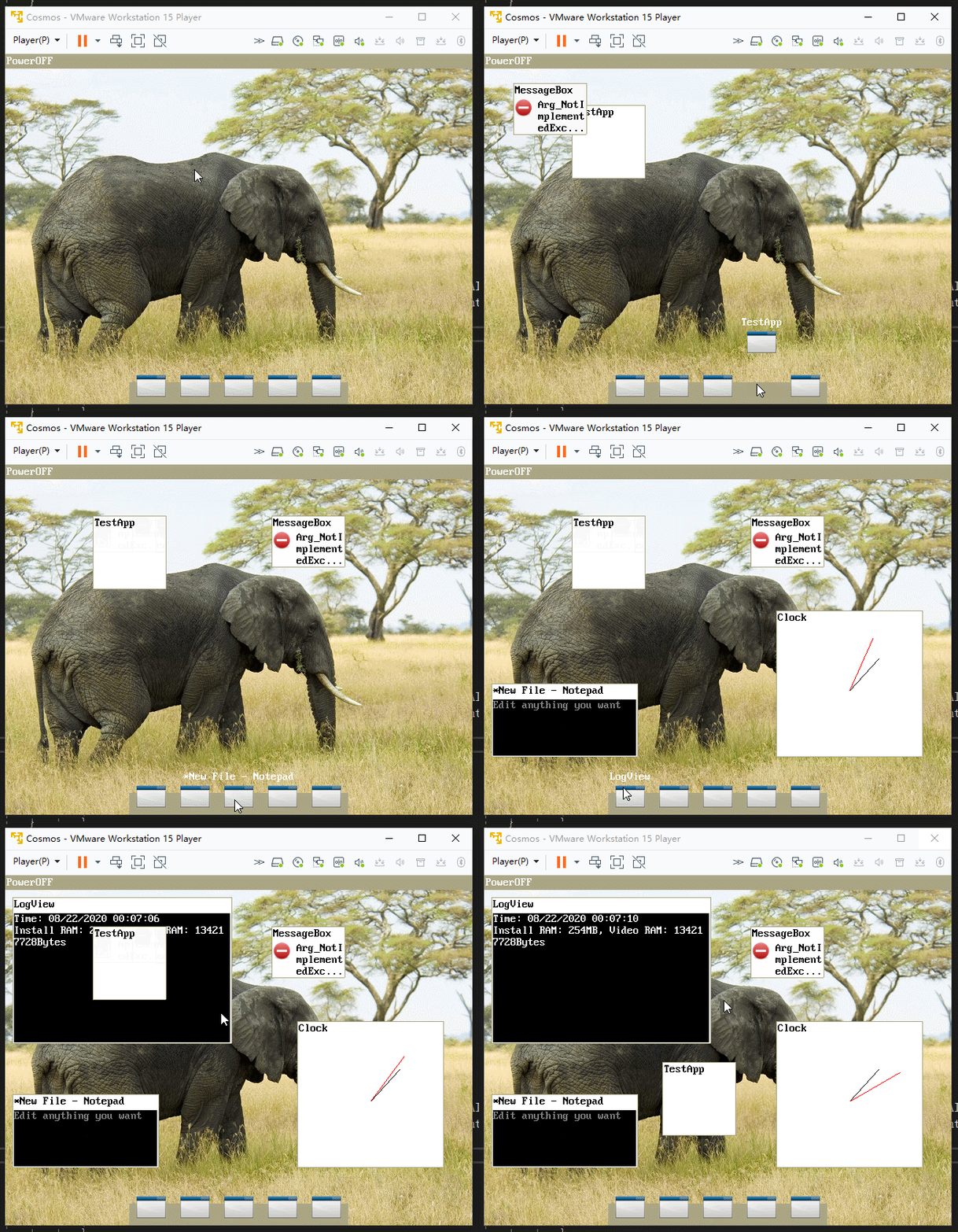 My previous project
nifanfa
on 4 Oct 2020
Gui is really easy but play sound....
nifanfa
on 4 Oct 2020
And networking...
nifanfa
on 4 Oct 2020
1464 #1458
nifanfa
on 4 Oct 2020
You are really good at GUI
WeRandom
on 4 Oct 2020
Thx
nifanfa
on 5 Oct 2020
in your project on launch it says something about a CPU exception and the GUI wont open. What is it?
WeRandom
on 5 Oct 2020
It also says stack corruption occured after a while.
WeRandom
on 5 Oct 2020
Have you put the files into filesystem.vmdk?
nifanfa
on 5 Oct 2020
no how do I do that
WeRandom
on 5 Oct 2020

nifanfa
on 5 Oct 2020
How do I add them when i get there
WeRandom
on 5 Oct 2020
Im confused... how do I add the files to the filesystem.mdk
WeRandom
on 5 Oct 2020
also @nifanfa you could probably make a really great youtube channel that does cosmos os tutorials.
WeRandom
on 5 Oct 2020
You should install VMware workstation and find filesystem.vmdk in explorer Then press mouse right to mount the vmdk Then put the files.
nifanfa
on 5 Oct 2020
oh ok
WeRandom
on 5 Oct 2020
when I try and mount it, it doesn't do anything
WeRandom
on 5 Oct 2020
do i need pro vmware to do it
WeRandom
on 5 Oct 2020
How do you mount I still dont understand... I made a shared folder but it still says cpu exception
WeRandom
on 5 Oct 2020
You can go on VMware Workstation 15.0 player with Cosmos selected and go -> Edit virtual machine settings. Than you go -> Hardisk IDE than go on map virtual disk. Tick off read only mode on the dialog and press enter. Than you can add your Cosmos OS images and other assets to the virtual disk. As long as you have successfully built a cosmos project with the VMware tab selected on in Cosmos project properties.
 elkaamee326
on 5 Oct 2020
elkaamee326
on 5 Oct 2020
do i need pro to do it?
WeRandom
on 5 Oct 2020
and does that mean i have to download an older version of vmware
WeRandom
on 6 Oct 2020
I've built the VMDK containing the bitmaps for the Cosmos-GUI-Sample OS here.
 sudopigeek
on 6 Oct 2020
sudopigeek
on 6 Oct 2020
Thank you so much
WeRandom
on 6 Oct 2020
it says CPU exception but then it says after that Exception occurred, invalid data size
WeRandom
on 6 Oct 2020
I remade the VMDK here; it no longer has CPU Exception.
sudopigeek
on 6 Oct 2020
can you explain what that is for future refrence
WeRandom
on 6 Oct 2020
It works!!!
WeRandom
on 6 Oct 2020
CPU Exception can be thrown by many things, but it usually has to do with the filesystem. In this case, it was probably thrown because the OS couldn't find the required bitmaps when it initialized.
sudopigeek
on 6 Oct 2020
ok thanks
WeRandom
on 6 Oct 2020
when launching it the gui is a bit messed up... Everything is yellow and the loading screen takes up half of the screen
WeRandom
on 6 Oct 2020
also @nifanfa is the clock acurate?
WeRandom
on 6 Oct 2020
Not really
nifanfa
on 6 Oct 2020
ok
WeRandom
on 6 Oct 2020
just checking
WeRandom
on 6 Oct 2020
As far as a GUI goes, here is a library I am developing that you might find useful.
sudopigeek
on 16 Oct 2020
As far as a GUI goes, here is a library I am developing that you might find useful.
Very useful. I will check it out. may your day be filled with puppies and gummy bears.
 octaviousrex
on 9 Nov 2020
octaviousrex
on 9 Nov 2020
can you explain what that is for future reference
VMDK is a file format that describes containers for virtual hard disk drives to be used in virtual machines like VMware Workstation or VirtualBox.
octaviousrex
on 11 Nov 2020
Related issues
 365Tito
·
11Comments
365Tito
·
11Comments
 jpmac26
·
8Comments
jpmac26
·
8Comments
 AAli107
·
10Comments
TFTWPhoenix
·
7Comments
AAli107
·
10Comments
TFTWPhoenix
·
7Comments
 geomtech
·
6Comments
geomtech
·
6Comments