Corefreq: No voltage with Gigabyte P55M-UD2 motherboard + Xeon X3450 (Lynnfield)
Hi Cyril, I have another bug similar to [#166], on a different motherboard+CPU.
After a standard build using just make, the 'V' field at the bottom is empty.
I tried the solution for [#166] (make HWM_CHIPSET=W83627), and then I get a value, but the range is wrong, _V=0.43-0.65_.
Either there are some different resistors in the circuitry reading the voltage, or the I/O chip on this motherboard is similar to W83627, but a bit different.
Full motherboard model name in the title, it's based on socket 1556 and P55 chipset, OS: Xubuntu 20.04.
 thebucc
All 38 comments
Are you sure P55M-UD2 has a W83627 ?
If not then the Vcore formula will give you garbage results.
Next, you will have to tell me your exact IC model, and if we're lucky, its datasheet with the voltage registers.
With all of these materials, it will be just a matter for me to implement a new formula.
 cyring
on 7 Dec 2020
cyring
on 7 Dec 2020
Are you sure P55M-UD2 has a
W83627?
Actually I said I think it isn't: probably something similar, so it reads something, but wrong. If it is the W83627, it is wired differently.
If not then the Vcore formula will give you garbage results.
It's not complete garbage, it seems to be off by a factor (and maybe a constant, e.g. there is a linear relationship with the correct value). The voltage follows the CPU load in a sensible manner, it is just too low.
Next, you will have to tell me your exact IC model, and if we're lucky, its datasheet with the voltage registers.
That's the problem: I have no idea how to do that. I'm happy to help, but I don't know what kind of chip we are talking about, how it looks and where it could be on the motherboard. I need some indication: how big it can be, where, what kind of markings it could have...? Any suggestions?
With all of these materials, it will be just a matter for me to implement a new formula.
thebucc
on 7 Dec 2020
...
It's not garbage, it seems to be off by a factor and maybe a constant (e.g. there is a linear relationship with the correct value). The voltage follows the CPU load in a sensible manner.
Below is the macro function you can tune with a specified constant.
0.008 is documented into the W83627 coming with the ASUS Rampage II Gene
https://github.com/cyring/CoreFreq/blob/b92bcd6ae8ca57828087ee97fdc2544e250d539d/corefreq.h#L626
Next, you will have to tell me your exact IC model, and if we're lucky, its datasheet with the voltage registers.
That's the problem: I have no idea how to do that. Any suggestions?
lm_sensorscan detect most sensors usingsensors-detect- The kernel boot log can also be a source to find the SuperIO chip
The GA-P55M-UD2 is also telling us that I/O Controller is iTE IT8720 chip
Googling that chip routes us to the datasheet repository
where you can download the IT8720F datasheet; ifFis the right revision of your motherboard SuperIO ?Inside the datasheet, you will have to search for some Vcore _constant_ or a formula to compute the CPU Voltage from the Voltage ID (VID)
Voltage ID 0 / General Purpose I/O 30.
• The first function of this pin is Voltage ID Input 0. The Voltage ID is the voltage supply readout from the CPU.
This value is read from the VID register. (The input threshold is 0.8/0.4V.)
According to this downloaded datashhet
VIN0is apparently the same index of0x20as theW83627chip- which is read at this line into the driver
https://github.com/cyring/CoreFreq/blob/b92bcd6ae8ca57828087ee97fdc2544e250d539d/corefreqk.c#L10082 - where
HWM_W83627_CPUVCORE, and SuperIO address are defined into header at:
https://github.com/cyring/CoreFreq/blob/b92bcd6ae8ca57828087ee97fdc2544e250d539d/corefreqk.h#L500
- which is read at this line into the driver
Quoting the specification
9.6.2.2.23 VIN7-VIN0 Voltage Reading Registers (Index=27h-20h)
If
VIN0doesn't give the expected voltage result, you may have a chance with the next ones:
Thus changeHWM_W83627_CPUVCOREwith0x21forVIN1
Then rebuild, reload all and test for Voltage.
If it's still not the good Voltage, do the above changes for the nextVIN#up toVIN7(which means0x22 ... 0x27)
Unfortunately I can't give you an immediate answer to your issue. It requires some R&D and without having your hardware in front me, it may go slowly.
cyring
on 7 Dec 2020
Below is the macro function you can tune with a specified constant.
0.008is documented into theW83627coming with the ASUS Rampage II Genehttps://github.com/cyring/CoreFreq/blob/b92bcd6ae8ca57828087ee97fdc2544e250d539d/corefreq.h#L626
Thanks, I'm in Windows now, I'll play with the macro tomorrow
* The [GA-P55M-UD2](https://www.gigabyte.com/Motherboard/GA-P55M-UD2-rev-11/sp#sp) is also telling us that I/O Controller is iTE IT8720 chip
  Googling that chip routes us to the datasheet [repository](https://datasheetspdf.com/datasheet/IT8720F.html)
  where you can download the [IT8720F datasheet](https://datasheetspdf.com/pdf-file/739483/ITE/IT8720F/1); **if `F` is the right revision of your motherboard SuperIO ?**
Yes, I have found the IC on the motherboard, and it is marked IT8720F, so you found the correct datasheet.
Now that I know the name I noticed that it is reported in CPU-Z, as ITE IT8720 (no F)
9.6.2.2.23 VIN7-VIN0 Voltage Reading Registers (Index=27h-20h)
If
VIN0doesn't give the expected voltage result, you may have a chance with the next ones:
Thus changeHWM_W83627_CPUVCOREwith0x21forVIN1
Then rebuild, reload all and test for Voltage.
If it's still not the good Voltage, do the above changes for the nextVIN#up toVIN7(which means0x22 ... 0x27)
Ok, I'll try these addresses and will let you know.
thebucc
on 8 Dec 2020
Hi Cyril, I tried your suggestions and these are the results:
without HWM_CHIPSET=W83627, the V field stays blank, regardless of factor in COMPUTE_VOLTAGE_WINBOND_IO or address in corefreqk.c, line 10082
change factor in COMPUTE_VOLTAGE_WINBOND_IO
-> NO CHANGE at all
0.016 (x2): 0.43-0.65
0.8 (x100): 0.43-0.65change address in corefreqk.c, line 10082:
0x20: 0.43-0.65 (~0.5 expected V_CPU)
0x21: 0.76
0x22: 1.62-1.64
0x23: 1.48-1.5 (RAM?)
0x24: 0.08-1.66
0x25: 1.54-1.55
0x26: 0.0-0.17
0x27: 1.07
thebucc
on 9 Dec 2020
HWM_CHIPSET=W83627 is still required to build the VID query until we set a new definition for your chip.
If we consider that VIN0 is correctly providing the voltage VID, we then need to write a new formula from scratch.
Idle and high CPU load should provide the minimum and maximum VID. With those limits we have to create an equation to compute the voltage.
Datasheet of your processor, especially volume 1, should also list a table of associated values {VID;VCC}
That's the way I usually extrapolate a formula.
cyring
on 9 Dec 2020
Can you post (Markdown formated) the output of corefreq-cli -s and samples of idle and high VID
cyring
on 9 Dec 2020
cyring
on 9 Dec 2020
The low and high voltages are the ones I reported before on address 0x20:
idle: 0.43V, 100% load (1 thread, 3.7GHz): 0.65V
In windows, the voltages reported by CPU-Z in the same conditions are:
0.864V-1.296V
So it looks that all that is required is to apply a factor of 2 to VIN0 (0x20).
The detailed info is (at idle):
$ corefreq-cli -s
Processor [Intel(R) Xeon(R) CPU X3450 @ 2.67GHz]
|- Architecture [Nehalem/Lynnfield]
|- Vendor ID [GenuineIntel]
|- Microcode [0x0000000a]
|- Signature [ 06_1E]
|- Stepping [ 5]
|- Online CPU [ 8/ 8]
|- Base Clock [155.000]
|- Frequency (MHz) Ratio
Min 1395.00 < 9 >
Max 3100.01 < 20 >
|- Factory [133.333]
2670 [ 20 ]
|- Performance
|- P-State
TGT 1395.00 < 9 >
|- Turbo Boost [ LOCK]
1C 3720.01 < 24 >
2C 3720.01 < 24 >
3C 3255.01 < 21 >
4C 3255.01 < 21 >
|- Uncore [ LOCK]
|- TDP Level [ 0:0 ]
|- Programmable [ LOCK]
|- Configuration [ LOCK]
|- Turbo Activation [ LOCK]
Instruction Set Extensions
|- 3DNow!/Ext [N/N] ADX [N] AES [N] AVX/AVX2 [N/N]
|- AVX512-F [N] AVX512-DQ [N] AVX512-IFMA [N] AVX512-PF [N]
|- AVX512-ER [N] AVX512-CD [N] AVX512-BW [N] AVX512-VL [N]
|- AVX512-VBMI [N] AVX512-VBMI2 [N] AVX512-VNMI [N] AVX512-ALG [N]
|- AVX512-VPOP [N] AVX512-VNNIW [N] AVX512-FMAPS [N] AVX512-VP2I [N]
|- AVX512-BF16 [N] BMI1/BMI2 [N/N] CLWB [N] CLFLUSH/O [Y/N]
|- CLAC-STAC [N] CMOV [Y] CMPXCHG8B [Y] CMPXCHG16B [Y]
|- F16C [N] FPU [Y] FXSR [Y] LAHF-SAHF [Y]
|- MMX/Ext [Y/N] MON/MWAITX [Y/N] MOVBE [N] PCLMULQDQ [N]
|- POPCNT [Y] RDRAND [N] RDSEED [N] RDTSCP [Y]
|- SEP [Y] SHA [N] SSE [Y] SSE2 [Y]
|- SSE3 [Y] SSSE3 [Y] SSE4.1/4A [Y/N] SSE4.2 [Y]
|- SERIALIZE [N] SYSCALL [Y] SGX [N] RDPID [N]
Features
|- 1 GB Pages Support 1GB-PAGES [Missing]
|- Advanced Configuration & Power Interface ACPI [Capable]
|- Advanced Programmable Interrupt Controller APIC [Capable]
|- Core Multi-Processing CMP Legacy [Missing]
|- L1 Data Cache Context ID CNXT-ID [Missing]
|- Direct Cache Access DCA [Missing]
|- Debugging Extension DE [Capable]
|- Debug Store & Precise Event Based Sampling DS, PEBS [Capable]
|- CPL Qualified Debug Store DS-CPL [Capable]
|- 64-Bit Debug Store DTES64 [Capable]
|- Fast-String Operation Fast-Strings [Missing]
|- Fused Multiply Add FMA | FMA4 [Missing]
|- Hardware Lock Elision HLE [Missing]
|- Instruction Based Sampling IBS [Missing]
|- Long Mode 64 bits IA64 | LM [Capable]
|- LightWeight Profiling LWP [Missing]
|- Machine-Check Architecture MCA [Capable]
|- Memory Protection Extensions MPX [Missing]
|- Model Specific Registers MSR [Capable]
|- Memory Type Range Registers MTRR [Capable]
|- OS-Enabled Ext. State Management OSXSAVE [Missing]
|- Physical Address Extension PAE [Capable]
|- Page Attribute Table PAT [Capable]
|- Pending Break Enable PBE [Capable]
|- Process Context Identifiers PCID [Missing]
|- Perfmon and Debug Capability PDCM [Capable]
|- Page Global Enable PGE [Capable]
|- Page Size Extension PSE [Capable]
|- 36-bit Page Size Extension PSE36 [Capable]
|- Processor Serial Number PSN [Missing]
|- Resource Director Technology/PQE RDT-A [Missing]
|- Resource Director Technology/PQM RDT-M [Missing]
|- Restricted Transactional Memory RTM [Missing]
|- Safer Mode Extensions SMX [Capable]
|- Self-Snoop SS [Capable]
|- Supervisor-Mode Access Prevention SMAP [Missing]
|- Supervisor-Mode Execution Prevention SMEP [Missing]
|- Time Stamp Counter TSC [Invariant]
|- Time Stamp Counter Deadline TSC-DEADLINE [Missing]
|- TSX Force Abort MSR Register TSX-ABORT [Missing]
|- TSX Suspend Load Address Tracking TSX-LDTRK [Missing]
|- User-Mode Instruction Prevention UMIP [Missing]
|- Virtual Mode Extension VME [Capable]
|- Virtual Machine Extensions VMX [Capable]
|- Extended xAPIC Support x2APIC [Missing]
|- Execution Disable Bit Support XD-Bit [Capable]
|- XSAVE/XSTOR States XSAVE [Missing]
|- xTPR Update Control xTPR [Capable]
Mitigation mechanisms
|- Indirect Branch Restricted Speculation IBRS [Capable]
|- Indirect Branch Prediction Barrier IBPB [Capable]
|- Single Thread Indirect Branch Predictor STIBP [Capable]
|- Speculative Store Bypass Disable SSBD [Capable]
|- Writeback & invalidate the L1 data cache L1D-FLUSH [Capable]
|- Hypervisor - No flush L1D on VM entry L1DFL_VMENTRY_NO [Missing]
|- Architectural - Buffer Overwriting MD-CLEAR [Missing]
|- Architectural - Rogue Data Cache Load RDCL_NO [Missing]
|- Architectural - Enhanced IBRS IBRS_ALL [Missing]
|- Architectural - Return Stack Buffer Alternate RSBA [Missing]
|- Architectural - Speculative Store Bypass SSB_NO [Missing]
|- Architectural - Microarchitectural Data Sampling MDS_NO [Missing]
|- Architectural - TSX Asynchronous Abort TAA_NO [Missing]
|- Architectural - Page Size Change MCE PSCHANGE_MC_NO [Missing]
|- Architectural - Split Locked Access Exception SPLA [Missing]
Technologies
|- System Management Mode SMM-Dual [ ON]
|- Hyper-Threading HTT [ ON]
|- SpeedStep EIST < ON>
|- Dynamic Acceleration IDA [ ON]
|- Turbo Boost TURBO < ON>
|- Race To Halt Optimization R2H <OFF>
|- Virtualization VMX [ ON]
|- I/O MMU VT-d [OFF]
|- Hypervisor [OFF]
Performance Monitoring
|- Version PM [ 3]
|- Counters: General Fixed
| 4 x 48 bits 3 x 48 bits
|- Enhanced Halt State C1E <OFF>
|- C1 Auto Demotion C1A <OFF>
|- C3 Auto Demotion C3A <OFF>
|- C1 UnDemotion C1U <OFF>
|- C3 UnDemotion C3U <OFF>
|- C6 Core Demotion CC6 <OFF>
|- C6 Module Demotion MC6 <OFF>
|- Legacy Frequency ID control FID [OFF]
|- Legacy Voltage ID control VID [OFF]
|- P-State Hardware Coordination Feedback MPERF/APERF [ ON]
|- Hardware-Controlled Performance States HWP [OFF]
|- Hardware Duty Cycling HDC [OFF]
|- Package C-States
|- Configuration Control CONFIG [ UNLOCK]
|- Lowest C-State LIMIT < C6>
|- I/O MWAIT Redirection IOMWAIT < Enable>
|- Max C-State Inclusion RANGE < C7>
|- MONITOR/MWAIT
|- State index: #0 #1 #2 #3 #4 #5 #6 #7
|- Sub C-State: 0 2 1 1 0 0 0 0
|- Core Cycles [Capable]
|- Instructions Retired [Capable]
|- Reference Cycles [Missing]
|- Last Level Cache References [Capable]
|- Last Level Cache Misses [Capable]
|- Branch Instructions Retired [Capable]
|- Branch Mispredicts Retired [Missing]
Power & Thermal
|- Clock Modulation ODCM <Disable>
|- DutyCycle [ 0.00%]
|- Power Management PWR MGMT [ LOCK]
|- Energy Policy Bias Hint [ 0]
|- Energy Policy HWP EPP [ 0]
|- Junction Temperature TjMax [ 0: 99]
|- Digital Thermal Sensor DTS [Capable]
|- Power Limit Notification PLN [Missing]
|- Package Thermal Management PTM [Missing]
|- Thermal Monitor 1 TM1 [ Enable]
|- Thermal Monitor 2 TM2 [Capable]
|- Thermal Design Power TDP [Missing]
|- Minimum Power Min [Missing]
|- Maximum Power Max [Missing]
|- Units
|- Power watt [ Missing]
|- Energy joule [ Missing]
|- Window second [ 0.000976562]
At 100% load it's all the same, except for TGT, which becomes:
TGT 3255.04 < 21 >
This is weird because I intentionally used a single thread for max voltage and max multiplier 24x. In fact I can see 3.7GHz / 24x in the UI, but the output of corefreq-cli -s for whatever reason shows 21x, the value for 3/4 cores. I tried a few times but it is consistent. If the CPU is really switching to more cores when collecting the information, it doesn't show in the UI: it shows 24x the whole time.
thebucc
on 9 Dec 2020
Table 7.5 Processor Core Active and Idle mode
VID Typical range from a minimum of 0.65 up to a maximum 1.40
Same as specified in the X3450 ARK for VID Voltage Range[0.6500V-1.4000V]Table 7.1 VRD : the
VCCis proportionally inverse to theVID


Those
VIDshould be the values you get in Idle and All Cores load
10011010=154
00100010=34VID can be monitored using the
Sensors > Voltageorcorefreq-cli -V.
One CPU has been selected by _CoreFreq_ to query theVIDfor the whole processor
cyring
on 10 Dec 2020
P-State
- Basically the VID is provided in P-State register.
Unfortunately VID from P-State is not provided with Nehalem and derivatives architectures.
However, it can be queried though the SuperIO
Super I/O
W83627
W83627 is partly doing the maths: the VID is inversed but we still have to fulfill the equation to compute Voltage
Vcore = (VID) * 0.008
IT8720F
IT8720F appears to provide the VID, through VIN0, as a raw value.
Referring to table 7.1, we have to compute:
Vcore = (Upper) - (VID) * factor
At 100% load it's all the same, except for TGT, which becomes:
TGT 3255.04 < 21 >This is weird because I intentionally used a single thread for max voltage and max multiplier 24x. In fact I can see 3.7GHz / 24x in the UI, but the output of
corefreq-cli -sfor whatever reason shows 21x, the value for 3/4 cores. I tried a few times but it is consistent. If the CPU is really switching to more cores when collecting the information, it doesn't show in the UI: it shows 24x the whole time.
What you are looking at is the Target TGT P-State.
The way the Nehalem architecture is triggering the Turbo P-states is when the requested P-State TGT is equal to the Max non turbo P-State plus one.
Turbo engaged if TGT = Max + 1
The kernel cpufreq driver is doing the job to engage Turbo by following the load and set accordingly the Target
The _CoreFreq_ allows to register its own cpufreq to have a deterministic target.
Sandybridge and superior architectures are triggering Turbo when TGT is greater than Max
HWP for capable processors is also a Turbo condition
- Can you still help with my previous questions about solving the VID equation for Core Voltage ?
cyring
on 11 Dec 2020
Sorry if sometime I take a long time to reply, but I'm also working so I can't dedicate too much time to this...
I have implemented your formula, and (correct me if I'm wrong), we have to solve a simple linear system:
0.65 = q - m * 154
1.4 = q - m * 34
which gives:
q = 1.6125
m = 0.00625
I'm using the HWM_W83627 path, so building with make -j8 HWM_CHIPSET=W83627 and modifying the COMPUTE_VOLTAGE_WINBOND_IO macro, which becomes:
#define COMPUTE_VOLTAGE_WINBOND_IO(Vcore, VID)              \
        (Vcore = 1.6125 - 0.00625 * (double) (VID))
But it has no effect: the voltage is still always ranging between 0.43V (idle) and 0.65V (load).
Did I misunderstand your instructions, should the new formula go somewhere else? I'm having trouble following your code, with all these macros...
thebucc
on 11 Dec 2020
Sorry if sometime I take a long time to reply, but I'm also working so I can't dedicate too much time to this...
I have implemented your formula, and (correct me if I'm wrong), we have to solve a simple linear system:0.65 = q - m * 154 1.4 = q - m * 34which gives:
q = 1.6125
m = 0.00625
I'm using the
HWM_W83627path, so building withmake -j8 HWM_CHIPSET=W83627and modifying the COMPUTE_VOLTAGE_WINBOND_IO macro, which becomes:#define COMPUTE_VOLTAGE_WINBOND_IO(Vcore, VID) \ (Vcore = 1.6125 - 0.00625 * (double) (VID))But it has no effect: the voltage is still always ranging between 0.43V (idle) and 0.65V (load).
Did I misunderstand your instructions, should the new formula go somewhere else? I'm having trouble following your code, with all these macros...
From driver down to Daemon, the VID is propagated through a call flow similar to my Westmere W3690
Id of Lynnfield in Driver
https://github.com/cyring/CoreFreq/blob/b92bcd6ae8ca57828087ee97fdc2544e250d539d/corefreqk.h#L5553
Vcore compute function in Daemon
https://github.com/cyring/CoreFreq/blob/b92bcd6ae8ca57828087ee97fdc2544e250d539d/corefreqd.c#L931
This WE I'll try to simulate it b/c I don't have Lynnfield.
However, please make sure to fully rebuild and reload all, especially when changing header files with clean all
Indeed formula is simple, you'll find similar functions for other archs in that header file.
Values above are sample, not the whole range of the table, some Lynnfield may go below or above in Voltage limits.
Best regards
cyring
on 11 Dec 2020
Found this about enabling voltage. Not sure if it is required but common to ITE EC ?
https://github.com/coreboot/coreboot/blob/370b8b6ceff588fc8616fc6ce4d3715c1a0d22b6/src/superio/ite/common/env_ctrl.c#L304
cyring
on 13 Dec 2020
Hi Cyril, sorry but I don't know what to make of your latest suggestions. You have to tell me exactly what to do, which lines to modify, because at the moment you are the only one that knows what needs to be changed and where. For example, it is clear that COMPUTE_VOLTAGE_WINBOND_IOdoesn't enter in the computation of the voltage that I see, but I don't even know where to start to find out why.
Perhaps the best way to proceed is if you create a branch and make the changes, and then I can try to adjust the constants.
thebucc
on 14 Dec 2020
Hi Cyril, sorry but I don't know what to make of your latest suggestions. You have to tell me exactly what to do, which lines to modify, because at the moment you are the only one that knows what needs to be changed and where. For example, it is clear that
COMPUTE_VOLTAGE_WINBOND_IOdoesn't enter in the computation of the voltage that I see, but I don't even know where to start to find out why.
Perhaps the best way to proceed is if you create a branch and make the changes, and then I can try to adjust the constants.
That's something I can provide however I would like some output of the VID in idle and load cases (single and all cores stressed)
In the UI press shortcut key V and please post the screenshots.
Make also sure in Settings > Voltage scope is at least PKG or Core or SMT but not None (in case it was the default)
The purpose is to check if the VID are actually collected by Driver and transmitted to the CLI.
With those VID, I will guess a formula for a development branch.
cyring
on 14 Dec 2020
I've run the CPU at idle, then 8-thread load (21x multiplier, 3.25GHz) and 1-thread load (24x multiplier, 3.7GHz), and this is the output (there are a few redundant values but I'm copying everything, in case there is some information for you):
sbucc@x3450:~/coding/CoreFreq$ corefreq-cli -V
CPU Freq(MHz) VID  Min     Vcore   Max
000   17.57     0  0.0000  0.0000  0.0000
001   10.22     0  0.0000  0.0000  0.0000
002    9.16    54  0.4240  0.4320  0.6560
003    3.83     0  0.0000  0.0000  0.0000
004   12.20     0  0.0000  0.0000  0.0000
005    8.50     0  0.0000  0.0000  0.0000
006   12.03     0  0.0000  0.0000  0.0000
007   14.21     0  0.0000  0.0000  0.0000

CPU Freq(MHz) VID  Min     Vcore   Max
000   17.57     0  0.0000  0.0000  0.0000
001    5.64     0  0.0000  0.0000  0.0000
002    4.15    54  0.4240  0.4320  0.6560
003    2.72     0  0.0000  0.0000  0.0000
004   12.20     0  0.0000  0.0000  0.0000
005   59.83     0  0.0000  0.0000  0.0000
006   13.51     0  0.0000  0.0000  0.0000
007   12.96     0  0.0000  0.0000  0.0000

CPU Freq(MHz) VID  Min     Vcore   Max
000   27.06     0  0.0000  0.0000  0.0000
001   10.92     0  0.0000  0.0000  0.0000
002   12.41    54  0.4240  0.4320  0.6560
003    9.98     0  0.0000  0.0000  0.0000
004   16.07     0  0.0000  0.0000  0.0000
005   65.24     0  0.0000  0.0000  0.0000
006   23.69     0  0.0000  0.0000  0.0000
007   20.90     0  0.0000  0.0000  0.0000

CPU Freq(MHz) VID  Min     Vcore   Max
000   70.26     0  0.0000  0.0000  0.0000
001   35.28     0  0.0000  0.0000  0.0000
002   32.82    57  0.4240  0.4560  0.6560
003   10.59     0  0.0000  0.0000  0.0000
004   34.09     0  0.0000  0.0000  0.0000
005   16.72     0  0.0000  0.0000  0.0000
006   21.53     0  0.0000  0.0000  0.0000
007   53.39     0  0.0000  0.0000  0.0000

CPU Freq(MHz) VID  Min     Vcore   Max
000  647.12     0  0.0000  0.0000  0.0000
001  592.56     0  0.0000  0.0000  0.0000
002  602.33    74  0.4240  0.5920  0.6560
003  623.18     0  0.0000  0.0000  0.0000
004  599.41     0  0.0000  0.0000  0.0000
005  632.26     0  0.0000  0.0000  0.0000
006  604.61     0  0.0000  0.0000  0.0000
007  625.75     0  0.0000  0.0000  0.0000

CPU Freq(MHz) VID  Min     Vcore   Max
000 3220.91     0  0.0000  0.0000  0.0000
001 3236.50     0  0.0000  0.0000  0.0000
002 3241.57    75  0.4240  0.6000  0.6560
003 3238.43     0  0.0000  0.0000  0.0000
004 3237.97     0  0.0000  0.0000  0.0000
005 3236.26     0  0.0000  0.0000  0.0000
006 3245.95     0  0.0000  0.0000  0.0000
007 3234.00     0  0.0000  0.0000  0.0000

CPU Freq(MHz) VID  Min     Vcore   Max
000 3255.03     0  0.0000  0.0000  0.0000
001 3244.88     0  0.0000  0.0000  0.0000
002 3252.91    75  0.4240  0.6000  0.6560
003 3249.64     0  0.0000  0.0000  0.0000
004 3255.03     0  0.0000  0.0000  0.0000
005 3255.03     0  0.0000  0.0000  0.0000
006 3255.04     0  0.0000  0.0000  0.0000
007 3250.11     0  0.0000  0.0000  0.0000

CPU Freq(MHz) VID  Min     Vcore   Max
000 3254.99     0  0.0000  0.0000  0.0000
001 3255.03     0  0.0000  0.0000  0.0000
002 3255.04    75  0.4240  0.6000  0.6560
003 3255.04     0  0.0000  0.0000  0.0000
004 3255.04     0  0.0000  0.0000  0.0000
005 3255.04     0  0.0000  0.0000  0.0000
006 3255.03     0  0.0000  0.0000  0.0000
007 3255.04     0  0.0000  0.0000  0.0000

CPU Freq(MHz) VID  Min     Vcore   Max
000 3255.04     0  0.0000  0.0000  0.0000
001 3255.04     0  0.0000  0.0000  0.0000
002 3255.04    75  0.4240  0.6000  0.6560
003 3255.03     0  0.0000  0.0000  0.0000
004 3255.03     0  0.0000  0.0000  0.0000
005 3255.03     0  0.0000  0.0000  0.0000
006 3255.04     0  0.0000  0.0000  0.0000
007 3255.03     0  0.0000  0.0000  0.0000

CPU Freq(MHz) VID  Min     Vcore   Max
000 2239.48     0  0.0000  0.0000  0.0000
001 2246.32     0  0.0000  0.0000  0.0000
002 2242.89    54  0.4240  0.4320  0.6560
003 2239.60     0  0.0000  0.0000  0.0000
004 2238.84     0  0.0000  0.0000  0.0000
005 2235.67     0  0.0000  0.0000  0.0000
006 2237.54     0  0.0000  0.0000  0.0000
007 2234.55     0  0.0000  0.0000  0.0000

CPU Freq(MHz) VID  Min     Vcore   Max
000   35.58     0  0.0000  0.0000  0.0000
001   14.37     0  0.0000  0.0000  0.0000
002  277.75    55  0.4240  0.4400  0.6560
003   71.87     0  0.0000  0.0000  0.0000
004  150.59     0  0.0000  0.0000  0.0000
005   31.60     0  0.0000  0.0000  0.0000
006   56.07     0  0.0000  0.0000  0.0000
007   16.98     0  0.0000  0.0000  0.0000

CPU Freq(MHz) VID  Min     Vcore   Max
000   86.43     0  0.0000  0.0000  0.0000
001   32.07     0  0.0000  0.0000  0.0000
002   56.08    57  0.4240  0.4560  0.6560
003  188.36     0  0.0000  0.0000  0.0000
004  123.35     0  0.0000  0.0000  0.0000
005   85.78     0  0.0000  0.0000  0.0000
006  119.84     0  0.0000  0.0000  0.0000
007  108.53     0  0.0000  0.0000  0.0000

CPU Freq(MHz) VID  Min     Vcore   Max
000   63.10     0  0.0000  0.0000  0.0000
001   24.69     0  0.0000  0.0000  0.0000
002   59.95    55  0.4240  0.4400  0.6560
003  390.60     0  0.0000  0.0000  0.0000
004   88.70     0  0.0000  0.0000  0.0000
005   77.06     0  0.0000  0.0000  0.0000
006  196.70     0  0.0000  0.0000  0.0000
007   88.52     0  0.0000  0.0000  0.0000

CPU Freq(MHz) VID  Min     Vcore   Max
000   72.08     0  0.0000  0.0000  0.0000
001   16.02     0  0.0000  0.0000  0.0000
002   18.02    54  0.4240  0.4320  0.6560
003   45.24     0  0.0000  0.0000  0.0000
004  146.23     0  0.0000  0.0000  0.0000
005  118.56     0  0.0000  0.0000  0.0000
006   20.72     0  0.0000  0.0000  0.0000
007  192.34     0  0.0000  0.0000  0.0000

CPU Freq(MHz) VID  Min     Vcore   Max
000   69.40     0  0.0000  0.0000  0.0000
001   25.13     0  0.0000  0.0000  0.0000
002   49.31    81  0.4240  0.6480  0.6560
003   36.02     0  0.0000  0.0000  0.0000
004  173.14     0  0.0000  0.0000  0.0000
005  234.41     0  0.0000  0.0000  0.0000
006 2062.20     0  0.0000  0.0000  0.0000
007   63.11     0  0.0000  0.0000  0.0000

CPU Freq(MHz) VID  Min     Vcore   Max
000   40.38     0  0.0000  0.0000  0.0000
001   18.22     0  0.0000  0.0000  0.0000
002   11.05    81  0.4240  0.6480  0.6560
003   47.59     0  0.0000  0.0000  0.0000
004   47.35     0  0.0000  0.0000  0.0000
005   28.30     0  0.0000  0.0000  0.0000
006 3700.46     0  0.0000  0.0000  0.0000
007   30.06     0  0.0000  0.0000  0.0000

CPU Freq(MHz) VID  Min     Vcore   Max
000   43.26     0  0.0000  0.0000  0.0000
001   46.47     0  0.0000  0.0000  0.0000
002    9.16    81  0.4240  0.6480  0.6560
003   50.80     0  0.0000  0.0000  0.0000
004    9.02     0  0.0000  0.0000  0.0000
005   23.21     0  0.0000  0.0000  0.0000
006 3703.06     0  0.0000  0.0000  0.0000
007   16.43     0  0.0000  0.0000  0.0000

CPU Freq(MHz) VID  Min     Vcore   Max
000   48.29     0  0.0000  0.0000  0.0000
001   24.62     0  0.0000  0.0000  0.0000
002    9.91    81  0.4240  0.6480  0.6560
003   64.36     0  0.0000  0.0000  0.0000
004    9.38     0  0.0000  0.0000  0.0000
005   27.60     0  0.0000  0.0000  0.0000
006 3703.38     0  0.0000  0.0000  0.0000
007   22.09     0  0.0000  0.0000  0.0000

CPU Freq(MHz) VID  Min     Vcore   Max
000   41.30     0  0.0000  0.0000  0.0000
001   28.53     0  0.0000  0.0000  0.0000
002    4.02    81  0.4240  0.6480  0.6560
003   57.49     0  0.0000  0.0000  0.0000
004   15.13     0  0.0000  0.0000  0.0000
005   31.47     0  0.0000  0.0000  0.0000
006 3702.85     0  0.0000  0.0000  0.0000
007   23.43     0  0.0000  0.0000  0.0000

CPU Freq(MHz) VID  Min     Vcore   Max
000   42.78     0  0.0000  0.0000  0.0000
001   39.76     0  0.0000  0.0000  0.0000
002    3.43    81  0.4240  0.6480  0.6560
003   59.46     0  0.0000  0.0000  0.0000
004    8.63     0  0.0000  0.0000  0.0000
005   25.89     0  0.0000  0.0000  0.0000
006 3700.65     0  0.0000  0.0000  0.0000
007   35.52     0  0.0000  0.0000  0.0000

CPU Freq(MHz) VID  Min     Vcore   Max
000   40.18     0  0.0000  0.0000  0.0000
001   30.25     0  0.0000  0.0000  0.0000
002    3.43    54  0.4240  0.4320  0.6560
003   82.99     0  0.0000  0.0000  0.0000
004   10.08     0  0.0000  0.0000  0.0000
005   21.12     0  0.0000  0.0000  0.0000
006 3573.63     0  0.0000  0.0000  0.0000
007   16.02     0  0.0000  0.0000  0.0000

CPU Freq(MHz) VID  Min     Vcore   Max
000  163.94     0  0.0000  0.0000  0.0000
001   27.21     0  0.0000  0.0000  0.0000
002   17.99    54  0.4240  0.4320  0.6560
003   65.29     0  0.0000  0.0000  0.0000
004   23.51     0  0.0000  0.0000  0.0000
005   20.27     0  0.0000  0.0000  0.0000
006   30.00     0  0.0000  0.0000  0.0000
007   88.29     0  0.0000  0.0000  0.0000

CPU Freq(MHz) VID  Min     Vcore   Max
000   36.83     0  0.0000  0.0000  0.0000
001   23.80     0  0.0000  0.0000  0.0000
002  102.57    54  0.4240  0.4320  0.6560
003   43.17     0  0.0000  0.0000  0.0000
004   46.24     0  0.0000  0.0000  0.0000
005   29.93     0  0.0000  0.0000  0.0000
006   40.82     0  0.0000  0.0000  0.0000
007   83.62     0  0.0000  0.0000  0.0000
Settings > Voltage scope is PKG by default, and I left it at that value.
thebucc
on 16 Dec 2020
Filtering out irrelevant CPU cores and duplicated VID leaves this simple table:
VID Vcore
54  0.432
55  0.44
57  0.456
74  0.592
75  0.6
81  0.648
f(VID) = ( VID * 12 ) / 1000
Or
f(VID) = ( VID * 16 ) / 1000
Aaargh! I think Firefox caching is messing with me... I ended up posting the same message twice, deleted one... and now both are gone! I'll repost in a minute.
thebucc
on 17 Dec 2020
The value I see fit this relationship, which is the formula in COMPUTE_VOLTAGE_WINBOND_IO:
Vcore = 0.008 * VID
This is half the real values, so the formula must become your _second_ formula:
Vcore = 0.016 * VID
This is the first thing I have tried in COMPUTE_VOLTAGE_WINBOND_IO, but any change in the macro has no effect on the value I see on screen.
Clearly, for some reason, COMPUTE_VOLTAGE_WINBOND_IO is not used, the computation follows another path, even if I have built with make HWM_CHIPSET=W83627.
I need your help to figure out which code path is used, so I know where to make the change.
thebucc
on 17 Dec 2020
Do you confirm you entered the following ?
make HWM_CHIPSET=W83627 clean all
I usually split make clean;make HWM_CHIPSET=W83627 all but I also tried your line, I even deleted all object files etc manually, but still no change, voltage is always stubbornly 0.43-0.65V. I even tried to put a fixed value in the macro, and I get the same variable reading...
thebucc
on 18 Dec 2020
I've tried debugging adding printf statements, but they don't show. I've never worked on drivers, so I'm probably doing something wrong, can you suggest ways to debug? Is there a log, how is it enabled?
thebucc
on 18 Dec 2020
How stupid I am... I missed one step: sudo make install... Sorry!
Just to be clear: I can see the effect of the code changes, and changing the constant in COMPUTE_VOLTAGE_WINBOND_IO from 0.008 to 0.016 gives me the correct values.
thebucc
on 18 Dec 2020
Great! So according to your tests which one of the two above formulas gives the most accurate voltage results ?
( I will make it available in the next develop commit )
cyring
on 18 Dec 2020
Vcore = 0.016 * VID
Vcore = (VID * 16) / 1000.0 doesn't make much sense, it's 2 operations (the parentheses force 1 mul and 1 div, I doubt the compiler would optimize that) instead of a single mul
thebucc
on 19 Dec 2020
Vcore = 0.016 * VID
Vcore = (VID * 16) / 1000.0doesn't make much sense, it's 2 operations (the parentheses force 1 mul and 1 div, I doubt the compiler would optimize that) instead of a single mul
I do agree.
My original question was to validate the equation on your hardware, before going onto optimizations.
Sure I could also suggest an assembly optimization with a shift left operation:
Vcore = (VID << 4) / 1000.0
But whatever the optimization is, the _penalty_ may remain in the float casting.
While I'm starting to program this formula, I wanted at least to see the Vcore results from your hardware in the use-cases of idle, single and all CPU stressed.
If you can reach the lowest and highest VID and thus validate the resulting Voltage based on Processor specs or any other references ?
cyring
on 19 Dec 2020
Hello,
Support of voltage released into the develop branch.
Build this way:
make HWM_CHIPSET=IT8720
Remark: develop is not part of make install thus you will have to insmod /your_path/corefreqk.ko
The same for Daemon and Client, run them explicitly with your_path
Please post screenshots or Cli output of results.
Thank you.
cyring
on 20 Dec 2020
I've pulled your changes, and I have the following problems (build with HWM_CHIPSET=IT8720 unless explicitly noted otherwise):
- _develop_ branch, HEAD
-> BUILD failure:
In file included from /home/sbucc/coding/CoreFreq/corefreqk.c:44:
/home/sbucc/coding/CoreFreq/corefreqk.h:4587:27: error: ‘CPUIDLE_FLAG_TLB_FLUSHED’ undeclared here (not in a function); did you mean ‘CPUIDLE_FLAG_COUPLED’?
4587 | .flags = (0x10 << 24) | CPUIDLE_FLAG_TLB_FLUSHED,
This happens regardless of the value of HWM_CHIPSET (IT8720, W83627 or none), and it suggest some problems with your last changes, and it's weird because CPUIDLE_FLAG_TLB_FLUSHED should be included at the line where it fails. I'm not trying to fix this.
_develop_ branch @ commit 36bc56b
-> builds ok, but HALF voltage_develop_ branch @ commit 36bc56b, modify COMPUTE_VOLTAGE_WINBOND_IO to 0.016 and build with HWM_CHIPSET=W83627
-> CORRECT voltage_master_ branch + cherry-pick commit 36bc56b
-> HALF voltage
2-4 indicate that the IT8720 fix apparently is still missing some bits. I'm trying to figure out what, but you might see it more easily.
Note: as you said, I am not running make install, I'm running giving the proper path to the executables
thebucc
on 22 Dec 2020
I think I've found the error, you just missed a name change after a cut&paste (last 2 lines), the voltage with this is correct:
$ git diff
diff --git a/coretypes.h b/coretypes.h
index 340fa30..214c096 100644
--- a/coretypes.h
+++ b/coretypes.h
@@ -273,7 +273,7 @@ VOLTAGE_FORMULA_AMD_0Fh    =(VOLTAGE_KIND_AMD_0Fh << 8)    | FORMULA_SCOPE_SMT,
 VOLTAGE_FORMULA_AMD_15h    =(VOLTAGE_KIND_AMD_15h << 8)    | FORMULA_SCOPE_SMT,
 VOLTAGE_FORMULA_AMD_17h    =(VOLTAGE_KIND_AMD_17h << 8)    | FORMULA_SCOPE_SMT,
 VOLTAGE_FORMULA_WINBOND_IO =(VOLTAGE_KIND_WINBOND_IO << 8) | FORMULA_SCOPE_PKG,
-VOLTAGE_FORMULA_ITETECH_IO =(VOLTAGE_KIND_WINBOND_IO << 8) | FORMULA_SCOPE_PKG
+VOLTAGE_FORMULA_ITETECH_IO =(VOLTAGE_KIND_ITETECH_IO << 8) | FORMULA_SCOPE_PKG
 };
Here are screenshots at idle, multiplier 21x and 24x. Just for clarity: this is for the _develop_ branch @ commit 36bc56b + the fix on the previous comment
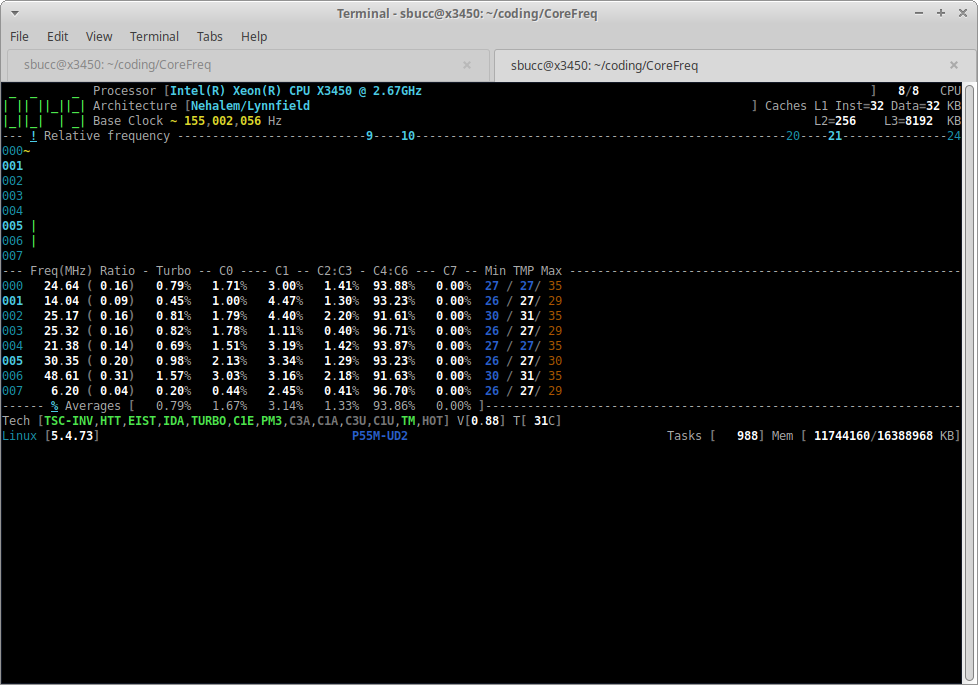
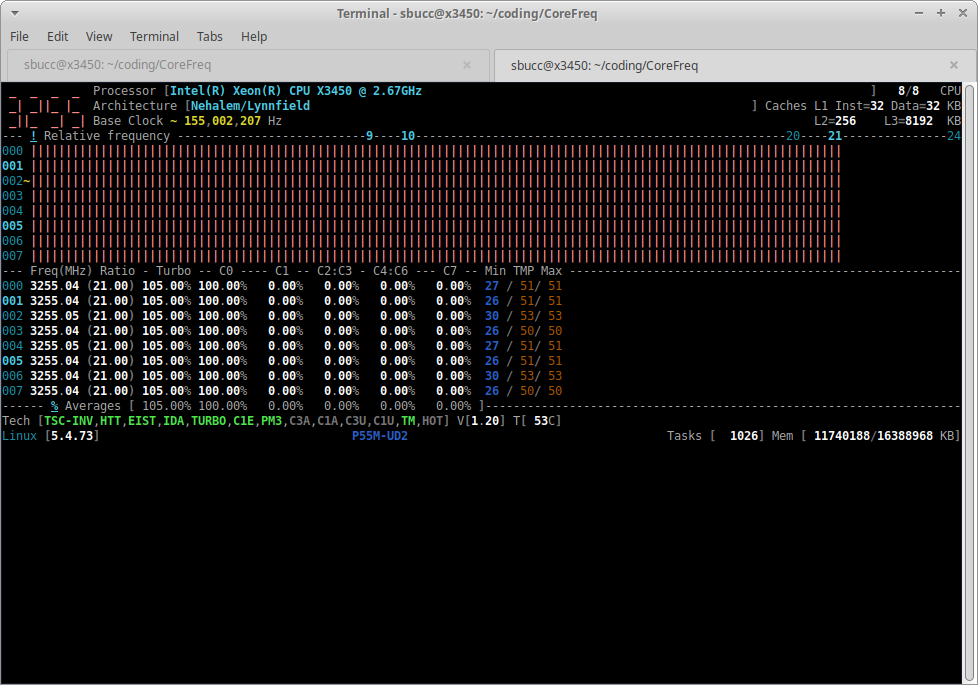
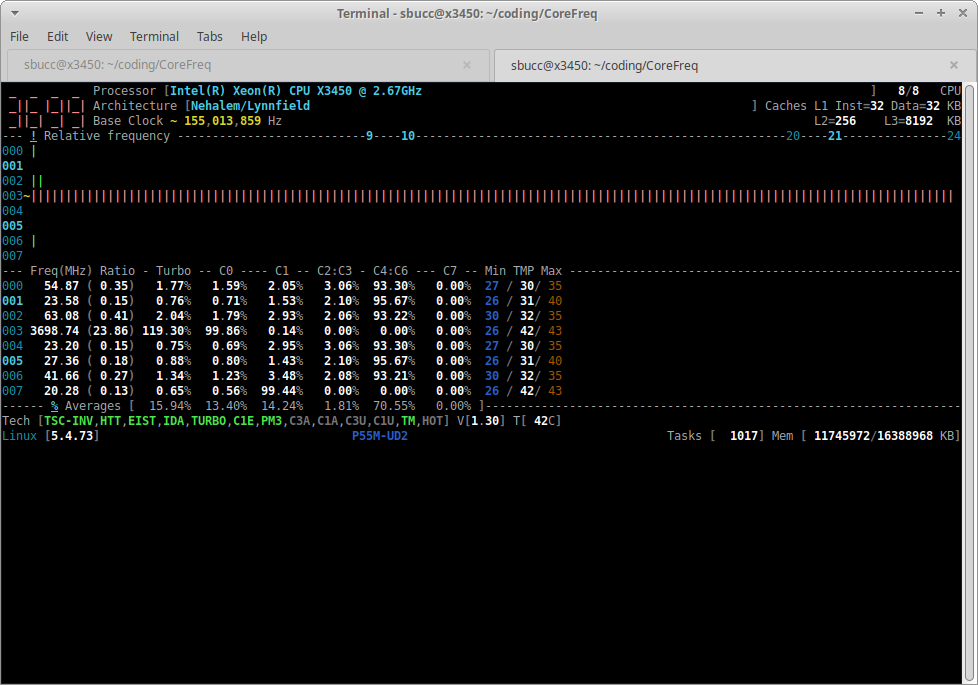
thebucc
on 22 Dec 2020
Thanks for pointing the copy paste error.
About build issue, kernel changes happened between 5.4 and 5.10 in cpuidle macros definition
Many impacts....
cyring
on 22 Dec 2020
Hello,
Fix available in develop
cyring
on 23 Dec 2020
Fix available in
develop
works great, issue can be closed as far as I'm concerned. Who should close it, you or I? And the build issue is also fixed.
thebucc
on 23 Dec 2020
Thanks for your help.
If you think Vcore is accurate, feel free to close the issue, or if the equation needs adjustment, just let me know.
Regards
Cyril
cyring
on 23 Dec 2020
I'm seeing the same values that I get from CPU-Z in windows, so I'm going to close it. Thanks and sorry for the time between replies.
thebucc
on 23 Dec 2020
Related issues
 olejon
·
16Comments
olejon
·
16Comments
 uzername123
·
11Comments
uzername123
·
11Comments
 RomanHargrave
·
20Comments
cyring
·
11Comments
RomanHargrave
·
20Comments
cyring
·
11Comments
 horus-dot
·
10Comments
horus-dot
·
10Comments