Corefreq: 3950X doesn't boost until 4700
I have a pretty similar system with yours @cyring.
CPU: 3950X
Motherboard: Asus Motherboard Crosshair Hero VIII WiFi (BIOS 2502)
RAM: F4-3200C14Q-32GFX (4x DIMM)
CPU Cooling: NZXT Kraken Z63
OS: Archlinux
So my BIOS settings are just defaults with XMP profile for 3200Mhz CL 14 and with these settings the max I can get on the corefreq is ~4500Mhz.
From your video you posted in [here] I see you can easily boost to 4700MHz and wondering how you got this? Is there a kernel parameter I'm missing?
 inglor
All 16 comments
EDIT
My BIOS version is the 2206. Any above versions have been unstable so far.
Like you, most settings are AUTO except DRAM set to its advertised speed of 3600 MHz and the primary timings 16-16-16-16-36 just copied from the SPD
DOCP or Manual, both giving 4700 on the best Core which is CPU #0
Recently I set manually FCLK to 1800 MHz rather than AUTO. It does not make any difference.
I built all components in April: was the Processor belonging to a good batch ? Can't tell but AMD is advertising the 3950X for a 4.7 GHz boost. Should be the same with yours.
Are 4 populated DIMM an issue to reach 4.7 GHz. I doubt so. But it is worth to try with two.
 cyring
on 19 Nov 2020
cyring
on 19 Nov 2020
Bellow is the bash script.
- you will need the MSR-Tools package
- load the driver
modprobe msr
* any CPU burn software like the 7-Zip benchmark
- as root in a terminal, start monitoring your best Core. Change the CPU number in the script.
CPU=0; REG=0xe8; while true; do CTR0=$(rdmsr --processor ${CPU} --decimal ${REG}); sleep 1; CTR1=$(rdmsr --processor ${CPU} --decimal ${REG}); (( FREQ=${CTR1} - ${CTR0} )); echo ${FREQ}; done
- in another terminal, as a user, burn the same CPU
taskset -c 0 7z b
- frequency output example
4694190478
4701950441
4696374211
4703442090
4702920638
4695896154
4700392651
4694149912
4703419400
4694399019
4702284225
4696449037
4703608365
4701421357
4695394645
4702811024
Hi @cyring and thanks for the details on how-to test this.
- I downgraded to the same BIOS
2206 - FCLK set to
1600MHz - DRAM settings are the XMP profile set
Manualto3200MHz with Timings as per screenshot below
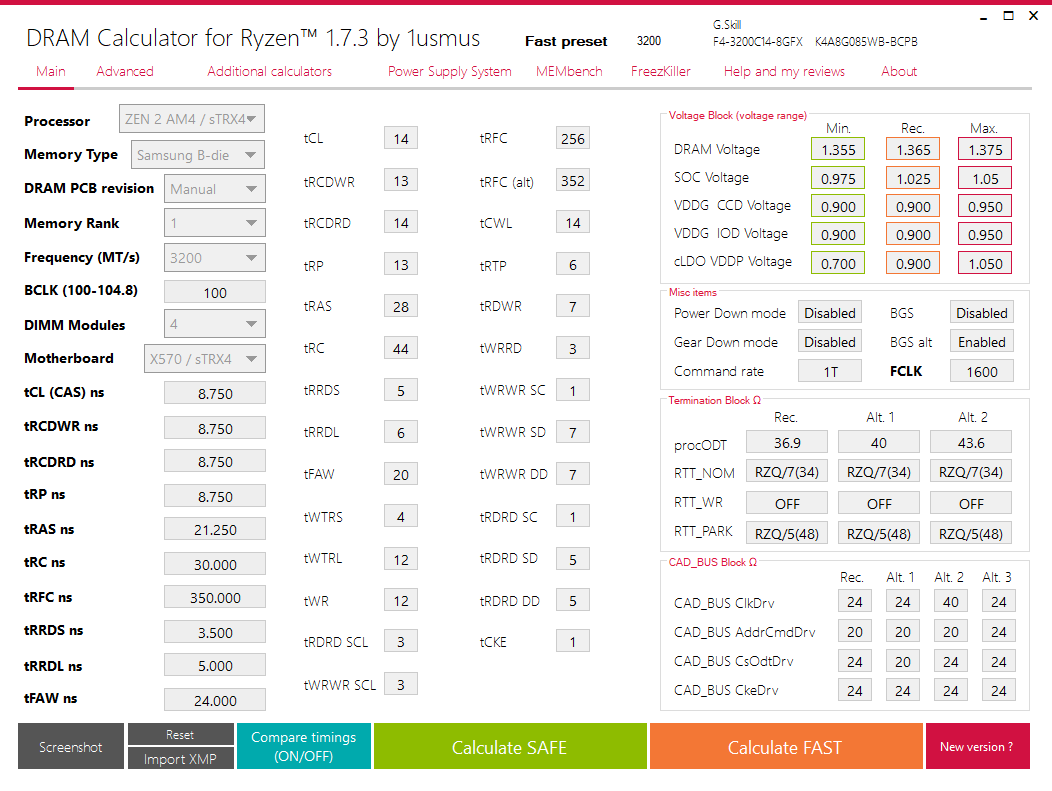
I've tested these RAM settings extensively so I doubt this prevents the CPU from Boosting all the way to 4.7GHz.
My results are as follow:
# CPU=0; REG=0xe8; while true; do CTR0=$(rdmsr --processor ${CPU} --decimal ${REG}); sleep 1; CTR1=$(rdmsr --processor ${CPU} --decimal ${REG}); (( FREQ=${CTR1} - ${CTR0} )); echo ${FREQ}; done
5760659
22360406
7620159
16644243
37317380
10618680
426375926
11214555
37411865
211541182
1016076336
531570479
651363557
69548075
44703720
27162100
561803707
475676343
887549996
12843659
7128716
2415858
2835474
2221526454
4626183195       # <-- Here is where I started the 7z benchmark.
4623634549
4624347706
4626349744
4630066483
4624044382
4632650725
4633719214
4633854642
4617750205
4615342788
4616498355
4620820788
4624491697
4628065394
4630986091
4631744797
4633497083
4633614086
4623421549
4612259524
4615896560
4618717434
4624136202
4629802348
4632266049
4630887624
4634141835
4634618023
4625548870
4620663907
4637934062
4628896146
4637468234
4624454790
4633225568
4639584828
4633149024
So my CPU is advertized for 4700 Mhz and only gets to 4630. Considering the FMAX of 3950X is 4725 Mhz (taken from dmi-decode) I'm missing ~ 100Mhz :(
I wonder how Windows can boost to 4700 Mhz..
inglor
on 19 Nov 2020
So my CPU is advertized for
4700Mhz and only gets to4630. Considering theFMAXof 3950X is4725Mhz (taken from dmi-decode) I'm missing ~ 100Mhz :(I wonder how Windows can boost to
4700Mhz..
I don't have oftenly
4700MHz and briefly above.
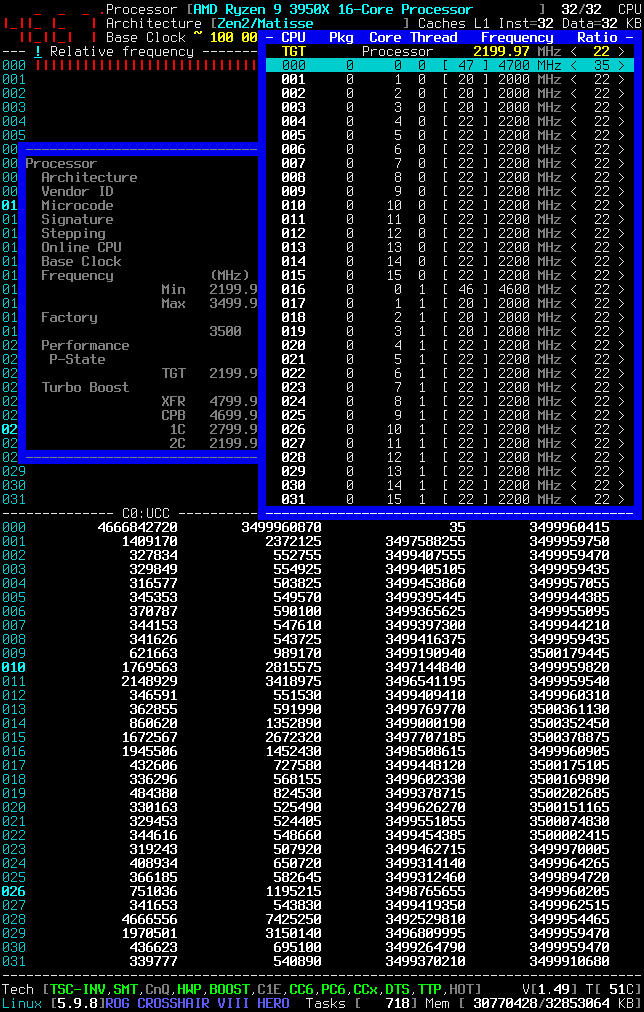
Open the
Processor > P-State:TGTwindow and stress your best CoreOn CPU
#0the Linux acpi-cpufreq module is governing or listening to the boosted P-States of47which is then multiplied by the Base Clock.
The BCLK should be ideally equaled to100MHz; but if your BIOS is protecting against the EMI, the BCLK can be slightly lower.
Be sure that any SPREAD SPECTRUM options are disabled in your BIOS.
cyring
on 19 Nov 2020
I adjusted my kernel params to
$ cat /proc/cmdline
BOOT_IMAGE=/boot/vmlinuz-linux root=UUID=c7d325eb-b760-466f-85ef-854f6a1d77a5 rw nvidia-drm.modeset=1 acpi_enforce_resources=lax add_efi_memmap nmi_watchdog=0 selinux=0 modprobe.blacklist=nouveau,k10temp cpu0_hotplug audit=0 nowatchdog sysrq_always_enabled
Open the
Processor > P-State:TGTwindow and stress your best Core
On CPU#0the Linux acpi-cpufreq module is governing or listening to the boosted P-States of47which is then multiplied by the Base Clock.
I tried your suggestion to manually set the P-State multiplier to 47 and failed with an error message:

The BCLK should be ideally equaled to
100MHz; but if your BIOS is protecting against the EMI, the BCLK can be slightly lower.
My BCLK is ~99.78 - it is jumping around so I assume it's the SPREAD SPECTRUM.

Be sure that any SPREAD SPECTRUM options are disabled in your BIOS.
@cyring
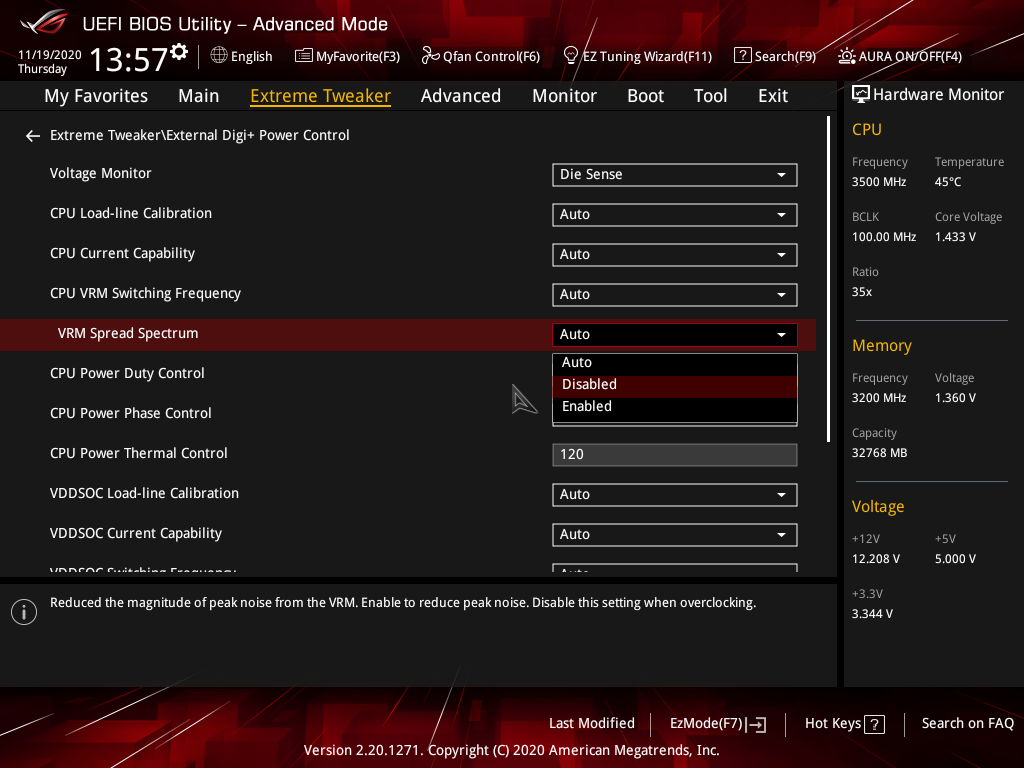
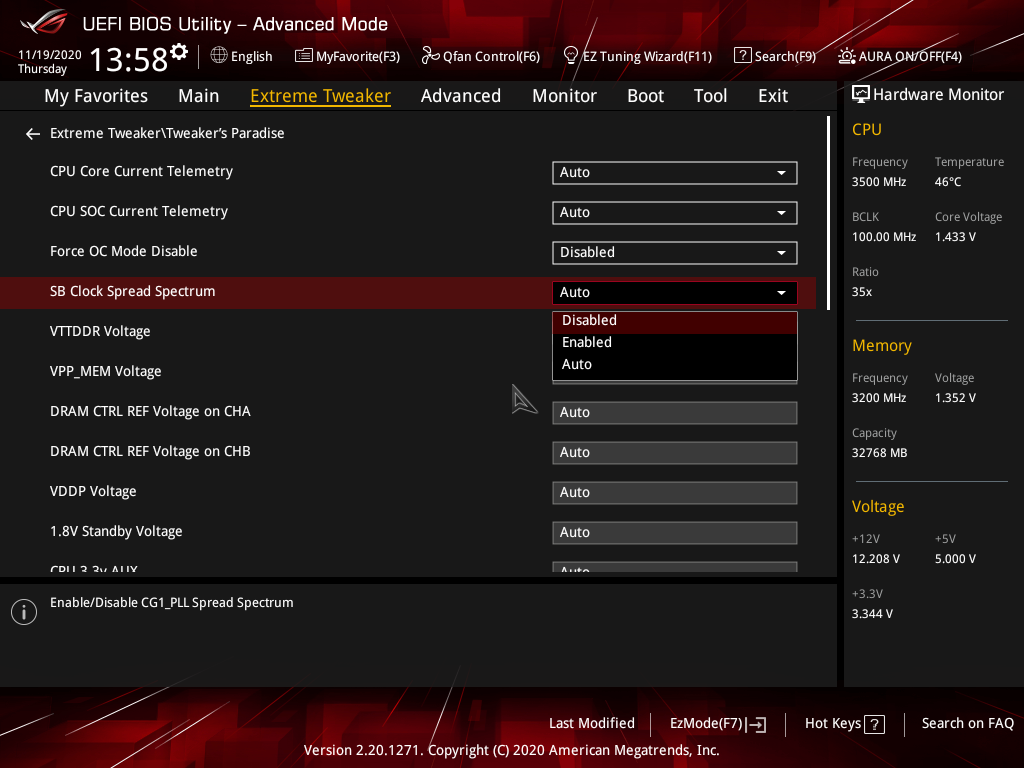
Which of the two SPREAD SPECTRUM settings in BIOS ?
- VRM Spread Spectrum
- SB Clock Spread Spectrum
inglor
on 19 Nov 2020
I adjusted my kernel params to
$ cat /proc/cmdline
BOOT_IMAGE=/boot/vmlinuz-linux root=UUID=c7d325eb-b760-466f-85ef-854f6a1d77a5 rw nvidia-drm.modeset=1 acpi_enforce_resources=lax add_efi_memmap nmi_watchdog=0 selinux=0 modprobe.blacklist=nouveau,k10temp cpu0_hotplug audit=0 nowatchdog sysrq_always_enabled
Open the
Processor > P-State:TGTwindow and stress your best Core
On CPU#0the Linux acpi-cpufreq module is governing or listening to the boosted P-States of47which is then multiplied by the Base Clock.I tried your suggestion to manually set the P-State multiplier to 47 and failed with an error message:
Contrary to Intel Proc, I noticed with the AMD Zen you can only target the valid P-states up to P0. That's why I put them in blue in the list.
The boosted P-States are barely undocumented. I don't have the registers and explanation how to target them, beside that if CPU is in P0 then start the boosted states.
However I'm offering a way to alter the Max Ratio. You have to activate the Experimental Mode in Settings. Prerequisites are that _CoreFreq_ is the current Linux clocksource and CPB disabled.
I have been able to OC to 4700 MHz
The BCLK should be ideally equaled to
100MHz; but if your BIOS is protecting against the EMI, the BCLK can be slightly lower.My BCLK is ~
99.78- it is jumping around so I assume it's the SPREAD SPECTRUM.
Be sure that any SPREAD SPECTRUM options are disabled in your BIOS.
@cyring
Which of the two SPREAD SPECTRUM settings in BIOS ?
- VRM Spread Spectrum
- SB Clock Spread Spectrum
I got to the conclusion that disabling SB Clock Spread Spectrum is sufficient to get a nice 100 MHz BCLK.
In BIOS you can verify the same in the CPU frequency (third tab) when frequency reports 3500-3502 MHz
cyring
on 19 Nov 2020
Contrary to Intel Proc, I noticed with the AMD Zen you can only target the valid P-states up to
P0. That's why I put them in blue in the list.
The boosted P-States are barely undocumented. I don't have the registers and explanation how to target them, beside that if CPU is inP0then start the boosted states.
However I'm offering a way to alter theMax Ratio. You have to activate theExperimental ModeinSettings. Prerequisites are that _CoreFreq_ is the current Linux clocksource and CPB disabled.
Yeah, I don't understand what you are suggestion and the CoreFreq UI is not friendly enough for me to understand it. The message I got is cryptic Numerical argument out of domain and your suggestion above regarding the experimental feature is not working because CoreFreq says Turbo Boost must be disabled. Is that what you mean with CPB disabled?
How do you make CoreFreq the current Linux clocksource?
How do you disable CPB?
Thank you
inglor
on 19 Nov 2020
OK tomorrow I should find some time to record an OC demo with _CoreFreq_
Driver messages need improvements.
CPB is Turbo Boost
UI is made for Terminals.
cyring
on 19 Nov 2020
- Kernel boot parameters
modprobe.blacklist=acpi_cpufreq idle=halt tsc=unstable
- Build with TSC implementation
make DELAY_TSC=1 clean all
- confirmed by this compilation trace:
  CC [M]  CoreFreq/corefreqk.o
CoreFreq/corefreqk.c:923:1: note: ‘#pragma message: "udelay() built with TSC implementation"’
  923 | FEAT_MSG("udelay() built with TSC implementation")
      | ^~~~~~~~
- Start the driver in the experimental mode with all sub-drivers registration
insmod corefreqk.ko Register_ClockSource=1 Register_Governor=1 Register_CPU_Freq=1 Register_CPU_Idle=1 Experimental=1
- Switch and check the current kernel clock source
echo "corefreq" > /sys/devices/system/clocksource/clocksource0/current_clocksource
cat /sys/devices/system/clocksource/clocksource0/current_clocksource
corefreq
- Start Daemon; next, the Client
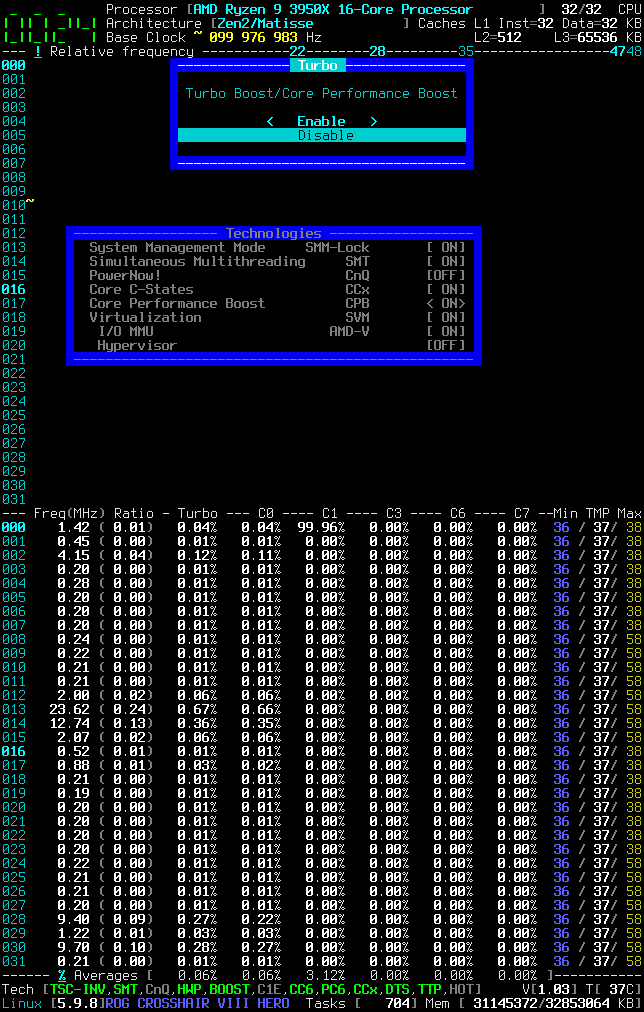
- Disable CPB
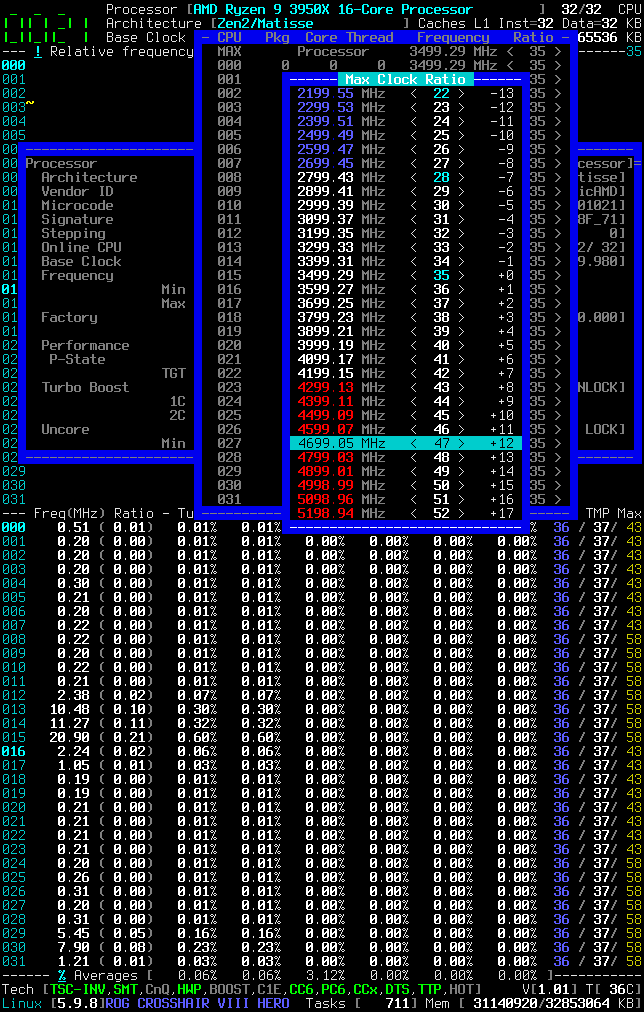
- Change the Max Ratio
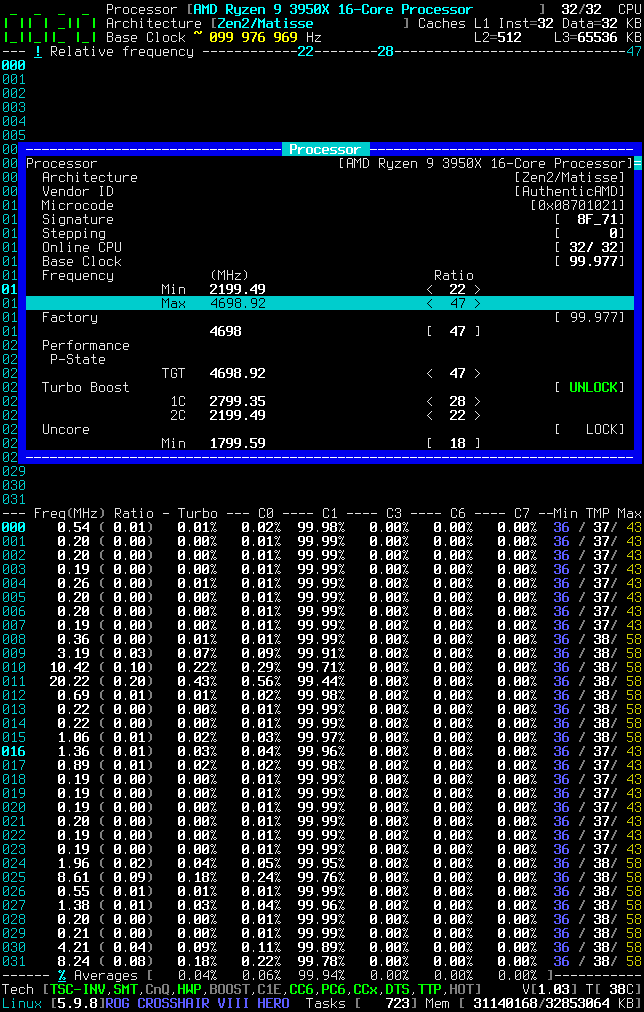
cyring
on 20 Nov 2020
Hi,
I'm back in BIOS today
- Both VRM options are disabled
- Trying Precision Boost 2 in AMD Overclocking section.
Rather thanAUTO, I'm setting those parameters:
- Limits = Motherboard
- Override = 75 MHz
- Scalar = 10X
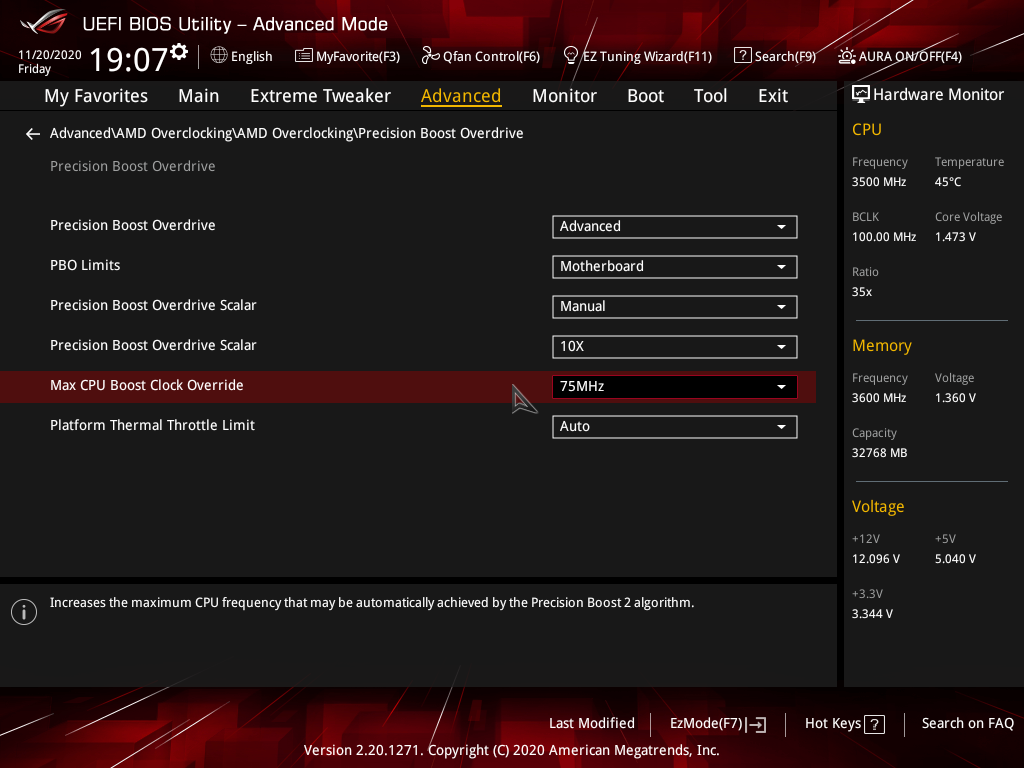
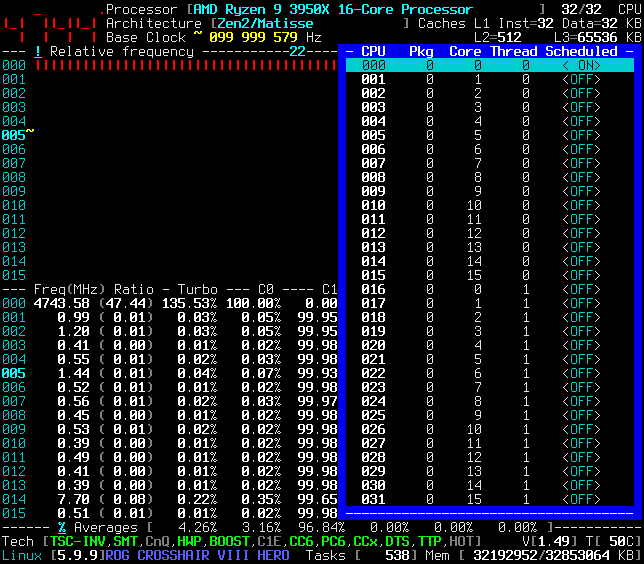
An override of 75 MHz is giving a better frequency bump than [100 to 200] MHz !
cyring
on 20 Nov 2020
- I don't have the same relative ratio among different boots
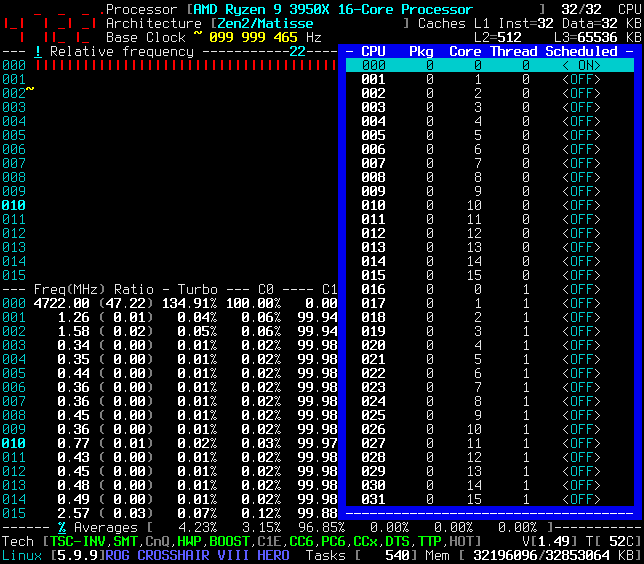
- Either a CoreFreq issue, either a Hardware issue, either Kernel ...
cyring
on 20 Nov 2020
I followed the steps to enable CPB2 in ASEGA as above and it helps.
I did not add any of the kernel params of _CoreFreq_ compiler params.
This helps quite a bit - first time I see 4.7GHz - ever.
_CoreFreq_ even reports 4725.
inglor
on 20 Nov 2020
I followed the steps to enable CPB2 in ASEGA as above and it helps.
I did not add any of the kernel params of _CoreFreq_ compiler params.
This helps quite a bit - first time I see 4.7GHz - ever.
_CoreFreq_ even reports 4725.
Can we say it's a good news !
I can however remember that my 3950X was reaching easily 4.7 GHz, single best Core, with the out of the box BIOS
Now, version 2206, requires me to tweak those PB options for the same.
Feel free to close the issue.
cyring
on 21 Nov 2020
Thanks for your assistance - I'm quite disappointed with Asus and their BIOS updates - I'll be looking for a different manufacturer for my next motherboard.
Thanks
inglor
on 21 Nov 2020
They just need some help (D
Meanwhile I may have found the source of my maximum frequencies inconsistency: COLD BOOT
I'm setting all BIOS settings and then save/reboot.
Next, shutdown, and Power Off the PSU
Power On PSU ---> Boot --> Best frequency !
cyring
on 21 Nov 2020
They just need some help (D
Meanwhile I may have found the source of my maximum frequencies inconsistency: COLD BOOT
I'm setting all BIOS settings and then save/reboot.
Next, shutdown, and Power Off the PSUPower On PSU ---> Boot --> Best frequency !
Interesting, that only means the BIOS is more messed up than I thought.. non deterministic results between reboots and / or cold/ warm reboots sounds really bad.
Maybe reach out to others in overclock.net to check if others see similar behaviour?
inglor
on 21 Nov 2020
Related issues
 hakonhall
·
5Comments
hakonhall
·
5Comments
 horus-dot
·
10Comments
horus-dot
·
10Comments
 LouisCyfer
·
5Comments
LouisCyfer
·
5Comments
 felixbecker2
·
21Comments
felixbecker2
·
21Comments
 RomanHargrave
·
20Comments
RomanHargrave
·
20Comments