CoreFreq doens't found the corefreqk module on Solus
Hi! The build worked normally, but when trying to load the module I get the error message below:
bkdwt@nsa ~/CoreFreq $ make MSR_CORE_PERF_UC=MSR_CORE_PERF_FIXED_CTR1 MSR_CORE_PERF_URC=MSR_CORE_PERF_FIXED_CTR2
cc -Wall -pthread -c corefreqd.c \
-D FEAT_DBG=0 -D UBENCH=0 \
-o corefreqd.o
cc -Wall -c corefreqm.c \
-D FEAT_DBG=0 -D UBENCH=0 \
-o corefreqm.o
cc -Wall corefreqd.c corefreqm.c \
-D FEAT_DBG=0 -D UBENCH=0 \
-o corefreqd -lpthread -lm -lrt
cc -Wall -c corefreq-cli.c \
-D FEAT_DBG=0 -D UBENCH=0 \
-o corefreq-cli.o
cc -Wall -c corefreq-ui.c \
-D FEAT_DBG=0 -D UBENCH=0 \
-o corefreq-ui.o
cc -Wall -c corefreq-cli-rsc.c \
-D FEAT_DBG=0 -D UBENCH=0 \
-o corefreq-cli-rsc.o
cc -Wall -c corefreq-cli-json.c \
-D FEAT_DBG=0 -D UBENCH=0 \
-o corefreq-cli-json.o
cc -Wall -c corefreq-cli-extra.c \
-D FEAT_DBG=0 -D UBENCH=0 \
-o corefreq-cli-extra.o
cc -Wall \
corefreq-cli.c corefreq-ui.c corefreq-cli-rsc.c \
corefreq-cli-json.c corefreq-cli-extra.c \
-D FEAT_DBG=0 -D UBENCH=0 \
-o corefreq-cli -lm -lrt
make -j1 -C /lib/modules/5.2.13-126.current/build M=/home/bkdwt/CoreFreq modules
make[1]: Entering directory '/usr/src/linux-headers-5.2.13-126.current'
CC [M] /home/bkdwt/CoreFreq/corefreqk.o
Building modules, stage 2.
MODPOST 1 modules
CC /home/bkdwt/CoreFreq/corefreqk.mod.o
LD [M] /home/bkdwt/CoreFreq/corefreqk.ko
make[1]: Leaving directory '/usr/src/linux-headers-5.2.13-126.current'
bkdwt@nsa ~/CoreFreq $ sudo modprobe corefreqk
modprobe: FATAL: Module corefreqk not found in directory /lib/modules/5.2.13-126.current
Is the compiler installing the module in a different directory?
 bkdwt
bkdwt
All 14 comments
Tried insmod:
bkdwt@nsa ~/CoreFreq $ sudo modprobe corefreqk
Password:
modprobe: FATAL: Module corefreqk not found in directory /lib/modules/5.2.13-126.current
bkdwt@nsa ~/CoreFreq $ sudo insmod corefreqk.ko
bkdwt@nsa ~/CoreFreq $ sudo corefreqd
sudo: corefreqd: command not found
bkdwt@nsa ~/CoreFreq $ sudo systemctl start corefreqd
Failed to start corefreqd.service: Unit corefreqd.service not found.
bkdwt@nsa ~/CoreFreq $ corefreq-cli
bash: corefreq-cli: command not found
bkdwt
on 3 Oct 2019
Hello,
I would recommend you use two terminals:
- the first, as root
insmod /working_directory/corefreqk.ko

/working_directory/corefreqd
- the second terminal as standard user
/working_directory/corefreq-cli
where /working_directory is the full path to the location you built _CoreFreq_
 cyring
on 3 Oct 2019
cyring
on 3 Oct 2019
Hello,
I would recommend you use two terminals:
* the first, as rootinsmod /working_directory/corefreqk.ko /working_directory/corefreqd* the second terminal as standard user/working_directory/corefreq-cliwhere /working_directory is the full path to the location you built _CoreFreq_
Many thanks! Now works! :+1:
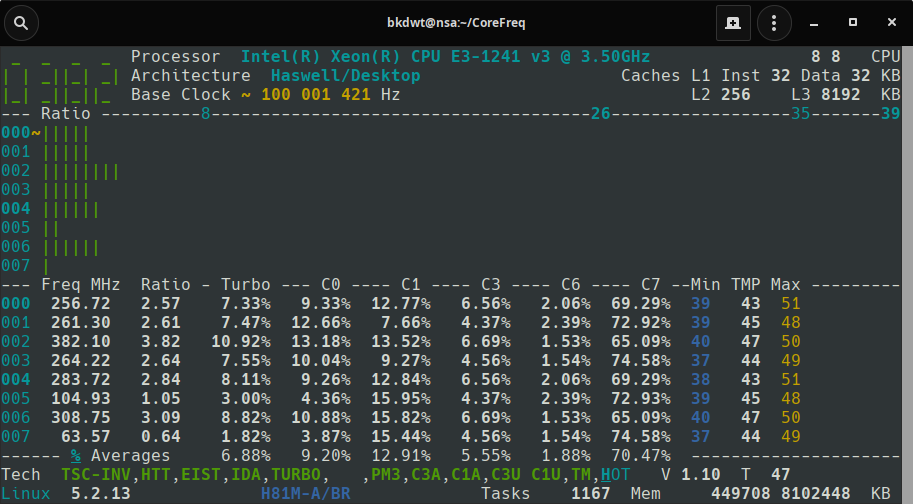
bkdwt
on 3 Oct 2019
Your welcome.
Please run corefreq-cli in Xterm (or Console) and you will notice the dark gray characters missing in your screenshot.
cyring
on 3 Oct 2019
I just notice that this Xeon is wrongly reported as Haswell / Desktop. It should be Haswell / Server. I need to fix this.
Can you please post the output of:
- System Information
corefreq-cli -s
- Memory Controller
corefreq-cli -M
Thank you
cyring
on 4 Oct 2019
@cyring I'll post on home. 👍🏻
bkdwt
on 4 Oct 2019
@cyring here we go: https://pastebin.com/6RXakZ9Q
bkdwt
on 4 Oct 2019
cyring
on 4 Oct 2019
HASWELL CPUID 06_3C
{.ExtFamily=0x0, .Family=0x6, .ExtModel=0x3, .Model=0xC}
Architecture |Code Name |Brand string discriminant
--------------------|-----------------------|---------------------------------
Devil's Canyon|Haswell/Canyon|Intel(R) Core(TM) i7-47
Devil's Canyon|Haswell/Canyon|Intel(R) Core(TM) i5-46
Haswell|Haswell/Desktop|Intel(R) Core(TM) i5-45
Haswell|Haswell/Desktop|Intel(R) Core(TM) i5-44
Haswell|Haswell/Desktop|Intel(R) Core(TM) i3-43
Haswell|Haswell/Desktop|Intel(R) Core(TM) i3-41
Haswell|Haswell/Desktop|Intel(R) Pentium(R) CPU G34
Haswell|Haswell/Desktop|Intel(R) Pentium(R) CPU G32
Haswell|Haswell/Desktop|Intel(R) Celeron(R) CPU G18
Denlow|Haswell/Denlow|Intel(R) Xeon(R) CPU E3-12
Haswell Mobile eXtreme|Haswell/Mobile/eXtreme|Intel(R) Core(TM) i7-4940MX
Haswell Mobile|Haswell/Crystal Well|Intel(R) Core(TM) i7-4800MQ
Haswell Mobile|Haswell/Mobile|Intel(R) Core(TM) i7-4710HQ
Haswell Embedded|Haswell/Embedded|Intel(R) 4th Gen Core(TM) i7-4700EQ
Haswell Mobile|Haswell/Mobile|Intel(R) Core(TM) i5-4300M
Haswell Mobile|Haswell/Mobile|Intel(R) Core(TM) i5-4200H
Haswell Mobile|Haswell/Mobile|Intel(R) Core(TM) i3-4000M
Haswell Mobile|Haswell/Mobile|Intel(R) Pentium(R) CPU 3550M
Haswell Mobile|Haswell/Mobile|Intel(R) Celeron(R) CPU 2950M
cyring
on 6 Oct 2019
HASWELL CPUID 06_3C
{.ExtFamily=0x0, .Family=0x6, .ExtModel=0x3, .Model=0xC}
Ordered Reduction
Architecture |Code Name |Brand string discriminant
--------------------|-----------------------|---------------------------------
Haswell Mobile eXtreme|Haswell/Mobile/eXtreme|Intel(R) Core(TM) i7-4940MX
Haswell Mobile eXtreme|Haswell/Mobile/eXtreme|Intel(R) Core(TM) i7-4930MX
Haswell Mobile|Haswell/Crystal Well|Intel(R) Core(TM) i7-4910MQ
Haswell Mobile|Haswell/Crystal Well|Intel(R) Core(TM) i7-4900MQ
Haswell Mobile|Haswell/Crystal Well|Intel(R) Core(TM) i7-4810MQ
Haswell Mobile|Haswell/Crystal Well|Intel(R) Core(TM) i7-4800MQ
Haswell Mobile|Haswell/Crystal Well|Intel(R) Core(TM) i7-4710HQ
Haswell Mobile|Haswell/Crystal Well|Intel(R) Core(TM) i7-4700HQ
Devil's Canyon|Haswell/Canyon|Intel(R) Core(TM) i7-47
Devil's Canyon|Haswell/Canyon|Intel(R) Core(TM) i5-46
Haswell Mobile|Haswell/Mobile|Intel(R) Core(TM) i5-4300M
Haswell Mobile|Haswell/Mobile|Intel(R) Core(TM) i5-4200H
Haswell|Haswell/Desktop|Intel(R) Core(TM) i5-4
Haswell Mobile|Haswell/Mobile|Intel(R) Core(TM) i3-4000M
Haswell|Haswell/Desktop|Intel(R) Core(TM) i3-4
Haswell|Haswell/Desktop|Intel(R) Pentium(R) CPU G
Haswell|Haswell/Desktop|Intel(R) Celeron(R) CPU G
Denlow|Haswell/Denlow|Intel(R) Xeon(R) CPU E3-12
Haswell Embedded|Haswell/Embedded|Intel(R) 4th Gen Core(TM) i
Haswell Mobile|Haswell/Mobile|Intel(R) Pentium(R) CPU 3
Haswell Mobile|Haswell/Mobile|Intel(R) Celeron(R) CPU 2
cyring
on 6 Oct 2019
Hello,
Please update to the latest version, you should read Haswell/Denlow as the architecture name ?
_screenshot welcomed_
cyring
on 6 Oct 2019
Hello,
Please update to the latest version, you should read
Haswell/Denlowas the architecture name ?_screenshot welcomed_
Yep, now shows Haswell/Denlow
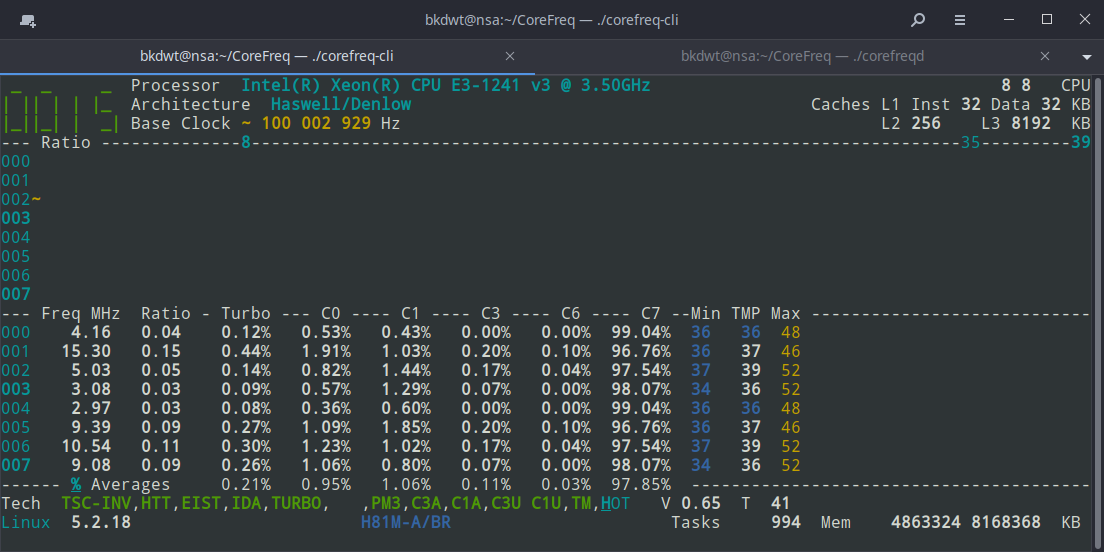
I think corefreq is not reporting frequencies correctly. Just see that it is reporting a frequency of 15MHz with the CPU in IDLE.
bkdwt
on 7 Oct 2019
Yep, now shows Haswell/Denlow
Thank you.
I think corefreq is not reporting frequencies correctly. Just see that it is reporting a frequency of 15MHz with the CPU in IDLE.
That's the expecting behavior of _CoreFreq_ which measures the performance counters of the Processor over an interval (default, 1 second) .
See the Hardware performance counter
At the GHz speed, processors are going too fast to be measured in real-time.
Continuous monitoring instructions would saturate the flow, and you may just monitor the monitoring loop during the idle time (which will not be entered btw)
So what you get is the Intel recommended algorithm based on PMC counters.
In the Client, you will however get various _absolute_ frequencies such as those in the Processor window.
cyring
on 7 Oct 2019
Yep, now shows Haswell/Denlow
Thank you.
I think corefreq is not reporting frequencies correctly. Just see that it is reporting a frequency of 15MHz with the CPU in IDLE.
That's the expecting behavior of _CoreFreq_ which measures the performance counters of the Processor over an interval (default, 1 second) .
See the Hardware performance counterAt the GHz speed, processors are going too fast to be measured in real-time.
Continuous monitoring instructions would saturate the flow, and you may just monitor the monitoring loop during the idle time (which will not be entered btw)So what you get is the Intel recommended algorithm based on PMC counters.
In the Client, you will however get various _absolute_ frequencies such as those in the Processor window.
Thanks for the explanation! :)
bkdwt
on 7 Oct 2019
Related issues
 Arthav24
·
26Comments
Arthav24
·
26Comments
 LouisCyfer
·
5Comments
LouisCyfer
·
5Comments
 uzername123
·
11Comments
uzername123
·
11Comments
 RomanHargrave
·
20Comments
RomanHargrave
·
20Comments
 thor2002ro
·
22Comments
thor2002ro
·
22Comments