Corefreq: Vcore always set to 0 in System Information json-encoded
It seems that the json-encoded System Information is always showing a value of 0 for the Vcore ("Voltage":{"VID":9082,"Vcore":0}), even if the dashboard view shows the correct value.
Another thing that I noticed is that only one CPU is showing VID and Vcore values, the others are all showing 0.

Processor                             [Intel(R) Core(TM) i7-4770K CPU @ 3.50GHz]
|- Architecture                                                [Haswell/Desktop]
|- Vendor ID                                                      [GenuineIntel]
|- Signature                                                            [ 06_3C]
|- Stepping                                                             [     3]
|- Microcode                                                            [     0]
|- Online CPU                                                           [  8/8 ]
|- Base Clock                                                           [ 97.23]
|- Frequency            (Mhz)                      Ratio
                 Min    777.84                    [   8 ]
                 Max   3403.03                    [  35 ]
|- Factory                                                              [100.00]
                       3500                       [  35 ]
|- Turbo Boost                                                          [UNLOCK]
                  1C   3791.95                    <  39 >
                  2C   3791.95                    <  39 >
                  3C   3694.72                    <  38 >
                  4C   3597.49                    <  37 >
|- Uncore                                                               [UNLOCK]
                 Min    777.84                    <   8 >
                 Max   3403.03                    <  35 >

ISA Extensions:
|- 3DNow!/Ext [N,N]        AES [Y]   AVX/AVX2 [Y/Y]   BMI1/BMI2 [Y/Y]
|- CLFSH        [Y]       CMOV [Y]      CMPXCH8 [Y]      CMPXCH16 [Y]
|- F16C         [Y]        FPU [Y]         FXSR [Y]     LAHF/SAHF [Y]
|- MMX/Ext    [Y/N]    MONITOR [Y]        MOVBE [Y]      PCLMULDQ [Y]
|- POPCNT       [Y]     RDRAND [Y]       RDTSCP [Y]           SEP [Y]
|- SGX          [N]        SSE [Y]         SSE2 [Y]          SSE3 [Y]
|- SSSE3        [Y] SSE4.1/4A [Y/N]      SSE4.2 [Y]       SYSCALL [Y]

Features:
|- 1 GB Pages Support                                      1GB-PAGES   [Present]
|- 100 MHz multiplier Control                            100MHzSteps   [Missing]
|- Advanced Configuration & Power Interface                     ACPI   [Present]
|- Advanced Programmable Interrupt Controller                   APIC   [Present]
|- Core Multi-Processing                                  CMP Legacy   [Missing]
|- L1 Data Cache Context ID                                  CNXT-ID   [Missing]
|- Direct Cache Access                                           DCA   [Missing]
|- Debugging Extension                                            DE   [Present]
|- Debug Store & Precise Event Based Sampling               DS, PEBS   [Present]
|- CPL Qualified Debug Store                                  DS-CPL   [Present]
|- 64-Bit Debug Store                                         DTES64   [Present]
|- Fast-String Operation                                Fast-Strings   [Present]
|- Fused Multiply Add                                       FMA|FMA4   [Present]
|- Hardware Lock Elision                                         HLE   [Missing]
|- Long Mode 64 bits                                         IA64|LM   [Present]
|- LightWeight Profiling                                         LWP   [Missing]
|- Machine-Check Architecture                                    MCA   [Present]
|- Model Specific Registers                                      MSR   [Present]
|- Memory Type Range Registers                                  MTRR   [Present]
|- OS-Enabled Ext. State Management                          OSXSAVE   [Present]
|- Physical Address Extension                                    PAE   [Present]
|- Page Attribute Table                                          PAT   [Present]
|- Pending Break Enable                                          PBE   [Present]
|- Process Context Identifiers                                  PCID   [Present]
|- Perfmon and Debug Capability                                 PDCM   [Present]
|- Page Global Enable                                            PGE   [Present]
|- Page Size Extension                                           PSE   [Present]
|- 36-bit Page Size Extension                                  PSE36   [Present]
|- Processor Serial Number                                       PSN   [Missing]
|- Restricted Transactional Memory                               RTM   [Missing]
|- Safer Mode Extensions                                         SMX   [Missing]
|- Self-Snoop                                                     SS   [Present]
|- Time Stamp Counter                                            TSC [Invariant]
|- Time Stamp Counter Deadline                          TSC-DEADLINE   [Present]
|- Virtual Mode Extension                                        VME   [Present]
|- Virtual Machine Extensions                                    VMX   [Present]
|- Extended xAPIC Support                                     x2APIC   [Missing]
|- Execution Disable Bit Support                              XD-Bit   [Present]
|- XSAVE/XSTOR States                                          XSAVE   [Present]
|- xTPR Update Control                                          xTPR   [Present]

Technologies:
|- System Management Mode                                   SMM-Dual       [ ON]
|- Hyper-Threading                                               HTT       [ ON]
|- SpeedStep                                                    EIST       < ON>
|- Dynamic Acceleration                                          IDA       [ ON]
|- Turbo Boost                                                 TURBO       < ON>
|- Virtualization                                                VMX       [ ON]
   |- I/O MMU                                                   VT-d       [OFF]
   |- Hypervisor                                                           [OFF]

Performance Monitoring:
|- Version                                                        PM       [  3]
|- Counters:          General                   Fixed
|                     4 x 48 bits             3 x 48 bits
|- Enhanced Halt State                                           C1E       <OFF>
|- C1 Auto Demotion                                              C1A       < ON>
|- C3 Auto Demotion                                              C3A       < ON>
|- C1 UnDemotion                                                 C1U       < ON>
|- C3 UnDemotion                                                 C3U       < ON>
|- Frequency ID control                                          FID       [OFF]
|- Voltage ID control                                            VID       [OFF]
|- P-State Hardware Coordination Feedback                MPERF/APERF       [ ON]
|- Hardware-Controlled Performance States                        HWP       [OFF]
|- Hardware Duty Cycling                                         HDC       [OFF]
|- Package C-State
   |- Configuration Control                                   CONFIG   [ UNLOCK]
   |- Lowest C-State                                           LIMIT   <      0>
   |- I/O MWAIT Redirection                                  IOMWAIT   < ENABLE>
   |- Max C-State Inclusion                                    RANGE   <      7>
|- MWAIT States:      C0      C1      C2      C3      C4
|                      0       2       1       2       4
|- Core Cycles                                                         [Present]
|- Instructions Retired                                                [Present]
|- Reference Cycles                                                    [Present]
|- Last Level Cache References                                         [Present]
|- Last Level Cache Misses                                             [Present]
|- Branch Instructions Retired                                         [Present]
|- Branch Mispredicts Retired                                          [Present]

Power & Thermal Monitoring:
|- Clock Modulation                                             ODCM   <Disable>
   |- DutyCycle                                                        <  6.25%>
|- Power Management                                         PWR MGMT   [   LOCK]
   |- Energy Policy                                        Bias Hint   [      0]
|- Junction Temperature                                        TjMax   [    100]
|- Digital Thermal Sensor                                        DTS   [Present]
|- Power Limit Notification                                      PLN   [Present]
|- Package Thermal Management                                    PTM   [Present]
|- Thermal Monitor 1                                         TM1|TTP   [ Enable]
|- Thermal Monitor 2                                         TM2|HTC   [Present]
|- Units
   |- Power                                               watt   [  0.125000000]
   |- Energy                                             joule   [  0.000061035]
   |- Window                                            second   [  0.000976562]
 leinardi
All 56 comments
The register IA32_PERF_STATUS MSR (0198H) is specified as a Package scope register.
However this MSR is poorly documented and might provide VID per Core ?
Each next comments below will tell you what code to add in _CoreFreq_ files to test voltage per Core
- add these two functions above line:
https://github.com/cyring/CoreFreq/blob/c5a96e24a80993b2dfb24763d3207ea9736e1e48/corefreqk.c#L5700
static enum hrtimer_restart Cycle_Haswell_DT(struct hrtimer *pTimer)
{
    PERF_STATUS PerfStatus = {.value = 0};
    unsigned int cpu = smp_processor_id();
    CORE *Core = (CORE *) KPublic->Core[cpu];

    if (BITVAL(KPrivate->Join[cpu]->TSM, MUSTFWD) == 1) {
        hrtimer_forward(pTimer,
                hrtimer_cb_get_time(pTimer),
                RearmTheTimer);

        SMT_Counters_SandyBridge(Core, 1);

        if (Core->Bind == Proc->Service.Core) {
            PKG_Counters_SandyBridge(Core, 1);

            PWR_ACCU_SandyBridge(Proc, 1);

            Delta_PC02(Proc);

            Delta_PC03(Proc);

            Delta_PC06(Proc);

            Delta_PC07(Proc);

            Delta_PTSC(Proc);

            Delta_UNCORE_FC0(Proc);

            Delta_PWR_ACCU(Proc, PKG);

            Delta_PWR_ACCU(Proc, CORES);

            Delta_PWR_ACCU(Proc, UNCORE);

            Save_PC02(Proc);

            Save_PC03(Proc);

            Save_PC06(Proc);

            Save_PC07(Proc);

            Save_PTSC(Proc);

            Save_UNCORE_FC0(Proc);

            Save_PWR_ACCU(Proc, PKG);

            Save_PWR_ACCU(Proc, CORES);

            Save_PWR_ACCU(Proc, UNCORE);

            Sys_Tick(Proc);
        }

        RDMSR(PerfStatus, MSR_IA32_PERF_STATUS);
        Core->Counter[1].VID = PerfStatus.SNB.CurrVID;

        Core_Intel_Temp(Core);

        RDCOUNTER(Core->Interrupt.SMI, MSR_SMI_COUNT);

        Delta_INST(Core);

        Delta_C0(Core);

        Delta_C3(Core);

        Delta_C6(Core);

        Delta_C7(Core);

        Delta_TSC(Core);

        Delta_C1(Core);

        Save_INST(Core);

        Save_TSC(Core);

        Save_C0(Core);

        Save_C3(Core);

        Save_C6(Core);

        Save_C7(Core);

        Save_C1(Core);

        BITSET(LOCKLESS, Core->Sync.V, 63);

        return(HRTIMER_RESTART);
    } else
        return(HRTIMER_NORESTART);
}

void InitTimer_Haswell_DT(unsigned int cpu)
{
    smp_call_function_single(cpu, InitTimer, Cycle_Haswell_DT, 1);
}
 cyring
on 4 Aug 2018
cyring
on 4 Aug 2018
- add this code below this line:
https://github.com/cyring/CoreFreq/blob/c5a96e24a80993b2dfb24763d3207ea9736e1e48/corefreqk.h#L499
extern void InitTimer_Haswell_DT(unsigned int cpu) ;
- replace the timer at this line (Architecture number 30)
https://github.com/cyring/CoreFreq/blob/c5a96e24a80993b2dfb24763d3207ea9736e1e48/corefreqk.h#L1707
.Timer = InitTimer_Haswell_DT,
- in the same structure (Arch number 30) replace also:
.voltageFormula = VOLTAGE_FORMULA_INTEL_SNB,
with:
.voltageFormula = VOLTAGE_FORMULA_INTEL_SKL_X,
Now make clean; make and start _CoreFreq_
Please post a screenshot of Voltages with different load on Cores
cyring
on 4 Aug 2018
Hey thanks for the quick reply!
Now the Vcore is displayed for all the cores inside the Dasboard:
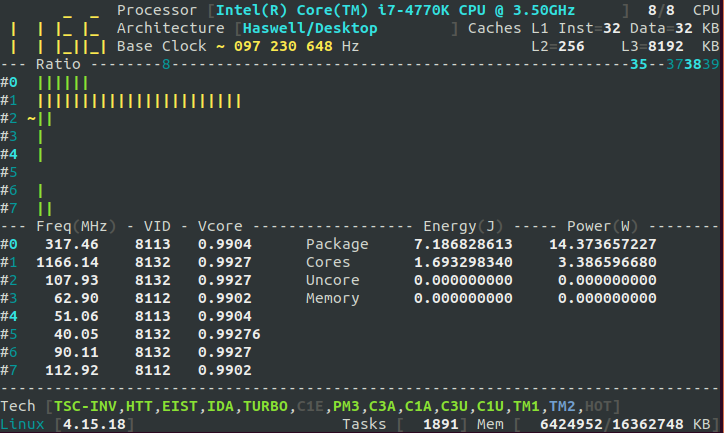
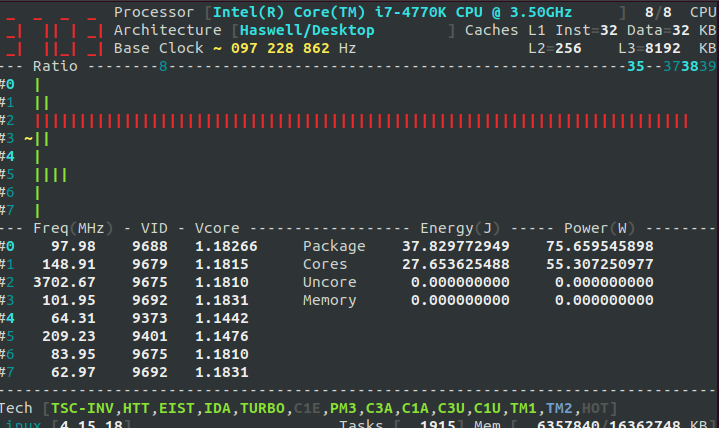
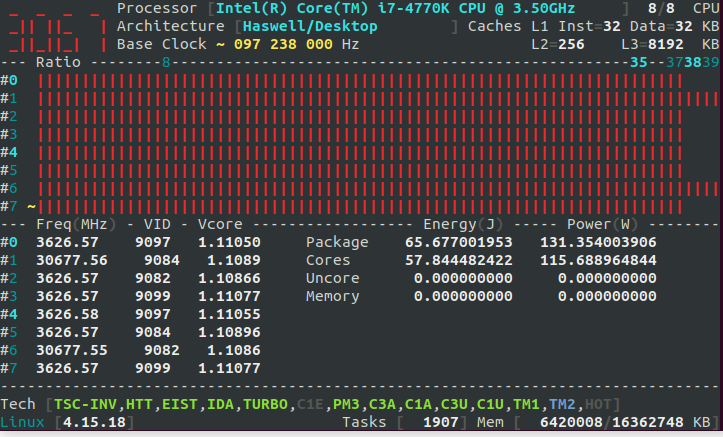
To make it work I had to do also a sudo rmmod corefreqk.ko and sudo insod corefreqk.ko after building.
But unfortunately in the json export is still set to 0:

This is the patch of the changes I made, just in case:
0001-WIP.patch.txt
If you want me to try something else feel free to push a branch ore give me a patch file.
leinardi
on 4 Aug 2018
For JSON please ask its author to Pull Request me a fix
About Vcore: according to the screenshot, it's a Core only register.
- in the function
Cycle_Haswell_DT, replace these lines:
        RDMSR(PerfStatus, MSR_IA32_PERF_STATUS);
        Core->Counter[1].VID = PerfStatus.SNB.CurrVID;
with:
    if (Core->T.ThreadID == 0) {
        RDMSR(PerfStatus, MSR_IA32_PERF_STATUS);
        Core->Counter[1].VID = PerfStatus.SNB.CurrVID;
    }
rebuild and restart the whole thing.
apply load individually on each physical Core and check if Voltage is unique
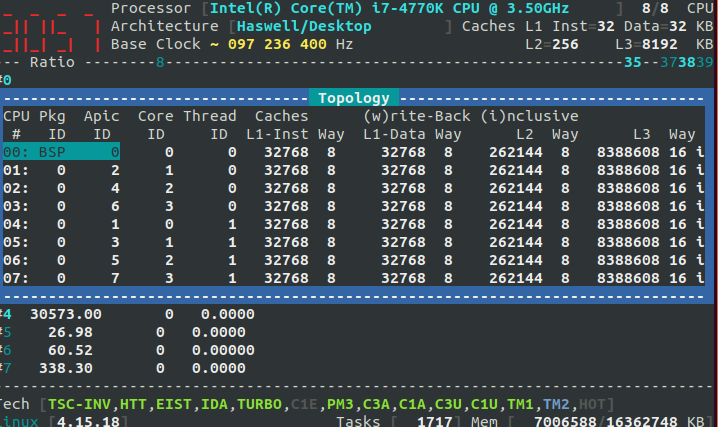
Remark: in the UI, go to Window > Topology, each physical core has a thread id equal to zero
cyring
on 4 Aug 2018
Thanks a lot for the patch.
cyring
on 4 Aug 2018
For JSON please ask its author to Pull Request me a fix
Unfortunately the issue tracker is disabled on the fork you linked.
I will try asking here: @altmind could you please have a look at this issue? The Vcore is always 0 in the json export.
About Vcore: according to the screenshot, it's a Core only register.
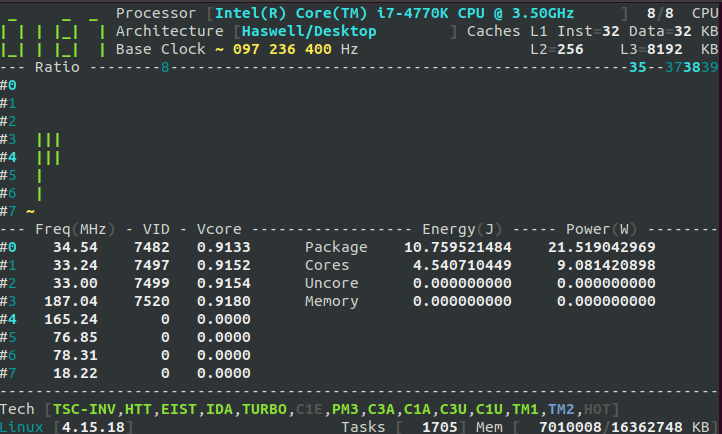

leinardi
on 4 Aug 2018
The physical Cores are CPU numbers 0, 1, 2, and 3
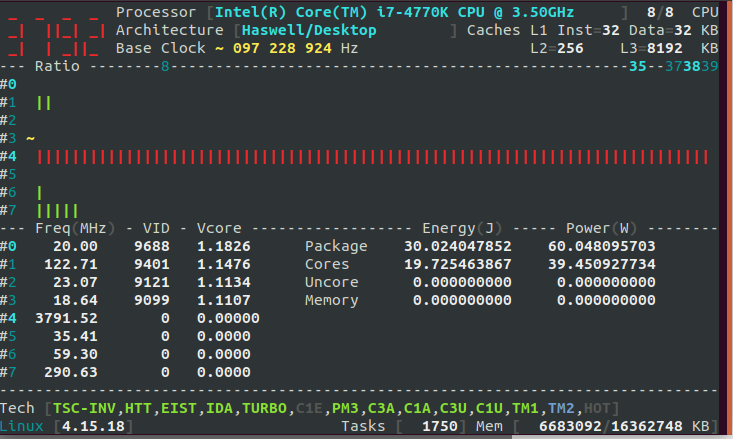
Can you try to bind the load on one of them using taskset for example on CPU number 0 because I'm not sure the register is per Core ?
cyring
on 4 Aug 2018
$ taskset -p 26016
pid 26016's current affinity mask: ff
$ taskset -cp 4 26016
pid 26016's current affinity list: 0-7
pid 26016's new affinity list: 4
leinardi
on 4 Aug 2018
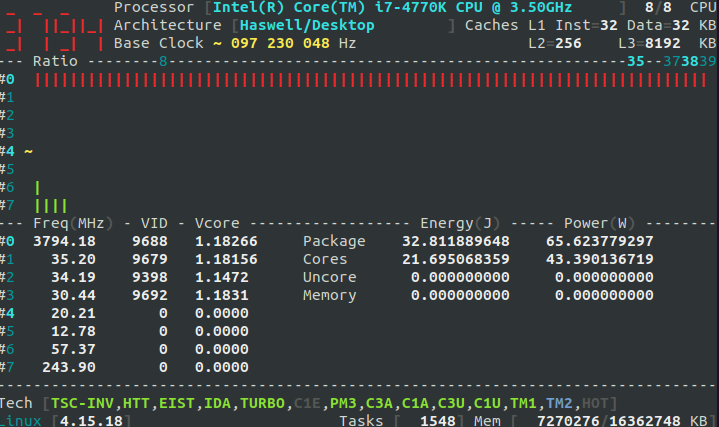
Sorry I meant taskset -c 0 to bind on CPU number 0
cyring
on 4 Aug 2018
$ taskset -cp 0 27229
pid 27229's current affinity list: 0-7
pid 27229's new affinity list: 0
leinardi
on 4 Aug 2018
VID (and thus Vcore) is the same on any Core with the load bound to only one CPU
The reading is per Package only.
Do you have any other tool that shows different Vcore ?
cyring
on 4 Aug 2018
I am not aware of any other tool, if you some some tell me and I can try it.
leinardi
on 4 Aug 2018
sensorswhich through the ACPI interface provides the following on my Xeon W3690
atk0110-acpi-0
Adapter: ACPI interface
3.3V Voltage:           +3.26 V  (min =  +2.97 V, max =  +3.63 V)
5V Voltage:             +5.02 V  (min =  +4.50 V, max =  +5.50 V)
12V Voltage:           +11.97 V  (min = +10.20 V, max = +13.80 V)
DRAM Bus Voltage:       +1.65 V  (min =  +1.40 V, max =  +1.90 V)
CPU Voltage:            +0.95 V  (min =  +0.80 V, max =  +1.80 V)
ICH Voltage:            +1.11 V  (min =  +0.90 V, max =  +1.35 V)
ICH PCIE Voltage:       +1.51 V  (min =  +1.20 V, max =  +1.80 V)
CPU PLL Voltage:        +1.82 V  (min =  +1.50 V, max =  +2.00 V)
IOH PCIE Voltage:       +1.51 V  (min =  +1.20 V, max =  +1.80 V)
IOH Voltage:            +1.12 V  (min =  +0.90 V, max =  +1.35 V)
QPI/DRAM Core Voltage:  +1.17 V  (min =  +0.80 V, max =  +1.50 V)
You will notice that only one Voltage CPU is retreived
- Your system BIOS should show the Voltage Core: check if it is per Core or for the whole Package
cyring
on 4 Aug 2018
$ sensors
nct6791-isa-0290
Adapter: ISA adapter
Vcore:                  +0.90 V  (min =  +0.00 V, max =  +1.74 V)
in1:                    +1.00 V  (min =  +0.00 V, max =  +0.00 V)  ALARM
AVCC:                   +3.34 V  (min =  +2.98 V, max =  +3.63 V)
+3.3V:                  +3.34 V  (min =  +2.98 V, max =  +3.63 V)
in4:                    +1.01 V  (min =  +0.00 V, max =  +0.00 V)  ALARM
in5:                    +1.99 V  (min =  +0.00 V, max =  +0.00 V)  ALARM
in6:                    +0.43 V  (min =  +0.00 V, max =  +0.00 V)  ALARM
3VSB:                   +3.42 V  (min =  +2.98 V, max =  +3.63 V)
Vbat:                   +3.36 V  (min =  +2.70 V, max =  +3.63 V)
in9:                    +1.01 V  (min =  +0.00 V, max =  +0.00 V)  ALARM
in10:                   +0.00 V  (min =  +0.00 V, max =  +0.00 V)
in11:                   +0.85 V  (min =  +0.00 V, max =  +0.00 V)  ALARM
in12:                   +0.50 V  (min =  +0.00 V, max =  +0.00 V)  ALARM
in13:                   +0.57 V  (min =  +0.00 V, max =  +0.00 V)  ALARM
in14:                   +0.58 V  (min =  +0.00 V, max =  +0.00 V)  ALARM
fan1:                   667 RPM  (min =    0 RPM)
fan2:                   694 RPM  (min =    0 RPM)
fan3:                   596 RPM  (min =    0 RPM)
fan4:                   609 RPM  (min =    0 RPM)
fan5:                   613 RPM  (min =    0 RPM)
fan6:                   631 RPM
SYSTIN:                 +38.0°C  (high =  +0.0°C, hyst =  +0.0°C)  ALARM  sensor = thermistor
CPUTIN:                 +44.0°C  (high = +80.0°C, hyst = +75.0°C)  sensor = thermistor
AUXTIN0:                +81.0°C    sensor = thermistor
AUXTIN1:               -128.0°C    sensor = thermistor
AUXTIN2:                +34.0°C    sensor = thermistor
AUXTIN3:                +50.0°C    sensor = thermistor
PECI Agent 0:           +47.5°C
PCH_CHIP_CPU_MAX_TEMP:   +0.0°C
PCH_CHIP_TEMP:           +0.0°C
PCH_CPU_TEMP:            +0.0°C
intrusion0:            ALARM
intrusion1:            ALARM
beep_enable:           disabled

acpitz-virtual-0
Adapter: Virtual device
temp1:        +27.8°C  (crit = +105.0°C)
temp2:        +29.8°C  (crit = +105.0°C)

asus-isa-0000
Adapter: ISA adapter
cpu_fan:        0 RPM

coretemp-isa-0000
Adapter: ISA adapter
Package id 0:  +58.0°C  (high = +80.0°C, crit = +100.0°C)
Core 0:        +58.0°C  (high = +80.0°C, crit = +100.0°C)
Core 1:        +47.0°C  (high = +80.0°C, crit = +100.0°C)
Core 2:        +41.0°C  (high = +80.0°C, crit = +100.0°C)
Core 3:        +38.0°C  (high = +80.0°C, crit = +100.0°C)
I can't reboot now to check the BIOS but I remember there it was shown only one Vcore.
leinardi
on 4 Aug 2018
So far I can't provide more than a Processor voltage for such architectures.
As you suggested above I will appreciate any test concerning Memory Controller, Core & Uncore OC, deactivation/activation of technology (EIST, Turbo, C1E, C3A, C6A ...); any unlocked features: clock modulation, bias hint...
In the UI menu > Settings, you can enable the Experimental mode to unleash _CoreFreq_ features. You will notice new additionnal infos like the IMC, Processor data...
The UI let you also increase the monitoring accuracy by lowering the interval (down to 100).
You can also shutdown CPUs on the fly or try the integrated burning functions in the "Tools"
For any of these, feel free to open an issue
About the Experimental mode or OC: save your files before enabling them.
Regards
CyrIng
cyring
on 4 Aug 2018
I am not familiar with these features, if you give me some step by step instructions on how to test I will be happy to do it (also, please, tell me also for each test how dangerous it is, I don't want to end up setting 2V as Vcore :D).
leinardi
on 4 Aug 2018
Indeed a step by step instructions is missing, but I miss manpower to do so.
_CoreFreq_ don't touch voltage; the BIOS may however change the Vcore if set to AUTO. Nothing I can control.
Overclocking is made through the Turbo and the Uncore registers.
With my Xeon I can add +4 to the Core frequency (1C).
Above than that, the Processor crashes whenever I stress the CPU
The Experimental mode has been successfully tested on several architectures.
Because it is querying the PCI registers with some slight bits variations from one architecture to another one, _CoreFreq_ is safely starting without it.
What you can experiment through the UI:
- Menu > Settings > Experimental : < Experimental operating mode >
- Window > Memory Controller
- Make screenshots of the DIMMs (timings, geometry, ...)
cyring
on 4 Aug 2018
What you can experiment through the UI:
Menu > Settings > Experimental : < Experimental operating mode >
Window > Memory Controller
Make screenshots of the DIMMs (timings, geometry, ...)
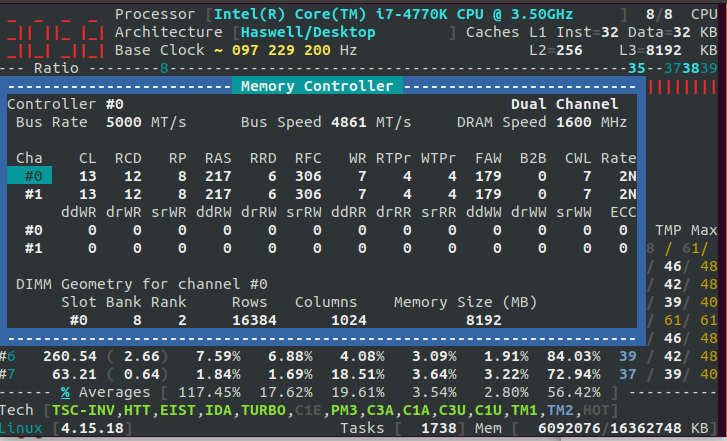
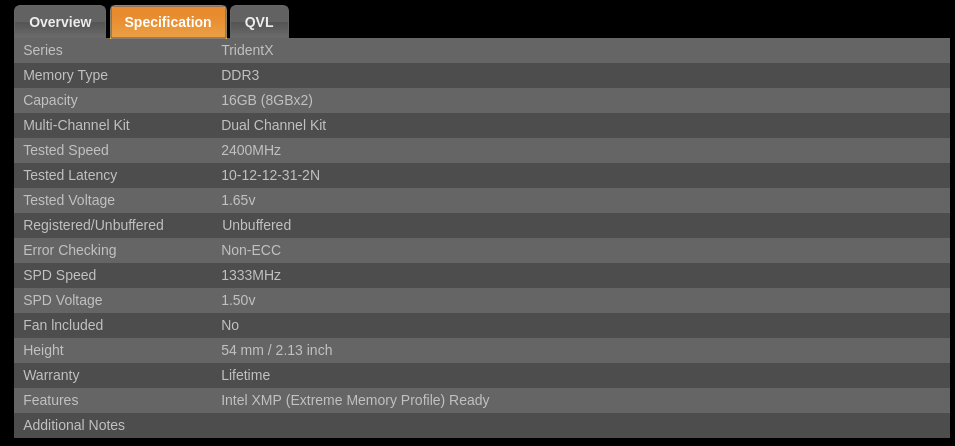
My RAM: https://www.gskill.com/en/product/f3-2400c10d-16gtx
When I reboot I can check the RAM settings from the BIOS if you want.
leinardi
on 4 Aug 2018
Thanks a lot.
Yes please make BIOS screenshots of the current DRAM timings and speed.
Apparently Dual channel looks OK
Do you have one or two sticks ? Are they 8 or 16 GB each ?
cyring
on 4 Aug 2018
2x8 GB sticks
leinardi
on 4 Aug 2018
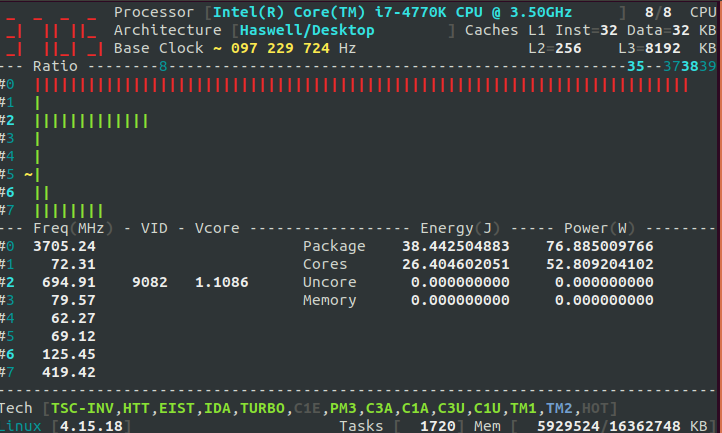
I just commit a change to only show the Vcore only bound to the measuring CPU.
cyring
on 4 Aug 2018
leinardi
on 4 Aug 2018
Thanks. Looks less confusing.
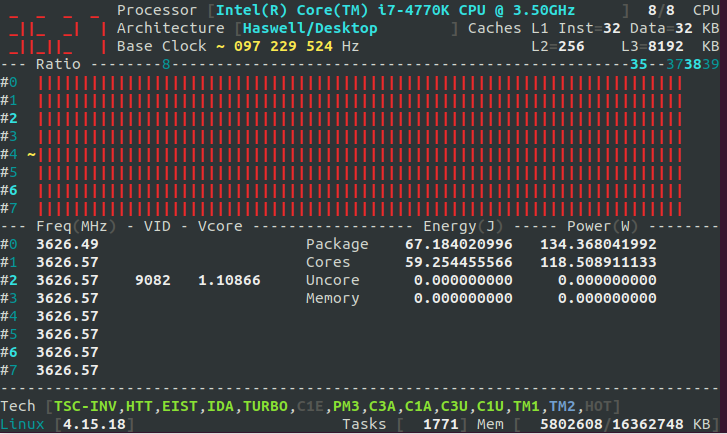
Can you tell if the measured power is good ?
The Processor specifications says a 84W TDP that should be compared against the measurement indicated by Package (W)
cyring
on 4 Aug 2018
I am not sure since I don't know how to measure it, but on full load the reported value is way higher than 84W:
leinardi
on 4 Aug 2018
Yep sounds like an issue
cyring
on 4 Aug 2018
Hello,
I'm seeing a few glitches on the UI screenshots: do you have disable the nmi_watchdog ?
cyring
on 5 Aug 2018
Hi, nope, I was lazy and I didn't changed it. Does it affect only the cli client or also the demon?
leinardi
on 5 Aug 2018
It does affect a perf counter and consequently the accuracy of the indicators
cyring
on 5 Aug 2018
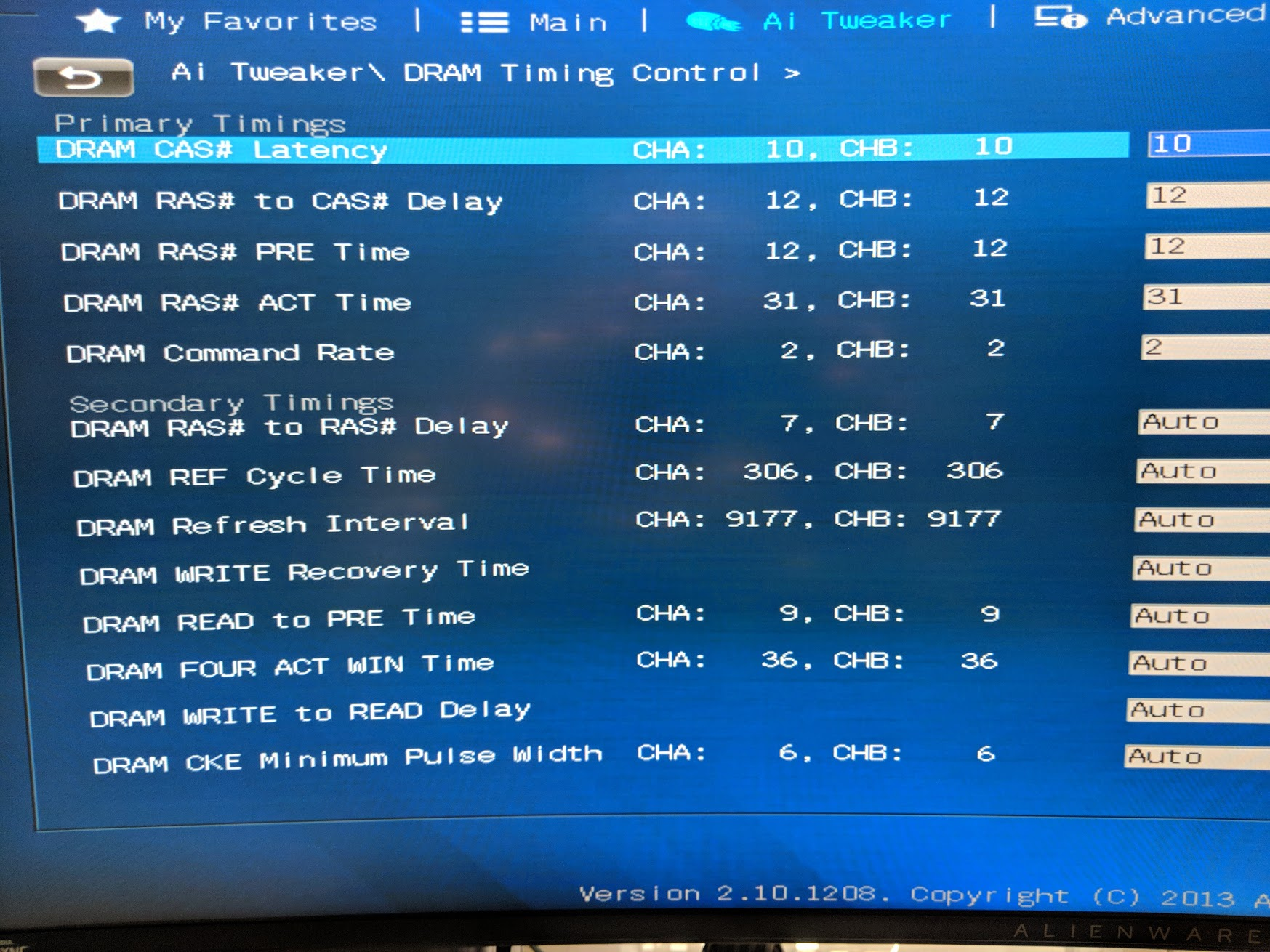
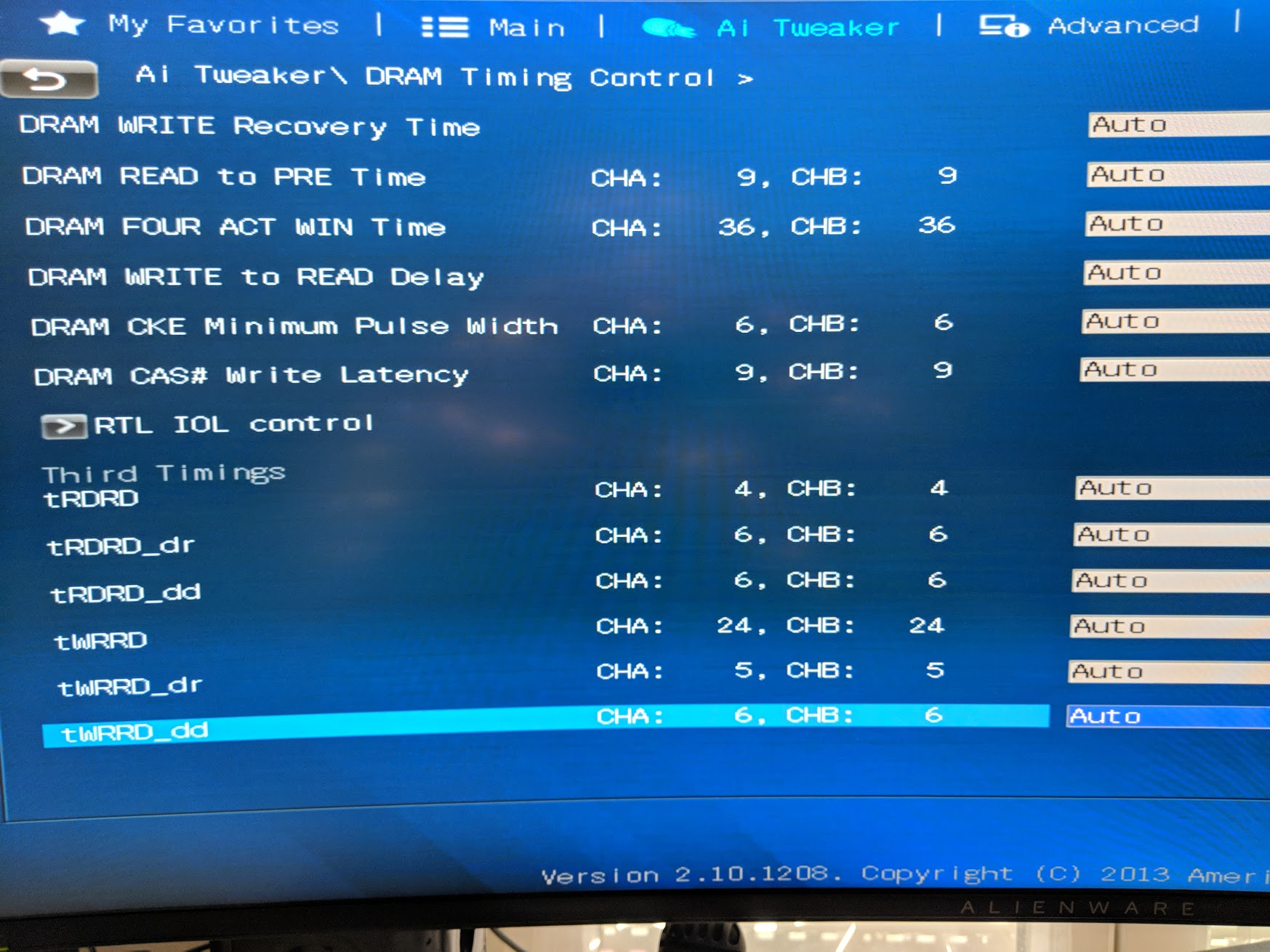
Hey, I finally took a pic of the DDR settings:
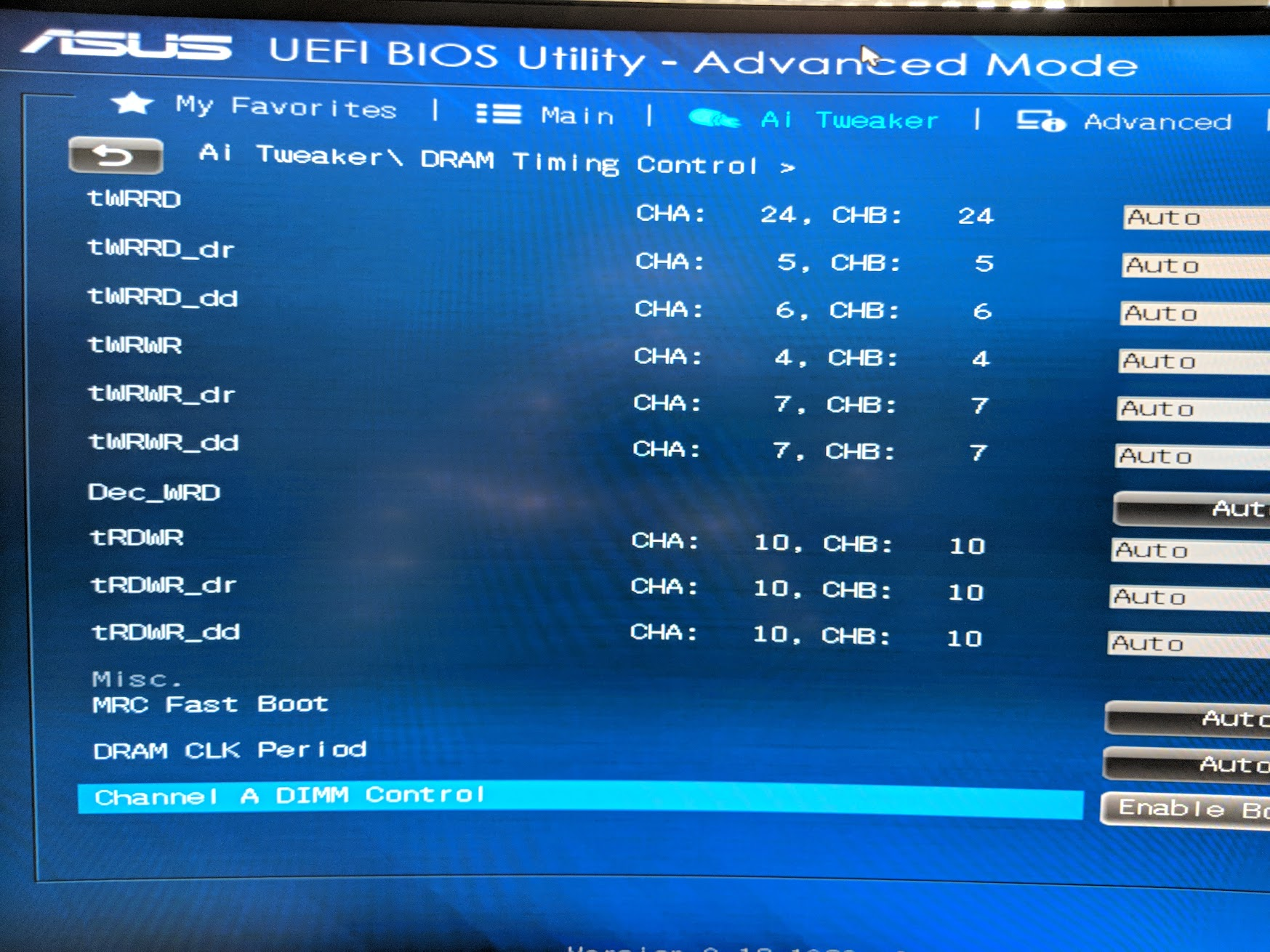
leinardi
on 6 Aug 2018
I find just a few matches with the previous _CoreFreq_ screenshot
RCD: 12
Cmd: 2N
RFC: 306
cyring
on 6 Aug 2018
Checking code, I notice that the Haswell DRAM timings are on my todo list !
I will complete soon.
Are the Dimms DDR3 ?
cyring
on 6 Aug 2018
Yep, DDR3:
leinardi
on 6 Aug 2018
Can you please print back the result of lspci -nn
cyring
on 6 Aug 2018
Sure:
00:00.0 Host bridge [0600]: Intel Corporation 4th Gen Core Processor DRAM Controller [8086:0c00] (rev 06)
00:01.0 PCI bridge [0604]: Intel Corporation Xeon E3-1200 v3/4th Gen Core Processor PCI Express x16 Controller [8086:0c01] (rev 06)
00:16.0 Communication controller [0780]: Intel Corporation 8 Series/C220 Series Chipset Family MEI Controller #1 [8086:8c3a] (rev 04)
00:19.0 Ethernet controller [0200]: Intel Corporation Ethernet Connection I217-V [8086:153b] (rev 04)
00:1a.0 USB controller [0c03]: Intel Corporation 8 Series/C220 Series Chipset Family USB EHCI #2 [8086:8c2d] (rev 04)
00:1c.0 PCI bridge [0604]: Intel Corporation 8 Series/C220 Series Chipset Family PCI Express Root Port #1 [8086:8c10] (rev d4)
00:1c.1 PCI bridge [0604]: Intel Corporation 8 Series/C220 Series Chipset Family PCI Express Root Port #2 [8086:8c12] (rev d4)
00:1c.3 PCI bridge [0604]: Intel Corporation 8 Series/C220 Series Chipset Family PCI Express Root Port #4 [8086:8c16] (rev d4)
00:1d.0 USB controller [0c03]: Intel Corporation 8 Series/C220 Series Chipset Family USB EHCI #1 [8086:8c26] (rev 04)
00:1f.0 ISA bridge [0601]: Intel Corporation Z87 Express LPC Controller [8086:8c44] (rev 04)
00:1f.2 SATA controller [0106]: Intel Corporation 8 Series/C220 Series Chipset Family 6-port SATA Controller 1 [AHCI mode] [8086:8c02] (rev 04)
00:1f.3 SMBus [0c05]: Intel Corporation 8 Series/C220 Series Chipset Family SMBus Controller [8086:8c22] (rev 04)
01:00.0 VGA compatible controller [0300]: NVIDIA Corporation GP104 [GeForce GTX 1080] [10de:1b80] (rev a1)
01:00.1 Audio device [0403]: NVIDIA Corporation GP104 High Definition Audio Controller [10de:10f0] (rev a1)
03:00.0 SATA controller [0106]: ASMedia Technology Inc. ASM1062 Serial ATA Controller [1b21:0612] (rev 01)
04:00.0 PCI bridge [0604]: PLX Technology, Inc. PEX 8608 8-lane, 8-Port PCI Express Gen 2 (5.0 GT/s) Switch [10b5:8608] (rev ba)
05:01.0 PCI bridge [0604]: PLX Technology, Inc. PEX 8608 8-lane, 8-Port PCI Express Gen 2 (5.0 GT/s) Switch [10b5:8608] (rev ba)
05:04.0 PCI bridge [0604]: PLX Technology, Inc. PEX 8608 8-lane, 8-Port PCI Express Gen 2 (5.0 GT/s) Switch [10b5:8608] (rev ba)
05:05.0 PCI bridge [0604]: PLX Technology, Inc. PEX 8608 8-lane, 8-Port PCI Express Gen 2 (5.0 GT/s) Switch [10b5:8608] (rev ba)
05:06.0 PCI bridge [0604]: PLX Technology, Inc. PEX 8608 8-lane, 8-Port PCI Express Gen 2 (5.0 GT/s) Switch [10b5:8608] (rev ba)
05:08.0 PCI bridge [0604]: PLX Technology, Inc. PEX 8608 8-lane, 8-Port PCI Express Gen 2 (5.0 GT/s) Switch [10b5:8608] (rev ba)
05:09.0 PCI bridge [0604]: PLX Technology, Inc. PEX 8608 8-lane, 8-Port PCI Express Gen 2 (5.0 GT/s) Switch [10b5:8608] (rev ba)
06:00.0 PCI bridge [0604]: PLX Technology, Inc. PEX8112 x1 Lane PCI Express-to-PCI Bridge [10b5:8112] (rev aa)
07:04.0 Multimedia audio controller [0401]: C-Media Electronics Inc CMI8788 [Oxygen HD Audio] [13f6:8788]
08:00.0 Network controller [0280]: Qualcomm Atheros AR93xx Wireless Network Adapter [168c:0030] (rev 01)
09:00.0 Ethernet controller [0200]: Realtek Semiconductor Co., Ltd. RTL8111/8168/8411 PCI Express Gigabit Ethernet Controller [10ec:8168] (rev 11)
0c:00.0 SATA controller [0106]: ASMedia Technology Inc. ASM1062 Serial ATA Controller [1b21:0612] (rev 01)
May I ask you what are you looking for?
leinardi
on 6 Aug 2018
Because here I have made a mistake: calling IVB rather than HSW architecture
https://github.com/cyring/CoreFreq/blob/3fba9c8258edb4ec70bdf42e364003c611bf68b0/corefreqk.h#L918
Can you change IVB_IMC with HSW_IMC
Rebuild and try again, please.
cyring
on 6 Aug 2018
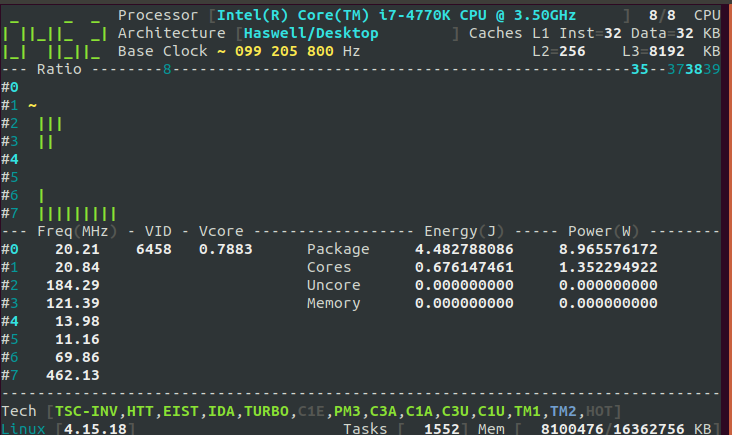
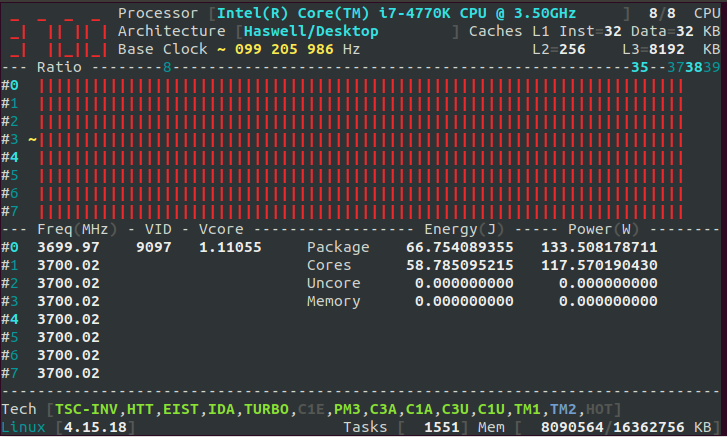
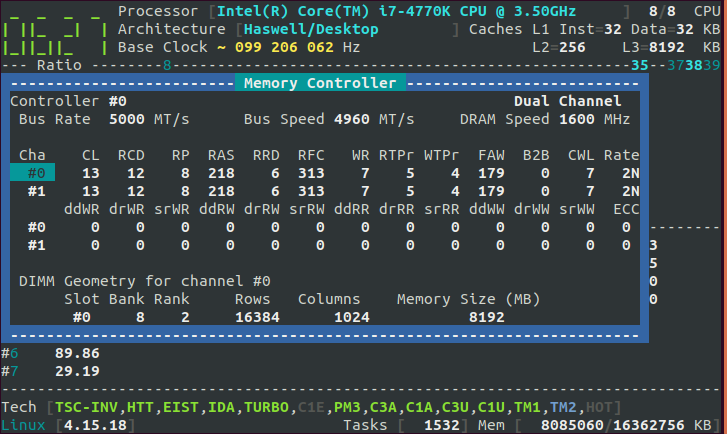
leinardi
on 6 Aug 2018
And here move this case
https://github.com/cyring/CoreFreq/blob/3fba9c8258edb4ec70bdf42e364003c611bf68b0/corefreqd.c#L2496
below this case
https://github.com/cyring/CoreFreq/blob/3fba9c8258edb4ec70bdf42e364003c611bf68b0/corefreqd.c#L2500
cyring
on 6 Aug 2018
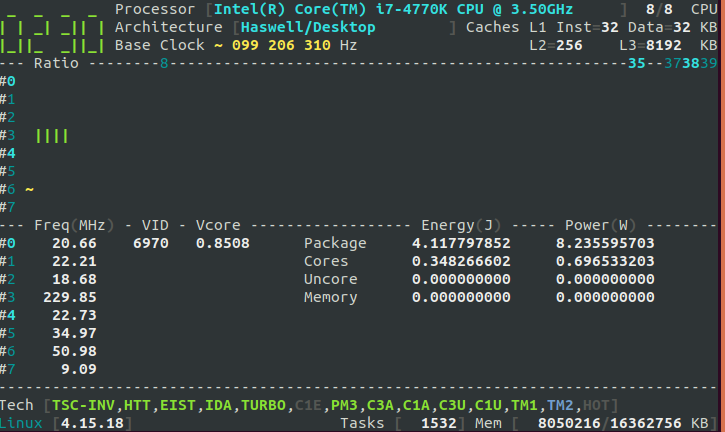
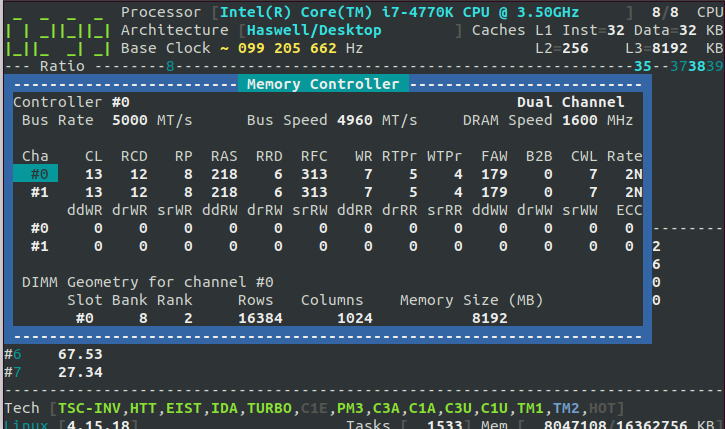
What differences should I see?
leinardi
on 6 Aug 2018
The code seems following the same path as previously.
This PCI id: 0c00 from
00:00.0 Host bridge [0600]: Intel Corporation 4th Gen Core Processor DRAM Controller [8086:0c00] (rev 06)
is the one which has to be detected first in driver corefreqk.c , queried in HSW_IMC then timing data have to be computed by daemon corefreqd.c same function name.
cyring
on 6 Aug 2018
Last commit provides a partial fix to test the IMC.
So far I'm focusing on the major timings.
cyring
on 8 Aug 2018
Hi @cyring, I just want to let you know that I have access to these CPUs and, if you want, I can do some test:
- Intel(R) Core(TM) i7-6820HQ CPU @ 2.70GHz
- Intel(R) Core(TM) i7-4800MQ CPU @ 2.70GHz
- Intel(R) Xeon(R) CPU E3-1240 v6 @ 3.70GHz
- Intel(R) Xeon(R) CPU E5-4650 v4 @ 2.20GHz
(number 4 I have access to a VPS instance)
leinardi
on 8 Aug 2018
Hello,
With great pleasure.
Even if _CoreFreq_ runs ok, feel free to open an issue for each of them with the cpu name as a title.
It will be easier to track problems and I may see issues in screenshots.
Btw, please disable the nmi_watchdog before starting _CoreFreq_ (better in kernel cmdline)
If the VPS is virtualized, I not sure about results.
Do you have better timings results on the HSW using last commit ?
cyring
on 9 Aug 2018
About JSON: I have reviewed the code part. It's a bit tricky to use.
- follow the key
Proc.Service.Service.Coreand mark down the value, for example:this
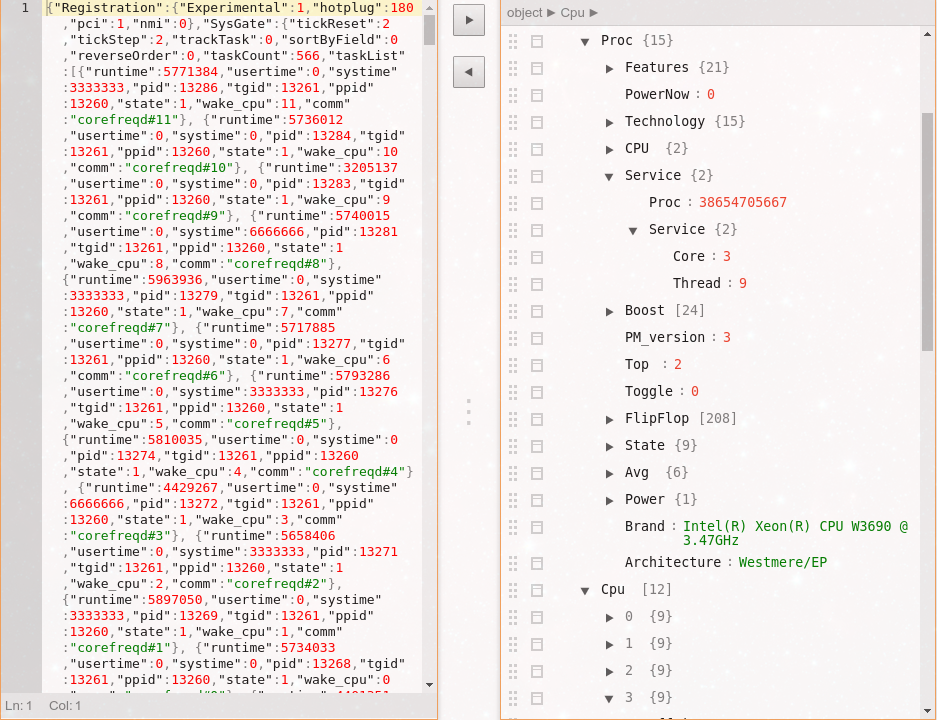
select
thisCpunodego to
FlipFlopindexNOT(Cpu[this].Toggle)read the voltage
VIDandVcore
_like_
Cpu[this].FlipFlop[NOT(Cpu[this].Toggle)].Voltage.Vcore
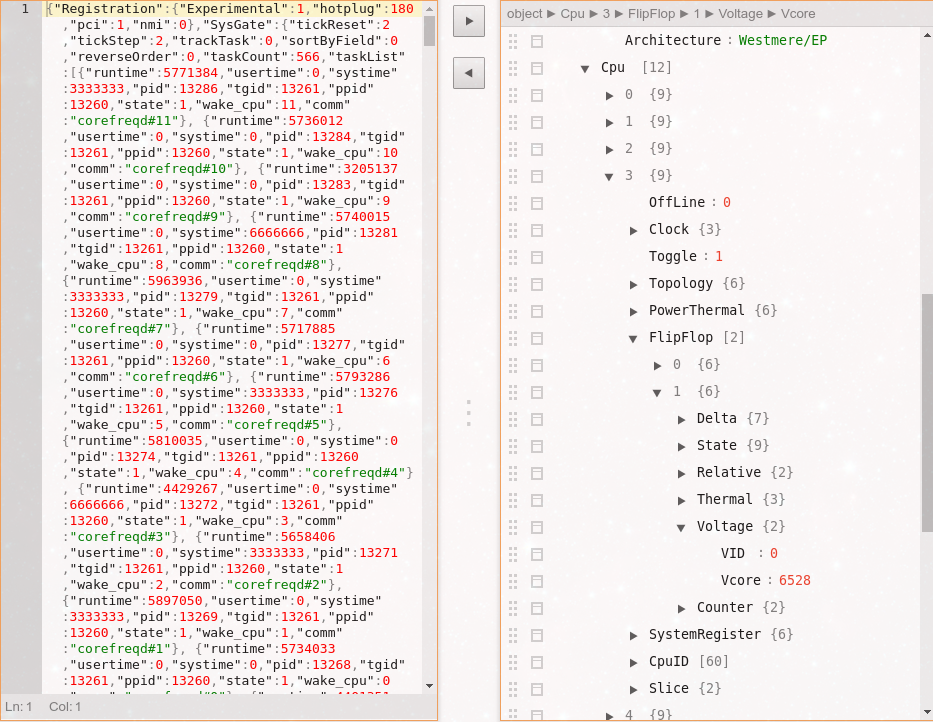
_remark_: if VID = 0 then Vcore is not meaningful
cyring
on 12 Aug 2018
Yeah I was looking there but for me all the Vcore values were zero. I will try again this evening :+1: (on my i7-6820HQ are correctly shown, I have to try in the i7-4770k where I first noticed the problem).
leinardi
on 13 Aug 2018
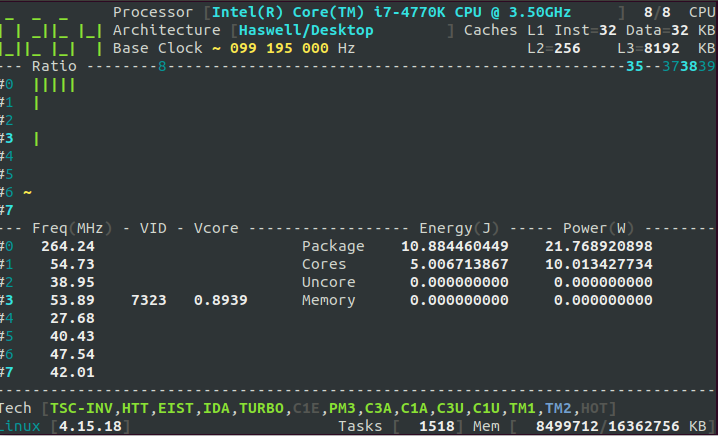
Just tested and, unfortunately, on my I7-4770k the json file only shows 0 values for Vcore: json.tar.gz
leinardi
on 13 Aug 2018
Thks, I will look at the attached file however the json code needs some refactoring and contributions...
cyring
on 14 Aug 2018
JSON basic types may not comply with floating numbers but Vcore is double encoded.
https://github.com/cyring/CoreFreq/blob/b8b3d778bf535b3dac33f83e2ebc7d21b1341515/corefreq.h#L112
That's a big issue.
One needs to define a compatible exchange.
Exponential or Strings ?
Simply like this:
"Voltage":{
    "VID":7125,
    "Vcore":"0.123456789"
}
Oh I see, the i7-4770k runs on an OS with Italian locale, and Italian uses commas as decimal separator, that can be the reason why it works on my other machine, where the OS is in English.
Is it possible to force the locale for the json serialization to US or to ROOT?
If is not possible I guess using a string would be a good enough workaround.
leinardi
on 14 Aug 2018
I believe the locale won't help to fix the problem.
The bug is at this line:
https://github.com/cyring/CoreFreq/blob/b8b3d778bf535b3dac33f83e2ebc7d21b1341515/corefreq-cli-json.c#L1396
where the JSON output format is an unsigned integer whereas the data is encoded double.
Thus a voltage like 0.9370 will cast to 0
What about Exponential numbers ?
Voltage could be exported to 937E+3
Is this better than a string ?
_(my notes: using format "%uE%+d" rather than "%u" )_
cyring
on 14 Aug 2018
Personally I would pick the string over the exponential notation.
leinardi
on 14 Aug 2018
Fix of the decimal numbers done. Can you test please ?
cyring
on 16 Aug 2018
Hey I can confirm that the fix for the 0 Vcore works! Thanks!
leinardi
on 16 Aug 2018
YES !
cyring
on 16 Aug 2018
Related issues
 horus-dot
·
10Comments
horus-dot
·
10Comments
 uzername123
·
11Comments
uzername123
·
11Comments
 hakonhall
·
5Comments
hakonhall
·
5Comments
 EUA
·
8Comments
EUA
·
8Comments
 Arthav24
·
26Comments
Arthav24
·
26Comments