Core: Apple iCloud integration repeatedly and frequently causes Apple ID sign-in notifications
The problem
Since yesterday, the Apple iCloud integration causes Apple ID sign-in notifications to appear on all my Apple devices every few minutes: "Your Apple ID is being used to sign in to a new device".
I haven't changed anything in the configuration for a long time.
This seems similar to #34332, which was closed. I have not tried the "solution" described there. Even if it works, it would be best to find and fix the underlying bug that causes this behavior. Users should not regularly have to remove and reinstall the integration.
It also seems similar to an issue discussed on the forum.
Environment
- Home Assistant Core release with the issue: 0.115.6
- Last working Home Assistant Core release (if known):
- Operating environment (OS/Container/Supervised/Core): Supervised HassOS 4.13
- Integration causing this issue: Apple iCloud
- Link to integration documentation on our website: https://www.home-assistant.io/integrations/icloud
Problem-relevant configuration.yaml
N/A
Traceback/Error logs
N/A
Additional information
From @GitHubxtsnl : https://community.home-assistant.io/t/icloud-integration-keeps-popping-up-apple-id-sign-in-request-on-ios-devices/219007/6
Copies: #36120 & #41586
 ehn
ehn
All 87 comments
icloud documentation
icloud source
(message by IssueLinks)
![probot-home-assistant[bot] picture](https://avatars2.githubusercontent.com/in/36093?v=4&s=40) probot-home-assistant[bot]
on 6 Oct 2020
probot-home-assistant[bot]
on 6 Oct 2020
Hey there @quentame, mind taking a look at this issue as its been labeled with an integration (icloud) you are listed as a codeowner for? Thanks!
(message by CodeOwnersMention)
probot-home-assistant[bot]
on 6 Oct 2020
I'm experiencing the same issue
 cgorms
on 6 Oct 2020
cgorms
on 6 Oct 2020
I will try to fix this, but not having too much time for now.
Please use the "solution" from #34332 for now.
Thanks.
 Quentame
on 7 Oct 2020
Quentame
on 7 Oct 2020
Thanks for looking into it! Didn't want to apply the "solution" before you had responded in case there would be something I can do to help you debug that would be destroyed by doing so. But if there isn't anything you need me to keep from the current state, I'll do so, as it's quite annoying.
ehn
on 7 Oct 2020
I am also experiencing this issue with all configured accounts. The described workaround here is not working for me.
Regards
Richard
 darootler
on 9 Oct 2020
darootler
on 9 Oct 2020
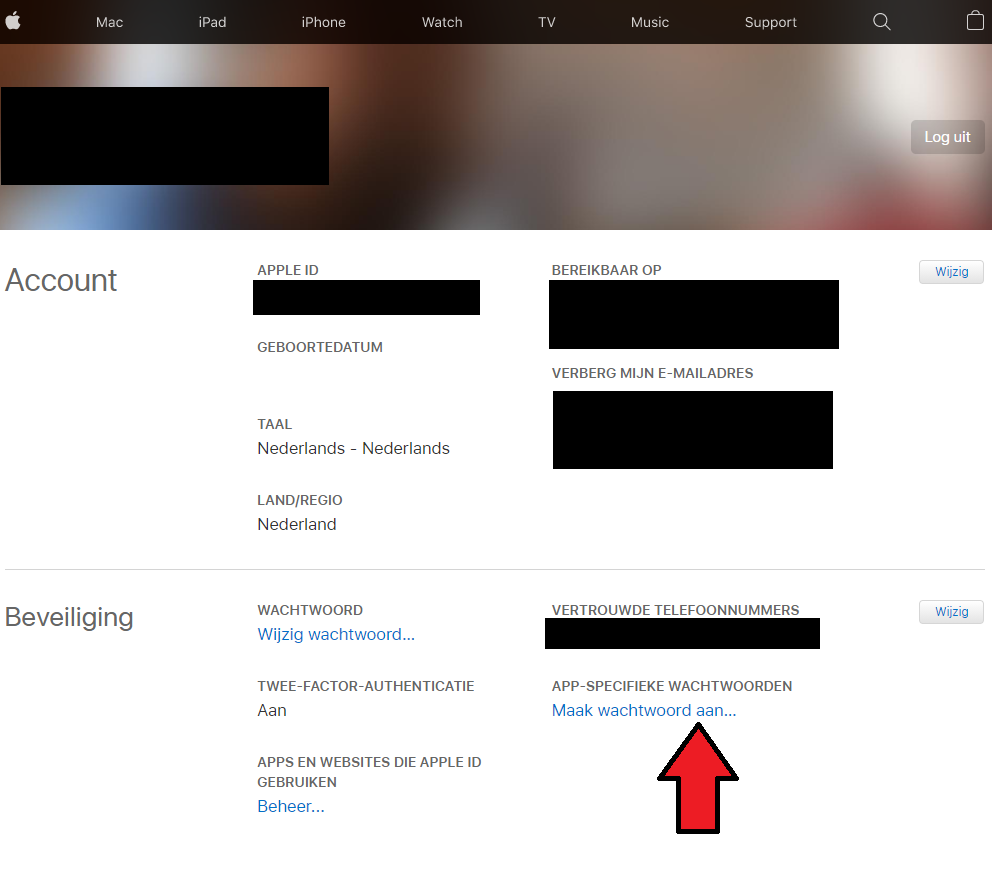
Same issue, i also see a (new?) option in the Apple Account management page for an App Specific password.
This this would exclude MFA, not tested yet. Looking for an way in Home Assistant to change the password.
(Screenshot in Dutch)
 JulienFloris
on 9 Oct 2020
JulienFloris
on 9 Oct 2020
I actually just experienced the same behaviour, it shows me the 2FA modals every ... 30 min ?
That would be awesome @JulienFloris but as the iCloud lib uses the iCloud.com website to login and request APIs, that's not possible now.
(for info: App Specific password exists for 5+ years :wink:)
Quentame
on 9 Oct 2020
A HA re authentication process is in progress, see #39138
Quentame
on 9 Oct 2020
I too have this issue as of last night. Endless prompts to enter the verification code, but the HA integration doesn't provide a place to enter the code.
Very frustrating.
 wormuths
on 10 Oct 2020
wormuths
on 10 Oct 2020
Same here. Usual method of removing/re-adding iCloud integration doesn't seem to rectify. Everything seems to work, however.
 t3n-matthomas
on 10 Oct 2020
t3n-matthomas
on 10 Oct 2020
I'm getting this too -- quite annoying, I'm about to disable the icloud integration and leave it disabled for now.
 rudijh
on 10 Oct 2020
rudijh
on 10 Oct 2020
I removed the integration and reconfigured it again. It didn’t change. The endless notifications started again.
I’ve deleted the iCloud integration altogether until this is sorted out.
Just curious. How does one disable an integration without deleting it?
wormuths
on 10 Oct 2020
Same here.
 Stooovie
on 10 Oct 2020
Stooovie
on 10 Oct 2020
+1
Notifications every 30 min - even in night mode
 Druidus
on 10 Oct 2020
Druidus
on 10 Oct 2020
Me too
 jsiemek
on 10 Oct 2020
jsiemek
on 10 Oct 2020
Same for me
 townsmcp
on 10 Oct 2020
townsmcp
on 10 Oct 2020
I can only agree. I have been using the integration for a long time without any issues whatsoever. But since upgrading to 0.116 (and subsequently downgrading to 0.115.6 for another irrelevant reason) I keep getting this annoying popups.
 Alvinger
on 10 Oct 2020
Alvinger
on 10 Oct 2020
me too, thanks for looking at this gurus
 johnpwhite
on 12 Oct 2020
johnpwhite
on 12 Oct 2020
What is the solution ? Forced to remove the integration!
 herveaurel
on 12 Oct 2020
herveaurel
on 12 Oct 2020
Same here, getting notifications that a new device logged in. Didn't happen with 0.115.6
 tristanXme
on 12 Oct 2020
tristanXme
on 12 Oct 2020
It would seem this issue is a duplicate of #36120. Then again, it seems a lot more people are experiencing this since the 0.116 release.
ehn
on 12 Oct 2020
Not sure if it helps with debugging this, but since this started, I get an email from Apple with the subject "Your Apple ID was used to sign in to iCloud via a web browser." roughly once a day. The device mentioned in the email is clearly Home Assistant. But this happens far from every time I get a notification.
ehn
on 12 Oct 2020
Not sure if it helps with debugging this, but since this started, I get an email from Apple with the subject "Your Apple ID was used to sign in to iCloud via a web browser." roughly once a day. The device mentioned in the email is clearly Home Assistant. But this happens far from every time I get a notification.
Exactly the same behaviour here.
tristanXme
on 12 Oct 2020
Lol same for me. Except I thought my account had been breached so I changed Apple ID password but kept getting the pop ups and emails
townsmcp
on 12 Oct 2020
Same issue here, I attempted the fix outlined in https://github.com/home-assistant/core/issues/34332#issuecomment-615110136 by removing the integration, deleting the .storage files and restarting HA. The constant notifications continue. This is all under 115.6 so I am not sure it's tied to 116 specifically. Interestingly in the logs it shows integration does get updates from iCloud so it doesn't affect functionality just the constant login requests in iOS and MacOS devices + emails from Apple as others have noted.
 gilperme
on 12 Oct 2020
gilperme
on 12 Oct 2020
It’s not related to 0.116. I had it on 0.115.6.
jsiemek
on 12 Oct 2020
Yep had on 115.6 too. i've tried to move to .116 hoping it will resolve it ^^...my bad.
 st3v3nFr
on 12 Oct 2020
st3v3nFr
on 12 Oct 2020
Just throwing out that Apple has been making some background changes since iOS 14 dropped. I always notice that around the time the do a version jump I have lots of weird quirks.
This time around I had some issues with HomeKit not allowing me to properly add a family member to the house prior to the update. The family member could join the home, see all devices, but everything showed offline. It magically corrected when iOS 14 dropped.
I get issues with shared calendars not propagating, etc... For a brief period, I also had my Apple ID showing as an address I hadn’t used in years. This under family sharing.
I have no idea if it’s relevant, but I’m just mentioning it in case we are placing blame on this integration when Apple may have changed something. I am curious because I hadn’t changed anything and I started getting these alerts. I honestly don’t think my timeout for the 2FA had expired because I just added the integration back after changing my Apple ID prior to iOS 14.
If the 2FA timeout is two months, I was only about 1 month into having added this integration, which I verified with 2FA at the time.
My text message history shows I last did this 2FA on September 26th. Clearly I was not due for a verification.
Steve
wormuths
on 13 Oct 2020
@wormuths has a valid point, likely related to changes on Apple's side with new version of iOS and not new ha version.
gilperme
on 13 Oct 2020
+1 also having this issue
 lsaadeh
on 13 Oct 2020
lsaadeh
on 13 Oct 2020
App-specific passwords does not work, since the underlying lib uses the iCloud.com website authentication, and it's impossible to connect with an App-specific password through https://www.icloud.com/.
I should add this to the documentation: https://www.home-assistant.io/integrations/icloud
I personally got the issue starting from 9th of October.
There are issues created on the library too : picklepete/pyicloud#307 & picklepete/pyicloud#308
I'll create an alert on https://alerts.home-assistant.io/
If anyone want to help, please get in touch here : picklepete/pyicloud#308
For a workaround of some features, please use the Mobile app : https://www.home-assistant.io/integrations/mobile_app
Sorry but solving this will be long.
Quentame
on 15 Oct 2020
@raman325 proposed a PR to handle better re_auth : picklepete/pyicloud#306 :muscle:
But work still need to be done.
Quentame
on 15 Oct 2020
I think there is an issue with the mobile app as well. I have completely removed iCloud integration and it still comes up.
 therealdandecker
on 15 Oct 2020
therealdandecker
on 15 Oct 2020
No, i had the same.
you have te remove all files in .icloud folder and you'll be fine
st3v3nFr
on 15 Oct 2020
Dynamite thanks. Been making me crazy.
Get Outlook for iOShttps://aka.ms/o0ukef
From: st3v3nFr notifications@github.com
Sent: Thursday, October 15, 2020 8:25:29 AM
To: home-assistant/core core@noreply.github.com
Cc: Dan Decker daniel.decker1@gmail.com; Comment comment@noreply.github.com
Subject: Re: [home-assistant/core] Apple iCloud integration repeatedly and frequently causes Apple ID sign-in notifications (#41315)
No, i had the same.
you have te remove all files in .icloud folder and you'll be fine
—
You are receiving this because you commented.
Reply to this email directly, view it on GitHubhttps://nam04.safelinks.protection.outlook.com/?url=https%3A%2F%2Fgithub.com%2Fhome-assistant%2Fcore%2Fissues%2F41315%23issuecomment-709279288&data=02%7C01%7C%7Ccb7a3e61bbe246f696cf08d87105699e%7C84df9e7fe9f640afb435aaaaaaaaaaaa%7C1%7C0%7C637383615336627899&sdata=s2m%2BOui01e04Ymw7K2fhq5Qwz8hCrvrfxbBVh40BVtg%3D&reserved=0, or unsubscribehttps://nam04.safelinks.protection.outlook.com/?url=https%3A%2F%2Fgithub.com%2Fnotifications%2Funsubscribe-auth%2FACSWFW5QAMFHJQ45J66PTELSK3S3TANCNFSM4SFNZ5NQ&data=02%7C01%7C%7Ccb7a3e61bbe246f696cf08d87105699e%7C84df9e7fe9f640afb435aaaaaaaaaaaa%7C1%7C0%7C637383615336637894&sdata=NoZ0RqUetrs52NJJg9VkwBHhCHL%2FZlB3jVWY1kJTq4Y%3D&reserved=0.
therealdandecker
on 15 Oct 2020
I think there is an issue with the mobile app as well. I have completely removed iCloud integration and it still comes up.
I've did the same, and got the same results.
It seems to have an other issue : when you remove the integration, it continues to update at fetch interval.
Remove the integration then reboot HA.
Quentame
on 15 Oct 2020
Is this the "solution":
- remove the iCloud integration(s)
- go to [HA-config]/.storage (invisible folder)
- remove the icloud folder
- restart HA
- add your iCloud integration(s) again
 qvsdeveloper
on 17 Oct 2020
qvsdeveloper
on 17 Oct 2020
@qvsdeveloper at present there is no solution. Your suggested steps work but only last for about 4 hours. After that you get the messages again
townsmcp
on 17 Oct 2020
Yes. the only solution for now is to remove everything so step 1 to 4 !
remove the iCloud integration(s)
go to [HA-config]/.storage (invisible folder)
remove the icloud folder ( or delete everything inside the folder )
restart HA
st3v3nFr
on 17 Oct 2020
Yes. the only solution for now is to remove everything so step 1 to 4 !
remove the iCloud integration(s)
go to [HA-config]/.storage (invisible folder)
remove the icloud folder ( or delete everything inside the folder )
restart HA
That doesn't work either. Within 4 hours you will get the pop ups again
townsmcp
on 17 Oct 2020
Not for me, no popups for a week now
st3v3nFr
on 17 Oct 2020
@st3v3nFr interesting. What version do you have installed of HA? Also, what country are you in?
townsmcp
on 17 Oct 2020
Almost the last one : 116.3
I’m using it in Spain
The popups stops right at the moment i deleted files in icloud folder
st3v3nFr
on 17 Oct 2020
@st3v3nFr thanks. I have it a go on 116.1 and 116.2 and gave up. Will try again.
I wonder if the country location does make a difference- I'm in the UK and know others in UK had no joy. Also saw some other threads where people said it seems Apple are rolling out security changes around the world. Maybe UK had it early?
townsmcp
on 17 Oct 2020
France 🇫🇷 = problem 🥺🥺🥺
herveaurel
on 17 Oct 2020
If you have an extra iOS device like and old iPod or iPad, create a new iCloud account, add it to your family and use it to log into the integration. Once setup...stuff that old device into a drawer and ignore the notifications. I did that and it's working like a charm...I don't have to worry about the notifications on my main devices that are logged in to my main account. Just a suggestion if you have an extra device laying around...I know it's not a solution to this problem, but at least you can keep the integration working and not get annoyed by the constant pop-ups.
gilperme
on 18 Oct 2020
This is weirdly brilliant.
From: gilper notifications@github.com
Sent: Saturday, October 17, 2020 6:36:51 PM
To: home-assistant/core core@noreply.github.com
Cc: Dan Decker daniel.decker1@gmail.com; Comment comment@noreply.github.com
Subject: Re: [home-assistant/core] Apple iCloud integration repeatedly and frequently causes Apple ID sign-in notifications (#41315)
If you have an extra iOS device like and old iPod or iPad, create a new iCloud account, add it to your family and use it to log into the integration. Once setup...stuff that old device into a drawer and ignore the notifications. I did that and it's working like a charm...I don't have to worry about the notifications on my main devices that are logged in to my main account. Just a suggestion if you have an extra device laying around...
—
You are receiving this because you commented.
Reply to this email directly, view it on GitHubhttps://github.com/home-assistant/core/issues/41315#issuecomment-711088994, or unsubscribehttps://github.com/notifications/unsubscribe-auth/ACSWFW4GPRRZOVR2HG6O4STSLIMAHANCNFSM4SFNZ5NQ.
therealdandecker
on 18 Oct 2020
Oui. la seule solution pour l'instant est de tout supprimer donc les étapes 1 à 4!
supprimer la ou les intégration (s) iCloud
aller dans [HA-config] /. storage (dossier invisible)
supprimer le dossier icloud (ou supprimer tout ce qui se trouve dans le dossier)
redémarrer HA
I tried in France. the notifications returned. disappointed.
herveaurel
on 18 Oct 2020
Is this the "solution":
1. ```
   remove the iCloud integration(s)
   ```

2. ```
   go to [HA-config]/.storage (invisible folder)
   ```

3. ```
   remove the icloud folder
   ```

4. ```
   restart HA
   ```

5. ```
   add your iCloud integration(s) again
   ```
I can confirm, the above works for a while but the notifications return.
 shaft8472
on 18 Oct 2020
shaft8472
on 18 Oct 2020
Yep another one to add to the list. Did the 5 step method which stopped if for about 6 hours but now getting requests again.
This didn't start until I updated to 0.116.4 I was on a 0.114 version prior to this.
 INGY23
on 19 Oct 2020
INGY23
on 19 Oct 2020
This is a great idea for a temporary workaround! I set it up last night and left it overnight. Can confirm that the popups are now only on the old iphone, and ignoring them seems to have no effect on other icloud functions. I'm still getting battery status on my other devices. Looking into tracking but at first glance it seems to be working.
My Apple Watch no longer shows up, but that makes sense that it doesn't appear in a family member's icloud account. I can live without watch battery life in HA for now,.
If you have an extra iOS device like and old iPod or iPad, create a new iCloud account, add it to your family and use it to log into the integration. Once setup...stuff that old device into a drawer and ignore the notifications. I did that and it's working like a charm...I don't have to worry about the notifications on my main devices that are logged in to my main account. Just a suggestion if you have an extra device laying around...I know it's not a solution to this problem, but at least you can keep the integration working and not get annoyed by the constant pop-ups.
 honkerst
on 19 Oct 2020
honkerst
on 19 Oct 2020
My Apple Watch no longer shows up, but that makes sense that it doesn't appear in a family member's icloud account. I can live without watch battery life in HA for now,.
For the record, I can see the battery status of family members' watches through the iCloud integration. This is using the "main" account of the family if it makes a difference. I haven't tried the newly suggested workaround yet.
ehn
on 19 Oct 2020
I guess maybe only the family 'Organiser' can see all the watches? That kinda makes sense too.
I've also noticed that my battery life has resumed normal behaviour. It's been awful for a few weeks and I wasn't sure why. I'm at about 60% now, whereas for the last week or two I would have been at around 20% at this time of day.
honkerst
on 19 Oct 2020
I logged my iPad out of iCloud and created a new account there and linked it to family sharing. Then I installed the integration using that account, and finally logged the iPad back into my regular account. It can see all of the battery statuses of the 4 phones, but can only see the location of two - HA entities are not created up for the other 2, despite the log suggesting they're being updated. It can see the battery state and location of my watch and iPad.
Also, using this method, the alerts still come through to the iPad, even though it is logged into a different iCloud account. So it does seem that you need an unused device to properly ignore the alerts. At least they don't pop up on my iPhone+iPad+Watch+MacBook at the same time.
 michaelblight
on 20 Oct 2020
michaelblight
on 20 Oct 2020
I was getting notified on every trusted device in the family sharing circle.
wormuths
on 20 Oct 2020
Yer on mine both me and my wife was getting the notifications constantly on separate accounts and devices.
INGY23
on 20 Oct 2020
Is this still considered an issue to be addressed at a future date? I'm a little concerned that all these comments are about embracing a very clever workaround that relies on having spare devices sitting around. Am I the only person who trades-in/recycles their old hardware?
 Ryan-J
on 22 Oct 2020
Ryan-J
on 22 Oct 2020
Yep another one to add to the list. Did the 5 step method which stopped if for about 6 hours but now getting requests again.
This didn't start until I updated to 0.116.4 I was on a 0.114 version prior to this.
Please tell me this is Ryan Ingram
 mrjomhomg
on 23 Oct 2020
mrjomhomg
on 23 Oct 2020
Yer on mine both me and my wife was getting the notifications constantly on separate accounts and devices.
Is this Ryan ingram?
mrjomhomg
on 23 Oct 2020
I too am having the issue, been the case for just over a week.
The above workaround works for around 5hrs only.
Getting notifications across all devices, new or old
 systanford
on 23 Oct 2020
systanford
on 23 Oct 2020
Its been 4 days for me, and I still only get notifications on my old phone. My current phone, ipad, watch don't get notifications.
I've also been testing the HACs iCloud3 integration. The documentation is a bit lengthy but I eventually got it up and running. So far it works well (I've got my watch battery back, yay), and it doesn't seem to suffer from the same authentication problem.
honkerst
on 23 Oct 2020
Same issue for me
Home Assistant 0.116.4
2FA set on iCloud acc
Orginal setup fine the messages started over night and now every few minutes. I've uninstalled the integration. pending a solution.
UPDATE: Uninstalled the integration and reinstalled. In less than 24 hours the sign in notifications returned and were repeating every few minutes.
 GazTheGeek
on 24 Oct 2020
GazTheGeek
on 24 Oct 2020
+1 same
Home Assistant 0.116.4
arch | aarch64
-- | --
chassis | embedded
dev | false
docker | true
docker_version | 19.03.12
hassio | true
host_os | HassOS 5.4
installation_type | Home Assistant OS
os_name | Linux
os_version | 4.19.127-v8
python_version | 3.8.5
supervisor | 249
timezone | Europe/London
version | 0.116.4
virtualenv | false
 JamieP83
on 25 Oct 2020
Quentame
on 25 Oct 2020
JamieP83
on 25 Oct 2020
Quentame
on 25 Oct 2020
Same issue with iCloud MFA enabled, issue persists after re-enabling the integration.
System setup:
arch | x86_64
-- | --
chassis | vm
dev | false
docker | true
docker_version | 19.03.11
hassio | true
host_os | HassOS 4.15
installation_type | Home Assistant OS
os_name | Linux
os_version | 5.4.72
python_version | 3.8.5
supervisor | 249
timezone | Europe/Amsterdam
version | 0.116.4
virtualenv | false
 Joooost
on 27 Oct 2020
Joooost
on 27 Oct 2020
Same issue here.
Tested on 0.116.1 and 0.116.4 too.
 NdR91
on 28 Oct 2020
NdR91
on 28 Oct 2020
Same issue here and it is not fixed by 0.117.0b5 unfortunately
 Johndolk
on 28 Oct 2020
Johndolk
on 28 Oct 2020
👍
 guilherme-santos
on 30 Oct 2020
guilherme-santos
on 30 Oct 2020
+1. Following
 wgstarks
on 5 Nov 2020
wgstarks
on 5 Nov 2020
+1. Following
version 117.4
 OB1KOB
on 6 Nov 2020
OB1KOB
on 6 Nov 2020
+1 Same issue...
 Poy7
on 9 Nov 2020
Poy7
on 9 Nov 2020
+1 following
 NoClaim
on 12 Nov 2020
NoClaim
on 12 Nov 2020
117.2 and facing the same issue
 maikeru010
on 13 Nov 2020
maikeru010
on 13 Nov 2020
Issue will persist until pyicloud library is updated.
Get Outlook for iOShttps://aka.ms/o0ukef
From: maikeru010 notifications@github.com
Sent: Friday, November 13, 2020 2:04:29 AM
To: home-assistant/core core@noreply.github.com
Cc: Dan Decker daniel.decker1@gmail.com; Comment comment@noreply.github.com
Subject: Re: [home-assistant/core] Apple iCloud integration repeatedly and frequently causes Apple ID sign-in notifications (#41315)
117.2 and facing the same issue
—
You are receiving this because you commented.
Reply to this email directly, view it on GitHubhttps://github.com/home-assistant/core/issues/41315#issuecomment-726564908, or unsubscribehttps://github.com/notifications/unsubscribe-auth/ACSWFWZ2HQP2JC3ZTOZWIUDSPTK73ANCNFSM4SFNZ5NQ.
therealdandecker
on 13 Nov 2020
0.118 beta 1 same issue
 djmirco
on 13 Nov 2020
djmirco
on 13 Nov 2020
Same issue here on latest HA and iOS versions. The real solution is to support app specific passwords in an updated version of the integration. What would be needed to code that?
 msberends
on 16 Nov 2020
msberends
on 16 Nov 2020
Same issue here on latest HA and iOS versions. The real solution is to support app specific passwords in an updated version of the integration. What would be needed to code that?
The problem is that this integration is based on the PyiCloud library, which needs to be updated first.
 martymarty004
on 16 Nov 2020
martymarty004
on 16 Nov 2020
+1 following
 DOTA2mm
on 18 Nov 2020
DOTA2mm
on 18 Nov 2020
same issue
 matteos1
on 18 Nov 2020
matteos1
on 18 Nov 2020
They are testing a fix. This requires an update to a Python library that the integration is dependent on.
I saw on GitHub the developers would be testing this week so maybe in a few weeks there will be a fix.
From: matteo notifications@github.com
Sent: Wednesday, November 18, 2020 10:52:09 AM
To: home-assistant/core core@noreply.github.com
Cc: Dan Decker daniel.decker1@gmail.com; Comment comment@noreply.github.com
Subject: Re: [home-assistant/core] Apple iCloud integration repeatedly and frequently causes Apple ID sign-in notifications (#41315)
same issue
—
You are receiving this because you commented.
Reply to this email directly, view it on GitHubhttps://eur01.safelinks.protection.outlook.com/?url=https%3A%2F%2Fgithub.com%2Fhome-assistant%2Fcore%2Fissues%2F41315%23issuecomment-729770569&data=04%7C01%7C%7C042d432bba5a4cfdc4ce08d88bd9eab3%7C84df9e7fe9f640afb435aaaaaaaaaaaa%7C1%7C0%7C637413115339364608%7CUnknown%7CTWFpbGZsb3d8eyJWIjoiMC4wLjAwMDAiLCJQIjoiV2luMzIiLCJBTiI6Ik1haWwiLCJXVCI6Mn0%3D%7C1000&sdata=tOdSf2YZWRByvwm2qsPO1MBA3c%2FeOEyA6zLPRH1OYWE%3D&reserved=0, or unsubscribehttps://eur01.safelinks.protection.outlook.com/?url=https%3A%2F%2Fgithub.com%2Fnotifications%2Funsubscribe-auth%2FACSWFWZ3ASQIBAS6SW3VFBLSQPUSTANCNFSM4SFNZ5NQ&data=04%7C01%7C%7C042d432bba5a4cfdc4ce08d88bd9eab3%7C84df9e7fe9f640afb435aaaaaaaaaaaa%7C1%7C0%7C637413115339374606%7CUnknown%7CTWFpbGZsb3d8eyJWIjoiMC4wLjAwMDAiLCJQIjoiV2luMzIiLCJBTiI6Ik1haWwiLCJXVCI6Mn0%3D%7C1000&sdata=zpPIvlAx6tPy954JDuE%2BPlxDHqOVKtapHgyI96f2Eec%3D&reserved=0.
therealdandecker
on 18 Nov 2020
For reference, it is here: https://github.com/picklepete/pyicloud/pull/310
msberends
on 18 Nov 2020
+1
 theseal666
on 20 Nov 2020
theseal666
on 20 Nov 2020
For me the same probleem
 Skottelbraai
on 21 Nov 2020
Skottelbraai
on 21 Nov 2020
Started happening for me yesterday. Thanks for sharing the dependency issue's conversation as well. Following.
 funkybunch
on 22 Nov 2020
funkybunch
on 22 Nov 2020
+1
 sebastien-k
on 23 Nov 2020
sebastien-k
on 23 Nov 2020
I can prompt this to happen by reloading the integration.
 porterbhall
on 25 Nov 2020
porterbhall
on 25 Nov 2020
Related issues
 missedtheapex
·
3Comments
missedtheapex
·
3Comments
 piitaya
·
3Comments
piitaya
·
3Comments
 coolriku
·
3Comments
coolriku
·
3Comments
 kirichkov
·
3Comments
kirichkov
·
3Comments
 arangates
·
3Comments
arangates
·
3Comments
Most helpful comment
Is this still considered an issue to be addressed at a future date? I'm a little concerned that all these comments are about embracing a very clever workaround that relies on having spare devices sitting around. Am I the only person who trades-in/recycles their old hardware?