Core: UPnP Router Sensor Not Working
The problem
UPnP Router Sensors Not Working. After installed the integration it able to auto detect my Linksys router and all the connection/speed sensor. But the sensor/entity are show "unavailable. Try restart router and HA also try remove and reconfigure integration also no luck. thanks
Environment
- Home Assistant Core release with the issue: 0.112.0
- Last working Home Assistant Core release (if known): Never Integrate before
- Operating environment (OS/Container/Supervised/Core): Hassio / Pi4
- Integration causing this issue: UPnP Integration
- Link to integration documentation on our website: https://www.home-assistant.io/integrations/upnp/
Problem-relevant configuration.yaml
Traceback/Error logs
Log Details (ERROR)
Logger: homeassistant.components.upnp
Source: components/upnp/device.py:131
Integration: UPnP (documentation, issues)
First occurred: 1:35:58 PM (281 occurrences)
Last logged: 3:55:28 PM

Unexpected error fetching DELTAZONE data: Error during async_call(), status: 500, body: <s:Envelope xmlns:s="http://schemas.xmlsoap.org/soap/envelope/" s:encodingStyle="http://schemas.xmlsoap.org/soap/encoding/"> <s:Body> <s:Fault> <faultcode>s:Client</faultcode> <faultstring>UPnPError</faultstring> <detail> <UPnPError xmlns="urn:schemas-upnp-org:control-1-0"> <errorCode>501</errorCode> <errorDescription>Action Failed</errorDescription> </UPnPError> </detail> </s:Fault> </s:Body> </s:Envelope>
Traceback (most recent call last):
  File "/usr/src/homeassistant/homeassistant/helpers/update_coordinator.py", line 136, in async_refresh
    self.data = await self._async_update_data()
  File "/usr/src/homeassistant/homeassistant/helpers/update_coordinator.py", line 124, in _async_update_data
    return await self.update_method()
  File "/usr/src/homeassistant/homeassistant/components/upnp/device.py", line 131, in async_get_traffic_data
    self._igd_device.async_get_total_packets_sent(),
  File "/usr/local/lib/python3.7/site-packages/async_upnp_client/profiles/igd.py", line 99, in async_get_total_bytes_sent
    result = await action.async_call()
  File "/usr/local/lib/python3.7/site-packages/async_upnp_client/client.py", line 520, in async_call
    (status_code, response_body))
async_upnp_client.client.UpnpError: Error during async_call(), status: 500, body: <s:Envelope xmlns:s="http://schemas.xmlsoap.org/soap/envelope/" s:encodingStyle="http://schemas.xmlsoap.org/soap/encoding/">
<s:Body>
<s:Fault>
<faultcode>s:Client</faultcode>
<faultstring>UPnPError</faultstring>
<detail>
<UPnPError xmlns="urn:schemas-upnp-org:control-1-0">
<errorCode>501</errorCode>
<errorDescription>Action Failed</errorDescription>
</UPnPError>
</detail>
</s:Fault>
</s:Body>
</s:Envelope>
Additional information

 d3vilsim
All 15 comments
Hey there @stevenlooman, mind taking a look at this issue as its been labeled with an integration (upnp) you are listed as a codeowner for? Thanks!
(message by CodeOwnersMention)
![probot-home-assistant[bot] picture](https://avatars2.githubusercontent.com/in/36093?v=4&s=40) probot-home-assistant[bot]
on 2 Jul 2020
probot-home-assistant[bot]
on 2 Jul 2020
Hi @d3vilsim . Thank you for reporting this. Do you have any knowledge on running any commands from 'within' your installation/hassio via a terminal?
 StevenLooman
on 2 Jul 2020
StevenLooman
on 2 Jul 2020
Hi @d3vilsim . Thank you for reporting this. Do you have any knowledge on running any commands from 'within' your installation/hassio via a terminal?
Hi @StevenLooman, good day. thanks for your help. Nope i dont really have knowledge on running command. But can you lead me where to ? ssh ? Maybe you can just provide me the commands and where to run then i can try and show u the result.
thanks
d3vilsim
on 3 Jul 2020
Ok, the commands to run are to emulate what home assistant does and hopefully get more information. I don't use hassio myself, but SSH is probably the thing that you should use.
First, we need to get the UPnP description file to your router. You can do this by runing the upnp-client discover command, like this (the $ is something your shell shows to tell you a command can be typed):
$ upnp-client search
{"Cache-Control": "max-age=1900", "Location": "http://192.168.178.1:80/RootDevice.xml", "Server": "UPnP/1.0 UPnP/1.0 UPnP-Device-Host/1.0", "ST": "upnp:rootdevice", "USN": "uuid:upnp-InternetGatewayDevice-1_0-889ffacb9043::upnp:rootdevice", "EXT": "", "_timestamp": "2020-07-04 12:28:48.742787", "_address": "192.168.178.1:1900", "_udn": "uuid:upnp-InternetGatewayDevice-1_0-889ffacb9043", "_source": "search"}
...
The long line (JSON in fact) is one of the many responses you might receive. Find the Location field and ensure it contains the IP of your router (in my case it is 192.168.178.1.) The part after the IP likely differs from my example. Copy the whole URL, it is required for the next command.
Secondly, we invoke the command to get traffic statistics:
$ upnp-client call-action http://192.168.178.1:80/RootDevice.xml WANCommonIFC1/GetTotalBytesSent
{"timestamp": 1593858721.5266316, "service_id": "urn:upnp-org:serviceId:WANCommonIFC1", "service_type": "urn:schemas-upnp-org:service:WANCommonInterfaceConfig:1", "action": "GetTotalBytesSent", "in_parameters": {}, "out_parameters": {"NewTotalBytesSent": -380894945}}
In my case it shows the results of the called action (GetTotalBytesSent) in the out_parameters field.
Hope you are able to run these commands. If you're having trouble please feel free to state them, perhaps others who are using hassio can help.
StevenLooman
on 4 Jul 2020
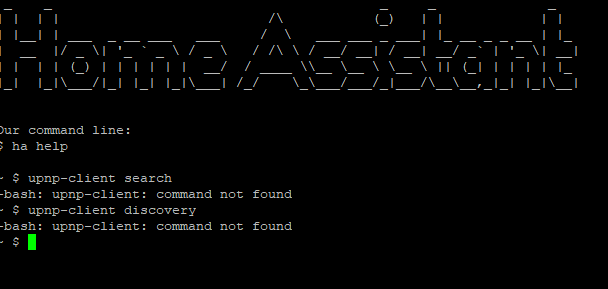
Try the command using SSH but got this error. Not sure i'm in the right place.
d3vilsim
on 6 Jul 2020
Ok, I'll try to install hassio and take a look soon.
StevenLooman
on 7 Jul 2020
Oh man ! thanks a lot and sorry for trouble. Take your time =)
d3vilsim
on 7 Jul 2020
Ok, I've installed HassOS (not hassio) in a VM and installed the core_ssh addon. Not entirely what I was expecting. :) It seems you end up in a different container (which is a good thing normally, but not in our case.)
Lets try another option. Can you enable logging for the upnp component? You can do this by editing your configuration.yaml and adding this, and restart your home assistant:
logger:
  logs:
    homeassistant.components.upnp: debug
    async_upnp_client: debug
    async_upnp_client.traffic:debug
Please do mind the spaces in the front/indenting, this is important in the configuration file.
This will log all your UPnP related traffic (not only from/to your router, but also from/to your TV if your TV supports UPnP/DLNA.) What we're looking for specifically is the description for the device and the description for the services. These are chunks of XML.
Also, it is probably a good idea to enable logging for just a few minutes and then disable it again.
Please do not post the output of the logs here, most likely it will be lots of data. Also, it contains information - such as local IPs - about your home network. If you do not want to share this, feel free to scrub this information (probably a search and replace of the IPs and/or hardware addresses is easiest.) You can mail the logs to me, you can find my email address on my Github profile page.
StevenLooman
on 8 Jul 2020
Do not forget the space between : and debug on the last line
logger:
  logs:
    homeassistant.components.upnp: debug
    async_upnp_client: debug
    async_upnp_client.traffic: debug
 welcoMattic
on 10 Jul 2020
welcoMattic
on 10 Jul 2020
Any luck, @d3vilsim ?
StevenLooman
on 22 Aug 2020
Any luck, @d3vilsim ?
oh no.. sorry lately quite tight up with work. Let me try this week. Appreciate the follow up =)
d3vilsim
on 24 Aug 2020
I have the same problem. Upnp integration is not reliable. Sometimes it is working, sometimes it is unavailable.
If I delete and try to re-enable it, I am getting "No UPnP/IGD devices found on the network." But, after some time, it automatically discovers it again even though nothing has changed.
 Salvora
on 12 Sep 2020
Salvora
on 12 Sep 2020
It wasn't clear if a log file had been sent to Steven yet so I just turned up the logging and sent off the log file.
I'm new to Home Assistant but I'm excited by what I'm finding. This was one of the only pieces that I haven't been able to get working, it hasn't worked since day 1 for me (2 weeks or so).
If I can help in any other way let me know.
 Nathanlclark
on 19 Sep 2020
Nathanlclark
on 19 Sep 2020
From the log files from @Nathanlclark it seems that the router does not respond within the given limits (5 seconds.) I have asked to (temporarily) increase the timeout to 10 seconds, or even longer, and see what the results are.
StevenLooman
on 23 Sep 2020
I was able to manually increase the timeout to 10 seconds and it solved the problem for me. I'm now collecting network statistics from my NETGEAR Nighthawk R7000P router.
Thank you again for your help @StevenLooman.
Nathanlclark
on 24 Sep 2020
Related issues
 missedtheapex
·
3Comments
missedtheapex
·
3Comments
 flsabourin
·
3Comments
flsabourin
·
3Comments
 aweb-01
·
3Comments
aweb-01
·
3Comments
 neonandu
·
3Comments
neonandu
·
3Comments
 moskovskiy82
·
3Comments
moskovskiy82
·
3Comments