Core: OZW: lock.set_usercode service missing
The problem
In the ozw beta integration the service lock.set_usercode/get_usercode/clear_usercode is missing.
Environment
- Home Assistant Core release with the issue: 0.111
- Last working Home Assistant Core release (if known): Zwave 1.4 integration
- Operating environment (OS/Container/Supervised/Core): Container
- Integration causing this issue: ozw
- Link to integration documentation on our website: https://www.home-assistant.io/integrations/ozw/
Problem-relevant configuration.yaml
n/a
Traceback/Error logs
n/a
Additional information
I know the functions are not implemented, but wanted this on the radar. If I can help implement this let me know.
 firstof9
All 49 comments
ozw documentation
ozw source
(message by IssueLinks)
![probot-home-assistant[bot] picture](https://avatars2.githubusercontent.com/in/36093?v=4&s=40) probot-home-assistant[bot]
on 24 Jun 2020
probot-home-assistant[bot]
on 24 Jun 2020
@cgarwood I have a base ready to go, I just couldn't figure out how to communicate to/from the ozw mqtt. Otherwise I have a get_usercode/etc service going but they don't do anything.
firstof9
on 24 Jun 2020
@cgarwood I agree that service would be best. My use case is to use an automation that writes an input number to the code when that input number is updated. Basically, a way of updated user codes from the HA GUI.
At this moment, I cant seem to be able to do it at all through OZW, even with admin.
 poldim
on 28 Jun 2020
poldim
on 28 Jun 2020
You can set codes via
topic: OpenZWave/1/command/setvalue/
payload:
{
  "ValueIDKey": <ValueIDKey of Code Slot>,
  "Value": "<string>"
}
user code delete:
topic: OpenZWave/1/command/setvalue/
payload:
{
  "ValueIDKey": <ValueIDKey of "Remove User Code" Label>,
  "Value": <index of Code Slot to delete>
}
Thanks @firstof9,
Is the 1 in the command the node ID? I can't find the docs that explain this, any chance you have a link?
poldim
on 1 Jul 2020
No that's the OpenZwave instance in MQTT.
Reference: MQTT.md
firstof9
on 1 Jul 2020
No that's the OpenZwave instance in MQTT.
Reference: MQTT.md
So if I'm following your recommendation from earlier, how does OpenZwave know that it needs to setvalue at my lock node which is in my case node 11? I would imagine it needs to be specified somewhere. For example, if I had two zwave locks, would it do both or neither?
In the past I would provide the following three pieces of info to set the code:
              service: lock.set_usercode
              service_data:
                node_id: 2
                code_slot: 3
                usercode: "1234567890"
The OZW Beta doesn't support set_usercode at this time, that's what this issue is regarding.
To answer your question fully, you'd have to look up the ValueIDKey in MQTT for the node you are attempting to set the code to, and the code slot you are setting it to. This logic will need to be done in HA by looping through the user inputted node id number's command class 99 valueid's to find the code slot, then set it, and then similar for the deleting of the user code from the slot, except instead of looking for the code slot valueidkey it needs the valueidkey of "Remove User Code", and the index from the code slot, which usually ends up being the code slot number.
firstof9
on 1 Jul 2020
@MartinHjelmare and @cgarwood, I have some information for this.
Surprisingly this works on Kwikset locks contrary to the manufacturer stating deleting codes isn't supported.
clear_usercode
{
    "Label": "Remove User Code",
    "Value": 0,
    "Units": "",
    "ValueSet": false,
    "ValuePolled": false,
    "ChangeVerified": false,
    "Min": -32768,
    "Max": 32767,
    "Type": "Short",
    "Instance": 1,
    "CommandClass": "COMMAND_CLASS_USER_CODE",
    "Index": 256,
    "Node": 14,
    "Genre": "System",
    "Help": "Remove A UserCode at the Specified Index",
    "ValueIDKey": 72057594287013910,
    "ReadOnly": false,
    "WriteOnly": true,
    "Event": "valueAdded",
    "TimeStamp": 1593368056
}
topic: OpenZWave/1/command/setvalue/
payload:
{
    "ValueIDKey": 72057594287013910,
    "Value": <user input slot number>
}
Trick for set_usercode is looping through the ValueIDKeys until you find the label Code #:
set_usercode
{
    "Label": "Code 11:",
    "Value": "",
    "Units": "",
    "ValueSet": false,
    "ValuePolled": false,
    "ChangeVerified": false,
    "Min": 0,
    "Max": 0,
    "Type": "String",
    "Instance": 1,
    "CommandClass": "COMMAND_CLASS_USER_CODE",
    "Index": 11,
    "Node": 14,
    "Genre": "User",
    "Help": "UserCode 11",
    "ValueIDKey": 3096224984514583,
    "ReadOnly": false,
    "WriteOnly": false,
    "Event": "valueAdded",
    "TimeStamp": 1593368056
}
topic: OpenZWave/1/command/setvalue/
payload:
```
{
"ValueIDKey": 3096224984514583,
"Value": "
}
firstof9
on 2 Jul 2020
Just to "throw" a curveball at you:
1) In OZW 1.4 - UserCodes were exposed as "Raw Binary" strings. This was based on reverse engineering and some devices "representing" usercodes as Decimal Values rather than ASCII strings.
2) in OZW 1.6 - We made Usercodes compliant with the Specifications - Which is ASCII representation.
But guess what - There are devices out there that do not adhear to the specs and represent the usercode as a Decimal Values. (some locks, most RFID readers etc). For those devices, you may get two additional ValueID's under the UserCode CC - "Raw UserCode" and "Raw UserCode Index" - it basically works as follows:
1) All UserCodes are exported as Strings, regardless, but if they are decimal representation, they will not decode to anything meaninful (garbage basically)
2) If you want to get the Raw decimal code - you input the UserCode Index into "Raw UserCode Index" and submit and "Raw UserCode" will update with the Decimal Code for that "index".
3) If can update the "Raw UserCode" ValueID with a Decimal representation suitable, and submit and it will be sent to the device.
This "Raw" mode is basically to handle devices that don't conform to the Specifications. I know several locks are in this category, so I suspect you might hit this eventually.
2)
 Fishwaldo
on 2 Jul 2020
Fishwaldo
on 2 Jul 2020
There are devices out there that do not adhear to the specs and represent the usercode as a Decimal Values.
Which manufacturers out of curiosity?
I'm sure it can be programmed in that if "Raw UserCode Index" and "Raw UserCode" exist to use those ValueIDKeys instead.
firstof9
on 2 Jul 2020
The ones I have here - BeNext (or basically any RFID reader) and Vision Door Locks.
Fishwaldo
on 2 Jul 2020
@firstof9 this issue can be closed now that usercode support is added ?
 marcelveldt
on 21 Jul 2020
marcelveldt
on 21 Jul 2020
Yes, this should have been closed, the PR accidentally didn't mark this issue as closed or fixed.
 frenck
on 21 Jul 2020
frenck
on 21 Jul 2020
Is it fixed? @Fishwaldo did you get the BeNext RFID panel to work?
 DieterKoblenz
on 24 Jul 2020
DieterKoblenz
on 24 Jul 2020
I don't use HA, but BeNext RFID work with OZW
Fishwaldo
on 24 Jul 2020
even though we can now use ozw.set_usercode, it doesn't seem to work for me...
Nothing happens.
Lock is a KeyWe GKW-2000.
Any ideas?
 gcorgnet
on 24 Jul 2020
gcorgnet
on 24 Jul 2020
Are you trying to use the node_id or entity_id?
firstof9
on 24 Jul 2020
Are you trying to use the
node_idorentity_id?
I am using the entity_id.
It actually seems to work sporadically. I did manage to call set_Usercode (the trick was to have the code itself as a string)
But clear_usercode does not seem to work
gcorgnet
on 24 Jul 2020
It actually seems to work sporadically. I did manage to call set_Usercode (the trick was to have the code itself as a string)
But clear_usercode does not seem to work
I've run into no issues with the touchiest of locks, Kwikset, both set and clear have worked properly even when the manufacturer states their lock doesn't support clearing a usercode.
Do the values not update in MQTT either?
firstof9
on 24 Jul 2020
Well, it's quite interesting.
When I first removed and added my Lock, looking at CommandClass 99 (in MQTT Explorer) there was no message/topic for User Code slots (my lock has 20 slots). There was only 3 topics under commandclass 99 (including one called "Remove User Code".
I was able to call this at least once (using the ozw.clear_usercode service) but since then, nothing.
I also notice that the ValueIDKey in MQTT Explorer does not match what I would expect. (am I wrong in expecting the 2 highligted IDs to be the same?

Now, I did manage to get the extra 20 topics to show up (the ones representing the Usercode slots) by removing the lock, moving HA back to the built in ZWave integration (not the OZW Beta) and adding the lock again. Once I had done that, I switched back over to OZW Beta integration and somehow the topics where there.
At that point, calling ozw.set_usercode service was working but I could not see the value being updated in the relevant slot in MQTT Explorer.
I could see the command/setvalue being updated with what was being sent though (see below)
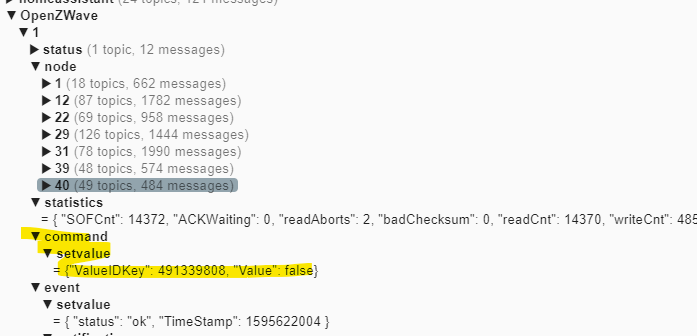
Is it possible my MQTT is somehow corrupted? In that case, what would be the best way to clean things up and try again?
I'm really keen to get that working to finally get the "Cleaner PIN Code" organised in a way that it only works once a week between certain hours and having HA reliably set/delete PIN code is the key to that...
I hope the aboce makes sense and I would appreciate any help
Thanks
gcorgnet
on 24 Jul 2020
Try waking the lock and issuing a Refresh Node command on it from ozw-admin. It's possible that OZW didn't pick up all the values in the cache before the lock went to sleep
 cgarwood
on 24 Jul 2020
cgarwood
on 24 Jul 2020
Not sure about the KeyWe brand locks, but Kwikiset locks are FLiRS so they don't require waking to set codes. @cgarwood may be onto something here.
firstof9
on 25 Jul 2020
Not sure about the KeyWe brand locks, but Kwikiset locks are FLiRS so they don't require waking to set codes. @cgarwood may be onto something here.
I thought it might have been. I checked but the Lock's status says "awake" so I thought that shouldn't be a problem.
I'll try a refresh I guess... I take it the "drivers" may be different between the built in zwave integration and the OZW Beta? Which could explain why the mqtt topics are different?
Also, can anyone confirm if the topic Id and ValueID should match in my screenshot above?
Thanks
gcorgnet
on 25 Jul 2020
I take it the "drivers" may be different between the built in zwave integration and the OZW Beta?
OZW beta is using OpenZwave 1.6 the built in integration uses OpenZwave 1.4, there's a lot of differences between the two.
Also, can anyone confirm if the topic Id and ValueID should match in my screenshot above?
We cannot, ValueIDKeys are unique to your device.
firstof9
on 25 Jul 2020
We cannot, ValueIDKeys are unique to your device.
Yeah, I know they are, but are the 2 numbers I highlighted supposed to be the same ? I thought they were but obviously these 2 values don't. Maybe that's part of the problem?
gcorgnet
on 25 Jul 2020
OK, definitely making progress here... Thanks to @cgarwood's suggestion, it looks like I'm able to both set user code and clear them, after I have done a Node Refresh from OZW admin.
The code slots only started showing in MQTT after I had done the refresh.
Problem is, it only seems to work a few times before it stops working altogether...
I noticed that when I call the service, the data in MQTT doesn't seem to get updated...
example here after I cleared the Slot 4 (and I heard the lock make a sound to confirm it had worked)
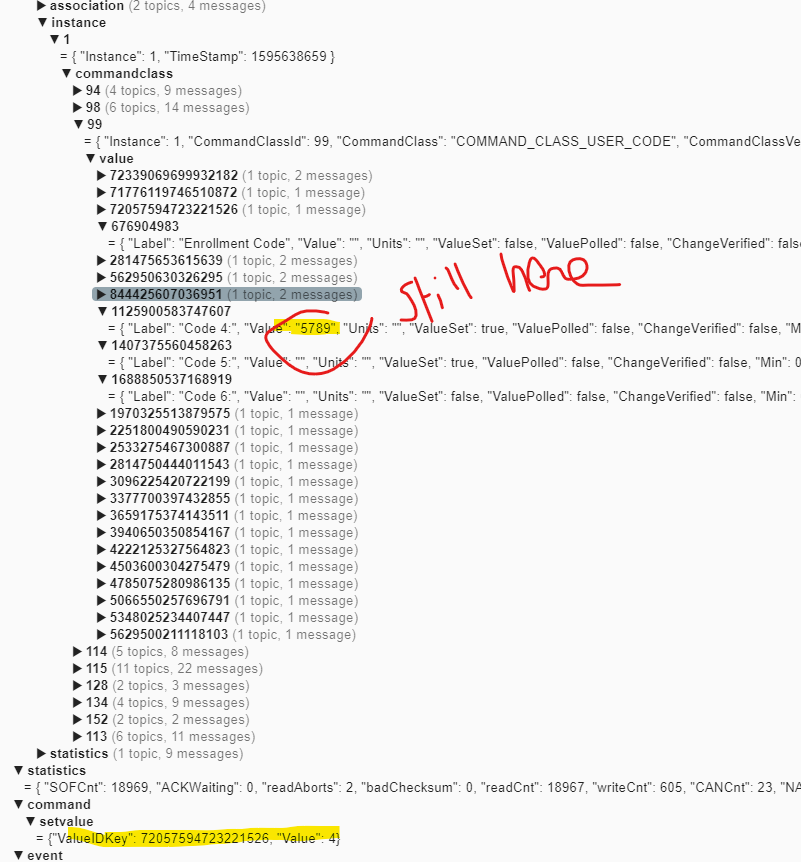
We can still code 4 is still there in MQTT. (it does go away if I do a node refresh though... but surely I shouldn't have to refresh the node everytime for changes to be picked up?
The bottom part is the command that gets issued by HA to clear the code.
Any ideas on why MQTT would not be updated properly?
Thanks
gcorgnet
on 25 Jul 2020
Try clearing it twice, it's already put in the code to issue the command twice, but just as a test give it a try.
I am thinking there's an underlying OpenZwave issue going on and have an issue open for it: https://github.com/OpenZWave/qt-openzwave/issues/119
firstof9
on 25 Jul 2020
Thanks but I have tried clearing it twice. no dice. Nothing happens until I do a full node refresh and then try again... Any idea why the json in the MQTT doesn't seem to get updated when I;m clearing or setting usercodes? (see image above)
gcorgnet
on 29 Jul 2020
I'm not sure about your brand of lock, but it could be that it's not then refreshing the code slots. My Kwikset refreshes the slot and it shows as blank after I issue the command.
firstof9
on 29 Jul 2020
Yeah, it's quite possibly what's happening... and I'd say because the slots
don't get refreshed, the state gets out of sync, which causes the commands
to only really work once before starting to be ignored...
At a high level, how could one fix this? Is that a lock firmware problem?
On Thu, Jul 30, 2020 at 1:53 AM Chris notifications@github.com wrote:
I'm not sure about your brand of lock, but it could be that it's not then
refreshing the code slots. My Kwikset refreshes the slot and it shows as
blank after I issue the command.—
You are receiving this because you commented.
Reply to this email directly, view it on GitHub
https://github.com/home-assistant/core/issues/37044#issuecomment-665678265,
or unsubscribe
https://github.com/notifications/unsubscribe-auth/ABEDGV2IAKNAXCG46NUCSKLR6ASXHANCNFSM4OGB5YQQ
.
gcorgnet
on 29 Jul 2020
Could be firmware, could be that your xml just needs some compatibility flags enabled.
firstof9
on 30 Jul 2020
I'm interested! What XML are you talking about?
On Thu, Jul 30, 2020 at 10:10 AM Chris notifications@github.com wrote:
Could be firmware, could be that your xml just needs some compatibility
flags enabled.—
You are receiving this because you commented.
Reply to this email directly, view it on GitHub
https://github.com/home-assistant/core/issues/37044#issuecomment-665956364,
or unsubscribe
https://github.com/notifications/unsubscribe-auth/ABEDGV4T3WKZYEMVNPO6OMLR6CM5NANCNFSM4OGB5YQQ
.
gcorgnet
on 30 Jul 2020
That'd be your ozwcache_xxxxxx.xml
Here's the wiki link: https://github.com/OpenZWave/open-zwave/wiki/CommandClass-Compatibility-Flags#all-commandclasses
firstof9
on 30 Jul 2020
With me using the OZW Hass.io add-on, where can I find such file?
On Thu, Jul 30, 2020 at 11:26 AM Chris notifications@github.com wrote:
That'd be your ozwcache_xxxxxx.xml
Here's the wiki link:
https://github.com/OpenZWave/open-zwave/wiki/CommandClass-Compatibility-Flags#all-commandclasses—
You are receiving this because you commented.
Reply to this email directly, view it on GitHub
https://github.com/home-assistant/core/issues/37044#issuecomment-665981164,
or unsubscribe
https://github.com/notifications/unsubscribe-auth/ABEDGV64PXQ4WK4332AUAIDR6CV33ANCNFSM4OGB5YQQ
.
gcorgnet
on 30 Jul 2020
I have no idea, I use the docker container from dockerhub.
@cgarwood might be able to assist with that one.
firstof9
on 30 Jul 2020
Thanks.
I found the file and this is what the relevant CommandClass looks like
No Compatibility Flags set here... Should I see something different?
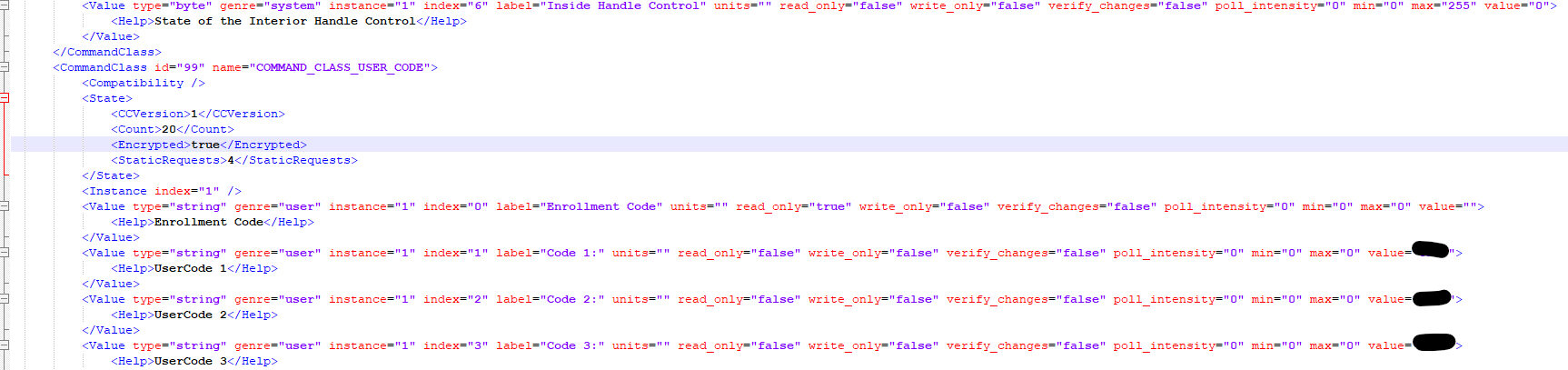
Also, say I edit the file to add one or more compatibility flags. What then? Do I need to remove/add the node again or should I just refresh? Hard to know that my change has been taken into account
gcorgnet
on 30 Jul 2020
You could try adding:
<Compatibility>
     <RefreshOnWakeUp>true</RefreshOnWakeUp>
</Compatibility>
It might help, I'm not 100% sure.
firstof9
on 30 Jul 2020
You could try adding:
<Compatibility>
     <RefreshOnWakeUp>true</RefreshOnWakeUp>
</Compatibility>
It might help, I'm not 100% sure.
Thanks. I a hve tried this but nothing has changed. That being said, I wasn't sure what I was supposed to do after editing the file? Do I need to remove the node and add it back again? Just a simple refresh?
gcorgnet
on 31 Jul 2020
Once you edit the cache, start ozw back up again.
firstof9
on 31 Jul 2020
Help! Trying to add user codes to Vision ZM1702.
Running openzwave 1.6 in docker on Pi. HA is running on another Debian box.
I've tried using MQTT Explorer to publish topic via OpenZWave/1/command/setvalue:
Code 1:
{
    "ValueIDKey": 281475200630807
    "Value": "123456"
}
Code 2:
{
    "ValueIDKey": 562950177341463
    "Value": "3456"
}
Code 3:
{
    "ValueIDKey": 844425154052119
    "Value": "76543"
}
but nothing is happening on the lock!
 danielbrunt57
on 1 Aug 2020
danielbrunt57
on 1 Aug 2020
Try removing the quotes from your Value.
Example:
{
    "ValueIDKey": 844425154052119
    "Value": 76543
}
Or use the service ozw.set_usercode from the dev-tools -> Services
firstof9
on 1 Aug 2020
Try removing the quotes from your Value.
Example:{ "ValueIDKey": 844425154052119 "Value": 76543 }Or use the service
ozw.set_usercodefrom thedev-tools -> Services
Thank you. I just tried ozw.set_usercode with
entity_id: lock.front_door_lock_locked
code_slot: 562950177341463
usercode: 0501
which processed without an error but no change in the MQTT topic, openzwave-admin user values tab or the lock...
danielbrunt57
on 1 Aug 2020
Your code slot is invalid. Should be from 1-255 only.
firstof9
on 1 Aug 2020
Thanks so much, that did the trick! I was thinking MQTT.
I did have to use quotes with the user code otherwise a strange number showed up at first without them.
On Jul. 31, 2020, at 8:45 p.m., Chris <[email protected]notifications@github.com> wrote:
Your code slot is invalid. Should be from 1-255 only.
—
You are receiving this because you commented.
Reply to this email directly, view it on GitHubhttps://github.com/home-assistant/core/issues/37044#issuecomment-667462969, or unsubscribehttps://github.com/notifications/unsubscribe-auth/AL4JU3IDG6RWDVGWTAWFLRDR6OFUZANCNFSM4OGB5YQQ.
danielbrunt57
on 1 Aug 2020
ozw.clear_usercode or MQTT publish
OpenZWave/1/command/setvalue/
{
"ValueIDKey": 72057594270236694,
"Value": 4
}
only works once after a node refresh. To get it to work one more time, the node has to be refreshed and so on, and so on...
danielbrunt57
on 25 Sep 2020
You'll need to file a bug report upstream (with either qt-openzwave or OpenZwave).
firstof9
on 25 Sep 2020
Hey @firstof9,
Not sure what was done, but _they_ broke your magical creation:
Logger: homeassistant
Source: components/ozw/lock.py:84
First occurred: 12:34:20 PM (1 occurrences)
Last logged: 12:34:20 PM

Error doing job: Exception in callback ZWaveLock.async_set_usercode(code_slot=3, usercode='1234')()
Traceback (most recent call last):
  File "/usr/local/lib/python3.8/asyncio/events.py", line 81, in _run
    self._context.run(self._callback, *self._args)
  File "/usr/src/homeassistant/homeassistant/components/ozw/lock.py", line 84, in async_set_usercode
    value.send_value(usercode)
AttributeError: 'NoneType' object has no attribute 'send_value'
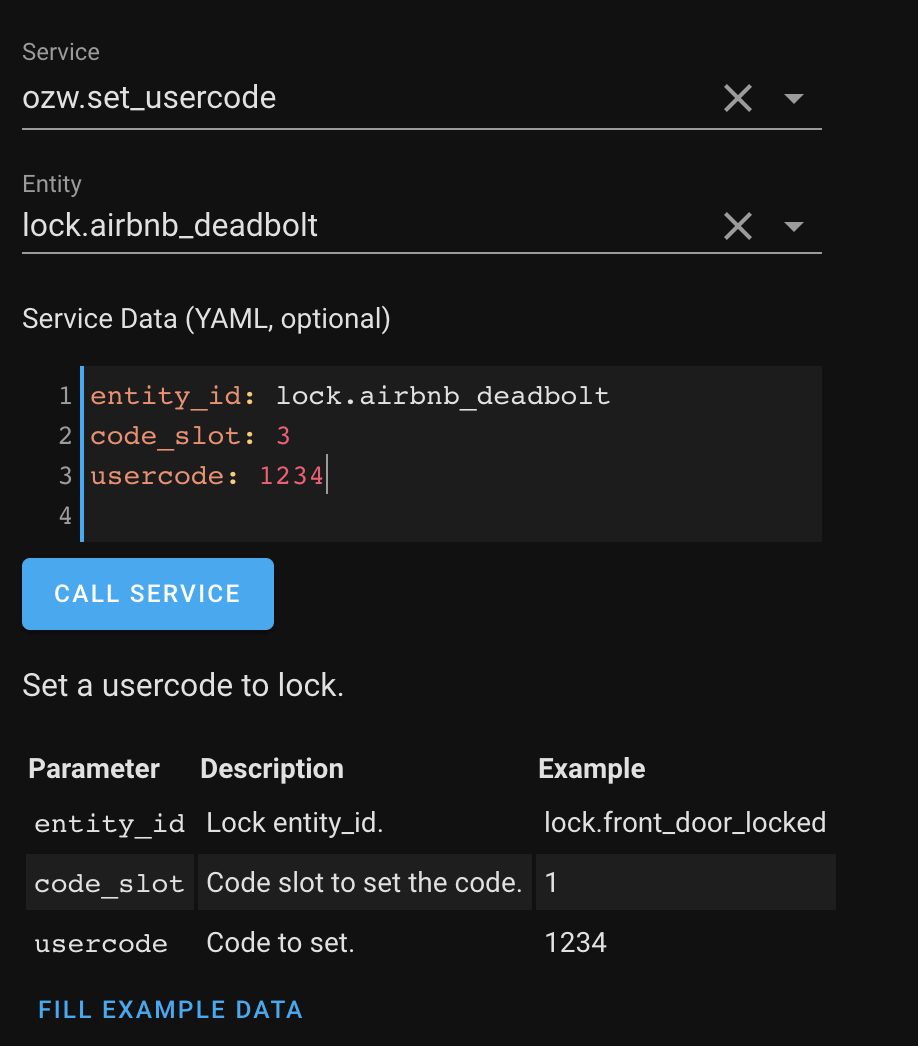
poldim
on 16 Oct 2020
What version of HA is this?
firstof9
on 16 Oct 2020
Related issues
 missedtheapex
·
3Comments
missedtheapex
·
3Comments
 MartinHjelmare
·
3Comments
MartinHjelmare
·
3Comments
 moskovskiy82
·
3Comments
moskovskiy82
·
3Comments
 i-am-shodan
·
3Comments
i-am-shodan
·
3Comments
 coolriku
·
3Comments
coolriku
·
3Comments