Core: Qubino Flush Shutter DC (ZMNHOD1) issues
The problem
I'm facing the same issues when using the older Zwave addon in HA.
For now I installed OpenZwave and the MQTT broker. Both are working and I have the Qubino paired and visible in HA.
The Shutter DC should add a "up", "down" and a "level" bar instead of only a "switch" so that i'm able to set level to 50% as example for my blinds.
Photo of added devices https://i.imgur.com/sCBXKLA.png
Environment
- Home Assistant Core release with the issue: 0.111.2
- Last working Home Assistant Core release (if known): none
- Operating environment (Home Assistant/Supervised/Docker/venv): Home Assistant
- Integration causing this issue: OpenZWave
- Link to integration documentation on our website: https://www.home-assistant.io/integrations/ozw/
Problem-relevant configuration.yaml
# Configure a default setup of Home Assistant (frontend, api, etc)
default_config:

# Text to speech
tts:
  - platform: google_translate

group: !include groups.yaml
automation: !include automations.yaml
script: !include scripts.yaml
scene: !include scenes.yaml
Traceback/Error logs
No errors in the log as far as i can find. It just does not correctly add the device.
Additional information
 JustinHoeky
All 21 comments
ozw documentation
ozw source
(message by IssueLinks)
![probot-home-assistant[bot] picture](https://avatars2.githubusercontent.com/in/36093?v=4&s=40) probot-home-assistant[bot]
on 16 Jun 2020
probot-home-assistant[bot]
on 16 Jun 2020
Hey there @cgarwood, @marcelveldt, @MartinHjelmare, mind taking a look at this issue as its been labeled with a integration (ozw) you are listed as a codeowner for? Thanks!
(message by CodeOwnersMention)
probot-home-assistant[bot]
on 16 Jun 2020
We haven't implemented support for the cover platform yet. You can help development by recording an mqtt dump of your device and post the dump in a text file here.
https://www.home-assistant.io/docs/mqtt/service/#service-mqttdump
 MartinHjelmare
on 16 Jun 2020
MartinHjelmare
on 16 Jun 2020
We haven't implemented support for the cover platform yet. You can help development by recording an mqtt dump of your device and post the dump in a text file here.
https://www.home-assistant.io/docs/mqtt/service/#service-mqttdump
Hi @MartinHjelmare ,
I've copied topic: openzwave/# to the Listen to a topic option at Developer Tools -> MQTT
The documentation tells me it writes the results in mqtt_dump.txt but i cannot find it in my Configuration folder.
Could you help me in the right direction? I'm willing to help and provide the information needed.
EDIT:
ozw-admin shows me the following User Values: https://imgur.com/Ckt9jNi
JustinHoeky
on 16 Jun 2020
The mqtt dump tool is a service under /developer-tools/service. The service is called mqtt.dump.
MartinHjelmare
on 16 Jun 2020
The mqtt dump tool is a service under
/developer-tools/service. The service is calledmqtt.dump.
Sorry, i should've known that. Sadly enough it's not showing a mqtt.dump in the Services list.
I'm running the Official Mosquitto broker, and the Integration is also enabled, so i'm not sure why it's not showing up under the Services
JustinHoeky
on 16 Jun 2020
Have you set up the mqtt integration?
MartinHjelmare
on 16 Jun 2020
Have you set up the
mqttintegration?
EDIT:
Reinstalled the MQTT Broker integration and now i have mqtt.dump
JustinHoeky
on 16 Jun 2020
@MartinHjelmare got it working, sorry for the hassle
mqtt_dump.txt
JustinHoeky
on 16 Jun 2020
If you need more dumps, information or testing, let me know.
JustinHoeky
on 16 Jun 2020
Hi @MartinHjelmare , any news on this topic? Just curious
JustinHoeky
on 23 Jun 2020
No news yet. New ozw features will probably be sparser during the summer weeks but I'll review contributions if they come in.
MartinHjelmare
on 23 Jun 2020
@JustinHoeky Should be solved by #37217 ;)
 Michsior14
on 30 Jun 2020
Michsior14
on 30 Jun 2020
@JustinHoeky Should be solved by #37217 ;)
Thank you for letting me know! Will try it out once it's released in stable.
Hopefully i can now use the "up" and "down" function properly.
JustinHoeky
on 30 Jun 2020
If you paste the xml entries from the zwcfg xml file, I can probably add it into the zwave integration as well.
 turbokongen
on 11 Jul 2020
turbokongen
on 11 Jul 2020
If you paste the xml entries from the zwcfg xml file, I can probably add it into the zwave integration as well.
Hi @turbokongen , apologies for the late response. Could you give me a direction where i can find the xml entries?
I will try and upload them today
JustinHoeky
on 14 Jul 2020
In the configuration file directory of your homeassistant installation.
There you will find a file named zwcfg_xxxxxx.xml
Then inside you find everything under Node id=
tir. 14. jul. 2020, 12:07 skrev JustinHoeky notifications@github.com:
If you paste the xml entries from the zwcfg xml file, I can probably add
it into the zwave integration as well.Hi @turbokongen https://github.com/turbokongen , apologies for the late
response. Could you give me a direction where i can find the xml entries?
I will try and upload them today—
You are receiving this because you were mentioned.
Reply to this email directly, view it on GitHub
https://github.com/home-assistant/core/issues/36848#issuecomment-658093984,
or unsubscribe
https://github.com/notifications/unsubscribe-auth/AD62JIASLO3OBQOU7B3K6D3R3QU43ANCNFSM4N7NV3JQ
.
turbokongen
on 14 Jul 2020
In the configuration file directory of your homeassistant installation. There you will find a file named zwcfg_xxxxxx.xml Then inside you find everything under Node id= tir. 14. jul. 2020, 12:07 skrev JustinHoeky notifications@github.com:
…
If you paste the xml entries from the zwcfg xml file, I can probably add it into the zwave integration as well. Hi @turbokongen https://github.com/turbokongen , apologies for the late response. Could you give me a direction where i can find the xml entries? I will try and upload them today — You are receiving this because you were mentioned. Reply to this email directly, view it on GitHub <#36848 (comment)>, or unsubscribe https://github.com/notifications/unsubscribe-auth/AD62JIASLO3OBQOU7B3K6D3R3QU43ANCNFSM4N7NV3JQ .
Hi @turbokongen ,
Took me a while to get some time for it.
I had to reinstall HA due too someone messing with my setup (some intern)
I've opened File editor in the webpanel, but i cannot find the zwcfg file in the /config folder.
Is it located somewhere else?
JustinHoeky
on 23 Jul 2020
Hi @MartinHjelmare , any news on this one?
JustinHoeky
on 14 Aug 2020
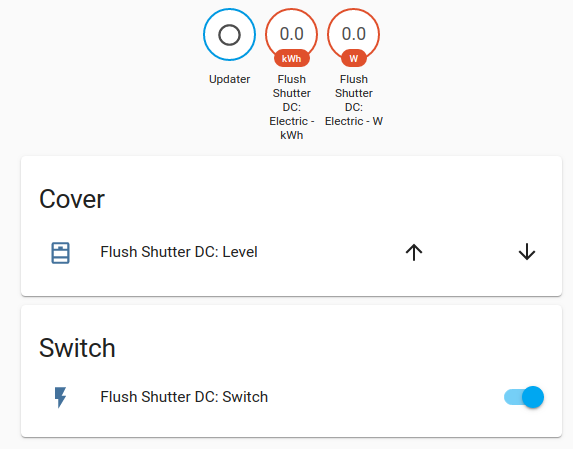
It should work with the latest release. Please try and report back.
MartinHjelmare
on 14 Aug 2020
@MartinHjelmare I tried this today in version 0.115.0.
The up and down arrows work, but the level slider does not. I tried creating a mqtt dump file where I first clicked the down arrow, then the up arrow and finally a few clicks on the level slider.
mqtt_dump.txt
Let me know if you need more information.
 MattiasC
on 17 Sep 2020
MattiasC
on 17 Sep 2020
Related issues
 sh0rez
·
3Comments
sh0rez
·
3Comments
 bdraco
·
3Comments
bdraco
·
3Comments
 aweb-01
·
3Comments
aweb-01
·
3Comments
 TheZoker
·
3Comments
TheZoker
·
3Comments
 piitaya
·
3Comments
piitaya
·
3Comments