Core: PLEX: async_call when dispatching 'plex_update_platforms_signal
The problem
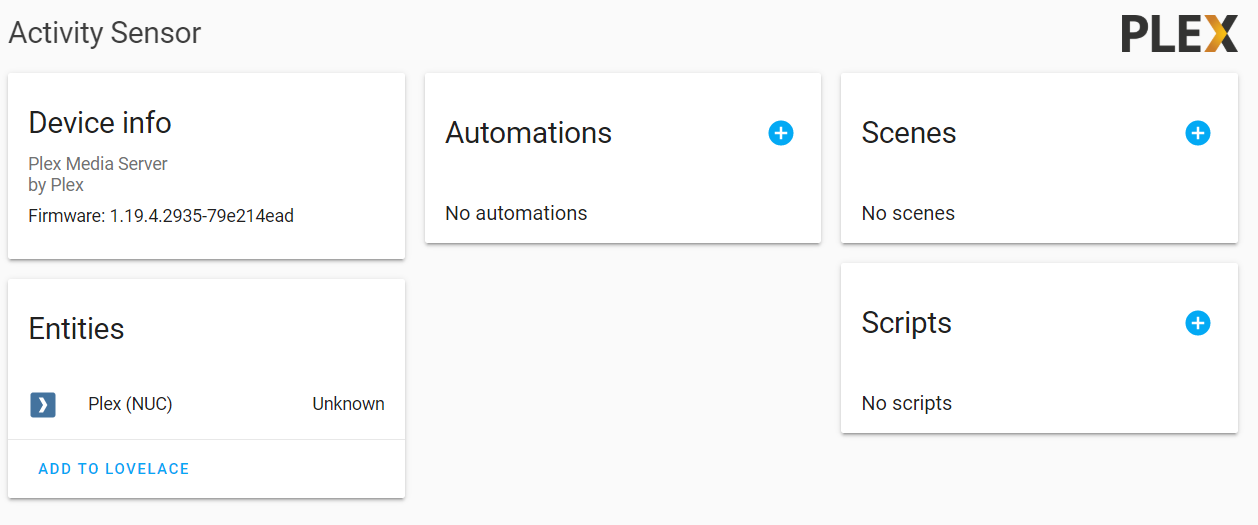
Plex intergration doesn't load correctly:
Sensor state is Unknown.
Media_player is not being created.
When opening the options of the intergration nothing happens:
Environment
- Home Assistant Core release with the issue: 0.111.0
- Last working Home Assistant Core release (if known): unknown i did not use the plex intergration before
- Operating environment (Home Assistant/Supervised/Docker/venv): Home Assistant Supervised
- Integration causing this issue: Plex Media Server
- Link to integration documentation on our website: https://www.home-assistant.io/integrations/plex/
Problem-relevant configuration.yaml
I used the Integrations page to set up the plex intergration.
Traceback/Error logs
This is the error i see on startup
ERROR (MainThread) [homeassistant.util.logging] Exception in async_call when dispatching 'plex_update_platforms_signal.xxxxxxxxxxxxxxxxxxxxxxxxxxxxxxxxxxxxxxxx': ()
Traceback (most recent call last):
  File "/usr/src/homeassistant/homeassistant/helpers/debounce.py", line 60, in async_call
    await self.hass.async_add_job(self.function)  # type: ignore
  File "/usr/src/homeassistant/homeassistant/components/plex/server.py", line 207, in _async_update_platforms
    known_accounts = set(self.option_monitored_users)
  File "/usr/src/homeassistant/homeassistant/components/plex/server.py", line 361, in option_monitored_users
    return self.options[MP_DOMAIN].get(CONF_MONITORED_USERS, {})
KeyError: 'media_player'
another error when opening the options of the intergration:
ERROR (MainThread) [aiohttp.server] Error handling request
Traceback (most recent call last):
  File "/usr/local/lib/python3.7/site-packages/aiohttp/web_protocol.py", line 418, in start
    resp = await task
  File "/usr/local/lib/python3.7/site-packages/aiohttp/web_app.py", line 458, in _handle
    resp = await handler(request)
  File "/usr/local/lib/python3.7/site-packages/aiohttp/web_middlewares.py", line 119, in impl
    return await handler(request)
  File "/usr/src/homeassistant/homeassistant/components/http/real_ip.py", line 39, in real_ip_middleware
    return await handler(request)
  File "/usr/src/homeassistant/homeassistant/components/http/ban.py", line 73, in ban_middleware
    return await handler(request)
  File "/usr/src/homeassistant/homeassistant/components/http/auth.py", line 127, in auth_middleware
    return await handler(request)
  File "/usr/src/homeassistant/homeassistant/components/http/view.py", line 129, in handle
    result = await result
  File "/usr/src/homeassistant/homeassistant/components/config/config_entries.py", line 186, in post
    return await super().post(request)
  File "/usr/src/homeassistant/homeassistant/components/http/data_validator.py", line 60, in wrapper
    result = await method(view, request, *args, **kwargs)
  File "/usr/src/homeassistant/homeassistant/helpers/data_entry_flow.py", line 73, in post
    "show_advanced_options": data["show_advanced_options"],
  File "/usr/src/homeassistant/homeassistant/data_entry_flow.py", line 129, in async_init
    flow, flow.init_step, data, init_done
  File "/usr/src/homeassistant/homeassistant/data_entry_flow.py", line 201, in _async_handle_step
    result: Dict = await getattr(flow, method)(user_input)
  File "/usr/src/homeassistant/homeassistant/components/plex/config_flow.py", line 328, in async_step_init
    return await self.async_step_plex_mp_settings()
  File "/usr/src/homeassistant/homeassistant/components/plex/config_flow.py", line 358, in async_step_plex_mp_settings
    known_accounts = set(plex_server.option_monitored_users)
  File "/usr/src/homeassistant/homeassistant/components/plex/server.py", line 361, in option_monitored_users
    return self.options[MP_DOMAIN].get(CONF_MONITORED_USERS, {})
KeyError: 'media_player'
Additional information
 Sjeff
Sjeff
All 15 comments
Wow you were 6 minutes faster! More details: https://github.com/home-assistant/core/issues/36678
 StevenReitsma
on 11 Jun 2020
StevenReitsma
on 11 Jun 2020
plex documentation
plex source
(message by IssueLinks)
![probot-home-assistant[bot] picture](https://avatars2.githubusercontent.com/in/36093?v=4&s=40) probot-home-assistant[bot]
on 11 Jun 2020
probot-home-assistant[bot]
on 11 Jun 2020
Hey there @jjlawren, mind taking a look at this issue as its been labeled with a integration (plex) you are listed as a codeowner for? Thanks!
(message by CodeOwnersMention)
probot-home-assistant[bot]
on 11 Jun 2020
What versions did you both upgrade from?
 jjlawren
on 11 Jun 2020
jjlawren
on 11 Jun 2020
i upgraded from 0.110.7
Sjeff
on 11 Jun 2020
Upgraded from 0.110.0 but wasn't using the integration before
StevenReitsma
on 11 Jun 2020
I'm 99% sure this is fixed in 0.111.2 but please confirm when you have the opportunity.
jjlawren
on 13 Jun 2020
Works fine now :) thanks for the quick fix
StevenReitsma
on 13 Jun 2020
Found this when looking for a resolution to the same issue! Thanks everyone, can confirm all good now for me too.
 iainp999
on 14 Jun 2020
iainp999
on 14 Jun 2020
Hey everyone, sorry for commenting on a closed issue, but seems this has returned for me since upgrading to Home Assistant 0.111.4
2020-06-18 13:59:55 ERROR (MainThread) [homeassistant.components.plex] Login to xxxxxx failed, verify token and SSL settings: [(401) unauthorized; http://192.xx.xx.xx:32400/ <html><head><script>window.location = window.location.href.match(/(^.+\/)[^\/]*$/)[1] + 'web/index.html';</script><title>Unauthorized</title></head><body><h1>401 Unauthorized</h1></body></html>]
And the same issue as original description above.
iainp999
on 18 Jun 2020
@iainp999 that's a different issue. It means your token is no longer valid. Did you change your Plex password or deauthorize HA?
jjlawren
on 18 Jun 2020
Thanks @jjlawren - neither of the above. I did upgrade HA via supervisor, though.
iainp999
on 18 Jun 2020
Either way the underlying problem is that your token is no longer valid. You'll need to set up the integration again (or manually obtain a new one). I'm working on a way to make this process more seamless but it's not ready yet.
jjlawren
on 18 Jun 2020
@jjlawren - thanks again - I think this was my misunderstanding of how the authentication mechanism works.
I have not been able to automatically obtain a token from plex whilst setting up - I allow the app permission but then control never returns to HA. I did try configuring base URL in configuration, but that didn't help.
I had worked around this by grabbing a token from the metadata XML in the plex UI in my browser.
However, that's obviously a hack and the token is associated to the browser.
iainp999
on 18 Jun 2020
If you're having issues with the UI setup, please open a new issue with the details and I'll do my best to help fix the problem.
jjlawren
on 18 Jun 2020
Related issues
 TheZoker
·
3Comments
TheZoker
·
3Comments
 flsabourin
·
3Comments
flsabourin
·
3Comments
 MartinHjelmare
·
3Comments
MartinHjelmare
·
3Comments
 kirichkov
·
3Comments
kirichkov
·
3Comments
 Konstigt
·
3Comments
Konstigt
·
3Comments