Core: Mobile App refusing to reregister sensors
The problem
36433 has fixed the issue of one bad sensor (eSIM) causing all sensors to not update. However, there any now multiple additional log errors appearing regarding registering sensors and webhooks. This also appears to cause intermittent lag in the app. This is most noticed while scrolling in which case it become extremely juddery
The volume of errors is immense I have now received in excess of 30,000 in 12 hours, this seems typical of all users
Environment
- Home Assistant Core release with the issue: 0.111b1
- Last working Home Assistant Core release (if known): N/A
- Operating environment (Home Assistant/Supervised/Docker/venv): Home Assistant
- Integration causing this issue: mobile_app
- Link to integration documentation on our website: https://www.home-assistant.io/integrations/mobile_app/
Problem-relevant configuration.yaml
Traceback/Error logs
Logger
homeassistant.components.mobile_app.webhook
Source: components/mobile_app/webhook.py:187
Integration: Mobile App (documentation, issues)
First occurred: 20:37:05 (4785 occurrences)
Last logged: 21:05:34

Refusing to re-register existing sensor connectivity_ssid!
Received invalid webhook payload: required key not provided @ data['state']. Got None
Refusing to re-register existing sensor connectivity_sim_1!
Refusing to re-register existing sensor last_update_trigger!
Refusing to re-register existing sensor geocoded_location!


Logger: homeassistant.components.webhook
Source: helpers/storage.py:218
Integration: Webhook (documentation, issues)
First occurred: 20:40:35 (6 occurrences)
Last logged: 21:05:34

Error processing webhook a19ff4630833a36…
Traceback (most recent call last):
  File "/usr/src/homeassistant/homeassistant/components/webhook/__init__.py", line 90, in async_handle_webhook
    response = await webhook["handler"](hass, webhook_id, request)
  File "/usr/src/homeassistant/homeassistant/components/mobile_app/webhook.py", line 187, in handle_webhook
    return await WEBHOOK_COMMANDS[webhook_type](hass, config_entry, webhook_payload)
  File "/usr/src/homeassistant/homeassistant/components/mobile_app/webhook.py", line 132, in validate_and_run
    return await func(hass, config_entry, data)
  File "/usr/src/homeassistant/homeassistant/components/mobile_app/webhook.py", line 464, in webhook_update_sensor_states
    await hass.data[DOMAIN][DATA_STORE].async_save(safe)
  File "/usr/src/homeassistant/homeassistant/helpers/storage.py", line 144, in async_save
    await self._async_handle_write_data()
  File "/usr/src/homeassistant/homeassistant/helpers/storage.py", line 218, in _async_handle_write_data
    self._write_data, self.path, data
concurrent.futures._base.CancelledError
Additional information
Going off the occurrences tally in the report, each sensor update is generating between 100 and 300 errors.
In the errors above the Received invalid webhook payload: required key not provided @ data['state']. Got None is what we were seeing for the invalid data from the eSIM sensor. The rest are all new. I think the list is truncated or supplemented by the other error set and actually these re-registering errors are being generated for every sensor on every push
 TomBrien
All 65 comments
mobile_app documentation
mobile_app source
(message by IssueLinks)
![probot-home-assistant[bot] picture](https://avatars2.githubusercontent.com/in/36093?v=4&s=40) probot-home-assistant[bot]
on 4 Jun 2020
probot-home-assistant[bot]
on 4 Jun 2020
Hey there @robbiet480, mind taking a look at this issue as its been labeled with a integration (mobile_app) you are listed as a codeowner for? Thanks!
(message by CodeOwnersMention)
probot-home-assistant[bot]
on 4 Jun 2020
It seems this only happens after the first restart of Home Assistant after 0.111.0b1 is installed. That is not the restart during the install but a subsequent user-triggered restart
TomBrien
on 4 Jun 2020
Refusing to re-register existing sensor errors still on 111.0b2.
 towerhand
on 6 Jun 2020
towerhand
on 6 Jun 2020
Did you see any client performance regression as part of this? The app (ios) feels quite sluggish to me immediately after installing 0.110.5
 travisghansen
on 6 Jun 2020
travisghansen
on 6 Jun 2020
Yep
TomBrien
on 6 Jun 2020
Same here. Each time I use the app, logs go crazy and the app is really slow
 mbo18
on 6 Jun 2020
mbo18
on 6 Jun 2020
Same here. I think the problem with the slow app happens because if we open the app about 500 errors will be logged and on a RPi with a sd card this really slows down the whole system.
Regards
Richard
 darootler
on 6 Jun 2020
darootler
on 6 Jun 2020
Same here. I think the problem with the slow app happens because if we open the app about 500 errors will be logged and on a RPi with a sd card this really slows down the whole system.
Regards
Richard
I’m on a i3 NUC with a M.2 SSD and the app is slow
mbo18
on 6 Jun 2020
I see, this should not happen on that hardware. I just reverted back to 0.110.4 because this massive writes to the sd card could easily lead to a dead sd card.
Regards
Richard
darootler
on 6 Jun 2020
Just to confirm that the slow behaviour was seen in 0.111.0b1 so it’s related to the sensor fix and not change to zeroconf. I guess it’s the huge number of errors spamming the system?
TomBrien
on 6 Jun 2020
I updated to 110.5 and for some reason the a lot of sensors are still not updating.....
I'll have to play a bit during the week when I have time.
The performance drop has been noticed. It's also reduced overall performance on my Raspberry Pi (3B+) installation
 austwhite
on 6 Jun 2020
austwhite
on 6 Jun 2020
I updated also to 110.5 and for some reason the a lot of sensors are still not updating.....!
 albasee
on 6 Jun 2020
albasee
on 6 Jun 2020
Confirming the errors are making the mobile app basically unusable.
 ethank
on 6 Jun 2020
ethank
on 6 Jun 2020
Here’s the patch again from the last issue:
https://github.com/brg468/core/tree/mobile_app_webhook_fix/homeassistant/components/mobile_app
 brg468
on 6 Jun 2020
brg468
on 6 Jun 2020
The app log is filling with entries like:
2020-06-06 15:15:38.847 [Error] [main] [HAAPI+WebhookHelpers.swift:31] handleWebhookResponse(response:seal:callingFunctionName:) > Error on RegisterSensors(_:) request: responseValidationFailed(reason: Alamofire.AFError.ResponseValidationFailureReason.unacceptableStatusCode(code: 409))
@brg468
Is that patch available in the Apple App store? If not, then it isn't a solution for most users.
austwhite
on 6 Jun 2020
@brg468
Is that patch available in the Apple App store? If not, then it isn't a solution for most users.
It’s a server side fix. Run as a custom component or replace mobile_app folder
brg468
on 6 Jun 2020
Same for me after updating from 0.110.4 to 0.110.5
 jonare77
on 7 Jun 2020
jonare77
on 7 Jun 2020
same here too...
 pi642s
on 7 Jun 2020
pi642s
on 7 Jun 2020
Same for me after updating today to 0.110.5...
 rechena
on 7 Jun 2020
rechena
on 7 Jun 2020
not sure about the release cycle, will a generally available update be available soonish? thanks 🙇 otherwise ill patch local 👍
 cfuerst
on 7 Jun 2020
cfuerst
on 7 Jun 2020
I was troubleshooting a huge amount of 409 errors on my nginx reverse proxy when I noticed this
2020-06-07 18:39:34 ERROR (MainThread) [homeassistant.components.mobile_app.webhook] Refusing to re-register existing sensor pedometer_steps!
2020-06-07 18:39:34 ERROR (MainThread) [homeassistant.components.mobile_app.webhook] Refusing to re-register existing sensor connectivity_bssid!
I'm assuming this is related? Any idea why it would only be affecting one of my mobile phones? Seems the other ones are working just fine :(
Thanks
rechena
on 7 Jun 2020
Sluggish app for me too...
Just updated to 0.110.5 this morning and my iOS app is so sluggish with changing menus, scrolling, etc.
Edit - I added in the mobile_app patch as a custom component that @brg468 mentioned and all is good here.
 glassbase
on 7 Jun 2020
glassbase
on 7 Jun 2020
@glassbase do you have a link to the patch? Thanks
rechena
on 7 Jun 2020
@rechena see comments from brg468 he posted the link either run as custom component or replace the entire folder 👍
cfuerst
on 7 Jun 2020
Just keep in mind if you use brg468’s patch it will break all sensors when you go back to the official release. I had the delete my integration and wipe my app moving from the patch to official release.
 mbaran5
on 7 Jun 2020
mbaran5
on 7 Jun 2020
I am thinking it might be worth rolling back to 0.110.4 and waiting until the app is patched to fix the issues. The sensors didn't update but at least the app was usable and there wasn't the string of errors.
I do know about the custom component @brg468 mentioned, but I am not really comfortable putting even more band-aids over a problem.
austwhite
on 7 Jun 2020
Good luck. Doesn’t seem the app owner is planning to patch this. He mentioned on discord that the issues were resolved server side.
mbaran5
on 7 Jun 2020
Good luck. Doesn’t seem the app owner is planning to patch this. He mentioned on discord that the issues were resolved server side.
Yeah, well someone has to fix it properly. Band-aid solutions are not solving the issue. Server side issues do not solve the issue that the app is sending rubbish data.
I think the core HA team will get to the bottom of it though.
Edit: Server side patches that should be.....
austwhite
on 7 Jun 2020
So is the entire core HA team using Android? It would seem that at least one regular should use iOS to see how bad this situation as become. For an issue this severe to span literally the entire year/decade and not only not get better, but actually get much worse would be embarrassing to me. I appreciate the attempt at improving the situation on the server side, but now it needs to be revisited and the iOS app needs to be pushed to the app store.
 skrenes
on 7 Jun 2020
skrenes
on 7 Jun 2020
I only recently got involved with hass and didn't realize this issue has been chronic :( That's a bit concerning as a new user...I'm not sure I would have the patience with something broken for a year if that's the case :(
Does anyone know the actual endpoint this app hits? I'm wondering if it's possible to somehow proxy the request(s) through Node-RED or similar and clean up the garbage before actually making it to hass.
travisghansen
on 7 Jun 2020
I had to rollback to my latest 0.110.4 snapshot and seems like I'm not gonna update anytime soon.
 WhoSayIn
on 7 Jun 2020
WhoSayIn
on 7 Jun 2020
ah man....0.110.4 has broken myq. and 0.110.5 has this issue...hoping for fix soon.
 romaneleven11
on 7 Jun 2020
romaneleven11
on 7 Jun 2020
The one time I didn’t do a snapshot of my vm :( is there a way to downgrade my version? Kinda sad that this is going in this direction :(
rechena
on 7 Jun 2020
Just keep in mind if you use brg468’s patch it will break all sensors when you go back to the official release. I had the delete my integration and wipe my app moving from the patch to official release.
If you keep it as acustom_component the sensors will continue to work. I tried to put this in as a temp fix PR but it was rejected.
brg468
on 8 Jun 2020
Just keep in mind if you use brg468’s patch it will break all sensors when you go back to the official release. I had the delete my integration and wipe my app moving from the patch to official release.
If you keep it as a
custom_componentthe sensors will continue to work. I tried to put this in as a temp fix PR but it was rejected.
Sorry I meant if you decided to discontinue the custom_component for the build in component, the sensors won’t work and it’ll throw some python errors.
mbaran5
on 8 Jun 2020
I only recently got involved with hass and didn't realize this issue has been chronic :( That's a bit concerning as a new user...I'm not sure I would have the patience with something broken for a year if that's the case :(
There was a bug that cause an error every once in a while ... 110.5 was supposed to fix that bug, but obviously something went wrong with the fix.
 steve28
on 8 Jun 2020
steve28
on 8 Jun 2020
It appears the error has been around since Feb which is better than a year I guess. 4 months is still quite some time to have non functioning sensors from the app and now the ‘fix’ is worse than non-functioning sensors since people are downgrading (myself included) to a pre fix version.
I’m optimistic it’ll get cleaned up all around however relatively soon.
travisghansen
on 8 Jun 2020
When I said "the entire year/decade", I facetiously meant 2020. But yeah, specifically, we've known of this issue since early February. Close enough. I don't think the app has been updated since the fall of 2019 though. Strangely, I can't find it in the Canadian app store to check. What does that mean?
skrenes
on 8 Jun 2020
At this point I'd love to get rid of the mobile app, and I've found the built-in iCloud integration actually provides most of the same info such as battery level and geocoded location. The one thing that doesn't seem to be there is the pedometer integration. If anyone can recommend an alternate method for gathering that data that'd be great.
 markmonroy
on 8 Jun 2020
markmonroy
on 8 Jun 2020
I think it’s missing ibeacon support as well.
travisghansen
on 8 Jun 2020
I just tried re-installing the app on my iPad and I cant find it in the App Store anymore. Just me or was it removed?
It was removed from the App Store temporarily to fix a crash bug. You can re-download it from the "Purchased" section of your account, instructions here: https://github.com/home-assistant/iOS/issues/598#issuecomment-640234213
 SeanPM5
on 8 Jun 2020
SeanPM5
on 8 Jun 2020
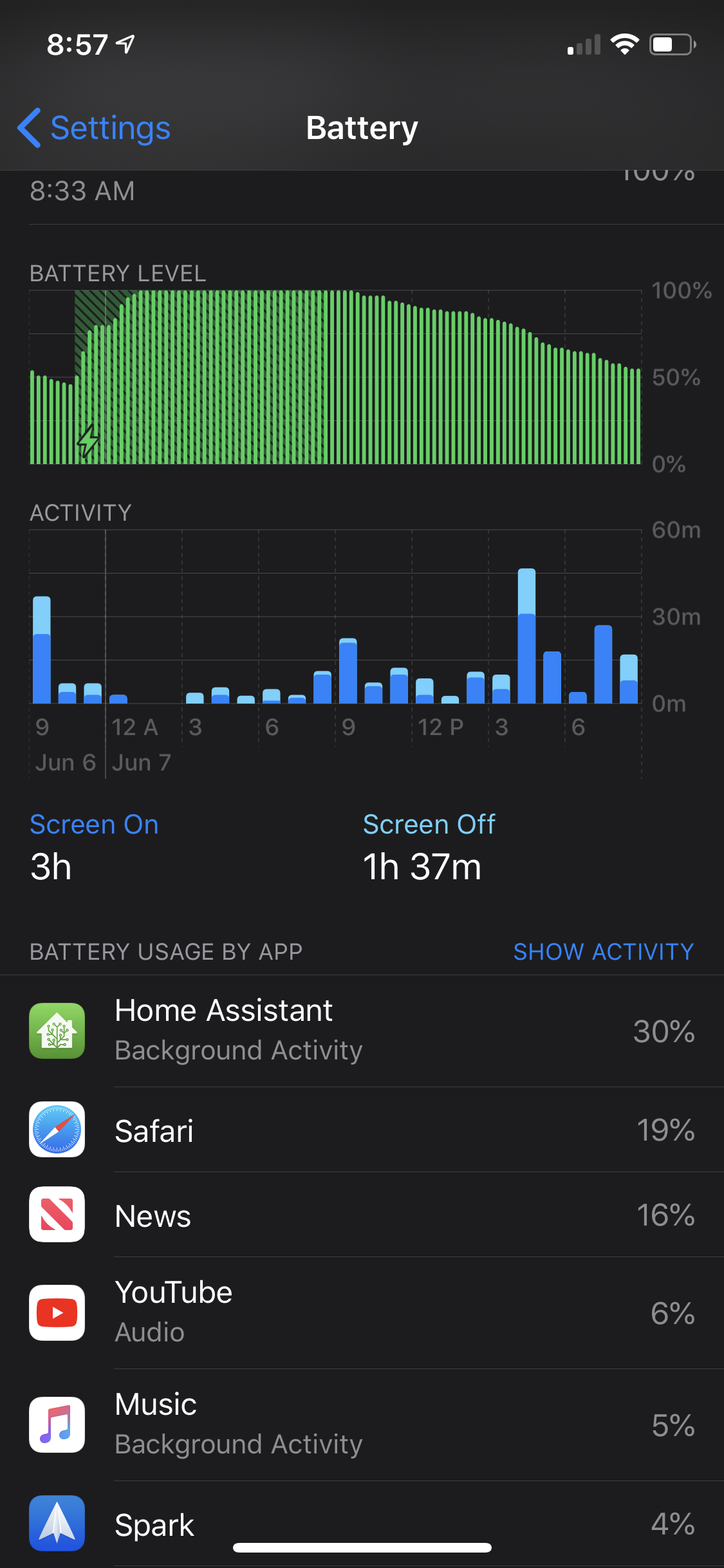
Just a heads up that it seems to burn quite a bit more battery in the background now also, at least that’s what I’m seeing.
 Codelica
on 8 Jun 2020
Codelica
on 8 Jun 2020
Same here
Xi Guo
[email protected]
On Jun 7, 2020, 11:04 PM -0400, James notifications@github.com, wrote:
Just a heads up that it seems to burn quite a bit more battery in the background now also, at least that’s what I’m seeing.
—
You are receiving this because you commented.
Reply to this email directly, view it on GitHub, or unsubscribe.
romaneleven11
on 8 Jun 2020
The one time I didn’t do a snapshot of my vm :( is there a way to downgrade my version? Kinda sad that this is going in this direction :(
If you SSH in you can downgrade to any version.
In the SSH prompt you use the following command:
ha core update --version=x.xxx.x
This works quite happily just in the SSH plugin via the SSH webui window also.
Note this is SSH to the Home Assistant, not the root OS
austwhite
on 8 Jun 2020
mbo18
on 8 Jun 2020
36559
Ohh this is great news, any idea when it will be landing? Thanks
rechena
on 8 Jun 2020
It's tagged for 0.111 which releases on Wednesday (two days from now).
SeanPM5
on 8 Jun 2020
3 PRs on the core pending right now, which should fix a large part of the errors reported.
 frenck
on 8 Jun 2020
frenck
on 8 Jun 2020
in version 0.110.6 the problem still exists ...
 dvd77
on 8 Jun 2020
dvd77
on 8 Jun 2020
@dvd77 That is correct, as it is not in 0.110.6, it will be part of 0.111.0.
frenck
on 8 Jun 2020
In version 0.110.6 the problem still exists! It's the same like before!
 pszeremeta86
on 9 Jun 2020
pszeremeta86
on 9 Jun 2020
In version 0.110.6 the problem still exists! It's the same like before!
The answer is literally right above your post. 0.111 is one day away.
 kzaoaai
on 9 Jun 2020
kzaoaai
on 9 Jun 2020
This has been a bit of a long road, but it is very nice to see a fix coming.
I don't normally update to x.xxx.0 versions as usually there are fixes that come not long after, but this time I will be making an exception to that rule.
austwhite
on 9 Jun 2020
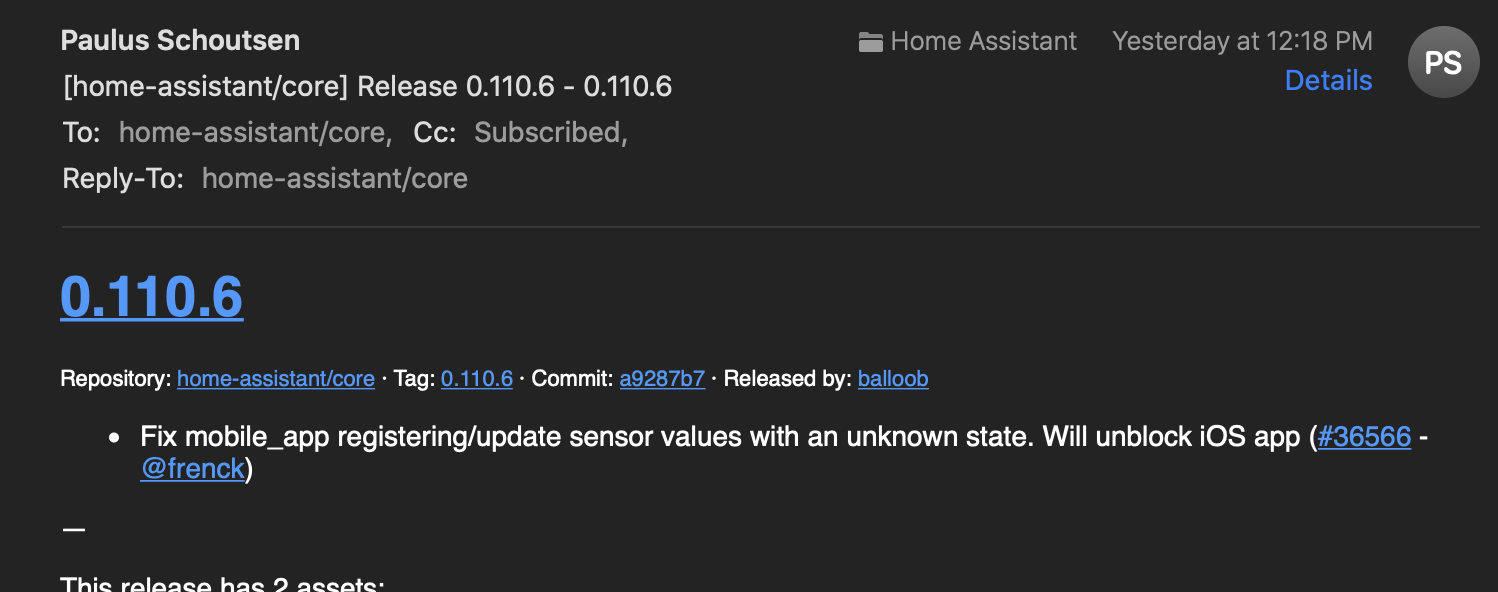
I think the 0.110.6 release announcement just confused some people (myself included), as it seemed to imply a fix, and contained nothing else. NBD though, Wednesday it is. 👍
Codelica
on 9 Jun 2020
0.110.7 should be available shortly and will finally fix this issue.
towerhand
on 9 Jun 2020
Just installed 0.110.7, and although the number of errors in log are significantly less, I am still getting the following:-
2020-06-10 09:25:28 ERROR (MainThread) [homeassistant.components.mobile_app.webhook] Received invalid sensor payload for connectivity_sim_2: required key not provided @ data['state']. Got None
2020-06-10 09:26:26 ERROR (MainThread) [homeassistant.components.mobile_app.webhook] Received invalid sensor payload for connectivity_sim_2: required key not provided @ data['state']. Got None
2020-06-10 09:29:32 ERROR (MainThread) [homeassistant.components.mobile_app.webhook] Received invalid sensor payload for connectivity_sim_2: required key not provided @ data['state']. Got None
2020-06-10 09:29:32 ERROR (MainThread) [homeassistant.components.mobile_app.webhook] Received invalid sensor payload for connectivity_sim_2: required key not provided @ data['state']. Got None
2020-06-10 09:36:50 ERROR (MainThread) [homeassistant.components.mobile_app.webhook] Received invalid sensor payload for connectivity_sim_2: required key not provided @ data['state']. Got None
2020-06-10 09:37:49 ERROR (MainThread) [homeassistant.components.mobile_app.webhook] Received invalid sensor payload for connectivity_sim_2: required key not provided @ data['state']. Got None
2020-06-10 09:37:49 ERROR (MainThread) [homeassistant.components.mobile_app.webhook] Received invalid sensor payload for connectivity_sim_2: required key not provided @ data['state']. Got None
2020-06-10 09:43:34 ERROR (MainThread) [homeassistant.components.mobile_app.webhook] Received invalid sensor payload for connectivity_sim_2: required key not provided @ data['state']. Got None
2020-06-10 09:45:34 ERROR (MainThread) [homeassistant.components.mobile_app.webhook] Received invalid sensor payload for connectivity_sim_2: required key not provided @ data['state']. Got None
2020-06-10 09:45:34 ERROR (MainThread) [homeassistant.components.mobile_app.webhook] Received invalid sensor payload for connectivity_sim_2: required key not provided @ data['state']. Got None
 aheath70
on 10 Jun 2020
aheath70
on 10 Jun 2020
@aheath70 I don't know for certain, but I suspect that the error logging you shared is expected. Home Assistant is, after all, still receiving an invalid payload from the mobile app for the eSIM slot, because the mobile app hasn't been updated yet to fix that underlying issue. So Home Assistant is still logging the invalid webhook payload, as it should.
What's changed in 0.110.7 is that Home Assistant doesn't react as poorly. The logging is limited (down from the spamming of the prior fixes), and if I understood the other closed bugs, the valid parts of the mobile app's payload should once again be parsed successfully, with only the invalid part being dropped (and logged).
I'll test it myself this evening, but would be thrilled to learn whether (in spite of the logging) the mobile app has gone back to being usable, instead of too sluggish to work with.
 alderete
on 10 Jun 2020
alderete
on 10 Jun 2020
Thanks @alderete.
I don't want this to come across as argumentative, but I downgraded to 0.110.4, and there are no such errors. There is clearly something server-side that has been done between 0.110.4 and 0.110.5 to cause the errors in the log.
aheath70
on 10 Jun 2020
@aheath70 are you sure you haven't started the iOS Home Assistant app after downgrading? This will only occur on a dual sim iPhone (even if you don't use the esim feature on iPhone Xs/11). I'm on 0.110.4 and here's the equivalent errors to what you were seeing on 0.110.7
2020-06-01 21:24:43 ERROR (MainThread) [homeassistant.components.mobile_app.webhook] Received invalid webhook payload: required key not provided @ data[11]['state']. Got None
2020-06-01 21:24:53 ERROR (MainThread) [homeassistant.components.mobile_app.webhook] Received invalid webhook payload: required key not provided @ data[11]['state']. Got None
2020-06-01 21:34:48 ERROR (MainThread) [homeassistant.components.mobile_app.webhook] Received invalid webhook payload: required key not provided @ data[11]['state']. Got None
2020-06-01 21:34:59 ERROR (MainThread) [homeassistant.components.mobile_app.webhook] Received invalid webhook payload: required key not provided @ data[12]['state']. Got None
2020-06-01 21:43:19 ERROR (MainThread) [homeassistant.components.mobile_app.webhook] Received invalid webhook payload: required key not provided @ data[12]['state']. Got None
2020-06-01 21:43:29 ERROR (MainThread) [homeassistant.components.mobile_app.webhook] Received invalid webhook payload: required key not provided @ data[11]['state']. Got None
2020-06-01 21:51:44 ERROR (MainThread) [homeassistant.components.mobile_app.webhook] Received invalid webhook payload: required key not provided @ data[11]['state']. Got None
2020-06-01 21:51:54 ERROR (MainThread) [homeassistant.components.mobile_app.webhook] Received invalid webhook payload: required key not provided @ data[11]['state']. Got None
2020-06-01 22:00:00 ERROR (MainThread) [homeassistant.components.mobile_app.webhook] Received invalid webhook payload: required key not provided @ data[12]['state']. Got None
2020-06-01 22:00:10 ERROR (MainThread) [homeassistant.components.mobile_app.webhook] Received invalid webhook payload: required key not provided @ data[12]['state']. Got None
@skrenes - correct you are. They are just coming through now with no where near the regularity that they did. Under 0.110.7 it was every 1-3 mins. Under 0.110.4 it is every 8-10 mins ... I may have been a bit impatient when I downgraded. They are definitely logging errors, just a lot less of them. My bad!
aheath70
on 10 Jun 2020
Just to confirm those are expected in 0.110.7. The frequency is set by how active your phone is. Is it possible when you looked at it on 0.110.7 you were using your phone but not when running 0.110.4
TomBrien
on 10 Jun 2020
@aheath70 You’re not coming across as argumentative. The errors that are logged has changed significantly several times between 0.110.4 and 0.110.7. It's confusing!
With .4 you were likely seeing errors like this one:
2020-06-10 09:58:27 ERROR (MainThread) [homeassistant.components.mobile_app.webhook] Received invalid webhook payload: required key not provided @ data[12]['state']. Got None
At least that's what I get right now, running 0.110.4, whenever I trigger the mobile app on my iPhone to connect to HA.
These errors, for a missing key, are due to the data payload the mobile app is sending to HA. The mobile app is having problems with the empty eSIM slot in my iPhone 11 Pro, and sending data about it in a format that HA doesn't expect. Hence the errors.
.5 and .6 attempted to handle these mangled payloads, but introduced a new problem, excessive logging that caused the mobile app to be sluggish. (And the HA logs to see many, many times more errors.)
.7 is a more complete fix, which drops the error logging back down to the level of .4, but the log lines are changed, and HA is "skipping over" the incomplete eSIM part of the mobile app's request. This hopefully restores the ability of the mobile app to send data (like location, etc.) to HA.
So, .7 is the version you want if you're running the mobile app on an iPhone with an empty eSIM slot. You'll still see errors, until the mobile app is updated to correctly handle the empty slot. From other bugs/message traffic, I believe that's coming soon. (The version mentioned is 2020.1 for the mobile app. I don't know when it'll drop.)
Cheers!
alderete
on 10 Jun 2020
https://twitter.com/Robbie/status/1270078689758208000
Hopefully anytime now... and hopefully without any regressions like seen in core 0.110.5 🤞
skrenes
on 10 Jun 2020
Related issues
 piitaya
·
3Comments
piitaya
·
3Comments
 Elmardus
·
3Comments
Elmardus
·
3Comments
 arangates
·
3Comments
arangates
·
3Comments
 TheZoker
·
3Comments
TheZoker
·
3Comments
 sh0rez
·
3Comments
sh0rez
·
3Comments
Most helpful comment
Did you see any client performance regression as part of this? The app (ios) feels quite sluggish to me immediately after installing 0.110.5