Core: ONVIF The date/time on the device is different from the system
The problem
Onvif integration refuses to pick up any sensors because:
2020-05-25 15:05:02 WARNING (MainThread) [homeassistant.components.onvif] The date/time on the device (UTC) is '2020-05-25 14:05:00+00:00', which is different from the system '2020-05-25 13:05:02.246786+00:00', this could lead to authentication issues
2020-05-25 15:05:04 WARNING (MainThread) [homeassistant.components.onvif] The system clock on 'CAMERA1' is more than 5 minutes off. Although this device supports events, they will be disabled until the device clock is fixed as we will not be able to renew the subscription.
Environment
- Home Assistant release with the issue: 0.110.2
- Last working Home Assistant release (if known): -
- Operating environment (Home Assistant/Supervised/Docker/venv): Home Assistant (hassio)
- Integration causing this issue: ONVIF
- Link to integration documentation on our website: https://www.home-assistant.io/integrations/onvif/
Problem-relevant configuration.yaml
It's from Configuration -> Integrations -> ONVIF.
Traceback/Error logs
See above.
Additional information
The log generated by Home Assistant has correct clock. There's no option to set the system clock in a different way.
 nagyrobi
All 8 comments
There are some other issues opened with what seems the same error. For example this: https://github.com/home-assistant/core/issues/34522
The developer said that It seems a bug in the firmware of the camera.
 McGiverGim
on 25 May 2020
McGiverGim
on 25 May 2020
onvif documentation
onvif source
(message by IssueLinks)
![probot-home-assistant[bot] picture](https://avatars2.githubusercontent.com/in/36093?v=4&s=40) probot-home-assistant[bot]
on 25 May 2020
probot-home-assistant[bot]
on 25 May 2020
Hey there @hunterjm, mind taking a look at this issue as its been labeled with a integration (onvif) you are listed as a codeowner for? Thanks!
(message by CodeOwnersMention)
probot-home-assistant[bot]
on 25 May 2020
While this duplicates #34522, I'm going to leave it open to see if I can't work around the Time Zone difference when it comes to handling event subscriptions somehow.
My HikVision doorbell reports this same issue. The cause is the firmware not handling DST correctly when returning the system date/time in UTC for ONVIF. The fix was turning off DST and manually adjusting the timezone setting.
 hunterjm
on 25 May 2020
hunterjm
on 25 May 2020
Unfortunately it's not desirable to modify the time settings in the cameras, because they are connected to an NVR for recording, and the NVR is the master time source for the cameras, including time zone and DST settings.
More precisely: it is possible to modify the time settings in the cameras, but that will cause inconsistency in the NVR operation - so nobody wants to do that. The NVR records not only the video stream, but also timecodes when motion is detected etc. so this is important to remain as designed.
nagyrobi
on 25 May 2020
I have the same issue
here the settings from the cam:
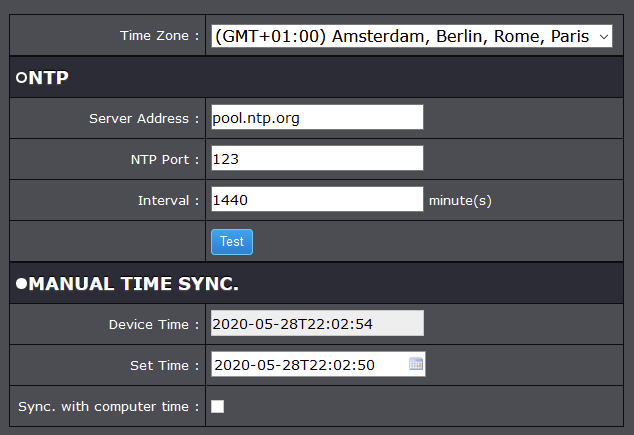
DST:
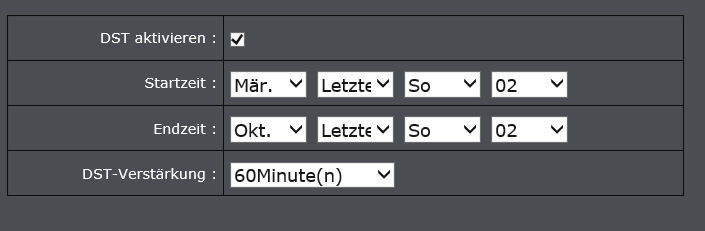
here the HA settings:

and the error:

 tofuSCHNITZEL
on 28 May 2020
tofuSCHNITZEL
on 28 May 2020
I have this bug too
Reading UTC time gets the system clock instead of the time and reading the regular time gets an incorrect time
I'm using the docker image
 UserBlackBox
on 4 Jul 2020
UserBlackBox
on 4 Jul 2020
There hasn't been any activity on this issue recently. Due to the high number of incoming GitHub notifications, we have to clean some of the old issues, as many of them have already been resolved with the latest updates.
Please make sure to update to the latest Home Assistant version and check if that solves the issue. Let us know if that works for you by adding a comment 👍
This issue now has been marked as stale and will be closed if no further activity occurs. Thank you for your contributions.
![stale[bot] picture](https://avatars3.githubusercontent.com/in/1724?v=4&s=40) stale[bot]
on 4 Oct 2020
stale[bot]
on 4 Oct 2020
Related issues
 moskovskiy82
·
3Comments
moskovskiy82
·
3Comments
 arangates
·
3Comments
arangates
·
3Comments
 YellowMonster76
·
3Comments
YellowMonster76
·
3Comments
 i-am-shodan
·
3Comments
i-am-shodan
·
3Comments
 bdraco
·
3Comments
bdraco
·
3Comments
Most helpful comment
While this duplicates #34522, I'm going to leave it open to see if I can't work around the Time Zone difference when it comes to handling event subscriptions somehow.
My HikVision doorbell reports this same issue. The cause is the firmware not handling DST correctly when returning the system date/time in UTC for ONVIF. The fix was turning off DST and manually adjusting the timezone setting.