Core: Zeroconf binds to multiple interfaces
The problem
Home Assistant will bind to multiple interfaces on port 5353 (mDNS).
This leads to UDP4 socket memory issues and UDP4 lost packets.
Below is a netstat extract that shows the issue on my system. The PID is the one used by home assistant. The other redundant interfaces that it binds to get choked by packets. Issue is clear if you have a tool to monitor the health of your system, like netdata.
Running ha-core on docker without net=host "solves" the issue, but we obviously lose a lot of functionalities from ha itself (e.g. ps4 discovery - which doesn't work even with the proper port exposed on docker - lg tv integration, aqara integration, etc.)
HA is the only container that I'd like to run with net=host for the added functionalities, but getting constant notifications from netdata of lost udp packets is worse. Disabling notifications for this issue is like sweeping it under the rug, not a fix.
Environment
- Home Assistant Core release with the issue: all
- Last working Home Assistant Core release (if known): none
- Operating environment (Home Assistant/Supervised/Docker/venv): Docker
- Integration causing this issue: everything using zeroconf (e.g. homekit, aqara, etc)
- Link to integration documentation on our website:
Problem-relevant configuration.yaml
Traceback/Error logs
extract from netstat -ulpna
Proto Recv-Q Send-Q Local Address           Foreign Address         State       PID/Program name
udp        0      0 0.0.0.0:59324           0.0.0.0:*                           970/avahi-daemon: r
udp        0      0 0.0.0.0:34807           0.0.0.0:*                           970/avahi-daemon: r
udp   6180160      0 0.0.0.0:5353            0.0.0.0:*                           30962/python3
udp   6180160      0 0.0.0.0:5353            0.0.0.0:*                           30962/python3
udp   6180160      0 0.0.0.0:5353            0.0.0.0:*                           30962/python3
udp   6180160      0 0.0.0.0:5353            0.0.0.0:*                           30962/python3
udp   6180160      0 0.0.0.0:5353            0.0.0.0:*                           30962/python3
udp        0      0 0.0.0.0:5353            0.0.0.0:*                           30962/python3
udp   6213440      0 0.0.0.0:5353            0.0.0.0:*                           30962/python3
udp   6213440      0 0.0.0.0:5353            0.0.0.0:*                           30962/python3
udp   6213440      0 0.0.0.0:5353            0.0.0.0:*                           30962/python3
udp   6213440      0 0.0.0.0:5353            0.0.0.0:*                           30962/python3
udp   6213440      0 0.0.0.0:5353            0.0.0.0:*                           30962/python3
udp        0      0 0.0.0.0:5353            0.0.0.0:*                           30962/python3
udp   6542080      0 0.0.0.0:5353            0.0.0.0:*                           30962/python3
udp   6542080      0 0.0.0.0:5353            0.0.0.0:*                           30962/python3
udp   6542080      0 0.0.0.0:5353            0.0.0.0:*                           30962/python3
udp   6542080      0 0.0.0.0:5353            0.0.0.0:*                           30962/python3
udp   6542080      0 0.0.0.0:5353            0.0.0.0:*                           30962/python3
udp        0      0 0.0.0.0:5353            0.0.0.0:*                           30962/python3
udp        0      0 0.0.0.0:5353            0.0.0.0:*                           970/avahi-daemon: r
udp        0      0 0.0.0.0:38397           0.0.0.0:*                           30962/python3
udp        0      0 127.0.0.1:8125          0.0.0.0:*                           27001/netdata
udp        0      0 0.0.0.0:631             0.0.0.0:*                           12702/cups-browsed
udp6       0      0 :::10001                :::*                                24987/docker-proxy
udp6       0      0 :::44436                :::*                                970/avahi-daemon: r
udp6       0      0 :::3478                 :::*                                25131/docker-proxy
udp6       0      0 :::44829                :::*                                970/avahi-daemon: r
udp6       0      0 :::5353                 :::*                                970/avahi-daemon: r

ps aux | grep 30962
 30962  3.2  1.3 418792 218548 ?       Ssl  11:04   0:36 python3 -m homeassistant --config /config
Additional information
Issue has also been reported here, but gained no traction. Hoping that someone can help me out.
 meme1337
All 21 comments
Hey there @robbiet480, @Kane610, mind taking a look at this issue as its been labeled with a integration (zeroconf) you are listed as a codeowner for? Thanks!
(message by CodeOwnersMention)
![probot-home-assistant[bot] picture](https://avatars2.githubusercontent.com/in/36093?v=4&s=40) probot-home-assistant[bot]
on 1 May 2020
probot-home-assistant[bot]
on 1 May 2020
This should be solved by #35281, closing this for now. Please try it out on dev or beta to give early feedback to @bdraco
 Kane610
on 7 May 2020
Kane610
on 7 May 2020
The issue is still not close on my side.
As it can be seen from the excerpt above, the “zombie” packets are divided in three main sections, with the same value across each section.
After setting zeroconf default interface property to true on 0.110.0, now the sections are two.
One is definitely HomeKit, that behaves opposite to the zeroconf integration with the property set to true.
@Kane610 @bdraco, is there anything I can provide the devs to investigate the issue?
meme1337
on 20 May 2020
Cast is still using its own zeroconf instance in 0.110. It wasn't adjusted until 0.111 dev
 bdraco
on 20 May 2020
bdraco
on 20 May 2020
Cast is still using its own zeroconf instance in 0.110. It wasn't adjusted until 0.111 dev
Awesome! Thanks for the update! So it will have the same option to set a default interface? I’ll try disabling the integration and check the result.
I’m quite sure that the other big offender is HomeKit, but I don’t understand how, as it has the same option set to true.
meme1337
on 20 May 2020
I have a PR open to cleanup homekit some more. https://github.com/home-assistant/core/pull/35687
So cast/zeroconf/homekit will all share the same instance in 0.111 and you'll only need to configure zeroconf
bdraco
on 21 May 2020
I have a PR open to cleanup homekit some more. https://github.com/home-assistant/core/pull/35687
So cast/zeroconf/homekit will all share the same instance in 0.111 and you'll only need to configure zeroconf
bdraco
on 21 May 2020
on my side, zeroconf still bind to 2 ports (instead of more than 9 ports)
did I miss anything?
with docker 0.112.4 image:
homeassistant/home-assistant 0.112.4 5290194f9fb3 5 days ago 1.41GB
netstat -ntlpu | grep 5353
(Not all processes could be identified, non-owned process info
 will not be shown, you would have to be root to see it all.)
udp   1063296      0 0.0.0.0:5353            0.0.0.0:*                           -
udp        0      0 0.0.0.0:5353            0.0.0.0:*
 fireinice
on 14 Jul 2020
fireinice
on 14 Jul 2020
It’s the same in my environment: it is definitely better than in the past, where I had 12 instances of zeroconf running, but I still have one attaching to the wrong interface and piling up packets.
I think it’s related to HomeKit, but I need to test that to confirm it.
meme1337
on 14 Jul 2020
You should have 2. One for ipv6 and one for ipv4
    if choice is InterfaceChoice.Default:
        if ip_version != IPVersion.V4Only:
            # IPv6 multicast uses interface 0 to mean the default
            result.append(0)
        if ip_version != IPVersion.V6Only:
            result.append('0.0.0.0')
You should have 2. One for ipv6 and one for ipv4
    if choice is InterfaceChoice.Default:
        if ip_version != IPVersion.V4Only:
            # IPv6 multicast uses interface 0 to mean the default
            result.append(0)
        if ip_version != IPVersion.V6Only:
            result.append('0.0.0.0')
Is there a way to disable the ipv6 binding? I still have packets on that interface that aren't handled and fill the buffer.
meme1337
on 15 Jul 2020
You should have 2. One for ipv6 and one for ipv4
    if choice is InterfaceChoice.Default:
        if ip_version != IPVersion.V4Only:
            # IPv6 multicast uses interface 0 to mean the default
            result.append(0)
        if ip_version != IPVersion.V6Only:
            result.append('0.0.0.0')
with 0.113, still got two 5353 ports:
$ netstat -ntlpu | grep 5353
(Not all processes could be identified, non-owned process info
 will not be shown, you would have to be root to see it all.)
udp    36864      0 0.0.0.0:5353            0.0.0.0:*                           -
udp        0      0 0.0.0.0:5353            0.0.0.0:*                           -
configuration.conf:
zeroconf:
  default_interface: true
  ipv6: false
version:
# hass --version
0.113.0
I didn't notice the new option to set ipv6 to false in zeroconf, but even if I set it to false, I still have two 5353 binds on 0.0.0.0.
Home Assistant
0.113.0
configuration.conf
zeroconf:
  default_interface: true
  ipv6: false
netstat -ulpna
Active Internet connections (servers and established)
Proto Recv-Q Send-Q Local Address           Foreign Address         State       PID/Program name
udp        0      0 127.0.0.53:53           0.0.0.0:*                           -
udp        0      0 0.0.0.0:631             0.0.0.0:*                           -
udp        0      0 0.0.0.0:60183           0.0.0.0:*                           -
udp        0    768 0.0.0.0:45776           0.0.0.0:*                           -
udp   1738048      0 0.0.0.0:5353            0.0.0.0:*                           -
udp        0      0 0.0.0.0:5353            0.0.0.0:*                           -
udp        0      0 0.0.0.0:5353            0.0.0.0:*                           -
udp        0      0 0.0.0.0:56439           0.0.0.0:*                           -
udp        0      0 127.0.0.1:8125          0.0.0.0:*                           -
udp6       0      0 :::10001                :::*                                -
udp6       0      0 :::3478                 :::*                                -
I didn't notice the new option to set ipv6 to false in zeroconf, but even if I set it to false, I still have two 5353 binds on 0.0.0.0.
Home Assistant
0.113.0configuration.conf
zeroconf:

  default_interface: true

  ipv6: false
netstat -ulpna
Active Internet connections (servers and established)

Proto Recv-Q Send-Q Local Address           Foreign Address         State       PID/Program name

udp        0      0 127.0.0.53:53           0.0.0.0:*                           -

udp        0      0 0.0.0.0:631             0.0.0.0:*                           -

udp        0      0 0.0.0.0:60183           0.0.0.0:*                           -

udp        0    768 0.0.0.0:45776           0.0.0.0:*                           -

udp   1738048      0 0.0.0.0:5353            0.0.0.0:*                           -

udp        0      0 0.0.0.0:5353            0.0.0.0:*                           -

udp        0      0 0.0.0.0:5353            0.0.0.0:*                           -

udp        0      0 0.0.0.0:56439           0.0.0.0:*                           -

udp        0      0 127.0.0.1:8125          0.0.0.0:*                           -

udp6       0      0 :::10001                :::*                                -

udp6       0      0 :::3478                 :::*                                -
That's normal one is for sending and one is for receiving
bdraco
on 24 Jul 2020
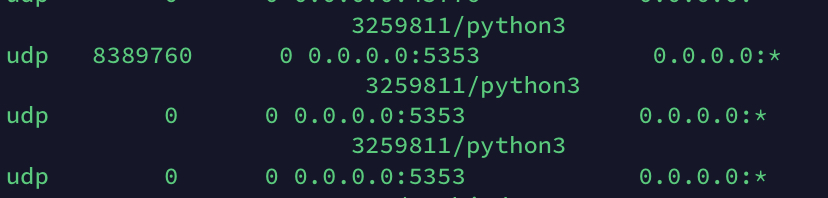
I'm not an expert, but I'm not sure about it. If that's the case, then why the receiving one is not consuming the packets and it's filling the memory buffer?
Proto Recv-Q Send-Q Local Address           Foreign Address         State       PID/Program name
udp        0      0 127.0.0.53:53           0.0.0.0:*                           -
udp        0      0 0.0.0.0:631             0.0.0.0:*                           -
udp        0      0 0.0.0.0:60183           0.0.0.0:*                           -
udp        0      0 0.0.0.0:45776           0.0.0.0:*                           -
udp   8389760      0 0.0.0.0:5353            0.0.0.0:*                           -
udp        0      0 0.0.0.0:5353            0.0.0.0:*                           -
udp        0      0 0.0.0.0:5353            0.0.0.0:*                           -
udp        0      0 0.0.0.0:56439           0.0.0.0:*                           -
udp        0      0 127.0.0.1:8125          0.0.0.0:*                           -
udp6       0      0 :::10001                :::*                                -
udp6       0      0 :::3478                 :::*                                -
Edit: actually there are still 3 instances of ha bound on that port. I still believe one is wrong. Maybe HomeKit is not using the default zeroconf and still creating the ipv6 handler?
meme1337
on 24 Jul 2020
I'm not an expert, but I'm not sure about it. If that's the case, then why the receiving one is not consuming the packets and it's filling the memory buffer?
Proto Recv-Q Send-Q Local Address           Foreign Address         State       PID/Program name
udp        0      0 127.0.0.53:53           0.0.0.0:*                           -
udp        0      0 0.0.0.0:631             0.0.0.0:*                           -
udp        0      0 0.0.0.0:60183           0.0.0.0:*                           -
udp        0      0 0.0.0.0:45776           0.0.0.0:*                           -
udp   8389760      0 0.0.0.0:5353            0.0.0.0:*                           -
udp        0      0 0.0.0.0:5353            0.0.0.0:*                           -
udp        0      0 0.0.0.0:5353            0.0.0.0:*                           -
udp        0      0 0.0.0.0:56439           0.0.0.0:*                           -
udp        0      0 127.0.0.1:8125          0.0.0.0:*                           -
udp6       0      0 :::10001                :::*                                -
udp6       0      0 :::3478                 :::*                                -
Edit: actually there are still 3 instances of ha bound on that port. I still believe one is wrong. Maybe HomeKit is not using the default zeroconf and still creating the ipv6 handler?
I tried disable homekit ( ssdp/discovery also actually), only enable zeroconf, there are still two 5353 ports and one did not consumpt receiving-queue.
fireinice
on 24 Jul 2020
the zeroconf-python had closed the bug related in 0.28.0, maybe we should just bump the version?
issue-link
fireinice
on 24 Jul 2020
@fireinice 0.113 uses zeroconf 0.28.0
bdraco
on 24 Jul 2020
@fireinice 0.113 uses zeroconf 0.28.0
It seems still not working now.
The piling buffer would block other network devices connections. It's really an annoying problem. Is there any other informations that we are expected to provide for resolving it?
fireinice
on 25 Jul 2020
For me the issue has disappeared.
@bdraco you're the man.
meme1337
on 13 Aug 2020
after upgrade to 0.114, it works like a charm. Well down @bdraco
fireinice
on 18 Aug 2020
Related issues
 coolriku
·
3Comments
coolriku
·
3Comments
 YellowMonster76
·
3Comments
YellowMonster76
·
3Comments
 TheZoker
·
3Comments
TheZoker
·
3Comments
 i-am-shodan
·
3Comments
i-am-shodan
·
3Comments
 sogeniusio
·
3Comments
sogeniusio
·
3Comments
Most helpful comment
For me the issue has disappeared.
@bdraco you're the man.