Core: Nextcloud error: "local variable 'ncm' referenced before assignment"
The problem
After adding nextcloud integration to my configuration.yaml file, I keep on getting a "Please check your config." error notification.
Environment
- Home Assistant Core release with the issue: HA 0.108.5. Same behaviour on previous versions (0.108.1 to 0.108.5)
- Operating environment (Home Assistant/Supervised/Docker/venv): Hassio installed on a Raspberry. Nextcloud is hosted on another Raspberry on the same network, running LibreElec with Docker, Nextcloud being a Docker container.
- Integration causing this issue: Nextcloud
- Link to integration documentation on our website: https://www.home-assistant.io/integrations/nextcloud
Problem-relevant configuration.yaml
nextcloud:
url: https://192.168.1.250
username: !secret nextcloud_username
password: !secret nextcloud_password
Nextcloud is running well on the above IP. I have generated the paswword in Nextcloud Web UI as instructed.
Traceback/Error logs
HA log:
2020-04-16 10:07:43 ERROR (SyncWorker_7) [homeassistant.components.nextcloud] Nextcloud setup failed - Check configuration
2020-04-16 10:07:43 ERROR (MainThread) [homeassistant.setup] Error during setup of component nextcloud
Traceback (most recent call last):
  File "/usr/src/homeassistant/homeassistant/setup.py", line 175, in _async_setup_component
    component.setup, hass, processed_config  # type: ignore
  File "/usr/local/lib/python3.7/concurrent/futures/thread.py", line 57, in run
    result = self.fn(*self.args, **self.kwargs)
  File "/usr/src/homeassistant/homeassistant/components/nextcloud/__init__.py", line 102, in setup
    hass.data[DOMAIN] = get_data_points(ncm.data)
UnboundLocalError: local variable 'ncm' referenced before assignment
Additional information
I tried to get help on HA forum, with no luck: https://community.home-assistant.io/t/nextcloud-integration/185516/5
 Alomon31
All 15 comments
Hey there @meichthys, mind taking a look at this issue as its been labeled with a integration (nextcloud) you are listed as a codeowner for? Thanks!
![probot-home-assistant[bot] picture](https://avatars2.githubusercontent.com/in/36093?v=4&s=40) probot-home-assistant[bot]
on 16 Apr 2020
probot-home-assistant[bot]
on 16 Apr 2020
@Alomon31
Is your instance encrypted with a self-signed ssl certificate or does it use one that is certified by Let's encrypt? In my initial testing, my integration failed when my certificate was expired.
Also, can you check the following?
- What version of nextcloud are you on?
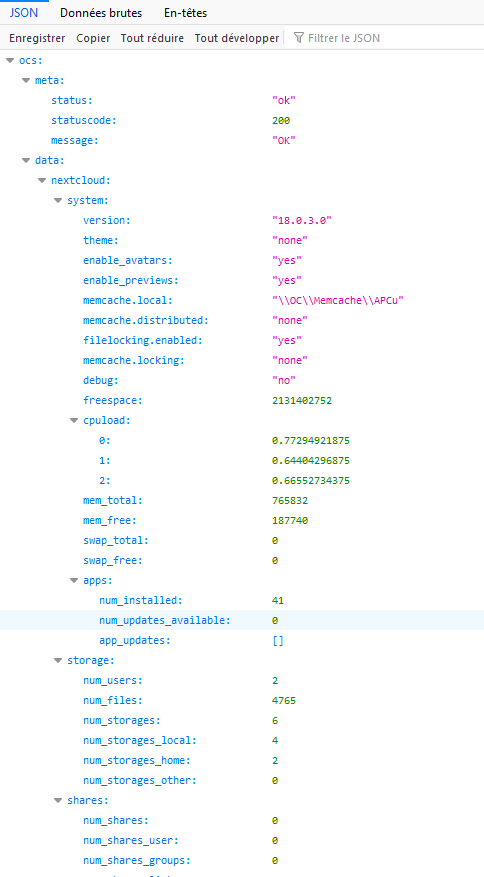
- Try opening this and let me know what is returned: https://192.168.1.250/ocs/v2.php/apps/serverinfo/api/v1/info?format=json
- With your user can you access this page? https://192.168.1.250/index.php/settings/admin/serverinfo
 meichthys
on 16 Apr 2020
meichthys
on 16 Apr 2020
Regarding the certificate, I didn't do anything more than installing the Docker container provided by Linuxserver. When I look at the certificate, it only says that it has been provided by Linuxserver and that it is valid until 03/02/2030.
- What version of nextcloud are you on?
18.0.3
- Try opening this and let me know what is returned: https://192.168.1.250/ocs/v2.php/apps/serverinfo/api/v1/info?format=json
Today I have a blank page. As you have seen on the forum, I already tried before and I had a file listing some information about my instance.
Edit: howerver, I can see these information on https://192.168.1.250/ocs/v2.php/apps/serverinfo/api/v1/info
- With your user can you access this page? https://192.168.1.250/index.php/settings/admin/serverinfo
Yes, I do.
Alomon31
on 16 Apr 2020
So you get a response when you access:
https://192.168.1.250/ocs/v2.php/apps/serverinfo/api/v1/info
But not when you access:
https://192.168.1.250/ocs/v2.php/apps/serverinfo/api/v1/info?format=json
If that's the case it seems like there might be a mis-configuration somewhere on the nextcloud docker image you setup. The Nextcloud integration needs the json response to work:
https://192.168.1.250/ocs/v2.php/apps/serverinfo/api/v1/info?format=json
meichthys
on 16 Apr 2020
It seems to be lunatic, now I do get a response on the json format! My instance is quite slow, can it be a reason why?
Alomon31
on 16 Apr 2020
I suppose it could be timing out.
As long as home-assistant can access that json out put it shouldn't have an issue setting up the integration.
Your CPU load seems high but not to the point where it should prevent the monitoring api from working.
If you know python, you can try accessing the data via the nextcloudmonitor package from pypi
pip install nextcloudmonitor
That's the package home-assistant uses to parse the json output.
meichthys
on 16 Apr 2020
Unfortunately, I don't know Python. I will try to find solutions to speed up my Nextcloud instance, otherwise I will have a look into what you suggest...
Thanks!
Le 16 avril 2020 15:23:34 GMT+02:00, MeIchthys notifications@github.com a écrit :
I suppose it could be timing out.
As long as home-assistant can access that json out put it shouldn't
have an issue setting up the integration.
Your CPU load seems high but not to the point where it should prevent
the monitoring api from working.If you know python, you can try accessing the data via the
nextcloudmonitor package from
pypi
pip install nextcloudmonitor
That's the package home-assistant uses to parse the json output.--
You are receiving this because you were mentioned.
Reply to this email directly or view it on GitHub:
https://github.com/home-assistant/core/issues/34284#issuecomment-614649869
Alomon31
on 16 Apr 2020
Ok, sounds like a plan. Would you mind closing the issue for now?
There's also an undocumented scan_interval parameter you could try changing:
nextcloud:
  url: https://192.168.1.250
  username: !secret nextcloud_username
  password: !secret nextcloud_password
  scan_interval: 300
By default scan_interval is set to 60 but bumping that up may help out if your instance is struggling to keep up with requests.
meichthys
on 16 Apr 2020
scan_interval didn't help. The error message shows up as soon as HA server starts up.
I close the issue as requested.
Alomon31
on 16 Apr 2020
@Alomon31
I've been thinking about this and remembered seeing the UnboundLocalError: local variable 'ncm' referenced before assignment error when i was testing different ssl certificates. Have you tried using http instead of https? If your nextcloud instance is in the same network as homeassistant, that may work.
meichthys
on 16 Apr 2020
I asked to the container developer about http and here is answer:
http would require modifying the default nginx site conf, which you can do, but we don't support it. We recommend reverse proxying (potentially via our letsencrypt image)
Should I better use letsencrypt?
Alomon31
on 16 Apr 2020
@Alomon31 Yes, LetsEncrypt would be the best solution. As the developer mentioned, using a reverse proxy is the best idea. If you have access to the home-assistant addons, you could use the NginxProxyManager to handle all the Let's Encrypt certificates.
meichthys
on 16 Apr 2020
Ok, thanks for the tips, I don't know letsencrypt but I will have a look at it and get back to you.
Le 16 avril 2020 22:58:30 GMT+02:00, MeIchthys notifications@github.com a écrit :
@Alomon31 Yes, LetsEncrypt would be the best solution. As the developer
mentioned, using a reverse proxy is the best idea. If you have access
to the home-assistant addons, you could use the NginxProxyManager to
handle all the Let's Encrypt certificates.--
You are receiving this because you were mentioned.
Reply to this email directly or view it on GitHub:
https://github.com/home-assistant/core/issues/34284#issuecomment-614891865
Alomon31
on 16 Apr 2020
Hi,
After a few days trying to understand how to use Letsencrypt on my server, I did it and I have now access to Nextcloud from Home Assistant!
Thank you
Alomon31
on 22 Apr 2020
@Alomon31 Great! Thanks for following up.
meichthys
on 22 Apr 2020
Related issues
 moskovskiy82
·
3Comments
moskovskiy82
·
3Comments
 TheZoker
·
3Comments
TheZoker
·
3Comments
 aweb-01
·
3Comments
aweb-01
·
3Comments
 ofuangka
·
3Comments
ofuangka
·
3Comments
 neonandu
·
3Comments
neonandu
·
3Comments