Core: Lifx.set_state changes brightness when brightness option isn't passed
The problem
When using the lifx.set_state service to adjust color_temp brightness is also being changed and shouldn't be.
Environment
Home Assistant release with the issue:
arch | armv7l
-- | --
dev | false
docker | true
hassio | false
os_name | Linux
os_version | 4.19.97-v7l+
python_version | 3.7.7
timezone | America/Chicago
version | 0.107.6
virtualenv | falseLast working Home Assistant release (if known):
This worked before 106.x- Operating environment (Hass.io/Docker/Windows/etc.):
above - Integration causing this issue:
Lifx - Link to integration documentation on our website:
https://www.home-assistant.io/integrations/lifx/
Problem-relevant configuration.yaml
The pictured call can be used to replicate the issue.
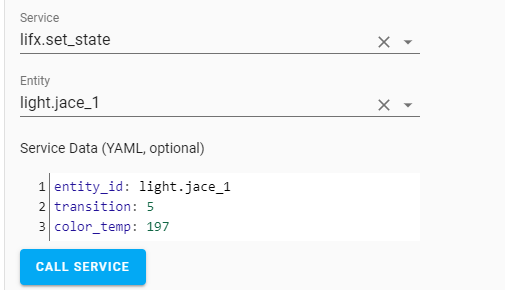
State_Changed event listening, while executing the above pictured call:
{
"event_type": "state_changed",
"data": {
"entity_id": "light.jace_1",
"old_state": {
"entity_id": "light.jace_1",
"state": "on",
"attributes": {
"min_mireds": 111,
"max_mireds": 400,
"effect_list": [
"effect_colorloop",
"effect_pulse",
"effect_stop"
],
"brightness": 28,
"color_temp": 365,
"friendly_name": "Jace 1",
"supported_features": 55
},
"last_changed": "2020-03-28T16:41:14.472903+00:00",
"last_updated": "2020-03-28T16:42:58.938681+00:00",
"context": {
"id": "83c09e1e9a8744c4a8563b45144910b2",
"parent_id": null,
"user_id": null
}
},
"new_state": {
"entity_id": "light.jace_1",
"state": "on",
"attributes": {
"min_mireds": 111,
"max_mireds": 400,
"effect_list": [
"effect_colorloop",
"effect_pulse",
"effect_stop"
],
"brightness": 255,
"color_temp": 197,
"friendly_name": "Jace 1",
"supported_features": 55
},
"last_changed": "2020-03-28T16:41:14.472903+00:00",
"last_updated": "2020-03-28T16:43:04.712328+00:00",
"context": {
"id": "8b56aead34e14061bc53b7b14513512d",
"parent_id": null,
"user_id": null
}
}
},
Traceback/Error logs
I don't not see anything in the log view at the time of the service call above.
Additional information
I'm happy to provide / test anything to help, but my coding skills are poor.
 gitdeath
All 14 comments
I am not seeing this behaviour. Do you have any automations that could interfere?
 amelchio
on 30 Mar 2020
amelchio
on 30 Mar 2020
I am not seeing this behaviour. Do you have any automations that could interfere?
Nothing that should be interfering and nothing was showing as having triggered in the log book.
As an extra precaution, I have disabled all automations and I am still able to replicate.
In full disclosure, I had some custom_components I was testing, but I deleted the directory and restarted as one of my first troubleshooting steps (a week or more ago).
gitdeath
on 30 Mar 2020
I also experience this with an automation to set color temperature. The YAML for the action looks like this:
data_template:
color_temp: |
{% set hour = now().hour | int %} {%- if hour == 0 -%}
400
{%- elif hour == 1 -%}
400
{%- elif hour == 2 -%}
400
{%- elif hour == 3 -%}
400
{%- elif hour == 4 -%}
400
{%- elif hour == 5 -%}
400
{%- elif hour == 6 -%}
400
{%- elif hour == 7 -%}
350
{%- elif hour == 8 -%}
300
{%- elif hour == 9 -%}
250
{%- elif hour == 10 -%}
220
{%- elif hour == 11 -%}
220
{%- elif hour == 12 -%}
220
{%- elif hour == 13 -%}
220
{%- elif hour == 14 -%}
220
{%- elif hour == 15 -%}
220
{%- elif hour == 16 -%}
220
{%- elif hour == 17 -%}
220
{%- elif hour == 18 -%}
285
{%- elif hour == 19 -%}
285
{%- elif hour == 20 -%}
300
{%- elif hour == 21 -%}
310
{%- elif hour == 22 -%}
300
{%- elif hour == 23 -%}
400
{%- endif %}
transition: 1
entity_id: light.bedroom
service: lifx.set_state
 KevinVanthuyne
on 31 Mar 2020
KevinVanthuyne
on 31 Mar 2020
@KevinVanthuyne
Not related to this LIFX issue but you can reduce that lengthy if-elif chain to this:
  service: lifx.set_state
  data_template:
    entity_id: light.bedroom
    transition: 1
    color_temp: >
      {% set ct = { 0:400, 1:400, 2:400, 3:400, 4:400, 5:400, 6:400, 7:350, 8:300, 9:250, 10:220, 11:220,
                   12:220, 13:220, 14:220, 15:220, 16:220, 17:220, 18:285, 19:285, 20:300, 21:310, 22:300, 23:400 } %}
      {{ ct[now().hour] if now().hour in ct.keys() else 400 }}
 tdejneka
on 31 Mar 2020
tdejneka
on 31 Mar 2020
I created something similar to @KevinVanthuyne and can now test with every light in my house (>30) at the same time. This behavior doesn't appear to happen to every light every time, which may make it difficult to reproduce with just my report of a service call. I don't see any reason or rhyme as to which lights are impacted when. Two lights with physical proximity and the same hardware/software version sometimes react differently.
Can replicate with kelvin: as well.
gitdeath
on 1 Apr 2020
If this only started in 0.107, can you try installing LIFX from 0.106 as a custom_component and see if the issue persists?
amelchio
on 1 Apr 2020
Sorry, no coffee. LIFX in 106 and 107 are identical, so I don't see where this issue is coming from.
amelchio
on 1 Apr 2020
Last time I know it worked was in 105.
I'll dig for some instructions on pulling an old version of a base component and using it as a custom_component. Or, if you are aware of a doc that I could use as reference that would speed it up - I've no idea how to do this, but I'll happily learn.
gitdeath
on 1 Apr 2020
Don't bother, the LIFX integration didn't change between those versions.
I want to fix this issue but a reproducible test case would be helpful in chasing it down :-)
amelchio
on 1 Apr 2020
What can I provide to help identify the problem? I'll reconfigure, run logging levels, whatever is needed. I have the capability to follow just about any instruction set, but I don't have pre-existing knowledge to lean on about what someone would need.
gitdeath
on 2 Apr 2020
To fix this, I need specific instructions on how to see the problem with my setup. I cannot tell you how to find that, it takes some experimentation to identify the exact requirements.
amelchio
on 4 Apr 2020
This is extremely easy to replicate with a completely default home assistant install. But, it doesn't happen every time to every light,
If you have dozen lights set them all to 1% brightness manually then use an automation to change the color_temp every 5 seconds from one value to another after a minute you will see multiple lights at different brightness levels.
Question:
How would I load light and lifx from 105 or 104 as custom_components? I tried just adding them in the custom_components, but it results in errors and the service calls don't work. Best I can tell this problem is happening during the hand-off of the lifx component and the light component. So I want to use your idea and run them both as older versions for testing, but that doesn't seem to work
gitdeath
on 25 Apr 2020
I still do not see the issue, tried with these automations:
automation:
  - alias: Startup
    trigger:
      platform: homeassistant
      event: start
    action:
    - delay: 0:00:10
    - service: lifx.set_state
      entity_id: all
      data:
        brightness_pct: 1
  - alias: Change
    trigger:
      platform: time_pattern
      seconds: /5
    action:
    - service: lifx.set_state
      entity_id: all
      data_template:
        kelvin: '{{ range(2700, 4000) | random }}'
        transition: 2
There hasn't been any activity on this issue recently. Due to the high number of incoming GitHub notifications, we have to clean some of the old issues, as many of them have already been resolved with the latest updates.
Please make sure to update to the latest Home Assistant version and check if that solves the issue. Let us know if that works for you by adding a comment 👍
This issue now has been marked as stale and will be closed if no further activity occurs. Thank you for your contributions.
![stale[bot] picture](https://avatars3.githubusercontent.com/in/1724?v=4&s=40) stale[bot]
on 25 Jul 2020
stale[bot]
on 25 Jul 2020
Related issues
 arangates
·
3Comments
arangates
·
3Comments
 bdraco
·
3Comments
bdraco
·
3Comments
 YellowMonster76
·
3Comments
YellowMonster76
·
3Comments
 missedtheapex
·
3Comments
missedtheapex
·
3Comments
 flsabourin
·
3Comments
flsabourin
·
3Comments
Most helpful comment
@KevinVanthuyne
Not related to this LIFX issue but you can reduce that lengthy if-elif chain to this: