Core: Issue with nmap_tracker since 107.6
The problem
Since I have updated to 107.6, nmap_tracker works 15 to 20min and then it stop to work. My logs are full of:
Updating device list from legacy took longer than the scheduled scan interval 0:00:12
With debug log activated, I can see that instead of running every 12 seconds, nmap scan seems to run every 5 seconds. It works fine at the beginning and then the scan does not finish before another scan start...
I have changed my config to increase the scan interval to 60s but then I still have some logs like this one:
Updating device list from legacy took longer than the scheduled scan interval 0:01:00
Was working fine before 107.6.
Environment
arch | armv7l
-- | --
dev | false
docker | true
hassio | true
os_name | Linux
os_version | 4.19.107
python_version | 3.7.7
timezone | Europe/Paris
version | 0.107.7
virtualenv | false
- Home Assistant release with the issue: 107.6
- Last working Home Assistant release (if known): 107.5
- Operating environment (Hass.io/Docker/Windows/etc.): Home Assistant
- Integration causing this issue: nmap_tracker
- Link to integration documentation on our website: https://www.home-assistant.io/integrations/nmap_tracker/
Problem-relevant configuration.yaml
  - platform: nmap_tracker
    hosts: 192.168.1.0/24
    home_interval: 5
    new_device_defaults:
      track_new_devices: false
works better with:
  - platform: nmap_tracker
    hosts: 192.168.1.0/24
    interval_seconds: 60
    consider_home: 300
    new_device_defaults:
      track_new_devices: false
Traceback/Error logs
Logger: homeassistant.components.device_tracker
Source: components/device_tracker/setup.py:156
Integration: Device tracker (documentation, issues)
First occurred: 9:49:03 AM (465 occurrences)
Last logged: 12:09:21 PM

Updating device list from legacy took longer than the scheduled scan interval 0:00:12
Additional information
https://community.home-assistant.io/t/0-107-6-broke-device-tracker/181234
 mbo18
mbo18
All 53 comments
I have the same configuration as you and am seeing the same issue.
This is my config I added the interval_seconds: 30 and it failed after about an hour changed it to interval_seconds 60 and it has been working for the last 2 hours.
EDIT as soon as I posted this it failed again.
  - platform: nmap_tracker
    home_interval: 10
    interval_seconds: 60
    hosts:
      - 192.168.0.0/24
    exclude:
# Jarvis
     - 192.168.0.22
# DNS VIP
     - 192.168.0.19
# Ben's iPhone
     - 192.168.0.110
# Ralph's iPhone
     - 192.168.0.112
# Tracy's iPhone
     - 192.168.0.113
 daveyrb
on 26 Mar 2020
daveyrb
on 26 Mar 2020
What if you try with:
  - platform: nmap_tracker
    interval_seconds: 60
    consider_home: 300
    hosts:
      - 192.168.0.0/24
    exclude:
# Jarvis
     - 192.168.0.22
# DNS VIP
     - 192.168.0.19
# Ben's iPhone
     - 192.168.0.110
# Ralph's iPhone
     - 192.168.0.112
# Tracy's iPhone
     - 192.168.0.113
I have modified my config as above and will let you know how it goes cheers.
daveyrb
on 26 Mar 2020
I'm having what I think is the same issue
 Mearman
on 26 Mar 2020
Mearman
on 26 Mar 2020
Same issue for me too. The last working version is 107.5
 gulpegaspe
on 27 Mar 2020
gulpegaspe
on 27 Mar 2020
Same issue for me on 107.7. Changing interval_seconds from 60 to 120 seems to help for a bit but the issue eventually re-occurs - it just seems to take longer to appear with a bigger value.
 mansbo
on 27 Mar 2020
mansbo
on 27 Mar 2020
What if you try with:
  - platform: nmap_tracker
    interval_seconds: 60
    consider_home: 300
    hosts:
      - 192.168.0.0/24
    exclude:
# Jarvis
     - 192.168.0.22
# DNS VIP
     - 192.168.0.19
# Ben's iPhone
     - 192.168.0.110
# Ralph's iPhone
     - 192.168.0.112
# Tracy's iPhone
     - 192.168.0.113
Mine has been working for the last 24 hours with the above config.
daveyrb
on 27 Mar 2020
Same issue here. Not really sure how to rollback so I guess its good I'm quarantined at home so my location is very static
 samuelbenzaquen
on 27 Mar 2020
samuelbenzaquen
on 27 Mar 2020
Same issue here. Not really sure how to rollback so I guess its good I'm quarantined at home so my location is very static
Install Terminal & SSH from add-on store and run "ha core update --version=0.107.5"
gulpegaspe
on 27 Mar 2020
Same issue here. Not really sure how to rollback so I guess its good I'm quarantined at home so my location is very static
Install Terminal & SSH from add-on store and run "ha core update --version=0.107.5"
I've reverted and up and running again. Any signs of a fix?
Mearman
on 29 Mar 2020
+1
Also, my frontend takes several minutes to load if enabled.
 mohesles
on 30 Mar 2020
mohesles
on 30 Mar 2020
Log Details (WARNING)
Logger: homeassistant.components.device_tracker
Source: components/device_tracker/setup.py:156
Integration: Device tracker (documentation, issues)
First occurred: 10:29:49 AM (1504 occurrences)
Last logged: 5:46:53 PM
Updating device list from legacy took longer than the scheduled scan interval 0:00:15
 vlad36N
on 1 Apr 2020
vlad36N
on 1 Apr 2020
I have the same issue. I'm "not at home" anymore after 15min of reboot. Same errors. Started looking for this github becaus it gives all kind of trouble in the depending "if i'm home" -kind of automations. Has this issue allready been noted by the developers?
Updating device list from legacy took longer than the scheduled scan interval 0:00:12
10:03:39 AM – Device tracker (WARNING) - message first occurred at April 3, 2020, 9:24:49 PM and shows up 3504 times
 MrUserY
on 3 Apr 2020
MrUserY
on 3 Apr 2020
I also have this issue. Reverting to 0.107.5 until there is a fix.
 omottestad
on 5 Apr 2020
omottestad
on 5 Apr 2020
What if you try with:
```
- platform: nmap_tracker
interval_seconds: 60
consider_home: 300
hosts:
- 192.168.0.0/24
exclude:
Jarvis
- 192.168.0.22
DNS VIP
- 192.168.0.19
Ben's iPhone
- 192.168.0.110
Ralph's iPhone
- 192.168.0.112
Tracy's iPhone
- 192.168.0.113
```
Mine has been working for the last 24 hours with the above config.
Update mine has failed again after working fine for the last 10 days.
daveyrb
on 6 Apr 2020
I have 2 HA’s running. Pi4 is the main one and my old Pi3B+ is used for adguard and as a zizbee bridge. Pi3 is running 107.7 and the device tracker on that is working fine with a few test devices to track and has been for days. I tried updating the Pi4 again last night and device tracker worked for about 12 hours before failing again - back to 107.5.
Wonder if it is the amount of devices that it is tracking that is causing the issue?
There were no logs on the Pi4 when it failed as well.
 BertrumUK
on 6 Apr 2020
BertrumUK
on 6 Apr 2020
Worked for 12 days... Had to restart HA this morning to make it work again
mbo18
on 7 Apr 2020
and we're here..anyone had any luck with 108.1? i sadly have not.
 marcelliotnet
on 10 Apr 2020
marcelliotnet
on 10 Apr 2020
Nothing here, downgraded back. This is very frustrating :-(
samuelbenzaquen
on 10 Apr 2020
Is the developer aware of this issue?
MrUserY
on 10 Apr 2020
I don't think so. There is no maintainer for this integration (and it must be rewrite to use config entries)
mbo18
on 10 Apr 2020
Try` removing "home_interval" from your configuration. Now I'm using a very basic configuration and it's working with 108.2 version.
device_tracker:
  - platform: nmap_tracker
    hosts: 192.168.1.100-200
Using the basic configuration made no difference at all for me on 0.108.2. Stopped working after 2 hours. I guess back to 0.107.5 for me, or find an alternative to nmap_tracker.
mansbo
on 11 Apr 2020
I have 2 HA’s running. Pi4 is the main one and my old Pi3B+ is used for adguard and as a zizbee bridge. Pi3 is running 107.7 and the device tracker on that is working fine with a few test devices to track and has been for days. I tried updating the Pi4 again last night and device tracker worked for about 12 hours before failing again - back to 107.5.
Wonder if it is the amount of devices that it is tracking that is causing the issue?
There were no logs on the Pi4 when it failed as well.
I think you may be on to something. I removed a number of entries from known_devices.yaml for devices that are no longer on my network (guests that were staying over during the holidays) and the rate of failure is much lower for me now. I still see the error in the logs, but much less frequently. I can also see that the devices I am tracking periodically show as "not home" even when they are at home, but only briefly and it mostly recovers instead of getting stuck.
Obviously this temporary workaround wouldn't help anyone that just has a lot of devices on their network, but for me it works just well enough that I don't have to downgrade for now.
 geckobelly
on 11 Apr 2020
geckobelly
on 11 Apr 2020
I did remove old entries in know_devices.yaml but it does not solve this issue (only 11 remaining). WAF is decreasing rapidly, I will need to find an alternative...
mbo18
on 12 Apr 2020
I have almost fully moved over to ping now instead and stopped tracking all the NMAP devices. Still have the family phones to add but my network devices are all detected via ping only now. Let’s see if this remains stable.
BertrumUK
on 12 Apr 2020
The ping tracker seems to be working. It doesn't provide as many attributes as nmap, but it actually tracks the devices. I'm hoping it's a temporary measure until the nmap tracker is fixed
 joshuazd
on 12 Apr 2020
joshuazd
on 12 Apr 2020
Maybe related to this: https://github.com/home-assistant/core/pull/34135
As in 107.6, the only PR that may had an impact was the one regarding S6 overlay
mbo18
on 13 Apr 2020
What installation type do you all have? I assuming docker? I am on a VENV install with no nmap issues in 0.108.x
 dshokouhi
on 13 Apr 2020
dshokouhi
on 13 Apr 2020
Hassio 108.3 here. Just updated from 107.5 which worked fine.
rpi4
 Mariusthvdb
on 13 Apr 2020
Mariusthvdb
on 13 Apr 2020
same problem here. Any fix?
 antoweb
on 17 Apr 2020
antoweb
on 17 Apr 2020
same problem here.
 piaso82
on 20 Apr 2020
piaso82
on 20 Apr 2020
HomeAssistant 108.7
Log Details (WARNING)
Logger: homeassistant.components.device_tracker
Source: components/device_tracker/setup.py:156
Integration: Device tracker (documentation, issues)
First occurred: 7:25:05 PM (1 occurrences)
Last logged: 7:25:05 PM
Updating device list from legacy took longer than the scheduled scan interval 0:00:12
MrUserY
on 22 Apr 2020
When I used NMAPtracker like this, it did not crashed yet in 2 days:
device_tracker:
- platform: nmap_tracker
home_interval: 10
hosts:
- 192.168.48.200
- 192.168.48.100
If I use it like, this, it crashes soon.
device_tracker:
- platform: nmap_tracker
hosts: 192.168.48.15-253
home_interval: 10
All personal data in this post is changed.
MrUserY
on 24 Apr 2020
Thanks @YRRK!
I have changed my config to only scan the DHCP range and it works better.
My config now:
- platform: nmap_tracker
  hosts: 192.168.1.15-50
  consider_home: 120
  new_device_defaults:
    track_new_devices: false
Solution...
Before have:
device_tracker:
  - platform: nmap_tracker
    hosts: 192.168.3.0/24
    home_interval: 10
    exclude:
     - 192.168.3.32
     - 192.168.3.150
     - 192.168.3.151
     - etc..
Solution:
device_tracker:
  - platform: nmap_tracker
    hosts:
     - 192.168.3.1
     - 192.168.3.2
     - 192.168.3.3
     - 192.168.3.4
     - 192.168.3.6
     - etc..
    home_interval: 10
    exclude:
     - 192.168.3.32
     - 192.168.3.150
     - 192.168.3.151
     - etc..
So I did change that all knowing devices are set by IP and all IP where there is not device that I have in exclude list, but this solution is only OK if you know exact IP list of devices which must have static IP and you do not need to know any new uknown devices on network.. so it's half way solution. But now do not take down nmap discovery service.
 dolenec
on 28 Apr 2020
dolenec
on 28 Apr 2020
Anyone have ideas where to look in the code? I didn't notice any relevant commits to nmap_tracker in the last couple of months.
 atpage
on 1 May 2020
atpage
on 1 May 2020
I have been playing around a bit (without really understanding what I’m doing, so apologies if my terminology is all wrong), by creating a version of nmap_tracker under custom_components and applying a liberal scattering of debug. For me at least, after a while of perfect running it is freezing at the point the code initiates the scan (in device_tracker.py) using the PortScanner class that is part of the python-nmap library. It just never returns, not even with an exception. At this point, the “Updating device list from legacy” error messages start to appear and all the devices I am tracking go to “Away”.
As to why it suddenly happens, I think it has something to do with either the number of hosts being scanned on the network, or the number being excluded, which is why previous comments have suggested that changing the hosts: configuration (which restricts the number of hosts being scanned) and/or the home_interval: configuration (which affects how many hosts are being excluded) can sometimes make a difference. I only have anecdotal evidence for this.
Following the trail a bit further, I then took a copy of the python-nmap code and narrowed it down to the point where the actual nmap command is being performed via subprocess.communicate. Again, after a while of working perfectly, this never returns and everything gets stuck from that point onwards.
I have no idea why this should suddenly start happening from HA 0.107.6. I can’t see any change that might affect how nmap_tracker works, nor has there been any change to python-nmap.
As part of my digging around I did notice that a timeout could be passed to the subprocess.communicatemethod. So I tried adding in a timeout of 30 seconds to my custom version of python-nmap to see if it made any difference. I replaced:
(self._nmap_last_output, nmap_err) = p.communicate()
With
try:
(self._nmap_last_output, nmap_err) = p.communicate(timeout=30)
except subprocess.TimeoutExpired:
p.kill()
raise PortScannerError('Timeout from nmap process')
I’ve been running with this version now for over a day without any failures, although I do get very frequent timeouts reported. And this might be complete coincidence of course, given that it’s not easy to reproduce the original issue in a consistent fashion. But perhaps it gives somebody with a bit more knowledge or experience some pointers?
mansbo
on 1 May 2020
May be an older problem than we thought?
atpage
on 1 May 2020
I haven't noticed this issue since ~0.109.2. But now my History is broken, so I can't really say when it was last bad...
Edit: still a problem. But it worked for a couple of weeks.
atpage
on 11 May 2020
Any luck in 110?
samuelbenzaquen
on 21 May 2020
I have been running this well in and old hassbian installation up to 109.6 on a rPi3 (still run well on that one). I got myself a new rPi4 and installed hass.io, now running the latest build.
It' seems to be connected with the actual reading of the file (or maybe just reading the file on startup). As soon as it has been running for a few minuets i start to get errors about too long reading the known_devices.yaml and all devices go to not_home.
A few of my automations will not be available until I get this working. But right now I'm totally out of ideas.
 haqwin
on 7 Jun 2020
haqwin
on 7 Jun 2020
I am using 114.3. I installed NMAP and it worked for two days, then everything shown as AWAY. Reboot and all is well. Waiting to see how long it lasts.
 orphan264
on 24 Aug 2020
orphan264
on 24 Aug 2020
similar Issue here, devices shown as "home" and few minutes later "away" and vice versa...
experience these with the nmap tracker AND the luci tracker - logbook and history are getting hammered with > 30 devices and their messages
it was working fine for years until now
 gotschi
on 8 Oct 2020
gotschi
on 8 Oct 2020
+1 same issue here. Following.
 addisonlynch
on 8 Oct 2020
addisonlynch
on 8 Oct 2020
It looks like @pvizeli has worked on this. He may have some insight
addisonlynch
on 8 Oct 2020
same issue, nmap works at first but fails after some time
luci always works but reports devices offline randomly and constantly
gotschi
on 10 Oct 2020
The issue is Nmap. Maybe they changed parameters between and the python library needs updated. Could be also a bug in the Nmap version or changed behavior in some case
 pvizeli
on 11 Oct 2020
pvizeli
on 11 Oct 2020
@pvizeli There is also no maintainer. Issues with nmap now going on for over more then a year. But nobody solves :(
In my experience, if you use it for detecting an IP is home or not, it works. But if you use it to scan the whole network range for new network members it fails.
MrUserY
on 11 Oct 2020
There's lots of different trackers failing since a few releases if you have a look at the reported issues - it's not only nmap.
I can speak for nmap, Luci and Ubus
gotschi
on 11 Oct 2020
iCloud tracking is also down since Apple forces more and more that 2factor authentication. The iCloud integration can't handle 2fa. So we don't have may trackers left then :-) Maybe via the offical app and then VPN-ed via Nabucasa. :-)
MrUserY
on 19 Oct 2020
BT_LE tracker is a no go as well!
HA is running out of trackers...
 DiggiD
on 23 Oct 2020
DiggiD
on 23 Oct 2020
While waiting for a fix I came up with the following workaround.
Workaround
Listen to logs events and kill nmap process on error occurring
Why
nmap process just do not exit and any subsequent scan will not be triggered, killing it will make new scan work correctly
Assumption
There are no other nmap processes running on the machine/container where home-assistant is running
How
Enable SystemLogs event in your configuration
system_log:
  fire_event: true
Create ssh command to kill nmap in you configuration:
shell_command:
  kill_nmap: 'pkill -f nmap'
Create an automation like this
- Triggers
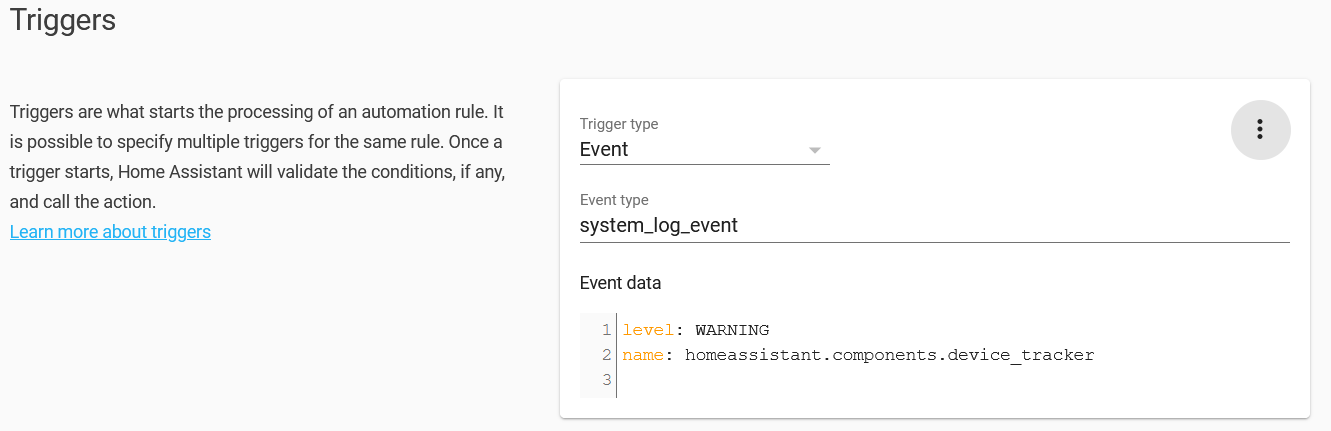
yaml
platform: event
event_type: system_log_event
event_data:
  level: WARNING
  name: homeassistant.components.device_tracker
- Conditions
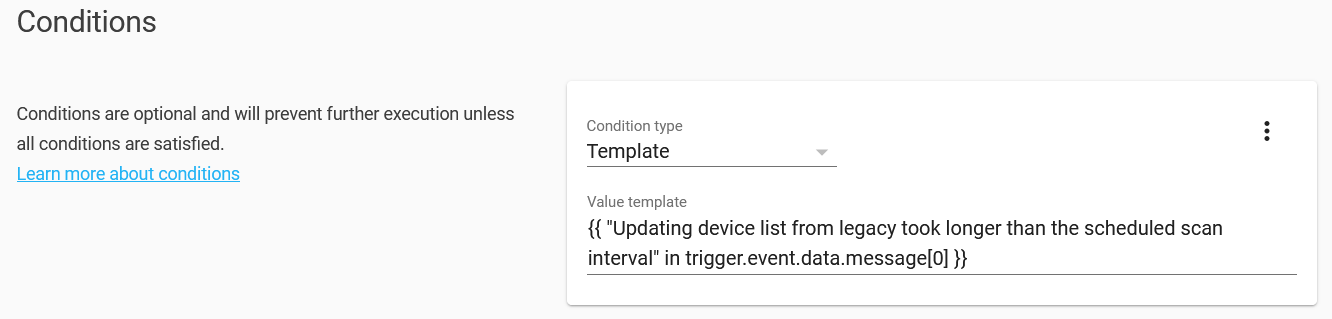
yaml
condition: template
value_template: >-
  {{ "Updating device list from legacy took longer than the scheduled scan
  interval" in trigger.event.data.message[0] }}
- Actions
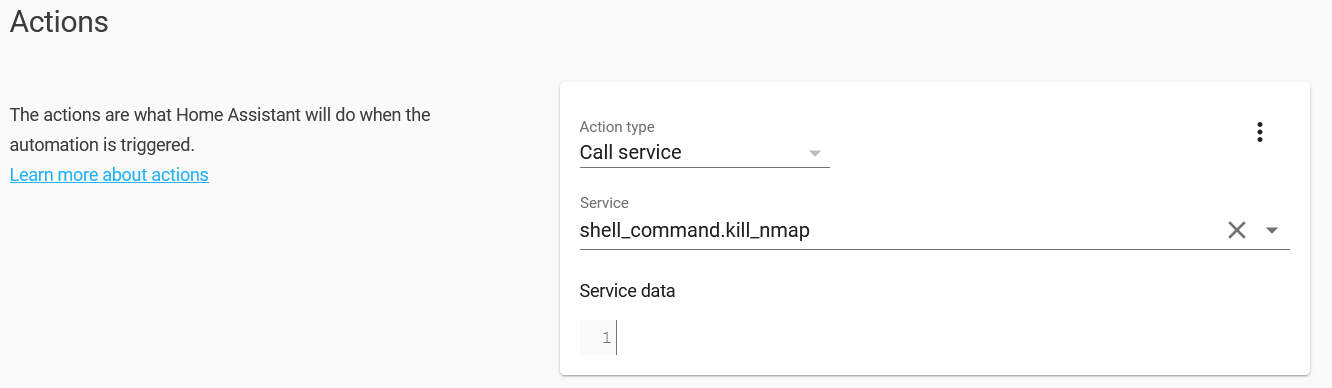
yaml
service: shell_command.kill_nmap
data: {}
_Trusting someone could benefit from it_
 Leosirth
on 27 Oct 2020
Leosirth
on 27 Oct 2020
Related issues
 flsabourin
·
3Comments
flsabourin
·
3Comments
 kirichkov
·
3Comments
kirichkov
·
3Comments
 i-am-shodan
·
3Comments
i-am-shodan
·
3Comments
 moskovskiy82
·
3Comments
moskovskiy82
·
3Comments
 Elmardus
·
3Comments
Elmardus
·
3Comments