Core: Alarm Decoder alarm_arm_night service no longer works in .107
The problem
The Alarm Decoder supports both Honeywell and DSC panels. Prior to integration breaking change for Honeywell panels in .107 the alarm_arm_night service successfully armed my DSC panel in night mode as expected. After .107 it just flashes ‘program’ on the panel and does nothing. Using the ‘night’ button on the keypad Lovelace card still works but can’t be used in automations. Did perhaps the change for Honeywell panels break support for DSC panels?
Environment
- Home Assistant release with the issue: 0.107.5
- Last working Home Assistant release (if known): 0.106
- Operating environment (Hass.io/Docker/Windows/etc.): Docker
- Integration causing this issue: AlarmDecoder
- Link to integration documentation on our website:
Problem-relevant configuration.yaml
Traceback/Error logs
No errors or traceback in log when executing service.
Additional information
 mcondren
All 47 comments
Hey there @ajschmidt8, mind taking a look at this issue as its been labeled with a integration (alarmdecoder) you are listed as a codeowner for? Thanks!
![probot-home-assistant[bot] picture](https://avatars2.githubusercontent.com/in/36093?v=4&s=40) probot-home-assistant[bot]
on 24 Mar 2020
probot-home-assistant[bot]
on 24 Mar 2020
@mcondren apologies, I did make some recent changes that likely affected this. Would you mind posting your config for the AlarmDecoder component as well as your DSC alarm panel model number?
 ajschmidt8
on 24 Mar 2020
ajschmidt8
on 24 Mar 2020
@mcondren, also can you share the key presses that you typically use to arm the system both with and without the code? For instance, I have a Honeywell system and I can use the following key sequences to arm the alarm:
Home: code + 3 or #3
Away: code + 2 or #2
Night: code + 7 or #7
ajschmidt8
on 24 Mar 2020
Hi @ajschmidt8. Thanks for the quick reply, but I think I just found the issue. I was cruising the alarmDecoder git repo and found this pull request from 8 months ago.
[(https://github.com/nutechsoftware/alarmdecoder/pull/37)]
It looks like support for (or a change to) EXIT_DELAY was only added in July. Once I updated my alarm decoder from the git repo it started working.
I think this can be closed. Thank you!
mcondren
on 24 Mar 2020
@mcondren, good to hear. would you mind answering the questions above regardless? I may make more changes and want to ensure I don't break any DSC functionality (I only have a Honeywell system). Namely, I'm looking for your panel model and the sequences of keys you use to arm (with and/or without a code). I've browsed the DSC owner's manuals, but it seems like their arming instructions don't align with the arming sequences that were being used previously which is a bit confusing.
ajschmidt8
on 24 Mar 2020
also curious about what you updated... the version of AlarmDecoder that HomeAssistant uses is 1.13.2 which was released _before_ the PR that you linked. if you manually updated the AlarmDecoder library from inside the Docker image, then this issue may still persist for other users who don't do the same.
ajschmidt8
on 24 Mar 2020
Sure.
alarmdecoder:
device:
type: socket
host: 192.168.x.xxx
port: 10000
panel_display: True
zones:
02:
name: 'Deck Door'
type: 'door'
03:
name: 'Basement Back Door'
type: 'door'
04:
name: 'Basement Side Door'
type: 'door'
I have a lot more sensors, but figured the first part and a sample of sensors was more important.
I have the DSC PC1616.
The only info you asked for that I don’t have is the key sequence. I only use the home assistant services to arm and disarm.
mcondren
on 24 Mar 2020
Sorry, I wasn’t clear. I did not update the HA library. I updated my AlarmDecoder AD2pi device directly using the web interface provided with the AD2Pi device. It allows you to upgrade your alarm decoder directly from the vendor git repo at the push of a button. I made no changes on the HA side. I just updated the AlarmDecoder Device (api I assume) to support the exit logic.
mcondren
on 24 Mar 2020
Ok. Thank you. I have one last request if you don't mind. HomeAssistant 0.107.6 was just released 45 minutes ago which includes my PR https://github.com/home-assistant/core/pull/32390 that enables arming AlarmDecoder systems _without_ a security code (at least for Honeywell). Can you test if this works for DSC as well?
The test procedure would look like this:
- Update HA to
0.107.6 - Add
code_arm_required: falseto your AlarmDecoder config - Arm your alarm through HomeAssistant _without_ entering a code.
Please let me know your results when you have a minute. Thanks!
ajschmidt8
on 24 Mar 2020
Sure. Has the official docker image on docker hub been updated yet if it’s that new? That’s what I pull from.
mcondren
on 24 Mar 2020
Whoops. It doesn't look like it has quite yet. I'm sure we'll see it published shortly.
ajschmidt8
on 24 Mar 2020
No rush, but it looks like the new container is published.
ajschmidt8
on 24 Mar 2020
What is the indenting in configuration.yaml? On .107.7 the config checker throws errors with code_arm_required inside the alarm decoder parent as well as inside the device section.
Can’t find a sample in the PR.
mcondren
on 27 Mar 2020
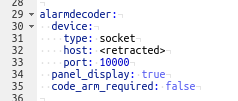
my config looks like this.
alarmdecoder:
  device:
    type: socket
    host: <retracted>
    port: 10000
  panel_display: true
  code_arm_required: false
I had a documentation PR that merged here, but it looks like it's not reflected on the live docs yet. what's the error message? can you paste it here?
Also, I'm available in the Home Assistant Discord channel if you're on there. username: ajschmidt#2382
ajschmidt8
on 28 Mar 2020
Configuration invalid
CHECK CONFIGURATION
Invalid config for [alarmdecoder]: [code_arm_required] is an invalid option for [alarmdecoder]. Check: alarmdecoder->alarmdecoder->code_arm_required. (See /config/configuration.yaml, line 153).
My config looks the same as yours.
mcondren
on 28 Mar 2020
Hmm. I see. I was able to replicate it. Let me see why this might be happening.
ajschmidt8
on 28 Mar 2020
shoot. apologies. I incorrectly assumed that because my PR https://github.com/home-assistant/core/pull/32390 was merged into dev, that it would be included in the next release. It looks like it's not in the 107.7 release yet.
- Dev branch - https://github.com/home-assistant/core/blob/dev/homeassistant/components/alarmdecoder/__init__.py#L111
- 107.7 branch - https://github.com/home-assistant/core/blob/0.107.7/homeassistant/components/alarmdecoder/__init__.py#L107
I'm pretty sure my changes won't work on DSC systems based on what I read in their manual. Can you manually call the alarmdecoder.alarm_keypress service as shown in the screenshot below and see if it arms the system? Additionally, can you try calling the service with each of the character sequences below and tell me what happens for each (making sure the system is disarmed each time before calling the sequence and not using any spaces)?
#7- probably won't do anythingyour security code- should arm the system in AWAY or STAY mode depending on whether or not you open a door after arming (based on the manual and this summary)your code + *1- _may_ arm the system in night mode (based on the manual)
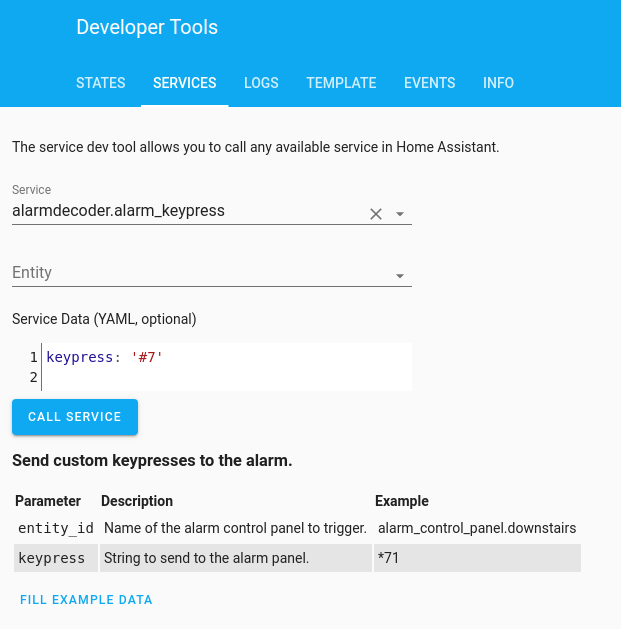
It looks like to arm the system without a code on DSC panels, we'd have to send the panel one of the _Special Keys_ outlined in the AlarmDecoder docs. Since those are special character sequences, it's not something you'd be able to test from the _Call Service_ panel like we did above. However if you're up for it, I could upload a custom image to DockerHub for you to try :grin:.
I'd love to get this feature supported on DSC systems so that people can more easily use their voice assistants (like Google) to arm their panels without having to worry about codes. Let me know if you're up for it. Thanks for your help so far.
ajschmidt8
on 28 Mar 2020
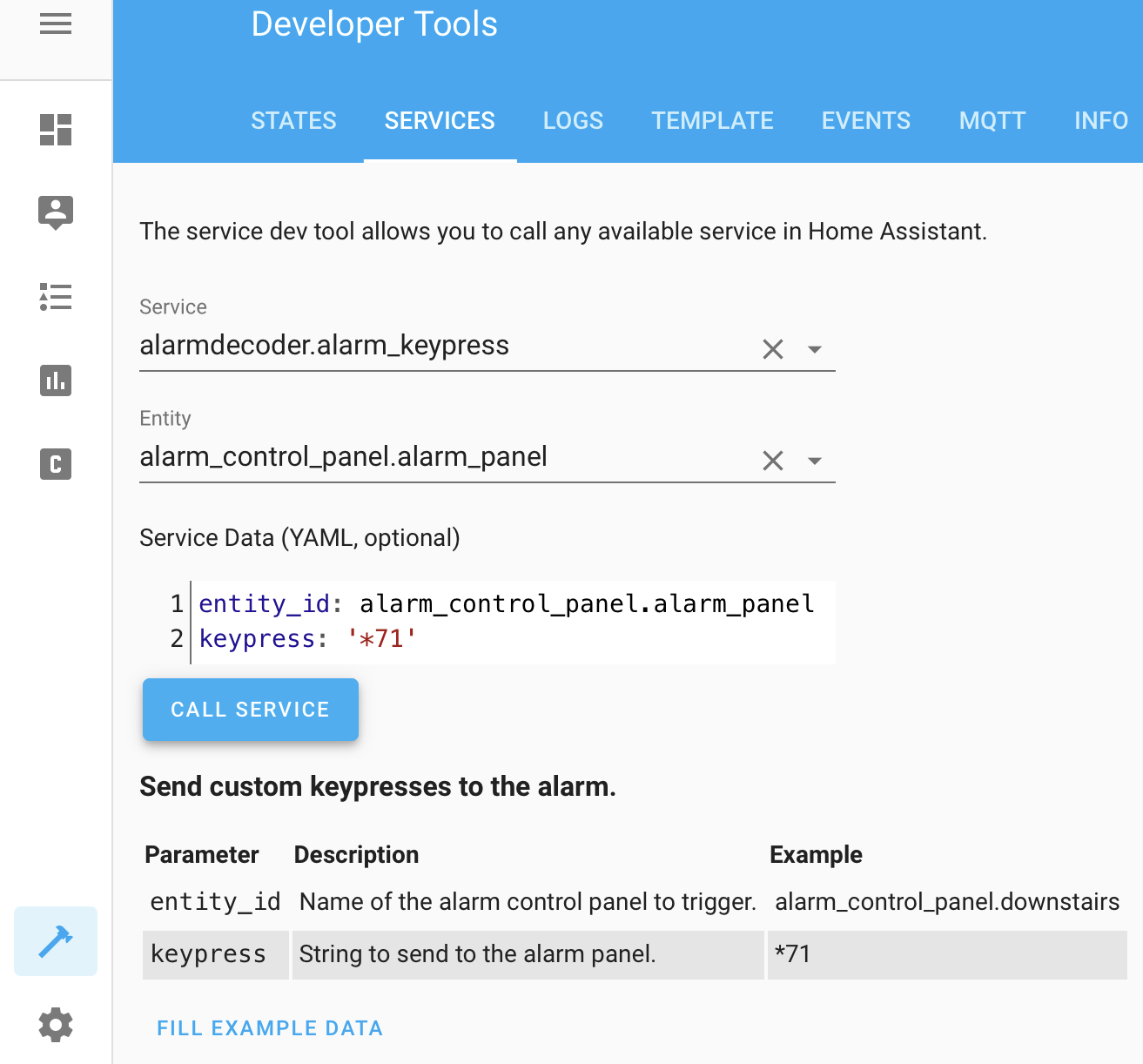
Sorry, work is crazy this week. I tried to do at least the first part. However, I can’t even get the service working with the keypress option. Even using the ‘fill example data’ option and then changing the entity ID to my entity ID throws an error. Tried it several ways.
`Log Details (ERROR)
Logger: homeassistant.components.websocket_api.http.connection.140499422933200
Source: core.py:1212
Integration: websocket_api (documentation, issues)
First occurred: 11:13:48 AM (1 occurrences)
Last logged: 11:13:48 AM
extra keys not allowed @ data['entity_id']
Traceback (most recent call last):
File "/usr/src/homeassistant/homeassistant/components/websocket_api/commands.py", line 134, in handle_call_service
connection.context(msg),
File "/usr/src/homeassistant/homeassistant/core.py", line 1212, in async_call
processed_data = handler.schema(service_data)
File "/usr/local/lib/python3.7/site-packages/voluptuous/schema_builder.py", line 272, in __call__
return self._compiled([], data)
File "/usr/local/lib/python3.7/site-packages/voluptuous/schema_builder.py", line 594, in validate_dict
return base_validate(path, iteritems(data), out)
File "/usr/local/lib/python3.7/site-packages/voluptuous/schema_builder.py", line 432, in validate_mapping
raise er.MultipleInvalid(errors)
voluptuous.error.MultipleInvalid: extra keys not allowed @ data['entity_id'] `
mcondren
on 28 Mar 2020
ahh whoops. i forgot to mention that in my previous post. i believe that's a bug from the original service author. I can open a PR for that. I've found that it works if you omit the entity_id from the yaml and the dropdown. see my previous screenshot above for an example.
ajschmidt8
on 28 Mar 2020
Ok, that worked. Results below.
7 - Nothing
‘Code’ - Arms in STAY mode
‘Code*1’ - Arms in AWAY mode. (Not night).
If, in the course of adding this no code feature, you could also disable the exit delay for night mode, that would be awesome. It’s great that the entry delay is gone now in night mode (I assume.. can’t test without triggering alarm), but when HA arms it at night, it counts down for two minutes... very annoying 🙂
mcondren
on 28 Mar 2020
I can program it however is most convenient for you as long as we can identify the right key sequences :slightly_smiling_face:. I have a few more questions about the above results.
- For just the
codeentry, if you open a door during the exit delay, does it switch to arming in AWAY mode? That's the expected result, so hopefully that's what will happen. And I believe that's the current behavior in Home Assistant. - How do you typically arm the system in night mode? I was hoping the
code+*1would do it based on the excerpt below from the manual. Can you also try arming the system in STAY mode (by calling the service withcode), waiting until the system is armed, and THEN calling the service again with*1? Based on the manual excerpt, I'm wondering if we need to wait until the system is fully armed before sending*1.

Regarding your comments about the entry delay, I assume your referring to my PR https://github.com/home-assistant/core/pull/32292. Unfortunately that PR is only applicable to Honeywell systems. We _might_ be able to accomplish similar functionality for DSC with the information below (and also get the _silent exit delay_ that you requested).
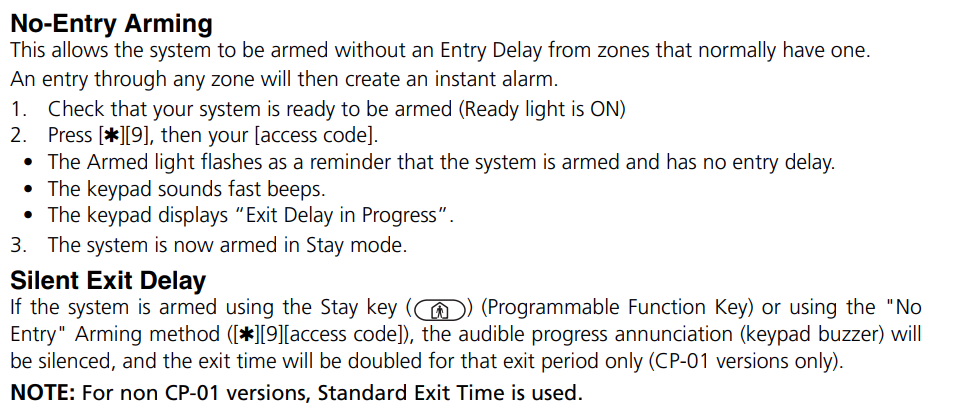
Based on that screenshot, try this sequence (from a disarmed state):
- Arm the system using the _No-Entry Arming_ (call the service with
*9+code). Let me know if the arming countdown is silenced. - Once the countdown is complete, try calling the service with
*1again to see if it puts you in a night mode. (You can also try repeating this sequence and calling*1_during_ the countdown, but I don't think that will work based on your previous results).
I'm wondering if that sequence would put you in some kind of _No Entry Armed Night Mode_. No clue if it will work haha.
My ultimate goal with all of this is to figure out what key sequences DSC uses for arming the system in Stay, Away, and Night mode both with and without a code (so 6 key sequences altogether). Some of those sequences will be with the the _Special Keys_ that I mentioned before. They'll require the Docker image that I mentioned, so for now we can just work on the sequences that _do_ require a code. Thanks again for working through this with me.
ajschmidt8
on 28 Mar 2020
Sure, glad to help as time permits.
So, with regards to the first two questions:
Yes, that’s what happened. Opening the door changed it to arm-away, once it finally finished counting down.
I arm in night mode by using the HA alarm_arm_night service.
It’s hard for me to tell if doing *1 after it arms in stay changes to night mode because my keypad doesn’t have a night button. It flashed ‘program’ and then returned to saying ‘stay’ and ‘bypass’. This is how both STAY and NIGHT show up on my keypad. I did get a response from the keypad though, so I am assuming it did switch. Same thing happens when I use the alarm_arm_night service. It counts down and then the Lovelace card shows status ‘HOME’ and the panel shows status ‘STAY - BYPASS’.
Regarding your second two questions after the screenshot:
Yes, ‘*9+code’ silences the exit countdown
Letting it silent arm and then sending *1 does the same thing as in the last set of questions. Blanks the screen, flashes ‘program’ and then goes back to ‘stay -bypass’. HA Lovelace card continues to say ‘Home’. It’s never actually reported ‘night’ in the card, even when I use the arm_night servers. Perhaps because my keypad liquid crystal display doesn’t seem to have characters for ‘night’. However the panel/keypad says it supports it, and the service works.
mcondren
on 28 Mar 2020
Let me try to use the manual code for night and see what the keypad shows. Let me dig up my manual.
mcondren
on 28 Mar 2020
Huh, there doesn’t seem to be one. *1 just activates all zones and bypasses all those tagged as night zones. So it’s still officially stay/home mode.
mcondren
on 28 Mar 2020
Huh, there doesn’t seem to be one. *1 just activates all zones and bypasses all those tagged as night zones. So it’s still officially stay/home mode.
Ok. Do you have zones tagged as _night zones_ on your system? Are you able to trip them with the system armed using both code and then code + *1 to see if the *1 is actually doing anything? It seems like night mode is the last mode that we're still uncertain about.
Looking at the AlarmDecoder code in HomeAssistant, it looks like it's using the following key sequences to arm (for both Honeywell _and_ DSC panels):
I think we've determined that the second characters (i.e. 3, 2, and 7) don't do anything for the DSC system (feel free to double check by calling the sequences with the service). This would mean that there really isn't a night mode setup for DSC currently and the only thing differentiating _Home_ vs _Away_ is whether or not a door gets opened during the exit delay.
ajschmidt8
on 28 Mar 2020
So basically here is where we're at right now...
DSC
No Code Sequences
- Home:
Home btn(untested yet) - Away:
Away btn(untested yet) - Night: ???
Code Sequences
- Home:
code+ _don't open door during exit delay_ - Away:
code+ _open door during exit delay_ - Night: ???
Honeywell
No Code Sequences
- Home:
#3 - Away:
#2 - Night:
#7
Code Sequences
- Home:
code+3 - Away:
code+2 - Night:
code+7
ajschmidt8
on 28 Mar 2020
I agree. That seems to be the case. *1 after arming is supposed to arm everything but zones marked as ‘night’. Unfortunately none of my sensors are tagged with ‘night’ so I can’t test that. It seems a little silly that there is no way to arm in night mode without being armed in stay mode first, but if there is, it’s undocumented.
I’m thinking I may use keypress to send *9 instead for night to arm stay with instant trigger. When doing this I noticed that the arm light flashes rapidly while armed instead of staying solid. Seems to be a ‘danger Will Robinson’ through the window warning.
mcondren
on 29 Mar 2020
Hm. Okay, no worries. I can probably set the _No Entry_ *9 mode to be the _Night Mode_ for DSC. That would make it match the Honeywell _Night_ mode's functionality.
So _No Entry_ mode works by typing *9 + code, right? Can you also test *9 + stay button on the keypad to see if it can also be enabled _without_ a code? After that we'll call it quits until next weekend. Think we've done enough for now :grin:. I won't be able to put all of this into code until at least then anyway.
ajschmidt8
on 29 Mar 2020
Yes. I just confirmed. *9+code sets alarm with no entry delay. It also (handily enough) seems to silence the exit delay.
*9+stay doesn’t do anything.
mcondren
on 29 Mar 2020
Correction...something that we did during testing seems to have silenced the exit delay permanently. Maybe it is a one-time command like turning on/off the chime. Just wanted to clarify that it wasn’t *9+code that did it.
mcondren
on 29 Mar 2020
really? so even if you press the Away key on the keypad, it's still silent?
This manual excerpt makes it sound like it should be temporary.

ajschmidt8
on 29 Mar 2020
I just tried both again. Exit delay is silent every time now for ‘stay’ (it used to count down audibly). Away is still audible though. Strange.
mcondren
on 29 Mar 2020
Tried stay several times in case it was a ‘silent for the first time after silencing’ situation.
mcondren
on 29 Mar 2020
Sorry that my testing was less than definitive. I realize it probably didn’t generate useful info.
mcondren
on 31 Mar 2020
no worries! every little bit helps. I'll ping you again when I have a Docker image to test. should be this weekend hopefully.
ajschmidt8
on 31 Mar 2020
I’m having difficulty testing due to the keypress service being broken like we discussed above. Have you created a issue for that, or shall I?
If I create an automation I can’t use the workaround (removing panel entity) because an automation won’t save without it.
Invalid data for call_service at pos 1: extra keys not allowed @ data['entity_id']
mcondren
on 31 Mar 2020
up to you. it's on my radar. if you open an issue, it'll send me an email since i'm the codeowner 🙂 . i likely won't get to it until the weekend though.
ajschmidt8
on 31 Mar 2020
can you post the automation your having issues with? it works for me in the following configuration. i want to make sure the fix that I create addresses your automation also.

ajschmidt8
on 1 Apr 2020
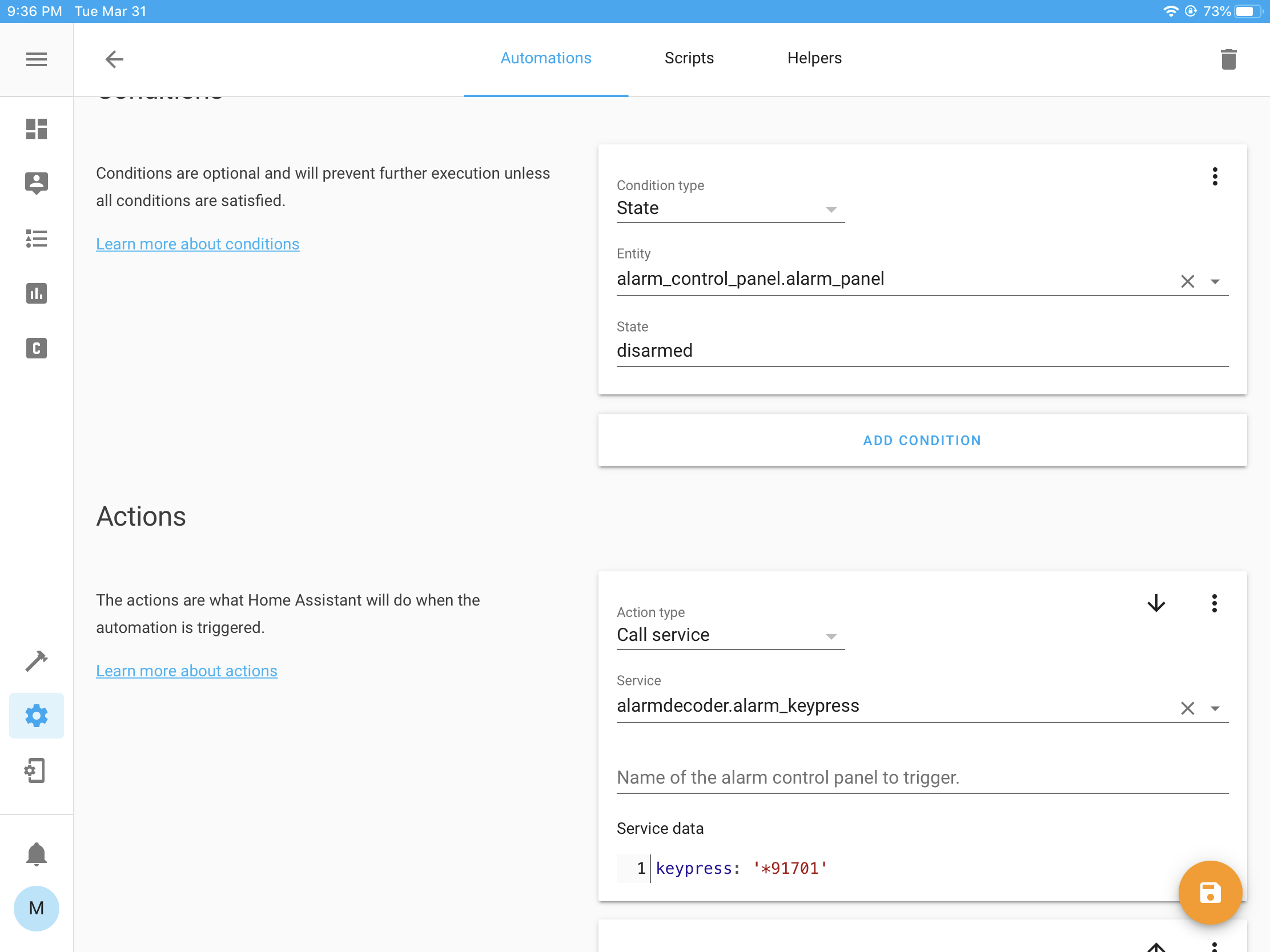
My automation looks the same as yours, and will save with a panel entity, but refuses to save (no error), without one.
mcondren
on 1 Apr 2020
I opened a PR to remove the extraneous entity_id parameter here https://github.com/home-assistant/core/pull/33516.
It took me a while to replicate your issue, but I finally did. Here's what I observed... When I created a brand new Automation and filled out all of the fields _except_ the _Name of the alarm control panel to trigger_ field, I was able to save the Automation and everything worked correctly. However, if I then left the screen (i.e. by clicking the back arrow in the top left) and then:
- went back into the new automation
- filled out the _Name of the alarm control panel to trigger_ field
- hit save
then I wasn't able to remove the _Name of the alarm control panel to trigger_ and re-save the automation without getting an error.
It was a weird process, but I tested it a few times and it was consistent. Maybe you'll be able to replicate it, maybe not. Regardless, PR https://github.com/home-assistant/core/pull/33516 should fix it :slightly_smiling_face:.
ajschmidt8
on 2 Apr 2020
Cool, thanks. I’ll try creating a fresh one.
mcondren
on 2 Apr 2020
hey, I have some instructions for the last bit of testing here if you're up for it. These tests will emulate pressing the _Home_ or _Away_ key that's on the DSC keypads from Home Assistant. Instead of the Docker containers I mentioned previously, I found out that we can just use the _Python Scripts_ integration.
Here's what the procedure will look like. The first few steps are straight from the (Python Script docs).
- Add
python_script:toconfiguration.yaml - Create folder:
<config>/python_scripts - Create a file called
alarm_test.pyin<config>/python_scriptswith the following contents:
hass.services.call("alarmdecoder", "alarm_keypress", {"keypress": chr(4) + chr(4) + chr(4)}, False)
- Reboot Home Assistant
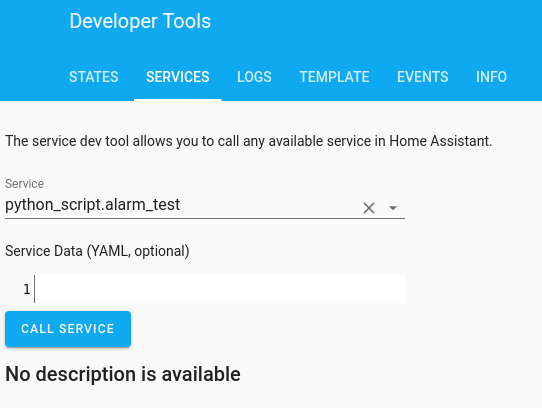
- Run the script by calling the new
python_script.alarm_testservice from the _Services_ tab in Developer tools. Don't put anything in the _Service Data_ section. This should arm your system in _Stay_ mode.
- Once you've confirmed that the system armed successfully, disarm the system and replace
alarm_test.pywith the following contents.
hass.services.call("alarmdecoder", "alarm_keypress", {"keypress": chr(5) + chr(5) + chr(5)}, False)
- Run the service again as in step 5. This should arm your system in _Away_ mode.
- Report back here as to whether _Stay_ and _Away_ armed as expected.
ajschmidt8
on 6 Apr 2020
Hi. Both worked as expected when I tested.
- Stay worked properly with a silenced exit delay
- Away worked properly as well but with an audible exit delay
Not sure what you plan to use for Night, but I have been using *9+code in my night automation. It arms in stay mode with no entry delay(instant trigger) and a silent exit delay. It’s been working well over the past week.
mcondren
on 6 Apr 2020
Great. Thanks for all of your help. Based on your results, I'll use the key sequences below for both systems. Unfortunately, it looks like we'll have to use the alarm code for _Night_ mode (a.k.a. instant trigger) on both the _Code_ and _No Code_ sequences for DSC. I'll just have to make a note of this in the docs.
Before I work on these changes, I'm going to try to update the alarmdecoder dependency from 1.13.2 to the latest version (1.13.9). Not sure how long this will all take, but I may circle back here once the work is complete to ask you to test the final changes to make sure everything is working as expected. Thanks again!
DSC
No Code Sequences
- Home:
Home btn - Away:
Away btn - Night:
*9 + code
Code Sequences
- Home:
code+ _don't open door during exit delay_ - Away:
code+ _open door during exit delay_ - Night:
*9 + code
Honeywell
No Code Sequences
- Home:
#3 - Away:
#2 - Night:
#7
Code Sequences
- Home:
code+3 - Away:
code+2 - Night:
code+7
ajschmidt8
on 6 Apr 2020
@mcondren, I've opened PR #35761 to add in all the key sequences from above. Additionally, I added some docs which are available to preview here. The docs add an Arming Key Sequences section and a new _alt_night_mode_ configuration setting.
Are you able to test these changes within the next few days? You'd need to add the files from my branch to a config/custom_components/alarmdecoder folder in your local HomeAssistant installation. I can help with that process if necessary.
ajschmidt8
on 18 May 2020
Sorry @ajschmidt8. I’m on vacation this week and don’t have access to do this in the next few days. Perhaps next week?
mcondren
on 18 May 2020
@mcondren, not a problem. the PR was rejected anyway. the moderators don't want that much logic in Home Assistant and suggested that I publish it to another library instead. so i'll have to knock that out before it's ready for testing. appreciate your response though! enjoy your vacation and stay safe 🍹 🏖️
ajschmidt8
on 18 May 2020
Related issues
 sh0rez
·
3Comments
sh0rez
·
3Comments
 aweb-01
·
3Comments
aweb-01
·
3Comments
 sogeniusio
·
3Comments
sogeniusio
·
3Comments
 moskovskiy82
·
3Comments
moskovskiy82
·
3Comments
 bdraco
·
3Comments
bdraco
·
3Comments