Core: Onvif cams not working anymore
The problem
After upgrading from 0.106.6 to 0.107.1 my 2 onvif cameras show as entity not available in lovelace, they dont exist in entities.
Environment
- Home Assistant release with the issue:
0.107.1 - Last working Home Assistant release (if known):
0.106.6 - Operating environment (Hass.io/Docker/Windows/etc.):
Hassio in docker on Ubuntu 18.04 - Integration causing this issue:
onvif core component - Link to integration documentation on our website:
https://www.home-assistant.io/integrations/onvif/
Problem-relevant cameras.yaml
- platform: onvif
  host: !secret cam_front_onvif
  name: Front Garden
  port: !secret onvif_port
  password: !secret onvif_pass
Traceback/Error logs
Log Details (WARNING)
Logger: homeassistant.components.onvif.camera
Source: components/onvif/camera.py:206
Integration: onvif (documentation, issues)
First occurred: 4:49:42 PM (110 occurrences)
Last logged: 7:25:20 PM

Couldn't connect to camera 'Back Garden', but will retry later. Error: [Errno None] Can not write request body for http://192.168.7.111/onvif/Media
Couldn't connect to camera 'Back Garden', but will retry later. Error: None
Couldn't connect to camera 'Front Garden', but will retry later. Error: [Errno 32] Broken pipe
Couldn't connect to camera 'Back Garden', but will retry later. Error: [Errno None] Can not write request body for http://192.168.7.111:80/onvif/device_service
Couldn't connect to camera 'Front Garden', but will retry later. Error: [Errno None] Can not write request body for http://192.168.7.112:80/onvif/device_service
Logger: homeassistant.components.camera
Source: helpers/entity_platform.py:203
Integration: Camera (documentation, issues)
First occurred: 4:50:15 PM (108 occurrences)
Last logged: 7:25:20 PM

Platform onvif not ready yet. Retrying in 60 seconds.
Platform onvif not ready yet. Retrying in 90 seconds.
Platform onvif not ready yet. Retrying in 120 seconds.
Platform onvif not ready yet. Retrying in 150 seconds.
Platform onvif not ready yet. Retrying in 180 seconds.
Additional information
Some Debugging steps I have carried out:
1: Restored my 'pre-update' snapshot back to 0.106.6 and cameras started working again.
2: Restored back to 0.107.1 and the issue arose again
3: Downloaded the onvif component from the 0.106.6 'tag' on github and placed it in my custom component folder on version 0.107.1, rebooted and all is well. Cameras working no problem.
My cameras are ptz cams but I have never tried to use the service from home assistant. This is probably irrelevant info but I did notice there was an issue with non ptz onvif cams previously.
 OptimusGREEN
All 14 comments
I am also seeing this exact same log:
Can not write request body for http://192.168.178.29:80/onvif/device_service
on 107.3 While before it could connect.
I did an update from 106.6 to 107.3
 indykoning
on 21 Mar 2020
indykoning
on 21 Mar 2020
I have the same issue even with the latest update version | 0.107.4 few minutes ago.
It just shows "Entity not available"
 Jacoleroux
on 21 Mar 2020
Jacoleroux
on 21 Mar 2020
A work around in the meantime until this is fixed is to download the onvif component directory from the 0.106.6 version and place it in your custom_components directory and restart home assistant. https://github.com/home-assistant/core/tree/0.106.6/homeassistant/components/onvif
This is what has got my cameras back up and running.
OptimusGREEN
on 21 Mar 2020
A work around in the meantime until this is fixed is to download the onvif component directory from the 0.106.6 version and place it in your
custom_componentsdirectory and restart home assistant. https://github.com/home-assistant/core/tree/0.106.6/homeassistant/components/onvifThis is what has got my cameras back up and running.
Thanks for the work around, it does work now, nice to have people that know stuff...
Jacoleroux
on 21 Mar 2020
Same Issue, same errors same last working version but with version 107.6
 panste13
on 25 Mar 2020
panste13
on 25 Mar 2020
As far as I could see the issue is that the mac adress of device cannot be obtained, and as a result the entities are never created resulting on the but will retry later message
panste13
on 5 Apr 2020
I've started light debugging on the latest (0.108.1) version.
For me it goes wrong on the async_check_date_and_time function with the error Can not write request body for http://<camera ip>:<camera port>/onvif/device_service
It almost seems like the camera does not like getting multiple requests on one variable or getting bombarded with requests, two new functions have been added when starting up, obtain_mac_adress and obtain_snapshot_uri
when i remove the obtain_mac_adress function it'll finish the async_check_date_and_time function. Running my own python script to collect onvif information being careful not to request things twice seems to get through all of the info.
But if i run the same function twice it errors out on Cannot write to closing transport and then Can not write request body
indykoning
on 9 Apr 2020
I have gotten the camera running on the newest version now, by cleaning up the calls (Lots of calls from different places for profiles while this can be saved so only one call has to be done)
and adding miliseconds of wait between each step. please let me know if this works for you as well
onvif.zip
indykoning
on 10 Apr 2020
Thanks for your work.
Tried with 107.6, and it indded works but only for the first camera ( I have 5 onvif cams) the rest seems to be ignored. Ill update to the latest home assistant version and try again.
*Note I am using Core on docker
panste13
on 11 Apr 2020
That does seem quite odd since the different cameras are not on the same request, what if you change the sleep functions of 0.1 to a higher number?
indykoning
on 14 Apr 2020
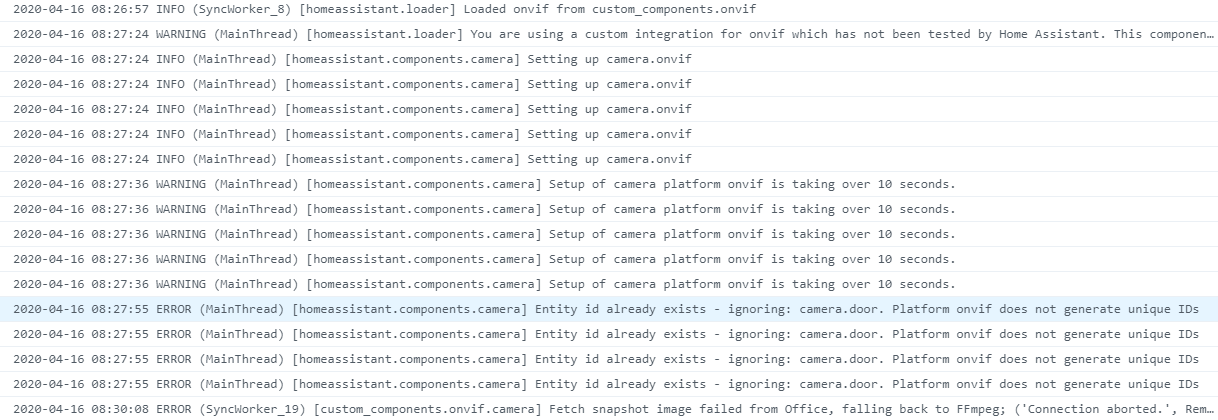
Upgraded to 108.5 with the same "lovelace" result, however the message pin points that the issue is that onvif doesnt generate ids .....
(Ill try the sleep function as well)
panste13
on 16 Apr 2020
Hi,
I have this camera

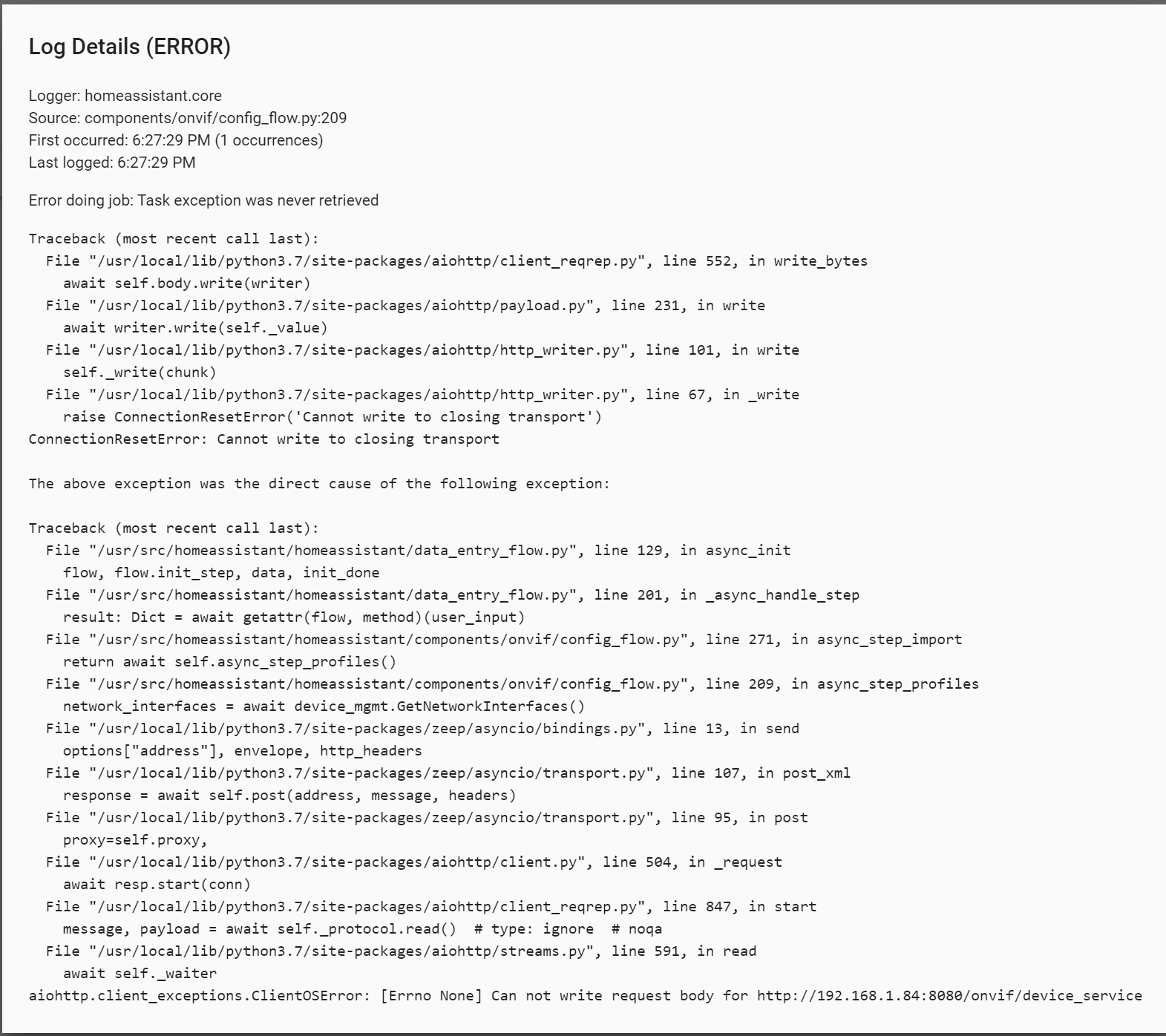
Im getting this error:
 proteusbr1
on 14 Jun 2020
proteusbr1
on 14 Jun 2020
There hasn't been any activity on this issue recently. Due to the high number of incoming GitHub notifications, we have to clean some of the old issues, as many of them have already been resolved with the latest updates.
Please make sure to update to the latest Home Assistant version and check if that solves the issue. Let us know if that works for you by adding a comment 👍
This issue now has been marked as stale and will be closed if no further activity occurs. Thank you for your contributions.
![stale[bot] picture](https://avatars3.githubusercontent.com/in/1724?v=4&s=40) stale[bot]
on 12 Sep 2020
stale[bot]
on 12 Sep 2020
I tried the official onvif integration just the other night and my camera doesn't work on it still same issue so this should not be closed yet.
OptimusGREEN
on 13 Sep 2020
Related issues
 moskovskiy82
·
3Comments
moskovskiy82
·
3Comments
 coolriku
·
3Comments
coolriku
·
3Comments
 MartinHjelmare
·
3Comments
MartinHjelmare
·
3Comments
 sogeniusio
·
3Comments
sogeniusio
·
3Comments
 arangates
·
3Comments
arangates
·
3Comments
Most helpful comment
Thanks for the work around, it does work now, nice to have people that know stuff...