Core: climate mqtt does not update target temperature when the target temperature and current temperature are in the same topic
The problem
I'm trying to create a climate entry from the thermostat that is sending info to mqtt server.
Here is what I have in mqtt from that thermostat:
{
  "deviceOn": true,
  "ecoMode": false,
  "firmware": "1.00",
  "floorTemperature": 15.5,
  "idx": "thermostatbeca_13610097",
  "ip": "192.168.31.40",
  "locked": false,
  "schedulesMode": "off",
  "targetTemperature": 3,
  "temperature": 8
}
And here is my configuration.yaml file:
# Configure a default setup of Home Assistant (frontend, api, etc)
default_config:

# Uncomment this if you are using SSL/TLS, running in Docker container, etc.
# http:
#   base_url: example.duckdns.org:8123

# Text to speech
tts:
  - platform: google_translate

group: !include groups.yaml
automation: !include automations.yaml
script: !include scripts.yaml
scene: !include scenes.yaml

mqtt:
  broker: !secret secret_mqtt_ip
  discovery: true
  username: !secret secret_mqtt_username
  password: !secret secret_mqtt_password

climate:
  - platform: mqtt
    name: Tech Thermostat

    payload_on: "true"
    payload_off: "false"

    json_attributes_topic: "thermostatbeca_13610097/things/thermostat/properties"
    temperature_command_topic: "thermostatbeca_13610097/things/thermostat/properties/targetTemperature"

    temperature_state_topic: "thermostatbeca_13610097/things/thermostat/properties"
    temperature_state_template: "{{ value_json.targetTemperature }}"

    current_temperature_topic: "thermostatbeca_13610097/things/thermostat/properties"
    current_temperature_template: "{{ value_json.temperature }}"

    mode_state_topic: "thermostatbeca_13610097/things/thermostat/properties"
    mode_state_template: >
      {% if value_json.deviceOn == true %}
      heat
      {% else %}
      off
      {% endif %}
    modes:
      - "off"
      - "heat"

    min_temp: 1
    max_temp: 35
    temp_step: 0.5
    precision: 0.5
    send_if_off: false
    retain: true
This is what i see in /developer-tools/state
hvac_modes:
  - 'off'
  - heat
min_temp: 1
max_temp: 35
target_temp_step: 0.5
current_temperature: 8
temperature: 8
idx: thermostatbeca_13610097
ip: 192.168.31.40
firmware: '1.00'
targetTemperature: 3
deviceOn: true
schedulesMode: 'off'
ecoMode: false
locked: false
floorTemperature: 15.5
friendly_name: Tech Thermostat
supported_features: 1
I'm expecting the value of temperature to be the the result of templating "{{ value_json.targetTemperature }}" (3), but this does not happen.
I've added some debug logging to the file /usr/src/homeassistant/homeassistant/components/mqtt/climate.py
@@ -397,10 +397,12 @@ class MqttClimate(
         @callback
         def handle_temperature_received(msg, template_name, attr):
             """Handle temperature coming via MQTT."""
             payload = render_template(msg, template_name)

+            _LOGGER.error("!!! %s %s", attr, payload)
+
             try:
                 setattr(self, attr, float(payload))
                 self.async_write_ha_state()
             except ValueError:
                 _LOGGER.error("Could not parse temperature from %s", payload)
so i can see that the code gets the expected values:
2020-03-17 12:11:17 ERROR (MainThread) [homeassistant.components.mqtt.climate] !!! _current_temp 8.0
2020-03-17 12:11:17 ERROR (MainThread) [homeassistant.components.mqtt.climate] !!! _target_temp 3.0
but the code does not update state correctly (maybe this is some kind of a race, but I don't known HA internals to be sure)
Environment
- Home Assistant release with the issue: I've found this issue with 0.105.1, but when I've started writing this ticket I've checked it with the latest 0.106.6
- Last working Home Assistant release (if known): ???
- Operating environment (Hass.io/Docker/Windows/etc.): docker homeassistant/raspberrypi3-homeassistant:0.106.6
- Integration causing this issue: climate.mqtt/
- Link to integration documentation on our website: https://www.home-assistant.io/integrations/climate.mqtt/
Problem-relevant configuration.yaml
Traceback/Error logs
Additional information
I'm using hardware Moes BHT-002-GBLW, with the custom firmware WThermostat_1.00.bin from the repo https://github.com/klausahrenberg/WThermostatBeca
The ticket https://github.com/klausahrenberg/WThermostatBeca/issues/43 is relevent to this issue.
 bessarabov
All 4 comments
Hey there @home-assistant/core, mind taking a look at this issue as its been labeled with a integration (mqtt) you are listed as a codeowner for? Thanks!
![probot-home-assistant[bot] picture](https://avatars2.githubusercontent.com/in/36093?v=4&s=40) probot-home-assistant[bot]
on 17 Mar 2020
probot-home-assistant[bot]
on 17 Mar 2020
I think it's working exactly as you've instructed it. Here's why:
The climate entity's "Target Temperature" is stored in an attribute called temperature. Here's an example of my climate entity. Its target temperature is 17.5 and the value is stored in temperature.
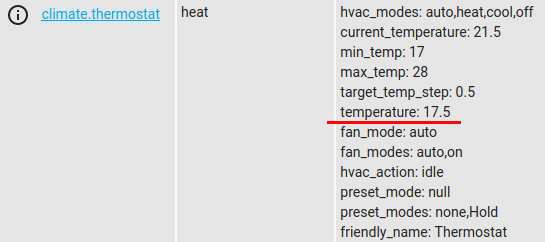
Your climate entity's configuration also contains this:
json_attributes_topic: "thermostatbeca_13610097/things/thermostat/properties"
That will create attributes from the received JSON payload. The issue is that the last key-value pair in your JSON payload is this:
"temperature": 8
That key name ("temperature") is the same name as the attribute used to store target temperature. So the last key-value pair in your JSON payload is overwriting the target temperature value.
You can easily confirm this by temporarily removing json_attributes_topic from the configuration (then restart Home Assistant).
 tdejneka
on 18 Mar 2020
tdejneka
on 18 Mar 2020
To prevent the temperature key from overwriting the climate entity's existing temperature attribute, you will need to use json_attributes_template to map the key's name to something else. However, the template cannot do that for just one key but must support all the keys in the payload. Here's an example that converts temperature to ambientTemperature.
    json_attributes_template: >-
      {"deviceOn":"{{value_json.deviceOn}}",
      "ecoMode":"{{value_json.ecoMode}}",
      "firmware":"{{value_json.firmware}}",
      "floorTemperature":{{value_json.floorTemperature}},
      "idx":"{{value_json.idx}}",
      "ip":"{{value_json.ip}}",
      "locked":"{{value_json.locked}}",
      "schedulesMode":"{{value_json.schedulesMode}}",
      "targetTemperature":{{value_json.targetTemperature}},
      "ambientTemperature":{{value_json.temperature}}}
I tested it and here's the result:
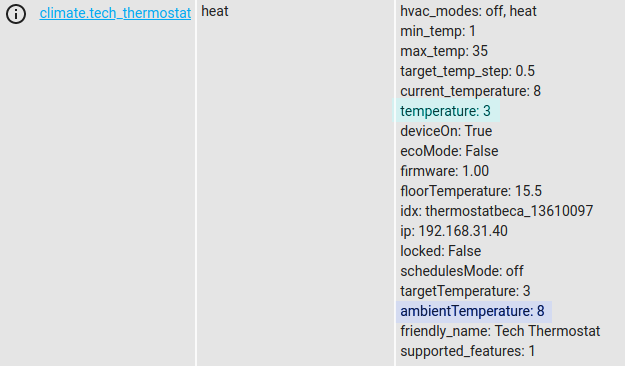
tdejneka
on 18 Mar 2020
Oh! This is perfect! Thank you very much!
I've checked it with removing json_attributes_topic and everything is working like a charm. I'll get all the attributes I need with json_attributes_template.
Thank you for such detailed and clear explanation.
bessarabov
on 18 Mar 2020
Related issues
 sogeniusio
·
3Comments
sogeniusio
·
3Comments
 piitaya
·
3Comments
piitaya
·
3Comments
 sibbl
·
3Comments
sibbl
·
3Comments
 moskovskiy82
·
3Comments
moskovskiy82
·
3Comments
 i-am-shodan
·
3Comments
i-am-shodan
·
3Comments